A compact desk does not have to limit your flight-sim setup. The right rudder pedals can deliver smoother yaw control and toe-brake input without taking over your entire floor area.
These 10 picks cover dedicated flight pedals, adjustable premium models, space-conscious setups, and bundle options. Before buying, check platform support, pedal dimensions, mounting stability, and how easily the unit can be stored between sessions.
Best 10 Flight Simulator Pedals for Small Desks Picks for 2026
Compact Precision Pick
Logitech G Pro Flight Rudder Pedals

- Self-centering rudder control
- Adjustable tension dial
- Differential toe brakes
Best For: PC pilots seeking adjustable, realistic pedal control
Foldaway Cockpit Solution
Anman Foldable Flight Simulator Stand

- Folding pedal section
- Stable X-shaped frame
- Supports flight and racing gear
Best For: PC users needing a storable pedal mounting stand
Console-Ready Upgrade
Turtle Beach VelocityOne Rudder Pedals
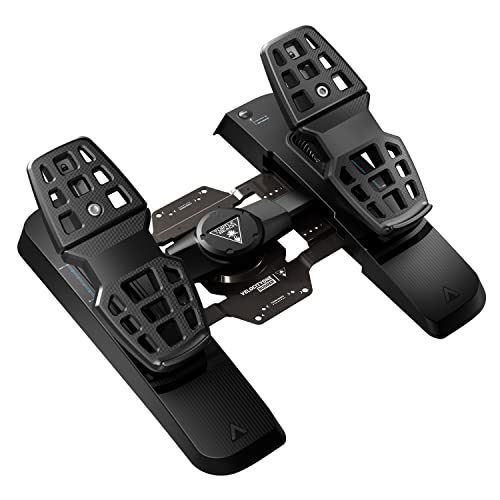
- Swappable rudder springs
- Adjustable width and brakes
- PC and Xbox compatibility
Best For: PC and Xbox users wanting customizable rudder pedals
Simple USB Value
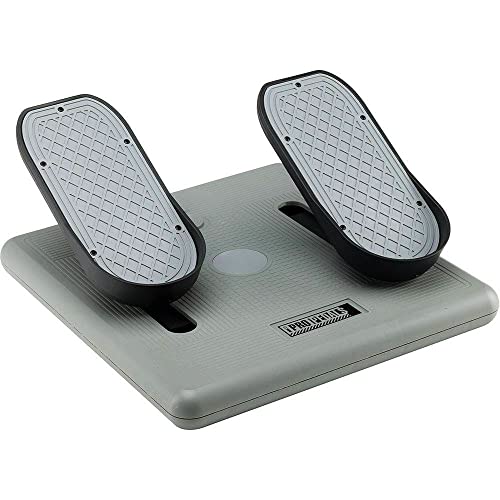
- Three-axis movement
- Seven-foot USB cable
- Mac and PC compatible
Best For: Users wanting straightforward flight and driving pedals
Versatile PC Pedal Upgrade
Logitech G RS Sim Racing Pedals

- 75 kg load-cell brake for precise braking
- Adjustable pedal positions and anti-slip frame
- USB PC support with Hall Effect sensors
Best For: PC users wanting adjustable pedals for racing and simulator use
Premium Rudder Precision
Thrustmaster TPR Rudder Pedals

- Suspended pendular mechanism for realistic motion
- HallEffect sensors deliver frictionless precision
- Adjustable spring resistance for customized feel
Best For: Serious PC flight sim users with floor space for large pedals
Adjustable Flight Control
Honeycomb Charlie Rudder Pedals
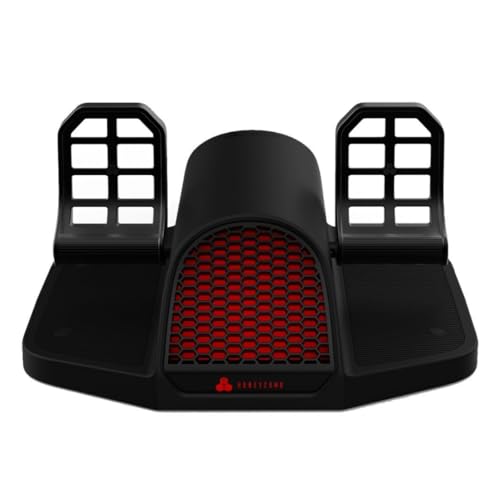
- Dedicated rudder pedals with left and right toe brakes
- Hall Effect sensors and belt-drive system
- Adjustable angles plus strips and carpet spikes
Best For: PC or Mac pilots needing adjustable rudder and toe-brake control
Best with Extra Features
Thrustmaster TFRP Rudder Pedals

- Long-travel, self-centering rudder axis
- Smooth four-rail aluminum sliding system
- Works with PC, PS5, and Xbox platforms
Best For: Multi-platform users seeking precise rudder control
All-in-One Starter Bundle
Logitech G Pro Yoke and Pedals

- Combines yoke system and rudder pedals
- Includes differential toe brakes
- Offers extensive programmable controls
Best For: Windows users building a complete flight-control setup
Value Pedal Option
Logitech G Pro Rudder Pedals Renewed

- Standalone Logitech G Pro pedal set
- Renewed option for value-focused shoppers
- Listed package weight is 6.69 pounds
Best For: Buyers seeking a renewed pedal-only setup
Compact Precision Pick – Logitech G Pro Flight Rudder Pedals
For shoppers comparing flight simulator pedals for small desks, the Logitech G Pro Flight Rudder Pedals offer dedicated rudder and braking control in a straightforward USB package. Their adjustable tension and self-centering design let you tailor the feel without adding separate controls.
Best For: PC pilots who want adjustable rudder resistance and differential toe brakes.
Pros:
- Self-centering rudder mechanism provides smooth, accurate control.
- Adjustable Tension Dial supports lighter or more robust pedal response.
- Differential toe brakes add control during runway rollout and taxiing.
Cons:
- Designed for Windows 7, 8, 8.1, and 10 rather than console platforms.
- The listed 31 x 41 x 17 cm footprint may be substantial for especially narrow desks.
This is a well-rounded PC option when realistic rudder and braking input matter more than minimal footprint. Confirm your available floor space before buying.
Foldaway Cockpit Solution – Anman Foldable Flight Simulator Stand
Although it is a stand rather than a standalone pedal set, the Anman Foldable Racing Flight Simulator Stand can help organize flight simulator pedals for small desks. Its adjustable pedal panel folds down for storage and includes pre-drilled mounting points for compatible equipment.
Best For: PC users who need a foldable frame for pedals, flight controls, or racing gear.
Pros:
- Foldable pedal section helps reduce storage space when not in use.
- X-shape and double-triangle construction are designed for stability.
- Wide, pre-drilled panels support various flight and racing accessories.
- Comes 80% pre-installed with mounting hardware and tools.
Cons:
- Its listed 37.5 x 38.4 x 28.3 inch dimensions are not ideal for every small desk area.
- Pedals and other controllers are not included.
- Warranty coverage is listed as three months, with online technical support afterward.
This makes the most sense for a compact, shared setup that needs to switch between flight and racing. Measure the folded and assembled footprint, and verify your hardware’s mounting pattern.
Console-Ready Upgrade – Turtle Beach VelocityOne Rudder Pedals
The Turtle Beach VelocityOne Universal Rudder Pedals are a versatile choice for flight simulator pedals for small desks when you also want console compatibility. Adjustable pedal width, swappable springs, and a non-slip base let you tune the setup while keeping the controls planted.
Best For: PC and Xbox pilots who want adjustable pedals with interchangeable components.
Pros:
- Ultra-smooth rudder axis uses swappable springs for different resistance options.
- Adjustable pedal width and two pedal sets support customization.
- Hall effect sensors are used across all axes.
- Non-slip base and adjustable brakes help maintain control.
Cons:
- The 13.3-pound weight and listed 15.2 x 19.26 x 8.79 inch dimensions may be demanding for very small spaces.
- Xbox use requires the VelocityOne Flight Control System.
- USB connectivity is corded rather than wireless.
This is a strong fit when platform flexibility and adjustability outweigh the need for the smallest possible floor unit. Check Xbox requirements and desk-side clearance before purchasing.
Simple USB Value – CH Products Pro Pedals
For a simple entry point into flight simulator pedals for small desks, the CH Products Pro Pedals provide three-axis movement through a USB connection. The included seven-foot cable and PC/Mac support make them easy to position in a basic desktop setup.
Best For: PC and Mac users seeking uncomplicated rudder pedals for flight or driving simulations.
Pros:
- Three-axis movement delivers dedicated simulation control.
- Seven-foot USB cord offers flexible placement.
- Works with Mac and PC systems.
- Can also be used for driving simulation games.
Cons:
- The supplied notes do not list adjustable tension or toe brakes.
- The 14.17 x 14.17 x 5.91 inch footprint still requires floor space beside a small desk.
- Its controller layout is listed with two buttons.
This is a practical, no-frills choice for buyers who value broad computer compatibility and easy setup. It is less suited to pilots specifically seeking extensive tuning features.
Versatile PC Pedal Upgrade – Logitech G RS Sim Racing Pedals
For shoppers comparing flight simulator pedals for small desks, the Logitech G RS Sim Racing Pedals are a sturdy but relatively compact-feeling option for PC setups that may also support racing games. Their USB connectivity, adjustable pedal positions, and anti-slip steel frame make them practical when placement and stability matter.
Best For: PC users who want adjustable pedals for mixed racing and simulator use.
Pros:
- USB connectivity supports PC use.
- Adjustable pedal positions help customize fit.
- Steel frame, rubber feet, carpet grippers, and an extendable brace help prevent slipping.
- Hall Effect accelerator and clutch sensors provide contactless, durable input detection.
Cons:
- Designed primarily as sim racing pedals rather than dedicated flight rudder pedals.
- At 10.8 pounds, the robust frame may be more substantial than some small-desk users need.
- The optional clutch module and some wheel connections require separate hardware.
This is a sensible choice if your small-desk setup needs stable, adjustable pedals and you also play racing simulations. Dedicated flight users may prefer a rudder-focused design with toe-brake controls.
Premium Rudder Precision – Thrustmaster TPR Rudder Pedals
The Thrustmaster TPR Rudder Pedals are a dedicated flight-control option for PC pilots, but their large footprint is important to consider when shopping for flight simulator pedals for small desks. The suspended pendular mechanism, adjustable resistance, and magnetic sensors are aimed at smooth, precise yaw control.
Best For: Serious PC flight sim users who prioritize realistic rudder feel over compact dimensions.
Pros:
- Pendul_r technology provides smooth, natural rudder movement.
- H.E.A.R.T HallEffect sensors offer frictionless input without mechanical wear.
- Adjustable springs and positioning allow resistance customization.
- Designed for subtle yaw corrections and coordinated turns.
Cons:
- The 18.8 x 18 x 14.1-inch dimensions are challenging for genuinely small desks.
- At 20.2 pounds, these are considerably heavier than many compact pedal options.
- Compatibility is listed for PC only.
The TPR is a strong performance choice when realistic rudder control is the priority. However, its substantial size and weight make it better suited to a dedicated floor area beside or beneath a small desk than to a tightly packed desktop arrangement.
Adjustable Flight Control – Honeycomb Charlie Rudder Pedals
The Honeycomb Charlie Rudder Pedals combine dedicated flight controls with adjustable feet angles and anti-slip features, making them worth considering among flight simulator pedals for small desks. Their 21 x 11 x 22-inch listed dimensions still require careful floor planning, but the high-friction strips and deployable carpet spikes can help keep them positioned.
Best For: PC or Mac pilots seeking adjustable rudder pedals with left and right toe-brake axes.
Pros:
- Aluminum construction and a belt-drive system support durable operation.
- Hall Effect sensors provide precise coordination and reduce unwanted corrections.
- Adjustable feet angles accommodate different pilot preferences.
- High-friction strips and deployable carpet spikes help limit slipping.
Cons:
- The listed 21 x 11 x 22-inch dimensions may be difficult to accommodate in a small setup.
- Xbox Series X or S use requires the Honeycomb Xbox Hub.
- The product is relatively heavy at 7.75 kg.
Charlie is the most directly flight-focused option here for users who need toe brakes and adjustable positioning. It can work well beside a small desk, provided you have enough floor depth to deploy and store its sizable pedal assembly.
Best with Extra Features – Thrustmaster TFRP Rudder Pedals
For shoppers comparing flight simulator pedals for small desks, the Thrustmaster TFRP offers a focused pedal setup with USB connectivity and compatibility across PC, PS5, and Xbox platforms. Its long-travel rudder axis and sliding aluminum rail system are designed for controlled, accurate inputs, though its listed dimensions should be checked against your available floor space.
Best For: Multi-platform flight sim users who want adjustable, self-centering rudder control.
Pros:
- Compatible with PC, PS5, and Xbox Series X|S, plus listed Xbox One and PS4 systems.
- Long rudder travel and a self-centering axis support smooth, precise maneuvers.
- Four aluminum rails provide a smooth sliding motion, with differential braking included.
Cons:
- The listed dimensions may be substantial for especially small desk areas.
- At 4.9 pounds, it is not the lightest pedal set for frequent repositioning.
The TFRP is a capable choice when precision and broad console compatibility matter most. Before buying for a compact workstation, measure your pedal area carefully and confirm that the 13.62 x 21.42 x 15.83-inch listed dimensions fit comfortably.
All-in-One Starter Bundle – Logitech G Pro Yoke and Pedals
The Logitech G Pro bundle combines a yoke system and rudder pedals, making it a practical starting point for a complete flight-control setup. For flight simulator pedals for small desks, note that the bundle adds multiple components and is listed for Windows desktop use, so you should plan space for both the pedals and yoke.
Best For: Windows users who want yoke, pedal, and programmable-control functionality in one bundle.
Pros:
- Includes both the G Pro Flight Yoke System and Pro Flight Rudder Pedals.
- Self-centering pedals and differential toe brakes support realistic taxi and landing control.
- The yoke provides 14 buttons, a POV hat, and a three-position mode switch, with at least 54 programmable controls.
- Adjustable foot rests with non-slip materials accommodate a range of foot sizes.
Cons:
- The supplied compatibility information lists Windows only.
- A combined yoke-and-pedal setup may require more room than a pedal-only solution.
This bundle makes the most sense when you need a broader control system rather than pedals alone. It can work in a compact setup if your desk and floor arrangement can accommodate both pieces, but it is less space-focused than a standalone pedal set.
Value Pedal Option – Logitech G Pro Rudder Pedals Renewed
The renewed Logitech G Pro Flight Rudder Pedals are worth considering if you want a standalone pedal set for flight simulator pedals for small desks without buying the accompanying yoke bundle. The supplied notes provide limited feature information, so buyers should verify the renewed unit’s condition, included accessories, compatibility, and available workspace before ordering.
Best For: Buyers seeking a renewed Logitech rudder-pedal option for a focused flight sim setup.
Pros:
- Standalone rudder pedals can avoid the extra hardware of a yoke-and-pedal bundle.
- The product is identified as Logitech G Pro Flight Rudder Pedals.
- Renewed status may appeal to shoppers comparing value-oriented options.
Cons:
- The supplied notes do not specify compatibility, connectivity, controls, or included components.
- At 6.69 pounds, it may be less convenient to move than lighter pedals.
- The listed package dimensions are relatively large for a compact setup.
This is a potentially space-conscious alternative to a complete bundle, but the available product information is sparse. Confirm the listing details and measure your floor area carefully, especially because the package dimensions are 18.5 x 13 x 11.25 inches.
How We Picked the Best Flight Simulator Pedals for Small Desks
We focused on the factors that matter most when floor space is limited: overall footprint, pedal spacing, stability, adjustability, connection type, platform support, and storage convenience. We also included options across several budgets and control styles, from straightforward USB pedals to premium units with adjustable geometry and independent toe brakes.
Compatibility is especially important. Some models are designed primarily for Windows PCs, while others support Xbox or PlayStation consoles through specific configurations. A bundle can also make sense if you need a yoke and pedals together, but it may take more room than pedals alone.
Quick Comparison
| Best For | What to Look For |
|---|---|
| Smallest practical setup | Compact dimensions, non-slip feet, and easy storage |
| Frequent flying | Adjustable spacing, smooth resistance, and durable construction |
| Console users | Confirmed compatibility with your Xbox or PlayStation model |
| Budget buyers | Reliable USB connectivity and a stable base |
| Complete cockpit upgrade | A compatible yoke-and-pedal bundle or mounting stand |
Key Buying Factors for Flight Simulator Pedals for Small Desks
Footprint and Storage
Measure the clear space beneath your desk before ordering. Pedals need enough room for full travel, and a compact unit is only useful if your chair can move freely around it. Foldable or lightweight designs are easier to put away after each session.
Stability and Resistance
Look for textured foot surfaces, rubber feet, a connecting bar, or another method of preventing movement. Smooth resistance helps with precise rudder inputs, while overly light pedals may slide when you apply toe brakes.
Adjustability and Toe Brakes
Adjustable pedal angle and spacing can improve comfort, especially in a cramped workspace. Separate toe-brake axes are useful for taxiing and landing, but they can increase the unit’s width and complexity.
Compatibility and Connections
Confirm the supported operating system, console compatibility, and required connection method before buying. PC USB pedals are generally straightforward, while console setups may require a compatible yoke, adapter, or specific ecosystem.
Who Should Buy Which Flight Simulator Pedals for Small Desks?
Choose a compact USB model if you fly at a small desk and want simple plug-and-play control. Pick an adjustable premium pedal set if you spend many hours in flight simulators and want more precise fit and resistance. Console players should prioritize officially supported hardware over appearance or low price.
If you are building a more complete cockpit, a yoke-and-pedal bundle or dedicated stand may provide better integration, provided you have enough floor space. Renewed hardware can be a worthwhile value option when it includes a clear return policy and the pedal mechanism has been inspected.
For most small-desk users, the best choice balances stability with easy storage. Avoid buying solely by pedal count or braking force; the unit that fits your chair, platform, and available floor area will usually produce the most satisfying setup.