The right rudder pedals can make taxiing, coordinated turns, and landing corrections feel far more natural. Adjustable width is especially useful when you want to match your cockpit layout, footwear, or preferred control stance.
We compared 10 popular flight simulator pedal systems from Turtle Beach, Thrustmaster, Honeycomb Aeronautical, and Logitech, focusing on adjustability, compatibility, braking controls, comfort, and overall setup value.
Best 10 Flight Simulator Pedals with Adjustable Width Picks for 2026
Best Adjustable-Width Xbox Rudder Pedals
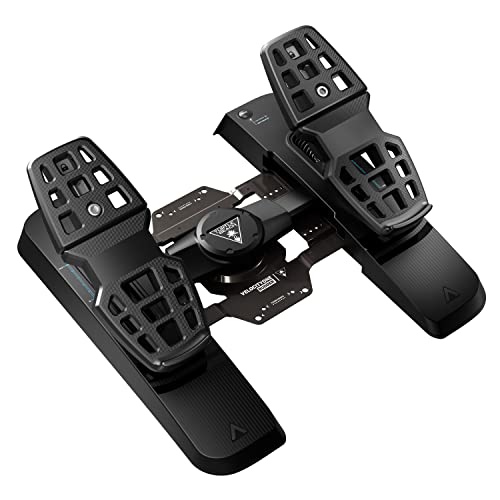
- Adjustable pedal width
- Differential brakes and swappable springs
- Works with PC and Xbox; Xbox requires VelocityOne Flight Control System
Best For: PC and Xbox pilots wanting a customizable pedal setup
Best Flight Pack With Twist Rudder

- Includes joystick, throttle, and pedals
- USB connection for Windows PC
- Ambidextrous joystick with twist rudder
Best For: PC users wanting a complete flight-control bundle
Best Adjustable Pedal Angles
Honeycomb Charlie Rudder Pedals

- Adjustable feet angles
- Aluminum construction and belt drive
- Hall Effect sensors with anti-slip features
Best For: PC and Mac pilots seeking stable, adjustable foot positioning
Best Premium Rudder Precision

- Pendular suspended mechanism
- H.E.A.R.T Hall Effect magnetic sensors
- Adjustable spring resistance
Best For: PC enthusiasts prioritizing realistic motion and precise control
Adjustable Tension Pick
Logitech G Pro Flight Rudder Pedals
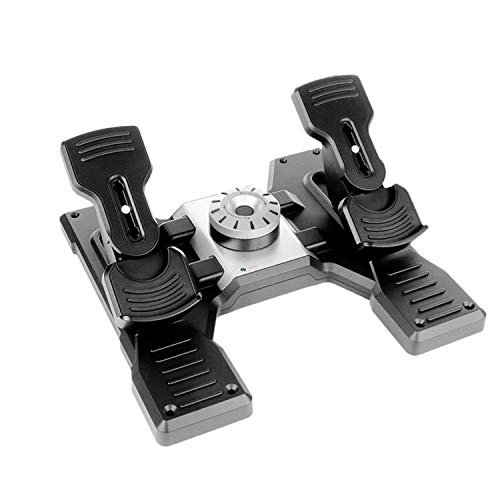
- Adjustable tension dial
- Self-centering rudder axis
- Differential toe brakes
Best For: Windows PC pilots seeking customizable pedal resistance
Multi-Platform Precision Pick
Thrustmaster TFRP Rudder Pedals

- Adjustable resistance
- Long-travel rudder axis
- PC and console compatibility
Best For: Multi-platform pilots wanting smooth, precise pedal travel
Complete Cockpit Bundle
Logitech G Pro Yoke and Rudder Pedals

- Yoke and pedals included
- Adjustable foot rests
- At least 54 programmable controls
Best For: Windows users building a complete desktop flight-control setup
Best Xbox Full Kit

- Complete HOTAS and rudder-pedal package
- Official Xbox Series X|S integration
- Smooth rails and removable heel rests
Best For: Xbox and PC pilots wanting an all-in-one setup
Best Adjustable-Feel Pedals
Logitech Pro Flight Rudder Pedals

- Adjustable tension dial
- Self-centering rudder action
- Differential toe brakes
Best For: Windows pilots tuning pedal resistance and braking control
Best Pedal and HOTAS Combo

- Includes joystick and rudder pedals
- Smooth aluminum slide-rail system
- Removable heel rests and differential brakes
Best For: PC pilots building a complete Thrustmaster control setup
Best Adjustable-Width Xbox Rudder Pedals – VelocityOne Universal Rudder
If you need flight simulator pedals with adjustable width for both PC and Xbox, the Turtle Beach VelocityOne Universal Rudder Pedals offer a flexible setup. They combine adjustable pedal spacing with differential brakes, swappable springs, and Hall Effect sensing across all axes.
Best For: PC and Xbox pilots who want adjustable spacing and interchangeable pedal components.
Pros:
- Adjustable pedal width and two sets of swappable pedals
- Differential brakes and a smooth rudder axis
- Hall Effect sensors, non-slip base, and PC/Xbox compatibility
Cons:
- Xbox use requires the VelocityOne Flight Control System
- At 13.3 pounds, it is a substantial unit
This is a versatile choice for households using both PC and Xbox. Its width adjustment and swappable parts make it easier to tailor the controls, while the stable base suits longer sessions.
Best Flight Pack With Twist Rudder – Thrustmaster T16000M FCS
The Thrustmaster T16000M FCS Flight Pack is a PC-focused bundle rather than dedicated flight simulator pedals with adjustable width. Its included pedals provide a complete entry point, while the ambidextrous joystick, throttle, and twist-rudder control broaden the package’s usefulness.
Best For: PC users seeking a bundled joystick, throttle, and pedal setup.
Pros:
- Includes flightstick, throttle, and pedals in one package
- PC connectivity through USB on Windows
- Joystick offers 16 buttons, an 8-way hat switch, and four axes
Cons:
- The supplied notes do not specify adjustable pedal width
- Designed for PC rather than Xbox or Mac
This bundle makes sense when you need a complete flight-control package and do not require dedicated width adjustment. The T.A.R.G.E.T software and ambidextrous joystick add configuration flexibility for supported PC games.
Best Adjustable Pedal Angles – Honeycomb Charlie Rudder Pedals
The Honeycomb Charlie Rudder Pedals are a strong option for pilots comparing flight simulator pedals with adjustable width and other fit options. While the notes emphasize adjustable feet angles rather than pedal-width adjustment, the aluminum construction, magnetic sensors, and belt drive system support a durable and customizable setup.
Best For: PC and Mac users who prioritize adjustable foot angles and stable construction.
Pros:
- Adjustable feet angles for a more tailored position
- Aluminum construction with a belt drive system
- Hall Effect sensors and included carpet spikes help support precise, stable control
Cons:
- The supplied notes do not specifically confirm adjustable pedal width
- Xbox Series X/S compatibility requires the Honeycomb Xbox Hub
Choose the Charlie when angle adjustment and physical stability matter more than confirmed width adjustment. Its compatibility with PC, Mac, and listed flight simulators gives it broad desktop-simulation appeal.
Best Premium Rudder Precision – Thrustmaster TPR Pedals
The Thrustmaster TPR Pedals focus on realistic movement and precision for PC flight simulation. They are not presented in the supplied notes as flight simulator pedals with adjustable width, but their adjustable spring resistance lets you tune the pedal feel for different flying styles.
Best For: PC flight-simulation enthusiasts seeking realistic motion and adjustable resistance.
Pros:
- Pendular suspended mechanism provides smooth, natural rudder movement
- H.E.A.R.T Hall Effect sensors deliver frictionless, wear-resistant input
- Adjustable spring system offers multiple resistance settings
Cons:
- The supplied notes do not specify adjustable pedal width
- Compatible with PC only
- At 20.2 pounds, it is a heavy pedal set
The TPR is best suited to serious PC users who value pedal feel and subtle yaw corrections. Its spring adjustment changes resistance rather than confirmed spacing, so verify the fit if width adjustment is essential.
Adjustable Tension Pick – Logitech G Pro Flight Rudder Pedals
For shoppers comparing flight simulator pedals with adjustable width, the Logitech G Pro Flight Rudder Pedals offer adjustable tension rather than a stated adjustable pedal-width feature. Their self-centering rudder axis, differential toe brakes, and USB PC compatibility make them a practical choice for desktop flight simulation.
Best For: Windows-based flight sim users who want adjustable pedal resistance and differential braking.
Pros:
- Adjustable Tension Dial lets you tailor the feel from lighter aircraft response to a more robust jet-like feel.
- Self-centering rudder pedals provide smooth, accurate control.
- Differential toe brakes support controlled runway maneuvering and stopping.
- Part-metal construction and USB connectivity suit desktop PC setups.
Cons:
- The supplied specifications do not state that the pedal width is adjustable.
- Compatibility is listed for Windows 7, 8, 8.1, and 10 rather than consoles.
This is a strong fit if adjustable resistance matters more to you than adjustable width. Verify your cockpit space against the listed dimensions before buying.
Multi-Platform Precision Pick – Thrustmaster TFRP Rudder Pedals
When evaluating flight simulator pedals with adjustable width, the Thrustmaster TFRP emphasizes adjustable resistance and a smooth sliding rail system; the supplied notes do not confirm adjustable pedal spacing. Its long-travel rudder axis, self-centering action, and broad PC and console compatibility support precise flight control.
Best For: PC, PlayStation 5, PlayStation 4, and Xbox users who want long-travel pedals with adjustable resistance.
Pros:
- Adjustable resistance helps tailor the pedal feel.
- Long rudder-axis travel supports smooth, precise maneuvers.
- Four aluminum rails provide a smooth, rigid sliding motion.
- Compatible with PC, PS5, PS4, Xbox Series X|S, and listed Xbox One models.
Cons:
- The supplied information does not specify adjustable pedal width.
- The larger listed dimensions may require careful cockpit-space planning.
- Its console and PC compatibility may be unnecessary for users with a single-platform setup.
The TFRP is the more versatile option for mixed-platform households and pilots who value travel and resistance adjustment. Treat width adjustability as unconfirmed and check the actual fit for your rig.
Complete Cockpit Bundle – Logitech G Pro Yoke and Rudder Pedals
This bundle pairs Logitech rudder pedals with a flight yoke for a fuller control setup. Although the supplied notes do not state that the pedals have adjustable width, the foot rests accommodate a wide range of sizes and use non-slip materials, while the system adds yoke, throttle, and programmable controls.
Best For: Windows desktop pilots building a coordinated yoke-and-pedal flight simulation station.
Pros:
- Includes both the Pro Flight Yoke System and Pro Flight Rudder Pedals.
- Pedal foot rests adjust to accommodate a wide range of sizes.
- Non-slip foot-rest materials support stable operation.
- Yoke system provides 14 buttons, a POV hat, and a three-position mode switch for at least 54 programmable controls.
Cons:
- The supplied notes do not confirm adjustable pedal width specifically.
- It is a larger commitment than buying pedals alone.
- Compatibility is listed for Windows rather than multiple platforms.
Choose this bundle when you need both yoke and rudder control and value foot-rest adjustability for different users. If you already own a yoke, the standalone pedals may be the more efficient purchase.
Best Xbox Full Kit – T-Flight Full Kit HOTAS
The Thrustmaster T-Flight Full Kit is a complete option for shoppers seeking flight simulator pedals with adjustable width, especially those building an Xbox-compatible setup. It combines a HOTAS stick and throttle with TFRP rudder pedals, offering smooth yaw control, differential braking, and a full-foot ergonomic design.
Best For: Xbox Series X|S and PC pilots who want an all-in-one HOTAS and rudder-pedal package.
Pros:
- Includes HOTAS controls and TFRP rudder pedals in one kit.
- Official Xbox integration with dedicated Guide, View, and Menu buttons.
- S.M.A.R.T. slide rails provide smooth rudder movement.
- Removable heel rests support alternate foot positions.
Cons:
- The supplied details do not specify adjustable pedal width.
- Its Xbox and PC focus may not suit users seeking broader platform support.
Choose this kit when convenience and console integration matter more than independently customizing the pedal position. Its included throttle, stick, and pedals make it a straightforward starting point for several flight-simulation styles.
Best Adjustable-Feel Pedals – Logitech Pro Flight Rudder Pedals
The Logitech Pro Flight Rudder Pedals are a focused choice for pilots comparing flight simulator pedals with adjustable width. While the supplied specifications do not confirm width adjustment, they do provide an adjustable tension dial, self-centering rudder action, and differential toe brakes for more controlled landings and taxiing.
Best For: Windows users who want to tune pedal resistance and add differential braking to a desktop simulator.
Pros:
- Adjustable tension dial accommodates lighter or firmer pedal response.
- Self-centering rudder pedals provide smooth, realistic control.
- Differential toe brakes support runway and ground handling.
- USB connectivity works with Windows systems.
Cons:
- The supplied notes do not list adjustable pedal width.
- It is a pedal-focused product rather than a complete HOTAS package.
This is a sensible pick if resistance adjustment is more important to you than changing the spacing between the pedals. Its differential brakes and self-centering action target users who want more precise ground control.
Best Pedal and HOTAS Combo – TFRP Rudder Pedals & T16000M
The ThrustMaster TFRP and T16000M FCS bundle is a practical option for shoppers researching flight simulator pedals with adjustable width who also need a joystick. The supplied details do not confirm width adjustment, but the pedals offer removable heel rests, smooth aluminum slide rails, differential braking, and broad compatibility with PC flight setups.
Best For: PC pilots who want a joystick, rudder pedals, twist control, and differential braking in one bundle.
Pros:
- Combines TFRP pedals with the T16000M FCS joystick.
- S.M.A.R.T. aluminum slide rails are designed for smooth movement.
- Removable heel rests allow alternative ergonomic configurations.
- Large pedals provide differential braking and full-foot support.
Cons:
- The supplied information does not specify adjustable pedal width.
- The bundle is primarily positioned for PC, with PS4 compatibility requiring specified Thrustmaster joysticks.
Consider this bundle when you want more than standalone pedals and prefer a coordinated Thrustmaster control setup. Its adjustable-feel ergonomics come from removable heel rests rather than a documented width mechanism.
How We Picked the Best Flight Simulator Pedals with Adjustable Width
We focused on the features that matter during everyday simulator use: pedal spacing, rudder smoothness, toe-brake control, platform stability, connection type, and compatibility with current gaming systems. We also considered whether each product works as a standalone controller or makes more sense as part of a HOTAS, yoke, or complete flight bundle.
Not every model offers the same degree of physical width adjustment, so check the manufacturer’s specifications before buying. Some products provide adjustable spacing or foot-position options, while others use a fixed layout but remain comfortable for a broad range of users.
Quick Comparison
| What to Compare | Why It Matters |
|---|---|
| Platform compatibility | Ensures the pedals work with your PC, Xbox, or PlayStation setup. |
| Adjustable width | Helps match your desk, cockpit frame, chair, and leg position. |
| Toe brakes | Adds differential braking for more realistic taxiing and landing control. |
| Connection and software | Determines setup time and access to calibration or remapping options. |
| Bundle contents | Can provide better value if you also need a yoke, joystick, throttle, or HOTAS. |
Key Buying Factors for Flight Simulator Pedals with Adjustable Width
Fit and Pedal Spacing
Measure the space beneath your desk or cockpit before ordering. A wider stance may feel more natural for taller users, while a compact layout can work better in a conventional gaming chair. Adjustable spacing is useful only if the adjustment range suits your available room.
Compatibility and Controls
Confirm support for your simulator and platform, particularly if you use Xbox or PlayStation alongside PC. Toe brakes are valuable for civilian aviation, airliners, and detailed ground handling, while a basic rudder axis may be sufficient for casual flying.
Stability and Calibration
Look for a substantial base, grippy feet, and reliable centering. Pedals that slide during braking can be frustrating even when their sensors are accurate. Software calibration, dead-zone adjustment, and axis remapping are also useful for fine-tuning control response.
Who Should Buy Which Flight Simulator Pedals with Adjustable Width?
PC sim enthusiasts: Choose a dedicated set with adjustable spacing, smooth sensors, and toe brakes if realism and long-term upgradeability are priorities.
Console pilots: Prioritize confirmed Xbox or PlayStation compatibility and simple USB or console integration. A compatible bundle can reduce setup issues.
New flight-sim users: A HOTAS or yoke bundle with included pedals may offer better value than buying every component separately.
Existing yoke or joystick owners: Buy standalone rudder pedals so you can improve directional control without replacing equipment that already suits your cockpit.