The right pedals can make taxiing, coordinated turns, crosswind landings, and helicopter control feel far more natural. This roundup compares 10 budget-friendly flight-simulation pedal options and bundles for PC and compatible consoles.
We prioritized control layout, compatibility, adjustability, construction, and overall value so you can choose a setup that fits your aircraft, simulator, and available desk or cockpit space.
Best 10 Flight Simulator Pedals Under 200 Picks for 2026
Best All-Around Rudder Pedals
TFRP Precision Flight Sim Pedals

- Long-travel self-centering rudder axis
- Four aluminum rails for smooth motion
- Compatible with PC, PS5, and Xbox Series X|S
Best For: Players seeking precise, versatile rudder control
Best Simple USB Pick
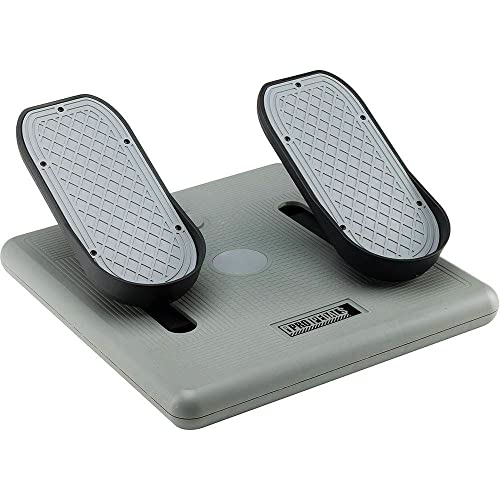
- Realistic three-axis pedal movement
- 7-foot USB cable for flexible setup
- Works with Mac and PC
Best For: PC or Mac users wanting simple, versatile pedals
Best Racing Crossover
Logitech G RS Sim Racing Pedals

- 75 kg load-cell brake
- Adjustable pedal positions and steel frame
- USB PC support with broad racing compatibility
Best For: Racers building a stable, customizable pedal setup
Best HOTAS Alternative
T-Flight Hotas X Stick and Throttle

- Five axes and 12 programmable buttons
- Detachable full-size throttle
- Built-in dual rudder-control methods
Best For: PC pilots wanting compact all-in-one flight controls
Best Overall Flight Rudder Pedals
Logitech G Pro Flight Rudder Pedals
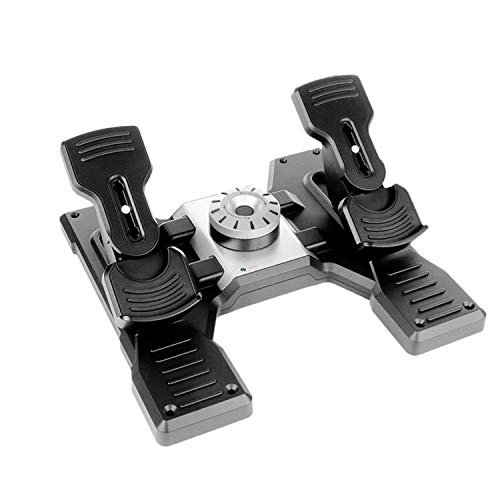
- Self-centering rudder axis
- Adjustable tension dial
- Differential toe brakes
Best For: PC pilots seeking adjustable, realistic rudder control
Best Modular Sim Racing Pedals
Thrustmaster Raceline Pedals III

- Three-pedal all-metal design
- Adjustable springs and pressure settings
- PC, PlayStation, and Xbox compatibility
Best For: Multi-platform sim racers wanting a durable modular pedal set
Best Flight Pedal and Throttle Bundle
Logitech Pro Flight Rudder Pedals & Throttle

- Rudder pedals with adjustable tension
- Includes three-axis throttle quadrant
- Configurable mounting and lever heads
Best For: Windows pilots building a broader cockpit control setup
Premium Pedal Pick
Honeycomb Charlie Rudder Pedals

- Aluminum construction and belt drive system
- Magnetic Hall Effect sensors
- Adjustable feet with anti-slip features
Best For: PC and Mac pilots seeking precise, stable rudder control
Renewed Value Pick
Logitech G Pro Flight Rudder Pedals

- Renewed Logitech rudder-pedal model
- 6.69-pound listed package weight
- Compact package dimensions
Best For: Shoppers seeking a renewed Logitech pedal option
Complete Setup Pick
Logitech G Pro Yoke and Rudder Pedals

- Combines yoke and rudder pedals
- Self-centering pedals with differential toe brakes
- Adjustable non-slip foot rests
Best For: Windows users building a complete flight-control setup
Best All-Around Rudder Pedals – TFRP Precision Flight Sim Pedals
For flight simulator pedals under 200, the Thrustmaster TFRP stands out with a self-centering rudder axis, long travel, and a four-rail aluminum sliding system. It connects by USB and is compatible with PC, PS5, and Xbox Series X|S setups.
Best For: Flight sim players who want smooth rudder control and broad platform compatibility.
Pros:
- Long rudder-axis travel supports precise, gradual turns.
- Self-centering design balances resistance with responsive control.
- Four aluminum rails provide smooth, rigid sliding motion.
- Includes differential braking and secure mounting features.
Cons:
- At 4.9 pounds, it is less portable than lighter pedal sets.
- Its larger listed dimensions may require dedicated cockpit or desk space.
The TFRP is a strong choice when realistic rudder movement matters more than minimal size. Its console and PC compatibility also makes it a flexible upgrade for mixed-platform households.
Best Simple USB Pick – CH Products Pro Pedals
Among flight simulator pedals under 200, the CH Products Pro Pedals offer a straightforward USB setup with realistic three-axis movement. They work with Mac and PC systems and include a 7-foot USB cable for flexible placement.
Best For: PC and Mac users who want uncomplicated flight pedals with driving-sim versatility.
Pros:
- Realistic three-axis movement supports flight simulation.
- 7-foot USB cable allows convenient positioning.
- Compatible with both Mac and PC.
- Can also be used for driving simulation games.
Cons:
- Compatibility is limited to PC and Windows in the listed details.
- The design and feature set are less specialized than the TFRP’s rail system.
The Pro Pedals make sense for shoppers prioritizing easy installation and cross-genre use. Their three-axis layout gives them useful flexibility, although console users should look elsewhere.
Best Racing Crossover – Logitech G RS Sim Racing Pedals
Although designed for racing, these Logitech pedals deserve consideration among flight simulator pedals under 200 if you also play driving sims. A 75 kg load-cell brake, Hall Effect accelerator and clutch sensors, adjustable pedal positions, and a reinforced steel frame emphasize consistency and stability.
Best For: Sim racers who want a sturdy pedal set that can complement a broader gaming setup.
Pros:
- 75 kg load-cell brake registers braking force precisely.
- Hall Effect accelerator and clutch sensors support durable, accurate input.
- Adjustable pedal positions allow a more customized fit.
- Steel frame, rubber feet, carpet grippers, and a brace help prevent slipping.
Cons:
- It is a racing pedal set, not a dedicated rudder-pedal design.
- The optional clutch module and some adapters are sold separately.
- At 10.8 pounds, it is relatively heavy.
Choose the RS pedals primarily for racing rather than coordinated aircraft rudder control. Their modular construction and load-cell brake make them compelling for users who need one stable platform for motorsport simulation.
Best HOTAS Alternative – T-Flight Hotas X Stick and Throttle
If you are comparing flight simulator pedals under 200 but need a complete hand-control setup instead, the Thrustmaster T-Flight Hotas X combines a joystick and detachable throttle. Its five axes, programmable controls, adjustable resistance, and dual rudder methods provide broad flight-control coverage without separate pedals.
Best For: PC pilots who prefer a compact HOTAS arrangement with built-in rudder control.
Pros:
- Five axes and 12 programmable buttons support customized controls.
- Detachable, full-size throttle allows flexible desk arrangements.
- Adjustable joystick resistance helps tailor handling feel.
- Built-in rudder control is available through handle rotation or a tilting lever.
Cons:
- It is a flight stick and throttle, not a dedicated foot-pedal set.
- Listed compatibility is primarily PC, with PlayStation 3 also specified.
- Hand-operated rudder control may not feel as authentic as separate pedals.
The T-Flight Hotas X is best for newcomers or space-conscious pilots who want many controls in one package. Select dedicated pedals instead if foot-based rudder and braking input is your priority.
Best Overall Flight Rudder Pedals – Logitech G Pro Flight Rudder Pedals
For shoppers comparing flight simulator pedals under 200, the Logitech G Pro Flight Rudder Pedals offer a focused setup for PC flight simulation. They combine a self-centering rudder axis, adjustable tension, and differential toe brakes for more detailed ground and yaw control.
Best For: PC pilots who want realistic rudder and braking control with adjustable pedal resistance.
Pros:
- Smooth, accurate self-centering rudder pedals
- Adjustable Tension Dial supports lighter or heavier pedal feel
- Differential toe brakes improve runway and taxi control
- USB connectivity and compatibility with Windows 7, 8, 8.1, and 10
Cons:
- Designed for Windows PCs rather than consoles
- Additional software may require an internet connection to download
- Offers rudder and toe-brake control without the extra controls included in a throttle bundle
Its adjustable feel and differential braking make it a strong all-around choice for flight-focused setups, especially if you already own a separate throttle or yoke.
Best Modular Sim Racing Pedals – Thrustmaster Raceline Pedals III
Although built for sim racing rather than aircraft control, the Thrustmaster Raceline Pedals III are worth separating from true flight pedals when comparing flight simulator pedals under 200. This USB, three-pedal set emphasizes durable construction, adjustable resistance, and broad PC and console compatibility.
Best For: Users who want one sturdy pedal set for PC or console racing simulations and are open to a racing-focused design.
Pros:
- All-metal three-pedal construction
- H.E.A.R.T. Hall-effect sensors are designed for consistent input
- Three pressure-adjustment notches and multiple springs allow feel customization
- Non-slip pads and optional load-cell upgrade support added stability and future expansion
Cons:
- Designed for sim racing, not dedicated aircraft rudder control
- Load-cell brake upgrade is sold separately
- May provide more pedals than a flight-only setup requires
This is a practical choice for a mixed racing setup, but flight-simulation buyers should prioritize a dedicated rudder axis if yaw and differential braking are their main requirements.
Best Flight Pedal and Throttle Bundle – Logitech Pro Flight Rudder Pedals & Throttle
For buyers comparing flight simulator pedals under 200, this Logitech bundle adds a throttle quadrant to the rudder-pedal setup. It combines adjustable self-centering rudder pedals and differential toe brakes with three-axis throttle controls, rocker switches, and configurable lever heads.
Best For: Windows flight-sim users who want rudder pedals and expanded throttle, flap, mixture, or prop-pitch controls in one package.
Pros:
- Includes smooth self-centering rudder pedals with adjustable tension
- Differential toe brakes provide added runway control
- Throttle quadrant has three axis levers and three two-way rocker switches
- Quadrant can mount on top of or in front of a desk on either pilot side
Cons:
- Compatibility is listed for Windows systems
- Bundle may be more equipment than users who only need rudder pedals require
- Supplied notes do not specify detailed technical specifications for the quadrant
This bundle is a convenient way to build a more complete cockpit-style control layout, particularly for simulator pilots who need several engine and aircraft-control inputs beyond rudder and braking.
Premium Pedal Pick – Honeycomb Charlie Rudder Pedals
For shoppers comparing flight simulator pedals under 200, the Honeycomb Charlie Rudder Pedals stand out for their aluminum construction, belt drive system, and adjustable setup. Magnetic Hall Effect sensors are designed to provide precise rudder input, while the included traction features help keep the pedals in place.
Best For: PC and Mac users who want a durable, adjustable rudder-pedal setup for Microsoft Flight Simulator, X-Plane 12, or Prepar3D.
Pros:
- Durable aluminum construction with a belt drive system
- Magnetic Hall Effect sensors for precise coordination
- Adjustable foot angles and high-friction strips
- Deployable carpet spikes help reduce slipping
Cons:
- Xbox Series X or S compatibility requires a Honeycomb Xbox Hub
- Its listed weight is 7.75 kg, making it less convenient to move
The Charlie is a feature-rich choice for pilots prioritizing stability, adjustability, and realistic control. Its broad system and software compatibility makes it a versatile centerpiece for a desktop simulator.
Renewed Value Pick – Logitech G Pro Flight Rudder Pedals
If you are shopping for flight simulator pedals under 200, the renewed Logitech G Pro Flight Rudder Pedals offer a way to consider this established model at a potentially lower cost. The supplied details identify this unit as renewed and list a package weight of 6.69 pounds.
Best For: Buyers who are specifically comfortable choosing a renewed Logitech G Pro Flight Rudder Pedals unit.
Pros:
- Renewed version of the Logitech G Pro Flight Rudder Pedals
- Compact package dimensions of 18.5 x 13 x 11.25 inches
- Listed package weight is 6.69 pounds
Cons:
- The supplied notes provide limited information about features and compatibility
- Renewed condition may not suit shoppers seeking a new product
This option may appeal when the renewed designation and available pricing are more important than having extensive published specifications. Confirm the listing details before purchase if platform compatibility is essential.
Complete Setup Pick – Logitech G Pro Yoke and Rudder Pedals
For flight simulator pedals under 200 shoppers building a broader cockpit, this Logitech bundle combines Pro Flight Rudder Pedals with the Pro Flight Yoke System. The pedals add smooth self-centering control and differential toe brakes, while the yoke provides programmable controls for a more complete desktop setup.
Best For: Windows users who need both rudder pedals and a yoke system in one bundle.
Pros:
- Includes both Pro Flight Rudder Pedals and Pro Flight Yoke System
- Smooth self-centering pedals with differential toe brakes
- Adjustable foot rests include non-slip materials
- Yoke offers 14 buttons, a POV hat, and a three-position mode switch
Cons:
- The bundle is listed as compatible with Windows
- It may be more equipment than buyers seeking pedals alone need
This bundle makes the most sense for a new or expanding simulator station. It delivers coordinated rudder, braking, and yoke controls while keeping the setup centered around USB desktop hardware.
How We Picked the Best Flight Simulator Pedals Under 200
We focused on products that offer meaningful control for flight simulation while staying near a $200 budget. The selection includes dedicated rudder pedals, pedal-and-throttle bundles, entry-level HOTAS equipment, and a few racing-style pedal sets that may suit hybrid simulator users. We considered compatibility, axis layout, toe-brake availability, adjustability, connection method, mounting stability, and user-friendly setup.
Because street prices change, treat the $200 limit as a buying target rather than a permanent specification. Renewed and bundled products can offer particularly strong value, but check the seller’s warranty and return policy before ordering.
Quick Comparison
- Best dedicated rudder control: Look for a full-width pedal set with a central rudder axis and independent toe brakes.
- Best value: CH Products and Thrustmaster options are worth considering for straightforward PC setups.
- Best ecosystem choice: Logitech G and Honeycomb products make sense if you already use compatible flight controls.
- Best for mixed simulation: Modular racing pedals may work for users who also play driving simulators, but they do not always provide a conventional rudder axis.
- Best bundle potential: A yoke, throttle quadrant, or HOTAS bundle can be cheaper than assembling a complete cockpit one component at a time.
Key Buying Factors for Flight Simulator Pedals Under 200
Rudder and Toe-Brake Axes
Traditional flight pedals use a linked rudder axis for yaw control. Independent toe brakes are useful for differential braking during taxiing and landing rollout. If you primarily fly airliners, taildraggers, or helicopters, confirm that the pedal design matches your preferred aircraft.
Compatibility and Connections
Check operating-system, console, and simulator support before buying. Most PC pedals connect by USB, while console compatibility may depend on a supported HOTAS ecosystem or specific game. Also verify whether the pedals appear as a separate controller in your simulator.
Adjustability and Footprint
Adjustable spacing, angle, resistance, and toe-brake position can improve comfort during long sessions. Measure your floor area and look for rubber feet, mounting holes, or another way to prevent the pedals from sliding.
Build Quality and Calibration
Metal construction can improve durability, but a stable plastic chassis may still perform well. Smooth sensor response, a reliable center position, and easy software calibration matter more than appearance. Leave room for dead-zone and sensitivity adjustments in your simulator.
Who Should Buy Which Flight Simulator Pedals Under 200?
Choose dedicated rudder pedals if realistic yaw control and toe braking are your priorities. They are the most direct upgrade from keyboard, controller, or twist-stick flying.
Choose a bundle if you are building a complete entry-level cockpit and need a yoke, throttle quadrant, or stick at the same time. Bundles can simplify compatibility, though they may include components you already own.
Choose a renewed model when price is the deciding factor and the seller provides a clear warranty and return window. Inspect the pedals promptly for drift, uneven resistance, or missing accessories.
Choose racing-style pedals only if cross-simulator flexibility matters more than authentic rudder control. They can be useful for driving games, but confirm axis mapping and simulator support before treating them as a flight-specific replacement.