Choosing among today’s graphics cards for 1440p gaming means balancing frame rates, visual quality, memory capacity, features, and price. The right card should handle modern games smoothly without forcing unnecessary compromises.
We compare 10 current models across AMD Radeon, NVIDIA GeForce, and Intel Arc lineups, highlighting the best fits for high-refresh gaming, ray tracing, value-focused builds, and long-term upgrades.
Best 10 Graphics Cards for 1440p Gaming Picks for 2026
High-Performance AMD Pick

- 16GB GDDR6 memory
- 3060MHz GPU clock
- WINDFORCE cooling system
Best For: High-performance 1440p gaming builds with room for a larger card
Compact NVIDIA Option
ASUS Prime GeForce RTX 5070 OC

- 12GB GDDR7 memory
- Blackwell architecture and DLSS 4
- SFF-ready 2.5-slot design
Best For: NVIDIA-focused 1440p systems with tighter build constraints
Value-Focused 16GB Card

- 16GB GDDR6 memory
- 3290MHz boost clock
- Compact two-slot design
Best For: Mainstream 1440p builds needing ample memory in a smaller chassis
Heavy-Duty NVIDIA Build

- 12GB GDDR7 with DLSS 4
- 2640MHz OC boost clock
- Large 3.125-slot triple-fan cooler
Best For: Spacious 1440p gaming PCs prioritizing cooling and durability
High-End 1440p Power

- 16GB GDDR6 memory
- Boost clock up to 2970 MHz
- Triple-fan cooling design
Best For: Demanding 1440p gaming builds
Compact AI-Enhanced Gaming

- 16GB GDDR7 memory
- DLSS 4 and Blackwell architecture
- 2.5-slot dual-fan design
Best For: Compact 1440p systems with modern AI features
High-Performance 1440p Pick
ASRock RX 9070 Challenger 16GB OC

- RDNA 4 GPU with 56 compute units
- 16GB GDDR6 on a 256-bit bus
- Triple-fan, 0dB cooling design
Best For: High-performance 1440p gaming and demanding textures
Quiet Compact Choice
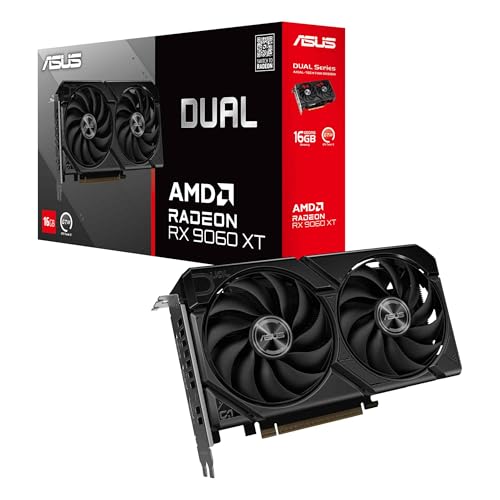
- 16GB GDDR6 memory
- 2.5-slot dual-fan design
- 0dB cooling and dual BIOS
Best For: Quiet, flexible 1440p gaming builds
Enthusiast 1440p and 4K Pick
ASRock RX 9070 XT Challenger 16GB

- 64 RDNA 4 compute units
- Up to 2970MHz boost clock
- Triple-fan cooling with 0dB mode
Best For: High-refresh 1440p and capable 4K gaming
High-Performance AMD Pick – Radeon RX 9070 XT Gaming OC
The GIGABYTE Radeon RX 9070 XT Gaming OC is a strong choice for graphics cards for 1440p gaming, pairing 16GB of GDDR6 memory with a 3060MHz GPU clock. Its WINDFORCE cooling system, Hawk fan, and thermal conductive gel are designed for sustained desktop gaming workloads.
Best For: Gamers seeking a high-performance AMD card with generous memory capacity and robust cooling.
Pros:
- 16GB of GDDR6 memory
- 3060MHz GPU clock speed
- WINDFORCE cooling system with Hawk fan
- Three-year manufacturer warranty
Cons:
- Large 11.34-inch card may require careful case-clearance checking
- Uses a PCI-Express x16 interface and is intended for desktop systems
With 16GB of memory and a dedicated cooling design, this card is well suited to buyers building a capable 1440p gaming PC and who have sufficient room in their case.
Compact NVIDIA Option – ASUS Prime GeForce RTX 5070 OC
The ASUS Prime GeForce RTX 5070 OC is a practical contender among graphics cards for 1440p gaming, with 12GB of GDDR7 memory, NVIDIA Blackwell architecture, and DLSS 4 support. Its SFF-ready design and 2.5-slot profile offer useful flexibility for compatible builds.
Best For: Gamers wanting NVIDIA features and a relatively compact 2.5-slot card for a performance-focused desktop.
Pros:
- 12GB of GDDR7 memory
- NVIDIA Blackwell architecture with DLSS 4
- SFF-ready 2.5-slot design
- Dual BIOS with Quiet and Performance profiles
Cons:
- 12GB capacity is lower than some competing cards in this roundup
- 12-inch length still requires case-clearance verification
Quiet gaming features, a dual BIOS, and SFF compatibility make the Prime RTX 5070 appealing when you want NVIDIA functionality without moving to a larger three-slot design.
Value-Focused 16GB Card – Radeon RX 9060 XT Challenger
The ASRock Radeon RX 9060 XT Challenger is a sensible option for graphics cards for 1440p gaming, offering 16GB of GDDR6 memory and a boost clock of up to 3290MHz. Its compact two-slot design and dual-fan cooler make it suitable for many standard desktop cases.
Best For: 1440p gamers who prioritize 16GB of memory and a compact, straightforward card design.
Pros:
- 16GB GDDR6 memory running at 20Gbps
- Up to 3290MHz boost clock
- Compact 249mm two-slot design
- 0dB silent feature and dual fans
Cons:
- Requires a single 8-pin power connector
- Recommended power supply is 550W
- Two-year manufacturer warranty is shorter than some alternatives here
Its 16GB frame-buffer capacity, small footprint, and 550W recommended power requirement create a balanced fit for mainstream 1440p systems, provided your case and power supply meet the specifications.
Heavy-Duty NVIDIA Build – ASUS TUF GeForce RTX 5070 OC
The ASUS TUF Gaming GeForce RTX 5070 OC combines NVIDIA Blackwell architecture and DLSS 4 with 12GB of GDDR7 memory, making it a capable choice among graphics cards for 1440p gaming. Its substantial 3.125-slot cooler, three Axial-tech fans, and reinforced construction favor demanding desktop builds.
Best For: Gamers who want a rugged, heavily cooled RTX 5070 for a spacious performance-oriented PC.
Pros:
- 12GB of GDDR7 memory with Blackwell architecture
- 2640MHz OC boost clock
- Large three-fan cooling system
- Protective PCB coating and GPU support hardware
Cons:
- 3.125-slot design requires substantial expansion-room clearance
- 13-inch length may not suit compact cases
- Heavier 3.4-pound construction benefits from secure mounting
The TUF model is best matched with a roomy case that can accommodate its large cooler. In return, it emphasizes thermal capacity, durability-focused construction, and secure installation for long gaming sessions.
High-End 1440p Power – XFX RX 9070 XT Swift
The XFX Swift RX 9070 XT is a high-performance option for shoppers comparing graphics cards for 1440p gaming. Its 16GB of GDDR6 memory, boost clock up to 2970 MHz, and triple-fan cooling design are well suited to demanding desktop gaming setups.
Best For: Gamers seeking a powerful 1440p card with generous memory and substantial air cooling.
Pros:
- 16GB of GDDR6 memory for modern game textures and applications
- Boost clock up to 2970 MHz
- Triple-fan XFX SWFT cooling solution
- Includes HDMI and three DisplayPort outputs
Cons:
- Triple-fan design may require more case space than compact cards
- Uses the PCI-Express x16 interface, so chassis and motherboard clearance should be checked
With support for resolutions up to 7680 x 4320 and a three-year manufacturer warranty, this card is a strong fit for buyers prioritizing performance headroom and long-term coverage.
Value-Focused 1440p Gaming – ASRock Intel Arc B580 Challenger
The ASRock Intel Arc B580 Challenger is a practical choice among graphics cards for 1440p gaming, pairing 12GB of GDDR6 memory with a 2740 MHz GPU clock. Its two-slot, 249mm format can suit builds where space matters, provided your case has the required clearance and power support.
Best For: Value-conscious gamers wanting 1440p capability, modern display outputs, and a relatively compact card.
Pros:
- 12GB GDDR6 memory on a 192-bit bus
- XeSS 2 support and 160 XMX engines for AI acceleration
- Dual-fan cooling with 0dB silent operation at low temperatures
- Three DisplayPort 2.1 outputs and one HDMI 2.1a output
Cons:
- Requires one 8-pin power connector and a 650W power supply
- PCIe 4.0 interface is listed as PCI-Express x8
- Only a two-year manufacturer warranty is specified
Its 249mm length, metal backplate, and broad display connectivity make the B580 Challenger easy to consider for balanced gaming and productivity systems, but confirm your power supply and chassis fit first.
Compact AI-Enhanced Gaming – ASUS RTX 5060 Ti 16GB
The ASUS Dual GeForce RTX 5060 Ti 16GB is a compact option for graphics cards for 1440p gaming, combining 16GB of GDDR7 memory with NVIDIA Blackwell architecture and DLSS 4 support. Its 2.5-slot design and dual-fan cooler aim to balance performance, compatibility, and noise control.
Best For: Gamers who want 16GB of newer GDDR7 memory, DLSS 4, and a compact dual-fan design.
Pros:
- 16GB GDDR7 memory
- DLSS 4 support and NVIDIA Blackwell architecture
- 2.5-slot design for improved compatibility with smaller chassis
- 0dB technology, dual BIOS, and dual ball-bearing fans
Cons:
- 2.5-slot thickness may still limit clearance in very small cases
- Maximum boost clock varies by mode: 2632 MHz OC or 2602 MHz default
With three DisplayPort 2.1b outputs, HDMI 2.1b, PCIe 5.0, and a three-year warranty, this ASUS card is a versatile pick for modern 1440p systems that also value quiet operation.
High-Performance 1440p Pick – ASRock RX 9070 Challenger 16GB OC
The ASRock Radeon RX 9070 Challenger is a strong option for shoppers comparing graphics cards for 1440p gaming. Its RDNA 4 GPU, 16GB of GDDR6 memory, factory overclock, and triple-fan cooler are suited to high-framerate gaming while leaving room for demanding textures and ray tracing.
Best For: Gamers seeking a high-performance 1440p card with 16GB of VRAM and substantial cooling.
Pros:
- RDNA 4 architecture with 56 compute units and third-generation ray tracing accelerators.
- 16GB GDDR6 memory on a 256-bit bus supports demanding textures and workloads.
- Factory boost up to 2520MHz, triple-fan cooling, and 0dB silent operation.
Cons:
- The 2.5-slot, 290 x 123 x 51mm design requires careful case-clearance checks.
- It uses two 8-pin power connectors and has a recommended 700W PSU.
This card balances 1440p performance, memory capacity, and quiet cooling well, but its size and power requirements should be confirmed before purchase.
Quiet Compact Choice – ASUS Dual RX 9060 XT 16GB
The ASUS Dual Radeon RX 9060 XT 16GB is a practical contender among graphics cards for 1440p gaming, especially for builders who value compatibility and quieter operation. Its 2.5-slot format, dual axial-tech fans, 0dB technology, and dual BIOS provide useful flexibility for everyday gaming setups.
Best For: Desktop builders wanting a 16GB 1440p card with quiet cooling and a relatively compact 2.5-slot design.
Pros:
- 16GB of GDDR6 memory supports modern games and high-resolution textures.
- 0dB technology and axial-tech fans can keep light gaming relatively quiet.
- Dual BIOS offers Quiet and Performance profiles, with boost clocks up to 3250MHz in OC mode.
- DisplayPort 2.1a and HDMI 2.1b support modern high-resolution displays.
Cons:
- The 2.5-slot design still requires a check of available expansion-space clearance.
- As a dual-fan card, its cooling setup is less substantial than the triple-fan models in this roundup.
For a balanced build, this ASUS model emphasizes quiet operation, display connectivity, and a manageable form factor while retaining 16GB of memory.
Enthusiast 1440p and 4K Pick – ASRock RX 9070 XT Challenger 16GB
The ASRock Radeon RX 9070 XT Challenger targets shoppers who want extra headroom from graphics cards for 1440p gaming. Its RDNA 4 architecture, 64 compute units, 2970MHz boost clock, and 16GB of GDDR6 memory also position it for smooth 4K gaming and demanding creative workloads.
Best For: Enthusiast gamers seeking high-refresh 1440p performance with added 4K capability.
Pros:
- RDNA 4 GPU includes 64 compute units, third-generation ray tracing, and second-generation AI accelerators.
- 16GB GDDR6 on a 256-bit bus provides substantial memory bandwidth.
- Boost clock up to 2970MHz and triple-fan cooling suit intensive gaming.
- Three DisplayPort 2.1a outputs and HDMI 2.1b support modern high-refresh displays.
Cons:
- The manufacturer recommends an 800W power supply, increasing system requirements.
- Its triple-fan cooler may require more case space than smaller graphics cards.
This is the performance-focused choice of the three, offering the highest listed compute-unit count and boost clock, provided your case and power supply can accommodate it.
How We Picked the Best Graphics Cards for 1440p Gaming
We evaluated these cards by considering their expected 1440p performance, graphics memory, upscaling and ray-tracing support, cooling design, power requirements, and overall positioning. We also included different performance tiers so the list is useful for budget-conscious buyers as well as enthusiasts building a high-refresh-rate system.
Specifications such as 16GB memory, modern display outputs, PCIe 5.0 support, and multi-fan coolers can improve a card’s longevity, but real-world value still depends on street price and the games you play. Check current pricing before purchasing.
Quick Comparison
| Performance Tier | Best For | What to Look For |
|---|---|---|
| Entry-level 1440p | Efficient builds and moderate settings | Strong raster performance, 12GB or more VRAM |
| Mainstream 1440p | High settings and high-refresh monitors | 16GB VRAM, capable cooling, upscaling support |
| Upper-midrange | Max settings and demanding releases | High frame rates, ray-tracing performance, 16GB VRAM |
Key Buying Factors for Graphics Cards for 1440p Gaming
Performance and Refresh Rate
Match the card to your monitor. A 60Hz display needs less rendering power than a 144Hz or 165Hz panel. If you play competitive shooters, prioritize consistent frame rates and low latency; for cinematic single-player games, higher image quality may matter more.
VRAM Capacity
Sixteen gigabytes is a strong target for a new 1440p gaming build, particularly if you use high-resolution texture packs or want extra headroom for future games. Twelve gigabytes can still be suitable, especially when the card offers excellent overall performance and efficient upscaling.
Ray Tracing and Upscaling
Ray tracing can substantially reduce frame rates, so compare both standard rendering and ray-traced performance. DLSS, FSR, and XeSS can increase playable frame rates, but support varies by game and image-quality preference.
Size, Power, and Cooling
Measure your case before buying, especially for triple-fan models. Confirm the recommended power supply and required connectors, and leave room for adequate airflow. A larger cooler may run quieter, while a compact dual-fan card can simplify smaller builds.
Who Should Buy Which Graphics Cards for 1440p Gaming?
Choose an entry-level model if you want reliable 1440p gaming at sensible settings or are upgrading from an older midrange card. Mainstream 16GB options are the safest choice for most buyers seeking high settings and longer useful life. Step up to an RX 9070 or RX 9070 XT-class card if you use a high-refresh display, want maximum settings, or plan to keep the GPU for several years.
Buyers focused heavily on ray tracing, supported upscaling features, or creator software should compare NVIDIA options closely. AMD cards can be especially appealing for rasterized performance and generous memory, while Intel Arc models may offer strong value when their game compatibility and driver support meet your needs. Finally, prioritize the best current deal rather than paying a large premium for small performance differences.