Choosing among the best graphics cards for 1080p gaming depends on more than raw GPU speed. Resolution, refresh rate, game settings, power requirements, and your budget all affect which card makes the most sense.
This roundup compares 10 options across current and older GPU generations, helping you match performance, features, and compatibility to the way you play.
Best 10 Graphics Cards for 1080p Gaming Picks for 2026
High-End 1080p Headroom
Gigabyte Radeon RX 9070 XT Gaming OC

- 16GB GDDR6 memory
- WINDFORCE cooling system
- PCIe 5.0 support
Best For: Enthusiasts wanting substantial 1080p gaming headroom
Quiet Compact Performance
ASUS Dual Radeon RX 9060 XT 16GB
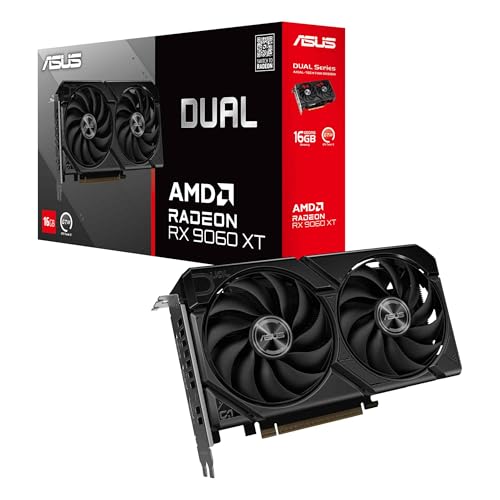
- 16GB GDDR6 memory
- 0dB quiet technology
- Dual BIOS profiles
Best For: Quiet, flexible 1080p gaming desktops
Balanced 1080p Pick

- RX 7600 with 8GB GDDR6
- Up to 2655 MHz boost clock
- Dual-fan cooling with HDMI and 3x DisplayPort
Best For: 1080p gamers wanting a current-generation AMD card
Budget-Friendly Classic

- 6GB GDDR6 on a 192-bit bus
- DVI, DisplayPort, and HDMI outputs
- Dual-fan cooling with 2-year warranty
Best For: Budget 1080p PCs and systems needing DVI
Feature-Rich Upgrade
ASRock Intel Arc B570 Challenger

- 10GB GDDR6 with 2600 MHz GPU clock
- XeSS 2 and AV1 encoding support
- HDMI 2.1a and 3x DisplayPort 2.1
Best For: 1080p gamers who also stream or create content
Balanced RTX 1080p Pick
MSI Gaming RTX 3050 Ventus 2X 6G OC

- 6GB GDDR6 memory
- Dual-fan Ventus 2X cooling
- HDMI 2.1a and DisplayPort 1.4a
Best For: NVIDIA-focused 1080p gaming builds
Quiet Multi-Display Choice

- 8GB GDDR6 memory
- Three DisplayPort and one HDMI output
- Intelligent semi-passive fan system
Best For: 1080p gaming with multiple displays
High-End 1080p Headroom – Gigabyte Radeon RX 9070 XT Gaming OC
For shoppers seeking graphics cards for 1080p gaming with plenty of performance headroom, the GIGABYTE Radeon RX 9070 XT Gaming OC pairs 16GB of GDDR6 memory with a listed 3060 MHz GPU clock. Its substantial cooling system and high-resolution output support make it a performance-focused choice for a desktop gaming build.
Best For: Enthusiasts who want a powerful Radeon card for 1080p gaming and other demanding desktop workloads.
Pros:
- 16GB of GDDR6 memory provides generous capacity for modern game textures.
- WINDFORCE cooling, Hawk fans, and thermal conductive gel are designed for heat management.
- Supports PCIe 5.0 and up to 7680×4320 display output.
- Includes RGB lighting and a three-year manufacturer warranty.
Cons:
- Its 11.34-inch length and 5.2-inch width require careful case-clearance planning.
- At 1.78 kg, it is a relatively substantial graphics card.
The RX 9070 XT Gaming OC is more performance-oriented than necessary for basic 1080p play, but its 16GB memory and robust cooling make it a compelling option for buyers prioritizing longevity and extra headroom.
Balanced Modern Value – ASRock Intel Arc B580 Challenger 12GB OC
The ASRock Intel Arc B580 Challenger is a modern option among graphics cards for 1080p gaming, combining 12GB of GDDR6 memory with a 2740 MHz GPU clock and 19 Gbps memory speed. XeSS 2 support and a compact two-slot design add practical appeal for newer gaming systems.
Best For: Gamers seeking a current, feature-rich card for 1080p or 1440p gaming in a carefully sized desktop build.
Pros:
- 12GB of GDDR6 memory on a 192-bit bus supports modern textures and creative applications.
- Supports XeSS 2 and includes 160 XMX engines for AI acceleration.
- Dual-fan cooling includes 0dB Silent operation at low temperatures.
- Offers three DisplayPort 2.1 outputs, HDMI 2.1a, and AV1 encoding.
Cons:
- Requires a 650W power supply and one 8-pin power connector.
- The 249mm length should be checked against the case before purchase.
- Uses a PCIe 4.0 interface listed as PCIe x8.
With modern display connectivity, quiet low-load operation, and 12GB of memory, this Challenger model is a versatile pick when your system meets its power and clearance requirements.
Quiet Compact Performance – ASUS Dual Radeon RX 9060 XT 16GB
The ASUS Dual Radeon RX 9060 XT 16GB is a practical contender among graphics cards for 1080p gaming, offering 16GB of GDDR6 memory in an 8-inch, 2.5-slot design. Its dual BIOS, 0dB mode, and axial-tech fans make it suited to buyers who value both performance flexibility and quieter operation.
Best For: Desktop gamers who want generous memory, modern display outputs, and selectable quiet or performance profiles.
Pros:
- 16GB of GDDR6 memory provides ample capacity for current games.
- OC mode lists up to a 3250 MHz boost clock and up to a 2640 MHz game clock.
- 0dB technology, dual BIOS, and axial-tech fans support flexible acoustics and cooling.
- Includes DisplayPort 2.1a, HDMI 2.1b, and PCIe 5.0 support.
Cons:
- The 2.5-slot thickness may limit compatibility in smaller or tightly packed builds.
- Two power or performance profiles mean buyers may need to adjust settings to match their priorities.
This ASUS card offers a strong balance of memory capacity and build-friendly length, while its quiet mode and dual BIOS make it especially appealing for everyday gaming PCs.
Budget Entry Point – Kelinx AISURIX RX 580 8GB
The Kelinx AISURIX RX 580 is a budget-oriented option among graphics cards for 1080p gaming, with 8GB of GDDR5 memory, a 1750 MHz clock, and a PCIe 3.0 x16 interface. Its dual-fan cooler and straightforward display selection make it a sensible fit for basic gaming upgrades when cost is the main concern.
Best For: Budget desktop upgrades and entry-level 1080p gaming systems with an available 8-pin power connector.
Pros:
- 8GB of memory offers useful capacity for an older budget gaming build.
- Includes two DisplayPort outputs and one HDMI output, with support for up to two monitors.
- Semi-automatic fans can stop at low temperatures for quieter operation.
- Supports up to 3840×2160 output and uses a dual-slot design.
Cons:
- The older GDDR5 memory and PCIe 3.0 interface are less modern than the other listed options.
- Maximum power draw is rated at 185W and requires one 8-pin connector.
- Includes a one-year warranty.
The RX 580 is best viewed as an affordable replacement or upgrade for an older desktop rather than a future-focused purchase. Confirm the power supply and case fit before buying.
Balanced 1080p Pick – XFX RX 7600 SWFT210
XFX Speedster SWFT210 Radeon RX 7600 Graphics Card with 8GB GDDR6 HDMI 3xDP, AMD RDNA 3 RX-76PSWFTFY
Check Price On AmazonThe XFX Speedster SWFT210 is a strong option for shoppers comparing graphics cards for 1080p gaming. Its AMD Radeon RX 7600 GPU, 8GB of GDDR6 memory, and boost clock of up to 2655 MHz provide a capable foundation for modern desktop gaming, while the dual-fan cooler is designed for sustained use.
Best For: Gamers seeking a current-generation AMD card with 8GB of VRAM and straightforward HDMI/DisplayPort connectivity.
Pros:
- AMD RX 7600 GPU with 8GB GDDR6 memory
- Boost clock of up to 2655 MHz
- Dual-fan XFX SWFT cooling solution
- Supports HDMI and three DisplayPort outputs
Cons:
- Its 9.49-inch length should be checked against your case clearance
- Uses a single listed HDMI output alongside DisplayPort connections
With its newer RDNA 3 platform, ample 8GB memory, and three-year manufacturer warranty, this XFX model is a practical all-around choice for a 1080p-focused gaming PC.
Budget-Friendly Classic – ZER-LON GTX 1660 Super
The ZER-LON GeForce GTX 1660 Super is a sensible entry-level choice among graphics cards for 1080p gaming. It combines 6GB of GDDR6 memory with a 192-bit memory bus, dual-fan cooling, and a useful mix of DVI, DisplayPort, and HDMI outputs for older and newer monitors.
Best For: Budget-conscious desktop builders who need a familiar NVIDIA card with broad display compatibility.
Pros:
- 6GB GDDR6 memory with a 192-bit interface
- Dual-fan cooling with direct-contact heat-pipe design
- Includes DVI, DisplayPort, and HDMI outputs
- Supports up to three monitors and includes a two-year warranty
Cons:
- Older GTX 1660 Super platform uses PCI Express 3.0
- Has less memory than the other listed cards
- Driver installation requires removing an old driver first, according to the notes
This card makes the most sense for a cost-conscious 1080p system or a build that still needs DVI support. Its 6GB capacity and older platform are worth considering before choosing it for longer-term upgrades.
Feature-Rich Upgrade – ASRock Intel Arc B570 Challenger
The ASRock Intel Arc B570 Challenger brings modern features to the graphics cards for 1080p gaming category. Its 10GB of GDDR6 memory, 2600 MHz GPU clock, XeSS 2 support, and AV1 encoding make it appealing to gamers who also stream or create content.
Best For: Gamers and creators who want extra VRAM, modern display standards, and Intel’s AI-assisted upscaling features.
Pros:
- 10GB GDDR6 memory on a 160-bit bus
- 2600 MHz GPU clock with 19 Gbps memory speed
- Supports XeSS 2, DirectX 12 Ultimate, and AV1 encoding
- Three DisplayPort 2.1 outputs plus HDMI 2.1a
Cons:
- Uses a PCI Express x8 interface
- Requires a single 8-pin power connector
- Its feature set may be more than needed for a basic 1080p-only build
The B570 stands out when a 1080p gaming PC also needs current connectivity and content-creation capabilities. Its dual 0dB cooling design, metal backplate, and 10GB memory give it a well-equipped profile for a modern system.
Balanced RTX 1080p Pick – MSI Gaming RTX 3050 Ventus 2X 6G OC
For shoppers comparing graphics cards for 1080p gaming, the MSI RTX 3050 Ventus 2X 6G OC offers a compact, current-generation NVIDIA option with 6GB of GDDR6 memory, dual-fan cooling, and HDMI 2.1a and DisplayPort connectivity.
Best For: 1080p gamers who want an NVIDIA RTX 30-series card with modern display support and a compact dual-fan design.
Pros:
- 6GB of GDDR6 memory with a 96-bit interface.
- Dual-fan Ventus 2X cooling design.
- Supports one DisplayPort 1.4a connection and two HDMI 2.1a outputs.
- Includes a 3-year warranty.
Cons:
- The 6GB memory capacity is lower than the 8GB offered by some alternatives.
- Its listed boost clock is 1492 MHz.
The MSI RTX 3050 is a straightforward choice for a compact gaming desktop, especially if you prefer NVIDIA hardware and need multiple modern video outputs. Check your system’s available PCIe x16 slot and case clearance before buying.
High-Capacity Budget Option – OKAMUS RX 590 8GB
The OKAMUS RX 590 is a budget-oriented choice among graphics cards for 1080p gaming, pairing 8GB of GDDR5 memory with a 256-bit interface, dual-fan cooling, and support for HDMI plus two DisplayPort outputs.
Best For: Budget desktop upgrades and 1080p gaming setups that need 8GB of memory and multi-monitor connectivity.
Pros:
- 8GB of GDDR5 memory with a 256-bit memory interface.
- Dual low-noise fans and an aluminum heatsink.
- Supports HDMI and two DisplayPort outputs for multi-monitor setups.
- Advertised compatibility with Windows 7, 10, and 11.
Cons:
- Uses the older PCIe 3.0 x16 interface and GDDR5 memory.
- Requires an 8-pin power connector and a stated 500W power supply.
- Includes a 1-year warranty.
With its generous memory capacity and broad display output selection, this RX 590 can suit an affordable 1080p system or multi-screen workstation. Confirm that your power supply meets the stated requirement and has the necessary 8-pin connector.
Quiet Multi-Display Choice – AISURIX RX 5500 XT 8GB
The AISURIX RX 5500 XT 8GB is a practical contender among graphics cards for 1080p gaming, with GDDR6 memory, three DisplayPort connections, HDMI output, and an intelligent fan system designed to reduce noise during lighter workloads.
Best For: 1080p gamers and desktop users who need several DisplayPort outputs and semi-passive cooling.
Pros:
- 8GB of GDDR6 memory with a 128-bit interface.
- Three DisplayPort 1.4a outputs plus one HDMI 2.0b output.
- Intelligent fans can stop at low temperatures or under light load.
- Uses composite heat pipes for added heat dissipation.
Cons:
- Requires one 8-pin power connector.
- Uses a dual-slot design, so case space should be checked.
- The listed warranty is 2 years.
This AISURIX model stands out when display flexibility and quieter light-use operation matter. Its 130W maximum listed power draw and 8-pin connector make checking your power supply and case layout an important part of installation planning.
How We Picked the Best Graphics Cards for 1080p Gaming
We compared the selected cards by expected 1080p performance, available VRAM, architecture, feature support, cooling design, connectivity, and overall value. We also considered how each model fits different systems, from budget PCs and older upgrades to high-refresh-rate gaming builds.
Specifications can vary between manufacturers, so check the exact card dimensions, power connector requirements, recommended power supply, and warranty before buying. Real-world performance also depends on the game, processor, graphics settings, and driver support.
Quick Comparison
| Best For | Recommended Type | What to Look For |
|---|---|---|
| High-refresh 1080p | RX 9070 XT or comparable modern GPU | High frame rates, ample VRAM, strong cooling |
| Mainstream gaming | RX 9060 XT, RX 7600, Arc B580, or Arc B570 | Modern features and at least 8GB of VRAM |
| Budget upgrades | RTX 3050, GTX 1660 Super, RX 5500 XT, or RX 590 | Low cost, compatible power requirements |
| Very low-cost systems | RX 580 or similar older card | Used-market value and realistic settings |
Key Buying Factors for Graphics Cards for 1080p Gaming
Performance and Refresh Rate
A standard 60Hz monitor requires less GPU power than a 144Hz or 240Hz display. Match the card to your target frame rate rather than paying for performance your monitor cannot show. Competitive games typically benefit more from high frame rates, while visually demanding single-player games may prioritize image quality.
VRAM and Memory Bandwidth
Eight gigabytes is a practical baseline for many 1080p gaming PCs, while 10GB, 12GB, or 16GB offers more room for high-resolution textures and newer releases. VRAM alone does not determine performance, but insufficient memory can cause stuttering or force lower settings.
Upscaling, Ray Tracing, and Drivers
Modern cards may support features such as AMD FSR, NVIDIA DLSS, or Intel XeSS, which can improve frame rates when supported by a game. Ray tracing is more demanding than standard rendering, so check independent benchmarks if it is important to you. Driver maturity and game-specific support also matter, particularly with newer GPU platforms.
Fit, Power, and Outputs
Confirm the card will fit your case and that your power supply has the required wattage and connectors. DisplayPort and HDMI versions should match your monitor’s resolution and refresh-rate needs. Dual-fan cards are often easier to fit and cool, but verify the exact length and slot thickness.
Who Should Buy Which Graphics Cards for 1080p Gaming?
Choose a modern midrange card such as the RX 9060 XT, RX 7600, Arc B580, or Arc B570 for a new 1080p gaming build with current features and better long-term flexibility. The RX 9070 XT is better suited to enthusiasts who want very high frame rates, maximum settings, or a path toward higher-resolution gaming.
For inexpensive upgrades to an existing PC, the RTX 3050, GTX 1660 Super, RX 5500 XT, and RX 590 can make sense when priced competitively and compatible with the system’s power supply. Older options such as the RX 580 are best for buyers focused on basic 1080p play and willing to use medium settings or shop the used market carefully.