Finding the best flight simulator pedals for PC can make taxiing, coordinated turns, crosswind landings, and helicopter control feel substantially more natural. The right set should match your simulator, available desk or cockpit space, and preferred control setup.
This roundup compares 10 options, including standalone rudder pedals and bundles with yokes, joysticks, or throttles. Use the guide below to narrow the choices by compatibility, adjustability, braking controls, construction, and budget.
Best 10 Flight Simulator Pedals for PC Picks for 2026
Premium Precision
Thrustmaster TPR Rudder Pedals

- Suspended Pendul_r mechanism for fluid rudder control
- H.E.A.R.T. magnetic sensors support lasting accuracy
- Adjustable spring resistance for personalized feel
Best For: Serious PC flight enthusiasts prioritizing precision
Flexible Multi-Platform Control
Turtle Beach VelocityOne Rudder Pedals
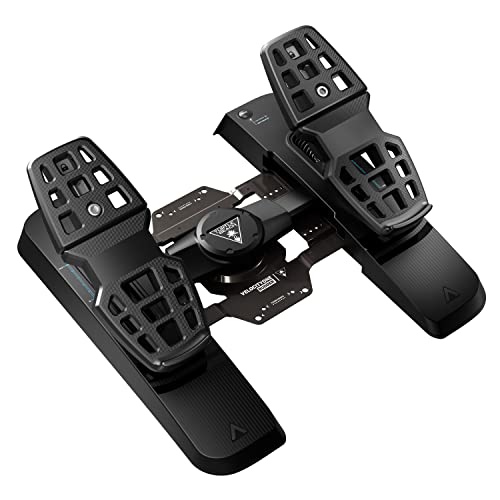
- Works with Windows PCs and compatible Xbox consoles
- Swappable springs and adjustable pedal width
- Differential brakes and Hall Effect sensing
Best For: PC and Xbox pilots wanting customizable controls
Complete Starter Pack
Thrustmaster T16000M FCS Flight Pack

- Bundles joystick, throttle, and pedals
- USB-compatible with Windows PCs
- Ambidextrous stick and TARGET profile software
Best For: PC pilots building a complete flight-control setup
Balanced Rudder Control
Logitech G Pro Flight Rudder Pedals
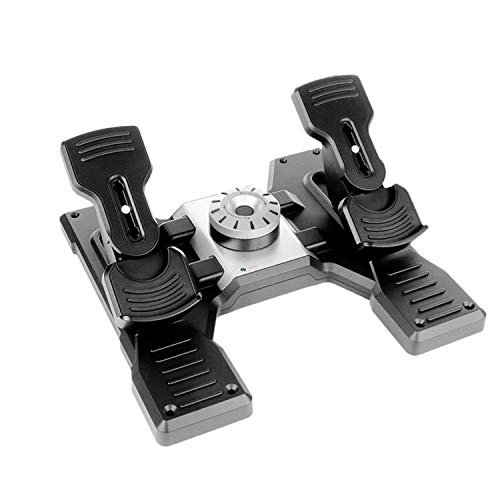
- Self-centering rudder axis for smooth control
- Adjustable tension dial changes pedal feel
- Differential toe brakes support ground handling
Best For: Windows pilots wanting dedicated rudder and toe-brake control
Precision Rudder Control

- Long-travel, self-centering rudder axis
- Smooth four-rail aluminum sliding system
- Works with PC, PS5, and Xbox Series X|S
Best For: PC pilots seeking smooth rudder control and differential braking
Premium Magnetic Sensing
Honeycomb Charlie Rudder Pedals

- Durable aluminum construction with belt drive
- Hall Effect sensors for precise coordination
- Adjustable feet and anti-slip floor hardware
Best For: Dedicated PC or Mac simulator cockpits
Complete HOTAS Bundle

- Includes joystick, throttle, and rudder pedals
- Five axes and 14 programmable buttons
- Designed for PC and Xbox Series X|S
Best For: New pilots wanting a complete flight-control setup
Classic Rudder Control
Saitek Pro Flight Rudder Pedals

- Self-centering pedals with adjustable tension
- Adjustable foot rests use non-slip materials
- USB connectivity with programmable controls
Best For: Dedicated PC rudder and braking control
Complete Entry Setup
Logitech G Pro Flight Yoke and Pedals Bundle

- Combines yoke and self-centering rudder pedals
- Differential toe brakes support runway control
- Yoke includes 14 buttons and a mode switch
Best For: Building a complete desktop flight setup
Combat and Space Sim Bundle
Logitech G X56 HOTAS with Pro Flight Pedals

- Combines X56 joystick and throttle with pedals
- Pedals offer adjustable tension and toe brakes
- Extensive programmable controls with RGB lighting
Best For: Customizable combat and space simulation setups
Premium Precision – Thrustmaster TPR Rudder Pedals
For sim pilots seeking highly precise flight simulator pedals for PC, the Thrustmaster TPR emphasizes smooth, realistic rudder movement. Its suspended Pendul_r mechanism, magnetic sensing, and adjustable spring resistance are designed for detailed yaw control.
Best For: Serious PC flight enthusiasts who want adjustable resistance and professional-grade rudder precision.
Pros:
- Pendular mechanism provides fluid, natural-feeling rudder motion.
- H.E.A.R.T. HallEffect sensors avoid mechanical wear while maintaining accuracy.
- Adjustable spring resistance supports different flying styles.
Cons:
- At 20.2 pounds, it is a substantial setup component.
- Its large footprint may require dedicated cockpit space.
The TPR is built around refined control rather than minimal size or weight. It is a strong choice when subtle yaw corrections, long sessions, and adjustable pedal feel matter most.
Flexible Multi-Platform Control – Turtle Beach VelocityOne Rudder Pedals
The Turtle Beach VelocityOne is a versatile option among flight simulator pedals for PC, with Windows 10 and 11 support plus Xbox compatibility. It combines a smooth rudder axis, adjustable pedal width, differential brakes, and non-contact Hall Effect sensing.
Best For: PC and Xbox users who want adjustable, multi-platform rudder pedals.
Pros:
- Supports Windows PCs and Xbox One, Series X, and Series S.
- Adjustable pedal width and swappable springs allow customization.
- Includes differential brakes and Hall Effect sensors on all axes.
- Stable, non-slip base helps keep the pedals positioned.
Cons:
- Xbox use requires the VelocityOne Flight Control System.
- Its feature set and 13.3-pound build may be more than basic PC users need.
With interchangeable pedals, springs, and adjustable spacing, the VelocityOne is especially practical for households or setups that span PC and Xbox. Confirm the Xbox system requirement before buying for console use.
Complete Starter Pack – Thrustmaster T16000M FCS Flight Pack
The Thrustmaster T16000M FCS Flight Pack is a convenient way to add flight simulator pedals for PC alongside a joystick and throttle. Its pedals are included in a complete USB flight-control bundle, while the ambidextrous stick and mapping software broaden the setup’s flexibility.
Best For: PC beginners and pilots who need a joystick, throttle, and pedals in one package.
Pros:
- Includes flightstick, throttle, and pedals in one bundle.
- USB compatibility supports Windows PCs.
- Ambidextrous joystick can be configured for left- or right-handed use.
- TARGET software supports custom game profiles.
Cons:
- The pedals are part of a bundled system rather than a standalone upgrade.
- Pedal-specific adjustment features are not detailed in the supplied specifications.
This pack makes sense when building a complete PC flight setup from scratch. Buyers who already own a joystick and throttle may get better value from dedicated rudder pedals instead.
Balanced Rudder Control – Logitech G Pro Flight Rudder Pedals
The Logitech G Pro Flight Rudder Pedals offer a straightforward upgrade for flight simulator pedals for PC, pairing self-centering rudder control with differential toe brakes. An adjustable tension dial lets you tailor the response from a lighter small-aircraft feel to a more robust heavy-jet feel.
Best For: Windows PC pilots who want adjustable pedal tension and integrated toe brakes.
Pros:
- Self-centering rudder pedals provide smooth, accurate control.
- Adjustable tension dial changes the pedal response.
- Differential toe brakes assist with runway and ground control.
- USB 2.0 connectivity supports compatible Windows systems.
Cons:
- Listed platform compatibility covers Windows 7 through Windows 10.
- Its 5.1-pound weight may provide less inherent heft than heavier pedal designs.
The G Pro Flight Rudder Pedals focus on the controls most PC sim pilots need without bundling extra hardware. They are a practical fit for users who value adjustable resistance and toe-brake control in a dedicated pedal unit.
Precision Rudder Control – TFRP Flight Sim Pedals
The Thrustmaster TFRP is a practical choice for anyone looking for flight simulator pedals for PC with a self-centering rudder axis and smooth, extended travel. Its four-aluminum-rail S.M.A.R.T. sliding system is designed for controlled turns, taxiing, and coordinated maneuvers.
Best For: PC pilots who want smooth rudder movement, differential braking, and broad console compatibility.
Pros:
- Long rudder-axis travel supports precise maneuvering.
- Self-centering design balances resistance and responsiveness.
- Four aluminum rails provide smooth sliding motion.
- Compatible with PC, PS5, and Xbox Series X|S.
Cons:
- Its larger dimensions may require substantial cockpit space.
- It is a dedicated pedal set rather than a complete flight-control package.
Choose the TFRP when smooth rudder input and stable foot control matter more than extra controls. The adjustable resistance and full-foot ergonomic design make it a focused upgrade for longer simulator sessions.
Premium Magnetic Sensing – Honeycomb Charlie Rudder Pedals
The Honeycomb Charlie is aimed at sim pilots who want flight simulator pedals for PC with durable construction and adjustable positioning. Aluminum construction, a belt-drive system, and Hall Effect magnetic sensors focus on consistent, precise rudder coordination.
Best For: PC and Mac users building a more substantial, adjustable flight-simulation setup.
Pros:
- Aluminum construction is designed for durability.
- Hall Effect sensors support precise pedal inputs.
- Adjustable feet angles accommodate different pilot preferences.
- High-friction strips and deployable carpet spikes help reduce slipping.
Cons:
- The listed weight of 7.75 kg makes it less portable.
- Xbox Series X|S use requires a Honeycomb Xbox Hub.
The Charlie Rudder Pedals make sense for users who prioritize a stable, adjustable platform and magnetic sensing. They are especially well suited to dedicated PC or Mac cockpits running Microsoft Flight Simulator, X-Plane 12, or Prepar3D.
Complete HOTAS Bundle – T-Flight Full Kit with Pedals
The Thrustmaster T-Flight Full Kit combines flight simulator pedals for PC with a joystick and detachable throttle. It is a convenient all-in-one option for pilots who want rudder control alongside five axes, 14 programmable buttons, a trigger, and a multidirectional hat switch.
Best For: PC or Xbox Series X|S players who need a complete flight-control setup rather than pedals alone.
Pros:
- Includes HOTAS controls and TFRP rudder pedals.
- Provides five axes and 14 programmable buttons.
- Detachable throttle and hat switch support varied flight-sim inputs.
- Full-foot pedal surfaces and removable heel rests support longer sessions.
Cons:
- It may be excessive for users who already own a joystick and throttle.
- The supplied compatibility details list PC and Xbox Series X|S, not PlayStation.
This bundle is a strong starting point for a new simulator setup because it supplies the main hands-on controls in one package. Choose it when versatility and convenience outweigh the flexibility of selecting separate premium components.
Classic Rudder Control – Saitek Pro Flight Rudder Pedals
The Saitek Pro Flight Rudder Pedals are a focused option for PC pilots who want dedicated flight simulator pedals for PC setups. Self-centering pedals, adjustable tension, and differential braking provide practical control for flight and space simulators.
Best For: PC pilots seeking dedicated rudder and toe-brake control with adjustable resistance.
Pros:
- Self-centering pedals with adjustable damping and tension.
- Adjustable foot rests with non-slip materials accommodate different foot sizes.
- Differential braking supports more precise runway control.
- USB connectivity and Smart Technology programming software offer configurable controls.
Cons:
- Compatibility notes are limited to older Windows versions through Windows 7.
- Partial metal construction may not match an all-metal pedal set.
Choose this model if you want straightforward rudder and braking control rather than a complete cockpit bundle. Its adjustable resistance makes it easier to tailor the feel to your preferred flying style.
Complete Entry Setup – Logitech G Pro Flight Yoke and Pedals Bundle
The Logitech G Pro Flight Yoke System and Pro Flight Rudder Pedals bundle combines yoke, rudder, and braking control in one PC-focused package. It is a practical way to add flight simulator pedals for PC use while also building a more complete conventional-flight setup.
Best For: Aspiring pilots and desktop sim users who want yoke and pedal controls together.
Pros:
- Includes smooth, self-centering rudder pedals for realistic control.
- Differential toe brakes provide control when positioning the aircraft on the runway.
- Adjustable foot rests with non-slip materials fit a wide range of users.
- Yoke system offers a POV hat, 14 buttons, and a three-position mode switch.
Cons:
- The bundle is less focused than a pedals-only purchase if you already own a yoke.
- Its listed platform is Windows desktop, so other systems are not specified.
This bundle makes sense when you are assembling a full desktop flight control setup. The combination of yoke, programmable controls, pedals, and differential brakes covers the core inputs for conventional flight simulation.
Combat and Space Sim Bundle – Logitech G X56 HOTAS with Pro Flight Pedals
The Logitech G X56 H.O.T.A.S. bundle pairs a customizable joystick and throttle with Pro Flight Rudder Pedals. For PC users comparing flight simulator pedals for PC, it offers both adjustable pedal control and a broad set of inputs for combat and space simulation.
Best For: Combat-flight and space-sim players who want HOTAS controls plus rudder pedals.
Pros:
- Includes X56 joystick and throttle with extensive customizable controls.
- Mini analog stick surfaces support multiple directional and weapon-control inputs.
- RGB backlighting can be configured through the software.
- Pedals provide self-centering control, adjustable tension, and differential toe brakes.
Cons:
- The large control package may be more than needed for users seeking pedals alone.
- The supplied notes specify Windows compatibility but do not list other platforms.
- Its many controls may require more setup than a basic pedal-and-yoke arrangement.
This is the most feature-heavy choice of the three, aimed at users who want a complete combat or space-sim control station. The adjustable pedal tension and extensive X56 inputs provide room to customize the setup around different aircraft and play styles.
How We Picked the Best Flight Simulator Pedals for PC
We focused on pedal sets and flight-control bundles that are compatible with Windows PCs and relevant to popular civilian and military flight simulators. We considered rudder-axis precision, toe-brake functionality, adjustability, connectivity, construction, software support, and overall value. Because some products are part of larger HOTAS or yoke systems, we also considered whether the included pedals make sense for buyers building a complete cockpit rather than upgrading one control at a time.
Compatibility can vary by simulator and console version, so confirm current driver, USB, and platform requirements before ordering. Console compatibility is useful, but PC support and practical desktop or cockpit installation remain the priorities here.
Quick Comparison
| Best For | What to Look For |
|---|---|
| First-time buyers | Simple USB setup, broad Windows support, and a manageable price |
| Serious civilian simulation | Adjustable spacing, smooth rudder travel, and independent toe brakes |
| Military or space-sim setups | Durable construction and compatibility with an existing HOTAS |
| Complete cockpit upgrades | A bundle that includes the yoke, joystick, or throttle you still need |
| Premium enthusiasts | Rigid construction, precise sensors, and extensive adjustment options |
Key Buying Factors for Flight Simulator Pedals for PC
Compatibility and Connectivity
Most PC pedals connect through USB, but check operating-system support, required software, and whether the simulator recognizes separate rudder and brake axes. A standalone set is usually easier to integrate with an existing yoke or HOTAS.
Rudder Precision and Travel
Smooth, predictable movement matters more than simply having a large range. Adjustable resistance and a centered neutral position can improve small corrections during approach, taxiing, and coordinated turns.
Toe Brakes
Independent left and right toe brakes are valuable for realistic ground handling, differential braking, and tighter turns. If you mainly fly aircraft that use simpler controls, they may be less important than stability and price.
Fit, Stability, and Adjustability
Measure your available floor space and check the pedal width, angle, and adjustment range. Non-slip feet or a cockpit mounting option help prevent movement when applying brake pressure.
Standalone Pedals Versus Bundles
A standalone unit is the sensible choice when you already own a compatible joystick, yoke, or throttle. Bundles can save money when building a complete setup, but avoid paying for duplicate controls you will not use.
Who Should Buy Which Flight Simulator Pedals for PC?
Choose an entry-level set if you want a straightforward improvement over keyboard controls or a twist joystick. Choose adjustable pedals with toe brakes if realism, airport maneuvering, and varied aircraft types are priorities. Choose premium construction if you fly frequently, use a dedicated cockpit, or want hardware that can withstand regular training-style sessions.
Choose a complete bundle when you are starting from scratch and need a yoke, throttle, or joystick as well as pedals. Buyers who already own a strong HOTAS should generally select standalone Flight Simulator Pedals for PC, then configure the axes in their simulator instead of replacing an entire control system.