The right pedals can make Xbox flight simulation feel more controlled, immersive, and precise. They let you manage yaw and ground steering with your feet while keeping your hands focused on the yoke, joystick, or throttle.
We’ve selected 10 options spanning dedicated rudder pedals, complete HOTAS packages, and adaptable pedal systems. The best choice depends on Xbox compatibility, available space, adjustability, and whether you want a standalone upgrade or an all-in-one setup.
Best 10 Flight Simulator Pedals for Xbox Picks for 2026
Best Overall
Thrustmaster TFRP Rudder Pedals

- Xbox Series X|S, Xbox One, PS5, and PC support
- Long-travel self-centering rudder axis
- Four aluminum rails for smooth motion
Best For: Xbox pilots seeking dedicated rudder control
Best for Multi-Sim Setups
Logitech G RS Sim Racing Pedals

- 75 kg load-cell brake for precise force input
- Adjustable pedal positions and modular design
- Stable steel frame for console or PC setups
Best For: Racing-focused Xbox setups with occasional flight use
Best All-in-One Flight System
Turtle Beach VelocityOne Flight
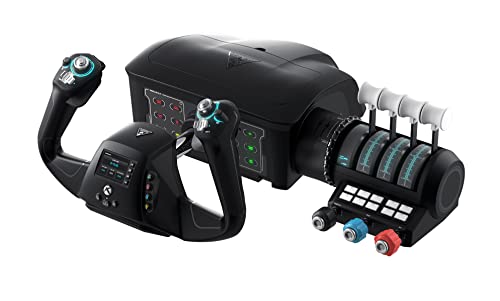
- Integrated yoke, throttle, trim, rudder, and brakes
- Compatible with Xbox One and Xbox Series X|S
- Includes 12 analog axes and secure clamping
Best For: New Xbox pilots building a complete control station
Best Modular Alternative
Thrustmaster Raceline Pedals III

- All-metal three-pedal construction
- H.E.A.R.T. sensors for consistent input
- Adjustable resistance and load-cell upgrade path
Best For: Xbox racing setups with occasional flight use
Best Adjustable Rudder Pedals
Logitech G Pro Flight Rudder Pedals
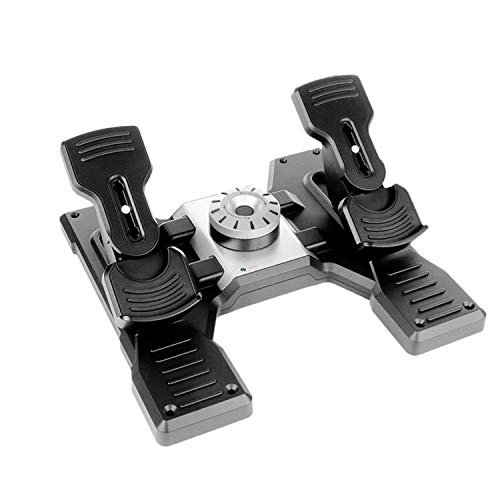
- Self-centering rudder control
- Adjustable tension dial
- Differential toe brakes
Best For: Windows PC flight simulation setups
Best Xbox Flight Control System
Turtle Beach VelocityOne H.O.T.A.S.
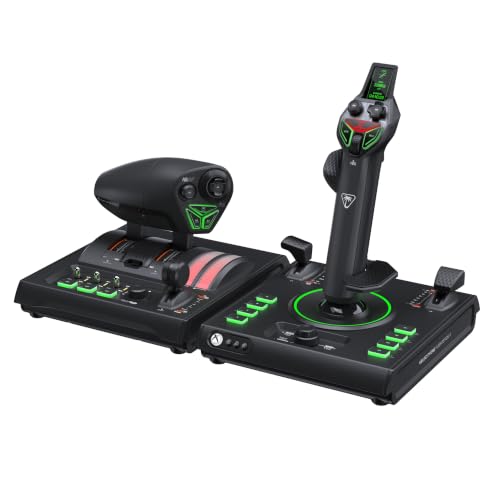
- Works with Xbox One and Series X|S
- 73 programmable inputs and 15 axes
- Expandable pedal support
Best For: Xbox users building an expandable flight cockpit
Best Classic PC Rudder Pedals
Saitek Pro Flight Rudder Pedals

- Adjustable damping and tension
- Fitting foot rests with non-slip materials
- Precise rudder and braking control
Best For: Legacy Windows flight and space simulation setups
Best Xbox Rudder Pedal Upgrade
VelocityOne Universal Rudder Pedals
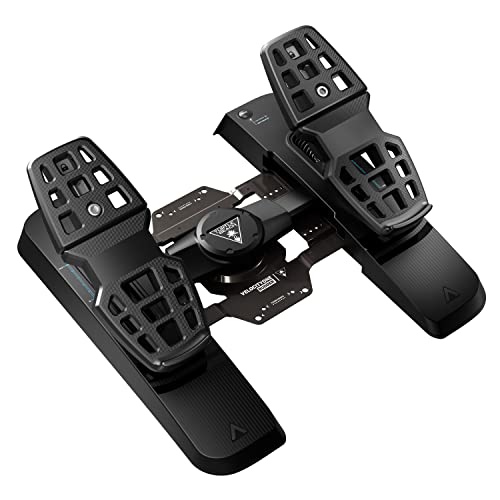
- Smooth axis with swappable springs
- Adjustable width and differential brakes
- Xbox use requires VelocityOne Flight Control System
Best For: Xbox and PC pilots wanting adjustable dedicated rudder pedals
Best Complete Xbox Flight Setup

- Includes stick, throttle, and rudder pedals
- Xbox-integrated Guide, View, and Menu buttons
- Smooth S.M.A.R.T. slide-rail pedal system
Best For: Xbox pilots wanting an all-in-one HOTAS package
Best Flexible Pedal and HOTAS Combo
TFRP Rudder Pedals & T16000M FCS

- Smooth aluminum slide-rail rudder system
- Removable heel rests and differential brakes
- PC-oriented bundle with Hall-effect joystick
Best For: PC pilots wanting adjustable pedals and a joystick bundle
Best Overall – Thrustmaster TFRP Rudder Pedals
For shoppers comparing flight simulator pedals for Xbox, the Thrustmaster TFRP stands out for its dedicated rudder control, long pedal travel, and broad Xbox Series X|S compatibility. Its self-centering axis and aluminum rail system are designed for smooth, controlled inputs during longer flights.
Best For: Xbox pilots who want dedicated rudder and differential-braking control.
Pros:
- Compatible with Xbox Series X|S, Xbox One, PS5, and PC.
- Long rudder-axis travel supports precise turns and coordinated flight.
- Self-centering rudder with four aluminum rails provides smooth, consistent motion.
Cons:
- Its 4.9-pound design and larger footprint may require dedicated cockpit space.
- Built specifically for flight simulation rather than racing.
The TFRP is the strongest all-around choice here for dedicated Xbox flight simulation, especially if you value realistic rudder movement, stability, and adjustable resistance.
Best for Multi-Sim Setups – Logitech G RS Sim Racing Pedals
The Logitech G RS pedals are primarily racing pedals, but their Xbox Series X|S compatibility makes them relevant for buyers building a broader simulator setup. A 75 kg load-cell brake, adjustable pedal positions, and a stable steel frame provide substantial control and support for compatible console configurations.
Best For: Gamers who want one robust pedal set for racing-focused Xbox setups and PC use.
Pros:
- 75 kg load-cell brake registers braking force precisely.
- Adjustable pedal positions help customize fit and driving style.
- Steel frame includes anti-tip features, rubber feet, carpet grippers, and a frame brace.
Cons:
- These are sim racing pedals, not dedicated aircraft rudder pedals.
- Console connectivity depends on compatible wheel-base arrangements; a Racing Adapter is sold separately for G-Series wheels.
Choose the RS pedals when racing is your priority and flight simulation is secondary. They offer strong braking hardware, but they are not the most direct match for Xbox aircraft rudder control.
Best All-in-One Flight System – Turtle Beach VelocityOne Flight
The Turtle Beach VelocityOne Flight takes a different approach to flight simulator pedals for Xbox by combining rudder and brake controls with a complete yoke, throttle quadrant, trim wheel, and flight-management features. It is designed for Xbox One, Xbox Series X|S, and Windows titles including Microsoft Flight Simulator.
Best For: Xbox users who want a complete flight-control station instead of separate pedals.
Pros:
- All-in-one system includes yoke, throttle quadrant, trim wheel, rudder, and brake controls.
- Supports Xbox One, Xbox Series X|S, and Windows flight titles.
- Offers 12 analog axes, customizable controls, and a secure clamping system.
Cons:
- Rudder controls are integrated rather than provided as standalone floor pedals.
- Its broader control system takes more space than a pedal-only upgrade.
The VelocityOne Flight is ideal for starting or expanding an Xbox cockpit in one purchase. However, shoppers who already own a yoke and throttle may prefer dedicated pedals instead.
Best Modular Alternative – Thrustmaster Raceline Pedals III
The Thrustmaster Raceline Pedals III are designed for sim racing rather than aircraft rudder control, but their Xbox compatibility and modular construction may appeal to buyers who use one setup across multiple simulator genres. Hall-effect sensors, adjustable resistance, and non-slip support pads emphasize consistent pedal input.
Best For: Xbox households that prioritize racing and want a durable, upgrade-ready pedal set.
Pros:
- Three-pedal all-metal construction is built for repeated use.
- H.E.A.R.T. sensors provide frictionless input without surface abrasion.
- Includes adjustable pressure settings, multiple springs, and load-cell upgrade compatibility.
Cons:
- It is a racing pedal set, not a dedicated aircraft rudder-pedal design.
- The load-cell brake upgrade is sold separately.
Raceline Pedals III make sense when Xbox racing is the main use and flight simulation is occasional. For authentic aircraft yaw and differential braking, a dedicated flight pedal set remains the better fit.
Best Adjustable Rudder Pedals – Logitech G Pro Flight Rudder Pedals
If you want flight simulator pedals for Xbox, verify platform compatibility carefully: the Logitech G Pro Flight Rudder Pedals are specified for Windows PCs rather than Xbox consoles. They offer smooth self-centering control, adjustable tension, and differential toe brakes for more precise taxiing and braking.
Best For: Windows-based flight simulation setups that prioritize adjustable rudder feel and toe-brake control.
Pros:
- Self-centering rudder pedals provide smooth, accurate control.
- Adjustable tension dial lets you tailor resistance for different aircraft.
- Differential toe brakes add control during runway operations.
Cons:
- Supplied compatibility information lists Windows 7, 8, 8.1, and 10, not Xbox.
- Requires a wired USB connection.
Choose these pedals for a PC cockpit where rudder feel and independent braking matter. Xbox users should confirm console support before buying, since the supplied specifications identify Windows compatibility only.
Best Xbox Flight Control System – Turtle Beach VelocityOne H.O.T.A.S.
For shoppers seeking flight simulator pedals for Xbox, the Turtle Beach VelocityOne H.O.T.A.S. is a console-compatible flight control system for Xbox One and Xbox Series X|S. It is not a pedal set, but it can form the center of an expandable cockpit that supports pedals and mounting solutions.
Best For: Xbox pilots who want an expandable HOTAS setup with extensive programming and adjustable controls.
Pros:
- Compatible with Xbox One, Xbox Series X|S, and PC.
- Provides 73 programmable inputs and 15 axes.
- Supports pedals in an expandable cockpit ecosystem, with twist rudder lockout.
- Hall-effect sensors, adjustable throttle resistance, and stick tension support precise control.
Cons:
- It is a HOTAS flight control system, not standalone rudder pedals.
- Its USB-C wired connection may require setup around your console configuration.
This is the strongest Xbox-oriented option in the supplied selection, especially if you want a complete control foundation and may add pedals later. Its programmable inputs, display, and adjustable controls make it more versatile than a pedal-only purchase.
Best Classic PC Rudder Pedals – Saitek Pro Flight Rudder Pedals
Although often considered when comparing flight simulator pedals for Xbox, the Saitek Pro Flight Rudder Pedals are specified for Windows PCs, including older Windows versions. They provide self-centering rudder control, adjustable damping, fitting foot rests, and separate braking control through a wired USB connection.
Best For: Windows users who want adjustable rudder resistance and adaptable foot positioning for flight or space simulation.
Pros:
- Self-centering pedals include adjustable damping.
- Adjustable foot rests and non-slip materials support different foot sizes.
- Offers precise rudder and braking control with customizable tension.
- Partial metal construction is designed for long life.
Cons:
- Supplied compatibility information lists Windows XP, Vista, and Windows 7, not Xbox.
- Uses an older USB 2.0 wired connection.
These pedals make sense for a legacy Windows flight-simulation setup where basic adjustability and braking control are more important than current-console compatibility. Xbox buyers should not assume support without separate confirmation.
Best Xbox Rudder Pedal Upgrade – VelocityOne Universal Rudder Pedals
The Turtle Beach VelocityOne is a dedicated option for shoppers comparing flight simulator pedals for Xbox. It offers a smooth rudder axis, adjustable pedal spacing, differential brakes, and interchangeable springs and pedals. Xbox use requires the VelocityOne Flight Control System, while PC users can connect via USB.
Best For: Xbox and PC pilots who want adjustable, dedicated rudder pedals with a stable base.
Pros:
- Smooth rudder axis with swappable springs
- Differential brakes and adjustable pedal width
- Hall-effect sensors across all axes
- Non-slip base and two sets of interchangeable pedals
Cons:
- Requires the VelocityOne Flight Control System for Xbox console use
- At 13.3 pounds, it is relatively substantial to move and store
This is a strong fit when pedal customization and stability matter most. Confirm that you have the required VelocityOne flight system before choosing it for Xbox.
Best Complete Xbox Flight Setup – T-Flight Full Kit HOTAS
The Thrustmaster T-Flight Full Kit is a complete choice for shoppers seeking flight simulator pedals for Xbox without assembling a separate stick, throttle, and pedal setup. It combines HOTAS controls with TFRP rudder pedals, Xbox integration buttons, five axes, and 14 programmable buttons for flight and menu control.
Best For: Xbox pilots who want an all-in-one HOTAS package with included rudder pedals.
Pros:
- Includes joystick, detachable throttle, and TFRP rudder pedals
- Official Xbox console integration with Guide, View, and Menu buttons
- S.M.A.R.T. slide rails provide smooth pedal steering
- Full-foot pedal design with removable heel rests
Cons:
- Less specialized than a standalone premium pedal set
- The supplied compatibility details emphasize Xbox Series X and PC
The Full Kit is the practical pick when you need the entire cockpit control package in one purchase. Its included pedals and console-focused controls simplify setup for Xbox flight simulation.
Best Flexible Pedal and HOTAS Combo – TFRP Rudder Pedals & T16000M FCS
This Thrustmaster bundle pairs TFRP rudder pedals with the T16000M FCS HOTAS for shoppers comparing flight simulator pedals for Xbox and PC. The pedals use S.M.A.R.T. slide rails, removable heel rests, and differential braking, while the included stick provides Hall-effect precision and 16 action buttons.
Best For: PC-focused pilots who want a pedal and joystick bundle with ergonomic adjustment options.
Pros:
- S.M.A.R.T. aluminum slide rails support smooth steering
- Removable heel rests allow two foot positions
- Large differential brake pedals support varied shoe sizes
- T16000M stick adds Hall-effect precision and 16 buttons
Cons:
- The supplied details list Windows as the compatible device
- Xbox compatibility is associated with the T.Flight HOTAS One joystick rather than clearly confirmed for this bundle
This bundle offers useful ergonomics and a capable stick for PC flight simulation. Xbox buyers should verify console compatibility and the required joystick configuration before ordering.
How We Picked the Best Flight Simulator Pedals for Xbox
We focused on pedal systems and flight-control bundles that are relevant to Xbox users, while noting products that are primarily designed for PC or racing simulation. The shortlist considers platform compatibility, rudder functionality, build quality, adjustability, connection requirements, and overall value.
Because Xbox compatibility can vary by game, console generation, firmware, and required control system, check the manufacturer’s current compatibility list before buying. A product advertised for PC may not work as a standalone Xbox accessory, even if its controls are physically suitable for flight simulation.
Quick Comparison
- Dedicated rudder pedals: Best for adding yaw and braking control to an existing Xbox flight setup.
- HOTAS bundles: A practical choice if you also need a joystick, throttle, or complete control system.
- Universal Xbox systems: Useful for players who want a coordinated setup from one ecosystem.
- Racing-pedal alternatives: Consider these only when the game, adapter, or control system supports their inputs properly.
Key Buying Factors for Flight Simulator Pedals for Xbox
Compatibility and Connection
Confirm whether the pedals connect directly to Xbox, plug into a compatible yoke or HOTAS unit, or require a PC and adapter. Also verify support for your specific game, such as Microsoft Flight Simulator, rather than relying only on the product’s platform label.
Pedal Movement and Precision
Look for smooth rudder travel, a usable center position, and enough resistance to make small adjustments predictable. Adjustable sensitivity or response curves can help tailor the controls to aircraft ranging from light planes to airliners.
Braking and Adjustability
Toe brakes are useful for taxiing, tight turns, and stopping after landing. Adjustable spacing, angle, and resistance improve comfort, especially during longer sessions or when sharing the setup with other players.
Stability and Storage
Pedals should stay planted during rudder inputs. Wide bases, rubber feet, and mounting options reduce sliding. Measure your available floor space, and consider whether the pedals can be stored easily between sessions.
Who Should Buy Which Flight Simulator Pedals for Xbox?
Choose dedicated rudder pedals if you already own an Xbox-compatible yoke or HOTAS and want more precise yaw and ground handling. They are usually the cleanest upgrade.
Choose a complete HOTAS kit if you are starting from scratch and want the joystick, throttle, and pedals to work as one package. This can simplify setup, though individual components may offer less adjustment.
Choose a premium modular system if you fly frequently and value stronger construction, customization, and a more realistic feel. Make sure the added features are supported on Xbox before paying for them.
Consider racing pedals cautiously if you already use a compatible control ecosystem. They may provide durable foot controls, but they are not a direct substitute for rudder pedals and may lack the correct axis layout or Xbox support.