Choosing among resin printers for small businesses means balancing print detail, throughput, operating cost, and how much hands-on maintenance your team can manage. The right machine can support prototypes, miniatures, jewelry patterns, product samples, and other detail-focused work without requiring an industrial setup.
This roundup compares 10 selected printers and resin options across different business needs, including compact entry-level machines, high-resolution models, larger-format systems, and specialty castable or tough resins.
Best 10 Resin Printers for Small Businesses Picks for 2026
Best for Dual-Material Workflows

- Dual-color and dual-material printing
- Automatic leveling and AI monitoring
- Handles high-viscosity resins up to 8,000 cps
Best For: Creative models and specialized professional resin workflows
Best for High-Detail Prototyping

- 16K LCD with 14 × 19 μm XY resolution
- 385nm light source for controlled curing
- Heating and remote monitoring for professional workflows
Best For: Detailed prototypes, dental models, jewelry, and small-batch production
Best for Easy Setup

- One-click automatic leveling
- 4K monochrome LCD for detailed prints
- Self-checks and residue detection reduce errors
Best For: Small teams and beginners seeking a simple resin-printing workflow
Best for High-Volume Production
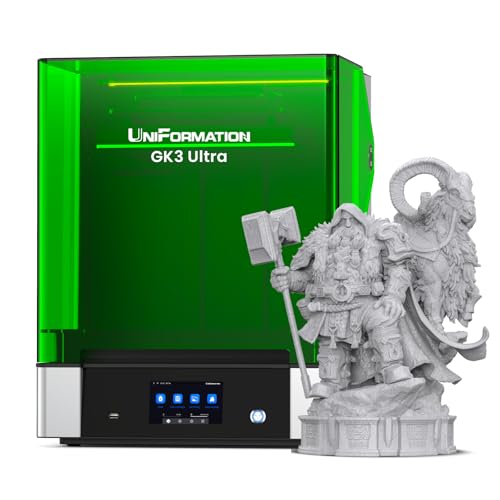
- 300 × 160 × 300mm large build volume
- 16K detail with stable Z-axis positioning
- Automatic resin feeding for longer prints
Best For: Large models, batch production, and professional studio workflows
Detail-Focused Workhorse

- 7-inch 10K screen with 17×17μm pixel precision
- 6.04 x 3.42 x 6.49-inch build volume
- Easy leveling and power-loss recovery
Best For: Detailed prototypes, miniatures, and general resin parts
Jewelry Casting Specialist
Siraya Tech Cast True Blue Resin

- Wax-containing formula supports cleaner burnout
- Captures fine details and smooth surfaces
- Works with LCD, DLP, and SLA printers
Best For: Jewelry, dental, and thicker castable designs
Fast-Start Detail Printer

- 10K screen with 17×17μm pixel precision
- 1.5-second exposures and stabilized illumination
- Assembled, calibrated, and ready to start quickly
Best For: Small teams seeking detailed, low-friction resin printing
Miniature Maker's Choice
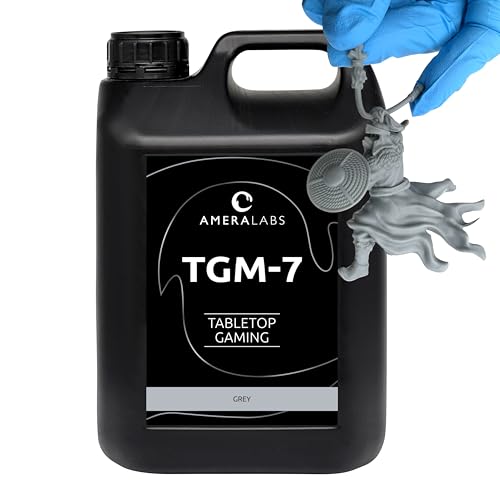
- Fine detail for professional-looking miniatures
- Durable, slightly flexible prints
- Hard, paint-friendly finish after curing
Best For: Tabletop miniature businesses needing a larger resin supply
High-Detail Production Pick

- 7-inch 10K LCD for fine detail
- 1.5-second exposure times improve efficiency
- Power-loss resume and one-year warranty
Best For: Small production shops needing detailed, efficient prints
Beginner-Friendly Starter

- Automatic calibration and leveling
- Removable magnetic build plate
- Compact 2K printer for small models
Best For: Beginners and small studios starting resin production
Best for Dual-Material Workflows – Photon P1
For small businesses exploring resin printers for small businesses, the ANYCUBIC Photon P1 stands out for its dual-color and dual-material capability. Automatic leveling, AI monitoring, and support for high-viscosity resins make it suited to creative and professional workflows.
Best For: Small businesses producing creative models, multi-color parts, or projects using specialized high-viscosity resins.
Pros:
- Prints with two colors or materials simultaneously, which can reduce resin use on small models.
- Factory-calibrated automatic leveling with pressure feedback helps simplify setup.
- AI monitoring checks build-plate installation, layer separation, resin levels, and vat residue.
- Supports resins with viscosity up to 8,000 cps.
Cons:
- Its 39-pound weight and 28-inch depth require a substantial workspace.
- Dual-material printing may add workflow complexity compared with a standard single-resin printer.
The Photon P1 is a practical choice when material flexibility and reduced hands-on monitoring matter more than a compact footprint. Its sturdy motion system and easier model release also support repeatable day-to-day production.
Best for High-Detail Prototyping – UniFormation GK3 Pro
Businesses comparing resin printers for small businesses may prefer the UniFormation GK3 Pro when fine detail and controlled production are priorities. Its 16K display, 385nm light source, heated resin system, and remote-management tools are designed for demanding model and prototype work.
Best For: Professional studios and small businesses producing detailed miniatures, dental models, jewelry designs, prototypes, or small batches.
Pros:
- 16K resolution and 14 × 19 μm XY resolution support highly detailed surfaces and textures.
- The 385nm light source is designed to reduce light scattering and over-curing, including for transparent models.
- Heated resin management helps maintain fluidity at temperatures as low as 5°C/41°F.
- Smart-app support enables remote monitoring, control, and multi-printer management.
Cons:
- At 53.7 pounds, it is relatively heavy to move or reposition.
- The high-resolution feature set may be more than a basic, low-volume operation needs.
The GK3 Pro is aimed at businesses that need crisp, repeatable results and better oversight of ongoing prints. Its stable Z-axis and cleaner handling features further support a professional workflow.
Best for Easy Setup – ELEGOO Mars 5
The ELEGOO Mars 5 is a straightforward option for resin printers for small businesses that want to minimize calibration and setup time. One-click leveling, automatic self-checks, and resin-residue detection make it approachable for teams with mixed experience levels.
Best For: Small businesses and first-time resin-printing teams that need a compact, easy-to-operate printer for detailed parts.
Pros:
- One-click automatic leveling helps users begin printing without tedious manual calibration.
- A 4K monochrome LCD and COB light source reproduce intricate details.
- Self-checks, resin-shortage alerts, and residue detection help reduce avoidable failures.
- Overheat protection stops printing and triggers an alarm if LED temperature exceeds 80°C.
Cons:
- Its listed features do not include the large-format capacity or dual-material printing offered by some alternatives.
- The printer still requires resin handling and post-processing typical of resin workflows.
With a 14.52-pound weight and automation-focused controls, the Mars 5 is well suited to small teams that value simplicity. It offers useful safeguards without requiring advanced setup knowledge.
Best for High-Volume Production – UniFormation GK3 Ultra
For small businesses that need production capacity, the UniFormation GK3 Ultra is one of the more scalable resin printers for small businesses. Its 300 × 160 × 300mm build volume can accommodate large models or multiple parts, while automatic resin feeding and heating support longer print runs.
Best For: Small and medium-sized businesses, studios, and prototyping teams handling large models or multiple parts per print.
Pros:
- Large 300 × 160 × 300mm build volume supports large models and batch production.
- 16K LCD and 20 × 26μm pixel size provide sharp detail across the larger build area.
- Automatic resin feeding helps prevent failures caused by insufficient resin during long prints.
- Built-in heating can bring resin to 25°C/30°C even when ambient temperatures reach 0°C.
Cons:
- Its 85.8-pound weight and 26-inch height make installation and relocation difficult.
- The large format may be excessive for businesses printing only small individual parts.
- Automatic feeding and the larger resin system can require additional maintenance.
The GK3 Ultra makes the most sense when throughput and print volume justify its substantial footprint. Its rigid Z-axis, automatic refill system, and cleaner vat-handling features are valuable for sustained production.
Detail-Focused Workhorse – ANYCUBIC Photon Mono 4
For small businesses comparing resin printers for small businesses, the ANYCUBIC Photon Mono 4 offers a practical balance of fine detail, usable build volume, and beginner-friendly operation. Its 7-inch 10K screen and 17×17μm pixel size are suited to detailed models, while the platform design helps support reliable printing.
Best For: Small businesses producing detailed prototypes, miniatures, and general resin parts.
Pros:
- 10K resolution with 17×17μm pixel precision for highly detailed models.
- 6.04 x 3.42 x 6.49-inch build volume supports a range of projects.
- Laser-engraved platform improves adhesion while keeping model removal manageable.
- Four-point leveling and power-loss recovery simplify routine operation.
Cons:
- Anycubic app service is not supported.
- Requires resin-printing safety, ventilation, and post-processing practices.
This is a strong general-purpose choice when print detail and straightforward setup matter more than app connectivity. Its moderate footprint and generous build area make it flexible for recurring small-business work.
Jewelry Casting Specialist – Siraya Tech Cast True Blue Resin
For small businesses comparing resin printers for small businesses, Siraya Tech Cast True Blue is a specialized castable resin rather than a printer. It is designed for SLA, LCD, and DLP workflows where clean burnout, fine detail, and smooth surfaces are important for jewelry and metal-casting models.
Best For: Jewelry studios, dental workflows, and businesses creating thicker castable designs.
Pros:
- Wax-containing formulation is easier to burn out and leaves less ash.
- Suitable for thicker designs such as bracelets, pendants, medals, and coins.
- High-resolution formulation captures complex features and fine structures.
- Designed for broad compatibility with LCD, DLP, and SLA printers.
Cons:
- This is consumable resin, not a standalone 3D printer.
- The 500g quantity may require replenishment for higher-volume production.
Choose this material when casting performance is the priority. Its easier, cleaner burnout and smooth surface quality make it particularly relevant to jewelry and metal-part production, though printer compatibility and casting procedures still need to be verified.
Fast-Start Detail Printer – ANYCUBIC Photon Mono 4 10K
For small businesses comparing resin printers for small businesses, this ANYCUBIC Photon Mono 4 version emphasizes quick setup alongside high-resolution output. It arrives fully assembled and factory-calibrated, with rapid 1.5-second exposures, an upgraded build plate, and recovery after power interruptions.
Best For: Teams that want detailed resin printing with minimal initial setup.
Pros:
- 7-inch 10K screen provides 17×17μm pixel precision.
- LighTurbo illumination supports smoother surfaces and reduced layer lines.
- Fully assembled and factory-calibrated for a quick start.
- Power-failure recovery helps reduce wasted time and material.
Cons:
- Its 10 x 10 x 15-inch footprint requires dedicated workspace.
- Resin printing still involves handling and post-processing requirements.
This model suits a small operation that values a short setup process without giving up fine detail. The combination of rapid exposure times, adhesion-focused platform design, and print recovery supports a more efficient day-to-day workflow.
Miniature Maker's Choice – TGM-7 5kg Tough Resin
For small businesses producing tabletop miniatures, resin choice affects detail, durability, and finishing time. TGM-7 is a professional-oriented option designed for high-resolution 4K, 8K, and 12K LCD/DLP/SLA printers, with a 5kg quantity suited to regular production.
Best For: Tabletop miniature businesses and sellers who need detailed, durable prints in larger resin quantities.
Pros:
- Designed to capture fine miniature details and expressions.
- Durable prints have some flexibility to help resist breakage during shipping and gaming.
- Short post-curing produces a hard, non-sticky surface that is easy to paint.
- Manufacturer offers personal support aimed at achieving consistent prints.
Cons:
- This is resin rather than a printer, so a compatible UV resin printer is required.
- The 5kg container may be more material than occasional users need.
TGM-7 is a practical production-supply pick when miniature businesses value repeatable detail, shipping durability, and a substantial resin supply over a small trial bottle.
High-Detail Production Pick – ANYCUBIC Photon Mono 4
For small businesses seeking resin printers for small businesses, the ANYCUBIC Photon Mono 4 combines a 7-inch 10K monochrome LCD with a compact but useful build volume. Its fast exposure times, stable lighting, and power-loss recovery are aimed at productive, detailed print runs.
Best For: Small production shops and experienced users who prioritize fine detail, print efficiency, and a larger work area.
Pros:
- 10K resolution and 17×17-micrometer XY pixels support highly detailed models.
- LighTurbo matrix lighting is designed for balanced illumination and smoother surfaces.
- 1.5-second exposure times can improve print efficiency.
- Power-loss resume, pre-shipment testing, and a one-year warranty support business use.
Cons:
- The 153.4 × 87 × 165 mm build volume may limit especially large parts.
- It still requires initial leveling and normal resin-printing preparation.
The Photon Mono 4 is the strongest all-around printer in this group for detail-focused output, particularly when its productivity features and 10K resolution can support frequent customer orders.
Beginner-Friendly Starter – MALYAN S100 Mini
Businesses starting with resin printing may benefit from a simple, compact machine. The MALYAN S100 Mini offers automatic calibration and leveling, a removable magnetic build plate, and a 115 × 65 × 110 mm print area for small models and early production work.
Best For: Beginners, small studios, and businesses producing compact models while keeping setup straightforward.
Pros:
- Auto-calibration and auto-leveling simplify the initial workflow.
- Magnetic build plate is removable for easier cleaning and repeated print jobs.
- 2K LCD and upgraded parallel LED array support detailed, smooth models.
- Laser-engraved build plate is designed to improve adhesion and reduce warping.
Cons:
- Its 115 × 65 × 110 mm build area is smaller than the Photon Mono 4’s.
- As a 2K entry-level printer, it offers less stated resolution than newer 10K models.
- Different resins require matching printing parameters for better success rates.
The S100 Mini is a sensible entry point for resin-printing businesses that value ease of use and compact output, though growing production needs may eventually call for its limited build volume to be supplemented.
How We Picked the Best Resin Printers for Small Businesses
We evaluated the selected products by considering resolution, build volume, print speed, ease of setup, likely operating costs, and the types of work each option can support. We also considered practical business concerns such as replacement parts, resin compatibility, odor control, workflow consistency, and whether a printer is better suited to occasional prototyping or repeated production.
Some listings are complete printers, while others are specialty resins intended for specific applications. That distinction matters: a capable printer still requires resin matched to the desired strength, surface finish, flexibility, or casting process.
Quick Comparison
| Best For | What to Look For |
|---|---|
| Small, detailed prototypes | High-resolution mono LCD and reliable exposure controls |
| Miniatures and figures | Fine XY resolution, consistent curing, and tough or low-odor resin choices |
| Larger parts or batches | Large build volume, dependable leveling, and efficient vat changes |
| Jewelry and casting patterns | Castable resin compatibility and accurate detail reproduction |
| New operators | Auto-leveling, straightforward software, clear setup instructions, and accessible support |
Key Buying Factors for Resin Printers for Small Businesses
Resolution and Usable Detail
Higher pixel counts can improve small features and surface smoothness, but resolution alone does not guarantee better results. Exposure calibration, resin quality, machine stability, and model orientation also affect the finished part.
Build Volume and Workflow
Measure the parts you expect to produce rather than buying solely by screen size. A compact printer may be more economical for samples and small batches, while a larger-format model can reduce the number of print jobs for multiple parts.
Materials, Safety, and Running Costs
Budget for resin, release film, build plates, gloves, cleaning fluid, filters, and curing equipment. Resin printing requires ventilation and careful handling because uncured resin can irritate skin and may produce noticeable odors. Specialty materials such as castable resin may also require specific washing and burnout procedures.
Reliability and Support
For business use, predictable operation is often more valuable than a slightly lower purchase price. Look for accessible replacement components, stable slicing software, easy leveling, and a workflow your staff can repeat consistently.
Who Should Buy Which Resin Printers for Small Businesses?
Choose a compact entry-level model if you are starting a service, studio, classroom, or small prototyping workflow and want to control upfront costs. Midrange high-resolution printers are a better fit for businesses producing detailed miniatures, small mechanical prototypes, or display-quality samples on a regular basis.
Choose a large-build-volume model when batching several parts or printing larger pieces is more important than minimizing the machine’s footprint. Jewelry makers and casting specialists should prioritize a printer-resin combination explicitly suited to castable patterns rather than selecting based only on LCD resolution.
Finally, consider a tough or low-odor resin when parts will be handled frequently or when the printer will operate in a shared workspace. Regardless of the model, validate your intended materials and workflow with test prints before committing to customer-facing production.