Engineering students need more than sharp-looking miniatures from a resin printer. The right machine should produce accurate prototypes, fit a student workspace, and offer a manageable workflow for washing, curing, and handling resin.
These 10 picks cover compact desktop printers, fast high-resolution models, large-format options, and bundles that include essential post-processing equipment. Use the guide below to match features, operating costs, and safety requirements to your coursework and projects.
Best 10 Resin Printers for Engineering Students Picks for 2026
Precision Speed Pick

- 9K LCD with 18 μm XY resolution
- Up to 150 mm/h with tilt release
- AI camera and Wi-Fi cluster printing
Best For: Detailed prototypes and fast, monitored workflows
Automation Upgrade

- 14K resolution for fine model details
- Up to 170 mm/h with high-speed resin
- Auto-fill and temperature-controlled vat
Best For: High-resolution batch printing with automated handling
Large-Format Workhorse

- 10-inch 12K mono LCD
- 218.88 × 122.88 × 250 mm build volume
- Supports CHITUBOX and Lychee Slicer
Best For: Larger prototypes and multi-part print jobs
Lightweight Detail Choice

- 10K screen with 17 μm XY pixels
- Up to 120 mm/h printing speed
- Five intelligent inspections and 8.8-pound weight
Best For: Compact workspaces and guided, detailed printing
Best Beginner-Friendly Pick

- Automatic leveling simplifies setup
- 4K detail at up to 70mm/h
- Built-in sensor monitors common issues
Best For: Students making detailed, small-format prototypes with minimal leveling work
Best for Advanced Materials

- 14K LCD captures very fine details
- Handles resins up to 8,000 cps
- Auto-leveling and AI monitoring support reliability
Best For: Advanced prototyping with detailed models and industrial resins
Best Complete Workflow Bundle

- 16K printer supports detailed models
- Large build area and 150mm/h speed
- Includes 7.5-liter wash-and-cure station
Best For: Students needing a larger, faster printer with dedicated post-processing
Best Entry-Level Detail

- 10K resolution with 17 × 17 μm pixel precision
- Stable curing and 1.5-second exposures
- Assembled setup with power-failure recovery
Best For: Detailed student prototypes and compact workspaces
Best for Large Prototypes
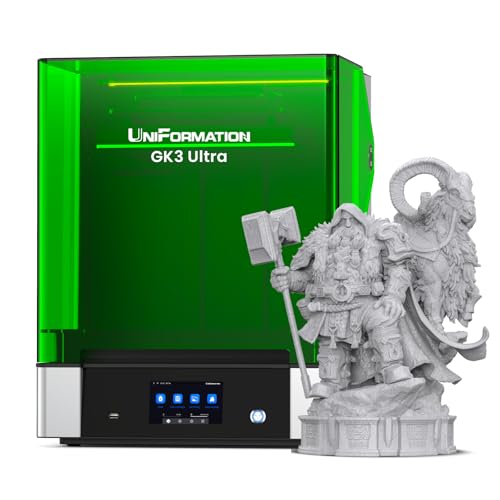
- 300 × 160 × 300 mm build volume
- 16K screen with ±0.003 mm repeat accuracy
- Heating and automatic resin feeding
Best For: Large models and multi-part prototype batches
Best for Automated Materials Testing

- Dual-color or dual-material printing
- Auto-leveling and AI print monitoring
- Supports resins up to 8,000 cps
Best For: Multi-material projects and monitored professional-resin workflows
Precision Speed Pick – ELEGOO Mars 5 Ultra
For engineering students seeking resin printers for engineering students, the ELEGOO Mars 5 Ultra combines fine detail, fast printing, and monitoring features in a relatively compact machine. Its 9K mono LCD and 18 μm XY resolution suit detailed prototypes, while tilt-release printing can help shorten project turnaround times.
Best For: Students who prioritize detailed prototypes, quick print cycles, and multi-printer workflow control.
Pros:
- 9K resolution and 18 μm XY resolution support intricate models.
- Print speeds reach up to 150 mm/h with tilt-release technology.
- AI camera and mechanical sensors help detect common printing issues.
- Wi-Fi cluster printing supports control of multiple printers.
Cons:
- AI detection results can vary with the environment, model, and resin.
- Its listed build dimensions are smaller than those of larger-format options.
The Mars 5 Ultra is a strong fit for coursework and iterative design work where detail and productivity matter. Its monitoring tools may also help reduce avoidable failures, though users should still supervise resin printing and post-processing.
Automation Upgrade – ANYCUBIC Photon Mono M7 PRO
For engineering students comparing resin printers for engineering students, the ANYCUBIC Photon Mono M7 PRO stands out for its 14K detail, high claimed speed, and automation features. Temperature control and resin auto-fill can make repeated project printing more convenient, while its detection systems add operational safeguards.
Best For: Students who want maximum resolution, faster batch printing, and automated resin handling.
Pros:
- 14K resolution and 16.8 × 24.8 μm XY resolution support fine details.
- Print speed reaches up to 170 mm/h with high-speed resin.
- Temperature-controlled vat helps maintain resin conditions.
- Auto-fill, recycling, and six detection features simplify operation.
Cons:
- The printer is comparatively heavy at 33.3 pounds.
- The highest stated speed depends on using high-speed resin.
The M7 PRO is the most feature-rich choice in this group for students who value automation and high-resolution output. Its advanced systems can streamline demanding schedules, but the larger footprint and weight may matter in a shared workspace.
Large-Format Workhorse – ELEGOO Saturn 3
The ELEGOO Saturn 3 is a practical option for engineering students needing resin printers for engineering students that can handle larger prototypes. Its 10-inch 12K screen pairs with a build volume of 218.88 × 122.88 × 250 mm, giving students more room for substantial parts or multiple smaller components in one print.
Best For: Students printing larger engineering models or several smaller parts together.
Pros:
- Generous build volume supports larger and more ambitious projects.
- 12K mono LCD delivers detailed prints at up to 70 mm/h.
- Tempered glass helps protect the LCD from resin-related damage.
- GOO support works with CHITUBOX, Lychee Slicer, and other third-party software.
Cons:
- At 33 pounds, it is less portable than the lighter options.
- Its maximum listed speed is lower than the faster printers in this roundup.
The Saturn 3 makes the most sense when build capacity is more important than top speed. Open slicer compatibility also gives engineering students flexibility in choosing a workflow for prototypes and coursework.
Lightweight Detail Choice – ANYCUBIC Photon Mono 4 Ultra
For students looking at resin printers for engineering students in a compact format, the ANYCUBIC Photon Mono 4 Ultra offers 10K detail, a claimed 120 mm/h maximum speed, and a notably light 8.8-pound listed weight. Its intelligent inspections and straightforward interface are useful for students learning a resin-printing workflow.
Best For: Students who need detailed prints, a lighter machine, and guided operation in a limited workspace.
Pros:
- 10K resolution and 17 × 17 μm pixels support detailed models.
- ACF film and intelligent release features support speeds up to 120 mm/h.
- Five inspections monitor residue, resin, failed prints, and component lifespan.
- 4.3-inch interface supports eight languages.
Cons:
- Its listed build size is not described as generously as the Saturn 3’s.
- The maximum speed is below the fastest printer in this roundup.
The Mono 4 Ultra is a sensible student-oriented pick when portability and ease of use matter alongside detail. It offers useful checks for reducing operational errors without the heavier footprint of larger-format machines.
Best Beginner-Friendly Pick – ELEGOO Mars 5
For engineering students seeking resin printers for engineering students, the ELEGOO Mars 5 offers a relatively straightforward starting point with automatic leveling, issue detection, and a compact 6.6-inch 4K monochrome screen. Its 35×35μm XY resolution and speeds up to 70mm/h suit detailed prototypes and small functional models.
Best For: Students who want automated setup and detailed small-format prints without manually leveling the build plate.
Pros:
- Automatic leveling with a built-in sensor and spring.
- 4K monochrome LCD delivers 35×35μm XY resolution.
- Mechanical monitoring can detect low resin, foreign objects, overheating, and other issues.
- Laser-engraved build plate and one-touch locking support easier print setup.
Cons:
- Its 6.6-inch screen and listed dimensions indicate a smaller format than larger resin printers.
- Users still need correct machine settings, adequate supports, and prompt vat cleaning.
The Mars 5 is a practical choice when ease of setup and dependable monitoring matter more than maximum build volume. Its built-in safeguards can reduce routine troubleshooting, while the 4K screen supports precise student prototypes.
Best for Advanced Materials – ANYCUBIC Photon P1 14K
The ANYCUBIC Photon P1 is a strong option for engineering students who need fine detail and broader resin compatibility. Its 14K monochrome LCD, stable ball-screw structure, automatic calibration, and support for resins up to 8,000 cps make it suited to demanding prototype work.
Best For: Advanced users printing highly detailed models or experimenting with ultra-high-viscosity industrial resins.
Pros:
- 14K screen provides 13,312 × 5,120 resolution and 16.8 × 24.8μm pixels.
- Supports ultra-high-viscosity resins up to 8,000 cps.
- Factory-calibrated Smart Leveling 3.0 performs automatic checks before printing.
- AI monitoring checks build plate installation, layer separation, resin level, and vat residue.
Cons:
- At 29.7 pounds, it is relatively heavy for moving between student workspaces.
- Its larger footprint requires more dedicated bench space.
The Photon P1 stands out when an engineering workflow calls for exceptionally crisp details or specialized, high-viscosity materials. Its release technology and monitoring features also target reliability during longer or more demanding prints.
Best Complete Workflow Bundle – ELEGOO Saturn 4 Ultra 16K
ELEGOO Saturn 4 Ultra 16K Resin 3D Printer and ELEGOO Mercury Plus V3.0 Wash and Cure Station
Check Price On AmazonEngineering students looking for resin printers for engineering students may appreciate this bundle because it pairs the ELEGOO Saturn 4 Ultra 16K printer with a Mercury Plus V3.0 wash and cure station. The printer combines a large 8.33 × 4.66 × 8.66-inch build area with 150mm/h printing, while the station provides a 7.5-liter capacity.
Best For: Students who want a larger, faster printing setup with dedicated washing and curing equipment.
Pros:
- 16K resin printer supports highly detailed model production.
- Large listed build volume accommodates bigger or multiple parts.
- 150mm/h high-speed printing can shorten production cycles.
- Mercury Plus V3.0 offers a 7.5-liter wash-and-cure capacity and broad printer compatibility.
Cons:
- The larger printer-and-station combination requires substantial workspace.
- The supplied notes do not specify automatic leveling or monitoring features.
- A wash-and-cure station adds another piece of equipment to set up and maintain.
This is the most complete option of the three for students producing larger batches or parts. The included wash-and-cure station makes post-processing more organized, while the Saturn 4 Ultra’s speed and build size support ambitious engineering projects.
Best Entry-Level Detail – ANYCUBIC Photon Mono 4
For engineering students comparing resin printers for engineering students, the ANYCUBIC Photon Mono 4 is a practical compact option for detailed prototypes, brackets, and small mechanical parts. Its 10K screen, stabilized light source, and straightforward setup emphasize precision without adding a complicated startup process.
Best For: Students who need high-detail prints in a compact, easy-to-start machine.
Pros:
- 10K, 9024 × 5120 resolution with 17 × 17 μm pixel precision.
- Stable LighTurbo curing supports smoother surfaces and 1.5-second exposures.
- Factory-assembled design, four-point leveling check, and power-failure recovery.
Cons:
- The compact 10 × 10 × 15-inch format is less suited to large assemblies.
- The supplied features emphasize single-material printing rather than multi-material workflows.
The Photon Mono 4 makes the most sense when detail, portability, and a low-friction setup matter more than build volume. Its upgraded build plate and recovery feature can also help reduce avoidable print interruptions during coursework.
Best for Large Prototypes – UniFormation GK3 Ultra
Among resin printers for engineering students, the UniFormation GK3 Ultra stands out for students working on large prototypes or several parts at once. Its 300 × 160 × 300 mm build volume, 16K screen, and rigid Z-axis architecture are designed for high-capacity, repeatable printing.
Best For: Engineering students producing large models, multiple components, or frequent prototype batches.
Pros:
- Large 300 × 160 × 300 mm build volume for bigger parts or batch printing.
- 16K detail, 20 × 26 μm pixels, and repeat positioning accuracy up to ±0.003 mm.
- Resin heating, automatic refilling, quick-release vat, and built-in carbon filter.
Cons:
- At 85.8 pounds and 19 × 21 × 26 inches, it requires substantial workspace.
- The large-format feature set may be excessive for students printing only small parts.
The GK3 Ultra is a productivity-focused choice rather than a minimalist desktop printer. Automatic resin feeding and temperature control can simplify longer jobs, while its large format supports ambitious engineering prototypes.
Best for Automated Materials Testing – ANYCUBIC Photon P1
For engineering students seeking resin printers for engineering students with advanced workflow features, the ANYCUBIC Photon P1 combines dual-color or dual-material printing with automated monitoring. It is particularly useful when projects call for different materials, visual differentiation, or high-viscosity professional resins.
Best For: Students exploring multi-material concepts and professional resin workflows with minimal manual calibration.
Pros:
- Supports simultaneous printing with two colors or materials.
- Auto-leveling, factory calibration, and pre-print self-checks reduce setup work.
- AI monitoring checks plate installation, resin levels, residue, and layer separation.
- Handles ultra-high-viscosity resins up to 8,000 cps.
Cons:
- At 39 pounds and 28 × 14 × 13 inches, it needs a dedicated setup area.
- Dual-material capability may be unnecessary for straightforward single-resin prototypes.
The Photon P1 is appealing for students who want more automated oversight and material flexibility. Its sturdy motion system and reduced release force are also aimed at improving consistency across repeated prints.
How We Picked the Best Resin Printers for Engineering Students
We focused on factors that matter in student engineering work: dimensional detail, print consistency, build volume, speed, ease of setup, reliability features, and total ownership cost. Resolution is useful for fine parts, but it is not the only measure of performance. A printer with dependable leveling, stable exposure control, and accessible replacement parts can be more valuable than a higher-resolution model that is difficult to maintain.
We also considered the practical workflow. Resin printing requires a wash-and-cure process, ventilation, protective equipment, and a suitable space for handling uncured resin. Models that simplify setup or pair well with a wash-and-cure station earned consideration alongside raw specifications.
Quick Comparison
Compact Mars and Photon models are generally the easiest fit for dorm rooms, apartments, and shared workspaces, while Saturn, GK3 Ultra, and other large-format options suit students producing bigger assemblies or multiple parts at once. The 10K, 12K, 14K, and 16K labels indicate LCD resolution, but real-world detail also depends on optics, layer height, exposure settings, resin choice, and model orientation.
Fast-printing options can reduce waiting time, although advertised maximum speeds are dependent on resin, layer height, lift settings, and geometry. Bundles that include washing and curing equipment may cost more initially but can offer a more complete and organized workflow.
Key Buying Factors for Resin Printers for Engineering Students
Accuracy and Engineering Detail
Choose a printer with consistent XY resolution and stable exposure control for brackets, housings, fit checks, and small mechanical features. Remember that resin parts can shrink or warp, so calibration and material testing remain important when tolerances matter.
Build Volume
A compact printer is easier to place and often wastes less resin on small parts. A larger build platform is worthwhile if you regularly print assemblies, fixtures, ergonomic study models, or several components in one batch.
Workflow and Reliability
Auto-leveling, mechanical sensors, failure detection, clear interfaces, and dependable release mechanisms can reduce setup mistakes. These features are especially useful for students who need repeatable results between classes and project deadlines.
Total Cost and Safety
Budget for resin, gloves, filters, replacement films, cleaning supplies, and a wash-and-cure solution. Uncured resin should be handled with appropriate protective equipment and ventilation, and liquid waste must be cured or disposed of according to local requirements.
Who Should Buy Which Resin Printers for Engineering Students?
Choose a compact Mars or Photon model if you are new to resin printing, have limited space, or primarily need detailed small prototypes. A fast 14K printer is a better fit for students with frequent deadlines and repeat batches. Consider a Saturn-class printer when you need more build area without moving to an especially large machine.
Students producing larger prototypes or multiple parts at once should look at the UniFormation GK3 Ultra or another large-format option, provided they have adequate ventilation and workspace. A wash-and-cure bundle is the most convenient choice for anyone who wants a coordinated post-processing setup. Finally, dual-color or dual-material models may suit presentation models and experimental workflows, but confirm material compatibility and whether the added complexity supports your actual coursework.