The best laser engravers for artists make it easier to turn drawings, lettering, and original designs into repeatable work across wood, leather, acrylic, glass, and coated metals. The right machine depends on your preferred materials, workspace, safety requirements, and production goals.
We selected 10 options ranging from pocket-sized and cordless tools to enclosed desktop machines and higher-power cutters. Use the guide below to match features, workflow, and budget to the kind of art you want to create.
Best 10 Laser Engravers for Artists Picks for 2026
Best High-Power Pick

- 40W laser cuts up to 18mm cherry wood in one pass
- Large bed and 600mm/s speed suit batch work
- Enclosed Class 1 design with rotary bundle
Best For: Large signs, batch production, and versatile studio work
Best Portable Hand Tool
Resparked Customizer Engraving Pen
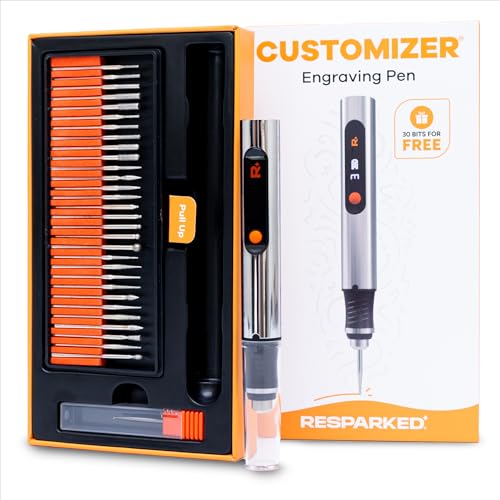
- Engraves more than 50 types of surfaces
- Cordless design provides up to two hours of use
- Includes 30 bits, practice materials, and a guide
Best For: Freehand personalization and portable DIY work
Best Smart Desktop Option

- AI tools simplify photo conversion and layout
- Camera-assisted positioning reaches 0.1mm accuracy
- Class 1 enclosure and interchangeable laser platform
Best For: Photo engraving, personalized gifts, and expandable desktop work
Precision Power Pick

- True 12W laser for engraving and cutting
- 0.01mm positioning accuracy for fine detail
- 300 × 300mm workspace with expansion options
Best For: Artists needing detailed engraving and deeper cuts
Enclosed Creative Studio

- Dual cameras support accurate material placement
- Class 1 enclosed design for home crafting
- Templates and AI image tools in xTool Studio
Best For: Beginners and home artists seeking guided setup
Connected Maker Value

- 300 × 300mm workspace for craft projects
- Up to 30,000mm/min engraving speed
- Wi-Fi, TF-card, LightBurn, and LaserGRBL support
Best For: Hobbyists wanting fast, connected engraving
Best with Extra Features

- 15.7 × 16.3-inch workspace
- 0.06mm compressed spot
- Supports 200+ materials
Best For: Artists needing a spacious, versatile diode engraver
Feature-Rich Workshop Pick

- Near-A4 11.8 × 7.9-inch work area
- Supports 300+ materials
- App, offline, and LightBurn control
Best For: Artists and small businesses handling varied repeat projects
Best High-Power Pick – xTool S1 40W Rotary Bundle
For artists who need substantial capacity and cutting power, the xTool S1 is one of the most capable laser engravers for artists in this lineup. Its 40W laser, large bed, rotary bundle, and enclosed Class 1 design make it suited to both detailed artwork and larger production runs.
Best For: Artists creating large signs, batches of small items, and engraved projects on wood, metal, acrylic, or curved surfaces.
Pros:
- Powerful 40W laser can cut 18mm cherry wood in one pass.
- Large 23.93-by-15.16-inch bed and 600mm/s engraving speed support bigger or batch projects.
- Auto-focus, guided XCS software, material presets, tutorials, and AI design tools ease setup.
- Enclosed Class 1 design includes flame sensors, lid-open protection, and an emergency stop.
Cons:
- At 86.8 pounds, it is substantially less portable than compact desktop options.
- Its larger footprint and high power may be more than beginners need for small craft projects.
The xTool S1 is the strongest choice here when productivity, material capacity, and versatility matter most. It is a serious studio machine rather than a lightweight tool for occasional crafting.
Best Portable Hand Tool – Resparked Customizer Engraving Pen
The Resparked Customizer takes a hands-on approach to laser engravers for artists: rather than using a desktop laser, you guide a cordless engraving pen yourself. Its lightweight body, adjustable speed, and broad bit selection make it approachable for adding personal details to many surfaces.
Best For: Artists and DIYers who want portable, freehand engraving on wood, metal, glass, plastic, ceramics, and similar surfaces.
Pros:
- Works on more than 50 surfaces, including wood, metal, glass, plastic, and ceramics.
- Cordless design offers up to two hours of battery life and USB-C charging.
- Three-speed control and lightweight ergonomic construction support detailed handwork.
- Includes 30 premium bits, practice materials, a guide, and a carbide burr.
Cons:
- Manual operation requires a steadier hand than an automated desktop engraver.
- Its two-hour battery life may require recharging during extended sessions.
- It is intended for decorative engraving and labeling rather than large-format projects.
This pen is a practical entry point for artists who value mobility and direct control. Choose it for freehand personalization, not automated layouts or high-volume production.
Best Compact Starter – Twotrees TS1 Mini 3W Engraver
The Twotrees TS1 Mini is a compact option for artists exploring laser engravers for artists without giving up much desk space. Its enclosed design, smartphone control, and 80-by-80mm work area make it well suited to small, detailed craft projects.
Best For: Beginners, classrooms, and makers who need a small machine for thin materials, gifts, and detailed desktop projects.
Pros:
- Fully enclosed acrylic cover contains laser light and debris, with goggles included.
- Bluetooth smartphone control works through the MKSLaser app, while USB supports computer software such as LightBurn.
- Compact 3.08-pound design fits on small desks and craft tables.
- Offers 0.1mm positioning accuracy, auto-focus, and speeds up to 3000mm/min.
Cons:
- The 80-by-80mm work area limits it to small objects and designs.
- Its 3W laser is intended for thin materials and light cutting rather than demanding cuts.
- Adult supervision is still needed for family or classroom use.
The TS1 Mini is appealing when workspace and simplicity are higher priorities than production size. It is a convenient way to learn laser engraving and make small, precise designs.
Best Smart Desktop Option – Creality Falcon A1C 10W
The Creality Falcon A1C combines a 10W laser with camera-assisted setup and AI design tools, making it a strong choice among laser engravers for artists who want faster transitions from image to finished piece. Its enclosed Class 1 construction and interchangeable platform add room to grow.
Best For: Artists who want assisted photo engraving, accurate positioning, and a compact machine for wood, leather, acrylic, gifts, and décor.
Pros:
- AI tools can convert photos, remove backgrounds, optimize layouts, and recommend settings.
- Built-in camera and auto-focus support positioning accuracy up to 0.1mm.
- 10W module reaches speeds up to 15,000mm/min for efficient project work.
- Enclosed Class 1 design and interchangeable laser platform support safer, expandable use.
Cons:
- The 150-by-150mm work area is smaller than that of full-size production machines.
- Each package includes only one laser module, so additional capabilities require compatible modules.
- Its 31.1-pound weight makes it portable for a desktop machine but not effortless to carry.
The Falcon A1C is a balanced pick for creators who want automation without moving to a large studio machine. Its camera and AI workflow are especially useful for photo-based artwork and repeatable personalized designs.
Precision Power Pick – ACMER S2 12W Laser Engraver
For artists comparing laser engravers for artists, the ACMER S2 is a strong choice when detailed engraving and deeper cutting matter. Its true 12W laser, 300 × 300mm work area, and claimed 0.01mm positioning accuracy support projects ranging from intricate artwork and photos to signs, ornaments, and layered designs.
Best For: Artists and makers who need fine detail, a roomy workspace, and flexibility across engraving and cutting projects.
Pros:
- True 12W laser supports engraving and cutting across more than 100 materials.
- Fine 0.08 × 0.08mm spot and up to 0.01mm positioning accuracy suit detailed artwork.
- 300 × 300mm workspace accommodates signs, layered art, and larger layouts.
- Works with ACMER Studio, LightBurn, and LaserGRBL on Windows, macOS, and Linux.
Cons:
- Rotary modules, risers, and air assist are optional accessories.
- Deeper cuts may require multiple passes.
The S2 offers a useful balance of precision, power, and expandability. It is particularly appealing if your artwork includes both fine surface detail and occasional cutting, though you should budget separately for add-ons if you plan to work with cylindrical or taller objects.
Enclosed Creative Studio – xTool M2 10W Laser Engraver
The xTool M2 is a practical option for artists who prioritize an enclosed, guided workflow. Among laser engravers for artists, its dual cameras, Class 1 enclosed design, and xTool Studio templates can make positioning and project setup easier for home crafting, personalized gifts, and decor.
Best For: Home crafters and beginners who want camera-assisted setup, templates, and a safer enclosed machine.
Pros:
- Built-in dual cameras provide workspace preview and support precise placement.
- Class 1 enclosed design includes real-time monitoring for home use.
- xTool Studio offers templates and an integrated AI image generator.
- 10W laser handles materials such as wood, leather, felt, fabric, paper, and cardstock.
Cons:
- CMYK Inkjet and RA3 Lite Rotary modules are not included.
- Optional 3W IR laser and CMYK module are sold separately.
- The machine is substantially heavier than the open-frame options in this roundup.
The M2 stands out for convenience rather than maximum diode power. Its enclosed construction and camera-driven placement are well suited to artists who want a streamlined creative process, while additional modules can broaden its capabilities at extra cost.
Connected Maker Value – Twotrees TTS-55 Pro 5.5W
For artists seeking affordable control and a generous work area, the Twotrees TTS-55 Pro combines a 5.5W laser with a 300 × 300mm workspace. It is a capable entry point among laser engravers for artists, especially for wood, leather, acrylic, paper, and small-business craft projects.
Best For: Hobbyists and makers who want wireless control, fast engraving, and support for common craft materials.
Pros:
- 300 × 300mm work area supports signs, artwork, and batch projects.
- Up to 30,000mm/min engraving speed and a 32-bit control board support efficient work.
- Built-in Wi-Fi enables mobile app or computer web control, with TF-card offline engraving.
- Includes a metal air-assist nozzle and red laser shield for cleaner cutting and added protection.
Cons:
- 5.5W output is less powerful than the ACMER S2’s 12W laser.
- Air-assist integration is supported, but a complete air-assist system is not specified as included.
- LaserGRBL compatibility is limited to Windows, while macOS and Linux support is listed for LightBurn.
The TTS-55 Pro makes sense for creators who value speed and connected controls without moving to a more powerful laser. Its lower output may limit deeper cutting, but the fine spot, open workspace, and wireless features make it versatile for everyday craft work.
Best with Extra Features – Creality Falcon 10W
For artists seeking laser engravers for artists with a larger creative workspace, the Creality Falcon 10W combines a 15.7 × 16.3-inch work area with a reported 0.06 × 0.06mm compressed laser spot. Its 10W diode module is designed for detailed engraving and cutting across materials such as wood, leather, acrylic, fabric, and metal.
Best For: Artists who want a relatively spacious work area, fast operation, and flexibility across many materials.
Pros:
- 15.7 × 16.3-inch workspace accommodates larger projects.
- Reported 0.06mm spot size supports detailed engraving.
- Works with more than 200 materials, including wood, leather, acrylic, and metal.
- Compatible with LightBurn and LaserGRBL, with offline SD-card operation.
Cons:
- The supplied product dimensions are listed as 1 × 1 × 1 inches, so confirm the machine’s full footprint before buying.
- Eye protection and the integrated UV-filtering acrylic do not replace appropriate laser-safety practices.
The Falcon 10W is a strong fit for artists who value project capacity and material versatility. Its combination of speed, precision, and software compatibility makes it suitable for both detailed artwork and practical cutting projects.
Portable Starter Pick – LaserPecker LP1 Plus Mini
The LaserPecker LP1 Plus is a compact option for artists comparing laser engravers for artists that can travel easily. It is designed for beginner-friendly engraving on non-metal materials such as wood, leather, and acrylic, and can run from a power bank for mobile projects.
Best For: Beginners, students, and mobile creators who want a small engraver for personalized non-metal projects.
Pros:
- Pocket-sized design weighs 2.4 pounds for easy transport.
- Can reportedly go from setup to first engraving in under two minutes.
- Adjustable stand supports 360-degree engraving angles.
- App supports importing photos and doodles, while the magnetic base helps secure small items.
Cons:
- Metal engraving is not supported.
- Requires a precise 200mm lens-to-material distance using the included ruler.
- Its compact format is better suited to small projects than large artwork.
The LP1 Plus prioritizes portability and simplicity over cutting power or broad material support. It makes the most sense for artists who want to personalize small objects wherever they create.
Feature-Rich Workshop Pick – K15 Pro 10W Laser Engraver
For artists who want laser engravers for artists with strong software and workflow features, the K15 Pro offers a near-A4 11.8 × 7.9-inch workspace, 10W diode output, and one-touch focusing. It is built for materials including wood, acrylic, leather, coated metal, glass, and stone, with wireless, offline, and app-based control options.
Best For: Artists and small craft businesses that need repeatable projects, broad material compatibility, and a compact workbed.
Pros:
- Near-A4 workspace fits many signs, coasters, jewelry pieces, and gifts.
- Reported 10.36–10.58W output and support for more than 300 materials.
- CutLabX works across computers, tablets, and phones and includes AI-assisted design features.
- One-touch focus, offline TF-card jobs, and smart memory support repeat work.
Cons:
- The optional 1W IR head is required for bare-metal engraving such as stainless steel and aluminum.
- The supplied notes are truncated when describing optional accessories, so confirm included equipment.
- An 11.8 × 7.9-inch work area may limit oversized artwork.
The K15 Pro stands out for creators who want a compact machine that can grow with their workflow. Its app ecosystem, offline controls, focusing features, and optional IR upgrade make it particularly practical for repeat craft orders.
How We Picked the Best Laser Engravers for Artists
We focused on machines that suit creative workflows rather than evaluating power alone. Our selection considers engraving precision, usable work area, supported materials, camera or alignment features, enclosure and safety design, portability, software accessibility, and overall versatility. We also included different formats so beginners, mobile makers, classroom users, and small studios can find a practical fit.
Specifications such as wattage, speed, and advertised resolution are useful comparisons, but real-world results also depend on lens quality, material settings, ventilation, software, and the design’s complexity. Always confirm the manufacturer’s approved materials and safety instructions before operating a machine.
Quick Comparison
| Best For | Look For | Product Types in This Roundup |
|---|---|---|
| Beginners and small projects | Simple setup, compact size, guided software | Mini and portable engravers |
| Detailed craft work | Fine spot size, stable motion, accurate alignment | Desktop diode engravers with cameras |
| Mixed materials | Appropriate power, material presets, adjustable focus | 10W to 12W machines |
| Higher-volume work | Larger bed, faster motion, enclosure, ventilation | Higher-power cutters and enclosed systems |
Key Buying Factors for Laser Engravers for Artists
Laser Power and Material Compatibility
Power affects cutting depth and speed, but it does not automatically determine engraving quality. Lower-power machines can be well suited to wood, leather, paper, and coated surfaces, while more powerful models are better for thicker stock and faster production. Check whether the machine can safely handle the materials you use most often; some plastics and coated products can release hazardous fumes.
Work Area, Focus, and Precision
Measure your typical artwork before choosing a bed size. A larger work area reduces tiling and repositioning, while a compact footprint is easier to fit in a home studio. Fine spot size, reliable focus adjustment, and rigid motion components matter for small lettering, line art, and layered designs.
Enclosure, Ventilation, and Safety
An enclosed Class 1 design can simplify supervision and help contain laser light and smoke, but it still needs appropriate ventilation. Open-frame machines generally require more careful placement, protective eyewear where specified, and a controlled operating area. Look for emergency stops, lid sensors, flame protection, and clear safety documentation.
Workflow and Software
Artists should consider file support, operating-system compatibility, camera alignment, rotary compatibility, and whether the software offers useful material presets. Built-in cameras can make positioning artwork easier, especially when engraving irregular objects or working around existing graphics.
Who Should Buy Which Laser Engravers for Artists?
Choose a portable or mini engraver if you want low-commitment experimentation, small artwork, or a tool that can move between workspaces. These models are convenient but usually sacrifice bed size and cutting capacity.
Choose an enclosed desktop engraver if you work indoors, value straightforward alignment, or want a safer, cleaner setup for regular craft projects. Camera-equipped machines are particularly useful for visual artists who frequently position designs on pre-cut blanks.
Choose a higher-power or larger-bed model if you sell finished goods, work with thicker materials, or need to batch multiple pieces. Budget for ventilation, maintenance, suitable software, and consumables—not just the machine itself.
Before buying, compare the actual bed dimensions, included accessories, warranty, replacement parts, and local support. A machine that fits your materials and studio routine will usually be more valuable than one with the highest headline speed or wattage.