The best laser engravers make it easier to personalize gifts, create signs, produce craft projects, and handle small-batch work at home or in a studio. This roundup covers compact diode machines, enclosed models, dual-laser systems, and higher-power cutters.
Our selections span beginner-friendly options and capable machines for makers or small businesses, with attention to work area, material compatibility, speed, safety, and useful accessories.
Best 10 Laser Engravers Picks for 2026
Best for Big Projects

- 40W laser with a large work bed
- Rotary bundle and curved-surface support
- Enclosed Class 1 safety design
Best For: Large signs, batch work, tumblers, and guided creative projects
Best for Metal and Production

- 20W fiber and diode laser combination
- Engraves metals and many nonmetal materials
- Fast, camera-assisted batch production
Best For: Metal customization, deep engraving, and business workflows
Best Rotary Value

- Includes a versatile 4-in-1 rotary kit
- Adjustable air assist for cleaner cuts
- Works with LaserGRBL and LightBurn
Best For: Tumblers, cylindrical items, and detailed wood projects
Best Compact Hobby Pick

- 5.5W laser for common craft materials
- Compact 300-by-300mm work area
- Wi-Fi, TF-card, and LightBurn support
Best For: Hobbyists, small projects, and wireless or offline engraving
Best Compact Pick
ACMER S1 2500mW Laser Engraver

- Compact 130 x 130mm work area
- 99% preassembled for easy setup
- Supports major desktop software
Best For: Beginners and small home craft projects
Best for Precision and Speed
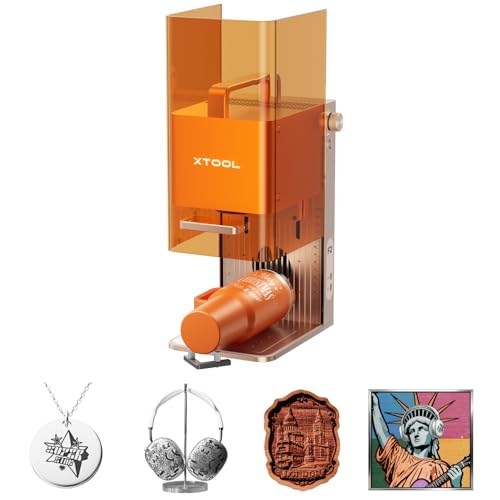
- 15W diode plus 5W IR laser
- Built-in 50MP camera for alignment
- Speeds up to 6000mm/s
Best For: Metal marking and small-batch customization
Best High-Power Value
ATOMSTACK A20 Pro V2 Laser Engraver

- 20W output for stronger cutting
- 400 x 365mm working area
- Supports LightBurn and LaserGRBL
Best For: Larger wood, acrylic, metal, and leather projects
Best Enclosed Pick

- Enclosed Class 1 design for home crafting
- Dual cameras support accurate material placement
- Optional modules expand printing and engraving capabilities
Best For: Home DIY makers and personalized-gift projects
Best Large Work Area
LONGER Ray5 10W Laser Engraver

- 400-by-400mm work area for larger projects
- USB, Wi-Fi, app, and TF-card control options
- Works with LaserGRBL and LightBurn
Best For: Makers needing a spacious, flexible workbed
Best Compact Starter

- Compact A4 work area for desks and small shops
- Quick assembly with included starter accessories
- App, AI, offline, and one-touch focus features
Best For: Beginners and small-business craft production
Best for Big Projects – xTool S1 40W Rotary Bundle
For shoppers comparing laser engravers for larger, demanding projects, the xTool S1 stands out with a 40W laser, a spacious bed, and support for wood, metal, acrylic, and curved items. Its enclosed Class 1 design, autofocus, and guided software make it a practical choice for both ambitious makers and newer users.
Best For: Large signs, batch production, tumblers, curved-surface engraving, and users who want an enclosed, guided setup.
Pros:
- 40W power can cut up to 18mm cherry wood in a single pass.
- Large 23.93-by-15.16-inch bed and speeds up to 600mm/s suit bigger projects.
- Rotary bundle, pin-point positioning, autofocus, and AutoPassthrough expand its capabilities.
- Enclosed Class 1 design includes flame sensors, lid-open protection, and an emergency stop.
Cons:
- At 86.8 pounds, it is a substantial machine to place and move.
- The advanced feature set may be more than casual users need.
The xTool S1 is a strong all-around pick when capacity, cutting power, and safety features matter more than compact size. Its included rotary setup also makes it more versatile for personalized products.
Best for Metal and Production – xTool F1 Ultra Dual Laser
The xTool F1 Ultra is one of the most versatile laser engravers in this roundup, combining 20W fiber and diode lasers. It is designed for fast, detailed work across metals and nonmetals, with camera-assisted batch processing and 3D embossing features aimed at serious makers and businesses.
Best For: Metal customization, deep engraving, 3D embossing, and high-volume desktop production.
Pros:
- Dual 20W fiber and diode lasers handle metals, wood, acrylic, leather, glass, and more.
- Speeds up to 10,000mm/s support rapid engraving and batch workflows.
- 16MP camera enables shape recognition and automated positioning.
- Enclosed design includes smoke extraction, fire alerts, and an emergency stop.
Cons:
- It is a Class 4 laser, so users must follow the supplied safety requirements carefully.
- The Auto Conveyor for expanded batch production is sold separately.
- Its business-focused features may be excessive for occasional hobby use.
Choose the F1 Ultra when material range and throughput are priorities. The combination of fiber and diode lasers is particularly compelling for businesses that customize both metal goods and nonmetal products.
Best Rotary Value – Creality Falcon 10W
The Creality Falcon 10W is a practical option among laser engravers for shoppers who want air assist and cylindrical-object capability in one package. Its included rotary roller supports multiple shapes, while compatibility with LaserGRBL and LightBurn gives users flexibility in software and workflow.
Best For: Tumblers, cylindrical and spherical objects, wood projects, and makers seeking an accessible rotary-equipped setup.
Pros:
- Included 4-in-1 rotary kit supports cylinders, spheres, rings, and adjustable jaw configurations.
- Air assist helps clear smoke and dust while reducing excessive burning.
- 10W output can cut up to 12mm wood or 3mm black acrylic in one pass.
- Fine 0.06mm laser spot supports detailed engraving and precise cuts.
Cons:
- Assembly is required, although the manufacturer estimates 10–20 minutes.
- It is a Class 4 laser and requires careful attention to operating instructions.
- The rotary-kit connection cable may be hidden deeply in the packaging.
The Falcon 10W offers a well-rounded feature set for personalized goods, especially when rotary work is central to your projects. Air assist and broad software compatibility add useful everyday convenience.
Best Compact Hobby Pick – Twotrees TTS-55 Pro
The Twotrees TTS-55 Pro is a compact laser engraver for hobbyists, makers, and small businesses working within a 300-by-300mm area. Its 5.5W laser supports common materials, while Wi-Fi, TF-card operation, and broad software compatibility provide flexible control options.
Best For: Small signs, craft projects, leather and plywood work, and users who want wireless or offline operation.
Pros:
- 5.5W laser can cut up to 5mm plywood, 3mm acrylic, and 0.7mm leather.
- Compression-laser technology and a short focal length support sharp engraving detail.
- Up to 30,000mm/min speed, Wi-Fi, and TF-card engraving offer flexible workflows.
- Supports LaserGRBL, LightBurn, Windows, macOS, and Linux.
Cons:
- The 300-by-300mm work area is less suitable for large projects.
- Its lower 5.5W output is better suited to lighter cutting than heavy-duty work.
- Air assist is supported, but the notes describe the nozzle as an integration feature rather than a complete air-pump system.
For smaller projects, the TTS-55 Pro balances affordability-oriented capability with useful connectivity. It is a sensible starting point for creators who value compact size, software choice, and offline control.
Best Compact Pick – ACMER S1 2500mW Laser Engraver
If you want a compact entry point into laser engravers, the ACMER S1 emphasizes simple setup, portability, and broad material support. Its 130 x 130mm work area, 10,000mm/min engraving speed, and included Acmerstudio software make it suitable for small home projects and detailed crafts.
Best For: Beginners, hobbyists, and home users working on small wood, acrylic, leather, and craft projects.
Pros:
- 99% preassembled with a quick laser-head installation.
- Supports engraving on wood, bamboo, leather, plastic, ceramics, and more.
- Compatible with macOS, Windows, Linux, LightBurn, and LaserGRBL.
- Compact 2kg aluminum-alloy design with a 12-month warranty and 24/7 support.
Cons:
- The 130 x 130mm working area is relatively small.
- Its 2500mW laser is better suited to smaller projects than demanding production work.
The ACMER S1 is a practical choice when easy operation and a small footprint matter more than a large working area. It offers useful software flexibility and a straightforward path into laser engraving.
Best for Precision and Speed – xTool F2 Dual-Laser Engraver
The xTool F2 stands out among laser engravers for combining a 15W diode laser with a 5W infrared laser. Its built-in 50MP camera, enclosed design, and claimed speeds up to 6000mm/s make it especially appealing for precise personalization, metal marking, and small-batch work.
Best For: Creators and small businesses needing precise alignment, metal color marking, and portable customization.
Pros:
- Dual lasers handle more than 300 materials, including metal-focused IR marking and diode cutting.
- 50MP camera provides up to 0.1mm alignment accuracy on small pieces.
- Fully enclosed, leak-proof design with a built-in fan and optional purifier.
- Arrives fully assembled and supports accessories for batch processing.
Cons:
- Accessories such as the Slide Extension and purifier are optional additions.
- Its Class 4 laser classification means users should follow the supplied safety guidance.
With dual-laser flexibility and camera-assisted positioning, the xTool F2 is designed for users who value speed and repeatable personalization. It is a strong fit for workshops, stores, fairs, and pop-up services.
Best High-Power Value – ATOMSTACK A20 Pro V2 Laser Engraver
For shoppers comparing laser engravers with stronger cutting capability, the ATOMSTACK A20 Pro V2 pairs 20W output with a 400 x 365mm work area. Its aluminum-alloy frame, linear-guide structure, and support for LightBurn and LaserGRBL make it a versatile option for larger personalized projects.
Best For: Makers and small businesses cutting or engraving larger wood, acrylic, metal, and leather projects.
Pros:
- 20,000mW output supports high-energy cutting and engraving.
- Large 400 x 365mm working area compared with compact desktop models.
- Modular aluminum-alloy design includes limit switches and cross-line positioning light.
- Includes a magnetic protective cover, safety glasses, tilt safety beep, and lifetime technical support.
Cons:
- At 13.67 pounds, it is less portable than compact engravers.
- Assembly is required, despite the modular quick-assembly design.
- The supplied notes do not specify an enclosure exhaust or fume-purification system.
The A20 Pro V2 is a compelling choice when higher laser output and a larger work area take priority. Its safety features, software compatibility, and long-term technical support add practical value for frequent makers.
Best Enclosed Pick – xTool M2 10W Laser Engraver
The xTool M2 is a versatile, enclosed laser engraver for home crafters who want a safer, more guided setup. Its 10W diode laser handles materials such as wood, leather, felt, fabric, paper, and cardstock, while built-in cameras support accurate placement and previewing.
Best For: Home DIY makers, personalized gifts, decor, and beginners who value an enclosed Class 1 design.
Pros:
- Enclosed Class 1 design with real-time monitoring for home use.
- Dual cameras and xTool’s “Place & Go” workflow help reduce alignment mistakes.
- xTool Studio includes templates and an AI image generator for simpler project creation.
- Optional add-ons can expand the machine with color printing or finer metal and plastic engraving.
Cons:
- The CMYK Inkjet module, 3W IR laser, and RA3 Lite Rotary are sold separately.
- The included configuration is a 10W diode laser, so expanded capabilities require additional purchases.
The M2 stands out among laser engravers for its enclosed construction, camera-assisted workflow, and beginner-oriented software. It is particularly appealing if convenience and home-friendly operation matter more than an open-frame work area.
Best Large Work Area – LONGER Ray5 10W Laser Engraver
The LONGER Ray5 is an open-style 10W laser engraver built for makers who need a roomy 400-by-400mm work area and flexible control options. It supports USB, Wi-Fi, an app, and TF-card operation, making it suitable for both connected and offline projects.
Best For: Makers working on larger signs, panels, and varied materials who want software and connectivity flexibility.
Pros:
- Large 400-by-400mm engraving area accommodates bigger projects.
- Up to 10,000mm/min engraving speed with a reported 0.06mm laser spot.
- Supports USB, Wi-Fi, app, and TF-card workflows, including offline use.
- Compatible with LaserGRBL and LightBurn, with emergency-stop and motion-protection features.
Cons:
- Its Laser Class II design and included protective cover and goggles require attentive safety practices.
- Setup and operation may involve more hands-on involvement than an enclosed, camera-guided machine.
- Material results can vary, so advertised cutting thickness should not be treated as universal performance.
Choose the Ray5 if workspace and control flexibility are priorities. Its generous bed, offline capabilities, and broad software compatibility make it a practical platform for experimenting across wood, leather, acrylic, glass, and other listed materials.
Best Compact Starter – K15 Pro 10W Laser Engraver
The K15 Pro is a compact 10W diode laser engraver with an A4-sized work area, quick assembly, and app-based controls. It is designed for common craft and small-business projects, including wood signs, coasters, leather goods, coated metal, and acrylic.
Best For: Beginners, small workspaces, gift makers, and small businesses producing repeat craft projects.
Pros:
- Compact 11.8-by-7.9-inch A4 work area fits comfortably on or under a desk.
- Assembles with six screws and includes safety glasses, materials, and tools.
- Free CutLabX software supports computers, tablets, and phones, with AI design features.
- One-touch focus, offline TF-card operation, and optional upgrades support repeat jobs.
Cons:
- The A4 work area is less suitable for oversized signs or large panels than a 400-by-400mm machine.
- The optional 1W IR laser head is required for bare-metal engraving capabilities described in the notes.
- Accessories such as a rotary roller, honeycomb plate, air pump, and air purifier are optional upgrades.
The K15 Pro is a strong space-conscious choice among laser engravers, combining straightforward setup with app control and useful repeat-job features. Its upgrade path is appealing for beginners who may later expand into tumbler or other specialized projects.
How We Picked These Laser Engravers
We evaluated these Laser Engravers by comparing their laser type and power, stated engraving speed, work area, safety design, software support, included features, and upgrade potential. We also considered practical extras such as air assist, rotary compatibility, cameras, offline controls, and enclosure design. Because no single machine is ideal for every material or project, the list includes both affordable open-frame cutters and more specialized enclosed systems.
Specifications can vary by configuration, so confirm the seller’s current listing before purchasing. In particular, check whether an air pump, rotary attachment, enclosure, exhaust system, or suitable power adapter is included.
Quick Comparison
| Best For | Look For | Recommended Type |
|---|---|---|
| Basic wood and craft projects | Affordable diode laser, simple controls | 5W–10W diode |
| Faster cutting and thicker materials | Higher optical power and air assist | 20W–40W diode |
| Metal marking | IR or fiber laser capability | Dual-laser or fiber system |
| Safer indoor crafting | Fully enclosed Class 1 design | Enclosed engraver |
| Round objects | Rotary compatibility or included roller | Machine with rotary support |
Key Buying Factors for Laser Engravers
Laser Type and Power
Diode lasers are versatile for wood, leather, cardboard, coated metal, and some acrylic. Higher optical power generally improves cutting performance, but it does not automatically make a machine better for every job. IR and fiber systems are more appropriate for certain metal-marking applications, while dual-laser models provide broader material flexibility.
Work Area and Speed
Measure your typical projects before choosing a machine. A larger bed suits signs and panels, while a compact engraver may be easier to store. Advertised maximum speed is useful for comparing models, but real production speed also depends on image density, material, passes, and focusing.
Safety and Ventilation
Laser work produces smoke and potentially hazardous fumes. Open-frame machines require suitable eye protection, supervision, ventilation, and a controlled workspace. Enclosed units can simplify indoor use, but they still need appropriate exhaust and operating precautions. Never assume an enclosure eliminates every safety requirement.
Workflow Features
Cameras can simplify alignment, while rotary support helps with tumblers and cylindrical objects. Air assist can improve edges and reduce scorching during cuts. Touchscreens, offline operation, limit switches, emergency stops, and compatible design software are also valuable for frequent use.
Who Should Buy Which Laser Engravers?
- Beginners: Choose a straightforward 5W–10W diode model with good software support and a manageable work area.
- Frequent wood cutters: Consider a 20W or higher diode machine with air assist and room for an enclosure.
- Indoor hobbyists: An enclosed Class 1 model is the most convenient choice when space and safety are priorities.
- Metal-focused makers: Select a dual-laser, IR, or fiber-capable machine designed for your intended metal types.
- Small businesses: Prioritize repeatable alignment, camera assistance, rotary compatibility, reliable cooling, and service support over headline speed alone.