The best hard drive enclosures for Windows make it easy to reuse internal SATA drives, recover files, expand storage, or build a portable backup drive without buying a complete external disk.
Our selection includes compact 2.5-inch cases, powered 3.5-inch enclosures, drive docks, and multi-bay models. Use the guide below to match connection speed, drive size, power needs, and cooling to your setup.
Best 10 Hard Drive Enclosures for Windows Picks for 2026
Best Overall
ORICO 3.5-Inch USB 3.0 Enclosure

- Supports SATA drives up to 20TB
- Tool-free plug-and-play installation
- Includes 12V/2A power adapter
Best For: Windows users needing a simple high-capacity 3.5-inch drive enclosure
Best Aluminum Build

- Aluminum housing aids heat dissipation
- Supports drives up to 18TB
- Includes removable vertical stand
Best For: Desktop setups prioritizing metal construction and stable powered operation
Best Lay-Flat Design
CLAVOOP 3.5-Inch USB 3.0 Enclosure

- Works with 2.5-inch and 3.5-inch SATA drives
- Supports capacities up to 20TB
- Ventilated lay-flat design with UASP
Best For: Users wanting flexible drive-size support for Windows access or recovery
Best Compact 2.5-Inch Option
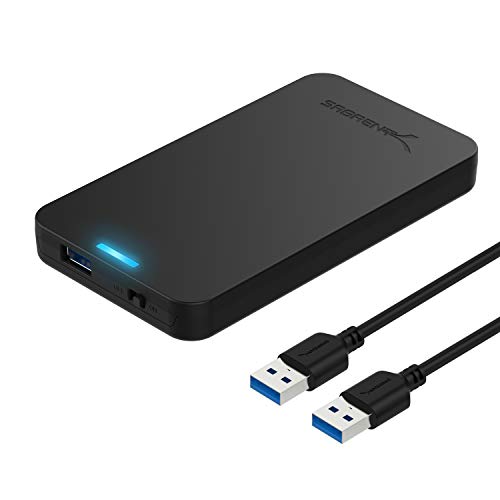
- Lightweight design for 2.5-inch drives
- Tool-free and hot-swappable
- USB 3.0 with UASP support
Best For: Portable 2.5-inch SATA HDD or SSD use with Windows PCs and laptops
Best Portable 2.5-Inch Case

- Fits 7mm and 9.5mm 2.5-inch SATA drives
- Supports up to 6TB and 5Gbps transfers
- Protective EVA foam and plug-and-play setup
Best For: Laptop-drive reuse and portable Windows storage
Best 3.5-Inch Enclosure
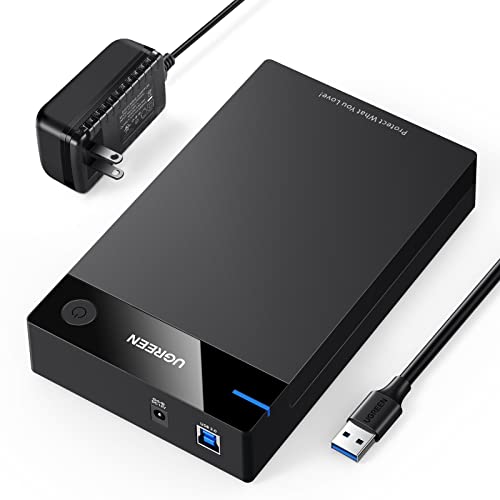
- Supports SATA drives up to 20TB
- Powered USB 3.0 enclosure with UASP
- Fits both 2.5- and 3.5-inch drives
Best For: High-capacity external Windows storage and backups
Best Compact Pick
BENFEI 2.5-Inch SATA Enclosure

- Tool-free design for one 2.5-inch SATA drive
- USB-C and USB-A connectivity with UASP
- Supports Windows and drives up to 6TB
Best For: Portable 2.5-inch HDD and SSD upgrades
Best Versatile Single-Drive Pick
SABRENT 2.5/3.5-Inch Enclosure
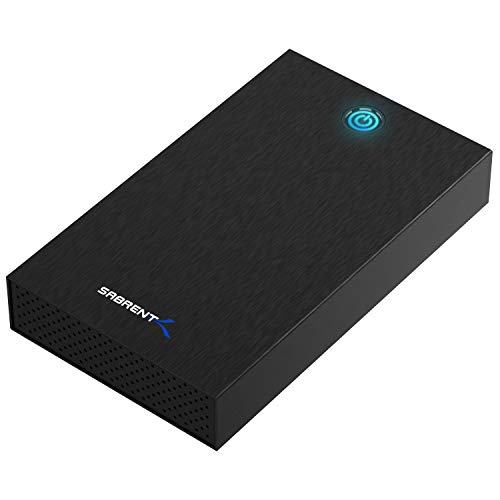
- Fits 2.5-inch and 3.5-inch SATA drives
- Tool-free swapping with USB 3.0 and UASP
- Includes required 12V/2A power adapter
Best For: Mixed-size SATA drive access at a desk
Best Dual-Bay Pick

- Holds two 2.5-inch or 3.5-inch SATA drives
- USB-A/C 3.0, hot swapping, and tool-free trays
- Aluminum body with built-in cooling fan
Best For: Desktop storage expansion with two SATA drives
Best Overall – ORICO 3.5-Inch USB 3.0 Enclosure
For shoppers comparing hard drive enclosures for windows, the ORICO 3588US3 is a practical choice for a single 3.5-inch SATA drive. It supports capacities up to 20TB, offers USB 3.0 transfer speeds up to 5Gbps with UASP, and installs without tools or drivers.
Best For: Windows users who need a simple, high-capacity enclosure for a 3.5-inch SATA HDD or SSD.
Pros:
- Supports 3.5-inch SATA I, II, and III drives up to 20TB.
- Tool-free, plug-and-play setup with no reboot or driver required.
- Includes a 12V/2A power adapter, shock-absorbing sponge, and auto-sleep mode.
Cons:
- The enclosure requires external power for 3.5-inch drives.
- It supports one drive, and the HDD or SSD is not included.
The ORICO combines broad Windows compatibility with useful everyday features such as an activity LED, UASP support, and a heat-resistant ABS shell. It is a strong all-around option when straightforward installation and 20TB support matter most.
Best Aluminum Build – GODO 3.5-Inch SATA Enclosure
The GODO enclosure is worth considering among hard drive enclosures for windows if you prefer a metal housing and desktop-friendly stand. Its USB 3.0 connection supports up to 5Gbps with UASP, while the included 12V/2A adapter is designed to provide stable power for a single 3.5-inch SATA drive.
Best For: Desktop users who want aluminum heat dissipation, a vertical stand, and added drive-protection features.
Pros:
- Aluminum housing helps with heat dissipation and static protection.
- Supports 3.5-inch SATA I, II, and III HDDs or SSDs up to 18TB.
- Includes a separate vertical base, screws, screwdriver, and 12V/2A power adapter.
Cons:
- Installation uses screws rather than a fully tool-free design.
- Capacity support is listed at 18TB, below some alternatives.
- Only one drive is supported.
With UASP, TRIM support, LED status indication, and multiple electrical safeguards, the GODO is geared toward stable desktop use. Its aluminum construction and removable stand make it especially appealing for users who value organization and heat management.
Best Lay-Flat Design – CLAVOOP 3.5-Inch USB 3.0 Enclosure
The CLAVOOP is a flexible pick for hard drive enclosures for windows, supporting both 3.5-inch and 2.5-inch SATA HDDs and SSDs. Its lay-flat design, ventilation openings, UASP support, and included 12V/2A adapter suit desktop data access, transfers, and drive recovery tasks.
Best For: Users who want one enclosure for 3.5-inch or 2.5-inch SATA drives, including Windows-based data access and recovery work.
Pros:
- Supports 2.5-inch and 3.5-inch SATA I, II, and III drives up to 20TB.
- Lay-flat design includes ventilation openings and non-slip feet.
- Tool-free plug-and-play operation with UASP and auto-sleep functionality.
Cons:
- It is not compatible with IDE, mSATA, or M.2 drives.
- The supplied notes do not specify a warranty.
- A 3.5-inch drive requires the included external power adapter.
The CLAVOOP stands out for format flexibility and its cooling-focused physical design. Its stated tested read speed of up to 336MB/s may be useful, though actual results depend on the drive and connected system.
Best Compact 2.5-Inch Option – SABRENT EC-UASP Enclosure
For portable hard drive enclosures for windows, the SABRENT EC-UASP is designed specifically for 2.5-inch SATA HDDs and SSDs. Its tool-free, hot-swappable design connects over USB 3.0 at up to 5Gbps and remains backward-compatible with USB 2.0 and 1.1.
Best For: Laptop-drive upgrades, portable 2.5-inch SATA storage, and SSD users who want a lightweight enclosure.
Pros:
- Compact 2.5-inch enclosure weighs about 2 ounces.
- Tool-free, plug-and-play, and hot-swappable design.
- Supports UASP SATA III and USB 3.0 speeds up to 5Gbps.
Cons:
- It supports 2.5-inch drives only.
- The listed Windows compatibility covers Windows XP through Windows 8, not newer versions.
- The plastic enclosure is less robust than metal alternatives.
The SABRENT is a straightforward option for reusing a notebook drive or installing a 2.5-inch SSD externally. Its small size and tool-free setup are the main advantages, while users with 3.5-inch drives will need a different enclosure.
Best High-Capacity Dock – ORICO 2.5/3.5-Inch Hard Drive Dock
For shoppers comparing hard drive enclosures for windows, the ORICO DD18 is a flexible docking station for accessing one bare 2.5- or 3.5-inch SATA HDD or SSD. It supports drives up to 22TB, uses USB 3.0 with UASP, and includes a dedicated power adapter for larger desktop drives.
Best For: Windows users who need a tool-free dock for backups, disk imaging, drive transfers, or hot-swapping both 2.5-inch and 3.5-inch SATA drives.
Pros:
- Supports 2.5- and 3.5-inch SATA I/II/III HDDs and SSDs up to 22TB.
- USB 3.0 and UASP support provide transfer speeds up to 5Gbps.
- Tool-less design supports convenient drive access and hot-swapping.
- Works with Windows, macOS, Linux, and several compatible devices.
Cons:
- Supports SATA drives only; IDE and SAS drives are not compatible.
- New or unallocated drives must be initialized and formatted in Windows Disk Management.
- The open docking design offers less physical enclosure protection than a sealed case.
This ORICO dock is a strong choice when capacity and drive-format flexibility matter more than portability. Its 12V power supply and broad platform support make it practical for desktop storage work, while the single-drive design keeps setup simple.
Best Portable 2.5-Inch Case – UGREEN USB 3.0 SATA Enclosure
The UGREEN 2.5-inch enclosure is a compact option for turning a spare SATA laptop HDD or SSD into external storage. Among hard drive enclosures for windows, it stands out for plug-and-play setup, UASP support, and compatibility with 7mm and 9.5mm drives up to 6TB.
Best For: Windows laptop users who want to reuse a 2.5-inch SATA drive for file transfers, storage expansion, or recovering files from an older computer.
Pros:
- Supports 2.5-inch 7mm and 9.5mm SATA HDDs and SSDs up to 6TB.
- USB 3.0 and UASP support offer transfer speeds up to 5Gbps.
- Plug-and-play compatibility works with Windows, Linux, and macOS.
- EVA foam helps protect the installed drive from shakes and scratches.
Cons:
- Designed for 2.5-inch drives only; it cannot house 3.5-inch desktop drives.
- The enclosure does not include an SSD or HDD.
- Drives with protruding screws may need screw removal to fit.
For a straightforward portable enclosure, this UGREEN model keeps the feature set focused. It is best suited to smaller SATA drives and everyday Windows transfers rather than high-capacity desktop disks.
Best 3.5-Inch Enclosure – UGREEN 2.5/3.5-Inch SATA Case
The UGREEN 50423 is a powered external case for one 2.5- or 3.5-inch SATA HDD or SSD. It is a practical pick among hard drive enclosures for windows when you need up to 20TB of additional storage, USB 3.0/UASP performance, and support for both desktop and laptop-size drives.
Best For: Windows users adding a high-capacity external drive for storage, media, backups, or compatible console and router applications.
Pros:
- Supports 2.5- and 3.5-inch SATA I/II/III drives up to 20TB.
- USB 3.0 with UASP supports transfers up to 5Gbps and works with USB 2.0 and 1.1.
- Includes a 12V/2A power adapter for stable operation with larger drives.
- Rubber strips, ABS construction, and ventilation openings provide added physical and thermal protection.
Cons:
- It houses one drive at a time.
- Requires safe removal before unplugging to help avoid data loss.
- The powered 3.5-inch design is less compact than a small 2.5-inch enclosure.
This UGREEN enclosure offers a balanced setup for users who want one case to accommodate both common SATA drive sizes. Its powered design is particularly useful for 3.5-inch storage, while the 20TB capacity makes it suitable for larger Windows storage projects.
Best Compact Pick – BENFEI 2.5-Inch SATA Enclosure
For shoppers comparing hard drive enclosures for windows, the BENFEI is a compact choice for a single 2.5-inch SATA drive. Its tool-free design, integrated USB Type-C/Type-A connectivity, and UASP support make it practical for upgrading, file transfers, or repurposing a laptop drive.
Best For: Windows users who need a portable enclosure for one 2.5-inch SATA HDD or SSD.
Pros:
- Supports 2.5-inch SATA I/II/III HDDs and SSDs up to 6TB.
- Tool-free, plug-and-play installation with no driver required.
- Includes USB Type-C and Type-A connection options, with UASP support up to 5Gbps.
- Works with Windows, Linux, and macOS and includes an 18-month warranty.
Cons:
- Designed for 2.5-inch drives only, not 3.5-inch desktop drives.
- Supports one drive at a time.
The BENFEI stands out when portability and simple setup matter most. Confirm that your drive is a 7mm or 9.5mm-thick 2.5-inch SATA model before buying.
Best Versatile Single-Drive Pick – SABRENT 2.5/3.5-Inch Enclosure
The SABRENT is a flexible option for hard drive enclosures for windows because it accepts both 2.5-inch and 3.5-inch SATA HDDs and SSDs. It uses a tool-free slide-and-click design, but its included power adapter means a wall outlet is required for operation.
Best For: Windows users who want one enclosure that can handle both laptop-size and desktop-size SATA drives.
Pros:
- Supports both 2.5-inch and 3.5-inch SATA HDDs and SSDs.
- Tool-free setup makes drive swapping quick and straightforward.
- USB 3.0 with UASP offers up to 5Gbps theoretical transfer speed.
- Aluminum housing, shock-absorbing tray, LED activity indicator, and included 12V/2A adapter.
Cons:
- Requires an AC wall outlet; it is not USB bus-powered.
- Uses USB-A, so USB-C-only computers need an adapter.
- Not compatible with SAS, M.2, NVMe, or IDE/PATA drives.
This SABRENT model offers broader SATA compatibility than compact 2.5-inch-only enclosures. Check your drive interface and physical dimensions, especially with some high-capacity 3.5-inch drives, before purchasing.
Best Dual-Bay Pick – CENMATE 2-Bay SATA Enclosure
For users needing more capacity than a single-drive box provides, the CENMATE is a two-bay option among hard drive enclosures for windows. It supports 2.5-inch and 3.5-inch SATA drives, adds an aluminum chassis and cooling fan, and connects through USB-A or USB-C at up to 5Gbps.
Best For: Desktop users who need convenient access to two SATA HDDs or SSDs in a single enclosure.
Pros:
- Holds two 2.5-inch or 3.5-inch SATA drives, with up to 20TB per drive listed.
- Tool-free trays and hot swapping simplify drive installation and replacement.
- Aluminum construction and a built-in fan help with cooling.
- Includes USB-A and USB-C cables, supports Windows 7 and newer, and allows daisy-chain expansion.
Cons:
- This is a DAS enclosure, not a RAID or NAS system.
- The cooling fan is rated around 40–50 decibels and may be audible.
- Its larger dual-bay design is less portable than a single-drive enclosure.
The CENMATE is the practical choice when drive count and capacity take priority over compactness. Keep its lack of RAID/NAS functionality and the fan noise in mind when planning a desktop setup.
How We Picked the Best Hard Drive Enclosures for Windows
We focused on enclosure designs that support common SATA hard drives and SSDs used with Windows PCs. The lineup covers 2.5-inch laptop drives, larger 3.5-inch desktop drives, dual-format enclosures, docking stations, and a two-bay model. We also considered USB 3.0 or faster connectivity, tool-free installation, stated capacity support, power requirements, construction, cooling, and compatibility with both USB-A and USB-C systems.
Because enclosure performance depends on the installed drive, advertised interface speeds are maximum theoretical rates rather than guaranteed file-transfer speeds. A SATA SSD can benefit most from a fast USB connection, while a mechanical hard drive will usually remain limited by its own platter speed.
Quick Comparison
| Enclosure type | Best suited to | Important consideration |
|---|---|---|
| 2.5-inch tool-free case | Laptop HDDs and SATA SSDs | Usually bus-powered and highly portable |
| 3.5-inch enclosure | Desktop hard drives | Requires an external power adapter |
| Drive dock | Testing, cloning, and frequent swaps | Leaves the drive exposed |
| 2.5/3.5-inch enclosure | Mixed drive collections | Larger footprint and added power needs |
| Two-bay enclosure | Multiple drives and organized storage | Check cooling, bay support, and operating-system behavior |
Key Buying Factors for Hard Drive Enclosures for Windows
Drive Size and Interface
Confirm whether your drive is 2.5 or 3.5 inches and whether it uses SATA. Most current enclosures do not support older IDE or proprietary laptop connectors. A dual-format model is useful if you expect to reuse drives of different sizes.
USB Connection and Compatibility
USB 3.0, commonly marketed as USB 3.2 Gen 1, offers up to 5Gbps in ideal conditions. USB-C describes the connector shape, not necessarily a faster protocol, so check both the port and included cable. Windows generally recognizes standard SATA-to-USB storage automatically, but an available USB port and suitable cable are still essential.
Power, Cooling, and Noise
Most 2.5-inch SSDs and laptop drives can draw power from USB. Desktop 3.5-inch drives normally need the included AC adapter. For sustained transfers or always-on use, aluminum shells and active cooling can help manage heat, while fan-equipped designs may produce more noise.
Installation and Protection
Tool-free access is convenient for occasional drive swaps, but a secure fit matters more for portable use. Look for a stable enclosure, ventilation, a reliable power switch where applicable, and clear activity indicators. An enclosure is not a backup by itself; protect important files with a second copy.
Who Should Buy Which Hard Drive Enclosures for Windows?
Choose a compact 2.5-inch tool-free enclosure if you want portable storage or are reusing a laptop SSD. Pick a powered 3.5-inch model for a desktop hard drive and regular external storage. A docking station is better for technicians, data recovery, drive testing, or users who frequently rotate bare drives. If you need one solution for several drive sizes, select a dual-format enclosure. For multiple installed drives, a two-bay enclosure offers better organization, but verify its cooling, hot-swap behavior, and Windows compatibility before buying.