The best NAS enclosures for Mac make it easier to expand storage, protect important files, and share media without relying on internal drive space. This roundup covers diskless NAS systems, USB-C direct-attached enclosures, and DIY cases for different budgets and workflows.
Whether you need automatic backups, a compact photo library, or a larger multi-drive setup, focus on macOS compatibility, drive flexibility, RAID options, connection speed, and how much hands-on setup you are comfortable managing.
Best 10 Nas Enclosures for Mac Picks for 2026
Best Overall Private Cloud
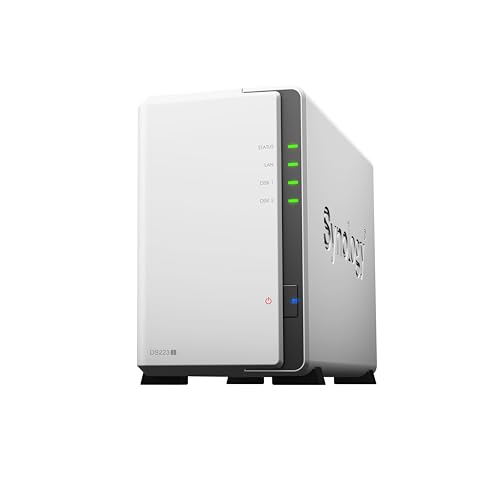
- Two-bay diskless NAS for private file storage
- Automated Mac, PC, and mobile backups
- Remote sharing plus IP camera support
Best For: Mac users wanting an easy private cloud and backup hub
Best DIY Expansion

- Accommodates up to 11 3.5-inch drives
- Supports Mini-ITX through ATX motherboards
- Four 140mm fans and mesh airflow design
Best For: Experienced builders making a high-capacity custom NAS
Best Direct-Attached Storage

- Four-bay diskless USB-C storage enclosure
- Up to 10Gbps USB 3.2 Gen 2 connectivity
- Mac-compatible hot-swappable tool-free trays
Best For: Mac users needing fast local multi-drive storage
Best Beginner-Friendly NAS

- Two-bay NAS with macOS backup support
- AI photo organization and duplicate detection
- 1GbE, 4GB RAM, and up to 64TB stated capacity
Best For: Beginners wanting simple personal storage and device backups
Best Mac RAID Enclosure

- Four-bay USB Type-C DAS
- Hardware RAID 0, 1, 5, and JBOD
- Works with macOS and QNAP NAS backups
Best For: Mac users needing flexible local RAID storage
Best High-Speed Mac Storage Hub

- Four SATA bays support HDDs and SSDs
- 10Gbps USB-C with HDMI expansion
- Temperature-controlled dual cooling fans
Best For: Mac workstations needing storage and connectivity
Best Two-Bay Mac RAID Enclosure

- 10Gbps USB 3.2 Gen 2 connection
- Hardware RAID with RAID 0 and 1
- Tool-free trays with temperature-controlled cooling
Best For: Mac users wanting simple two-drive RAID storage
Best DIY NAS Case

- Eight hot-swap HDD/SSD bays
- Mini-ITX and Micro-ATX support
- Dual air channels with three quiet fans
Best For: Custom multi-drive home servers and media libraries
Best NAS Expansion Unit

- Four SATA HDD/SSD bays
- 10Gbps USB-C connection
- Supports MyArchive cold backup
Best For: Adding storage to a compatible Asustor NAS
Best Mac-Friendly DAS

- Four trayless hot-swap bays
- 10Gbps USB-C connectivity
- Works with macOS, Windows, and Linux
Best For: Direct-attached multi-drive storage for Mac users
Best Overall Private Cloud – Synology DS223j
The Synology DS223j is a straightforward two-bay option for shoppers comparing NAS enclosures for Mac. It supports Mac backups, private file access, syncing, and remote sharing, while its diskless design lets you choose the storage drives.
Best For: Mac users who want an easy private cloud and automated backup hub.
Pros:
- Supports set-and-forget backups for Macs, PCs, and mobile devices.
- Provides private cloud access and cross-platform file sharing.
- Includes remote IP camera monitoring support and a two-year warranty.
Cons:
- Diskless design requires separate drive purchases.
- Limited to two drive bays.
The DS223j is a sensible fit when simple backups and dependable personal file access matter more than extensive hardware expansion. Synology’s ongoing software updates and support resources add useful reassurance for first-time NAS buyers.
Best DIY Expansion – Rosewill Helium NAS Max
The Rosewill Helium NAS Max is a spacious ATX case for building a custom NAS rather than a ready-to-use storage appliance. For buyers exploring NAS enclosures for Mac, its support for up to 11 3.5-inch hard drives makes it appropriate for large-capacity DIY servers, provided you supply the motherboard, drives, and other components.
Best For: Experienced builders creating a high-capacity NAS or Mac-accessible home media server.
Pros:
- Supports up to 11 3.5-inch hard drives.
- Accepts Mini-ITX, Micro ATX, and ATX motherboards, including compatible BTF boards.
- Includes four 140mm PWM fans and a mesh front panel for airflow.
- Offers a front USB 3.2 Type-C port.
Cons:
- Requires a separate NAS build and components.
- Large mid-tower footprint may not suit compact setups.
- Only a one-year warranty is listed.
This enclosure offers considerably more drive capacity than turnkey two-bay NAS products, but it demands more planning and assembly. It is best viewed as the foundation for a custom Mac-compatible server, not as a complete NAS out of the box.
Best Direct-Attached Storage – TerraMaster D4-320
The TerraMaster D4-320 is a four-bay diskless DAS, not a network-attached NAS. Still, it can be useful alongside a Mac because it connects over USB-C, works with macOS, and provides direct access to multiple SATA drives without requiring a network setup.
Best For: Mac users who want fast, local four-drive storage and do not need built-in network sharing.
Pros:
- USB 3.2 Gen 2 connectivity supports transfers up to 10Gbps.
- Works with Mac, Windows, and Linux systems.
- Supports four individual disks, hot swapping, and tool-free trays.
- Temperature-controlled cooling and sound-dampening features help reduce noise.
Cons:
- It is a DAS rather than a NAS and has no network-sharing function.
- No RAID function is supported.
- Drives are not included.
The D4-320 is a strong alternative for a Mac workstation needing expandable local storage, especially where speed and simple plug-and-play operation are priorities. Choose a true NAS instead if you need remote access for multiple devices.
Best Beginner-Friendly NAS – UGREEN NAS DH2300
The UGREEN NAS DH2300 is an approachable two-bay NAS for personal files, photos, phone backups, and Mac storage. It supports macOS alongside Windows, iOS, and Android, and its built-in 1GbE connection and 4GB of RAM are designed for everyday home use.
Best For: Beginners and personal users who want simple cross-device backups and photo organization.
Pros:
- Supports automatic backups across macOS, Windows, iOS, and Android.
- Offers up to 64TB of stated capacity with separately purchased drives.
- Includes AI-assisted photo tagging, duplicate detection, and sharing tools.
- Provides RAID modes, two-factor authentication, permissions, and encrypted transfers.
Cons:
- Drives are not included.
- Does not support Docker or virtual machines.
- Wired Ethernet is recommended; Wi-Fi requires an external USB adapter.
The DH2300 emphasizes ease of use over advanced server features, making it a practical starting point for Mac households moving away from scattered external drives or cloud storage. Its two-bay layout and entry-level positioning are better suited to personal storage than demanding applications.
Best Mac RAID Enclosure – QNAP TR-004
QNAP TR-004 4 Bay USB Type-C Direct Attached Storage (DAS) with hardware RAID (Diskless)
Check Price On AmazonThe QNAP TR-004 is a practical choice among NAS enclosures for Mac users who want direct-attached storage rather than a network appliance. It connects over USB Type-C, supports macOS, and provides four disk bays with hardware RAID for local storage, backups, or capacity expansion.
Best For: Mac users who need a four-bay DAS for local storage, RAID protection, or QNAP NAS backup.
Pros:
- Works with Windows, macOS, and Linux over USB Type-C.
- Four 3.5-inch SATA bays support RAID 0, 1, 5, JBOD, and individual disks.
- Lockable drive bays and a metal enclosure provide a practical desktop design.
- Can serve as external storage for NAS backup or QNAP NAS capacity expansion.
Cons:
- Diskless, so drives must be purchased separately.
- It is a DAS, not a standalone NAS, and NAS applications cannot be installed on it.
- QNAP lists compatibility restrictions for certain older NAS models.
The TR-004 stands out for Mac owners who value hardware RAID and four-bay flexibility in a straightforward USB enclosure. Confirm the stated QNAP compatibility limitations if you plan to attach it to an existing NAS.
Best High-Speed Mac Storage Hub – WAVLINK 4-Bay Enclosure
The WAVLINK 4-Bay enclosure combines multi-drive storage with workstation connectivity, making it a versatile option among NAS enclosures for Mac. Its USB-C 3.2 interface supports up to 10Gbps, while HDMI and an additional USB-C port add useful expansion features for compatible hosts.
Best For: Mac workstation users who want four SATA bays, fast USB-C transfers, cooling fans, and additional display connectivity.
Pros:
- Four bays accept 3.5-inch and 2.5-inch SATA HDDs or SSDs.
- USB 3.2 Type-C supports data transfer rates up to 10Gbps.
- Built-in fans activate automatically at 48°C for temperature management.
- Includes HDMI output up to 4K at 60Hz when the host USB-C port supports video output.
Cons:
- 2.5-inch drives require separate 2.5-to-3.5-inch mounting brackets.
- HDMI functionality depends on a compatible host USB-C video-output port and USB-C-to-C connection.
- The supplied notes do not specify hardware RAID modes.
This enclosure is particularly appealing when storage expansion and desk connectivity matter equally. Its display feature requires host support, so verify your Mac’s USB-C capabilities before relying on HDMI output.
Best Two-Bay Mac RAID Enclosure – TerraMaster D2-320
The TerraMaster D2-320 is a compact two-bay DAS for Mac users who want fast USB connectivity and hardware RAID without setting up a networked NAS. It supports 3.5-inch and 2.5-inch SATA drives, offers RAID 0, RAID 1, JBOD, and Single modes, and installs drives without tools.
Best For: Mac users seeking a simple two-drive enclosure for mirrored backups, high-speed storage, or flexible disk configurations.
Pros:
- USB 3.2 Gen 2 provides transfer rates up to 10Gbps.
- Hardware RAID supports RAID 0, RAID 1, JBOD, and Single modes.
- Supports two 3.5-inch or 2.5-inch SATA HDDs or 2.5-inch SATA SSDs.
- Tool-free trays and temperature-controlled, low-noise cooling simplify installation and operation.
Cons:
- Only two drive bays are available.
- Diskless, so storage drives are not included.
- As a DAS rather than a NAS, it connects directly to a computer over USB.
The D2-320 is a strong fit for straightforward Mac storage projects where RAID 1 mirroring or fast local access is more important than multiple bays. Its tool-free design also makes drive installation and replacement uncomplicated.
Best DIY NAS Case – 8-Bay Hot-Swap NAS Enclosure
For shoppers comparing NAS enclosures for Mac and other home-server setups, this AUDHEID case is a flexible DIY chassis rather than a complete NAS. It provides eight hot-swap bays for 3.5-inch HDDs or 2.5-inch SSDs, supports Mini-ITX and Micro-ATX motherboards, and includes separate cooling paths for the drives and mainboard.
Best For: Building a customized Plex, Jellyfin, backup, surveillance, or private-cloud server with multiple drives.
Pros:
- Eight hot-swap bays support both 3.5-inch HDDs and 2.5-inch SSDs.
- Mini-ITX and Micro-ATX compatibility offers useful DIY flexibility.
- Separate air channels and three temperature-controlled fans support quieter cooling.
- Steel construction, drive-status indicators, and a front USB 3.0 port add practical convenience.
Cons:
- Motherboard, CPU, power supply, and drives are not included.
- Requires assembly and careful component-size matching, including a 58mm CPU-cooler height limit.
- It is a chassis for a DIY NAS build, not a ready-to-use Mac-compatible storage unit.
This is the most expandable option here for hands-on builders who want eight bays and broad motherboard support. Confirm your chosen board, power supply, and cooler dimensions before buying.
Best NAS Expansion Unit – Asustor Xpanstor 4
Among NAS enclosures for Mac and network-storage systems, the Asustor Xpanstor 4 is an expansion unit designed to add capacity to a compatible NAS through USB-C. Its four bays accept 3.5-inch or 2.5-inch SATA drives, while USB 3.2 Gen 2 connectivity provides a stated 10Gbps link.
Best For: Expanding a compatible Asustor NAS with four additional drive bays and adding cold-backup capacity through MyArchive.
Pros:
- Four drive trays support 3.5-inch and 2.5-inch SATA HDDs or SSDs.
- USB 3.2 Gen 2 Type-C connectivity is rated for 10Gbps.
- Smart power synchronization and fan control help manage energy use and cooling.
- Supports MyArchive cold backup technology.
Cons:
- It is an expansion unit, so compatibility with your existing NAS should be verified.
- Drives are not listed as included in the supplied details.
- Its USB-connected design is less suitable if you need a standalone NAS enclosure.
The Xpanstor 4 makes the most sense when you already have a compatible Asustor setup and want a straightforward four-bay capacity upgrade. Check host-NAS compatibility before ordering.
Best Mac-Friendly DAS – Sabrent 4-Bay USB-C Enclosure
For users seeking NAS enclosures for Mac but actually needing direct-attached storage, the Sabrent DS-SC4B offers four trayless bays and a 10Gbps USB-C connection. It works with macOS, Windows, and Linux, but operates as individual JBOD-style drives rather than a hardware RAID array.
Best For: Mac users who want convenient access to up to four separately mounted SATA drives from one USB-C-connected enclosure.
Pros:
- Four tool-free hot-swap bays accept 3.5-inch SATA HDDs or SSDs.
- USB 3.1 Gen 2 Type-C connectivity supports a stated 10Gbps transfer rate.
- Per-bay power switches and activity LEDs make drive management straightforward.
- Aluminum-and-metal construction, a 92mm fan, and a locking key support regular desktop use.
Cons:
- This is direct-attached JBOD storage, not hardware RAID or a network NAS.
- Drives are not included.
- Maximum performance depends on using a suitable USB-C connection and compatible drives.
The DS-SC4B is a practical choice when Mac compatibility and simple multi-drive access matter more than network sharing or built-in RAID. Choose it as a DAS enclosure, not as a standalone NAS.
How We Picked These Nas Enclosures for Mac
We selected these 10 models across several storage categories rather than treating every enclosure as the same type of product. The list includes traditional network-attached storage, USB-C direct-attached storage, RAID enclosures, expansion units, and DIY NAS cases. We considered drive-bay count, support for 3.5-inch and 2.5-inch SATA drives, connection standards, RAID availability, cooling, installation complexity, and suitability for Mac-centered backups and file workflows.
Because most options are diskless, you can choose the drive capacity and NAS-grade or desktop drives that fit your needs. Always verify current macOS support, included cables, RAID limitations, and whether a model is a network device or a directly connected enclosure before buying.
Quick Comparison
| Best For | Recommended Type | What to Prioritize |
|---|---|---|
| Simple Mac backups | Two-bay NAS or USB RAID enclosure | Easy setup, Time Machine support, quiet operation |
| Large photo and video libraries | Four-bay enclosure or NAS | Capacity, RAID, cooling, and fast USB-C or Ethernet |
| Portable or desk-side storage | Compact direct-attached enclosure | USB-C speed, power delivery, and drive access |
| Custom storage builds | DIY NAS case | Motherboard fit, hot-swap support, airflow, and expansion |
Key Buying Factors for Nas Enclosures for Mac
Networked NAS Vs. Direct-Attached Storage
A network NAS connects through Ethernet and can serve multiple Macs, iPhones, and other devices. A USB DAS connects directly to one Mac and generally offers simpler installation and lower cost. Choose NAS when remote access and shared storage matter; choose DAS when you mainly want fast local capacity or backups.
Drive Bays, RAID, and Capacity
Two bays are suitable for personal files and mirrored redundancy. Four or more bays provide more capacity and flexible RAID configurations, but they also increase cost, noise, and setup time. RAID improves availability, not backup protection, so keep a separate copy of irreplaceable data.
Speed, Compatibility, and Cooling
USB 3.2 Gen 2 and USB-C can be useful for large file transfers, but real-world speed depends on the drives, enclosure controller, cable, and Mac port. Check whether the enclosure supports the drive sizes you own and whether its fan profile is appropriate for a quiet office or studio. For network models, gigabit Ethernet may limit throughput compared with faster wired networking.
Who Should Buy Which Nas Enclosures for Mac?
- Choose a two-bay model if you want a manageable home backup target, mirrored storage, or a first NAS.
- Choose a four-bay enclosure if you store video, photography, music, or multiple computers and need room to expand.
- Choose a USB-C DAS if one Mac is the primary host and you want fast, straightforward plug-in storage without network administration.
- Choose a DIY NAS case if you already understand PC components and want control over the motherboard, operating system, drive count, and cooling.
- Choose an expansion unit only when it is compatible with your existing NAS ecosystem; it may not operate as a standalone Mac storage device.
Before ordering, confirm the enclosure’s connection type, supported drive capacity, RAID modes, power requirements, and macOS workflow. For valuable data, combine the enclosure with a second backup stored on another device or in the cloud.