The best external GPU enclosures let laptops, mini PCs, and compact desktops use a full-size graphics card without replacing the entire system. The right model can add gaming performance, GPU-accelerated creative work, and flexible desktop connectivity.
This roundup compares 10 options across Thunderbolt 5, Thunderbolt 4, USB4, and OCuLink designs, with attention to bandwidth, power delivery, graphics-card fit, and upgrade flexibility.
Best 10 External GPU Enclosures Picks for 2026
Most Versatile
MINISFORUM DEG2 USB4 V2 eGPU Dock

- USB4 V2/TBT5-compatible and OCuLink dual-link support
- Built-in M.2 2280 NVMe slot
- Supports ATX and SFX power supplies
Best For: Flexible multi-host setups and expandable workstation workflows
Best High-Power Option

- 850W built-in power supply
- Supports triple-wide modern GPUs
- Adds 5GbE, USB-A, and Thunderbolt connectivity
Best For: Demanding Windows 11 workstation and creative workloads
Best Compact Kit
GOLDSOUN Thunderbolt 4 eGPU Dock

- Includes 240W PSU, cables, and carrying case
- Supports GPUs up to 205mm long
- Provides 85W PD and DisplayPort
Best For: Portable laptop, NUC, and handheld graphics expansion
Best Overall

- Fits GPUs up to four slots wide
- Thunderbolt 5 and USB 4 compatible
- 140W USB-C power delivery
Best For: Windows gaming and creative workstations
Best for OCuLink
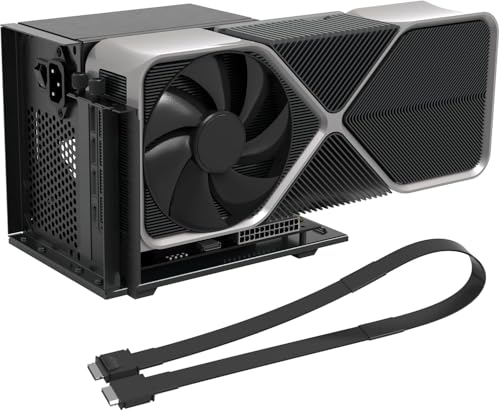
- Up to 64 Gbps over PCIe 4.0 x4
- Open frame fits varied GPU sizes
- Includes a 19.7-inch shielded cable
Best For: OCuLink-equipped mini PCs and handhelds
Best Compact Option

- Supports Thunderbolt 3/4 and USB 4
- 85W charging with DisplayPort output
- 339 g portable aluminum enclosure
Best For: Portable laptops, NUCs, and ROG Ally X setups
Best OCuLink Expansion Dock

- PCIe 4.0 x4 OCuLink connection
- Supports ATX and SFX power supplies
- Fits large NVIDIA and AMD GPUs
Best For: OCuLink-equipped mini PCs needing an external graphics dock
Best Open-Frame Thunderbolt Dock

- Thunderbolt 3/4 and USB4 connectivity
- 85W power delivery with broad GPU support
- Open-frame design with unrestricted card length
Best For: Laptops, NUCs, and handhelds with Thunderbolt or USB4
Best Portable OCuLink Dock

- 64Gbps PCIe 4.0 x4 performance
- Detachable design for easier storage
- Supports full-size RTX and Radeon cards
Best For: Laptop and mini PC users with OCuLink connectivity
Most Versatile – MINISFORUM DEG2 USB4 V2 eGPU Dock
For shoppers comparing external gpu enclosures, the MINISFORUM DEG2 stands out for its dual-interface design. It supports USB4 V2/TBT5-compatible connectivity at up to 80Gbps and OCuLink at up to 64Gbps, with a switch for docking or GPU-performance mode.
Best For: Users who want flexible connectivity, expandable storage, and compatibility with ATX or SFX power supplies.
Pros:
- Supports both USB4 V2/TBT5-compatible and OCuLink connections.
- Includes an M.2 2280 NVMe slot for project files or AI models.
- Works with standard ATX and SFX power supplies and desktop graphics cards.
- Signal re-drive circuitry is designed to improve stability during demanding workloads.
Cons:
- The highest stated bandwidth requires compatible TBT5/USB4 V2 hardware and cabling.
- A separate power supply may be needed because the dock supports universal ATX/SFX units.
The DEG2 is a strong fit for a modular desktop workflow. Its storage slot, dual-link connectivity, and single-cable charging and display support make it especially adaptable for users who move between host devices.
Best High-Power Option – Sonnet Breakaway Box 850 T5
The Sonnet Breakaway Box 850 T5 is one of the more capable external gpu enclosures for Windows 11 systems. Its 850W supply, Thunderbolt 5 connectivity, triple-wide card support, and built-in cooling are aimed at demanding graphics workloads.
Best For: Windows 11 users running high-power GPUs for rendering, editing, animation, visual effects, gaming, or AI applications.
Pros:
- 850W power supply supports demanding current and future GPU cards.
- Supports triple-wide NVIDIA GeForce RX50, 40, and 30 series and AMD Radeon RX 9000, 7000, and 6000 series cards.
- Includes a temperature-controlled fan for cooling and noise reduction.
- Built-in dock adds one Thunderbolt 5 port, three 10Gbps USB-A ports, and 5GbE.
Cons:
- Its 14.1-pound weight and large desktop dimensions reduce portability.
- The product is specified for Windows 11, so platform compatibility should be checked before purchase.
With its substantial power budget and integrated connectivity, the Breakaway Box 850 T5 is geared toward a permanent or semi-permanent workstation rather than travel. It is a sensible choice when GPU capacity matters more than compact size.
Best OCuLink Value – AOOSTAR AG01 External GPU Dock
The AOOSTAR AG01 is an open-frame option among external gpu enclosures, pairing OCuLink expansion with a built-in 800W Huntkey power supply. Its compact aluminum-profile frame has no stated graphics-card length limit, but it requires a host device with an OCuLink port.
Best For: OCuLink-equipped laptops, mini PCs, and other compatible systems using mainstream NVIDIA or AMD graphics cards.
Pros:
- Built-in 800W supply supports graphics cards rated up to 600W.
- Open design accommodates graphics cards without a stated length limit.
- OCuLink provides up to 64Gbps effective bandwidth over PCIe 4.0 x4 lanes.
- Compact 1.5kg frame is easier to place than a full enclosed chassis.
Cons:
- Only works with devices that have an OCuLink port.
- OCuLink does not support hot-plugging; the system must be powered off before connecting or disconnecting.
- The built-in power supply is for the dock and does not power the host device.
The AG01 makes the most sense for buyers who already have OCuLink hardware and want high-bandwidth GPU expansion without a closed case. Its open construction improves card flexibility, but the connection and safety procedures require extra attention.
Best Compact Kit – GOLDSOUN Thunderbolt 4 eGPU Dock
This compact GOLDSOUN model is a practical entry in the external gpu enclosures category for laptops, NUCs, and handhelds with Thunderbolt 3, Thunderbolt 4, or USB4. It includes a 240W power supply, cables, and a carrying case, while supporting PCIe 3.0 x16 operation.
Best For: Portable setups using smaller NVIDIA or AMD graphics cards up to 205mm long.
Pros:
- Compact aluminum enclosure includes a custom carrying case.
- Complete kit includes the power supply, Thunderbolt 4 cable, and 8-pin PCIe cable.
- Offers 85W and 15W PD charging connections plus a DisplayPort output.
- Supports Windows 10/11 and Linux with compatible Thunderbolt or USB4 hosts.
Cons:
- GPU dimensions are limited to 205mm in length, 150mm in height, and 55mm in width.
- The 240W power supply may not suit higher-power graphics cards.
- The listed warranty period is 30 days.
The GOLDSOUN enclosure prioritizes portability and convenience over maximum GPU capacity. Confirm both the host protocol and graphics-card dimensions before buying, especially if you plan to use a larger or power-hungry card.
Best Overall – Razer Core X V2
The Razer Core X V2 is a versatile choice among external gpu enclosures for Windows 11 laptops and devices with Thunderbolt 4, Thunderbolt 5, or USB 4. It supports desktop NVIDIA and AMD cards up to four slots wide, with PCIe 4.0 support and up to 80 Gbps bandwidth through Thunderbolt 5.
Best For: Windows users who want a roomy, upgradeable enclosure for gaming or demanding creative applications.
Pros:
- Fits PCIe desktop GPUs up to four slots wide.
- Supports Thunderbolt 5, Thunderbolt 4, and USB 4 devices.
- Provides 140W USB-C power delivery and active cooling with a 120 mm fan.
- Tool-free GPU and ATX power-supply installation uses included thumbscrews.
Cons:
- Graphics card and power supply are sold separately.
- Mac devices with M1 or later chipsets do not support eGPUs.
- Thunderbolt 5 benefits require a compatible host device.
With broad connectivity, generous GPU clearance, and strong power delivery, the Core X V2 is a practical long-term platform for compatible Windows systems. Its separate GPU and PSU requirements should be included in the total budget.
Best for OCuLink – VORZOKISPL PCIe 4.0 eGPU Dock
This OCuLink model is a specialized option among external gpu enclosures, connecting to compatible mini PCs, handhelds, or laptops through a native OCuLink port. Its PCIe 4.0 x4 interface offers up to 64 Gbps, but it is not compatible with USB-C, USB 4, or Thunderbolt.
Best For: Users with a native OCuLink port or an available M.2 NVMe or desktop PCIe slot and adapter.
Pros:
- PCIe 4.0 x4 connection supports bandwidth up to 64 Gbps.
- Open-frame design accommodates GPUs of varying sizes.
- Includes a detachable 19.7-inch shielded OCuLink cable.
- LED indicators and auto-start or forced modes aid setup monitoring.
Cons:
- Works only with OCuLink connections; USB-C, USB 4, and Thunderbolt are unsupported.
- GPU, ATX power supply, and any required adapter are not included.
- Assembly is required, and hot-plugging is not allowed.
This dock can deliver a direct, high-bandwidth connection for OCuLink-equipped systems, making it appealing for gaming, rendering, or AI workloads. Confirm your device has the correct port and plan for an ATX PSU with at least 40% extra wattage.
Best Compact Option – VIKINYEE VK-Y900
The VIKINYEE VK-Y900 is a compact external gpu enclosure for laptops, handhelds, and NUCs with Thunderbolt 3, Thunderbolt 4, or USB 4. It supports a wide range of NVIDIA and AMD cards, uses an ATX power supply, and provides 85W power delivery for compatible host devices.
Best For: Portable setups, including ROG Ally X users who want 30W Turbo Mode support through 85W pass-through charging.
Pros:
- Supports NVIDIA RTX cards up to the 50 series and AMD Radeon RX cards up to the 9000 series.
- Compatible with Thunderbolt 3, Thunderbolt 4, and USB 4 systems.
- Offers dual Thunderbolt ports with 15W and 85W power delivery plus DisplayPort.
- Compact aluminum enclosure weighs 339 g.
Cons:
- Requires a separate ATX power supply.
- Host-device compatibility and driver setup may require technical assistance.
- The listed Apple Silicon Mac use case is limited to AI deep-learning development, not gaming or 3D rendering.
The VK-Y900 combines broad GPU support with a small, portable chassis and useful pass-through charging. It is especially compelling for compatible handhelds, while buyers should verify their laptop’s Thunderbolt or USB 4 implementation before purchasing.
Best OCuLink Expansion Dock – MINISFORUM DEG1
The MINISFORUM DEG1 is a straightforward choice for users comparing external gpu enclosures built around an OCuLink connection. It supports PCIe 4.0 x4 upstream bandwidth, a PCIe x16 graphics-card slot, and either ATX or SFX power supplies. The GPU and power supply must be purchased separately.
Best For: Mini PC users who specifically need an OCuLink graphics expansion dock for large NVIDIA or AMD cards.
Pros:
- Supports compatible cards such as the RTX 4090 and AMD RX 7900 XTX.
- Accepts standard ATX and SFX power supplies.
- Compact 10.64-by-6.87-by-1.6-inch dock design.
Cons:
- Only supports OCuLink; Thunderbolt is not supported.
- OCuLink does not support hot-plugging, so the computer must be turned off before connecting or disconnecting.
- Does not include a GPU or power supply.
The DEG1 is best suited to a compatible OCuLink-equipped mini PC rather than a general-purpose laptop setup. Confirm your computer’s port and plan for a separate ATX or SFX power supply before buying.
Best Open-Frame Thunderbolt Dock – Maskedfish MK-L18
The Maskedfish MK-L18 is an open-frame option among external gpu enclosures, connecting through Thunderbolt 3, Thunderbolt 4, or USB4. It supports NVIDIA and AMD graphics cards, provides 85W power delivery, and uses a certified controller with PCIe 4.0 x16 mode and 32Gbps bandwidth.
Best For: Laptop, NUC, and handheld users who want broad Thunderbolt or USB4 compatibility, external graphics support, and device charging through one setup.
Pros:
- Works with Thunderbolt 3/4 and USB4 systems running supported Windows or Linux configurations.
- Supports NVIDIA RTX 50-series and AMD RX 7000-series graphics cards.
- 85W power delivery can support charging and ROG Ally X 30W Turbo Mode.
- Open-frame aluminum construction provides unrestricted graphics-card length and airflow.
Cons:
- Non-Thunderbolt and non-USB4 USB-C ports are not supported.
- The ATX power supply is not included.
- Its TinyGPU Apple Silicon feature is limited to AI deep-learning development, not gaming or 3D rendering.
With dual Thunderbolt ports, DisplayPort, and an open-frame layout, the MK-L18 offers a flexible desktop-style arrangement. Verify that your host has a compatible Thunderbolt or USB4 port and budget for an ATX power supply.
Best Portable OCuLink Dock – OwlTree PCIe 4.0 eGPU Dock
The OwlTree PCIe 4.0 eGPU Dock is a practical pick for external gpu enclosures when portability and a detachable OCuLink design matter. It provides a PCIe 4.0 x4 connection rated at 64Gbps, includes a flexible 50cm SFF-8611 cable, and accepts a standard ATX power supply.
Best For: Laptop and mini PC owners seeking a portable OCuLink dock with status indicators and support for full-size graphics cards.
Pros:
- PCIe 4.0 x4 interface offers 64Gbps transfer speed.
- Detachable design improves portability and storage.
- Supports graphics cards including the RTX 4090 and AMD RX 7900 XTX without stated length restrictions.
- Includes a flexible, shielded 50cm SFF-8611 cable and multi-status LED indicators.
Cons:
- Supports standard ATX power supplies only.
- The GPU and power supply are not included.
- OCuLink is not hot-pluggable; the computer must be turned off before disconnecting the cable.
The OwlTree dock emphasizes easy storage and broad graphics-card compatibility while retaining a simple ATX-powered design. It is a good match for systems with the required OCuLink connection, but it is not intended as a plug-and-play Thunderbolt enclosure.
How We Picked These External GPU Enclosures
We selected enclosures and docks that support current NVIDIA and AMD graphics cards while covering the main connection standards used by modern laptops and mini PCs. Our comparison emphasizes interface bandwidth, power capacity, physical compatibility, cooling, included cables, and practical setup requirements.
Because an eGPU’s real-world performance depends on the host port, cable, graphics card, and software, we favor products with clear specifications and useful compatibility features. OCuLink models are included for systems with an available PCIe connection, while Thunderbolt and USB4 enclosures suit more broadly compatible laptops.
Quick Comparison
| Connection type | Best suited to | Main advantage | Key limitation |
|---|---|---|---|
| Thunderbolt 5 | Newer high-performance laptops and workstations | Highest bandwidth in this group | Requires compatible host hardware and cable |
| Thunderbolt 4/USB4 | General laptop and mini PC upgrades | Broad compatibility and simple connection | Lower bandwidth than Thunderbolt 5 or OCuLink |
| OCuLink | Mini PCs and systems with PCIe expansion | Direct PCIe connectivity and low overhead | Less convenient and not universal |
| Open-frame eGPU dock | DIY builds and oversized graphics cards | Flexible card and power-supply choices | Usually lacks enclosure-style protection and cooling |
Key Buying Factors for External GPU Enclosures
Host Connection and Bandwidth
Check the exact port on the computer, not just its USB-C shape. Thunderbolt 5, Thunderbolt 4, USB4, and OCuLink offer different bandwidth and compatibility. A high-end enclosure cannot overcome a slower host interface.
Power Supply and Graphics-Card Support
Match the enclosure’s continuous wattage and auxiliary PCIe connectors to the GPU you plan to install. High-end cards may require substantial power, while an enclosure with power delivery can also charge a connected laptop.
Physical Clearance and Cooling
Verify maximum card length, height, thickness, and slot width. Four-slot cards and large coolers may require a spacious case or an open dock. Active fans, ventilation, and a replaceable power supply can improve long-term reliability.
Included Accessories and Expansion
Look for the correct Thunderbolt, USB4, or OCuLink cable, M.2 storage support, extra ports, and reliable driver or operating-system compatibility. Cable quality matters particularly at higher link speeds.
Who Should Buy Which External GPU Enclosures?
Choose a Thunderbolt 5 enclosure if you have a new compatible laptop and want the strongest bandwidth available from a conventional cable-connected case. Choose Thunderbolt 4 or USB4 for the widest selection of compatible laptops and straightforward plug-and-play use.
Choose OCuLink when maximum PCIe efficiency matters and your mini PC or laptop provides the required connector. These docks are especially attractive for desktop-style setups where portability is less important. Choose an open-frame or ATX-compatible dock if you already own a power supply, need clearance for a very large GPU, or want easier component access.
Before buying, confirm host-port support, operating-system compatibility, graphics-card dimensions, power requirements, and whether the required cable is included.