Reliable backup storage helps protect business files from hardware failure, ransomware, accidental deletion, and unexpected downtime. The right portable drive should balance speed, capacity, security, durability, and compatibility with your existing devices.
We selected 10 external SSDs and hard drives for different business needs, from fast daily backups and media-heavy workflows to affordable high-capacity archiving. Use the guide below to narrow the list based on your backup strategy and budget.
Best 10 External SSD for Business Backup Picks for 2026
Best Rugged SSD
SanDisk 2TB Extreme Portable SSD

- Up to 1,050MB/s read speeds
- IP65 protection and 3-meter drop resistance
- 256-bit AES hardware encryption
Best For: Mobile professionals needing durable, secure backups
Best High-Capacity Backup Drive

- Generous 5TB portable capacity
- Backup software with ransomware defense
- Password protection and hardware encryption
Best For: Capacity-focused routine business backups
Best Everyday Business SSD

- Up to 1,050MB/s read speeds
- Shock-resistant aluminum design
- 256-bit AES hardware encryption
Best For: Fast everyday backups across computers and mobile devices
Best Professional Performance
SanDisk Professional PRO-G40 SSD
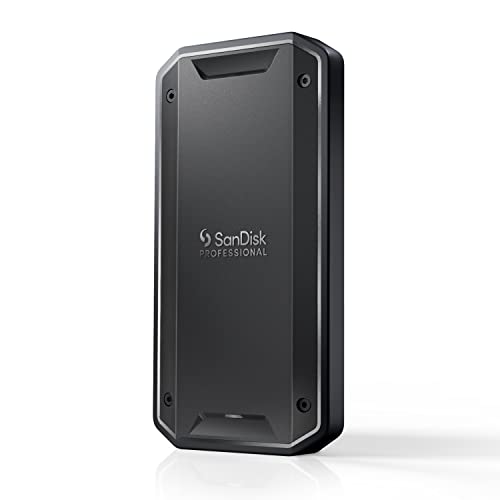
- Up to 3,000MB/s read speeds
- 4TB capacity with Thunderbolt 3 and USB-C
- IP68 and 4,000-pound crush resistance
Best For: High-volume creative and professional file backups
Best Budget Capacity
Seagate 2TB Portable Hard Drive

- 2TB capacity for business and personal files
- Plug-and-play USB 3.0 setup
- Works with Windows and Mac
Best For: Affordable, straightforward portable backups
Best High-Speed SSD

- Up to 2,000 MB/s read and write speeds
- AES 256-bit hardware encryption
- Five-year limited warranty
Best For: Fast, frequent large-file transfers
Best Backup Security Tools

- 2TB portable storage in a slim design
- Backup software with ransomware defense
- Password protection and hardware encryption
Best For: Portable backups with added security features
Fast 2TB Value
Amazon Basics Portable External SSD

- 2TB capacity with speeds up to 2000MB/s
- IP65 water and dust resistance
- Includes USB-C-to-C, USB-C-to-A cables and case
Best For: Portable business backups needing capacity and speed
Encrypted Backup Pick
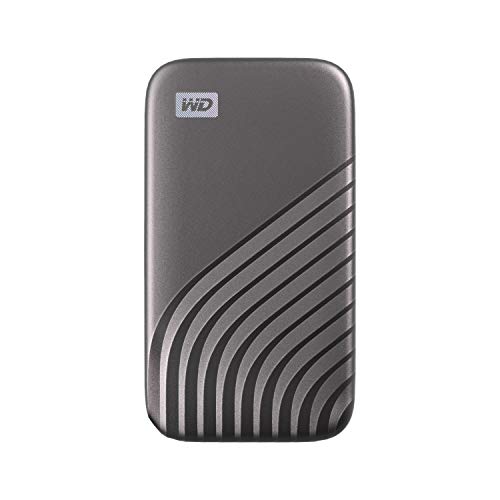
- Password-enabled 256-bit AES hardware encryption
- Up to 1050MB/s read and 1000MB/s write
- USB-C and USB-A compatibility with drop resistance
Best For: Portable backups where data protection is a priority
Most Versatile 2TB
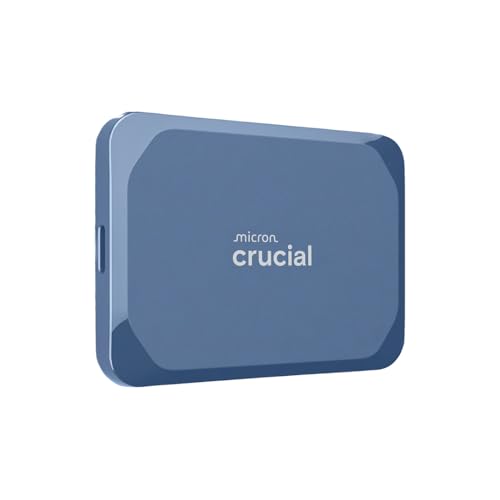
- 2TB capacity with read speeds up to 2100MB/s
- IP65 rating and drop resistance up to 9.8 feet
- Works across Windows, Mac, Android, Linux and more
Best For: Multi-platform teams needing rugged portable backups
Best Rugged SSD – SanDisk 2TB Extreme Portable SSD
The SanDisk Extreme Portable SSD is a strong external ssd for business backup when portability and protection from everyday hazards matter. It combines 2TB of capacity with read speeds up to 1,050MB/s, password protection, and 256-bit AES hardware encryption.
Best For: Mobile professionals who need a fast, compact backup drive for laptops, tablets, or desktops.
Pros:
- Fast NVMe performance with up to 1,050MB/s read and 1,000MB/s write speeds
- IP65 water and dust resistance with up to 3-meter drop protection
- Includes password protection with 256-bit AES hardware encryption
- Carabiner loop and compact portable design
Cons:
- 2TB capacity may be limiting for large business archives
- Maximum speeds depend on the host device and other factors
This is a well-rounded choice for employees who carry backup media between locations. Its rugged build and security features add practical protection, while the 5-year limited warranty supports longer-term use.
Best High-Capacity Backup Drive – WD 5TB My Passport
The WD My Passport is a practical external ssd for business backup shoppers who prioritize capacity and included backup tools. Its 5TB portable hard drive provides more room for business files than the SSD options here, along with password protection and hardware encryption.
Best For: Small businesses and individuals who need substantial portable storage for routine file backups.
Pros:
- Large 5TB capacity for business documents and media
- Included device management and backup software with ransomware defense
- Password protection and hardware encryption help secure files
- USB 2.0 and USB 3.0 compatibility with PC, Mac after reformatting, and Linux platforms
Cons:
- Hard-drive storage is less suited to speed-focused workflows than an SSD
- USB connectivity and listed data rate are more modest than the SSD alternatives
- Included cable is USB-A, which may require an adapter for some newer devices
The My Passport makes the most sense when backup capacity matters more than fast project transfers. Its included software and security features make it a useful value-oriented option for scheduled or occasional backups.
Best Everyday Business SSD – Samsung T7 Portable SSD
The Samsung T7 is a compact external ssd for business backup that balances quick transfers with broad device compatibility. Its 2TB capacity, USB 3.2 Gen 2 interface, and read speeds up to 1,050MB/s suit everyday file saving, portable work files, and backup tasks.
Best For: Office users, creators, and remote workers who want a small, fast backup drive for computers and mobile devices.
Pros:
- Up to 1,050MB/s read and 1,000MB/s write speeds
- Compact aluminum unibody with shock resistance and fall protection up to 6 feet
- 256-bit AES hardware encryption
- Compatible with PCs, Macs, smartphones, tablets, and gaming consoles
Cons:
- 2TB capacity may not suit extensive shared archives
- Supplied details identify personal use rather than business-specific backup software
The T7 is an easy general-purpose pick for fast, portable backups. It lacks the higher capacity and rugged ratings of some alternatives, but its compact design and broad compatibility make it convenient for distributed teams.
Best Professional Performance – SanDisk Professional PRO-G40 SSD
The SanDisk Professional PRO-G40 is a premium external ssd for business backup and large creative workloads. With 4TB of capacity, Thunderbolt 3 connectivity, and read speeds up to 3,000MB/s, it is designed for teams moving substantial files quickly.
Best For: Creative professionals and businesses with Thunderbolt-equipped Macs or PCs that need high-speed, high-capacity storage.
Pros:
- Very fast performance of up to 3,000MB/s read and 2,500MB/s write over Thunderbolt 3
- Dual-mode Thunderbolt 3 and USB-C compatibility
- 4TB capacity for large working files and backups
- IP68 dust and water resistance, 4,000-pound crush resistance, and 3-meter drop resistance
Cons:
- Thunderbolt performance requires a compatible Thunderbolt 3 host
- Listed drive format is Mac-ready APFS, so PC users may need to reformat
- Premium performance may be unnecessary for basic document backups
This is the performance-first option in the group. Its rugged enclosure and 5-year limited warranty add confidence for demanding workflows, while USB-C fallback preserves broader compatibility when Thunderbolt is unavailable.
Best Budget Capacity – Seagate 2TB Portable Hard Drive
If you need an external ssd for business backup but prioritize affordable capacity, the Seagate Portable 2TB drive offers straightforward USB storage for documents, media, and other working files. It supports Windows and Mac computers, and setup is as simple as connecting the included USB 3.0 cable and dragging files across.
Best For: Businesses and individuals seeking simple, portable 2TB backup storage for Windows or Mac.
Pros:
- Provides 2TB of portable storage for business or personal files.
- Works with Windows and Mac computers with no software installation required.
- Includes a USB 3.0 cable and supports plug-and-play setup.
Cons:
- Uses a mechanical hard disk rather than solid-state storage.
- Its listed read speed is up to 120 MB/s, so it is not the fastest option for large transfers.
The Seagate Portable is a practical capacity-first choice for routine file backups. Choose it when low-friction setup and 2TB of space matter more than SSD-level speed.
Best High-Speed SSD – Samsung T9 Portable SSD 1TB
For teams moving large project files, the Samsung T9 is a strong external ssd for business backup where transfer speed matters. Its USB 3.2 Gen 2×2 connection supports advertised read and write speeds of up to 2,000 MB/s, while Dynamic Thermal Guard is designed to manage heat during heavier use.
Best For: Businesses, creators, and professionals who regularly transfer or work with large files.
Pros:
- Advertised read and write speeds reach up to 2,000 MB/s.
- Includes AES 256-bit hardware encryption and Magician Software support.
- Compact solid-state design offers durability rated for drops up to 9.8 feet.
- Backed by a five-year limited warranty.
Cons:
- Its 1TB capacity is smaller than the 2TB hard-drive options in this roundup.
- Achieving maximum speed requires compatible USB hardware.
The T9 is the performance-focused option here, combining fast transfers, encryption, thermal management, and a long warranty. It is especially compelling when backup workflows involve frequent large-file movement rather than simple archival storage.
Best Backup Security Tools – WD My Passport 2TB
The WD My Passport is a practical external ssd for business backup shoppers who want storage paired with management and security features. This 2TB portable hard drive includes device-management and backup software with ransomware defense, plus password protection and hardware encryption for helping secure important files.
Best For: Small businesses and individuals wanting 2TB of portable backup storage with built-in security features.
Pros:
- Offers 2TB of portable storage in a slim design.
- Includes backup and device-management software with defense against ransomware.
- Supports password protection and hardware encryption.
- Comes with a three-year limited warranty.
Cons:
- Uses a mechanical hard disk rather than an SSD.
- Its USB 2.0/3.0 compatibility is less performance-focused than the Samsung T9.
My Passport stands out for adding security and backup-management tools to a familiar portable-drive format. It is a sensible fit when protecting files and simplifying backup administration are higher priorities than maximum transfer speed.
Fast 2TB Value – Amazon Basics Portable External SSD
For businesses looking for an external ssd for business backup, this 2TB Amazon Basics model combines high stated transfer speeds with a compact, travel-friendly design. Its USB 3.2 Gen 2×2 connection, included USB-C cables, and IP65 rating make it practical for moving and storing working files.
Best For: Businesses that need spacious, fast portable backup storage with protection from dust and water.
Pros:
- 2TB capacity and stated read/write speeds of up to 2000MB/s.
- IP65 water- and dust-resistant design with thermal protection intended to keep the SSD below 50°C during heavy use.
- Includes USB-C-to-C and USB-C-to-A cables plus a storage case.
- Compact metal casing with a scratch-resistant polymer bottom.
Cons:
- Actual speeds vary by device, file size, and operating conditions.
- USB 3.2 Gen 2×2 performance depends on compatible host hardware.
This is a strong capacity-and-speed choice for routine business file backups, especially when the drive may travel between newer USB-C systems and older USB-A computers.
Encrypted Backup Pick – WD My Passport SSD
This Western Digital My Passport SSD is a sensible external ssd for business backup when data protection and broad computer compatibility matter. It provides 1TB of portable NVMe storage, password-enabled 256-bit AES hardware encryption, and support for USB-C and older USB-A systems.
Best For: Small business users who prioritize password-protected backups, portability, and cross-compatible connections.
Pros:
- Password-enabled 256-bit AES hardware encryption adds a layer of backup protection.
- NVMe performance reaches up to 1050MB/s read and 1000MB/s write speeds.
- Shock- and vibration-resistant design with drop resistance up to 6.5 feet.
- Works with USB 3.2 Gen 2 and USB-C, with USB-A support for older systems.
Cons:
- 1TB capacity is lower than the 2TB alternatives in this roundup.
- Other operating systems may require reformatting.
With encryption, drop protection, and a five-year limited warranty, this model is well suited to safeguarding business documents on the go, provided 1TB meets your backup requirements.
Most Versatile 2TB – Crucial X10 Portable SSD
The Crucial X10 is a flexible external ssd for business backup, offering 2TB of storage, stated read speeds up to 2100MB/s, and compatibility across Windows, Mac, Android, Linux, and several gaming platforms. Its rugged enclosure is designed for frequent travel and everyday file handling.
Best For: Businesses and creators that need high-capacity backups across multiple operating systems and devices.
Pros:
- 2TB capacity with read speeds up to 2100MB/s.
- IP65 dust and water resistance plus drop resistance up to 9.8 feet.
- Broad compatibility with Windows, Mac, iPad Pro, Chromebooks, Android, Linux, PS4, PS5, and Xbox.
- Includes three months of Mylio Photos plus and Acronis True Image after purchase and registration.
Cons:
- Maximum performance depends on the connected device and USB hardware.
- Software bonuses require purchase and registration.
- The supplied details list a USB-C-to-C cable; USB-A connections may require suitable equipment.
The X10 stands out for teams managing files across varied platforms, while its capacity and rugged build make it a practical choice for mobile backup workflows.
How We Picked the Best External SSD for Business Backup
We compared these drives by looking at the factors that matter most in business backup: storage capacity, rated transfer speeds, connection standards, portability, physical protection, security features, operating-system compatibility, and overall value. The lineup includes solid-state drives for speed and durability as well as traditional portable hard drives for lower-cost, high-capacity storage.
Advertised speeds are maximum theoretical figures and depend on the computer, cable, port, file sizes, and workload. For dependable backups, also consider whether the drive works with your backup software and whether your business has a second, off-site copy.
Quick Comparison
| Best For | Recommended Type | Why It Stands Out |
|---|---|---|
| Fast daily backups | Portable SSD | Higher transfer speeds and better resistance to movement |
| Large archives on a budget | Portable hard drive | More capacity for less money |
| Video and large project files | High-speed SSD | Faster transfers reduce waiting during backup and restoration |
| Travel and field work | Rugged portable SSD | Compact designs with dust and water resistance |
| Protected business data | Security-enabled drive | Password protection or hardware encryption support |
Key Buying Factors for an External SSD for Business Backup
Capacity and Backup Rotation
Choose enough space for a full system image or complete working-data backup, plus room for version history. A drive should not be filled to its limit. Many small businesses will find 2TB a practical starting point, while media teams and long-term archives may need 4TB or more. For stronger protection, rotate two drives and keep one disconnected or off-site.
Speed and Connectivity
USB 3.2 Gen 2 SSDs can offer fast everyday transfers, while USB 3.2 Gen 2×2 and Thunderbolt-compatible models can be substantially faster when both the drive and computer support those standards. Check the included cable and your computer’s ports before paying for premium speed.
Security and Durability
Password protection, hardware encryption, and ransomware-aware backup software can add valuable safeguards, but they do not replace offline or cloud copies. If the drive travels between offices or job sites, prioritize shock-resistant SSD construction and IP-rated dust or water protection.
Compatibility and Maintenance
Confirm support for Windows, macOS, Android, or other systems used by your team. Format the drive appropriately, label backup dates, test restoration regularly, and replace cables that become unreliable.
Who Should Buy Which External SSD for Business Backup?
Choose a fast portable SSD for frequent backups, large active files, or employees who work away from the office. Pick a rugged SSD for travel, photography, production, and field service. A high-speed model makes the most sense when your computers support its faster interface. For inexpensive bulk storage and less frequent backups, a portable hard drive offers better capacity per dollar. Businesses handling confidential information should favor drives with password protection or encryption support and pair them with a documented, multi-copy backup plan.