Handheld gaming PCs deliver impressive portable performance, but demanding games can still benefit from a desktop-class graphics card. The right external GPU enclosure can turn a compatible handheld into a more capable gaming setup at home.
This roundup compares 10 options across OCuLink, USB4, and Thunderbolt connectivity, with attention to bandwidth, power delivery, GPU compatibility, and setup requirements.
Best 10 External GPU Enclosures for Handheld Gaming PCs Picks for 2026
Handheld Charging Pick

- 85W PD pass-through
- Thunderbolt 3/4 and USB4 support
- ATX PSU required separately
Best For: ROG Ally X users prioritizing 30W Turbo Mode support
Portable Complete-Kit Pick

- 240W PSU and travel case included
- 85W PD and DisplayPort
- 205 mm maximum GPU length
Best For: Travel-focused handheld setups using a compact graphics card
Premium Expansion Pick
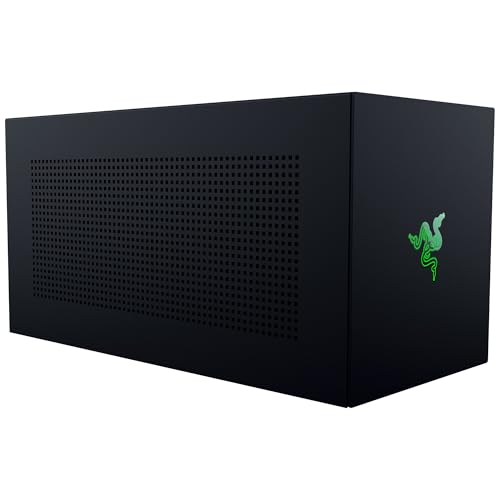
- Supports GPUs up to four slots wide
- Thunderbolt 5 and USB4 compatibility
- 140W USB-C power delivery
Best For: Upgrade-minded users with space for a full-size enclosure
Best OCuLink ATX Dock
High-Bandwidth Open-Frame eGPU Enclosure

- PCIe 4.0 x4 bandwidth up to 64Gbps
- Supports NVIDIA, AMD, and Intel GPUs
- Requires a separate ATX power supply
Best For: Building a flexible OCuLink GPU setup for a handheld or mini PC
Best USB4 and Thunderbolt Dock
Versatile eGPU Station for Handhelds
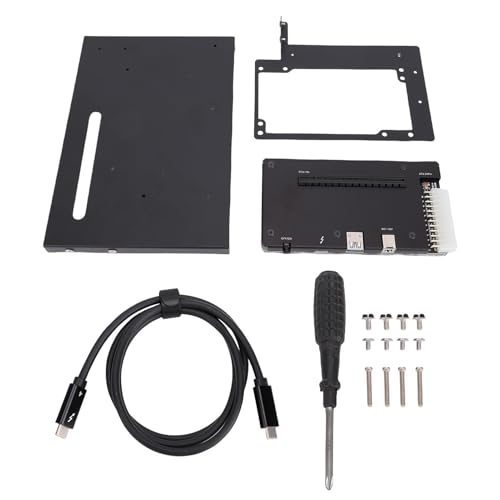
- Works with USB4 and Thunderbolt 3/4
- Offers a PCIe x16 expansion slot
- Aluminum-alloy structure with brackets
Best For: Handhelds and laptops needing flexible USB4 or Thunderbolt expansion
Best Portable OCuLink Dock
Detachable PCIe 4.0 eGPU Setup
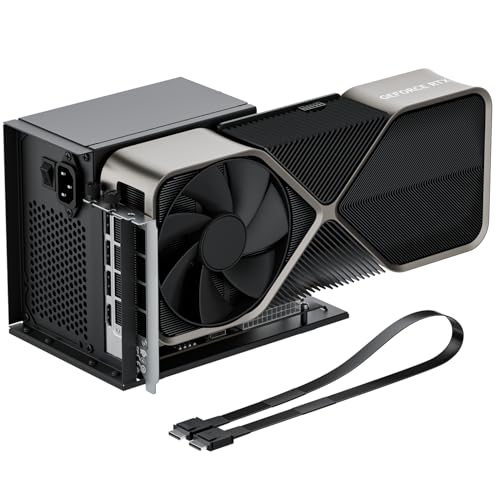
- PCIe 4.0 x4 bandwidth up to 64Gbps
- Supports large GPUs such as RTX 4090
- Detachable design aids storage and portability
Best For: Portable OCuLink builds using a large GPU and ATX power supply
Best Thunderbolt/USB4 Pick

- USB4/Thunderbolt 3/4 support
- 85W PD for compatible handheld charging
- NVIDIA and AMD GPU compatibility
Best For: ROG Ally X and MSI Claw 8 owners wanting a versatile USB4 eGPU dock
Best OCuLink Dock for High-End GPUs

- PCIe 4.0 x4 OCuLink uplink
- Supports ATX and SFX power supplies
- Designed for RTX 4090-class GPUs
Best For: OCuLink-equipped systems using powerful desktop graphics cards
Best Portable OCuLink Design

- 64Gbps PCIe 4.0 x4 interface
- Detachable design aids storage
- Supports varied GPU sizes
Best For: OCuLink users seeking a portable dock with broad graphics-card fit
High-Power OCuLink Pick – AOOSTAR AG02
For handheld gaming PCs with OCuLink or compatible USB4 support, the AOOSTAR AG02 is one of the most power-focused external gpu enclosures for handheld gaming pcs. Its built-in 800W power supply and PCIe 4.0 x4 OCuLink connection are designed for adding a desktop graphics card, though the GPU itself is not included.
Best For: Users who want high GPU power capacity and have a Windows 11 handheld with confirmed OCuLink or compatible USB4 eGPU support.
Pros:
- Built-in 800W server-grade PSU with up to 600W GPU power output.
- Supports OCuLink PCIe 4.0 x4 and USB4 connections.
- Includes a full PCIe x16 graphics card slot and three 8-pin GPU power connectors.
- Compact 1.5 kg dock with no stated graphics-card length limit.
Cons:
- Graphics card is sold separately.
- Standard OCuLink does not support hot-plugging; the host should be powered off before connection changes.
- Compatibility varies by device, BIOS, firmware, GPU, cable, and drivers, with several listed device and GPU exclusions.
The AG02 stands out when maximum power flexibility matters, but it requires careful compatibility checking and a deliberate setup. It is a stronger fit for technically confident Windows handheld owners than for plug-and-play buyers.
Handheld Charging Pick – VK-Y900 Thunderbolt eGPU
The VK-Y900 is a Thunderbolt 3/4 and USB4 option among external gpu enclosures for handheld gaming pcs, with a particular emphasis on power delivery. Its 85W PD pass-through can help support ROG Ally X 30W Turbo Mode, while the enclosure uses an ATX power supply that must be provided separately.
Best For: ROG Ally X owners and other compatible handheld users who value high-wattage charging alongside an external NVIDIA or AMD GPU.
Pros:
- Supports Thunderbolt 3/4 and USB4 host connections.
- 85W PD pass-through is designed to support ROG Ally X 30W Turbo Mode.
- Broad stated support for NVIDIA RTX and AMD Radeon cards, including newer series.
- Uses an Intel JHL7440/7450 controller for the connection.
Cons:
- ATX power supply and graphics card are not supplied.
- Compatibility and driver behavior can vary by handheld and GPU.
- Its Apple Silicon Mac AI feature is limited to deep-learning development, not gaming or 3D rendering.
The VK-Y900 is most compelling when charging performance is as important as graphics expansion. Confirm your handheld’s USB4 or Thunderbolt support and plan for the additional cost and space of an ATX power supply.
Portable Complete-Kit Pick – GOLDSOUN Compact eGPU
For shoppers seeking portable external gpu enclosures for handheld gaming pcs, the GOLDSOUN enclosure offers a compact aluminum chassis, carrying case, 240W power supply, and Thunderbolt 4 cable in one kit. It supports compatible NVIDIA and AMD cards within its 205 mm size limit, but the graphics card is not included.
Best For: Handheld gamers who want a travel-friendly Thunderbolt or USB4 enclosure with the basic power and cabling included.
Pros:
- Includes a 240W power supply, Thunderbolt 4 cable, 8-pin PCIe cable, and carrying case.
- Supports Thunderbolt 3/4 and USB4 handhelds, laptops, and NUCs.
- Provides 85W and 15W PD ports plus a DisplayPort output.
- Lightweight anodized aluminum design is suited to portable use.
Cons:
- GPU support is limited to cards no longer than 205 mm, 150 mm high, and 55 mm wide.
- The graphics card is not included.
- Listed warranty coverage is only 30 days.
This is a practical starter kit for a small, compatible GPU and a handheld setup that supports Thunderbolt or USB4. Its compact dimensions and included accessories are useful for travel, but card-size limits make checking measurements essential.
Premium Expansion Pick – Razer Core X V2
The Razer Core X V2 is a large, upgrade-friendly choice among external gpu enclosures for handheld gaming pcs. It supports Thunderbolt 4/5 and USB4 devices, PCIe 4.0 graphics cards up to four slots wide, and 140W USB-C power delivery, but both the GPU and power supply are sold separately.
Best For: Owners of compatible USB4 or Thunderbolt handhelds who want a premium enclosure with broad, tool-free GPU and ATX PSU upgrade support.
Pros:
- Supports desktop NVIDIA and AMD graphics cards up to four slots wide.
- Thunderbolt 5 connectivity offers stated bandwidth up to 80 Gbps.
- Provides 140W power delivery through USB-C.
- Includes active cooling with a 120 mm fan and a two-year manufacturer warranty.
Cons:
- Graphics card and power supply are sold separately.
- At 5.06 kg, it is substantially less portable than compact enclosure designs.
- Apple devices with M1 or later chipsets do not support eGPUs.
The Core X V2 is a flexible long-term platform rather than an all-in-one handheld accessory. Its roomy four-slot support and modular PSU design are valuable for upgrades, provided your handheld supports USB4 or Thunderbolt and you have space for the enclosure.
Best OCuLink ATX Dock – High-Bandwidth Open-Frame eGPU Enclosure
For handheld gaming PCs or mini PCs with an OCuLink connection, this open-frame dock is a flexible option among external gpu enclosures for handheld gaming pcs. Its PCIe 4.0 x4 interface provides up to 64Gbps bandwidth, while the open design accepts NVIDIA, AMD, and Intel graphics cards without a stated length limit. You supply the GPU and a standard ATX power supply separately.
Best For: Handheld or mini PC owners who want to reuse a full-size GPU with an ATX power supply.
Pros:
- PCIe 4.0 x4 OCuLink connection rated at 64Gbps.
- Supports NVIDIA, AMD, and Intel graphics cards with no listed length restriction.
- Includes a 50cm, EMI-shielded OCuLink cable and user manual.
Cons:
- GPU and standard ATX power supply are not included.
- OCuLink does not support hot-plugging; the system must be powered off before connection changes.
- Graphics drivers should be installed before first use.
This is a straightforward, high-bandwidth choice when you already have a compatible GPU and ATX PSU. Its open-frame construction prioritizes component flexibility over an enclosed, travel-ready design.
Best USB4 and Thunderbolt Dock – Versatile eGPU Station for Handhelds
This Serounder dock is aimed at users comparing external gpu enclosures for handheld gaming pcs that connect over USB4, Thunderbolt 3, or Thunderbolt 4. It provides a PCIe x16 slot for a desktop graphics card and can also accommodate compatible PCIe storage, sound, and network cards. Its aluminum-alloy structure and included one-meter data cable make it suitable for flexible desktop setups.
Best For: Handheld, laptop, and small-host users who need broad USB4 or Thunderbolt compatibility and a PCIe expansion slot.
Pros:
- Connects through USB4, Thunderbolt 3, or Thunderbolt 4 interfaces.
- PCIe x16 slot supports desktop graphics cards and listed expansion cards.
- Aluminum-alloy structure with panel brackets for added support.
Cons:
- The notes do not specify a bundled GPU or standard ATX power supply.
- Not compatible with DMA acquisition cards.
- Manufacturer warranty is listed as 90 days.
Choose this model when connection flexibility matters more than a dedicated OCuLink interface. It can also serve lower-power PCIe devices in standalone mode when powered by a DC adapter or PD decoy cable.
Best Portable OCuLink Dock – Detachable PCIe 4.0 eGPU Setup
The OwlTree dock is a practical candidate for external gpu enclosures for handheld gaming pcs when you want PCIe 4.0 x4 OCuLink performance and easier storage. Its detachable design improves portability, and the included 50cm flat cable uses shielding and EMI-control materials. It supports large cards such as the RTX 4090 and RX 7900 XTX, but the GPU and ATX power supply must be provided separately.
Best For: Users seeking a portable OCuLink dock for large graphics cards and a standard ATX power supply.
Pros:
- PCIe 4.0 x4 transfer speed rated at 64Gbps.
- Supports large GPUs including listed RTX 4090 and RX 7900 XTX examples.
- Detachable design, shielded flat cable, LED status indicators, and gold-plated contacts.
Cons:
- GPU and power supply are not included.
- Supports standard ATX power supplies only.
- OCuLink is not hot-pluggable; the computer must be turned off before disconnecting.
Its detachable construction and flexible cable make this a compelling option for a setup that needs occasional storage or transport. Just plan for a separate ATX PSU and a full shutdown whenever you connect or remove the OCuLink cable.
Best Thunderbolt/USB4 Pick – ANQ-L336 Mini eGPU Enclosure
For handheld gaming PCs with USB4 or Thunderbolt 3/4, the ANQ-L336 is a flexible choice among external gpu enclosures for handheld gaming pcs. Its certified JHL7440 controller, PCIe 4.0 x4 connectivity, and 85W power delivery are designed for gaming and demanding creative workloads, while the compact dock also adds useful hub functionality.
Best For: ROG Ally X and MSI Claw 8 users who want USB4/Thunderbolt connectivity, broad GPU support, and charging for 30W Turbo Mode.
Pros:
- Supports Thunderbolt 3/4 and USB4 with PCIe 4.0 x4 connectivity.
- Compatible with NVIDIA and AMD graphics cards, including AMD 9000 series support.
- 85W PD can enable ROG Ally X 30W Turbo Mode through the connection.
- Includes two Thunderbolt 4 ports and a 10Gbps USB-A port for hub use.
Cons:
- Power supply is not included.
- Requires a compatible USB4 or Thunderbolt-equipped host device.
- NVIDIA RTX 50-series support is limited.
The ANQ-L336 stands out when convenience matters as much as graphics expansion. It offers more connectivity and charging flexibility than a basic GPU dock, though buyers must budget for a compatible PSU and confirm GPU support before purchasing.
Best OCuLink Dock for High-End GPUs – MINISFORUM DEG1 eGPU Dock
The MINISFORUM DEG1 is a straightforward OCuLink option for handheld gaming PCs or mini PCs equipped with that interface. It uses a PCIe 4.0 x4 uplink and PCIe x16 downlink, supports standard ATX or SFX power supplies, and is intended for powerful cards such as the RTX 4090 and RX 7900 XTX.
Best For: OCuLink-equipped systems paired with a high-end desktop GPU and an ATX or SFX power supply.
Pros:
- PCIe 4.0 x4 OCuLink connection is designed for high-performance external graphics.
- Supports ATX and SFX standard power supplies.
- Compatible with demanding GPUs including RTX 4090 and AMD RX 7900 XTX.
Cons:
- Supports OCuLink only and does not support Thunderbolt.
- OCuLink is not hot-pluggable; the system must be powered off first.
- GPU and power supply are not included.
The DEG1 is best viewed as a performance-focused dock rather than an all-in-one enclosure. Its OCuLink connection and flexible PSU support are appealing for compatible handheld setups, but installation is less convenient than USB4 because shutdowns are required for connection changes.
Best Portable OCuLink Design – OwlTree PCIe 4.0 eGPU Dock
The OwlTree PCIe 4.0 x4 dock is a practical pick among external gpu enclosures for handheld gaming pcs when portability and a flexible GPU fit are priorities. Its detachable ends simplify storage, while the included shielded OCuLink cable, status LEDs, and ATX PSU mounting add useful setup and monitoring features.
Best For: Laptop and mini PC users with OCuLink who want a portable dock compatible with full-size external graphics cards.
Pros:
- PCIe 4.0 x4 transfer interface rated at 64Gbps.
- Detachable design improves portability and storage.
- Supports graphics cards of various sizes, including RTX 4090 and RX 7900 XTX.
- Includes a flexible, shielded 50cm OCuLink cable and multi-status LED indicators.
Cons:
- Supports standard ATX power supplies only.
- GPU and power supply are not included.
- OCuLink is not hot-pluggable and requires shutdown before disconnecting.
This dock offers a useful balance of portability and desktop-GPU compatibility. It is a strong fit for buyers who already have an ATX power supply and need a compact OCuLink setup, but its single-PSU format is less flexible than docks that also accept SFX units.
How We Picked the Best External GPU Enclosures for Handheld Gaming PCs
We focused on enclosure and dock designs that can pair with compatible handheld gaming PCs, including systems with USB4, Thunderbolt, or OCuLink ports. The selection includes complete enclosures with built-in power supplies as well as open eGPU docks that require a separate ATX power supply. We also considered advertised interface bandwidth, graphics-card support, operating-system compatibility, physical clearance, and whether the design is practical for desk-based gaming.
Specifications can vary by handheld, cable, GPU, and driver support. Confirm your device’s port capabilities before buying, particularly because a USB-C connector does not automatically guarantee USB4 or Thunderbolt eGPU support.
Quick Comparison
| Connection | Main advantage | Typical trade-off |
|---|---|---|
| OCuLink | Lower overhead and strong PCIe bandwidth | Requires a compatible OCuLink port and usually offers limited extra connectivity |
| USB4 | Broad compatibility and convenient single-cable setups | Performance depends heavily on the host port and implementation |
| Thunderbolt 3/4/5 | Established laptop and handheld compatibility | Bandwidth and latency may limit high-end GPU performance |
Key Buying Factors for External GPU Enclosures for Handheld Gaming PCs
Connection and Bandwidth
OCuLink PCIe 4.0 x4 docks can provide a direct, high-bandwidth connection and are often attractive for maximum gaming performance. USB4 and Thunderbolt enclosures are more flexible, but their real-world results depend on the handheld’s controller, firmware, cable, and drivers.
Power Supply and GPU Support
Check the enclosure’s wattage, connectors, and recommended graphics-card limits. High-end cards may need substantial continuous power and multiple PCIe power leads. Open docks using an ATX 24-pin interface can be flexible, but they add the cost and bulk of a separate power supply.
Size, Cooling, and Clearance
Verify supported card length, height, and slot width before ordering. A compact dock may expose the GPU for easy access but provide less protection, while a closed enclosure is neater and safer for a permanent desk setup. Adequate ventilation matters during sustained gaming.
Portability and Extras
Some models prioritize a small footprint, while others add USB ports, power delivery, or a built-in PSU. Decide whether you need a travel-friendly dock or a complete desktop-style enclosure. Also budget for a suitable data cable if one is not included.
Who Should Buy Which External GPU Enclosures for Handheld Gaming PCs?
Choose an OCuLink dock if your handheld has a dedicated OCuLink port and you want the best chance of maximizing GPU performance. These are especially suitable for a fixed gaming desk.
Choose a USB4 or Thunderbolt enclosure if you want broader compatibility, simpler cabling, or a more finished enclosure design. They are a practical choice for handhelds that lack OCuLink but support a capable USB4 or Thunderbolt connection.
Choose an open ATX-powered dock if you already own a power supply and want flexible GPU upgrades. For a cleaner, safer, and easier installation, select a model with an integrated PSU and sufficient clearance for your graphics card.