Adding a desktop graphics card to a laptop, mini PC, or compact workstation can deliver a major graphics upgrade without replacing the entire system. The best external GPU enclosure matches your computer’s connection, your card’s physical dimensions, and its power requirements.
We’ve gathered 10 options ranging from polished Thunderbolt enclosures to flexible USB4, OCuLink, and PCIe dock designs. Use the guide below to narrow the choices by performance, portability, expandability, and ease of installation.
Best 10 External GPU Enclosures for Full Size Graphics Cards Picks for 2026
Premium Thunderbolt 5 Pick

- Fits GPUs up to four slots wide
- Up to 80 Gbps Thunderbolt 5
- 140W USB-C power delivery
Best For: Windows 11 and USB 4 users seeking a flexible high-end eGPU enclosure
GPU Stability Accessory
GSCOLER Dual Mode Support Bracket
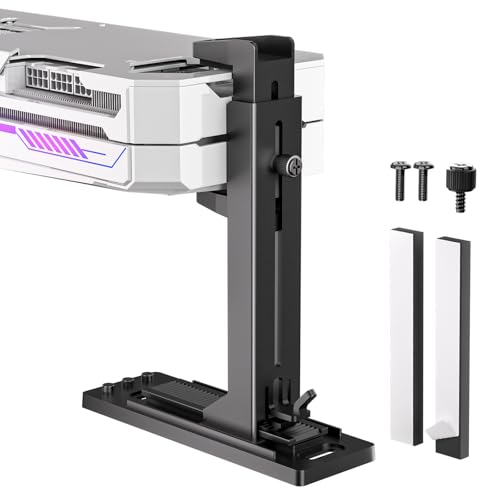
- 35–120 mm adjustable support range
- Vertical or horizontal installation
- Screw or 3M pad mounting options
Best For: Reducing GPU sag in compatible custom builds and chassis
Established Thunderbolt 3 Option
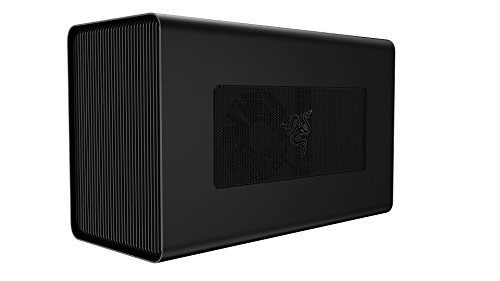
- Supports GPUs up to three slots wide
- Built-in 650W ATX power supply
- 100W Thunderbolt 3 laptop charging
Best For: Thunderbolt 3 Windows laptops and supported AMD-equipped Macs
Open NVMe Dock Choice

- Up to 128 Gbps PCIe 5.0 x4
- Supports full-size GPUs without length limits
- Includes a 50 cm shielded riser cable
Best For: Hands-on users expanding an NVMe-equipped Mini PC, NUC, or laptop
Best All-in-One Pick

- Integrated RX 7600M XT graphics and 240W PSU
- USB4 80Gbps and OCuLink connectivity
- Compact design with 65W laptop charging
Best For: Portable plug-and-play graphics expansion
Best Flexible Dock
AOOSTAR EG01 OCuLink eGPU Dock

- Supports ATX and SFX power supplies
- Compatible with GPUs up to 350W
- Open aluminum dock with 64Gbps OCuLink
Best For: Existing graphics cards and customizable power setups
Best Feature-Rich Upgrade
MINISFORUM DEG2 USB4 V2 eGPU Dock

- Supports desktop GPUs with ATX/SFX power supplies
- USB4 V2/TBT5-compatible and OCuLink modes
- Adds an M.2 2280 NVMe storage slot
Best For: Modular graphics, storage, and AI workloads
Best High-Bandwidth M.2 Option
OwlTree PCIe 5.0 eGPU Dock, 50cm

- PCIe 5.0 x4 bandwidth up to 128Gbps
- Supports full-size RTX 50 and RX 90xx cards
- 50cm flexible NVMe-to-PCIe cable
Best For: NVMe-equipped systems needing extra cable reach
Best OCuLink Pick
OwlTree PCIe 4.0 eGPU Dock for Full-Size GPUs

- PCIe 4.0 x4 bandwidth up to 64Gbps
- Supports large cards including RTX 4090
- Includes flexible 50cm OCuLink cable
Best For: OCuLink-equipped laptops and mini PCs
Best Compact M.2 Setup
OwlTree PCIe 5.0 eGPU Dock, 30cm

- PCIe 5.0 x4 bandwidth up to 128Gbps
- Supports full-size RTX 50 and RX 90xx cards
- Shorter 30cm cable for compact routing
Best For: NVMe systems with closely positioned components
Premium Thunderbolt 5 Pick – Razer Core X V2
The Razer Core X V2 is a strong choice among external gpu enclosures for full size graphics cards when you want broad desktop GPU compatibility and modern connectivity. It supports NVIDIA and AMD cards up to four slots wide, PCIe 4.0, Thunderbolt 5, Thunderbolt 4, and compatible USB 4 devices. The GPU and ATX power supply must be purchased separately.
Best For: Windows 11 laptop and USB 4 handheld users building a high-performance, upgradeable eGPU setup.
Pros:
- Fits PCIe desktop graphics cards up to four slots wide.
- Thunderbolt 5 bandwidth reaches up to 80 Gbps.
- Supports modular GPU and ATX PSU swaps with tool-free installation.
- Includes a 120 mm fan and provides up to 140W USB-C power delivery.
Cons:
- Graphics card and power supply are not included.
- Mac devices with M1 or later chipsets do not support eGPUs.
- Compatibility depends on a laptop or device with Thunderbolt 4, Thunderbolt 5, or USB 4 support.
With its four-slot clearance and active cooling, the Core X V2 is well suited to demanding desktop GPUs. Its separate PSU requirement adds to the setup cost, but also makes future upgrades more flexible.
GPU Stability Accessory – GSCOLER Dual Mode Support Bracket
The GSCOLER support bracket is not an enclosure, but it can complement external gpu enclosures for full size graphics cards by helping stabilize a heavy card in a compatible chassis or build. Its adjustable 35–120 mm range, anti-static sponge pads, and vertical or horizontal mounting options are designed to reduce GPU sag.
Best For: Builders who need a lightweight GPU brace for horizontal or vertical card installations.
Pros:
- Adjusts from 35 to 120 mm to fit many graphics cards.
- Supports both vertical and horizontal installation.
- Uses screw mounting or a tool-free 3M pad option.
- ABS construction and sponge pads help reduce PCIe slot strain and contact risks.
Cons:
- It is a support bracket, not a powered GPU enclosure.
- Compatibility depends on available chassis mounting space.
- The product notes specify long-term use up to 80°C for the ABS material.
This is a practical add-on for a large graphics card that needs extra support, particularly in a custom or open-style setup. It does not provide power, connectivity, or enclosure protection by itself.
Established Thunderbolt 3 Option – Razer Core X
The original Razer Core X remains a straightforward option among external gpu enclosures for full size graphics cards if your laptop uses Thunderbolt 3. Its aluminum enclosure accommodates full-size cards up to three slots wide and includes a 650W ATX power supply with 100W laptop charging. The graphics card is sold separately.
Best For: Thunderbolt 3 Windows laptops and compatible macOS systems using supported AMD graphics cards.
Pros:
- Supports full-size PCIe graphics cards up to three slots wide.
- Includes a built-in 650W ATX power supply.
- Provides up to 100W laptop charging through Thunderbolt 3.
- Works with compatible NVIDIA or AMD cards on Windows.
Cons:
- Limited to Thunderbolt 3 connectivity.
- macOS support is limited to compatible AMD graphics cards; NVIDIA cards are not supported.
- Graphics card is not included.
The Core X offers the convenience of an integrated high-wattage PSU and useful laptop charging. It is best considered for existing Thunderbolt 3 systems rather than newer Thunderbolt 5 or USB 4 devices.
Open NVMe Dock Choice – RGEEK PCIe 5.0 x4 eGPU Dock
The RGEEK NVMe dock takes a more modular approach to external gpu enclosures for full size graphics cards. It connects a compatible Mini PC, NUC, or laptop through an NVMe M.2 slot and provides a PCIe x16 graphics-card interface through a 50 cm riser cable. It supports full-size cards without a stated length restriction, but the GPU and ATX power supply are not included.
Best For: Experienced users with an available NVMe M.2 slot who want to pair a Mini PC, NUC, or laptop with a full-size GPU.
Pros:
- Supports PCIe 5.0 x4 bandwidth up to 128 Gbps.
- Designed for full-size graphics cards without length restrictions.
- Includes a flexible, shielded 50 cm NVMe M.2 riser cable.
- Supports automatic or forced power-on modes and provides status LEDs.
Cons:
- Only supports NVMe M.2; M.2 SATA, Wi-Fi, and WWAN protocols are not supported.
- Requires a separate ATX power supply rated above 500W.
- Connections must be made with the system powered off; hot-plugging is not supported.
This dock can accommodate unusually large cards and newer PCIe 5.0 GPUs, but it requires more hands-on setup than a conventional enclosure. Confirm the host has a compatible NVMe M.2 slot and install current GPU drivers before use.
Best All-in-One Pick – Nimo RX 7600M XT eGPU Dock
For buyers seeking external gpu enclosures for full size graphics cards without assembling separate components, the Nimo takes an all-in-one approach. It combines an AMD Radeon RX 7600M XT 8GB graphics processor with a 240W power supply in a compact enclosure for compatible Windows laptops, mini PCs, and handhelds.
Best For: Portable gaming and graphics upgrades when you want an integrated GPU, power supply, and laptop charging in one unit.
Pros:
- Built-in Radeon RX 7600M XT and 240W PSU reduce setup complexity.
- Offers USB4 80Gbps and OCuLink PCIe 4.0 x4 connectivity.
- Supports 65W USB-C power delivery and HDMI 2.1/DisplayPort 2.0 output.
- Compact 0.8L design weighs about 2.4 pounds.
Cons:
- Uses an integrated mobile Radeon GPU rather than a user-installed full-size desktop graphics card.
- Compatibility is limited to Windows devices with USB4 or OCuLink.
The Nimo is best viewed as a highly portable, ready-to-use graphics dock rather than a traditional upgradeable enclosure. Its integrated hardware and dual connectivity make it convenient, while the fixed GPU limits future graphics-card upgrades.
Best Flexible Dock – AOOSTAR EG01 OCuLink eGPU Dock
The AOOSTAR EG01 is a practical choice among external gpu enclosures for full size graphics cards when you already have a desktop GPU and want flexible power options. Its open aluminum design supports ATX or SFX power supplies and graphics cards drawing up to 350W.
Best For: Mini PC and laptop users who want to pair an existing graphics card with a selectable ATX/SFX power setup.
Pros:
- Supports standard ATX and SFX power supplies.
- Handles external graphics cards with power consumption up to 350W.
- OCuLink PCIe 4.0 x4 connection provides up to 64Gbps effective bandwidth.
- Includes an OCuLink cable, 6-pin cable, and holder.
Cons:
- Does not include a graphics card or standard power supply.
- OCuLink is not hot-pluggable; power must be turned off when connecting or disconnecting.
- Its open dock design provides less enclosure protection than a closed case.
The EG01 emphasizes compatibility and upgrade flexibility rather than portability or a finished all-in-one experience. Confirm your graphics card, power supply, and host support before buying, especially if you need hot swapping.
Best Feature-Rich Upgrade – MINISFORUM DEG2 USB4 V2 eGPU Dock
The MINISFORUM DEG2 stands out among external gpu enclosures for full size graphics cards by combining desktop-GPU support with USB4 V2/TBT5-compatible and OCuLink connections. It also adds an M.2 2280 NVMe slot, making the dock useful for graphics work, project storage, and AI workloads.
Best For: Users who want an upgradeable desktop graphics setup with dual-link connectivity and built-in NVMe storage.
Pros:
- Supports standard ATX/SFX power supplies and a range of desktop graphics cards.
- Provides USB4 V2/TBT5-compatible 80Gbps and OCuLink 64Gbps modes.
- Includes an M.2 2280 NVMe slot for models and project files.
- Signal re-driver is designed to improve stability during high-bandwidth tasks.
Cons:
- Power supply and graphics card are not included in the supplied specifications.
- Feature support depends on the host computer’s USB4, TBT5-compatible, or OCuLink interface.
The DEG2 is a strong modular option for buyers planning a longer-term desktop-style setup. Its storage slot and connection modes add versatility, while the need to supply compatible components makes it less turnkey than an integrated eGPU.
Best High-Bandwidth M.2 Option – OwlTree PCIe 5.0 eGPU Dock, 50cm
For shoppers comparing external gpu enclosures for full size graphics cards, this OwlTree dock is a flexible M.2-based option with PCIe 5.0 x4 bandwidth and a 50cm cable. It is designed for NVMe-equipped laptops, NUCs, and ITX/STX systems, and supports standard ATX power supplies.
Best For: Users who need extra cable reach for a full-size, high-performance GPU and have an available NVMe M.2 slot.
Pros:
- PCIe 5.0 x4 transfer speed up to 128Gbps, with backward compatibility.
- Supports NVIDIA RTX 50 Series, AMD RX 90xx Series, and other full-size graphics cards.
- Flexible, shielded 50cm cable and detachable dock design support easier positioning and storage.
- Uses standard ATX power supplies rated at 500W or higher, with dual-screw mounting.
Cons:
- Requires an NVMe-protocol M.2 interface; M.2 SATA, Wi-Fi, WWAN, and USB interfaces are not supported.
- GPU and power supply are not included.
- The longer cable may be less convenient where a compact setup is preferred.
This is a strong fit for a high-bandwidth external GPU setup when your host system provides a compatible NVMe M.2 connection. Confirm the interface and provide your own ATX power supply before buying.
Best OCuLink Pick – OwlTree PCIe 4.0 eGPU Dock for Full-Size GPUs
This OwlTree dock is a practical choice among external gpu enclosures for full size graphics cards if your laptop or mini PC has an OCuLink connection. Its PCIe 4.0 x4 interface supports large cards such as the RTX 4090 and RX 7900 XTX, while the detachable 50cm cable simplifies storage.
Best For: OCuLink-equipped laptops and mini PCs that need support for large graphics cards and a standard ATX power supply.
Pros:
- PCIe 4.0 x4 transfer speed up to 64Gbps.
- Supports graphics cards of various sizes, including RTX 4090 and AMD RX 7900 XTX.
- Includes a flexible, shielded 50cm OCuLink cable with a detachable enclosure design.
- Dual-screw mounting helps stabilize a standard ATX power supply.
Cons:
- Requires an OCuLink interface and does not support hot plugging.
- The computer must be turned off before disconnecting the OCuLink cable.
- GPU and power supply are not included.
Choose this model when OCuLink compatibility matters more than the newer PCIe 5.0 standard. Its broad card-size support is useful for full-size GPUs, but shutdown requirements make it less convenient for frequent connection changes.
Best Compact M.2 Setup – OwlTree PCIe 5.0 eGPU Dock, 30cm
For a tidier installation, this 30cm OwlTree dock offers PCIe 5.0 x4 connectivity in a shorter M.2-to-PCIe cable. It belongs on a shortlist of external gpu enclosures for full size graphics cards when your laptop, NUC, or ITX/STX system has an NVMe M.2 slot and the components can sit close together.
Best For: Compact NVMe-based eGPU builds using a full-size graphics card and a nearby ATX power supply.
Pros:
- PCIe 5.0 x4 transfer speed up to 128Gbps, with backward compatibility.
- Supports NVIDIA RTX 50 Series, AMD RX 90xx Series, and full-size high-performance GPUs.
- Shorter 30cm cable can help keep compatible setups compact.
- Flexible, shielded cable and detachable ends aid routing and storage.
Cons:
- Works only with NVMe-protocol M.2 interfaces, not M.2 SATA, Wi-Fi, WWAN, or USB.
- Requires a standard ATX power supply rated at 500W or higher.
- GPU and power supply are not included.
This version makes the most sense when a 50cm lead would add unnecessary slack. Measure the distance between the host M.2 slot, dock, graphics card, and ATX power supply to ensure the shorter cable suits your build.
How We Picked the Best External GPU Enclosures for Full Size Graphics Cards
We focused on compatibility, practical bandwidth, graphics-card clearance, power delivery, expansion features, and setup requirements. The selection includes traditional enclosed eGPUs, open-frame docks, and compact all-in-one designs so shoppers can compare different approaches rather than assuming every system needs the same hardware.
Connection standards were also important. Thunderbolt 3, Thunderbolt 4, Thunderbolt 5, USB4, OCuLink, and internal M.2 PCIe connections can provide very different installation experiences and performance. Always verify the host device, operating system, cable, and graphics card before buying.
Quick Comparison
- Best for a finished, desktop-like setup: A traditional Razer Core enclosure with a built-in power supply and protective chassis.
- Best for newer high-bandwidth laptops and mini PCs: USB4 or Thunderbolt 5-compatible docks, provided the host supports the required mode.
- Best for maximum link performance: OCuLink or PCIe 4.0/5.0 x4 docks, which typically require a compatible port, cable, and separate power supply.
- Best for portability: A compact all-in-one eGPU that includes its own mobile graphics processor.
- Best for flexible DIY upgrades: Open docks with an x16 slot and standard ATX or SFX power support.
Key Buying Factors for External GPU Enclosures for Full-Size Graphics Cards
Host Connection and Bandwidth
Check the exact port on your laptop or mini PC, not just its connector shape. USB-C does not automatically mean USB4 or Thunderbolt. OCuLink and M.2-based docks can offer a more direct PCIe connection, but they are less universal and may require an internal adapter or exposed slot.
GPU Size and Enclosure Clearance
Full-size graphics cards vary widely in length, height, thickness, and connector placement. Confirm slot width, maximum card length, airflow clearance, and whether the enclosure supports vertical or oversized cards. An open dock may accept larger cards but provides less physical protection.
Power Supply and Connectors
Compare the enclosure’s continuous wattage with the card’s recommended power supply. Leave headroom for transient spikes, and check whether the dock includes the necessary PCIe power leads. Some open designs require a separate ATX or SFX power supply, while enclosed models may include one.
Cooling, Ports, and Convenience
Look for adequate ventilation, accessible controls, and useful extras such as USB ports, Ethernet, an M.2 slot, or laptop charging. These features can reduce cable clutter, but they may share bandwidth with the GPU connection.
Who Should Buy Which External GPU Enclosures for Full Size Graphics Cards?
Choose a traditional enclosed model if you want the cleanest, safest installation and plan to use a standard desktop GPU at a desk. Choose an OCuLink or PCIe dock if performance and upgrade flexibility matter more than portability and your computer already provides the appropriate connection.
USB4 and newer Thunderbolt docks are the better fit for users who need broader laptop compatibility and a simpler cable-based setup. An all-in-one mobile eGPU suits travelers who want graphics performance in a compact package. Finally, DIY builders should confirm every electrical and mechanical requirement before choosing an open dock, especially when pairing it with a high-power, full-size card.