Upgrading your laptop’s memory can improve multitasking, reduce slowdowns, and extend the useful life of an older notebook. The right kit depends on more than capacity: you also need the correct DDR generation, SO-DIMM format, speed, and system limits.
We selected 10 computer memory kits for laptops spanning DDR3L and DDR4 systems, from affordable 16GB upgrades to high-capacity 64GB kits. Use the guide below to narrow the choices based on your laptop and workload.
Best 10 Computer Memory Kits for Laptops Picks for 2026
High-Capacity DDR4 Pick
Crucial 32GB 3200MHz Laptop RAM Kit

- 32GB total via two 16GB modules
- 3200MHz DDR4, downclockable to 2933/2666MHz
- 260-pin non-ECC SODIMM design
Best For: High-capacity multitasking upgrades
Legacy Laptop Upgrade

- 16GB total in two 8GB modules
- 1600MHz, 204-pin SODIMM format
- Supports 1.35V and 1.5V operation
Best For: Compatible DDR3 and DDR3L notebooks
Performance DDR4 Alternative

- 32GB capacity from two 16GB modules
- 3200MHz speed with CL22 timing
- Supports several lower DDR4 frequencies
Best For: Demanding multitasking and enthusiast laptops
Balanced DDR4 Upgrade
Crucial 16GB 3200MHz Laptop Kit
- 16GB total through two 8GB modules
- 3200MHz DDR4, downclockable to 2933/2666MHz
- 260-pin, 1.2V non-ECC SODIMM kit
Best For: Everyday multitasking and productivity
Best for Easy Setup
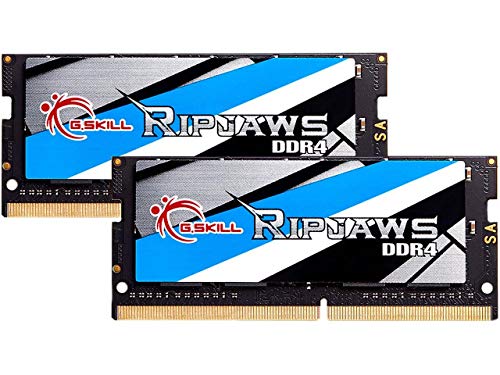
- 32GB capacity from two 16GB modules
- Up to 3200MT/s at 1.2V
- JEDEC default profile included
Best For: Compatible laptops and mini PCs needing a matched 32GB DDR4 kit
High-Capacity Laptop Kit
- 64GB total from two 32GB modules
- 3200MHz with 2933/2666MHz downclocking
- Compatibility tools available from Crucial
Best For: Compatible laptops requiring maximum capacity for multitasking
Value 2666MHz Upgrade

- 32GB total from two 16GB modules
- Up to 2666MHz at 1.2V
- Lifetime warranty and U.S.-based support
Best For: DDR4 laptops and mini PCs supporting 2666MHz SO-DIMM memory
Balanced Capacity Pick
TEAMGROUP Elite 32GB DDR4-3200 Kit
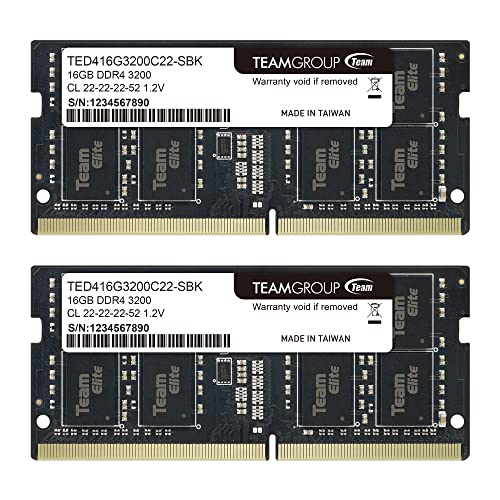
- 32GB capacity with two 16GB modules
- 3200MHz rated speed; may downclock to 2933MHz or 2666MHz
- Lifetime warranty and free technical support
Best For: Compatible laptops needing a straightforward 32GB DDR4 upgrade
Easy Upgrade Option
Timetec 32GB DDR4-3200 Laptop RAM Kit

- Two 16GB modules provide 32GB total
- Supports laptops, notebooks, Mini PCs, and AIO systems
- Lifetime warranty with US-based technical support
Best For: Plug-and-play upgrades for compatible 260-pin DDR4 systems
High-Capacity DDR4 Pick – Crucial 32GB 3200MHz Laptop RAM Kit
For shoppers comparing computer memory kits for laptops, this Crucial kit offers 32GB through two 16GB DDR4 SODIMMs. Its 3200MHz speed can support smoother multitasking, while compatibility with lower 2933MHz and 2666MHz speeds adds flexibility for supported systems.
Best For: Users who want a high-capacity DDR4 upgrade for multitasking and responsive everyday performance.
Pros:
- 32GB total capacity in a 2x16GB kit.
- 3200MHz DDR4 speed with downclocking to 2933MHz or 2666MHz.
- 260-pin, 1.2V non-ECC SODIMM design and limited lifetime warranty.
- Crucial provides installation guides and compatibility tools.
Cons:
- Requires a laptop that supports DDR4 SODIMM memory.
- May run below 3200MHz when the system requires a lower supported speed.
This is a practical choice when 16GB is not enough and the laptop supports a 32GB DDR4 kit. Check the laptop’s specifications or use Crucial’s compatibility tools before buying.
Legacy Laptop Upgrade – Timetec 16GB DDR3L/DDR3 Kit
Among computer memory kits for laptops, this Timetec option is designed for older DDR3 and DDR3L notebooks. The 16GB kit includes two 8GB modules, operates at 1600MHz, and supports both 1.35V and 1.5V operation for compatible systems.
Best For: Older laptops, mini PCs, and all-in-one systems that require 204-pin DDR3 or DDR3L memory.
Pros:
- 16GB capacity supplied as two 8GB modules.
- Compatible with DDR3 and DDR3L systems.
- Dual-voltage operation at 1.35V or 1.5V.
- Includes a lifetime warranty and U.S.-based technical support.
Cons:
- 1600MHz DDR3 performance is intended for older hardware, not newer DDR4 laptops.
- Requires a system with 204-pin SODIMM slots.
This kit makes sense when a legacy laptop needs more memory but cannot use DDR4. Confirm the required generation, pin count, and maximum supported capacity before ordering.
Performance DDR4 Alternative – PNY 32GB 3200MHz Notebook Kit
This PNY kit is a strong option for shoppers seeking computer memory kits for laptops with a 32GB DDR4 upgrade. Its two 16GB modules run at 3200MHz with CL22 timing and can work at several lower frequencies when supported by the laptop.
Best For: PC enthusiasts and laptop users running demanding applications or multiple programs at once.
Pros:
- 32GB total capacity using two 16GB modules.
- 3200MHz PC4-25600 performance with CL22 timing.
- Backwards compatible with 2933MHz, 2666MHz, 2400MHz, and 2133MHz frequencies.
- 260-pin, 1.2V non-ECC SODIMM configuration.
Cons:
- Compatibility depends on the laptop’s DDR4 support and memory limits.
- The supplied specifications list registered memory as an additional feature, so buyers should verify system requirements carefully.
PNY’s kit combines substantial capacity with broad stated frequency compatibility. Verify the laptop’s memory type and supported speed before installation, especially for systems with strict module requirements.
Balanced DDR4 Upgrade – Crucial 16GB 3200MHz Laptop Kit
For a balanced upgrade among computer memory kits for laptops, this Crucial kit provides 16GB through two 8GB DDR4 SODIMMs. The 3200MHz modules are designed to improve multitasking and can downclock to 2933MHz or 2666MHz in supported laptops.
Best For: Everyday laptop users who want a practical 16GB DDR4 upgrade without moving to a 32GB kit.
Pros:
- 16GB total capacity in a 2x8GB configuration.
- 3200MHz DDR4 speed with support for lower 2933MHz and 2666MHz operation.
- 260-pin, 1.2V non-ECC SODIMM format.
- Crucial offers compatibility tools, installation guides, and a limited lifetime warranty.
Cons:
- Not suitable for laptops that require DDR3 or another memory generation.
- Some systems may operate the modules below 3200MHz.
This kit is a sensible middle ground for general productivity, browsing, and multitasking when the laptop supports DDR4. Confirm the laptop’s slot configuration and maximum supported memory before purchase.
Best for Easy Setup – G.SKILL Ripjaws 32GB
For shoppers comparing computer memory kits for laptops, this G.SKILL Ripjaws kit offers 32GB across two matched 16GB DDR4 SO-DIMMs. It supports speeds up to 3200MT/s, uses a 1.2V profile, and includes a JEDEC default profile for compatible systems.
Best For: Laptop, notebook, mini PC, and AIO users seeking a matched 32GB DDR4 kit.
Pros:
- 32GB capacity in a 2x16GB matched kit
- Up to 3200MT/s with CL22 timing
- 260-pin, non-ECC SO-DIMM design with a JEDEC default profile
Cons:
- Maximum speed depends on the motherboard, CPU, and system settings
- Do not mix with other memory kits
- Overclocking or BIOS adjustments may be required for advertised performance
This is a practical middle-capacity option for compatible DDR4 laptops. Confirm system support and review G.SKILL’s compatibility tools before installation, especially if targeting the top rated speed.
High-Capacity Laptop Kit – Crucial 64GB DDR4
Among computer memory kits for laptops, this Crucial kit stands out for its 64GB capacity, supplied as two 32GB DDR4 SO-DIMMs. The modules operate at 3200MHz and can downclock to 2933MHz or 2666MHz when supported by the system.
Best For: Compatible laptops that need substantial memory for demanding multitasking and system responsiveness.
Pros:
- Large 64GB capacity in a 2x32GB kit
- Supports 3200MHz, 2933MHz, and 2666MHz operation
- 260-pin, 1.2V, non-ECC SO-DIMM design
- Crucial provides a System Scanner and Upgrade Selector for compatibility checking
Cons:
- Compatibility and operating speed depend on the laptop
- Its high capacity may exceed the needs or limits of some systems
This kit is the strongest choice here for maximizing supported laptop memory. Check the specific computer’s capacity and speed requirements with Crucial’s compatibility tools before purchasing.
Value 2666MHz Upgrade – Timetec 32GB Kit
This Timetec kit is a straightforward option for buyers comparing computer memory kits for laptops with DDR4 support. It includes two 16GB 260-pin SO-DIMMs for 32GB total, operating at up to 2666MHz with CL19 timing and 1.2V power.
Best For: Selected DDR4 laptops, notebooks, mini PCs, and all-in-one systems that support 2666MHz SO-DIMM memory.
Pros:
- 32GB capacity in a 2x16GB kit
- Plug-and-play design intended for easy installation
- Non-ECC, unbuffered 260-pin SO-DIMM format
- Backed by a limited lifetime warranty and U.S.-based technical support
Cons:
- Not compatible with desktop DIMM slots
- Limited to up to 2666MHz
- PCB color and memory rank may vary by production batch
For systems designed around DDR4-2666, this kit provides a simple capacity upgrade without requiring a higher-speed configuration. Verify the laptop’s memory specification before ordering.
Balanced Capacity Pick – TEAMGROUP Elite 32GB DDR4-3200 Kit
For shoppers comparing computer memory kits for laptops, the TEAMGROUP Elite kit offers 32GB through two 16GB DDR4 SO-DIMM modules. Its rated 3200MHz speed, CL22 latency, 1.2V operation, and 260-pin design suit compatible laptop and notebook upgrades, though the system may run the memory at 2933MHz or 2666MHz.
Best For: Laptop users seeking a two-module 32GB DDR4 upgrade with lifetime support.
Pros:
- 32GB capacity in a 2 x 16GB kit
- 3200MHz rated speed with 2933MHz and 2666MHz fallback support
- Non-ECC, unbuffered 260-pin SO-DIMM design
- Lifetime warranty and free technical support
Cons:
- Actual operating speed depends on the laptop, CPU, BIOS, and memory configuration
- Compatibility must be checked before purchase
This is a practical general-purpose kit when your laptop supports DDR4 260-pin SO-DIMMs and you want 32GB without moving to a higher-capacity configuration.
Easy Upgrade Option – Timetec 32GB DDR4-3200 Laptop RAM Kit
Among computer memory kits for laptops, this Timetec package combines two 16GB DDR4 260-pin SO-DIMMs for a 32GB upgrade. It supports speeds up to 3200MHz, CL22 timing, and 1.2V operation, with automatic downclocking to 2933MHz or 2666MHz when required by the system.
Best For: Users upgrading compatible laptops, notebooks, Mini PCs, or all-in-one systems with plug-and-play memory.
Pros:
- 32GB kit with two 16GB modules
- Designed for selected DDR4 260-pin SO-DIMM systems
- Non-ECC, unbuffered 1.2V memory rated up to 3200MHz
- Lifetime warranty and US-based technical support
Cons:
- Not compatible with desktop DIMM slots
- PCB color and memory rank may vary by production batch
- System specifications determine the actual operating speed
The Timetec kit is a flexible choice for compatible compact systems, especially if you value simple installation and lifetime warranty coverage. Confirm your device manual before ordering.
Wide Compatibility Choice – GIGASTONE 32GB DDR4-3200 Kit
This GIGASTONE kit is a 32GB, 2 x 16GB option for shoppers evaluating computer memory kits for laptops, notebooks, and compatible all-in-one computers. The 260-pin DDR4 SO-DIMMs run at 3200MHz with CL22 timing, 1.2V voltage, and non-ECC unbuffered specifications; supported systems may use lower speeds.
Best For: Laptop and AIO owners looking for a broadly specified 32GB DDR4 SO-DIMM kit.
Pros:
- 32GB total capacity in two 16GB modules
- 3200MHz rated performance with 2933MHz and 2666MHz compatibility
- 260-pin, 1.2V, CL22 non-ECC unbuffered design
- Listed five-year warranty
Cons:
- Designed for laptop-style SO-DIMM systems, not standard desktop DIMM slots
- Actual speed depends on the host device’s specifications
- Compatibility should be confirmed before purchase
With clear core specifications and support for several common DDR4 laptop speeds, this GIGASTONE kit can be a sensible upgrade when your device accepts 260-pin SO-DIMM memory and 32GB total capacity.
How We Picked the Best Computer Memory Kits for Laptops
We focused on laptop-compatible SO-DIMM kits with clearly stated capacities, speeds, voltages, and memory standards. The selection includes widely used DDR4-3200 options, a DDR4-2666 kit for systems with lower memory support, and a DDR3L kit for older notebooks. We also considered dual-module configurations, since matched pairs can enable dual-channel operation on compatible laptops.
Because laptop memory compatibility is system-specific, these picks are not ranked by speed alone. A kit is only a good upgrade if your laptop supports its DDR generation, maximum capacity, module density, and operating voltage.
Quick Comparison
| Best For | Typical Capacity | Memory Type | Common Speed |
|---|---|---|---|
| Everyday multitasking | 16GB | DDR4 | 3200MHz |
| Gaming and demanding work | 32GB | DDR4 | 2666–3200MHz |
| Heavy workloads | 64GB | DDR4 | 3200MHz |
| Older laptops | 16GB | DDR3L | 1600MHz |
Key Buying Factors for Computer Memory Kits for Laptops
Check the DDR Generation First
DDR3, DDR3L, and DDR4 modules are not interchangeable. Confirm the memory type listed in your laptop’s manual or manufacturer specifications before buying. A DDR4 kit will not fit a DDR3L slot, even if the capacity and speed appear suitable.
Match the SO-DIMM Format and Pin Count
Notebook memory normally uses SO-DIMMs rather than desktop DIMMs. DDR4 laptop modules commonly have 260 pins, while DDR3 and DDR3L SO-DIMMs commonly have 204 pins. Physical fit and electrical compatibility both matter.
Choose Capacity for Your Workload
For browsing, office work, and school use, 16GB is usually a practical target. Choose 32GB for gaming, photo editing, programming, virtual machines, or extensive multitasking. A 64GB kit makes sense only when the laptop supports it and your applications can use the additional memory.
Understand Speed and Downclocking
Many DDR4-3200 kits can operate at 2933MHz or 2666MHz when required by the laptop. This is normal, but verify the system’s supported speed and maximum capacity. Faster-rated memory does not override the laptop’s built-in limits.
Verify Upgradeability
Some thin laptops have soldered memory, while others provide only one accessible slot or impose strict module-density limits. Check the service manual and current configuration before ordering. Installing a matched two-module kit may require replacing existing memory.
Who Should Buy Which Computer Memory Kits for Laptops?
Choose a 16GB DDR4 kit for a general-purpose laptop that needs a responsive, affordable upgrade. A 32GB DDR4 kit is the better fit for creators, gamers, developers, and users who keep many applications open. Select the 64GB option only for a compatible workstation-class or enthusiast laptop with genuinely demanding workloads.
Owners of older systems should choose the DDR3L kit rather than attempting a DDR4 upgrade. If your laptop is limited to DDR4-2666, a compatible 2666MHz kit can be preferable to paying for speed your system cannot use. Finally, compare return policies and confirm compatibility before installation, since laptop memory support varies considerably by model.