Choosing compatible memory is one of the easiest ways to improve a desktop PC, but speed ratings, timings, capacity, and platform support can make the decision confusing. Intel XMP-compatible kits simplify tuning by letting supported motherboards apply tested memory settings with minimal manual adjustment.
We compared 10 popular DDR4 and DDR5 kits across capacity, rated speed, latency, voltage, form factor, and feature support. The right choice depends mainly on your motherboard generation, processor platform, workload, and whether you value low-profile clearance, RGB lighting, or maximum performance.
Best 10 Computer Memory Kits for Intel Xmp Picks for 2026
Balanced XMP Performance

- 32GB DDR5 kit with 6000MHz rated speed
- Supports Intel XMP 3.0 and AMD EXPO
- CL30 timing with onboard voltage regulation
Best For: Flexible Intel or AMD desktop upgrades
Efficient DDR5 Choice
- 32GB DDR5 kit with 6000MHz rated speed
- XMP 3.0 ready for compatible systems
- PMICs and reinforced cooling structure
Best For: Intel 600- and 700-series desktop builds
Best Low-Profile DDR4 Kit
Corsair Vengeance LPX 32GB 3200MHz

- 32GB capacity in a 2x16GB kit
- Intel XMP support and CL16 timing
- Low-profile 34mm design
Best For: Intel DDR4 builds needing capacity and cooler clearance
Best Value 3600MHz Kit

- 16GB matched 2x8GB configuration
- Intel XMP 2.0 support up to 3600MT/s
- JEDEC default profile included
Best For: Budget-conscious desktop upgrades prioritizing memory speed
Best RGB DDR5 Upgrade
Corsair Vengeance RGB 32GB 6000MHz

- 32GB DDR5 in a 2x16GB kit
- 6000MHz speed with CL30 timing
- Ten-zone addressable RGB lighting
Best For: Intel DDR5 builds seeking performance and customizable lighting
Best Value DDR4 Pick
GIGASTONE Game PRO 32GB DDR4-3200 Kit

- 32GB 2x16GB DDR4 kit
- 3200MHz speed with CL16 timing
- Intel XMP 2.0 and AMD Ryzen support
Best For: Affordable DDR4 gaming desktop upgrades
Best DDR5 Flexibility
G.SKILL Flare X5 32GB DDR5-6000 Kit

- 32GB 2x16GB DDR5 kit
- Up to 6000MT/s at CL36
- Intel XMP 3.0 and AMD EXPO profiles
Best For: Newer Intel or AMD DDR5 desktop builds
Top-Tier DDR5 Speed – Trident Z5 RGB 32GB
For shoppers seeking computer memory kits for intel xmp, the G.SKILL Trident Z5 RGB pairs 32GB of DDR5 with an Intel XMP 3.0 profile and a rated speed of up to 6400MT/s. Its CL32 timing and 1.40V specification make it a performance-focused option for compatible desktop systems.
Best For: Intel desktop and gaming builds using compatible Z890, Z790, B860, or B760 platforms.
Pros:
- 32GB matched 2x16GB DDR5 kit
- Intel XMP 3.0 profile with up to 6400MT/s rated speed
- CL32-39-39-102 timing and RGB styling
Cons:
- Reaching maximum speed requires BIOS adjustments or overclocking
- Compatibility depends on the motherboard, CPU, and other system components
- G.SKILL advises against mixing memory kits
This is a strong choice when high DDR5 speed matters, but buyers should verify the motherboard QVL or RAM Configurator before enabling its XMP profile.
Balanced XMP Performance – CORSAIR Vengeance DDR5 32GB
The CORSAIR Vengeance is a practical pick among computer memory kits for intel xmp, offering 32GB of DDR5 at up to 6000MHz with a CL30 specification. It supports both AMD EXPO and Intel XMP 3.0, giving compatible desktop users platform-specific memory profiles.
Best For: Desktop builders who want a 32GB DDR5 kit with Intel and AMD profile support.
Pros:
- 32GB capacity in a 2x16GB DDR5 kit
- Intel XMP 3.0 and AMD EXPO compatibility
- Up to 6000MHz speed with CL30 timing
- Onboard voltage regulation supports tuned overclocking
Cons:
- Maximum speed requires overclocking or PC BIOS adjustments
- Actual performance depends on the CPU, motherboard, and system components
With its tight stated timing and dual-platform profile support, Vengeance offers flexibility for modern desktop builds while retaining the usual need to confirm platform compatibility.
DDR4 XMP Value Pick – Ripjaws V 32GB
For DDR4 systems, the G.SKILL Ripjaws V is one of the more straightforward computer memory kits for intel xmp. This matched 32GB kit runs at up to 3200MT/s with CL16-18-18-38 timing and includes an Intel XMP 2.0 profile for compatible desktop platforms.
Best For: Intel or AMD desktop users upgrading an existing DDR4 system with 32GB.
Pros:
- 32GB matched 2x16GB DDR4 configuration
- Intel XMP 2.0 profile for easier memory tuning
- Up to 3200MT/s speed with CL16 timing
- Non-ECC 288-pin U-DIMM design for desktop PCs
Cons:
- Not compatible with DDR5-only platforms
- Maximum rated speed requires BIOS adjustments or overclocking
- G.SKILL recommends not mixing memory kits
This kit makes sense when the system uses DDR4 and the goal is a simple capacity and profile upgrade rather than moving to newer DDR5 hardware.
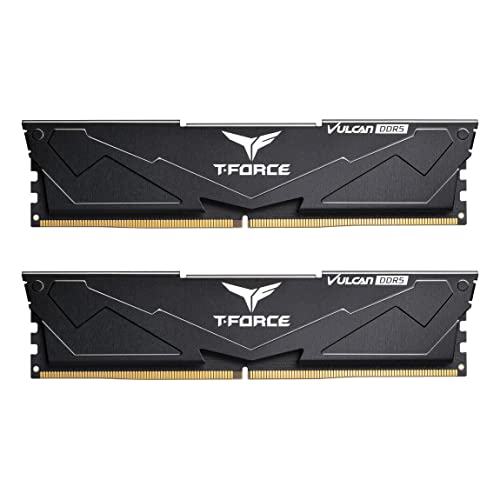
Efficient DDR5 Choice – T-Force Vulcan 32GB
The TEAMGROUP T-Force Vulcan provides a 32GB DDR5 option for shoppers comparing computer memory kits for intel xmp. It is rated up to 6000MHz, supports XMP 3.0, and uses PMICs plus a reinforced structure to support efficient power use and cooling.
Best For: Compatible Intel 600- and 700-series desktop builds seeking a straightforward DDR5 XMP kit.
Pros:
- 32GB capacity in a 2x16GB DDR5 kit
- XMP 3.0 ready with up to 6000MHz speed
- 1.25V specification with integrated PMICs
- Reinforced structure designed for better cooling
Cons:
- CL38 timing is less aggressive than some competing kits
- Maximum speed depends on system compatibility and configured memory settings
- Designed for desktop DIMM use rather than laptops
Vulcan is a sensible fit for users prioritizing capacity, DDR5 support, and power-management features, provided the motherboard supports its XMP settings and rated speed.
Best Low-Profile DDR4 Kit – Corsair Vengeance LPX 32GB 3200MHz
For shoppers comparing computer memory kits for intel xmp, the Corsair Vengeance LPX offers 32GB in a matched 2x16GB DDR4 configuration, with an Intel XMP-compatible profile and a rated speed of up to 3200MHz. Its 34mm low-profile design is useful for builds where cooler clearance matters.
Best For: Intel DDR4 desktop builds needing 32GB, broad motherboard compatibility, and a low-profile heatsink.
Pros:
- 32GB capacity in a 2x16GB dual-channel kit
- Intel XMP support with 3200MHz rated speed and CL16 latency
- 34mm height fits many small-form-factor builds
- Aluminum heatspreaders help dissipate heat
Cons:
- Reaching maximum speed requires BIOS adjustments or overclocking
- Actual performance depends on the motherboard, CPU, and other system components
This is a practical choice for users who want generous capacity without a tall heatspreader. Confirm your motherboard and processor support the selected speed before enabling the memory profile.
Best Value 3600MHz Kit – G.SKILL Ripjaws V 16GB DDR4
The G.SKILL Ripjaws V is a straightforward option among computer memory kits for intel xmp, providing 16GB through two matched 8GB DDR4 modules. It includes a JEDEC default profile for standard startup and an Intel XMP profile for its rated speed of up to 3600MT/s.
Best For: Desktop users upgrading an Intel-compatible DDR4 system for higher memory frequency on a budget.
Pros:
- Matched 2x8GB kit for desktop systems
- Intel XMP 2.0 profile supports up to 3600MT/s
- CL18-22-22-42 timing at 1.35V
- JEDEC default profile supports booting at standard settings
Cons:
- 16GB offers less capacity than the 32GB kits in this roundup
- Maximum rated speed requires BIOS adjustments or overclocking
- G.SKILL advises against mixing it with other memory kits
Choose this kit when frequency is a priority and 16GB is sufficient for your workload. Check the motherboard QVL or RAM configurator, and install the matched modules together for the best chance of stable operation.
Best RGB DDR5 Upgrade – Corsair Vengeance RGB 32GB 6000MHz
For newer systems, the Corsair Vengeance RGB DDR5 is one of the computer memory kits for intel xmp worth considering, with 32GB in a 2x16GB kit and a rated speed of up to 6000MHz. It combines Intel DDR5 optimization with addressable RGB lighting and onboard voltage regulation.
Best For: Intel DDR5 desktop builds that want high rated bandwidth, tight CL30 timing, and customizable RGB lighting.
Pros:
- 32GB capacity in a 2x16GB configuration
- 6000MHz rated speed with CL30 timing
- Ten-zone RGB lighting on each module
- Onboard voltage regulation supports more finely tuned overclocking through CORSAIR iCUE
Cons:
- Requires a compatible DDR5 motherboard and processor
- Maximum speed requires BIOS adjustments or overclocking
- RGB features may be unnecessary for non-illuminated builds
This kit suits a performance-focused DDR5 system where appearance and memory tuning both matter. Verify DDR5 compatibility and system support for the rated speed before enabling the profile.
Best Value DDR4 Pick – GIGASTONE Game PRO 32GB DDR4-3200 Kit
For shoppers comparing computer memory kits for intel xmp, the GIGASTONE Game PRO offers a straightforward 32GB DDR4 upgrade with an Intel XMP 2.0 profile. Its 3200MHz rating and CL16 timing make it a practical fit for compatible gaming desktops using DDR4 UDIMM memory.
Best For: Budget-conscious gaming desktop upgrades that need 32GB of DDR4 memory and Intel XMP 2.0 support.
Pros:
- 32GB capacity in a matched 2x16GB kit
- DDR4-3200 speed with CL16 timing
- Supports Intel XMP 2.0 and AMD Ryzen platforms
- Includes a listed five-year warranty
Cons:
- Only compatible with systems that use DDR4 desktop UDIMMs
- Reaching the rated speed requires compatible hardware and XMP configuration
This kit balances useful capacity, moderate speed, and broad platform support. Confirm your motherboard supports DDR4 and Intel XMP before buying.
Best DDR5 Flexibility – G.SKILL Flare X5 32GB DDR5-6000 Kit
The G.SKILL Flare X5 is a strong option for buyers seeking computer memory kits for intel xmp on newer desktop platforms. This 32GB DDR5 kit supports Intel XMP 3.0 as well as AMD EXPO and is rated for up to 6000MT/s with CL36 timing.
Best For: DDR5 desktop builders who want one kit with both Intel XMP 3.0 and AMD EXPO profiles.
Pros:
- 32GB capacity in a matched 2x16GB kit
- Up to 6000MT/s performance with CL36 timing
- Supports both Intel XMP 3.0 and AMD EXPO
- Includes a JEDEC default profile for standard boot settings
Cons:
- Rated performance requires BIOS adjustments and compatible components
- Designed for DDR5 systems and cannot replace DDR4 memory
- Mixing it with another memory kit may cause instability or failure
Its dual-profile support gives this kit useful platform flexibility, but motherboard and CPU compatibility remain important. Check the manufacturer’s QVL or configurator and use the kit as a matched set.
Best RGB DDR4 Upgrade – G.SKILL Trident Z RGB 32GB DDR4-3600 Kit
For computer memory kits for intel xmp with a visual component, the G.SKILL Trident Z RGB combines 32GB of DDR4 capacity with an Intel XMP profile and RGB styling. It is rated for up to 3600MT/s at CL18 and uses a matched 2x16GB desktop kit.
Best For: DDR4 gaming desktops where RGB design and a 3600MT/s memory profile are priorities.
Pros:
- 32GB capacity in a matched 2x16GB kit
- Up to 3600MT/s speed with CL18 timing
- Supports Intel XMP 2.0 and includes a JEDEC default profile
- RGB-series design for compatible desktop builds
Cons:
- Rated speed requires overclocking or BIOS adjustments
- Limited to compatible DDR4 desktop systems
- Mixing memory kits can cause stability issues or system failure
This kit suits users who want faster DDR4 memory and RGB-focused styling in the same upgrade. Verify your platform with G.SKILL’s QVL or RAM Configurator before enabling XMP.
How We Picked These Computer Memory Kits for Intel Xmp
We focused on dual-channel desktop kits from established memory manufacturers, prioritizing 16GB and 32GB capacities, mainstream speeds, and clearly stated Intel XMP support. The selection includes both DDR4 and DDR5 so you can match an existing system or plan a new build. We also considered rated timings, operating voltage, heat-spreader height, RGB options, and compatibility with AMD platforms where listed.
Advertised memory speed is not a guarantee that every system will reach that setting. The motherboard, processor memory controller, BIOS version, and number of installed modules all affect stability. Check the qualified vendor list when possible and confirm that the kit is sold as one matched package.
Quick Comparison
| Memory type | Common capacities | Typical selected speeds | Best suited to |
|---|---|---|---|
| DDR4 | 16GB or 32GB | 3200–3600 MT/s | Existing Intel and AMD DDR4 systems |
| DDR5 | 32GB | 6000–6400 MT/s | Newer platforms and high-performance builds |
Key Buying Factors for Computer Memory Kits for Intel Xmp
DDR4 or DDR5 Compatibility
DDR4 and DDR5 are not interchangeable. Select the memory type supported by your motherboard; a DDR5 kit cannot be installed in a DDR4 slot. For an upgrade, matching your existing platform is usually more cost-effective than replacing the motherboard and processor.
Capacity and Channel Configuration
A 32GB kit made from two 16GB modules is a strong general-purpose choice for modern gaming, multitasking, and creative applications. A 16GB kit remains suitable for basic gaming and everyday use, but demanding games and productivity software may benefit from 32GB or more. Two matched modules also enable dual-channel operation on typical consumer boards.
Speed, Timings, and Voltage
Higher data rates can improve performance, but timings matter too. Compare complete specifications rather than speed alone: a lower CL rating can offset some of the advantage of a faster kit. Higher-rated DDR5 kits may require more voltage and careful BIOS tuning, while mainstream DDR4-3200 and DDR4-3600 kits are often easier to run.
Clearance and Motherboard Support
Check the memory height against large CPU air coolers, especially with tall RGB heat spreaders. Confirm the motherboard supports the desired capacity and speed, then update the BIOS if the manufacturer recommends it. After installation, enable the advertised XMP profile and test system stability.
Who Should Buy Which Computer Memory Kits for Intel Xmp?
Choose a DDR4-3200 or DDR4-3600 kit if you are upgrading an existing DDR4 desktop or want a practical, lower-cost replacement. A 32GB kit is the safer long-term choice for gaming and multitasking, while 16GB can suit lighter workloads.
Choose a DDR5-6000 kit for a newer compatible platform and a balanced mix of performance, capacity, and value. Kits with tighter timings are attractive for performance-focused gaming systems, while standard timings can be a sensible choice when price matters more.
Choose an RGB kit if appearance is part of your build and your case has a visible side panel. For compact builds or oversized air coolers, prioritize low-profile designs and verify clearance before ordering.