Upgrading to 32GB of RAM can make a noticeable difference when gaming, editing media, running virtual machines, or multitasking across demanding applications. The right kit depends on more than capacity: your system’s memory generation, form factor, speed support, and upgrade limits all matter.
We selected 10 options spanning DDR3, DDR4, and DDR5, with both desktop UDIMMs and laptop SODIMMs represented. Use the guide below to narrow the list to a compatible kit that fits your performance goals and budget.
Best 10 32gb Computer Memory Kits Picks for 2026
Best Low-Profile DDR4 Pick

- 32GB (2x16GB) DDR4-3200 kit
- Low-profile 34mm heatspreaders
- CL16 with Intel and AMD compatibility
Best For: Compact DDR4 desktop builds
Best Legacy Desktop Upgrade

- Four 8GB DDR3/DDR3L modules
- 1600MHz CL11 performance
- Dual-voltage 1.35V/1.5V support
Best For: Compatible older DDR3 desktops
Best Laptop Memory Kit

- Two 16GB DDR4 laptop modules
- 3200MHz with 2933/2666MHz downclocking
- 260-pin, 1.2V SODIMM design
Best For: Compatible DDR4 laptops
Best High-Speed DDR5 Kit

- 32GB (2x16GB) DDR5-6000MT/s kit
- AMD EXPO and Intel XMP 3.0 support
- CL36 timings for modern desktops
Best For: Compatible DDR5 desktop and gaming builds
Laptop Upgrade Pick
TEAMGROUP Elite 32GB DDR4-3200 SODIMM Kit
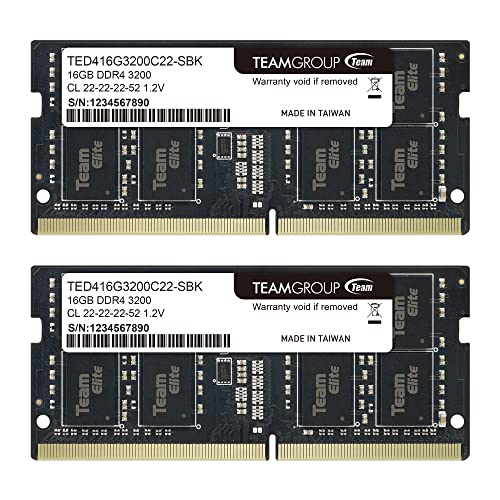
- 2 x 16GB DDR4 laptop modules
- 3200MHz rated; may run at 2933MHz or 2666MHz
- Lifetime warranty and free technical support
Best For: Compatible laptops and notebooks needing a 32GB DDR4 upgrade
RGB Performance Pick
Corsair Vengeance RGB Pro 32GB

- 2x16GB DDR4-3200 kit with CL16 timing
- Customizable multi-zone RGB via CORSAIR iCUE
- Screened ICs and custom PCB for performance builds
Best For: RGB gaming and enthusiast desktop upgrades
Reliable Everyday Upgrade

- 2x16GB DDR4-3200 UDIMM configuration
- Can operate at 3000MHz or 2666MHz when needed
- Crucial compatibility tools simplify installation planning
Best For: Everyday desktop upgrades and compatibility-conscious buyers
Gaming Value Option

- 2x16GB DDR4-3200 kit with CL16 timing
- Supports Intel XMP 2.0 and AMD Ryzen
- White unbuffered, non-ECC modules for desktop builds
Best For: Gaming desktops using supported memory profiles
Best Low-Profile DDR4 Pick – Corsair Vengeance LPX 32GB
For shoppers comparing 32gb computer memory kits for a desktop, the CORSAIR Vengeance LPX combines a 32GB (2x16GB) capacity with DDR4-3200 speed and CL16 latency. Its 34mm low-profile design suits many compact builds, while the aluminum heatspreader helps dissipate heat. Reaching the advertised maximum speed requires compatible hardware and BIOS adjustments.
Best For: Desktop users seeking a broadly compatible, low-profile DDR4 upgrade with overclocking support.
Pros:
- 32GB dual-module kit with DDR4-3200 speed and CL16 latency.
- Low-profile 34mm height fits many small-form-factor systems.
- Supports wide compatibility with Intel and AMD DDR4 motherboards.
- Aluminum heatspreaders and hand-sorted chips provide cooling and overclocking headroom.
Cons:
- Maximum rated speed depends on system components and BIOS adjustments.
- Designed for DDR4 systems, not newer DDR5 platforms.
This is a practical choice when cooler clearance and platform compatibility matter. Confirm that your motherboard supports DDR4 and the intended memory profile before buying.
Best Legacy Desktop Upgrade – Timetec DDR3L/DDR3 32GB Kit
This Timetec option is one of the 32gb computer memory kits aimed at older desktop systems. It includes four 8GB DDR3L/DDR3 1600MHz UDIMMs, uses a dual-voltage 1.35V/1.5V design, and operates at CL11. Check your motherboard’s memory generation, slot count, and supported capacity before ordering.
Best For: Compatible legacy desktops that use four DDR3 or DDR3L UDIMM slots.
Pros:
- Provides 32GB across four 8GB modules.
- Supports DDR3L 1.35V and DDR3 1.5V operation.
- Non-ECC, unbuffered 240-pin UDIMMs suit compatible desktop systems.
- Includes a guaranteed lifetime warranty and U.S.-based technical support.
Cons:
- Limited to older DDR3/DDR3L platforms and 1600MHz speed.
- Four-module layout requires enough compatible memory slots.
- PCB color may vary by production batch.
For an aging desktop that still uses DDR3, this kit offers a high-capacity replacement or expansion path. It is not suitable for DDR4 or DDR5 motherboards, so platform verification is essential.
Best Laptop Memory Kit – Crucial 32GB DDR4 SODIMM
Among 32gb computer memory kits for laptops, this Crucial kit pairs two 16GB DDR4 SODIMMs with a 3200MHz rating and 1.2V operation. It can downclock to 2933MHz or 2666MHz when required by the system. Use the manufacturer’s compatibility tools or confirm your laptop’s specifications before installation.
Best For: Compatible laptops needing a 32GB DDR4 memory upgrade in a two-module configuration.
Pros:
- 32GB capacity supplied as two 16GB 260-pin SODIMMs.
- 3200MHz speed can downclock to 2933MHz or 2666MHz.
- Low 1.2V voltage suits laptop memory requirements.
- Crucial provides installation guidance and compatibility-checking tools.
Cons:
- Designed for laptops, not desktop DIMM slots.
- CL22 latency is higher than some performance-focused desktop kits.
- Actual speed depends on the laptop’s supported memory specification.
This kit is a straightforward choice for increasing multitasking capacity in a compatible laptop. Verify the system supports 32GB, DDR4 SODIMMs, and the required module configuration before purchase.
Best High-Speed DDR5 Kit – G.SKILL Flare X5 32GB
For newer desktop platforms, the G.SKILL Flare X5 is a 32GB (2x16GB) DDR5 kit rated up to 6000MT/s at CL36. It includes both AMD EXPO and Intel XMP 3.0 profiles, but reaching the advertised speed requires compatible hardware and BIOS configuration. The manufacturer also advises against mixing memory kits.
Best For: DDR5 desktop and gaming builds with a compatible motherboard supporting EXPO or XMP profiles.
Pros:
- High-speed DDR5-6000MT/s specification with CL36 timings.
- Supports both AMD EXPO and Intel XMP 3.0 profiles.
- 32GB dual-module configuration is suited to modern desktop builds.
- Includes a JEDEC default profile for compatible standard boot settings.
Cons:
- Maximum speed depends on the motherboard, CPU, and BIOS settings.
- Not compatible with DDR4 motherboard slots.
- Mixing it with another memory kit may cause instability or failure.
This kit is a strong fit for a current DDR5 desktop where memory speed and profile flexibility are priorities. Check the motherboard QVL or configurator and install it as the matched kit supplied.
Laptop Upgrade Pick – TEAMGROUP Elite 32GB DDR4-3200 SODIMM Kit
For shoppers comparing 32gb computer memory kits for a laptop, this TEAMGROUP kit combines two 16GB DDR4 SODIMMs with a rated speed of 3200MHz. It uses a 260-pin, 1.2V, non-ECC, unbuffered design, though compatible systems may run the modules at 2933MHz or 2666MHz.
Best For: Laptop and notebook owners checking for a 32GB DDR4 SODIMM upgrade.
Pros:
- 32GB capacity in a matched 2 x 16GB kit
- 3200MHz rated speed with 2933MHz and 2666MHz compatibility noted
- JEDEC-compliant, 1.2V, non-ECC design with lifetime warranty and free technical support
Cons:
- Not intended for desktop DIMM slots
- Actual operating speed depends on the laptop, CPU, BIOS, and memory configuration
This is a practical choice for a compatible laptop that supports DDR4-3200 SODIMMs. Verify the system specifications before ordering, especially because supported devices may automatically use a lower speed.
Desktop Performance Pick – G.SKILL Ripjaws V 32GB DDR4-3200 Kit
Among 32gb computer memory kits for desktop PCs, the G.SKILL Ripjaws V kit pairs two 16GB DDR4 U-DIMMs with a 3200MT/s rating and CL16 timing. It supports an Intel XMP profile, but reaching the advertised maximum speed can require compatible hardware and BIOS adjustments.
Best For: Desktop users who want a matched 32GB kit with XMP support and CL16 timing.
Pros:
- 32GB capacity in a matched 2 x 16GB desktop kit
- 3200MT/s rated speed with CL16-18-18-38 timings
- Intel XMP 2.0 profile and JEDEC default profile included
Cons:
- Designed for desktop 288-pin U-DIMM slots, not laptops
- Maximum speed may require overclocking or BIOS adjustments
- G.SKILL advises against mixing memory kits
This kit suits a compatible desktop build where the motherboard and CPU support its settings. Check the manufacturer’s QVL or RAM configurator, and use it as a matched set rather than combining it with another kit.
Broad Compatibility Pick – GIGASTONE 32GB DDR4-3200 Laptop Kit
This GIGASTONE option is one of the 32gb computer memory kits built for laptops, notebooks, and all-in-one computers. The matched 2 x 16GB DDR4 kit is rated at 3200MHz and uses 260-pin, 1.2V, CL22, non-ECC, unbuffered SODIMMs; compatible systems may operate at lower listed speeds.
Best For: Laptop, notebook, and AIO users seeking a straightforward 32GB DDR4 memory upgrade.
Pros:
- 32GB capacity from two 16GB SODIMM modules
- 3200MHz rated speed with 2933MHz and 2666MHz compatibility
- Non-ECC, 1.2V, 260-pin design and a stated five-year warranty
Cons:
- Not suitable for standard desktop DIMM slots
- CL22 timing is less performance-focused than the desktop kit’s CL16 specification
- Actual speed depends on the host system’s support
Choose this kit when your laptop or AIO accepts DDR4-3200 260-pin SODIMMs and you value broad device compatibility. Confirm the exact memory requirements before purchase, since the modules may downshift to a supported speed.
RGB Performance Pick – Corsair Vengeance RGB Pro 32GB
For shoppers comparing 32gb computer memory kits, the CORSAIR Vengeance RGB PRO combines a 2x16GB DDR4 configuration with 3200MHz speed, CL16 timing, and customizable lighting. Its screened ICs and custom PCB are aimed at dependable performance on compatible Intel and AMD desktop platforms.
Best For: RGB-focused gaming and performance-oriented desktop builds.
Pros:
- 32GB capacity in a matched 2x16GB kit
- 3200MHz speed with CL16-20-20-38 timing
- Dynamic multi-zone RGB lighting controlled through CORSAIR iCUE
- Custom PCB and screened ICs support overclocking potential
Cons:
- Requires a compatible desktop motherboard and DDR4 support
- RGB features may not matter if appearance is not a priority
This is a strong choice when visual customization and tighter stated timings matter as much as capacity. Confirm motherboard compatibility before purchase, particularly for the listed Intel Z390 and AMD 400-, 500-, or X570-series platforms.
Reliable Everyday Upgrade – Crucial 32GB DDR4 Desktop Kit
This Crucial kit is a straightforward option among 32gb computer memory kits, providing 32GB through two 16GB DDR4 UDIMMs. It runs at 3200MHz and can downclock to 3000MHz or 2666MHz, making it a practical fit for compatible Intel and AMD desktop systems.
Best For: Mainstream desktop users who want a simple, broadly compatible memory upgrade.
Pros:
- 32GB capacity in a 2x16GB configuration
- 3200MHz DDR4 speed with support for lower operating speeds
- Crucial provides compatibility tools and installation guides
- Backed by Micron manufacturing expertise and a limited lifetime warranty
Cons:
- CL22 timing is less performance-focused than the tighter-timing alternatives here
- Designed as standard non-ECC memory without RGB lighting
Choose this kit when easy installation and compatibility guidance are more important than enthusiast styling or aggressive timings. Use Crucial’s system scanner or upgrade selector to verify support for your specific desktop.
Gaming Value Option – Gigastone Game PRO 32GB DDR4
For gaming-oriented shoppers evaluating 32gb computer memory kits, the GIGASTONE Game PRO offers 32GB in a 2x16GB DDR4-3200 kit with CL16 timing. It supports Intel XMP 2.0 and AMD Ryzen platforms and uses 1.35V unbuffered, non-ECC UDIMMs for compatible desktop systems.
Best For: Gaming desktops using Intel XMP 2.0 or AMD Ryzen memory profiles.
Pros:
- 32GB capacity in a dual-module 2x16GB kit
- DDR4-3200 speed with CL16-18-18-40 timing
- Supports Intel XMP 2.0 and AMD Ryzen
- White modules offer a distinct look for themed builds
Cons:
- Compatibility is limited to supported desktop systems
- Uses 1.35V and may require profile configuration for advertised performance
- Five-year warranty is shorter than the limited lifetime warranties listed for the other kits
This kit makes sense for a gaming build where dual-channel capacity, CL16 timing, and profile support are priorities. Verify the motherboard’s DDR4 compatibility and check whether Intel XMP or the relevant AMD memory settings are supported.
How We Picked the Best 32gb Computer Memory Kits
We compared these 32gb Computer Memory Kits by compatibility, capacity configuration, rated speed, timings, voltage, installation type, and platform support. The selection includes common 2 x 16GB kits as well as a 4 x 8GB DDR3 option, covering older systems, current DDR4 machines, modern DDR5 desktops, and upgradeable laptops.
We also considered practical features such as Intel XMP or AMD EXPO support, downclocking flexibility, non-ECC unbuffered design, and heat-spreader or RGB considerations. Always verify your motherboard or laptop specifications before buying; memory generation and physical form factor are not interchangeable.
Quick Comparison
| Best For | Memory Type | Form Factor | Typical Configuration |
|---|---|---|---|
| Older desktop upgrades | DDR3/DDR3L | DIMM | 4 x 8GB |
| Mainstream desktops | DDR4 | 288-pin UDIMM | 2 x 16GB |
| Laptops | DDR4 | 260-pin SODIMM | 2 x 16GB |
| New AMD or Intel desktops | DDR5 | Desktop DIMM | 2 x 16GB |
Key Buying Factors for 32gb Computer Memory Kits
Compatibility and Form Factor
Check whether your system requires DDR3, DDR4, or DDR5. A DDR4 module cannot be installed in a DDR5 slot, even if the capacity and speed appear suitable. Desktop systems generally use 288-pin UDIMMs, while laptops use shorter 260-pin SODIMMs. Confirm the maximum supported capacity and whether your device accepts matched modules.
Speed, Timings, and Profiles
Higher rated speeds can improve performance on supported platforms, but the motherboard and processor determine the actual operating speed. XMP and EXPO profiles simplify configuration, while kits with lower default speeds or downclocking support can be useful for broader compatibility. Timings such as CL16 or CL22 should be compared alongside speed rather than viewed in isolation.
Capacity and Configuration
A 2 x 16GB kit is usually the most convenient 32GB choice for a dual-channel desktop or laptop because it leaves room for future expansion when slots are available. Older systems may require four 8GB modules or have stricter rank and density requirements, so consult the motherboard memory list when upgrading legacy hardware.
Voltage and Reliability
Use the voltage recommended by your platform. Standard non-ECC unbuffered memory is appropriate for most consumer desktops and laptops, while workstations and servers may require ECC or registered memory instead. For stability, install a matched kit rather than combining unrelated modules.
Who Should Buy Which 32gb Computer Memory Kits?
- For a modern performance desktop: Choose a DDR5 kit with EXPO or XMP support if your motherboard and processor support DDR5.
- For a mainstream DDR4 gaming PC: A 3200-speed 2 x 16GB kit with responsive timings offers a strong balance of compatibility and performance.
- For a laptop upgrade: Select a 260-pin DDR4 SODIMM kit and confirm that the laptop supports user-replaceable memory and 32GB total capacity.
- For an older computer: Match the system’s DDR3 or DDR3L requirement exactly, including supported voltage and module density.
- For a style-focused build: RGB desktop memory can add lighting effects, but prioritize compatibility and clearance over appearance.
Before installation, shut down and unplug the system, use the recommended motherboard slots, and enable the advertised memory profile in firmware only after confirming stability. If the computer fails to boot, reset the profile and check the manufacturer’s supported settings.