The best compact smart displays fit useful information and voice control into spaces where a larger screen would feel intrusive. They can serve as bedside alarms, kitchen assistants, video-call devices, family dashboards, or wall-mounted calendars.
This roundup compares 10 options across Amazon Alexa, Google Assistant, Apple-style wall setups, video calling, and dedicated calendar displays. Pay attention to screen size, ecosystem compatibility, audio, mounting, privacy, and whether the device is new or like-new.
Best 10 Compact Smart Displays Picks for 2026
Best Nightstand Pick
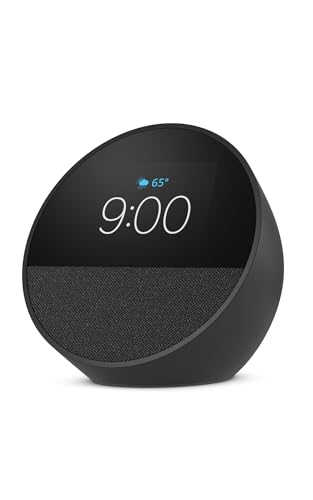
- Customizable clock with weather and reminders
- Rich sound in a compact alarm-clock design
- Alexa routines and compatible smart-home control
Best For: Nightstands, routines, and glanceable information
Best Family Organizer

- Syncs Google, iCloud, and Outlook calendars
- Tracks chores, points, meals, and grocery lists
- Wall-mountable with photo slideshow mode
Best For: Shared family planning and household routines
Best Video-Calling Pick

- 5.5-inch display for weather, news, and streaming
- Built-in camera for calls and compatible check-ins
- Improved bass plus camera and microphone privacy controls
Best For: Calls, camera monitoring, and compact entertainment
Best Wall-Mounted Premium Pick

- 7-inch Liquid Retina display with wall-mounted design
- Personalized experiences for up to six users
- Siri AI, calendar, weather, and wall-tuned audio
Best For: Permanent hallway or entryway home control
Best Overall

- 8.7-inch HD display with expanded viewing area
- Spatial audio and up to 2x the bass of the prior model
- Built-in smart-home hub and advanced video calling
Best For: An all-purpose Alexa display with strong audio and smart-home control
Best Compact Google Pick

- Compact 7-inch display for counters and nightstands
- Google Assistant supports organization and entertainment
- Controls compatible Google smart-home devices
Best For: Google Assistant users seeking a simple, space-saving display
Best for Video Calls
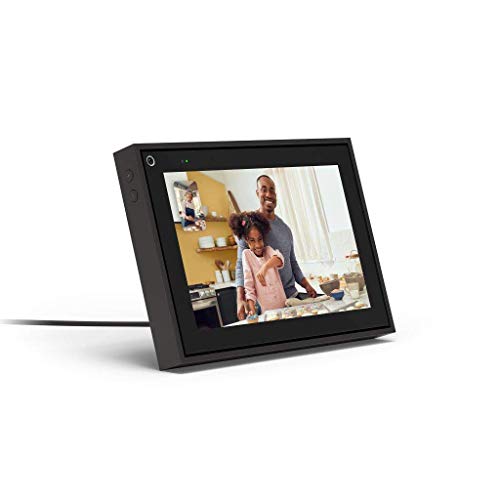
- Automatic panning and zooming keeps callers in frame
- Supports Messenger and WhatsApp video calls
- Privacy controls include camera and microphone switches
Best For: Family video calls, remote communication, and hands-free conversations
Best for Desk Connectivity

- 10-in-1 hub with HDMI, DisplayPort, Ethernet, USB, and card slots
- Built-in screen tracks port status, power, speed, and temperature
- Supports high-refresh displays on compatible Windows laptops
Best For: Windows laptop users building a compact, information-rich desktop setup
Best for Video Calling

- 8-inch touchscreen with automatic camera panning and zooming
- Works with Messenger and WhatsApp video calls
- Alexa, entertainment apps, and physical privacy controls included
Best For: Families and remote workers who want easy hands-free video calls
Best Compact Alexa Display
- 5.5-inch display for Alexa information, media, and photos
- Deeper bass and clearer vocals in a compact design
- Controls compatible smart-home devices and includes privacy controls
Best For: Small-space Alexa setups in bedrooms, kitchens, or home offices
Best Nightstand Pick – Echo Spot
The Echo Spot is a compact smart display designed for nightstands, offices, and kitchens. Its customizable clock face, visible reminders, weather information, Alexa controls, and strong audio make it a practical choice when you want more than a basic alarm clock without taking up much space.
Best For: Nightstands, morning routines, music, and compact smart-home control.
Pros:
- Customizable clock faces, colors, time, weather, reminders, and song information.
- Rich sound with clear vocals and deep bass for music, podcasts, and audiobooks.
- Supports Alexa routines, compatible smart-home controls, motion detection, and optional eero Wi-Fi extending.
- Includes a microphone-off button and app-based privacy controls.
Cons:
- Its smaller display is better suited to glanceable information than extended viewing.
- The eero Built-in Wi-Fi extender feature requires an existing eero network.
The Echo Spot stands out among compact smart displays for combining an alarm-clock format with useful Alexa features and room-filling sound. It is especially convenient beside the bed or in another space where quick visual updates matter.
Best Family Organizer – 10.1-Inch Digital Calendar
This 10.1-inch digital calendar is one of the more task-focused compact smart displays for busy households. It syncs calendars, organizes chores and meals, displays photos, and can be wall-mounted in a high-traffic area so the family can see shared information at a glance.
Best For: Families managing schedules, chores, meal planning, and household lists.
Pros:
- Syncs with Google, iCloud, and Outlook calendars in real time.
- Includes chore tracking with points and rewards to encourage participation.
- Combines meal planning, grocery lists, reminders, weather, and photo slideshows.
- Wall-mountable design and auto-sleep mode support convenient everyday use.
Cons:
- Its primary focus is household organization rather than general entertainment or voice-assistant features.
- Wall mounting may require more installation planning than a freestanding display.
For shoppers who want compact smart displays centered on family coordination, this model offers a broad set of planning tools in a relatively small wall-mounted format. Its photo-frame mode also gives the display a more personal role when schedules are not being shown.
Best Video-Calling Pick – Echo Show 5
The Echo Show 5 is a compact smart display with a 5.5-inch screen, built-in camera, and improved audio. It works well for viewing weather and news, making video calls, checking compatible cameras, streaming content, and controlling compatible smart-home devices from a small footprint.
Best For: Video calling, camera check-ins, streaming, and compact Alexa control.
Pros:
- 5.5-inch display shows news, weather, shows, song titles, and more.
- Provides deeper bass and clearer vocals for music, podcasts, and supported video content.
- Built-in 2 MP camera supports video calls, camera check-ins, and compatible video-doorbell viewing.
- Includes a camera shutter, mic/camera-off button, and other privacy controls.
Cons:
- The 5.5-inch screen is compact, so it may feel limited for extended video viewing.
- Video calling and camera features depend on compatible Alexa devices, apps, or cameras.
The Echo Show 5 is a strong choice when communication and monitoring matter as much as glanceable information. Its camera and privacy shutter add flexibility, while the compact design fits desks, counters, and bedside spaces.
Best Wall-Mounted Premium Pick – Apple HomeView
Apple HomeView (Wall Mounted) - Space Gray with Power Mount USB-C Wall Connector
Check Price On AmazonApple HomeView is a wall-mounted compact smart display intended to make household information and control easy to access from places such as an entrance or hallway. Its 7-inch Liquid Retina display, personalized user recognition, Siri AI, customizable faces, and wall-oriented speakers give it a purpose-built home command-center feel.
Best For: Apple-oriented households wanting a permanent hallway or entryway display.
Pros:
- Wall-mounted design keeps the display accessible without using counter space.
- 7-inch Liquid Retina display provides vibrant colors and sharp details.
- Can recognize up to six people and switch to personalized experiences.
- Offers Siri AI, full-range speakers tuned for wall placement, and customizable calendar and weather faces.
Cons:
- Its wall-mounted format is less flexible to reposition than a portable display.
- Siri AI is initially available in English, and usage limits may apply.
HomeView is best suited to shoppers seeking compact smart displays that become a fixed part of the home rather than a movable tabletop accessory. The combination of a sharp screen, personalized users, and wall-tuned audio makes it especially appealing for shared household spaces.
Best Overall – Echo Show 8
The newest Echo Show 8 is a strong choice among compact smart displays when you want a vibrant screen, capable smart-home control, and room-filling sound. Its 8.7-inch HD display, built-in hub, Alexa+ support, and video-calling features make it useful in kitchens, living rooms, and family spaces.
Best For: Households wanting an all-purpose Alexa smart display with stronger audio and advanced smart-home features.
Pros:
- Vibrant 8.7-inch HD touchscreen with 15% more viewing area than the 2023 Echo Show 8
- Spatial audio, crisper vocals, wider soundstage, and up to 2x the bass of the prior model
- Built-in smart-home hub, camera viewing, routines, and Alexa+ assistance
- Centered auto-framing camera with 3.3x zoom and noise reduction
Cons:
- Its broader feature set may be more than needed for basic display and voice-assistant tasks
- Alexa+ features depend on the supported Alexa experience
Choose this model if you want the most complete feature set in this group. It combines entertainment, household organization, calls, photo displays, and smart-home control in one compact unit, with multiple privacy controls for the camera and microphones.
Best Compact Google Pick – Nest Hub 7
Google Nest Hub 7” Smart Display with Google Assistant (1st Gen) - Chalk (Bulk Packaging)
Check Price On AmazonThe first-generation Google Nest Hub is a compact smart display designed for straightforward hands-free help and everyday organization. Its 7-inch screen fits well on kitchen counters, desks, nightstands, and office surfaces, while Google Assistant handles compatible smart-home controls, reminders, recipes, and entertainment.
Best For: Buyers who prefer Google Assistant and want a small display for basic home organization and smart-home tasks.
Pros:
- Compact 7-inch display suited to kitchens, bedrooms, desks, and nightstands
- Voice and touchscreen control for compatible lights, cameras, thermostats, plugs, and speakers
- Supports music, videos, Google Photos, weather, timers, reminders, and recipes
Cons:
- This is a first-generation model
- The supplied unit is a Korean/international version, so English must be enabled through setup
- Bulk packaging may provide a less conventional retail presentation
This Nest Hub makes sense for shoppers who value a small footprint and Google ecosystem integration over newer hardware. Confirm the international model’s language setup and compatibility with your existing devices before buying.
Best for Video Calls – Portal Mini
Facebook Portal Mini - Smart Video Calling 8” Touch Screen Display with Alexa - Black
Check Price On AmazonFacebook Portal Mini stands out among compact smart displays for video calling. Its 8-inch screen, automatic camera panning and zooming, enhanced voice pickup, and support for Messenger and WhatsApp make it especially practical for keeping in touch with family, friends, and remote coworkers.
Best For: Frequent video callers who want an 8-inch display with automatic framing and Alexa features.
Pros:
- Smart Camera pans and zooms to keep people in frame while they move
- Works with Messenger and WhatsApp, including calls with people who do not have Portal
- Smart Sound improves voice clarity while reducing background noise
- Camera and microphone can be disabled, and the lens can be physically covered
Cons:
- Its feature set is centered heavily on video calling and Portal services
- It is an older Portal product with the Portal operating system
- Some entertainment and work features depend on supported partner services
The Portal Mini is the focused choice here for family calls and remote communication. It also provides Alexa, music, photos, stories, and select work tools, but shoppers primarily seeking broad smart-home or assistant functionality may prefer a newer general-purpose display.
Best for Desk Connectivity – Anker Smart Display USB-C Hub
For shoppers seeking compact smart displays with serious workstation utility, the Anker USB-C Hub combines a small upright design with 10-in-1 connectivity. Its built-in screen provides port, charging, transfer-speed, and temperature information, while HDMI and DisplayPort support high-refresh-rate single- or dual-monitor setups on compatible Windows laptops.
Best For: Windows laptop users who want a compact desktop dock with status monitoring, fast data ports, Ethernet, card readers, and dual-display support.
Pros:
- Built-in display shows real-time port status, charging power, transfer speed, and temperature.
- Supports up to 4K at 144Hz or dual 2K at 240Hz with compatible hardware.
- Includes HDMI, DisplayPort, Ethernet, USB ports, SD/microSD slots, and up to 80W pass-through charging.
- Upright magnetic-base design helps route most cables toward the rear.
Cons:
- USB-C charger is not included.
- On macOS, both external monitors mirror the same content.
- Not compatible with Linux.
This is a practical choice when “smart display” means useful desktop feedback rather than a standalone entertainment screen. Check your laptop’s USB-C, USB4, or Thunderbolt specifications before buying, especially for high-refresh dual-monitor output.
Best for Video Calling – Facebook Portal Mini
Facebook Portal Mini - Smart Video Calling 8” Touch Screen Display with Alexa - White
Check Price On AmazonThe Facebook Portal Mini is one of the more communication-focused compact smart displays, pairing an 8-inch touchscreen with a camera that automatically pans and zooms to keep people in frame. It supports Messenger and WhatsApp calls, includes Alexa, and adds entertainment, family-story, and remote-work features for flexible use around the home.
Best For: Families and remote workers who prioritize hands-free video calling, automatic camera framing, and a compact touchscreen.
Pros:
- Smart Camera automatically pans and zooms as people move.
- Supports Messenger and WhatsApp video calls, including calls with people who do not own Portal.
- Alexa provides access to smart-home controls, music, news, weather, and timers.
- Camera and microphone can be disabled, and the camera lens can be physically covered.
Cons:
- It is an older second-generation model from 2019.
- The product’s ecosystem and calling features depend on supported services such as Messenger and WhatsApp.
- Its 8-inch display and compact form prioritize convenience over a larger viewing area.
Choose the Portal Mini if staying visually connected is your main goal. Its automatic framing and privacy controls make it especially suitable for family conversations, while Alexa and entertainment apps add versatility beyond calling.
Best Compact Alexa Display – Like-New Echo Show 5
The Like-New Amazon Echo Show 5 is a compact smart display for everyday Alexa tasks, glanceable information, music, video, smart-home control, and video calls. Its 5.5-inch screen fits small spaces, while the newer model’s listed audio improvements add deeper bass and clearer vocals. As a refurbished device, it has been tested and certified to look and work like new.
Best For: Alexa users who want a small bedside, kitchen, or desk display for smart-home control, media, photos, and calls.
Pros:
- Compact 5.5-inch display shows news, weather, song details, and other information at a glance.
- Improved audio is designed to provide deeper bass and clearer vocals.
- Controls compatible lights and thermostats and can view compatible cameras and doorbells.
- Includes a camera shutter and microphone/camera-off button for added privacy control.
Cons:
- Like-New units are refurbished and may arrive in generic Amazon-branded packaging.
- The smaller 5.5-inch screen is less suitable for extended viewing than a larger smart display.
- Video calling requires contacts using the Alexa app or a compatible Echo device with a screen.
This Echo Show 5 makes sense when space and price matter more than screen size. Its refurbished status can offer value, while Alexa, smart-home controls, photo display, and privacy features cover the essentials of a compact household display.
How We Picked These Compact Smart Displays
We selected products that suit small-space use while covering several common needs: alarms, voice assistants, music, video calls, home control, wall-mounted scheduling, and kitchen or office information. The lineup includes Compact Smart Displays from Amazon, Google, Facebook, Apple-oriented setups, and specialist calendar-display sellers.
We also considered practical differences that affect everyday ownership, including display size, speaker performance, camera availability, mounting options, connectivity, ecosystem support, and product condition. Some listings are older-generation or refurbished and should be checked carefully before purchase.
Quick Comparison
| Best For | Look For | Potential Trade-Off |
|---|---|---|
| Bedside alarms | Small footprint, clock features, adjustable brightness | Smaller screen and lighter audio |
| Kitchen or office control | Voice assistant, timers, smart-home compatibility | Privacy and placement considerations |
| Video calls | Front camera, calling-service support, clear audio | Camera privacy concerns |
| Family calendars | Large touch interface, Wi-Fi, wall mounting | May lack a full smart-home ecosystem |
| Music and media | Higher-quality speakers and a larger display | Requires more counter space |
Key Buying Factors for Compact Smart Displays
Size and Placement
Measure the intended surface before ordering. A small display works well on a nightstand or desk, while an 8-inch-class model is easier to read from across a kitchen or room. Wall-mounted products need a suitable outlet, mounting hardware, and a cable-management plan.
Assistant and Ecosystem
Choose the platform that matches your existing devices. Alexa is a natural fit for Echo products and compatible smart-home accessories; Google Assistant suits households already using Google services. Apple-oriented buyers should confirm app, mounting, and Home compatibility rather than assuming a third-party screen behaves like an Apple Home device.
Screen, Sound, and Camera
Higher resolution and stronger speakers matter for recipes, media, notifications, and calls. If you want video calling, verify which services are supported and whether the camera includes a physical shutter or software controls. For a bedside unit, automatic brightness and a nonintrusive clock mode may matter more than screen size.
Condition, Connectivity, and Power
Confirm whether the listing is new, refurbished, like-new, or bulk packaged. Check Wi-Fi requirements, included power accessories, USB-C compatibility, and whether a hub or charger is sold separately. Read the return policy carefully for older or open-box models.
Who Should Buy Which Compact Smart Displays?
Choose a compact alarm-focused display for a nightstand or small desk. Pick a mid-size smart display when you want better audio, video calls, recipes, or broader room coverage. A dedicated wall calendar is better for shared schedules and glanceable planning than a voice-first assistant. Buyers prioritizing video calls should select a model with a supported camera platform, while privacy-conscious users may prefer a display without a camera or keep its camera disabled. Finally, verify compatibility with your current phone, smart-home devices, and preferred services before choosing on price alone.