Smart displays with built-in cameras bring video calling, monitoring, entertainment, and hands-free control into one screen. The right model can serve as a compact kitchen assistant, a home security hub, a collaborative office display, or a large-format interactive board.
This roundup compares 10 options across several use cases, including Alexa displays, security monitors, smart monitors, video intercoms, and commercial touchscreen boards. Use the buying guide below to narrow your choice by size, camera purpose, privacy, connectivity, and budget.
Best 10 Smart Displays with Built in Cameras Picks for 2026
Compact Camera Hub

- 5.5-inch display with deeper bass and clearer vocals
- Built-in 2 MP camera for calls and home check-ins
- Camera shutter and microphone/camera-off button
Best For: Small spaces and Alexa-based home monitoring
Local-Storage Security System

- Four 5MP plug-in Wi-Fi cameras with 10-inch monitor
- 500GB local storage and 10-channel NVR
- Color night vision, motion alerts, and remote viewing
Best For: Multi-area property surveillance without required cloud fees
Large Interactive Meeting Display
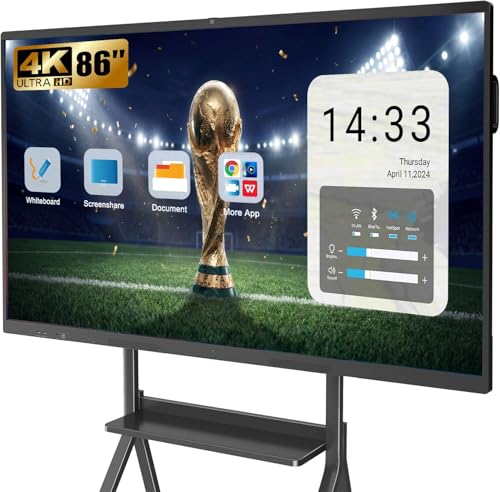
- 86-inch 4K touchscreen with 20-point multitouch
- Built-in 13MP camera, eight-array microphones, and 40W speakers
- Open app ecosystem and wireless projection for up to four users
Best For: Classrooms, offices, and collaborative video meetings
Wearable Camera Assistant

- Built-in 8MP camera with image stabilization
- Voice assistance, image recognition, and 139+ language translation
- Open-ear audio with interchangeable clear and sunglass lenses
Best For: Hands-free travel, recording, translation, and calls
Best for Multi-Camera Home Monitoring
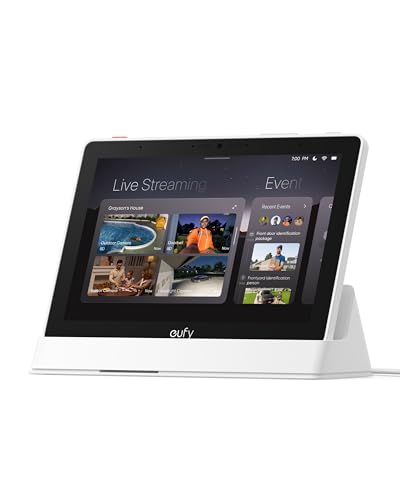
- Four simultaneous live camera feeds
- Automatic security event alerts
- Local playback and daily summaries
Best For: eufy security users who want an always-available monitoring hub
Best for Work and Entertainment

- 32-inch 4K HDR10+ display
- Detachable SlimFit camera
- USB-C with up to 65W charging
Best For: mixed productivity, streaming, gaming, and video calls
Best for Simple Indoor Intercom Monitoring
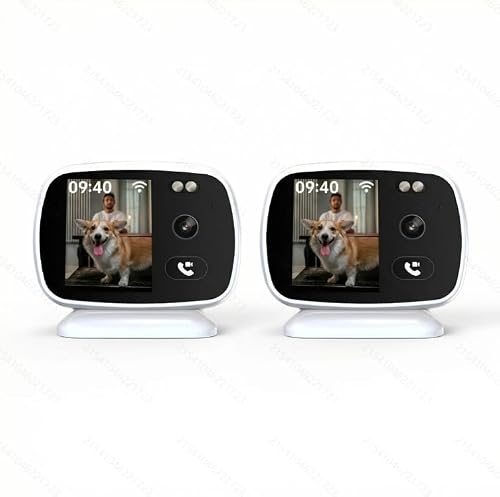
- Built-in display for video calling
- Motion alerts and full-color night vision
- Up to 256GB microSD support
Best For: pet and senior monitoring with simple indoor intercom use
Best Smart Monitor Pick
Samsung M8 32-Inch 4K Smart Monitor

- 4K display with HDR10+ and AI upscaling
- SlimFit camera, speakers, and USB-C connectivity
- Streaming TV, Gaming Hub, and ergonomic stand
Best For: Compact workspaces and hybrid entertainment setups
Best Interactive Whiteboard

- 20-point touch with 4K HDR display
- Built-in UHD camera and eight-array microphone
- Wireless casting for up to four devices
Best For: Classrooms, conference rooms, and collaborative presentations
Best Home Monitoring Display

- Built-in screen for phone-free live viewing
- 3K QHD video with full-color night vision
- One-click video calls, intercom, and motion alerts
Best For: Indoor pet and senior monitoring
Compact Camera Hub – Echo Show 5
For shoppers comparing smart displays with built in cameras, the Echo Show 5 is a compact option for video calls, quick information, entertainment, and basic home monitoring. Its 5.5-inch screen fits easily on a nightstand, desk, or kitchen counter.
Best For: Small spaces, Alexa users, video calling, and checking compatible cameras.
Pros:
- Built-in 2 MP camera supports video calls and home check-ins.
- 5.5-inch display shows news, weather, song information, photos, and compatible camera feeds.
- Controls compatible lights, thermostats, doorbells, and other smart devices.
- Includes a camera shutter and microphone/camera-off button for added privacy.
Cons:
- The compact 5.5-inch screen is less suitable for group viewing or detailed video.
- Camera and device-control features depend on compatible Alexa devices and services.
The Echo Show 5 is a practical choice when you want a small smart display with a built-in camera rather than a large entertainment screen. Its privacy controls and home-monitoring features add versatility for everyday use.
Local-Storage Security System – Jennov 5MP Camera Kit
Although it is a security system rather than a countertop assistant, this Jennov kit is worth considering among smart displays with built in cameras if your priority is monitoring multiple areas. It combines four plug-in Wi-Fi cameras with a 10-inch monitor, NVR, and local storage.
Best For: Homeowners or small businesses needing multi-area surveillance with local recording.
Pros:
- Includes four 5MP cameras, a 10-inch LCD monitor, and a 10-channel NVR.
- 500GB hard drive supports local recording without required monthly cloud storage fees.
- Color night vision, motion alerts, remote app viewing, and IP66-rated housings support day-to-day monitoring.
- System can expand to up to 10 channels.
Cons:
- Each camera and the NVR require plug-in power.
- The cameras transmit wirelessly to the NVR but are not battery-powered.
- A security camera system is less suited to general smart-display tasks such as media playback or voice assistance.
This is the strongest fit for shoppers who want a dedicated monitoring setup with an included screen and local footage storage. Plan outlet locations carefully because the cameras need continuous wired power.
Large Interactive Meeting Display – YCKJNB 86-Inch Smart Board
For offices, classrooms, and home learning spaces, this 86-inch YCKJNB board offers a large-format alternative among smart displays with built in cameras. It combines a 4K touchscreen, built-in 13MP camera, microphone array, speakers, and Android-based app support.
Best For: Video conferences, collaborative presentations, classroom instruction, and large-room whiteboarding.
Pros:
- 86-inch 4K UHD touchscreen provides ample space for presentations and annotation.
- Built-in 13MP camera, eight-array microphones, and dual 20W speakers support conferencing.
- 20-point infrared multitouch enables interactive writing and collaboration.
- Supports wireless projection for up to four users and an open app ecosystem.
Cons:
- Its large wall-mounted design requires substantial space and installation planning.
- It is considerably more specialized and expensive in scale than a small personal smart display.
- The supplied specifications list Android 14 in the title but Android 13 in the details.
This board makes sense when the built-in camera is part of a broader collaboration setup. Its size, touch controls, and audio hardware are better suited to shared spaces than casual bedside or countertop use.
Wearable Camera Assistant – Coucur AI Smart Glasses
These Coucur glasses are a wearable alternative for shoppers exploring smart displays with built in cameras, though they do not include a display. The built-in 8MP camera, AI features, open-ear audio, and companion app are designed for hands-free capture and assistance while moving.
Best For: Travel, walks, hands-free recording, image recognition, translation, and calls.
Pros:
- 8MP camera captures photos, while electronic image stabilization helps steady video.
- AI image recognition and voice assistance work through the companion app.
- Supports translation in more than 139 languages and hands-free calls with ENC microphones.
- Includes interchangeable sunglass and clear lenses, with up to seven hours of music playback.
Cons:
- There is no built-in display, so visual results depend on the connected smartphone app.
- Video specifications in the notes reference 1080P, despite the product title mentioning 4K recording.
- They require iOS or Android connectivity for companion features.
Choose these glasses when portability and hands-free interaction matter more than viewing information on a screen. The visible recording LED is a useful privacy signal, while the lack of an integrated display limits their similarity to conventional smart displays.
Best for Multi-Camera Home Monitoring – eufy Smart Display E10
If you want smart displays with built in cameras for centralized security monitoring, the eufy Smart Display E10 is designed around that use case. Its 8-inch touchscreen can show up to four simultaneous live feeds, surface alerts, and provide access to locally stored recordings.
Best For: Households that already use compatible eufy security cameras, doorbells, or sensors and want an easy-to-use monitoring hub.
Pros:
- Displays four live camera feeds at once for broad property visibility.
- Automatically shows a live feed and voice alert for supported doorbell, door, and camera events.
- Supports local event storage, replay, and daily summaries using facial and package recognition through HomeBase 3.
- The 8-inch touchscreen is designed for straightforward use by children and seniors.
Cons:
- Its strongest features depend on the eufy security ecosystem and HomeBase 3.
- This is primarily a security control panel rather than a general-purpose entertainment display.
The E10 is a focused choice for buyers who want security information visible at a glance instead of relying only on a phone app. Local playback and automatic alerts make it especially practical for active home monitoring.
Best for Work and Entertainment – Samsung M8 M80F 32-inch
Among smart displays with built in cameras, the Samsung M8 M80F stands out as a large all-in-one monitor for work, streaming, and video calls. It combines a 32-inch 4K screen with a detachable SlimFit camera, smart TV apps, speakers, and USB-C power delivery.
Best For: Users who want one 4K monitor for productivity, streaming, gaming, and camera-equipped video communication.
Pros:
- Large 32-inch 4K UHD display supports HDR10+, a 60Hz refresh rate, and a 4ms response time.
- Detachable SlimFit camera adds camera functionality without requiring a separate webcam.
- USB-C can connect and charge compatible devices with up to 65W of power.
- Built-in 10W speakers, Tizen smart apps, Wi-Fi, Bluetooth, AirPlay, and Gaming Hub broaden its standalone use.
Cons:
- Its 60Hz refresh rate may be less appealing for buyers seeking high-refresh-rate gaming.
- The camera is detachable rather than permanently built into the display chassis.
- It has one HDMI port, which may limit setups with several HDMI devices.
The M8 M80F is a versatile choice when a desk display also needs to function as a smart TV and video-call station. Its 4K resolution and USB-C charging are particularly useful for mixed work-and-entertainment setups.
Best for Simple Indoor Intercom Monitoring – PHANSATIM 3K Camera Pair
For shoppers looking for smart displays with built in cameras in a compact security format, this PHANSATIM two-camera set adds an integrated display and one-click video calling. It is aimed at indoor monitoring for pets and seniors, with real-time viewing, motion alerts, and full-color night vision.
Best For: Buyers who want a straightforward indoor camera system with visible intercom calling and monitoring without needing a phone for every live view.
Pros:
- Built-in display supports one-click video calls and visible two-way intercom communication.
- Offers 3K QHD capture, motion alerts, and real-time live viewing.
- Full-color night vision is supported, with a listed night-vision range of up to 100 feet.
- Supports Wi-Fi connectivity, H.265 encoding, and microSD storage up to 256GB.
Cons:
- The supplied specifications list conflicting resolution details, including 3K, 5MP, and 2MP figures.
- The product information describes indoor security use but also lists outdoor-style mounting and waterproofing details that may require verification.
- Its 90-degree viewing angle and 1x optical zoom are relatively limited for wide-area coverage.
This system is most compelling for simple room-to-room visibility and intercom use rather than advanced whole-property surveillance. Before buying, verify the exact camera resolution, placement requirements, and included quantity, since the supplied specifications contain inconsistencies.
Best Smart Monitor Pick – Samsung M8 32-Inch 4K Smart Monitor
For shoppers seeking smart displays with built in cameras, the Samsung M8 combines a 32-inch 4K screen with streaming TV, built-in speakers, and a SlimFit camera. Its USB-C connectivity, ergonomic stand, HDR10+, and AI upscaling make it a versatile choice for compact workspaces that also need entertainment features.
Best For: Small-space offices, hybrid workstations, and users who want a monitor that can also stream TV and support video calls.
Pros:
- 4K UHD resolution with HDR10+ and AI upscaling for enhanced picture quality.
- Built-in SlimFit camera, speakers, Wi-Fi, Bluetooth, HDMI, USB-A, and USB-C connectivity.
- Height-adjustable, tilting, and pivoting stand supports a more comfortable setup.
- Samsung Gaming Hub and Samsung TV Plus provide streaming and gaming access without requiring a separate device.
Cons:
- The 60Hz refresh rate is better suited to everyday use than high-refresh competitive gaming.
- Its 32-inch screen may be too small for large-room viewing or collaborative presentations.
The M8 is a particularly flexible smart display: it works as a detailed desktop monitor, a streaming screen, and a connected hub for compatible devices. Choose it if you value an uncluttered setup and ergonomic adjustability more than a larger display.
Best Interactive Whiteboard – 55-Inch 4K Touch Smart Board
This 55-inch smart board is a large-format option among smart displays with built in cameras, pairing a 4K touchscreen with a built-in UHD camera and eight-array microphone. Its 20-point infrared touch system, wireless casting, and Android 13 app ecosystem are designed for classrooms, offices, and collaborative presentations.
Best For: Classrooms, conference rooms, training spaces, and teams that need touch annotation, video communication, and screen sharing.
Pros:
- 55-inch 4K display with 20-point infrared touch and 10-bit HDR color depth.
- Built-in 1300W-pixel camera and eight-array microphone support video collaboration.
- Can wirelessly cast from up to four devices and supports AirPlay, Wi-Fi, USB-C, and HDMI.
- Android 13, 8GB RAM, 128GB storage, and APK installation provide app flexibility.
Cons:
- The glossy screen may reflect more ambient light than a matte display.
- Its 55-inch size and wall-oriented dimensions require more installation space than a desktop display.
- The listing specifies one HDMI port, which may limit wired source connections.
With its large touch surface, camera, microphone, and multi-device casting, this board is built for interactive group work rather than casual personal use. It is the stronger fit when annotation and collaboration matter more than compact placement.
Best Home Monitoring Display – PHANSATIM Indoor WiFi Camera
Unlike full-size smart monitors, this PHANSATIM unit is an indoor security camera with a built-in display, making it a specialized choice among smart displays with built in cameras. It offers 3K QHD video, one-click video calling, visible intercom functionality, motion alerts, and full-color night vision for monitoring pets or seniors without relying on a phone for live viewing.
Best For: Home monitoring of pets or seniors where quick local viewing and two-way communication are priorities.
Pros:
- Built-in display enables real-time viewing without needing a phone.
- 3K QHD video, full-color night vision, motion alerts, and two-way audio support home monitoring.
- One-click visible intercom and video calling add direct communication capabilities.
- Desktop placement is designed for straightforward indoor use.
Cons:
- This is a focused security camera rather than a general-purpose smart display for streaming or productivity.
- The supplied specifications list a 90-degree viewing angle and fixed/auto-focus options, which may provide less coverage than a pan-and-tilt camera.
- It requires corded power and does not include a battery.
The built-in screen makes this camera useful for quick, local check-ins and direct communication, especially in pet- or senior-monitoring situations. Consider it when dedicated surveillance features matter more than a large multifunction display.
How We Picked the Best Smart Displays with Built in Cameras
We selected products that combine a visible display with an integrated camera or camera-focused monitoring system. Because this category covers very different devices, we evaluated each option according to its intended role rather than treating a compact smart display, security monitor, and interactive board as interchangeable.
Our comparison emphasizes display size and resolution, camera functionality, communication features, smart-home compatibility, connectivity, privacy controls, ease of installation, and overall practicality. We also considered whether a product is best suited to home use, remote work, security monitoring, education, or business collaboration.
Quick Comparison
| Best For | Look For | Typical Strength |
|---|---|---|
| Kitchen and bedside use | Compact screen, voice assistant, privacy shutter | Hands-free control and video calls |
| Home security | Multiple cameras, local monitoring, alerts | Viewing rooms, doors, pets, or children |
| Remote work | Sharp webcam, USB-C, speakers, ergonomic design | Video meetings and desktop productivity |
| Classrooms and offices | Large 4K touchscreen, app support, built-in camera | Interactive presentations and collaboration |
| Smart-home control | Central dashboard, compatible ecosystem, automation support | Managing connected devices from one panel |
Key Buying Factors for Smart Displays with Built-In Cameras
Camera Purpose and Privacy
First decide whether you need a webcam for calls, a security camera viewer, a video intercom, or a camera for recording. Check for physical shutters, camera-disable switches, indicator lights, account permissions, and local-storage options. A high-resolution camera is useful for meetings, but security systems may prioritize motion detection, night vision, wide-angle coverage, and multi-camera viewing.
Screen Size and Image Quality
Small displays are easier to place on a counter or nightstand, while 32-inch monitors suit desks and large interactive boards work better in meeting rooms or classrooms. For detailed documents and presentations, 4K resolution provides a clearer image. Touch capability is valuable for whiteboarding and control panels but is not necessary for ordinary video calls.
Compatibility and Connectivity
Confirm support for your preferred voice assistant, smart-home platform, video-calling services, and mobile apps. For work monitors, USB-C power delivery can reduce cable clutter. For security products, verify Wi-Fi requirements, included cameras, recording plans, storage options, and whether remote access requires a subscription.
Audio, Mounting, and Everyday Usability
Built-in speakers matter for calls and media, especially when the display will not be paired with external audio. Also consider stand adjustability, wall-mount support, cable placement, setup complexity, and whether the interface is responsive enough for frequent use.
Who Should Buy Which Smart Displays with Built in Cameras?
Choose a compact Alexa-style display if you want voice control, quick video calls, recipes, music, and a small footprint. A dedicated security display or multi-camera kit is a better fit for monitoring entrances, pets, children, or several rooms. Select a smart monitor when your priority is remote work, streaming, USB-C connectivity, and a larger desktop workspace.
For classrooms, training rooms, and offices, a 55-inch or 86-inch interactive board offers the most useful canvas for presentations and collaborative work. Video intercom displays make sense for households that want simple one-click communication between rooms. Finally, camera-equipped smart glasses are a specialized choice for hands-free recording rather than a conventional home display, so buy them only if wearable capture is your main goal.