A reliable power strip can make a home office safer, tidier, and easier to use. The right model gives your computer, monitors, chargers, and accessories enough outlets without forcing bulky adapters into a crowded wall socket.
We selected 10 power strips for home offices with different strengths, including high joule ratings, long cords, USB-C charging, wide outlet spacing, desk mounting, and compact tower designs.
Best 10 Power Strips for Home Offices Picks for 2026
Best Overall
Anker 351 12-Outlet Power Strip

- 12 AC outlets plus USB-C and USB-A charging
- 20W USB-C port supports fast iPhone 15 charging
- 2,100J protection with spaced outlets and mounting hardware
Best For: Home-office desks needing ample outlets and USB-C charging
Best Heavy-Duty Cord
Belkin 12-Outlet Surge Protector

- 12 AC outlets with 4,156J surge protection
- 10-foot cord supports flexible workstation placement
- Includes phone-line and coaxial-cable protection
Best For: Large workstations using multiple AC-powered devices
Best for Maximum Capacity
SUPERDANNY 22-Outlet Power Strip

- 22 AC outlets and six USB charging ports
- Widely spaced outlets reduce adapter crowding
- 6.5-foot cord with mounting keyholes and flat plug
Best For: Large multi-device workstations and gaming setups
Best Budget Extension
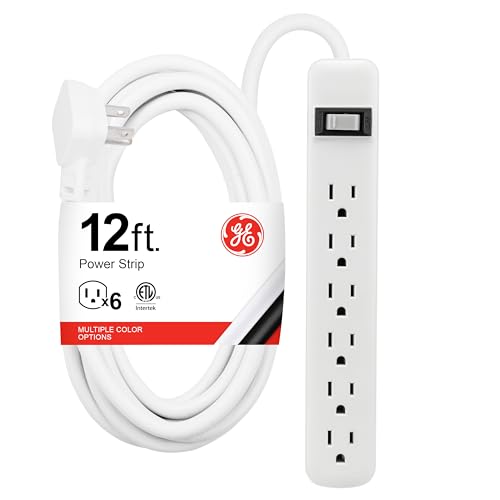
- Six grounded AC outlets for everyday electronics
- 12-foot cord offers broad placement flexibility
- Overload circuit breaker and mountable design
Best For: Basic offices needing long reach and simple AC expansion
Best Desk-Mounted Option
Jgstkcity Desk Clamp Power Strip

- Clamps to desks up to 1.96 inches thick
- Five outlets plus USB-C and USB-A charging
- 1,200 joules of surge protection
Best For: Organized, semi-permanent desk charging
Best High-Capacity Strip
Amazon Basics 12-Outlet Surge Protector

- Twelve outlets for crowded workstations
- 4,000 joules and a 15-amp circuit breaker
- Eight-foot cord with wall-mount keyhole
Best For: Powering many standard office devices
Best Tower Design

- Twelve AC outlets and six USB charging ports
- Three independently switched sections
- 6.5-foot retractable extension cord
Best For: Compact vertical desk organization
Best High-Capacity Pick
Belkin 12-Outlet Surge Protector

- 12 widely spaced AC outlets
- 3,940 joules of surge protection
- 8-foot cord and wall-mountable design
Best For: Busy home-office workstations with many plugs
Best Charging Tower
PASSUS 17-in-1 Power Strip Tower

- 12 AC outlets and 5 USB ports
- 18W USB-C fast-charging port
- 10-foot cord and vertical design
Best For: Multi-device charging stations and shared desks
Best Mountable Metal Strip

- Eight wide-spaced outlets
- Wall- or under-desk mountable
- 2,100 joules and automatic shutdown
Best For: Organized workstations with bulky plugs
Best Overall – Anker 351 12-Outlet Power Strip
The Anker 351 is a practical choice among power strips for home offices, combining 12 AC outlets with built-in USB charging in a desk-friendly design. Its spaced outlets, 5-foot cord, surge protection, and mounting hardware make it suitable for everyday workstations.
Best For: Home-office desks that need many AC outlets plus convenient USB-C charging.
Pros:
- Provides 12 AC outlets, one USB-C port, and two USB-A ports.
- 20W USB-C port can charge an iPhone 15 from 0% to 50% in about 26 minutes.
- Extra outlet spacing accommodates bulky plugs and charger bricks.
- Includes 2,100-joule surge protection, mounting screws, and an 18-month warranty.
Cons:
- The USB output is shared across all three USB ports, with a 15W maximum total.
- The 5-foot cord may be limiting for desks wider than about 5 feet.
Choose this model if you want a balanced mix of outlet capacity, USB-C charging, safety features, and compact desk placement rather than the longest extension cord.
Best Heavy-Duty Cord – Belkin 12-Outlet Surge Protector
The Belkin 12-outlet surge protector suits power strips for home offices where outlet capacity, a long reach, and strong surge protection matter most. Its 10-foot cord and widely spaced outlets help connect equipment across larger workstations without crowding charger bricks.
Best For: Large desks, workstations, and offices with equipment spread away from the wall outlet.
Pros:
- Offers 12 AC outlets with a substantial 4,156-joule surge-protection rating.
- The 10-foot heavy-duty cord provides flexible placement.
- Widely spaced outlets accommodate larger plugs and power adapters.
- Includes phone-line and coaxial-cable protection, plus a lifetime warranty.
Cons:
- It does not include USB charging ports.
- The longer cord can add extra bulk to a compact desk setup.
This is a strong fit for a traditional computer workstation or office setup that relies on AC adapters and benefits from maximum cord reach and a high surge rating.
Best for Maximum Capacity – SUPERDANNY 22-Outlet Power Strip
For demanding power strips for home offices, the SUPERDANNY stands out with 22 grounded AC outlets and six USB ports. Its widely spaced layout, 6.5-foot cord, mounting keyholes, and flat plug are especially useful for busy computer, gaming, or media setups.
Best For: Multi-device workstations, gaming rooms, and media centers that need the highest outlet count.
Pros:
- Combines 22 AC outlets with five USB-A ports and one USB-C port.
- Widely spaced outlets help prevent bulky adapters from blocking neighboring sockets.
- Includes a 6.5-foot cord, angled flat plug, and four mounting keyholes.
- Provides 2,100-joule surge protection and multiple safety protections.
Cons:
- The large footprint may be excessive for a small home-office desk.
- The side outlets cannot be rotated.
- USB-C charging is rated up to 5V/3A, while total USB output details are not specified.
If your setup includes many computers, monitors, peripherals, lamps, and USB devices, this model offers exceptional connection capacity, though its size is best suited to a larger surface.
Best Budget Extension – GE 6-Outlet Power Strip
The GE 6-outlet strip is a straightforward option among power strips for home offices when you need extra AC outlets and generous cord length without added USB features. Its 12-foot cable, overload circuit breaker, and mounting slots support practical placement around desks, workbenches, and counters.
Best For: Basic office setups that need long reach, six grounded outlets, and wall or desk mounting.
Pros:
- Converts one grounded outlet into six grounded AC outlets.
- The 12-foot extension cord supports flexible placement across a room or workspace.
- Built-in circuit breaker with reset switch helps interrupt power during overloads.
- Keyhole slots allow mounting to walls, desks, workbenches, or counters.
Cons:
- It has only six AC outlets and no usable USB charging specification in the supplied features.
- The notes identify overload protection but do not provide a joule surge-protection rating.
- The long cord may be more than needed for a compact desk.
This GE model makes sense for a simple workstation or utility area where cord reach and mounting flexibility matter more than USB charging or a high-capacity outlet layout.
Best Desk-Mounted Option – Jgstkcity Desk Clamp Power Strip
For power strips for home offices, this Jgstkcity model stands out by attaching directly to the desk edge. Its clamp-mounted design helps keep outlets and charging ports within reach while reducing cable clutter.
Best For: Desks that need a semi-permanent, space-saving charging station.
Pros:
- Desk clamp fits tabletops up to 1.96 inches thick.
- Provides five outlets, four USB-C ports, and two USB-A ports.
- Offers 40W total USB-C charging, 1,200 joules of surge protection, and a six-foot flat plug cord.
Cons:
- Requires suitable desk-edge clearance and a 0.4- to 0.5-inch gap from the wall.
- The 40W USB-C output is shared across the charging station.
This is a practical choice when keeping the power strip off the floor matters. The mounting hardware improves desk organization, though compatibility with your desk edge should be checked before buying.
Best High-Capacity Strip – Amazon Basics 12-Outlet Surge Protector
For home offices with several computers, monitors, and peripherals, this Amazon Basics model offers twelve outlets in a conventional rectangular design. Its long cord and high surge rating make it a straightforward choice among power strips for home offices.
Best For: Home offices or workspaces with many corded devices sharing one power source.
Pros:
- Twelve outlets accommodate multiple office, home, and gaming devices.
- Provides 4,000 joules of surge protection and a 15-amp circuit breaker.
- The eight-foot extension cord and rear keyhole support flexible placement and wall mounting.
Cons:
- Does not include USB charging ports.
- The rectangular form may take more desk or floor space than a tower design.
This model prioritizes outlet capacity and protection over added charging features. It is a sensible fit for a busy workstation, especially when your devices already use their own power adapters.
Best Tower Design – JACKYLED Power Strip Tower
This JACKYLED tower is a useful alternative to flat power strips for home offices when vertical organization is more convenient. It combines widely spaced AC outlets with USB charging and a retractable cord that can help keep the workspace tidy.
Best For: Desks, dorms, and home offices that need many outlets in a compact vertical format.
Pros:
- Includes twelve widely spaced AC outlets and six USB ports, including two USB-C ports.
- Three independent switches help manage power by tower section.
- The 6.5-foot retractable cord can be shortened for cleaner cable management.
Cons:
- USB charging output is shared at 24W total.
- Its 1,050-joule surge rating is lower than the Amazon Basics option in this roundup.
- The tower footprint may not suit very shallow desks.
The vertical layout makes access easy while using less horizontal space than a long strip. Choose it for flexible outlet access and cord management rather than maximum surge capacity or high-output USB charging.
Best High-Capacity Pick – Belkin 12-Outlet Surge Protector
For power strips for home offices, the Belkin 12-outlet model is a practical choice when you need to connect several computers, monitors, chargers, and other desk equipment. It combines widely spaced outlets, a long 8-foot cord, and 3,940 joules of surge protection in a wall-mountable design.
Best For: Home-office workstations with many plugs and bulky power adapters.
Pros:
- Provides 12 AC outlets with widely spaced sockets for larger plugs.
- Offers 3,940 joules of surge and overload protection.
- Includes an 8-foot cord, angled three-prong plug, safety indicator, and wall-mountable design.
- UL-listed and backed by a two-year limited warranty plus connected-equipment coverage.
Cons:
- It does not list USB charging ports.
- The unit is relatively large at 13 by 4.13 inches.
Choose this Belkin model if outlet capacity and device protection matter more than built-in USB charging. Its long cord and spaced outlets make it especially useful for a busy desk setup.
Best Charging Tower – PASSUS 17-in-1 Power Strip Tower
Among power strips for home offices, the PASSUS tower stands out for combining 12 AC outlets with five USB charging ports in a vertical format. Its 10-foot cord and dedicated 18W USB-C port can help centralize power for computers, phones, tablets, and other desk accessories.
Best For: Shared desks or charging areas that need many outlets and USB ports in a compact tower.
Pros:
- Combines 12 AC outlets with four USB-A ports and one 18W USB-C port.
- The 10-foot extension cord provides flexibility for desk placement.
- Includes overload, short-circuit, over-current, over-voltage, over-temperature, surge, and lightning protection features.
- Its vertical design helps organize numerous connected devices.
Cons:
- Its 1,800-joule surge rating is lower than some larger traditional strips.
- The unit is rated for a maximum current of 10 amps.
- The USB-C output is limited to 18W.
This PASSUS tower is a strong fit when USB charging is as important as AC outlets. Consider its 10-amp maximum and 1,800-joule rating when matching it to your office equipment.
Best Mountable Metal Strip – Plug'n 8-Outlet Power Strip
For power strips for home offices that need to stay secured under a desk or against a wall, this Plug’n model offers four mounting holes, a metal housing, and eight widely spaced outlets. Its 6-foot cord and flat 45-degree plug also support cleaner installations in workspaces.
Best For: Permanently organized desks, workbenches, garages, and office setups with bulky plugs.
Pros:
- Provides eight outlets with 1.69-inch spacing for larger adapters.
- Includes mounting holes and four screws for horizontal or vertical installation.
- Uses a durable aluminum metal housing and copper three-prong wiring.
- Offers 2,100 joules of surge protection and automatic shutdown for several fault conditions.
Cons:
- It does not include USB charging ports.
- The automatic fuse is disposable and the strip cannot continue operating after exceeding its specified limit.
- The 6-foot cord is shorter than the 10-foot option on the PASSUS tower.
This Plug’n strip makes the most sense when mounting and durability are priorities. Its eight outlets should suit a typical desk, while the wide spacing accommodates bulky chargers without crowding.
How We Picked These Power Strips for Home Offices
We compared the selected models by looking at outlet count, surge-protection rating, cord length, charging ports, physical design, and likely desk use. We also considered whether each strip suits a permanent workstation, a flexible shared office, a gaming setup, or a compact charging area.
Specifications such as joule ratings and USB output are useful comparison points, but they do not replace basic electrical safety. Choose products from reputable brands, avoid exceeding the rated load, and replace a surge protector after a major surge or visible damage.
Quick Comparison
| Best For | Features to Prioritize | Good Match From This List |
|---|---|---|
| Many desk devices | 10–12 AC outlets, high joule rating | Amazon Basics 12-Outlet or Belkin 12-Outlet |
| USB-C charging | USB-C ports and adequate shared wattage | Jgstkcity Desk Clamp or Tower 10FT |
| Long-distance placement | 8–12 ft cord and flat plug | GE 12 Ft or Belkin 10 Ft |
| Small desks | Vertical layout or outlet extender design | JACKYLED Tower or Anker Outlet Extender |
| Heavy-duty flexibility | Wide spacing, wall mounting, sturdy housing | 8 Outlet Metal Power Strip |
Key Buying Factors for Power Strips for Home Offices
Outlet Count and Spacing
Count the devices you use every day, then leave room for future additions. Wide-spaced outlets are especially helpful for laptop bricks, monitor adapters, and oversized plugs that can block neighboring sockets.
Surge Protection
A higher joule rating generally indicates more energy absorption capacity, although it is not a complete measure of product quality. Look for clear protection specifications and reputable safety certification. A power strip is not a substitute for whole-home surge protection or a properly grounded outlet.
Cord Length and Plug Design
Choose a cord long enough to reach the wall outlet without tension or daisy-chaining. Flat plugs can sit closer to the wall or behind furniture, while a longer cord helps when the desk is positioned away from the nearest receptacle.
USB and USB-C Charging
USB ports reduce adapter clutter, but check the total shared output rather than focusing only on the number of ports. USB-C Power Delivery is useful for compatible phones, tablets, and smaller laptops, but verify the stated wattage before relying on it for a computer.
Mounting and Layout
Desk-clamp, wall-mount, and tower designs keep outlets accessible and can improve cable management. A conventional flat strip is often better when you need to hide it beneath a desk or along a baseboard.
Who Should Buy Which Power Strips for Home Offices?
Choose a high-outlet, high-joule model if your workstation includes multiple monitors, speakers, storage drives, and accessories. Pick a USB-C model if you frequently charge mobile devices and want fewer charging bricks. A tower is a practical choice for a compact desk with plugs pointing in several directions.
For desks far from the wall, prioritize the GE or Belkin long-cord designs. If you need strong outlet separation or a mountable unit for a workshop-style office, consider the wide-spaced metal option. For a simple, flexible setup, an established six- or 12-outlet strip may offer the best balance of access, capacity, and price.