Choosing among the best 3D scanners for sculpture depends on more than headline accuracy. Sculptors need reliable tracking across complex forms, clean capture of fine surface detail, and software that can turn a scan into a usable digital model.
This roundup compares 10 handheld and wireless scanners suited to different studio workflows, from rapid reference capture and 3D printing to higher-precision work on intricate clay, wax, wood, or plaster pieces.
Best 10 3d Scanners for Sculpture Picks for 2026
Large-Format Laser Precision
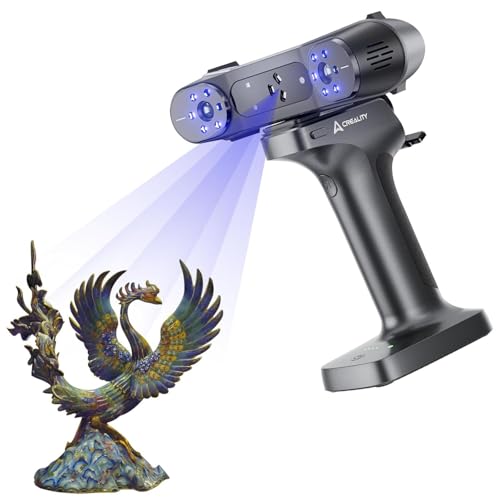
- 34 cross-laser lines with claimed 0.02mm single-frame accuracy
- Wireless Wi-Fi 6 transfer and markerless scanning
- Handles medium-to-large objects and human forms
Best For: Large sculptures and detailed studio scanning
Standalone Color Capture

- Scans and edits without a computer
- 48MP RGB camera for detailed color capture
- Near/Far modes and STL, PLY, OBJ export
Best For: Portable, color-rich sculpture digitization
Pocket-Sized Dual-Mode Scanner

- 260g body with blue laser and NIR modes
- Up to 0.03mm accuracy and 110 fps capture
- AI repair tools and broad device compatibility
Best For: Mobile scanning of figurines and body-sized forms
Versatile Outdoor-Ready Capture
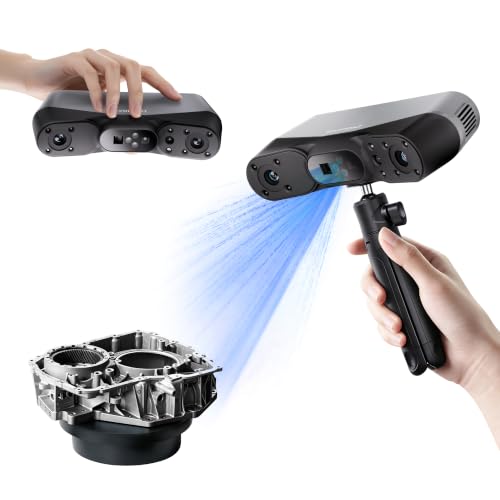
- Five modes for detailed, rapid, and deep-hole scanning
- Blue lasers handle dark and reflective surfaces
- Wireless operation with up to 4-hour battery grip use
Best For: Complex materials and outdoor sculpture scanning
Portable Precision Pick

- 0.03mm blue-laser accuracy
- Wireless, lightweight 260g design
- AI cleanup and scan-to-print exports
Best For: Portable sculpture, figure, and small-to-large object scanning
Versatile Detail Choice

- Dual infrared and laser scanning modes
- Captures synchronized color textures
- 190g body with Wi-Fi 6
Best For: Colorful sculptures, outdoor work, and flexible mobile scanning
Professional Wireless Workstation

- 0.04mm hybrid laser accuracy
- Standalone wireless or wired operation
- 5MP camera with onboard 1TB SSD
Best For: Professional studios scanning detailed, dark, or reflective sculptures
Fast Precision Pick

- Up to 0.01 mm single-frame precision
- Up to 90 FPS scanning with NVIDIA GPU
- No-spray scanning for dark and shiny surfaces
Best For: Fast, detailed scanning of small to medium-sized sculptures
Wireless Detail Specialist

- Up to 0.02 mm laboratory-condition accuracy
- 60 FPS and 660,000 points per second
- Supports 5 mm to 2,000 mm objects with color mapping
Best For: Variable-size sculptures where color and wireless scanning matter
Advanced Laser Choice

- Up to 0.01 mm single-frame precision
- Marker-free scanning at up to 7 million points per second
- Automatic turntable and HD RGB color capture
Best For: Advanced precision modeling of complex sculptures
Large-Format Laser Precision – Creality Raptor X
For shoppers comparing 3d scanners for sculpture, the Creality Raptor X is geared toward capturing medium-to-large forms with detailed blue-laser data. Its 34 cross-laser lines, claimed single-frame accuracy up to 0.02mm, and wireless Wi-Fi 6 transfer make it a strong fit for substantial sculptures and studio work.
Best For: Medium-to-large sculptures, detailed full-body forms, and users who want wireless scanning with minimal preparation.
Pros:
- 34 cross-laser lines and up to 0.02mm single-frame accuracy support detailed captures.
- Combines blue laser and infrared structured light for objects from very small parts to large forms.
- Markerless scanning, anti-shake imaging, and Wi-Fi 6 transfer can streamline handheld workflows.
- Face and body algorithms support rapid human-form scanning.
Cons:
- At 13.67 pounds in the package, it is less convenient to transport than smaller handheld options.
- Its feature set may be more than needed for small, simple sculptures.
The Raptor X stands out when scale, fine edge capture, and reduced tracking friction matter most. It is a practical choice for sculptors working across large objects, people, or complex feature-rich surfaces.
Standalone Color Capture – Revopoint MIRACO Pro
The Revopoint MIRACO Pro is an appealing option among 3d scanners for sculpture when portability and on-device control are priorities. It scans, edits, and exports without requiring a connected computer, while its 48-megapixel RGB camera is designed for photorealistic color capture.
Best For: Sculptors who want a self-contained workflow, detailed color references, and flexibility from small objects to large surfaces.
Pros:
- All-in-one design handles scanning and editing on its built-in hardware.
- Near and Far modes cover small detailed objects through large surfaces.
- 48-megapixel RGB capture and flash lighting support balanced color reproduction.
- Exports STL, PLY, and OBJ files for modeling and 3D-printing workflows.
Cons:
- Battery life is listed at up to 2 hours of scanning per charge.
- Revo Design scan-to-CAD software is sold separately and supports Windows only.
- Its 750g weight is portable, but heavier than pocket-sized alternatives.
MIRACO Pro is especially convenient for artists who move between workspaces or prefer not to bring a computer into the scanning area. Its screen, onboard processing, and strong color hardware make it a versatile sculpture digitization tool.
Pocket-Sized Dual-Mode Scanner – Creality Pika
For artists seeking compact 3d scanners for sculpture, the Creality Pika combines a 260g body with blue-laser and NIR structured-light modes. Its claimed 0.03mm accuracy, 110-fps capture, touchscreen, and AI-assisted repair features make it suited to both small sculptures and larger body scans.
Best For: Mobile sculptors, figurines, collectibles, and users who need a lightweight scanner that can also capture life-size forms.
Pros:
- Compact 260g design, touchscreen, Wi-Fi 6, and swappable batteries support mobile use.
- Blue laser mode targets fine detail, while NIR mode supports larger and full-body scans.
- AI hole filling, body completion, and retexturing can simplify post-processing.
- Exports STL, OBJ, PLY, and ASC files and supports Windows, macOS, iOS, and Android workflows.
Cons:
- Claimed accuracy is up to 0.03mm, below the listed 0.02mm figure of the Raptor X and MIRACO Pro.
- Some AI features and workflows may be most useful with compatible devices or software.
Pika is a strong convenience-first choice for sculptors who value portability without giving up dedicated detail and body-scanning modes. Its included accessories and broad device support make it easy to build a flexible scanning setup.
Versatile Outdoor-Ready Capture – Revopoint POP 4 Premium
The Revopoint POP 4 Premium offers several capture modes for sculptors who work across intricate objects, dark surfaces, and larger forms. As one of the more adaptable 3d scanners for sculpture, it combines blue cross-laser scanning, NIR modes, AI segmentation, and wireless operation.
Best For: Advanced sculpture workflows involving varied materials, outdoor scanning, deep grooves, or both small and large subjects.
Pros:
- Five scanning modes cover fine structured light, rapid capture, cross-laser work, and deep holes.
- Blue laser mode is designed for dark and highly reflective objects without scanning spray.
- AI segmentation can isolate the subject and filter background noise on Windows.
- Supports objects from 10mm minimum volume to 2m maximum volume and up to 4 hours with the battery grip.
Cons:
- Some AI functionality is limited to Windows.
- Outdoor performance depends on the selected mode and lighting conditions.
- The supplied notes do not specify the complete software or accessory package.
POP 4 Premium is compelling when material variety and scanning conditions are unpredictable. Its mode selection gives experienced users more control over reflective, dark, narrow, or outdoor sculpture subjects.
Portable Precision Pick – Creality Pika 3D Scanner
For artists comparing 3d scanners for sculpture, the Creality Pika stands out as a compact option that combines blue-laser detail capture with infrared scanning for larger subjects. Its wireless design, AI-assisted processing, and broad 5mm-to-2000mm scanning range make it practical for moving between small studies, figures, and full-body work.
Best For: Sculptors who want a lightweight, wireless scanner for detailed objects, body scans, and scan-to-print workflows.
Pros:
- Blue laser mode offers stated accuracy of up to 0.03mm for fine details.
- Infrared scanning supports fast full-body capture and objects up to 2000mm.
- AI hole-filling, body completion, and retexturing can reduce cleanup work.
- Wi-Fi 6, hot-swappable batteries, and no-spray scanning support portable use.
Cons:
- Outdoor scanning is specified for up to 80,000 lux, but challenging lighting can still affect capture.
- The extensive AI and dual-mode feature set may require time to learn.
The Pika is a strong fit when portability and flexible subject size matter as much as detail. Its direct STL, OBJ, PLY, and ASC export also suits sculptors planning to move scanned forms into digital editing or 3D printing.
Versatile Detail Choice – Revopoint INSPIRE 2
The Revopoint INSPIRE 2 is a versatile choice among 3d scanners for sculpture, especially for artists working with mixed materials, outdoor subjects, or colorful surface details. Its infrared structured-light and multi-line laser modes let you adapt the scan approach to the subject while the RGB camera records texture and color.
Best For: Sculptors and digital archivists who need portable scanning, color textures, and flexible capture modes.
Pros:
- Offers stated accuracy up to 0.05mm and precision up to 0.03mm.
- Infrared laser lines can capture dark or reflective surfaces without scanning spray.
- Built-in RGB capture synchronizes color data with 3D geometry.
- Lightweight 190g body, Wi-Fi 6, optical zoom, and outdoor support improve flexibility.
Cons:
- Revo Design is paid separately and supports Windows only.
- Computer use requires relatively capable hardware, including 16GB RAM and a listed RTX 3060 GPU for Windows.
- Outdoor performance is specified for up to 20,000 lux, which may limit use in bright conditions.
INSPIRE 2 balances portability with a more complete color-and-geometry workflow. It is particularly appealing for documenting finished sculptures or transferring physical work into design and archival projects, provided your computer or mobile device meets the requirements.
Professional Wireless Workstation – Shining3D EinScan Rigil
For professional studios seeking 3d scanners for sculpture, the Shining3D EinScan Rigil offers an all-in-one workflow with onboard computing, wireless operation, and hybrid laser-plus-infrared scanning. Its high-resolution camera and marker-free scanning capabilities are designed for detailed art, design, and technical capture.
Best For: Professional sculptors and studios that prioritize wireless autonomy, high-detail texture capture, and demanding dark or reflective subjects.
Pros:
- Hybrid scanning uses 50 laser lines and provides stated accuracy of up to 0.04mm.
- Standalone, wireless PC, and wired PC modes support different studio workflows.
- Onboard computing, 32GB RAM, and a 1TB SSD enable self-contained processing.
- 5MP texture capture and marker-free scanning support sculptures and complex surfaces.
Cons:
- At 28 pounds according to the supplied details, it is substantially less portable than the other options.
- Its professional hardware and accessories may be more than casual sculptors need.
- Although it supports outdoor use, the notes do not specify a maximum lighting level.
The Rigil is the most workstation-like option here, trading lightweight portability for integrated processing and a robust hybrid optical system. It makes the most sense for studios that regularly scan demanding surfaces and want fewer dependencies on a separate computer.
Fast Precision Pick – Revopoint MetroY Ultra
The Revopoint MetroY Ultra is a strong choice among 3d scanners for sculpture when you need fast, detailed capture of small to medium-sized forms. Its blue laser system, multiple scanning modes, wireless operation, and ability to scan dark or shiny surfaces make it especially versatile for demanding sculpture workflows.
Best For: Sculptors and makers who prioritize fine geometric detail, rapid scanning, and flexible indoor or outdoor use.
Pros:
- Up to 0.01 mm single-frame precision for intricate details.
- Scanning speeds reach up to 90 FPS with a compatible NVIDIA GPU.
- Can scan dark, glossy, metallic, and outdoor subjects without spray in supported modes.
- Exports to common formats including OBJ, STL, 3MF, FBX, and GLTF.
Cons:
- Requires a relatively powerful computer, including 32GB RAM and an RTX 3060-class GPU for Windows.
- The stated 2.5-hour battery-grip runtime may require recharging during longer sessions.
Choose the MetroY Ultra if speed and surface versatility matter as much as detail. Its broad software export support also makes it practical for moving scanned sculpture data into design, editing, or 3D-printing workflows.
Wireless Detail Specialist – Creality Raptor Pro
The Creality Raptor Pro is a practical option among 3d scanners for sculpture if you want high stated precision, wireless scanning accessories, and support for subjects ranging from very small parts to objects up to 2,000 mm. Its color mapping can also help preserve the visual character of a sculpture.
Best For: Sculptors who want a wide scanning range, detailed capture, and full-color texture reproduction.
Pros:
- Up to 0.02 mm accuracy in laboratory conditions.
- Scans at up to 60 FPS and 660,000 points per second.
- Supports objects from 5 mm to 2,000 mm in size.
- Includes Scan Bridge wireless scanning and full-color mapping.
Cons:
- Marker-based alignment is required for stitching multiple scans.
- The supplied item weight is 12.17 pounds, which may be less convenient for portable use.
The Raptor Pro stands out for range and color capability rather than the highest precision specification in this group. It is worth considering when your sculpture projects vary significantly in scale and you want texture information alongside the 3D geometry.
Advanced Laser Choice – Revopoint MetroX Pro
The Revopoint MetroX Pro is aimed at precision-focused creators choosing among 3d scanners for sculpture. It combines blue laser scanning, up to 0.01 mm single-frame precision, several tracking modes, marker-free structured-light scanning, and automated turntable capture for complex forms.
Best For: Advanced sculptors, designers, and makers who need high-precision modeling and multiple ways to capture complex surfaces.
Pros:
- Offers up to 0.01 mm single-frame precision and up to 0.02 mm single-frame accuracy.
- Multiple modes handle fine features, dark or shiny surfaces, and feature-rich objects.
- Supports marker-free scanning at up to 7 million points per second in full-field mode.
- Automatic turntable scanning and HD RGB color capture add workflow flexibility.
Cons:
- Revo Design and Revo Measure are paid separately and support Windows only.
- Its listed package weight of 14.82 pounds may make it less appealing for frequent travel.
MetroX Pro is the most feature-rich option here for controlled, precision-oriented work. Its combination of laser modes, tracking choices, and automated scanning is particularly useful when a sculpture includes varied surfaces or difficult geometry.
How We Picked the Best 3d Scanners for Sculpture
We focused on scanners that offer a useful combination of detail capture, tracking stability, scan speed, portability, and practical software features. The selection includes blue-laser, near-infrared, structured-light, wireless, and all-in-one models so you can match the scanner to your materials, sculpture size, working environment, and finishing workflow.
Published accuracy figures are only one part of performance. Lighting, surface color, gloss, operator technique, scan distance, and post-processing can all affect the final mesh. We therefore considered each model’s overall workflow value rather than treating its headline specification as a guarantee.
Quick Comparison
| What matters most | Look for | Best suited to |
|---|---|---|
| Fine detail | Blue laser or high-resolution structured light | Small and medium sculptures, intricate textures |
| Large forms | Stable tracking, wider field of view, fast capture | Full-size figures and studio pieces |
| Outdoor or mobile work | Wireless operation, onboard processing, strong tracking | Site work, installations, and reference capture |
| 3D printing | Watertight mesh tools and dependable alignment | Replica production and digital fabrication |
Key Buying Factors for 3d Scanners for Sculpture
Accuracy and Resolution
Accuracy describes how closely measurements match the physical object, while resolution affects how much small surface detail the scanner can distinguish. Choose higher resolution for facial features, carved textures, and ornamental work, but remember that alignment and cleanup can matter just as much.
Tracking and Scan Range
A scanner must maintain position as you move around an object. Good tracking is especially important for sculptures without distinct visual features. For large pieces, prioritize scan volume, stable registration, and the ability to combine multiple passes without visible alignment errors.
Surface and Lighting Performance
Dark, glossy, translucent, or reflective surfaces can challenge optical scanners. Matte spray, removable markers, controlled lighting, and a neutral background may improve results. If you regularly scan difficult finishes, check the manufacturer’s recommended preparation methods before buying.
Software and Export Workflow
Review supported file formats, mesh repair tools, texture handling, alignment controls, and compatibility with your sculpting or CAD software. A scanner with efficient editing and export tools can save more time than a slightly more accurate model with a cumbersome workflow.
Portability and Connectivity
Wireless and all-in-one scanners are convenient for galleries, outdoor work, and large studios. USB-connected models may provide a simpler or more consistent desktop workflow. Also check battery life, onboard storage, computer requirements, and whether scanning can continue if wireless connectivity is interrupted.
Who Should Buy Which 3d Scanners for Sculpture?
Choose a High-Precision Laser Model for Fine Detail
Blue-laser options are a strong fit for sculptors digitizing intricate, small-to-medium pieces or preparing highly detailed files for restoration and printing. They typically reward careful setup and controlled scanning technique.
Choose a Wireless All-In-One Model for Flexible Studio Work
If you move between rooms, exhibitions, client sites, or outdoor locations, an all-in-one scanner can reduce equipment and setup time. These models are particularly useful when immediate previews and portable processing matter.
Choose a Fast Structured-Light Model for Larger Pieces
For full figures, installations, and repeated scans, prioritize fast capture, dependable tracking, and a generous scan area. Speed helps reduce fatigue and makes it easier to capture multiple angles before the subject or setup changes.
Choose a Balanced Generalist for Learning and 3D Printing
New users and makers may get the best value from a scanner that balances accuracy, ease of use, wireless convenience, and accessible software. The right general-purpose model can handle reference capture, replica work, and routine 3D-printing projects without forcing you into a specialist workflow.