The best 3D printers for engineering students make it easier to turn CAD concepts into affordable, testable prototypes. The right model should balance print quality, speed, material compatibility, reliability, and ease of maintenance.
This roundup compares 10 options ranging from simple beginner machines to enclosed, high-temperature printers designed for demanding materials and larger functional parts.
Best 10 3d Printers for Engineering Students Picks for 2026
Best Overall

- Up to 600 mm/s printing with precision-focused flow control
- AMS 2 Pro enables multi-color printing and filament drying
- Automatic calibration and AI failure detection simplify use
Best For: Students wanting fast, convenient prototyping with multi-color capability
Best for Advanced Materials
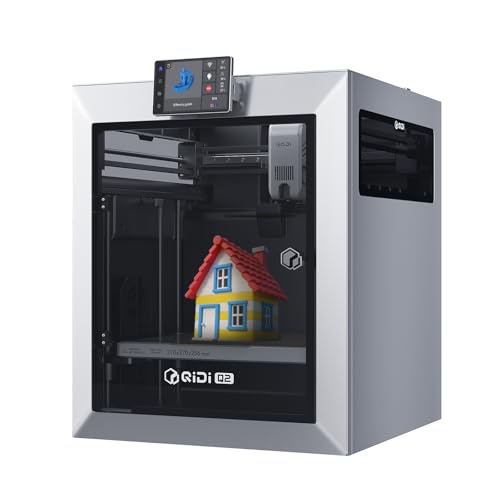
- 65°C heated chamber and 370°C nozzle support technical materials
- CoreXY design reaches speeds up to 600 mm/s
- Optional QIDI BOX enables up to 16-color printing
Best For: Students experimenting with high-temperature and composite materials
Best Value

- Ready to use with approximately 15-minute setup
- 500 mm/s printing and automatic bed leveling
- Enclosed design supports several advanced filaments
Best For: Students seeking simple, fast printing for everyday prototypes
Best Large-Format
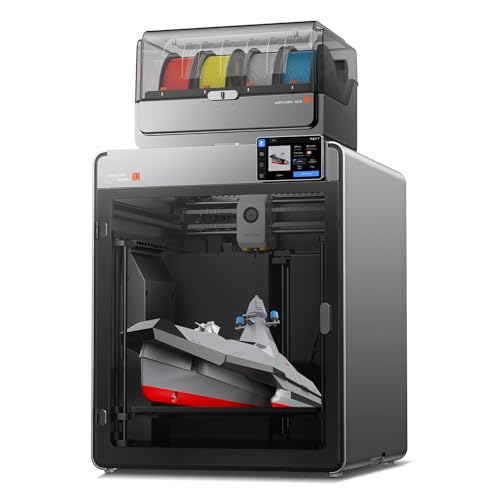
- 350 × 350 × 350 mm build volume for large one-piece prototypes
- 65°C chamber and 350°C hotend support advanced materials
- Included ACE 2 Pro provides four-color printing out of the box
Best For: Students printing large enclosures and full-scale engineering prototypes
Best Beginner Pick

- 10,000 mm/s² acceleration for fast, detailed prints
- Automatic calibration simplifies setup
- Optional AMS lite enables multicolor printing
Best For: Students prioritizing easy, quiet, automated printing
Best for Engineering Materials

- 65°C active chamber supports demanding materials
- Four independent extruders reduce color mixing
- HEPA13 filtration and enclosure improve workspace containment
Best For: Advanced projects using ABS, ASA, PC, Nylon, or multimaterial prints
Best Budget-Friendly Starter

- 250 mm/s speed for faster project iteration
- Auto-leveling and Z-offset calibration simplify setup
- Direct drive supports PLA, PETG, and TPU
Best For: Students starting with prototypes and everyday functional parts
Best Multi-Material Pick

- Four independent toolheads with approximately five-second changes
- Supports flexible, rigid, soluble-support, and engineering materials
- 270 mm cubed build volume with automatic calibration
Best For: Multi-material engineering prototypes and complex models
Best Fast CoreXY Option

- Up to 600 mm/s CoreXY printing
- One-click full-auto calibration
- 220 mm cubed build volume and quick-swap nozzle
Best For: Fast, repeatable desktop prototyping
Best Entry-Level Flexibility

- Up to 600 mm/s travel speed with automatic leveling
- Multiple nozzle sizes for detail or faster printing
- Supports PLA, PETG, ABS, ASA, and carbon-fiber blends
Best For: Accessible student projects and versatile prototyping
Best Overall – Bambu Lab P2S Combo
For engineering students seeking a fast, polished entry into 3D printers for engineering students, the Bambu Lab P2S Combo combines rapid FDM printing, automatic calibration, AI failure detection, and enclosed-material support. Its included AMS 2 Pro adds convenient multi-color and multi-material printing with filament drying.
Best For: Students who want an easy-to-use, high-speed printer for prototypes, models, and multi-color projects.
Pros:
- Print speeds up to 600 mm/s with active flowrate compensation for consistent detail.
- Automatic calibration, quick-swap nozzles, and AI failure detection simplify setup and operation.
- AMS 2 Pro supports multi-color and multi-material printing while drying filament up to 65°C.
- Adaptive airflow can support general and engineering-grade materials, with a carbon filter for cleaner air.
Cons:
- The printer alone does not support multi-color printing; the Combo configuration is required.
- At 46.3 pounds, it is relatively substantial for a student workspace.
The P2S Combo is a strong all-around choice when convenience, speed, and multi-color capability matter. Its automated workflow can reduce the learning curve while leaving room for more advanced material experiments.
Best for Advanced Materials – QIDI Q2
The QIDI Q2 is a compelling option among 3d printers for engineering students who expect to work with demanding materials. Its 65°C heated chamber, 370°C nozzle, CoreXY structure, and support for carbon- and glass-fiber composites give students room to progress from basic prototypes to more technical parts.
Best For: Engineering students prioritizing material flexibility, stable high-temperature printing, and future expansion.
Pros:
- A 65°C heated chamber helps reduce warping and improve layer adhesion.
- The 370°C nozzle supports advanced materials, including PA, PC, and fiber-reinforced composites.
- Full-metal CoreXY construction and linear rails support speeds up to 600 mm/s.
- Auto-leveling, AI camera monitoring, power-loss recovery, and optional QIDI BOX improve reliability.
Cons:
- Multi-color and multi-material printing requires the separate QIDI BOX.
- Its advanced capabilities may be more than needed for students printing mainly PLA projects.
The Q2 stands out for students who want an engineering-focused platform rather than a basic hobby printer. Its high-temperature hardware and enclosed, filtered design make it better suited to ambitious materials and demanding prototypes.
Best Value – Bambu Lab P1S
The Bambu Lab P1S offers a practical balance for students comparing 3d printers for engineering students. It arrives ready to use, sets up in about 15 minutes, and pairs high-speed printing with automatic bed leveling and an enclosed design that improves performance with several advanced filaments.
Best For: Students who want a straightforward enclosed printer for everyday prototypes and course projects.
Pros:
- Prints at up to 500 mm/s with 20,000 mm/s² acceleration.
- Automatic bed leveling helps simplify reliable first layers.
- The enclosed design improves print performance with materials such as PET ABS and ASA.
- Supports multi-color and multi-material printing when paired with a Bambu Lab AMS.
Cons:
- Multi-color printing requires the additional Bambu Lab AMS.
- Carbon- and glass-fiber-reinforced polymers are not recommended.
- Compared with the QIDI Q2, its listed material support is less focused on demanding composites.
The P1S is a sensible choice for students who value quick setup and dependable general-purpose printing. It handles common prototyping materials well, though students planning extensive composite work may need a more specialized machine.
Best Large-Format – Anycubic Kobra S1 Max Combo
For students who need to print large enclosures or full-scale prototypes, the Anycubic Kobra S1 Max Combo is one of the more capable 3d printers for engineering students. Its 350 × 350 × 350 mm build volume can accommodate larger parts in one piece, while the heated chamber and high-temperature hotend support a broad material range.
Best For: Engineering students building large prototypes, enclosures, and tall precision parts.
Pros:
- The 350 × 350 × 350 mm build volume reduces the need to split and join large parts.
- CoreXY construction is designed for stable, smooth printing of tall and accurately fitting models.
- Up to 600 mm/s speed and 20,000 mm/s² acceleration can shorten project print times.
- A 65°C heated chamber, 350°C hotend, and 49-point auto-leveling support advanced printing workflows.
Cons:
- At 77.8 pounds, it is considerably heavy and needs substantial workspace.
- Native four-color printing is included, while expansion to 16 colors requires additional ACE 2 Pro boxes.
- Its large format may be unnecessary for small classroom parts and compact prototypes.
The Kobra S1 Max Combo is best justified when build volume is a priority. It offers the scale and material capabilities needed for substantial engineering models, but its size and weight make workspace planning especially important.
Best Beginner Pick – Bambu Lab A1
For engineering students seeking approachable 3d printers for engineering students, the Bambu Lab A1 emphasizes automation, speed, and straightforward operation. Its automatic calibration and active flow rate compensation can reduce setup friction when producing prototypes, models, and project parts.
Best For: Students who want an easy-to-use printer with fast, precise FDM printing and optional multicolor capability.
Pros:
- 10,000 mm/s² acceleration supports fast printing while maintaining detail.
- Automatic Z-offset and bed-leveling calibration simplify setup.
- Active flow rate compensation supports consistent extrusion.
- Quiet operation and a quick-swap nozzle make routine use and maintenance easier.
Cons:
- Multicolor printing requires the AMS lite, sold separately unless you choose the A1 Combo.
- The supplied notes describe it as a beginner-focused printer rather than an engineering-grade enclosed system.
The A1 is a practical choice when ease of use matters more than advanced material handling. Students can spend less time calibrating and more time iterating on designs, while the optional AMS lite adds a path to multicolor work.
Best for Engineering Materials – FlashForge Creator 5 Pro
The FlashForge Creator 5 Pro is the most industrially oriented option among these 3d printers for engineering students. Its heated chamber, sealed enclosure, filtration, and independent extruders are designed for demanding prototypes and projects using materials such as ABS, ASA, PC, and Nylon.
Best For: Advanced engineering students working with engineering-grade materials, enclosed printing, and efficient multicolor or multimaterial projects.
Pros:
- Active chamber heating up to 65°C helps reduce warping and support interlayer adhesion.
- HEPA13 filtration and a sealed enclosure are suited to office, educational, or home environments.
- Four independent extruders support multicolor and multimaterial printing without shared-nozzle color mixing.
- CoreXY construction, 600 mm/s speed, automatic leveling, and toolhead calibration support high-throughput work.
Cons:
- Its 30.9-pound weight and industrial feature set may be more machine than beginners need.
- Advanced materials and multiple toolheads can require a steeper learning curve than a basic FDM printer.
The Creator 5 Pro stands out for students whose coursework involves functional prototypes and higher-performance filaments. It offers the strongest material-management features here, but its capabilities make the most sense when the added complexity will be used.
Best Budget-Friendly Starter – Creality Ender 3 V3 SE
The Creality Ender 3 V3 SE offers a straightforward entry point for students comparing 3d printers for engineering students. Its fast print speed, automatic leveling, and direct-drive extruder make it suitable for prototypes, functional parts, and everyday workshop projects with PLA, PETG, and TPU.
Best For: Students who want a beginner-friendly printer with automatic first-layer setup and support for common flexible and rigid filaments.
Pros:
- Up to 250 mm/s printing helps shorten prototype and project turnaround times.
- CR Touch auto-leveling and automatic Z-offset calibration simplify setup.
- Sprite direct-drive extrusion supports PLA, PETG, and TPU.
- Dual Z-axis screws, synchronized motion, and a flexible build plate support consistent prints and easy removal.
Cons:
- The supplied notes do not identify an enclosure or active chamber heating for advanced engineering materials.
- Its feature set is focused on everyday filament printing rather than dedicated industrial workflows.
The Ender 3 V3 SE is a sensible starting point for coursework and general prototyping. It combines useful automation with broad everyday filament support, making it easier to begin printing without the added complexity of a more specialized machine.
Best Multi-Material Pick – Snapmaker U1
For engineering students who need to prototype functional parts, the Snapmaker U1 stands out among 3d printers for engineering students with four independent toolheads, a 270 x 270 x 270 mm build volume, and support for rigid, flexible, soluble-support, and engineering materials. Its automatic calibration and fast CoreXY system are designed to reduce setup and print-time friction.
Best For: Students creating multi-color prototypes, mixed-material parts, and complex models with soluble supports.
Pros:
- Four toolheads switch in about five seconds for multi-color and multi-material printing.
- Supports materials including PLA, PVA, TPU, PETG, ABS, ASA, PA, and PC.
- Automatic calibration, vibration compensation, AI print monitoring, and remote app control simplify operation.
- 500 mm/s CoreXY printing and a large 270 x 270 x 270 mm build volume support productive prototyping.
Cons:
- At 59 pounds, it is relatively heavy and may need a dedicated workspace.
- The extensive toolhead and material capabilities may be more than needed for basic single-material projects.
The U1 is the most capable option here for students whose coursework involves material experimentation or detailed functional prototypes. Its automation and waste-reducing tool changes can also make repeated project iterations more convenient.
Best Fast CoreXY Option – FLASHFORGE AD5M
The FLASHFORGE AD5M is a practical choice among 3d printers for engineering students who prioritize fast iteration and straightforward operation. Its CoreXY platform offers up to 600 mm/s printing, while one-click full-auto calibration and a quick-swap nozzle are intended to keep routine setup manageable.
Best For: Students who want a compact, high-speed printer for repeated prototype iterations and general fabrication work.
Pros:
- CoreXY design supports printing speeds up to 600 mm/s.
- One-click full-auto calibration helps simplify first-layer setup.
- 3S quick-swap nozzle supports faster maintenance or nozzle changes.
- Customizable enclosure and 220 x 220 x 220 mm build volume suit many desktop projects.
Cons:
- The supplied notes do not specify the full list of supported materials or detailed connectivity features.
- Its 220 mm cubed build volume is smaller than the Snapmaker U1’s stated workspace.
Choose the AD5M if speed, automation, and a relatively compact footprint matter more than advanced multi-toolhead printing. The included 50 g HS PLA filament also gives students a small amount of material for getting started.
Best Entry-Level Flexibility – FLASHFORGE Adventurer 5M
The FLASHFORGE Adventurer 5M combines high-speed CoreXY motion with automatic leveling, making it a well-rounded option among 3d printers for engineering students. Its 32 mm³/s high-flow nozzle, dual-sided PEI platform, and interchangeable nozzle sizes support both efficient prints and more detailed work.
Best For: Students who need an easy-to-use printer for classroom projects, home prototyping, and varied filament experiments.
Pros:
- Up to 600 mm/s travel speed and 20,000 mm/s² acceleration support fast iteration.
- One-click automatic leveling helps produce consistent first layers.
- 0.25, 0.4, 0.6, and 0.8 mm nozzle options balance detail and throughput.
- Supports PLA, PETG, ABS, ASA, carbon-fiber blends, and other listed materials.
Cons:
- The 220 x 220 x 220 mm build volume may limit larger assemblies.
- Remote monitoring and adjustment require adding the Flashforge camera kit.
The Adventurer 5M is a sensible all-purpose pick for students who value quick setup and material flexibility. Its nozzle choices let one machine serve both fine-detail assignments and faster, larger draft prints.
How We Picked the Best 3d Printers for Engineering Students
We focused on features that matter in coursework, student design projects, laboratories, and prototype development: dependable print performance, useful build volume, accessible controls, material flexibility, calibration systems, and practical safety features. We also considered whether a printer is suitable for beginners or better matched to students who already understand slicing, maintenance, and material requirements.
For students sharing equipment or working on deadlines, automatic calibration, reliable first layers, fast motion systems, and readily available replacement parts can be more valuable than maximum specifications. Enclosures, heated chambers, and filtration become increasingly important when printing advanced engineering filaments.
Quick Comparison
- Best overall versatility: Bambu Lab P2S Combo, with multicolor capability and an automated workflow.
- Best for advanced materials: QIDI Q2, with a heated chamber and high-temperature nozzle.
- Best established enclosed option: Bambu Lab P1S, suited to fast, contained FDM printing.
- Best for large prototypes: Anycubic Kobra S1 Max Combo.
- Best beginner choice: Bambu Lab A1 or Creality Ender 3 V3 SE.
- Best for production-style experimentation: FLASHFORGE Creator 5 Pro or Snapmaker U1.
- Best compact high-speed options: FLASHFORGE AD5M and Adventurer 5M.
Key Buying Factors for 3d Printers for Engineering Students
Materials and Temperature Capability
PLA and PETG cover many classroom prototypes, but nylon, carbon-fiber composites, ABS, and other technical filaments require higher nozzle temperatures and, often, an enclosure or heated chamber. Check the full hot-end, bed, chamber, and filament-drying requirements before choosing a printer for structural parts.
Build Volume and Dimensional Accuracy
Choose a build area based on the parts you actually expect to make. A compact printer is easier to place and maintain, while a larger format model can produce assemblies and prototypes with fewer splits. Consistent calibration and a rigid frame generally matter more than headline resolution alone.
Workflow, Speed, and Maintenance
Automatic leveling, filament sensors, remote monitoring, and quick tool or nozzle changes can save substantial time during busy semesters. High speed is useful only when the printer can maintain good cooling, layer adhesion, and dimensional consistency.
Safety and Workspace
Enclosed printers are preferable for classrooms, shared workshops, and materials that produce stronger fumes or particles. Look for filtration, ventilation compatibility, thermal protection, and a location with adequate clearance around the machine.
Who Should Buy Which 3d Printers for Engineering Students?
Students new to 3D printing should prioritize the Bambu Lab A1, Creality Ender 3 V3 SE, or FLASHFORGE Adventurer 5M for straightforward setup and routine prototyping. Choose the P1S, P2S Combo, or AD5M if you want a faster enclosed workflow for frequent CAD iterations.
Students working with composite or high-temperature materials should consider the QIDI Q2 or FLASHFORGE Creator 5 Pro, provided their workspace supports those materials. Pick the Anycubic Kobra S1 Max Combo for oversized prototypes, or the Snapmaker U1 when rapid multicolor and multi-tool workflows are especially useful. Before buying, confirm software compatibility, local support, replacement-part availability, and the total cost of filament, nozzles, build plates, and maintenance.