Building a network-attached storage system around your own hardware gives you more control over drive capacity, operating systems, cooling, and upgrades. The right enclosure can turn a standard PC platform into a dependable home server or media-storage hub.
This roundup covers 10 NAS enclosures for PC, including external multi-drive units and DIY chassis for Mini-ITX, Micro ATX, ATX, and E-ATX builds. Use the guide below to match drive support, expansion room, cooling, and installation convenience to your storage plans.
Best 10 Nas Enclosures for PC Picks for 2026
Maximum DIY Capacity

- Up to 11 internal 3.5-inch HDD bays
- ATX and BTF motherboard compatibility
- Mesh panel with four 140mm PWM fans
Best For: High-capacity DIY NAS and media-server builds
Fast External Expansion
WAVLINK 4-Bay Hard Drive Enclosure

- Four bays for 3.5-inch or 2.5-inch SATA drives
- USB-C 3.2 connectivity up to 10Gbps
- Automatic cooling fans and independent switches
Best For: External multi-drive storage for desktops and laptops
Largest PC Case Capacity
DARKROCK Classico Storage Master

- Supports up to 13 hard drives
- Mesh front and side panels aid airflow
- Supports 360mm radiators and vertical GPUs
Best For: Large NAS, storage-server, and workstation builds
Simple DAS Storage
CENMATE Aluminum 4-Bay Enclosure

- Four bays support 2.5-inch and 3.5-inch SATA drives
- USB 3.0 offers up to 5Gbps transfers
- Tool-free hot swapping with USB-A/C cables
Best For: Basic direct-attached storage expansion
Rackmount Expansion Pick
Rosewill RSV-R4100U 4U Server Chassis
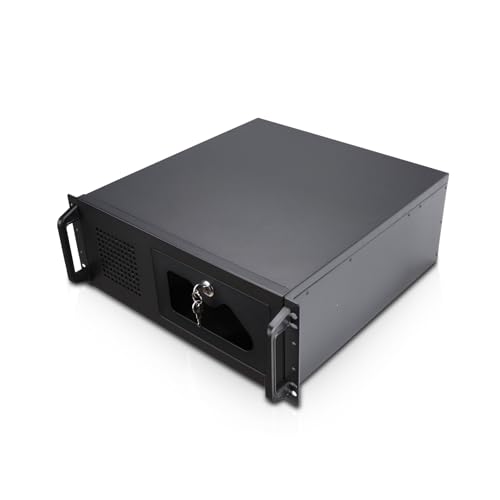
- Seven 3.5-inch HDD bays
- ATX and CEB motherboard support
- 4U rackmount design with front lock
Best For: ATX storage servers and expandable rack builds
Flexible Eight-Bay Build

- Supports eight 3.5-inch HDDs and two SSDs
- Works with MATX, uATX, and ITX boards
- Flexible FLEX, SFX, or ATX PSU layouts
Best For: Custom personal-cloud and desktop NAS builds
Maximum-Capacity Pick
Rosewill Thor Full-Tower NAS Chassis

- Up to 11 3.5-inch HDDs or 13 2.5-inch SSDs
- E-ATX support with 400mm expansion-card clearance
- USB-C, SATA/SAS bays, and a 140mm PWM fan
Best For: AI servers, workstations, and high-capacity DIY NAS builds
Compact Hot-Swap Value

- Eight hot-swap HDD bays plus two SSD slots
- Micro-ATX and Mini-ITX motherboard support
- Compact mini-tower with four fan positions
Best For: Home NAS, media server, and backup builds
Quiet DIY Choice

- Eight hot-swap bays for HDDs or SSDs
- Dual air channels with three temperature-controlled fans
- Supports Mini-ITX, Micro-ATX, and 1U/FLEX PSUs
Best For: Quiet media servers, private clouds, and backup systems
Maximum DIY Capacity – Rosewill Helium NAS Max
For builders seeking NAS enclosures for PC projects, the Rosewill Helium NAS Max is a spacious ATX mid-tower case designed around high drive capacity. It supports up to 11 3.5-inch HDDs, includes four pre-installed 140mm PWM fans, and offers a front USB-C port.
Best For: DIY NAS systems, media servers, file storage, and small-business builds requiring many 3.5-inch drives.
Pros:
- Supports up to 11 internal 3.5-inch HDDs
- Compatible with ATX, Micro-ATX, Mini-ITX, and BTF motherboards
- Mesh front panel and four 140mm PWM fans support airflow
- Includes front USB 3.2 Type-C connectivity
Cons:
- Large 15-pound mid-tower design requires substantial space
- Designed for DIY assembly rather than a turnkey NAS appliance
The Helium NAS Max stands out when drive count and standard PC component compatibility matter most. Its roomy layout and included airflow hardware make it a practical foundation for a custom NAS enclosure for PC use.
Fast External Expansion – WAVLINK 4-Bay Hard Drive Enclosure
The WAVLINK 4-Bay enclosure is a compact external option among NAS enclosures for PC users who want multi-drive expansion without building a full computer case. It accepts four SATA drives, connects over USB-C at up to 10Gbps, and adds temperature-controlled cooling.
Best For: Desktop and laptop users needing flexible external storage, fast file transfers, and support for both 3.5-inch and 2.5-inch drives.
Pros:
- Four SATA 6Gbps bays support up to 128TB total capacity
- USB 3.2 Type-C supports data transfer rates up to 10Gbps
- Built-in fans activate automatically at 48°C
- Independent power switches enable convenient drive swapping
Cons:
- 2.5-inch drives require separate mounting brackets
- HDMI video output requires a compatible host USB-C video connection
- External enclosure format is not a complete NAS system
With fast USB-C connectivity, broad drive support, and active cooling, this WAVLINK model is a versatile external storage enclosure. Its HDMI and peripheral connectivity also make it useful in a streamlined desktop workspace.
Largest PC Case Capacity – DARKROCK Classico Storage Master
For a full-size custom server or storage PC, the DARKROCK Classico Storage Master offers exceptional expansion. This full-tower case supports up to 13 hard drives, uses mesh front and side panels, and includes four pre-installed 120mm fans.
Best For: High-capacity NAS enclosures for PC builds that also need ATX component support, water-cooling options, or vertical GPU mounting.
Pros:
- Supports up to 13 hard drives, including 10 3.5-inch HDDs and 3 2.5-inch SSDs
- Compatible with ATX, Micro-ATX, and Mini-ITX motherboards
- Mesh panels and included fans promote airflow
- Supports a 360mm radiator and vertical GPU mounting
Cons:
- Full-tower size may be excessive for compact setups
- Cooling and expansion features can add complexity to a NAS-focused build
- Product details list four pre-installed fans while also listing two fans in specifications
The Classico Storage Master is a strong choice when maximum internal drive capacity is the priority. Its full-tower format leaves room for powerful PC hardware and advanced cooling, making it suitable for ambitious storage-server builds.
Simple DAS Storage – CENMATE Aluminum 4-Bay Enclosure
The CENMATE 4-Bay enclosure provides straightforward external expansion for users comparing NAS enclosures for PC setups. It supports four 2.5-inch or 3.5-inch SATA HDDs or SSDs, connects through USB 3.0, and includes both USB-A and USB-C cables.
Best For: Plug-and-play direct-attached storage for Windows, Mac, and Linux desktops or laptops.
Pros:
- Supports four 2.5-inch or 3.5-inch SATA drives
- Up to 80TB stated total capacity
- Tool-free and hot-swappable drive design
- Aluminum body and built-in fan help with heat management
Cons:
- USB 3.0 transfer speed is limited to up to 5Gbps
- Product is DAS and explicitly does not provide RAID or NAS functionality
- Fan noise is specified at approximately 40–50 decibels
CENMATE is best viewed as a simple direct-attached storage enclosure rather than a networked NAS. Its broad operating-system compatibility and included cables make it convenient for adding several drives to an existing computer.
Rackmount Expansion Pick – Rosewill RSV-R4100U 4U Server Chassis
For builders comparing nas enclosures for pc use, the Rosewill RSV-R4100U is a spacious 4U rackmount chassis designed around ATX or CEB systems and multiple 3.5-inch hard drives. Its rack-friendly format suits home servers, workstations, and data-center-style installations.
Best For: ATX-based storage servers and rackmount builds that need seven 3.5-inch bays and PCI expansion room.
Pros:
- Seven internal 3.5-inch HDD bays and seven PCI expansion slots provide room to grow.
- Supports ATX and CEB motherboards.
- Includes a front 120mm PWM fan, two rear 80mm PWM fans, USB 3.0 ports, and a front-panel lock.
- Standard 4U rackmount design works in server racks and home-server environments.
Cons:
- Drive compatibility is limited to HDDs with three screw holes on each side.
- Its 4U rackmount footprint is less suitable for compact desktop setups.
- Power supply mounting is external, according to the supplied details.
The RSV-R4100U is a practical choice when drive capacity, ATX compatibility, and rack installation matter more than minimizing enclosure size. Confirm your hard-drive mounting pattern and available rack space before buying.
Flexible Eight-Bay Build – AUDHEID 8-Bay NAS Chassis
Among nas enclosures for pc projects, this AUDHEID chassis stands out for its eight 3.5-inch HDD capacity and flexible power-supply configurations. The two-level internal layout separates the main PC components from the drive power area to support assembly and airflow management.
Best For: Personal cloud and desktop NAS builders who want eight hard-drive bays with MATX, uATX, or ITX motherboard support.
Pros:
- Supports up to eight 3.5-inch HDDs plus two 2.5-inch SSDs.
- Offers three drive and power-supply combinations, including FLEX, SFX/SFX-L, and ATX options.
- Compatible with MATX, uATX, and ITX motherboards.
- Internal layout places PC components above the hard-drive power area for easier organization.
Cons:
- Half-height PCIe devices are limited to less than 285mm.
- Water-cooling radiator height is limited to 80mm.
- It is diskless, so drives and other components must be purchased separately.
This enclosure offers useful configuration flexibility for a custom NAS, especially if you are deciding between compact power supplies and a full ATX unit. Check the selected PSU, graphics-card dimensions, and cooling requirements before assembling the system.
Home-Friendly Hot-Swap Choice – JONSBO N4 NAS PC Case
The JONSBO N4 is a compact option for shoppers seeking nas enclosures for pc systems that can blend into a home office. It combines six 3.5-inch HDD positions, two 2.5-inch SSD bays, four hot-swap bays, and Micro-ATX or ITX support in a steel-and-walnut enclosure.
Best For: Home office, personal server, and compact NAS builds needing convenient hot-swap access and a distinctive enclosure design.
Pros:
- Provides eight total drive positions: six 3.5-inch HDD bays and two 2.5-inch SSD bays.
- Four of the 3.5-inch bays support hot swapping, while two are non-hot-swap.
- Supports ITX and Micro-ATX motherboards with four PCI expansion slots.
- Includes USB 3.2 Gen 2 Type-C, USB 3.0, a built-in 120mm fan, and a walnut wood front accent.
Cons:
- CPU cooler height is limited to 70mm.
- GPU support is limited to 230mm, and expansion cards must be half-height.
- Uses an SFX power supply and includes only one built-in fan.
The N4 is a strong fit when a smaller, living-space-friendly NAS matters as much as drive access. Its compact component limits make careful selection of the cooler, GPU, motherboard, and SFX power supply essential.
Maximum-Capacity Pick – Rosewill Thor Full-Tower NAS Chassis
For builders who need extensive room to scale, the Rosewill Thor is one of the most expansive nas enclosures for pc systems in this roundup. Its full-tower layout supports E-ATX boards, up to 11 3.5-inch hard drives or 13 2.5-inch SSDs, and expansion cards up to 400mm.
Best For: AI servers, workstation builds, media servers, and large DIY NAS systems requiring high storage and expansion capacity.
Pros:
- Supports up to 11 3.5-inch HDDs or 13 2.5-inch SSDs.
- Accommodates E-ATX motherboards and expansion cards up to 400mm.
- Includes a 140mm PWM fan, dust filter, SATA/SAS bays, and USB 3.2 Type-C.
Cons:
- Its full-tower size is less suitable for compact workspaces.
- Only one fan is listed, so additional cooling may be useful for dense builds.
- It is a chassis rather than a complete NAS, so core components must be added.
The Thor is the strongest choice here when maximum drive capacity and component flexibility matter more than a small footprint. Its large interior suits demanding storage and workstation configurations.
Compact Hot-Swap Value – RGEEK PS100a 8-Bay NAS Case
The RGEEK PS100a offers a compact route into nas enclosures for pc projects, combining eight hot-swappable 3.5-inch bays with two dedicated 2.5-inch SSD slots. Its Micro-ATX and Mini-ITX support makes it practical for desk or shelf-based storage builds.
Best For: Home NAS systems, media servers, and backup builds needing hot-swap storage in a mini-tower format.
Pros:
- Provides eight 3.5-inch hot-swap bays plus two 2.5-inch SSD slots.
- Supports Micro-ATX and Mini-ITX motherboards with four full-height PCIe slots.
- Fits ATX PSUs up to 170mm and supports four 120mm fan positions.
Cons:
- GPU clearance is limited to 240mm.
- CPU cooler height is limited to 55mm.
- The listed warranty is six months.
Choose the PS100a if you want accessible drive swapping and useful expansion options without moving to a full tower. Its compact dimensions are a clear advantage, though component size requires careful planning.
Quiet DIY Choice – AUDHEID 8-Bay Mini NAS Case
The AUDHEID 8-bay case is designed for customized storage systems, making it a flexible option among nas enclosures for pc users. It supports hot-swappable 3.5-inch or 2.5-inch drives, Mini-ITX or Micro-ATX boards, and separate airflow paths for the drives and mainboard.
Best For: Plex or Jellyfin servers, private cloud storage, surveillance archives, and small-business data backup.
Pros:
- Offers eight hot-swap bays for 3.5-inch HDDs or 2.5-inch SSDs.
- Uses dual independent air channels and three temperature-controlled silent fans.
- Supports Mini-ITX, Micro-ATX, 1U/FLEX power supplies, and CPU coolers up to 58mm.
Cons:
- Motherboard, CPU, and other core components are not included.
- Its compatibility is focused on compact boards and low-profile cooling hardware.
- The product is listed with rack-mount mounting, which may require planning for a particular setup.
This case stands out for builders prioritizing controlled airflow, hot-swap access, and quiet operation. The included accessories simplify assembly, while the compact platform still leaves room for a capable DIY server.
How We Picked These Nas Enclosures for PC
We focused on the features that most directly affect a DIY NAS build: drive-bay count, supported motherboard sizes, hot-swap access, cooling, power-supply compatibility, and connectivity. The selection includes both complete external enclosures for SATA drives and internal PC cases designed for NAS-style systems.
We also considered practical differences between compact desktop designs, rackmount chassis, and large towers. A smaller enclosure may suit a quiet home server, while a full-size case is better for many drives, expansion cards, or future upgrades.
Quick Comparison
| Type | Best For | Main Advantage |
|---|---|---|
| External 4-bay enclosure | Existing computers and simple expansion | USB-C connectivity and easy drive access |
| Mini-ITX or Micro ATX case | Compact DIY NAS builds | Smaller footprint with internal components |
| ATX tower | Flexible home servers | More motherboard, drive, and expansion support |
| 4U rackmount chassis | Server racks and equipment rooms | Rack installation and larger hardware capacity |
Key Buying Factors for Nas Enclosures for PC
Drive Capacity and Layout
Count both the number and type of bays. Some cases prioritize 3.5-inch hard drives, while others add 2.5-inch SSD mounts. Hot-swap trays are useful when you need to replace or expand drives without opening the chassis, but fixed bays can reduce cost and complexity.
Motherboard and Power-Supply Compatibility
Check whether the enclosure supports Mini-ITX, Micro ATX, ATX, CEB, or E-ATX boards. Also verify the power-supply format and cable reach. A case with many drives may require more SATA power connectors than a typical desktop build provides.
Cooling, Noise, and Clearance
NAS systems often run continuously, so airflow matters. Look for direct cooling across the drive bays, dust-friendly mesh panels, and replaceable fans. Confirm clearance for CPU coolers, graphics cards, and expansion cards if you plan to use transcoding or storage-controller hardware.
Connectivity and Drive Interface
External enclosures commonly use USB-A or USB-C, while internal NAS cases depend on the motherboard or a separate SATA/SAS controller. USB 3.2 and 10Gbps support can improve transfers, but real-world speed still depends on the drives, controller, and network.
Who Should Buy Which Nas Enclosures for PC?
Choose a four-bay external enclosure if you already own a computer and want straightforward storage expansion. Pick a Mini-ITX or Micro ATX NAS case when space, efficiency, and a compact footprint matter most. An ATX tower is the better all-around choice for multiple drives, add-in cards, and long-term upgrades. For rack-based deployments, a 4U chassis provides easier integration with standard server equipment and typically offers more room for full-size components.