Photographers need storage that does more than hold files. The right enclosure can centralize a growing image library, protect working data with redundancy, and make large RAW catalogs easier to access across computers and editing devices.
This roundup compares 10 options across true NAS systems, portable network storage, direct-attached enclosures, and DIY cases. Use the buying guide below to match drive capacity, connection speed, expandability, and workflow needs to the way you shoot and edit.
Best 10 Nas Enclosure for Photographers Picks for 2026
Best Overall NAS
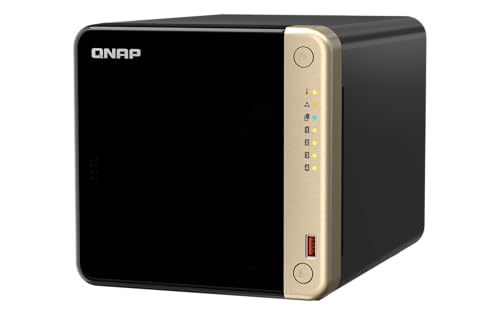
- Four hot-swappable bays for expandable storage
- Dual 2.5GbE ports for faster media transfers
- M.2 NVMe slots support cache or SSD pools
Best For: Home studios and small teams building a central photo archive
Best Portable Option

- Portable M.2 NVMe storage for field backups
- SD, USB, Wi-Fi 6, and AP-mode backup methods
- Replaceable batteries deliver up to six hours of use
Best For: Travel and location photographers backing up images on the go
Best High-Capacity DAS

- Up to 88TB per enclosure and 264TB across three
- 10Gbps USB-C connectivity for large media files
- Independent slots simplify single-drive replacement
Best For: Professionals building a large direct-attached photo or video archive
Best 4-Bay NAS

- Four drive bays for expandable photo storage
- 2.5GbE network connectivity
- 4GB memory and hardware encryption
Best For: Photographers building a compact network photo archive
Best High-Speed DAS

- Six hot-swappable SATA drive bays
- USB 3.2 Gen 2 up to 10Gbps
- Supports desktop and laptop workflows
Best For: Direct-attached photo storage with high expansion capacity
Best DIY NAS Case
AUDHEID 8-Bay Hot-Swap Chassis

- Eight hot-swap HDD and SSD bays
- Mini-ITX and Micro-ATX support
- Separate cooling channels with three fans
Best For: DIY builders creating an expandable studio photo server
Fast Two-Drive Workhorse

- USB 3.2 Gen 2 up to 10Gbps
- Supports two SATA HDDs or SSDs
- Tool-free and hot-swappable
Best For: Photographers needing fast local storage for two drives
High-Capacity Archive Hub

- Four bays for larger photo archives
- Up to 80TB listed total capacity
- USB 3.0 with active cooling
Best For: Photographers consolidating multiple archive drives
Flexible Everyday Storage

- Two bays for SATA HDDs or SSDs
- Tool-free and hot-swappable design
- Supports USB 3.0 and daisy chaining
Best For: Photographers needing simple two-drive expansion
Best Overall NAS – QNAP TS-464 4-Bay NAS
The QNAP TS-464-8G-US is a strong nas enclosure for photographers who want a dedicated desktop system for organizing and accessing photo libraries. Its four bays, 8GB of RAM, dual 2.5GbE ports, and NVMe expansion support fast transfers and room to grow.
Best For: Photographers building a central home studio or small-team photo archive.
Pros:
- Four hot-swappable SATA drive bays support expandable storage.
- Dual 2.5GbE ports help accelerate large media transfers.
- Two PCIe Gen3x2 M.2 NVMe slots support cache or SSD storage pools.
- Multiple USB 3.2 Gen 2 ports simplify transfers from external drives.
Cons:
- It is a desktop NAS rather than a compact portable enclosure.
- Storage drives are not specified as included.
Choose this QNAP when you want a full-featured, network-connected photo hub with useful performance upgrades. It is less suited to photographers seeking a simple direct-attached enclosure.
Best Direct-Attached Enclosure – WAVLINK 4-Bay USB-C Enclosure
The WAVLINK four-bay enclosure is a practical nas enclosure for photographers who primarily need high-capacity storage connected directly to a computer. USB-C 3.2 Gen 2 reaches up to 10Gbps, while support for 3.5-inch and 2.5-inch SATA drives adds flexibility.
Best For: Photographers managing large libraries from a desktop or laptop over USB-C.
Pros:
- Four bays support 3.5-inch and 2.5-inch SATA HDDs or SSDs.
- Up to 10Gbps USB-C connectivity suits large photo transfers.
- Temperature-controlled fans help cool drives during intensive use.
- Independent bay switches and hot-swappable design simplify drive changes.
Cons:
- 2.5-inch drives require separate mounting brackets.
- Network access is not listed; it is primarily a direct-attached enclosure.
- HDMI output requires a compatible host USB-C video port and USB-C-to-C connection.
This WAVLINK model is a capable expansion dock for photographers who already work from a computer and want multiple removable drives. It is not the best match if remote network access is essential.
Best Portable Option – PocketCloud Portable NAS
The PocketCloud is a compact nas enclosure for photographers who need backups while traveling, working on location, or shooting outdoors. It combines an M.2 NVMe slot with SD, USB, Wi-Fi 6, and optional Ethernet connectivity through the Dock.
Best For: Travel and location photographers who need portable, flexible backups.
Pros:
- Portable design supports on-the-go storage and backup.
- SD card, USB, Wi-Fi 6, and AP-mode backup options improve flexibility.
- Dual replaceable 3200mAh batteries provide up to six hours of continuous use.
- Local account storage plus SSL and asymmetric encryption support privacy.
Cons:
- It uses an M.2 NVMe drive rather than multiple internal bays.
- Ethernet connectivity requires the Dock.
- Capacity is listed as up to 8TB on its own, or 16TB with the Dock.
Photographers who prioritize portability and redundant backup paths will find the PocketCloud compelling. Its smaller capacity and single-drive format make it better for field workflows than as a primary studio archive.
Best High-Capacity DAS – ORICO 4-Bay USB-C Enclosure
The ORICO 9948C3 is a high-capacity nas enclosure alternative for photographers and video professionals who need direct-attached storage with expansion potential. It supports four 3.5-inch drives, up to 88TB per enclosure, and daisy-chaining of up to three units for a stated 264TB maximum.
Best For: Professionals managing very large photo or video libraries from Windows, macOS, or Linux systems.
Pros:
- Daisy-chain support enables up to 264TB across three enclosures.
- Independent disk slots allow single-drive replacement.
- USB 3.2 Gen 2 Type-C provides up to 10Gbps transfer rates.
- 150W power supply, aluminum construction, and an 80mm fan support sustained workloads.
Cons:
- It supports 3.5-inch HDDs rather than 2.5-inch drives.
- It is a USB-connected DAS, not a standalone network NAS.
- A one-year warranty is listed.
The ORICO is a strong choice for photographers who value scale and straightforward computer connectivity. Consider it for a workstation archive, but choose a true NAS if you need built-in network sharing without leaving a host computer connected.
Best 4-Bay NAS – QNAP TS-433-4G
The QNAP TS-433-4G is a practical nas enclosure for photographers who want a ready-made, four-bay network storage system without included hard drives. Its 4GB built-in memory, hardware encryption, and 2.5GbE connectivity make it suitable for organizing and accessing a growing photo library over a network.
Best For: Photographers seeking a compact four-bay NAS for office or home photo storage and backup.
Pros:
- Four drive bays support a substantial storage buildout.
- 2.5GbE offers faster network connectivity than standard 1GbE.
- Includes 4GB built-in memory and hardware encryption.
- Metal enclosure has a compact tower design.
Cons:
- Hard drives are not included.
- Only one Ethernet port is listed.
- ARM-based hardware may be less flexible than a DIY x86 system for demanding workloads.
Choose this QNAP when you want a straightforward four-bay platform and already plan to supply your own SATA drives. It is a more complete NAS solution than a bare enclosure, but drive costs should be included in the overall budget.
Best High-Speed DAS – CENMATE 6-Bay USB Enclosure
The CENMATE 6-bay enclosure is worth considering if your photography workflow centers on direct-attached storage rather than a network server. With USB 3.2 Gen 2, six hot-swappable bays, and support for 2.5-inch and 3.5-inch SATA drives, it provides a flexible way to expand storage from a desktop or laptop.
Best For: Photographers who need high-capacity direct-attached storage for a compatible computer.
Pros:
- Six bays support 2.5-inch and 3.5-inch SATA HDDs or SSDs.
- USB 3.2 Gen 2 supports data transfer rates up to 10Gbps.
- Hot swapping allows drive replacement without powering down.
- Aluminum construction and two fans help manage heat.
Cons:
- This is a DAS, not a NAS, so it does not provide network-attached storage by itself.
- RAID is not supported according to the product title.
- Fan noise is specified at approximately 40–50 decibels.
This enclosure can be a strong fit for a photographer editing from a local workstation, especially when six bays and USB-C compatibility are more important than network access. Confirm your backup and redundancy plan separately because the enclosure does not provide RAID or NAS functionality.
Best DIY NAS Case – AUDHEID 8-Bay Hot-Swap Chassis
The AUDHEID 8-bay case is a DIY nas enclosure for photographers who want to build a customized storage server around their own motherboard and power supply. Its hot-swap bays, separate cooling channels, and Mini-ITX/Micro-ATX compatibility make it suitable for large photo libraries, media servers, and studio storage projects.
Best For: Experienced users building a customizable eight-drive photo storage or backup server.
Pros:
- Eight hot-swap bays support both 3.5-inch HDDs and 2.5-inch SSDs.
- Compatible with Mini-ITX and Micro-ATX motherboards.
- Three temperature-controlled fans and dual air channels support cooling.
- Drive activity indicator lights make disk status easy to monitor.
Cons:
- Motherboard, CPU, power supply, and other core components are not included.
- Requires more assembly and configuration than a complete NAS.
- CPU cooler height is limited to 58mm.
This case offers the most flexibility of the three options, but it is intended for builders comfortable selecting compatible components and installing NAS software. Its eight bays make it particularly appealing for photographers planning a large, expandable archive or a multi-purpose home media server.
Fast Two-Drive Workhorse – 10Gbps 2-Bay Enclosure
For photographers seeking a nas enclosure for photographers without committing to a networked NAS, this two-bay CENMATE enclosure offers fast USB 3.2 Gen 2 storage for photo libraries, backups, and active project files. It supports both 2.5-inch and 3.5-inch SATA drives, with tool-free installation and hot swapping.
Best For: Photographers who want fast, locally connected storage for two SATA HDDs or SSDs.
Pros:
- USB 3.2 Gen 2 supports data transfer rates up to 10Gbps.
- Holds two 2.5-inch or 3.5-inch SATA drives, with up to 20TB per drive.
- Tool-free, hot-swappable design simplifies drive changes and upgrades.
- Aluminum construction and a built-in fan help manage heat.
Cons:
- This is a DAS enclosure, not a RAID or NAS system.
- The fan may produce approximately 40–50 dB of noise.
- Actual speeds depend on the drives and connected computer.
This model is the strongest fit of the three for photographers prioritizing quick transfers, especially when working with large RAW catalogs or video files. Its two-drive capacity is useful, though users needing redundancy or network access will need a separate solution.
High-Capacity Archive Hub – 4-Bay Enclosure
This four-bay CENMATE is a practical nas enclosure for photographers who need to connect several SATA drives to one computer. It supports up to four 2.5-inch or 3.5-inch HDDs or SSDs and provides up to 80TB of listed total capacity, making it well suited to expanding photo archives.
Best For: Photographers building a large directly connected archive across up to four drives.
Pros:
- Four drive bays provide more expansion room than the two-bay models.
- Supports up to 20TB per drive, with a listed total capacity of 80TB.
- USB 3.0 offers transfer rates up to 5Gbps under UASP control.
- Aluminum housing, cooling fan, and included 12V adapter support sustained use.
Cons:
- It is a DAS enclosure and does not provide RAID or NAS functionality.
- The cooling fan may be audible at approximately 40–50 dB.
- USB 3.0 is slower on paper than the 10Gbps USB 3.2 model.
Choose this enclosure when capacity and drive count matter more than maximum interface speed. It can consolidate multiple photography drives neatly, but it does not itself provide redundancy, so maintain separate backups of important work.
Flexible Everyday Storage – 5Gbps 2-Bay Enclosure
For photographers looking for a straightforward nas enclosure for photographers, this two-bay CENMATE provides flexible local storage without the complexity of a networked NAS. Its USB 3.0 connection, tool-free trays, and support for both 2.5-inch and 3.5-inch SATA drives make it suitable for routine backups and file transfers.
Best For: Photographers wanting affordable two-drive expansion for a desktop or laptop.
Pros:
- Accepts two 2.5-inch or 3.5-inch SATA HDDs or SSDs.
- Tool-free installation and hot swapping make drive changes convenient.
- USB 3.0 supports transfer rates up to 5Gbps.
- Daisy chaining can expand storage through up to three devices, according to the supplied notes.
Cons:
- It does not include RAID or NAS functionality.
- The fan may generate approximately 40–50 dB of noise.
- It is slower on paper than the 10Gbps two-bay alternative.
This is a sensible everyday option for photographers who need two additional drive bays and simple plug-and-play operation. It offers useful expansion features, but users handling irreplaceable images should still use an independent backup strategy.
How We Picked the Best Nas Enclosure for Photographers
We grouped these products by the kind of storage workflow they support rather than treating every enclosure as interchangeable. Network-attached storage systems such as the QNAP models are designed for shared access, remote connectivity, user management, and RAID-based protection. USB DAS enclosures prioritize straightforward local expansion, while portable units focus on field backup and transfer flexibility. DIY cases offer the most control but require separate hardware and setup.
We also considered bay count, supported drive sizes, interface speed, cooling, hot-swap capability, portability, and the practical difference between a diskless enclosure and a complete NAS. Advertised capacity is raw storage before formatting and RAID overhead, so real usable space will be lower.
Quick Comparison
| Type | Best For | Main Advantage | Watch For |
|---|---|---|---|
| 4-bay NAS | Home studios and small teams | Shared access and RAID options | Higher cost and setup time |
| 2- to 6-bay USB enclosure | Local desktop storage | Simple plug-in expansion | Usually depends on the host computer |
| Portable NAS | Travel and on-location backup | Compact, flexible file access | Lower capacity and performance |
| DIY NAS case | Custom builds | Flexible components and upgrades | Requires compatible parts and technical knowledge |
Key Buying Factors for a Nas Enclosure for Photographers
Capacity and Drive Bays
Two bays may suit a solo photographer with a modest library, but four bays provide more room for RAID protection and future expansion. Six- and eight-bay models make more sense for studios, video work, or extensive RAW archives. Check whether the enclosure accepts both 2.5-inch SSDs and 3.5-inch hard drives.
NAS, DAS, or Portable Storage?
A true NAS connects over Ethernet and can serve files to multiple devices. A DAS connects directly over USB and is often faster and simpler for one workstation. A portable NAS can be useful for travel, but verify its battery, wireless, SD-card, and mobile-app capabilities before relying on it as a field backup.
Speed, Cooling, and RAID
USB 3.2 and 10Gbps interfaces can reduce transfer times, but your computer, cables, drives, and card reader must support comparable speeds. Active cooling matters when several drives run during imports or backups. RAID improves availability, not backup safety; keep a separate copy of irreplaceable photos.
Compatibility and Software
Confirm operating-system support, network speed, filesystem compatibility, drive-size limits, and whether RAID or enclosure management is handled by hardware or software. A diskless product also requires separately purchased drives.
Who Should Buy Which Nas Enclosure for Photographers?
Choose a four-bay QNAP NAS for a shared photo library, automated backups, and room to grow. A two- or four-bay USB enclosure is better for photographers who mainly edit at one desk and want inexpensive local expansion. Consider a six- or eight-bay enclosure or DIY case for large archives, multiple editors, or custom storage builds. Pick the PocketCloud-style portable option for travel workflows and on-location copies, but pair it with another backup destination.