Upgrading to faster wired networking can reduce file-transfer times, improve multi-device performance, and help your NAS, gaming PCs, and Wi-Fi 7 access points reach their potential.
These 10 high-speed network switches range from compact 2.5GbE models to 10GbE options, with both simple plug-and-play designs and more advanced configurations for demanding networks.
Best 10 High Speed Network Switches Picks for 2026
Best 10G All-RJ45 Upgrade

- Eight multi-gig RJ45 ports up to 10G
- 160Gbps switching capacity
- Desktop or 19-inch rack mounting
Best For: 10G NAS, workstations, gaming PCs, and Wi-Fi 7 networks
Best Managed Multi-Gig Control

- Eight 2.5GbE ports
- Two SFP+ cages
- Managed switch design
Best For: Configurable home labs, small offices, and mixed copper/SFP+ networks
Best Silent 2.5G Value

- Eight 2.5Gbps RJ45 ports
- 40Gbps switching capacity
- Fanless and plug-and-play
Best For: Quiet gaming, home office, NAS, and entertainment networks
Best Mixed-Speed Uplink Design
10-Port 2.5G/10G Ethernet Switch
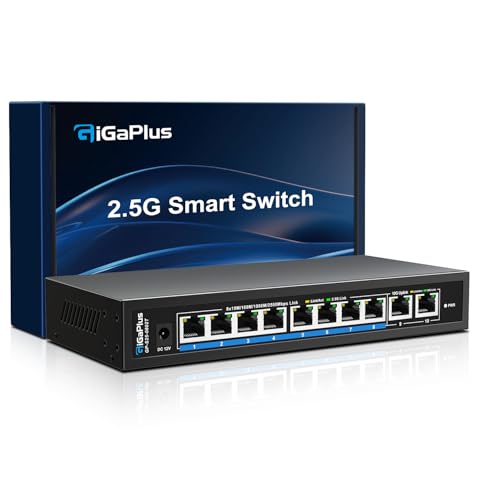
- Eight adaptive 2.5G RJ45 ports
- Two dedicated 10G RJ45 uplinks
- 80Gbps switching capacity
Best For: Mixed 2.5G networks with 10G NAS, server, or backbone links
Best 2.5Gb Upgrade

- Eight 2.5Gb RJ45 ports
- Plug-and-play unmanaged setup
- Fanless metal design
Best For: NAS, gaming PCs, and multi-gig home networks
Best Flexible 10G Backbone

- Five 2.5Gb ports plus 10Gb SFP+
- Supports Link Aggregation and VLAN modes
- Up to 12K jumbo frames
Best For: 10GbE NAS, servers, and configurable small networks
Best Overall Multi-Gig Upgrade
TP-Link TL-SG108S-M2 8-Port 2.5G Switch

- Eight 2.5Gbps RJ45 ports
- Up to 40Gbps switching capacity
- Fanless plug-and-play design
Best For: Home offices, gaming, NAS, and multi-gig wired networks
Best Compact Value
BrosTrend 5-Port 2.5G Unmanaged Switch

- Five full-speed 2.5Gbps ports
- 25Gbps switching capacity
- Silent, fanless plug-and-play setup
Best For: Small gaming, entertainment, and home-office networks
Best for 10G Uplinks
NUBASA 8-Port 2.5G Switch with SFP+
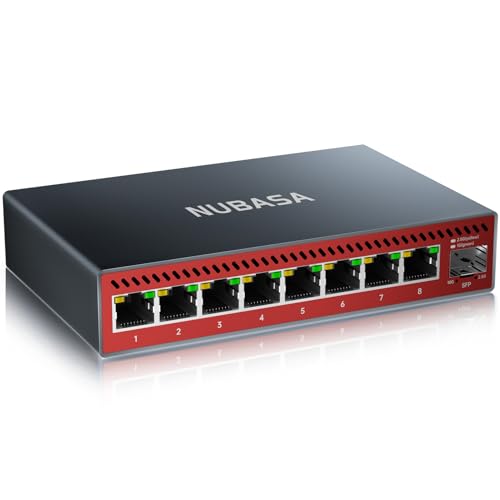
- Eight 2.5Gbps RJ45 ports
- 10Gbps SFP+ uplink
- Aluminum fanless enclosure
Best For: NAS, workstations, and networks needing a 10G backbone
Best 10G All-RJ45 Upgrade – 8-Port 10G Ethernet Switch
For networks built around 10G NAS devices, PCs, Wi-Fi 7 routers, or high-resolution media, this unmanaged model is one of the more direct high speed network switches to install. It provides eight multi-gig RJ45 ports with automatic speed negotiation, so compatible devices can connect without manual configuration.
Best For: Homes and small offices needing eight 10G-capable copper connections for NAS, workstations, gaming PCs, and other high-bandwidth devices.
Pros:
- Eight RJ45 ports support 10G, 5G, 2.5G, 1G, and 100M connections.
- 160Gbps switching capacity supports multiple connected devices.
- Plug-and-play setup with automatic MDI/MDIX and non-blocking forwarding.
- Metal case supports desktop or 19-inch rack mounting.
Cons:
- Unmanaged design does not provide advanced network configuration.
- Its 10G hardware and built-in fan make it less compact and silent than lower-speed alternatives.
This is a practical choice when you want 10G performance over familiar Ethernet cabling and need all eight ports to support multi-gig speeds. The one-year warranty and lifetime technical support add useful reassurance for a home or small-business deployment.
Best Managed Multi-Gig Control – MikroTik CRS310-8G+2S+IN
The MikroTik CRS310-8G+2S+IN stands apart from basic high speed network switches by using a managed design. Its eight 2.5GbE ports and two SFP+ cages provide a flexible foundation for users who want more control over a small wired network.
Best For: Network enthusiasts, small offices, and installations that need managed switching with both 2.5GbE copper ports and SFP+ expansion.
Pros:
- Includes eight 2.5Gigabit Ethernet ports for multi-gig wired devices.
- Two SFP+ cages add options for compatible high-speed links.
- Managed switch design is suited to more deliberate network configuration.
- Aluminum case and 60°C upper temperature rating support varied installations.
Cons:
- Only the supplied specifications identify 48Gbps data transfer, rather than 10G on every RJ45 port.
- A managed platform may require more setup than an unmanaged plug-and-play switch.
- The product details do not list a fanless design or mounting accessories.
This is the most control-oriented option in the group. Choose it when VLANs or other managed-switch features matter more than the simplest installation, and when SFP+ connectivity is useful alongside 2.5GbE copper ports.
Best Silent 2.5G Value – BrosTrend 8-Port 2.5Gb Switch
If you want faster wired connections without moving to 10G hardware, this BrosTrend model is a straightforward high speed network switch for desktops, gaming setups, and home offices. All eight RJ45 ports support 2.5Gbps, and the fanless enclosure keeps operation quiet.
Best For: Quiet home offices, gaming rooms, NAS setups, and entertainment systems with several 2.5G-capable devices.
Pros:
- Eight 2.5Gbps ports provide multi-gig connectivity throughout the switch.
- 40Gbps switching capacity supports multiple simultaneous connections.
- Fanless design operates quietly during demanding use.
- Plug-and-play setup avoids software installation or manual configuration.
Cons:
- It does not provide 5G or 10G port speeds.
- The plastic case may feel less rugged than metal alternatives.
- Unmanaged operation offers no advanced traffic controls.
This is a good fit when 2.5G is the target speed and silence is important. Its compact desktop or wall-mount-friendly design makes it easy to add more wired capacity without the noise or complexity associated with faster, actively cooled equipment.
Best Mixed-Speed Uplink Design – 10-Port 2.5G/10G Ethernet Switch
This GigaPlus switch is designed for networks that need several 2.5G endpoints plus faster uplinks. It combines eight adaptive RJ45 ports with two 10G RJ45 ports, making it a useful middle ground among high speed network switches for NAS, access points, PCs, and servers.
Best For: Small networks that need eight 2.5G connections and dedicated 10G links for a NAS, server, router, or backbone connection.
Pros:
- Eight ports support 100M, 1G, and 2.5G auto-sensing connections.
- Two 10G RJ45 ports provide high-speed uplink capacity.
- 80Gbps switching capacity suits mixed 2.5G and 10G workloads.
- Fanless metal design supports quiet desktop or wall-mounted installation.
Cons:
- The supplied details are inconsistent about the listed number of ports, so verify the current listing before purchase.
- It is unmanaged and does not offer advanced configuration features.
- The 10G ports are RJ45 rather than SFP+.
This layout makes sense when most devices use 2.5G but one or two links need 10G bandwidth. Its fanless metal construction and plug-and-play operation keep the upgrade relatively simple, while the two faster ports can help connect a high-performance NAS or network backbone.
Best 2.5Gb Upgrade – UGREEN 8-Port 2.5Gb Switch
For a straightforward upgrade to high speed network switches, this UGREEN model provides eight 2.5Gb Ethernet ports. It automatically negotiates 100Mbps, 1Gbps, and 2.5Gbps connections, making it a practical fit for modern home and office networks.
Best For: NAS users, gaming PCs, WiFi 6/6E routers, and anyone expanding a 2.5Gb wired network.
Pros:
- Eight full 2.5Gb RJ45 ports support multi-gig connections.
- Plug-and-play unmanaged operation requires no software or configuration.
- Metal housing, heatsinks, ventilation, and fanless operation support quiet, stable use.
- Can be placed on a desk or mounted on a wall.
Cons:
- It does not provide a 10Gb Ethernet port.
- As an unmanaged switch, it lacks advanced network configuration features.
Choose this switch when you want consistent 2.5Gb connectivity across several devices without adding setup complexity. Its eight matching ports are especially convenient for multi-gig home networks.
Best 10G Uplink – NETGEAR GS108MX 8-Port Switch
The NETGEAR GS108MX is a practical choice among high speed network switches when you need one 10Gb multi-gig connection alongside eight 1Gb Ethernet ports. Its auto-negotiating design works with existing Cat5e or Cat6 cabling and keeps installation simple.
Best For: Homes and small offices connecting a 10Gb-capable NAS, server, router, or backbone to several standard Gigabit devices.
Pros:
- Includes one 10Gbps multi-gig port plus eight 1Gbps ports.
- Auto-negotiation selects the appropriate connection speed.
- Plug-and-play unmanaged setup needs no software or configuration.
- Fanless, energy-efficient metal design supports quiet desktop or wall-mounted installation.
Cons:
- Only one port supports 10Gb multi-gig connectivity.
- The remaining ports are limited to 1Gbps.
This model makes the most sense when a single high-speed uplink is the priority rather than widespread 2.5Gb coverage. It is a compact way to connect a fast central device while retaining standard Gigabit ports for everyday equipment.
Best Flexible 10G Backbone – UGREEN 6-Port 2.5Gb Switch
This UGREEN switch stands out among high speed network switches by combining five 2.5Gb RJ45 ports with a 10Gb SFP+ port. Its selectable Standard, Link Aggregation, and VLAN modes add flexibility for NAS connections, high-speed backbones, and small business networks.
Best For: Users with a 10GbE NAS, server, or router who also need 2.5Gb access and optional link aggregation or VLAN functionality.
Pros:
- Combines five 2.5Gb Ethernet ports with one 10Gb SFP+ port.
- Link Aggregation mode can raise the bandwidth limit to 5Gbps for supported multi-port devices.
- VLAN mode isolates ports 1-4 while maintaining communication with ports 5-6.
- Supports up to 12K jumbo frames and desktop or wall mounting.
Cons:
- The SFP+ module is not included.
- It has fewer total ports than the eight-port alternatives.
- Advanced modes require more planning than standard plug-and-play use.
This is the strongest option here for a network that needs more than basic switching. The 10Gb SFP+ connection and selectable modes offer useful expansion paths, particularly for NAS users and small teams managing larger file transfers.
Best Overall Multi-Gig Upgrade – TP-Link TL-SG108S-M2 8-Port 2.5G Switch
The TP-Link TL-SG108S-M2 is a practical choice for anyone upgrading to high speed network switches without adding configuration work. Its eight 2.5Gbps RJ45 ports, auto-negotiation, and up to 40Gbps switching capacity suit multi-gig home networks, workstations, NAS devices, and gaming setups.
Best For: Home offices, LAN parties, gaming computers, NAS devices, and users who need eight wired multi-gig ports.
Pros:
- Eight 2.5Gbps ports provide substantial wired capacity for multi-gig devices.
- Auto-negotiates between 100Mbps, 1Gbps, and 2.5Gbps for broad compatibility.
- Fanless operation supports quiet use in homes and offices.
- Plug-and-play desktop or wall-mount design includes a three-year warranty.
Cons:
- It has no faster 10Gbps uplink port.
- As an unmanaged switch, it does not provide advanced network controls.
Choose this model when you want a reliable, quiet eight-port foundation for a 2.5Gbps network. It is especially appealing if you want to reuse existing Cat5e wiring rather than undertake a full cabling upgrade.
Best Compact Value – BrosTrend 5-Port 2.5G Unmanaged Switch
The BrosTrend 2.5Gb Switch is a compact option among high speed network switches for setups with only a few wired devices. All five RJ45 ports support 2.5Gbps, while the unmanaged plug-and-play design keeps installation simple for gaming, home entertainment, and small-office networks.
Best For: Smaller networks connecting a gaming PC, console, NAS, access point, or other Ethernet devices.
Pros:
- Five 2.5Gbps ports deliver multi-gig connectivity across every port.
- Up to 25Gbps switching capacity supports multiple connected devices.
- Fanless construction provides quiet operation and low-heat performance.
- Compact desktop or wall-mount form factor needs no software setup.
Cons:
- Five ports offer less expansion room than an eight-port switch.
- There is no SFP or SFP+ port for fiber or specialized uplinks.
- It is unmanaged, so advanced configuration features are not included.
This is a sensible pick when port count matters less than straightforward 2.5Gbps connectivity. Its small, silent design fits well beside a router, entertainment center, or compact desktop setup.
Best for 10G Uplinks – NUBASA 8-Port 2.5G Switch with SFP+
The NUBASA 8-Port 2.5G Switch stands out among high speed network switches by combining eight 2.5Gbps RJ45 ports with a 10Gbps SFP+ uplink. That layout is useful for connecting several multi-gig devices while maintaining a faster backbone to compatible routers, servers, or network storage.
Best For: NAS users, workstations, gaming setups, and networks that need an SFP+ backbone connection.
Pros:
- Eight 2.5Gbps RJ45 ports support PCs, consoles, NAS devices, and workstations.
- The 10Gbps SFP+ port accepts compatible 1G, 2.5G, and 10G modules.
- Aluminum construction and fanless operation support cooling without added noise.
- Plug-and-play auto-negotiation works with 10M, 100M, 1G, and 2.5G devices.
Cons:
- SFP+ modules or optical accessories may need to be purchased separately.
- It remains an unmanaged switch without software-based network controls.
This model is the strongest fit for a multi-gig network that needs more than standard RJ45 expansion. Its SFP+ uplink adds flexibility for a faster backbone, though buyers should account for the required module or cable.
How We Picked the Best High Speed Network Switches
We selected switches that match common upgrade paths for homes, studios, gaming setups, NAS users, and small offices. Our comparison emphasizes port speed, port count, uplink options, switching capacity, installation simplicity, cooling, and compatibility with existing Ethernet cabling.
The lineup includes unmanaged models for straightforward expansion, as well as a MikroTik option for buyers who need more configuration flexibility. Because advertised link speeds are not the same as real-world transfer rates, we also considered whether each design makes sense for the devices and internet or local-network workloads it will serve.
Quick Comparison
| Best For | Recommended Speed | What to Look For |
|---|---|---|
| Basic wired expansion | 1GbE to 2.5GbE | Enough ports, fanless cooling, plug-and-play setup |
| Gaming and desktop upgrades | 2.5GbE | Multi-gig compatibility and low-latency wired connections |
| NAS and workstation transfers | 2.5GbE to 10GbE | Fast uplinks, suitable cabling, and adequate switching capacity |
| Wi-Fi 7 or mixed-speed networks | 2.5GbE to 10GbE | Multi-gig ports and at least one faster uplink where needed |
| Advanced network management | 2.5GbE or higher | Configurable features, monitoring, and suitable SFP+ support |
Key Buying Factors for High-Speed Network Switches
Port Speed and Layout
Choose 2.5GbE if your PCs, NAS, access points, or internet service exceed gigabit speeds but do not require 10GbE. Choose 10GbE when moving large media files, backing up several workstations, or connecting a high-performance NAS. Check the port mix carefully: some switches combine slower multi-gig ports with one or two faster RJ45 or SFP+ uplinks.
Cabling and Compatibility
Many 2.5GbE connections work over existing Cat5e cable, while reliable 10GbE performance may require higher-quality Cat6 or Cat6a cabling, especially over longer runs. A switch can negotiate down to slower speeds, but every connected device must support the desired rate to benefit from it.
Unmanaged Versus Configurable
Unmanaged switches are usually the best choice for a simple home or small-office expansion: connect the cables and go. A configurable switch is more appropriate if you need VLANs, traffic controls, monitoring, or other network-management features.
Cooling, Power, and Placement
Fanless models are attractive for bedrooms, offices, and media areas because they reduce noise. Confirm ventilation requirements, power-adapter placement, and whether the switch can sit on a desk or mount where you need it. Higher-speed hardware may generate more heat than a basic gigabit switch.
Who Should Buy Which High Speed Network Switches?
Choose a 2.5GbE eight-port switch for a balanced home upgrade serving several computers, consoles, a NAS, or a Wi-Fi access point. Choose a compact five- or six-port model when you only need to connect a few nearby devices and want to minimize cost and desk space.
Choose a 10GbE switch for frequent large-file transfers, high-speed NAS workflows, media production, or a network built around 10GbE-capable workstations. A mixed-speed model can be especially practical when most devices use 2.5GbE but one NAS or uplink needs 10GbE.
Choose a managed or configurable option if you understand VLANs and network segmentation or need more control than plug-and-play hardware provides. For everyone else, an unmanaged switch with the right port speeds and enough capacity is typically the simpler, more reliable purchase.