The best smart displays do more than show the time: they organize family schedules, stream entertainment, display recipes, manage connected devices, and keep hands-free assistants within easy reach.
We compared 10 standout options across screen size, audio, smart-home features, software, installation, and everyday convenience to help you choose the right display for your space.
Best 10 Smart Displays Picks for 2026
Best Large-Screen Smart Display

- 21-inch Full HD screen for shared spaces
- Built-in Fire TV and Alexa smart-home controls
- Auto-framing video calls with privacy shutter
Best For: Families needing a large kitchen command center
Best Desk Display for Personalization

- 10.1-inch 1080p IPS display with RGB lighting
- Shows photos, videos, GIFs, and pixel art
- Widgets include weather, calendar, and stocks
Best For: Personalized gaming desks and creative workspaces
Best Mid-Size Kitchen Hub

- 15.6-inch Full HD family dashboard
- Fire TV, Alexa, and smart-home controls
- Auto-framing video calls and photo slideshow
Best For: Families wanting a balanced kitchen command center
Best Subscription-Free Family Planner

- 21.5-inch Full HD touchscreen dashboard
- Google Play supports multiple calendar and planning apps
- Wall mount and metal countertop stand included
Best For: Families wanting flexible, app-based household planning
Best Large-Screen Alexa Display
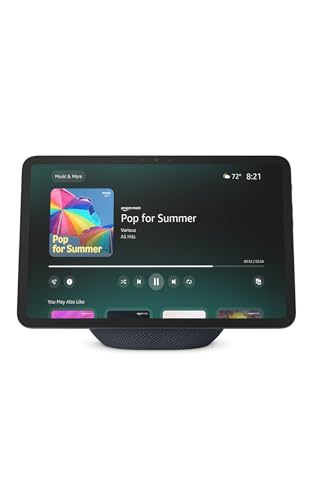
- 11-inch Full-HD display with 60% more viewing area than Echo Show 8 (2025).
- Spatial audio, built-in smart-home hub, and AZ3 Pro chip.
- Auto-framing video calls with layered camera and microphone privacy controls.
Best For: Families wanting a large, capable Alexa smart display.
Best Wall-Mounted Control Panel
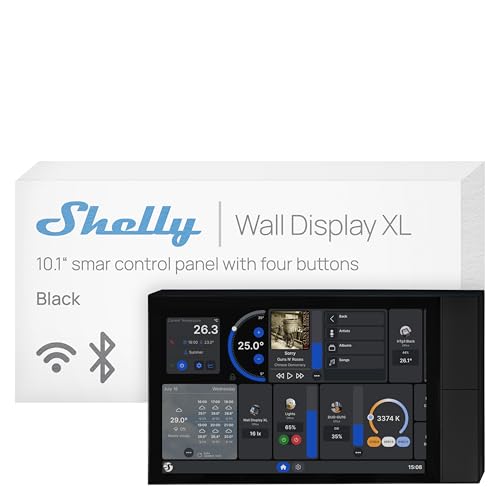
- 10.1-inch touchscreen with built-in 5A relay and four customizable buttons.
- Designed for in-wall control of lights, appliances, scenes, and audio.
- Supports Shelly, Home Assistant, Alexa, Google, and HomeKit ecosystems.
Best For: Users wanting a permanent, centralized smart-home control panel.
Best Compact Alexa Display

- 8.7-inch HD display with 15% more viewing area than the 2023 release.
- Built-in smart-home hub, spatial audio, and Alexa+ support.
- Auto-framing video calls and privacy controls in a space-conscious design.
Best For: Everyday users seeking a capable, countertop-friendly Alexa display.
Best Compact Google Pick

- 7-inch touchscreen with Google Assistant
- Smart-home control by voice or touch
- Recipes, reminders, music, videos, and photos
Best For: Google Assistant users needing a compact kitchen or nightstand display
Best Smart Alarm Clock
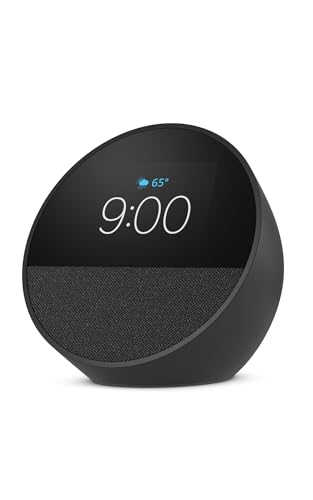
- Customizable clock with weather and reminders
- Clear vocals and deep bass
- Alexa routines and eero network support
Best For: Nightstands, offices, and kitchens where clock and audio features matter
Best Alexa Video Display

- 5.5-inch screen for news, shows, and photos
- 2 MP camera for calls and compatible camera views
- Deeper bass and clearer vocals
Best For: Alexa users wanting compact video calling and smart-home monitoring
Best Large-Screen Smart Display – Echo Show 21
The Amazon Echo Show 21 is one of the largest smart displays for kitchens and shared spaces. Its 21-inch Full HD screen provides room for calendars, lists, weather, smart-home controls, video calls, photos, and built-in Fire TV entertainment.
Best For: Families who want a large, Alexa-enabled organization and entertainment hub.
Pros:
- Large 21-inch Full HD display with customizable widgets
- Built-in Fire TV, remote, and support for popular streaming apps
- Centered auto-framing camera with 3.3x zoom and noise reduction
- Privacy controls include a camera shutter and mic/camera-off button
Cons:
- Its large footprint may require substantial wall or counter space
- Some entertainment services may require subscriptions
The Echo Show 21 is a strong choice when visibility matters most. It combines family planning, smart-home control, calling, photo display, and streaming in a single oversized screen.
Best Desk Display for Personalization – Divoom Times Frame
The Divoom Times Frame is a compact smart display designed for desks, gaming setups, offices, and creative workspaces. It combines a 10.1-inch 1080p IPS screen with customizable photos, GIFs, pixel art, widgets, and RGB lighting.
Best For: Tech enthusiasts, gamers, creators, and gift shoppers who want a customizable desktop display.
Pros:
- Supports photos, GIFs, short videos, and pixel art through the Divoom app
- Customizable clock, weather, calendar, stocks, and social-media widgets
- Adjustable brightness and RGB backlighting add desk ambiance
- Includes 64GB of storage and does not require a subscription
Cons:
- Requires continuous connection to power because it has no built-in battery
- App-controlled rather than designed as a general-purpose touchscreen tablet
The Times Frame prioritizes style and personalization over household management. Its modest size, ambient lighting, and creative content options make it especially fitting for a personalized workstation.
Best Mid-Size Kitchen Hub – Echo Show 15
The Amazon Echo Show 15 is a versatile smart display for kitchens and family spaces. Its 15.6-inch Full HD screen keeps calendars, to-do lists, weather, smart-home controls, photos, video calls, and Fire TV content visible without taking up as much room as a larger display.
Best For: Households seeking a balanced combination of family organization, entertainment, and Alexa control.
Pros:
- 15.6-inch Full HD display with customizable family widgets
- Built-in Fire TV with included remote and support for popular apps
- Centered auto-framing camera offers 3.3x zoom and a wide field of view
- Includes smart-home dashboard and camera-feed access
Cons:
- Some streaming content may require subscriptions
- Its 15.6-inch size still needs dedicated wall or counter space
The Echo Show 15 offers many of the organizational and entertainment features associated with larger smart displays in a more manageable format. It is a practical middle-ground for busy households.
Best Subscription-Free Family Planner – Mazera Smart Hub
The Mazera Smart Hub is a 21.5-inch touchscreen family planner built around flexibility. Because it supports Google Play, households can use preferred calendar, planning, productivity, photo, streaming, and smart-home apps instead of being limited to one proprietary calendar system.
Best For: Families wanting a customizable, subscription-free digital command center with wall or countertop placement.
Pros:
- Works with Google Calendar, Apple Calendar, Outlook, Cozi, and other apps
- Large anti-glare Full HD touchscreen with auto brightness
- Supports calendars, chore charts, meal plans, routines, reminders, and widgets
- Includes both a metal desk stand and wall-mount option
Cons:
- Requires included power connection for continuous all-day use
- App and service experiences may vary depending on the apps selected
Mazera stands out among smart displays for its open Android and Google Play approach. It is a strong fit for families that want to keep their existing calendars and planning tools while building a shared household dashboard.
Best Large-Screen Alexa Display – Echo Show 11
The Echo Show 11 is one of the most versatile smart displays for households that want a larger screen for entertainment, recipes, calendars, video calls, and Alexa smart-home control. Its 11-inch Full-HD display provides substantially more viewing area than the Echo Show 8, while spatial audio helps create a more immersive listening experience.
Best For: Families and entertainment-focused users who want a large Alexa display for media, organization, calls, and smart-home management.
Pros:
- Vibrant 11-inch Full-HD touchscreen with 60% more viewing area than the Echo Show 8 (2025 release).
- Built-in smart-home hub, Omnisense technology, and AZ3 Pro chip support responsive control and personalized routines.
- Centered auto-framing camera, 3.3x zoom, noise reduction, and privacy controls support convenient video calls.
- Spatial audio offers room-filling sound with crisper vocals, a wider soundstage, and up to 2x the bass versus the Echo Show 8 (2023 release).
Cons:
- Its larger footprint may require more counter space than a smaller smart display.
- The feature-rich design may be more than needed for shoppers seeking a basic voice assistant.
The Echo Show 11 stands out when screen size matters. It combines strong media features, household organization, camera viewing, and built-in smart-home control in a single centerpiece display.
Best Wall-Mounted Control Panel – Shelly Wall Display XL
The Shelly Wall Display XL is a purpose-built smart display for centralized, in-wall home control. Its 10.1-inch touchscreen, built-in 5A relay, and four customizable buttons make it useful for managing lights, fans, heaters, and other connected devices without requiring a separate hub or app for basic control.
Best For: Homeowners, property managers, and smart-home users who want a permanent wall-mounted control point for Shelly devices and compatible platforms.
Pros:
- Large 10.1-inch touchscreen installs in a standard electrical wall box.
- Built-in relay and four customizable buttons support appliance control and automation routines.
- Works with the Shelly Smart Control app, Home Assistant, Alexa, Google, and HomeKit.
- Can control Bluetooth or Sonos audio, with remote management and scene creation through the Shelly app.
Cons:
- Neutral wire is required for installation.
- Wall mounting requires electrical installation rather than simple countertop setup.
- The built-in relay is rated at 5A, which may limit some higher-power applications.
Unlike voice-first smart displays, the Shelly Wall Display XL is designed to be a fixed command center. Choose it when consistent, physical access to smart-home controls is more important than portable entertainment or video calls.
Best Compact Alexa Display – Echo Show 8
The Echo Show 8 is a balanced choice for shoppers comparing smart displays for everyday household use. Its redesigned 8.7-inch HD touchscreen fits more easily into kitchens, bedrooms, and living spaces while still supporting streaming, recipes, calendars, video calls, photo slideshows, and Alexa smart-home control.
Best For: Users who want a capable Alexa smart display with a practical size for counters, desks, or bedside tables.
Pros:
- Redesigned 8.7-inch HD screen provides 15% more viewing area than the Echo Show 8 (2023 release).
- Built-in smart-home hub supports control of compatible lights, thermostats, cameras, and other devices.
- Spatial audio delivers room-filling sound with crisper vocals, a wider soundstage, and up to 2x the bass versus the 2023 release.
- Centered auto-framing camera, 3.3x zoom, and noise reduction help with video calls.
Cons:
- The 8.7-inch screen offers less viewing area than the newer Echo Show 11.
- It may not provide the same large-screen impact for group viewing or detailed recipes.
The Echo Show 8 offers a strong middle ground: it retains the major Alexa+, smart-home, media, and communication features while taking up less space than the larger Echo Show 11. It is a practical fit for most everyday rooms.
Best Compact Google Pick – Nest Hub 7" Smart Display
Google Nest Hub 7” Smart Display with Google Assistant (1st Gen) - Chalk (Bulk Packaging)
Check Price On AmazonThe Google Nest Hub 1st Gen is a compact choice for shoppers comparing smart displays for hands-free help, entertainment, and everyday organization. Its 7-inch touchscreen works with Google Assistant for smart-home control, recipes, timers, reminders, weather, music, videos, and Google Photos.
Best For: Google Assistant users who want a practical display for kitchens, bedrooms, desks, or nightstands.
Pros:
- 7-inch touchscreen with a compact footprint.
- Controls compatible lights, cameras, thermostats, plugs, and speakers by voice or touch.
- Supports music, videos, recipes, timers, reminders, weather, and Google Photos.
- Language can be changed to English after setup through the Google Home app or device settings.
Cons:
- This is the 1st-generation model.
- The listed unit is an international/Korean-spec version, so setup may require changing the language.
- Bulk packaging may offer fewer retail-packaging extras.
Choose this Nest Hub if you prefer Google Assistant and want a simple, space-saving smart display rather than a larger entertainment screen.
Best Smart Alarm Clock – Echo Spot
The Amazon Echo Spot is a focused option among smart displays for nightstands, offices, and kitchens. It combines Alexa, a customizable clock face, visible time and weather information, music controls, smart-home commands, and an alarm routine with gradual light.
Best For: Shoppers who want a compact Alexa alarm clock with vibrant sound and glanceable information.
Pros:
- Customizable display shows the time, weather, reminders, and song titles.
- Delivers clear vocals and deep bass for music, podcasts, and audiobooks.
- Supports Alexa routines, including gradual wake-ups and motion-based home actions.
- Built-in eero functionality can add up to 1,000 square feet of coverage to an existing eero network.
Cons:
- eero mesh-extender functionality requires an existing eero network.
- Its compact display is oriented toward clock and control functions rather than a larger video experience.
The Echo Spot makes the most sense when alarm-clock convenience and audio matter more than a large screen or video calling.
Best Alexa Video Display – Echo Show 5
The Amazon Echo Show 5 is a practical smart display for shoppers who want Alexa, a 5.5-inch screen, and video features in a small footprint. It can show news, weather, photos, and song information; stream compatible content; control smart-home devices; and support video calls and camera viewing.
Best For: Alexa households seeking a compact display with video calling, camera monitoring, entertainment, and smart-home control.
Pros:
- 5.5-inch display for news, weather, shows, photos, and song titles.
- Improved sound with deeper bass and clearer vocals.
- Built-in 2 MP camera supports video calls and viewing compatible cameras.
- Includes a camera shutter, mic/camera-off button, and other privacy controls.
Cons:
- The 5.5-inch screen is smaller than larger Echo Show models.
- Video calling and camera features depend on compatible Alexa devices, apps, doorbells, or cameras.
- Some photo-storage benefits, such as unlimited cloud photo storage, are tied to Prime membership.
Pick the Echo Show 5 if you want more than a clock: its camera, video-calling support, photo display, and Alexa controls make it a versatile compact smart display.
How We Picked the Best Smart Displays
We evaluated these Smart Displays by focusing on the features that matter most in daily use: screen visibility, responsiveness, speaker quality, assistant compatibility, streaming support, privacy controls, and setup requirements. We also considered where each model fits best, from a kitchen command center or wall-mounted dashboard to a bedside alarm clock.
Because the products use different platforms, we looked beyond specifications. Amazon Echo Show models are strongest for Alexa households and Fire TV access, while Google Nest Hub is a natural fit for Google Assistant users. Other displays prioritize digital calendars, photos, or direct smart-home control rather than a broad assistant ecosystem.
Quick Comparison
| Best For | Recommended Type | What to Prioritize |
|---|---|---|
| Large family command center | 21-inch or 15-inch display | Screen size, calendar tools, streaming |
| Kitchen counter | 8-inch to 11-inch display | Readable controls, audio, footprint |
| Wall-mounted control | Smart home wall display | Installation, compatibility, relay support |
| Photo and desk display | Dedicated digital frame | Photo management, Wi-Fi, viewing angles |
| Nightstand or small office | Compact display or smart clock | Size, alarms, privacy, sound |
Key Buying Factors for Smart Displays
Screen Size and Placement
Choose the largest screen that fits comfortably in the intended location. A 21-inch model can replace a visible household calendar, but it needs substantial counter or wall space. Smaller displays are easier to position near a sink, desk, or bed and usually remain less intrusive.
Platform and Ecosystem
Check compatibility with your existing voice assistant, smart plugs, cameras, music services, and streaming subscriptions. Alexa users will generally get the smoothest experience from Echo Show products, while Google Assistant households may prefer Nest Hub. A display with Google Play or a more open software approach may suit buyers who want additional apps.
Audio, Video, and Everyday Controls
For streaming, recipes, video calls, and music, prioritize resolution, speaker performance, and viewing angle. If the display is mainly for calendars or device controls, responsiveness and readable text may matter more than premium audio. Built-in Fire TV is especially useful if the display will double as an entertainment screen.
Privacy and Installation
Review camera and microphone controls before buying, particularly for bedrooms and shared spaces. Wall-mounted models require more planning than countertop units, including power access and mounting hardware. A built-in relay or dedicated home-control interface can be valuable, but verify electrical compatibility and installation requirements.
Who Should Buy Which Smart Displays?
Choose a large Echo Show if your priority is a highly visible household dashboard with Alexa, calendars, recipes, and streaming. These models are best for busy kitchens and family spaces.
Choose a mid-size Echo Show or Nest Hub for a balanced mix of assistant commands, music, smart-home control, and compact placement. Match the platform to the devices and services you already use.
Choose a wall display if you want a permanent smart-home control point rather than a portable countertop screen. Confirm installation and wiring requirements first.
Choose a dedicated digital frame when displaying photos is the main goal. For a bedside table or small desk, a compact Echo model or smart alarm display delivers useful controls without consuming much space.