Choosing the right gaming mouse can improve click response, tracking confidence, and long-session comfort. Optical switches are designed to reduce debounce issues while offering fast actuation and strong durability.
This roundup compares 10 standout wired and wireless models, from lightweight esports mice to feature-rich ergonomic options, so you can match your grip, games, and budget to the right fit.
Best 10 Gaming Mouse with Optical Switches Picks for 2026
Best Lightweight Wired Pick

- 58 g with Gen-3 optical switches
- 90-million-click lifecycle and 0.2 ms actuation
- 8,500 DPI sensor with Chroma RGB
Best For: Competitive players who want a light, responsive wired mouse
Best Wireless Flexibility

- LIGHTSPEED and Bluetooth connectivity
- HERO 25K sensor with LIGHTFORCE switches
- 300+ hours with an AA battery
Best For: Wireless gamers who want long battery life and connection flexibility
Best Macro-Friendly Value

- Light Strike optical switch response rated at 0.2 ms
- Eight programmable buttons with macro support
- Metal feet and flexible cable
Best For: Players who want extra controls and a programmable wired mouse
Best Feature-Rich Wired Option
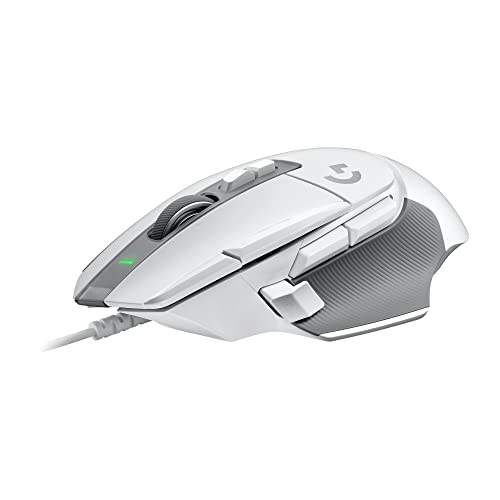
- LIGHTFORCE optical-mechanical switches
- HERO 25K sensor and 25,600 DPI
- Nine buttons with versatile scroll-wheel controls
Best For: Right-handed players who want extensive customization and controls
Best Overall

- 54g design for fast, controlled flicks
- Gen-3 optical switches rated for 90 million clicks
- Up to 95 hours of wireless battery life
Best For: Competitive PC gamers seeking lightweight wireless performance
Best Wired Option
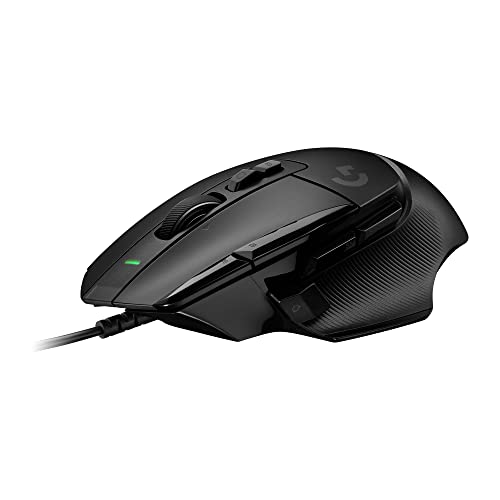
- LIGHTFORCE hybrid optical-mechanical switches
- Nine buttons with customizable DPI control
- HERO 25K sensor and hyperfast scroll wheel
Best For: Wired gaming setups needing extra controls
Best Battery Life

- Up to 280 hours on one AA battery
- 30,000-DPI Focus Pro optical sensor
- Low-latency HyperSpeed wireless connection
Best For: Wireless players prioritizing long battery endurance
Durable FPS Control

- Optical switches and 26,000 DPI sensor
- 8,000Hz polling with Sensor Fusion Control
- Durable aluminum frame with optional weights
Best For: Right-handed FPS players seeking a sturdy, adjustable wired mouse
Ultralight Esports Speed

- 59 g ergonomic right-handed design
- Gen-3 optical switches with 0.2 ms actuation
- 30,000 DPI sensor and 8,000Hz polling
Best For: Competitive players prioritizing speed, low weight, and low latency
Feature-Rich Ergonomic Control

- Gen-3 optical switches with 0.2 ms actuation
- 13 customizable controls and multi-function trigger
- 35,000 DPI sensor with configurable Hyperscroll wheel
Best For: Gamers who need extensive controls and ergonomic wired comfort
Best Lightweight Wired Pick – Razer Cobra
The Razer Cobra is a gaming mouse with optical switches for players who want a very light wired design, quick actuation, and straightforward sensitivity tuning. Its 58-gram body, 8,500 DPI sensor, flexible cable, and PTFE feet emphasize fast, controlled movement.
Best For: Competitive PC gamers who prefer a lightweight, wired mouse with customizable RGB lighting.
Pros:
- 58-gram design supports quick, precise movement.
- Gen-3 optical switches offer a rated 90-million-click lifecycle and 0.2 ms actuation.
- 50 DPI adjustment steps, PTFE feet, and Speedflex cable support fine control.
- Chroma RGB includes gradient underglow and extensive lighting customization.
Cons:
- Wired connectivity may not suit players seeking a wireless setup.
- The 8,500 DPI sensor is less sensitive on paper than some alternatives.
Choose the Cobra if low weight and optical-switch responsiveness matter more than extra buttons or wireless flexibility. Its six-button layout keeps the design focused and easy to tune.
Best Wireless Flexibility – Logitech G309 Lightspeed
The Logitech G309 is a gaming mouse with optical switches that combines low-latency LIGHTSPEED wireless with Bluetooth. It offers a HERO 25K sensor, up to six programmable buttons, and flexible power options for players who want a cable-free setup.
Best For: Wireless gamers who value long battery life and the choice between battery-powered and POWERPLAY charging.
Pros:
- LIGHTSPEED and Bluetooth provide two wireless connection options.
- LIGHTFORCE optical-mechanical switches combine optical speed with a mechanical feel.
- HERO 25K sensor tracks with sub-micron precision and no smoothing.
- Rated for 300-plus hours with the included AA battery, or battery-free use with POWERPLAY.
Cons:
- At 86 g with the AA battery, it is heavier than its battery-free 68 g configuration.
- POWERPLAY wireless charging requires the compatible charging system.
- The listed hand orientation is right-handed.
The G309 is a practical choice when wireless convenience is the priority. Its removable-battery approach offers long sessions without frequent charging, while POWERPLAY provides an upgrade path for compatible users.
Best Macro-Friendly Value – Bloody A60L
The Bloody A60L is a gaming mouse with optical switches built around fast Light Strike response and extensive button customization. It adds eight programmable buttons, an infrared scroll wheel, metal feet, and a flexible cable for players who want a feature-focused wired mouse.
Best For: Budget-conscious PC gamers who want programmable controls and macro support in an ambidextrous design.
Pros:
- Light Strike switches are rated for a minimum 0.2 ms tactical response speed.
- Eight buttons support programmable controls and advanced macros.
- Infrared scroll wheel is designed for fast wheel response.
- X’Glide metal feet and an Ultra Soft Flex cable support smooth movement.
Cons:
- At 153 g, it is substantially heavier than the other lightweight options here.
- The supplied notes list Windows 7 compatibility and also a Windows 10 minimum requirement.
- The notes do not specify a DPI rating.
The A60L makes the most sense for players who prioritize extra controls and macro functionality over a lightweight chassis. Its wired design and ambidextrous shape keep it broadly usable, while the optical switch system targets quick response.
Best Feature-Rich Wired Option – Logitech G502 X
The Logitech G502 X is a gaming mouse with optical-mechanical switches for players who want a familiar, control-heavy wired design. Its HERO 25K sensor, nine buttons, adjustable DPI-shift button, and dual-mode scroll wheel make it suited to detailed customization.
Best For: Right-handed gamers who want numerous controls, high sensor precision, and a versatile scroll wheel.
Pros:
- LIGHTFORCE switches combine optical speed with a mechanical feel.
- HERO 25K sensor is rated for sub-micron precision without smoothing, filtering, or acceleration.
- Nine buttons include a removable and reversible DPI-shift button for grip-based customization.
- Scroll wheel switches between hyper-fast free-spin and precise ratcheting, with left and right tilt controls.
Cons:
- At 89 g, it is heavier than the 58 g Razer Cobra.
- Its right-handed shape is less flexible for left-handed users.
- It uses a wired connection rather than wireless connectivity.
The G502 X is a strong fit when configurable controls matter as much as optical-switch performance. Its 25,600 DPI sensor and versatile wheel add flexibility, while the reduced-weight redesign keeps the feature-rich shape relatively manageable.
Best Overall – Razer Viper V3 Pro Wireless
The Razer Viper V3 Pro is a standout gaming mouse with optical switches for competitive players who want very low weight, fast actuation, and dependable wireless performance. Its 54g design, 35,000-DPI sensor, and optional 8,000Hz polling rate are geared toward precise, rapid movements.
Best For: Competitive PC gamers prioritizing lightweight wireless performance and optical-switch durability.
Pros:
- 54g lightweight design supports quick flicks and controlled swipes.
- Gen-3 optical switches offer 0.2ms actuation and a rated 90-million-click lifecycle.
- Up to 95 hours of battery life with HyperSpeed wireless connectivity.
- Focus Pro 35K sensor supports one-DPI-step adjustments and tracking on more surfaces, including glass.
Cons:
- The 8,000Hz polling mode is an advanced feature that may require additional setup.
- Designed for right-handed use.
This is the strongest all-around choice here for esports-style play, combining the lowest weight in the group with optical switches, a high-resolution sensor, and high-speed wireless options.
Best Wired Option – Logitech G502 X Wired
The Logitech G502 X is a wired gaming mouse with optical switches in a hybrid optical-mechanical design. It combines crisp actuation with the familiar G502-style control layout, nine buttons, a customizable DPI-shift button, and a versatile scroll wheel.
Best For: Players who prefer a wired mouse with extensive controls and customizable ergonomics.
Pros:
- LIGHTFORCE hybrid switches provide fast, precise actuation and a crisp response.
- HERO 25K sensor delivers high-precision tracking without smoothing, filtering, or acceleration.
- Nine buttons, a removable DPI-shift button, and a tilt-enabled scroll wheel offer substantial customization.
- Reduced 89g construction is lighter than the legacy design while retaining its control-focused layout.
Cons:
- Wired connectivity limits freedom of movement compared with the wireless models.
- Its right-handed, control-heavy design may be less suitable for minimalist setups.
The G502 X is a practical pick when optical-switch responsiveness matters but you also want numerous inputs and a feature-rich scroll wheel without managing battery life.
Best Battery Life – Razer Viper V3 HyperSpeed
The Razer Viper V3 HyperSpeed is a wireless gaming mouse built for long sessions, offering up to 280 hours from a single AA battery. Its 82g mass-centralized design, 30,000-DPI optical sensor, and low-latency HyperSpeed connection make it a practical option for everyday competitive PC gaming.
Best For: Wireless gamers who value exceptional battery life and on-mouse DPI control.
Pros:
- Up to 280 hours of battery life from one included AA battery.
- Focus Pro 30K optical sensor supports accurate tracking across a wider range of surfaces, including glass.
- HyperSpeed wireless is designed for a smooth, stable low-latency connection.
- Top-mounted DPI control and six-button layout support quick adjustments.
Cons:
- At 82g, it is heavier than the 54g Viper V3 Pro.
- Uses Gen-2 mechanical switches rather than optical switches.
- Requires a replaceable AA battery.
Although it is not an optical-switch model, the Viper V3 HyperSpeed makes a strong case for buyers who prioritize long battery endurance, reliable wireless performance, and straightforward DPI access.
Durable FPS Control – Corsair M65 RGB Ultra
The Corsair M65 RGB Ultra is a gaming mouse with optical switches built for right-handed FPS players who want fast clicks, precise tracking, and a durable chassis. Its aluminum frame, 26,000 DPI sensor, 8,000Hz polling, and adjustable weights make it a feature-rich wired option for competitive play.
Best For: Right-handed FPS gamers who value durability, adjustable weight, and low-lift-off tracking.
Pros:
- Optical left- and right-click switches are designed for fast, precise responses and long-term use.
- 26,000 DPI optical sensor supports tracking up to 650 IPS.
- 8,000Hz polling rate can transmit movement and clicks up to eight times faster than conventional gaming mice.
- Aluminum frame and included optional weights provide a sturdy, customizable feel.
Cons:
- At 97 g, it is substantially heavier than ultralight esports mice.
- Its wired connection may be less convenient for users who prefer wireless freedom.
- The right-handed shape limits suitability for left-handed players.
The M65 RGB Ultra stands out when durability and FPS-specific control matter more than minimizing weight. Sensor Fusion Control also helps maintain accuracy when lifting and repositioning the mouse.
Ultralight Esports Speed – Razer DeathAdder V3
The Razer DeathAdder V3 is a gaming mouse with optical switches designed for fast, low-latency esports performance. Its 59 g body, ergonomic right-handed shape, 30,000 DPI sensor, and 8,000Hz HyperPolling make it especially appealing for players who prioritize quick swipes and responsive clicks.
Best For: Competitive right-handed players who want an ultralight ergonomic mouse for fast aim and movement.
Pros:
- Gen-3 optical switches offer 0.2 ms actuation, no debounce delay, and a rated 90-million-click lifecycle.
- 59 g design supports fast, controlled movement.
- Focus Pro 30K optical sensor is designed to track across a wider variety of surfaces, including glass.
- SpeedFlex cable and 8,000Hz polling support smooth, low-latency play.
Cons:
- It has six buttons, offering fewer controls than many macro-focused gaming mice.
- The ergonomic shape is intended for right-handed use.
- Advanced settings and accuracy optimization require Razer Synapse and compatible system settings.
For esports-style gaming, the DeathAdder V3 combines a very low weight with fast optical switches and a high-speed sensor. It is a focused choice for players who prefer a clean, performance-oriented layout over numerous programmable controls.
Feature-Rich Ergonomic Control – Razer Basilisk V3 35K
The Razer Basilisk V3 35K is a gaming mouse with optical switches for players who want extensive controls alongside precise tracking. It combines 13 customizable controls, a multi-function trigger, a configurable Hyperscroll tilt wheel, and a 35,000 DPI sensor in a right-handed ergonomic wired design.
Best For: Right-handed gamers who need many programmable inputs for games, macros, push-to-talk, and utility commands.
Pros:
- Gen-3 optical switches provide 0.2 ms actuation and a rated 90-million-click lifecycle.
- 13 customizable controls support commands, macros, and quick-access functions.
- 35,000 DPI Focus Pro optical sensor offers granular one-DPI-step adjustments.
- Hyperscroll tilt wheel supports tactile, free-spin, and automatic Smart-Reel modes.
Cons:
- Its feature-heavy design is less suited to players seeking an ultralight mouse.
- The right-handed ergonomic shape is not intended for left-handed use.
- It is a wired model and requires Windows 10 or later according to the supplied details.
The Basilisk V3 35K is the most versatile option here for multitasking and games that benefit from extra inputs. Choose it over a minimalist esports mouse if programmable controls, lighting, and scroll-wheel flexibility are priorities.
How We Picked the Best Gaming Mouse with Optical Switches
We focused on models that emphasize optical or optical-hybrid switch technology, dependable sensor performance, useful software, and gaming-focused ergonomics. We also considered connection type, weight, polling-rate support, programmable controls, battery requirements, and whether each mouse suits competitive FPS play, general PC gaming, or productivity.
Because preferences vary, the selection includes lightweight symmetrical designs, ergonomic right-handed shapes, adjustable-weight models, and mice with extra buttons. Specifications can vary by configuration, firmware, or included accessories, so confirm the current details before purchasing.
Quick Comparison
| Best For | Recommended Type | What to Prioritize |
|---|---|---|
| Competitive FPS | Lightweight wired or wireless mouse | Low weight, precise sensor, high polling rate |
| All-purpose gaming | Balanced wireless or wired model | Comfort, reliable connectivity, flexible controls |
| MMOs and complex games | Multi-button ergonomic mouse | Programmable buttons, onboard profiles, software |
| Long work and gaming sessions | Ergonomic right-handed design | Hand support, surface comfort, sensible weight |
Key Buying Factors for a Gaming Mouse with Optical Switches
Switches and Click Feel
Optical switches use light-based actuation rather than relying solely on traditional metal contacts. This can help minimize unintended double-click behavior and deliver consistent response over time. However, the feel varies considerably, so read descriptions carefully if you prefer crisp, light clicks or a more substantial press.
Weight, Shape, and Grip
Light mice are often easier to move quickly in FPS games, while heavier or adjustable-weight designs may feel steadier. Shape matters just as much: symmetrical mice generally suit claw or fingertip grips, whereas contoured models can better support a relaxed palm grip. Check dimensions against your hand size whenever possible.
Wired Versus Wireless
Modern gaming wireless connections can offer performance close to wired models, but they add charging or battery management. Wired mice avoid downtime and typically cost less, while wireless models provide a cleaner desk and greater movement freedom. Consider whether the included receiver, charging cable, or dock fits your setup.
Sensor and Polling Rate
A high-quality sensor should track accurately without unwanted smoothing or spinouts. Higher polling rates may reduce reported input latency, but they can increase system load and require a compatible computer and display to show meaningful benefits. Prioritize consistent tracking over headline specifications alone.
Who Should Buy Which Gaming Mouse with Optical Switches?
Choose a lightweight esports-focused model if you mainly play competitive shooters and use low sensitivity. Pick an ergonomic mouse with several programmable buttons if you play action games, MMOs, or want shortcuts for everyday tasks. A balanced wireless option is best for flexible desk setups and users who dislike cable drag, while a wired model remains a strong value for uninterrupted performance.
Before buying, confirm hand orientation, grip compatibility, available USB or wireless support, software compatibility, and the return policy. The best Gaming Mouse with Optical Switches is the one whose shape and controls remain comfortable throughout your longest sessions—not simply the model with the highest specification.