A USB hub with Ethernet can add wired networking and much-needed ports to a laptop, tablet, or compact desktop without requiring a separate network adapter. The best choice depends on your device’s connector, preferred network speed, display needs, and available desk space.
We’ve gathered 10 practical options ranging from simple USB-A hubs to full USB-C docking stations with HDMI, power delivery, and multiple USB ports. Use the guide below to narrow the list by compatibility, performance, and everyday workload.
Best 10 USB Hub with Ethernet Picks for 2026
Best All-Around Value
ABLEWE 4-in-1 USB Hub with Gigabit Ethernet
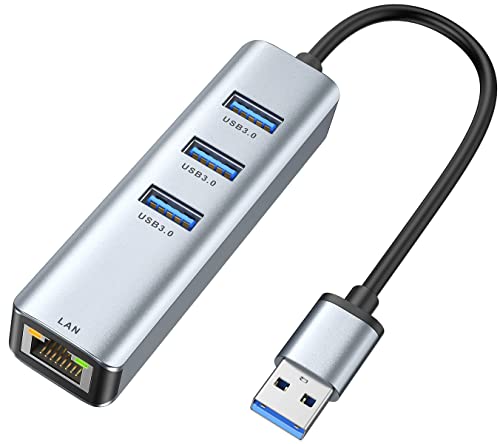
- Gigabit Ethernet plus three USB 3.0 ports
- Up to 5Gbps USB data transfer
- Compact aluminum design with 24-month warranty
Best For: Everyday wired networking and USB-A expansion
Best for Powered Peripherals
UGREEN 5-in-1 USB Hub with Ethernet
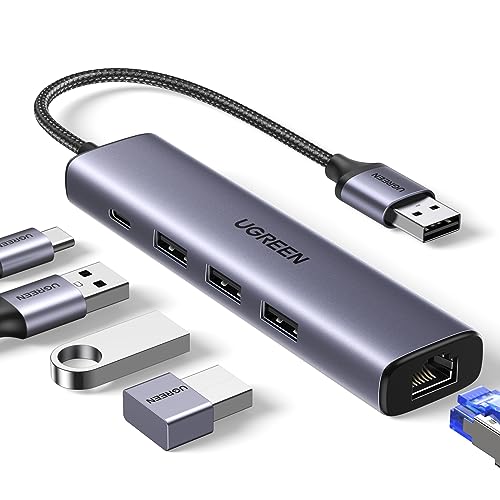
- Gigabit Ethernet and three USB 3.0 ports
- USB-C input helps power high-demand peripherals
- Up to 5Gbps USB data syncing
Best For: Users connecting external drives and other power-hungry accessories
Best Simple Plug-and-Play Pick
TP-Link UE330 USB Ethernet Hub

- Gigabit Ethernet with three USB 3.0 ports
- Backward-compatible with USB 2.0 and 1.1
- Compact design with two-year warranty and support
Best For: Travelers needing straightforward USB-A and Ethernet expansion
Best for USB-C Laptops and Displays

- Gigabit Ethernet, 4K HDMI, and three USB-A ports
- Up to 85W USB-C pass-through charging
- USB-A data transfer up to 5Gbps
Best For: USB-C laptops needing networking, display, and charging expansion
Flexible Dual-Connector Pick

- USB-A and USB-C connectors
- Gigabit Ethernet up to 1,000Mbps
- Three USB-A 3.0 ports
Best For: Switching between USB-A and USB-C devices
Full-Featured Docking Choice

- 4K HDMI output up to 60Hz
- Ethernet, card readers, and USB ports
- Up to 85W pass-through charging
Best For: USB-C laptop docking and multimedia expansion
Simple Value Option
ALL-LUCKY USB A/C Ethernet Hub

- Convertible USB-A/USB-C connector
- Gigabit Ethernet and three USB 3.0 ports
- Compact plug-and-play design
Best For: Basic wired networking and peripheral expansion
Best Overall
UGREEN Revodok Pro 9-in-1 USB-C Hub

- Gigabit Ethernet and 4K@60Hz HDMI
- SD/TF card readers plus USB-A and USB-C data ports
- Up to 85W pass-through charging and 10Gbps data
Best For: Feature-packed USB-C setups needing wired networking and display support
Best Value
UtechSmart 6-in-1 USB-C Ethernet Hub

- 1000M Ethernet, 4K@30Hz HDMI, and three USB 3.0 ports
- Up to 100W Power Delivery
- Compatible with Windows, macOS, Chrome OS, Linux, and Steam OS
Best For: Everyday USB-C connectivity at a cost-conscious price
Best for USB-A Desktops
FORIDA 8-Port USB Ethernet Hub
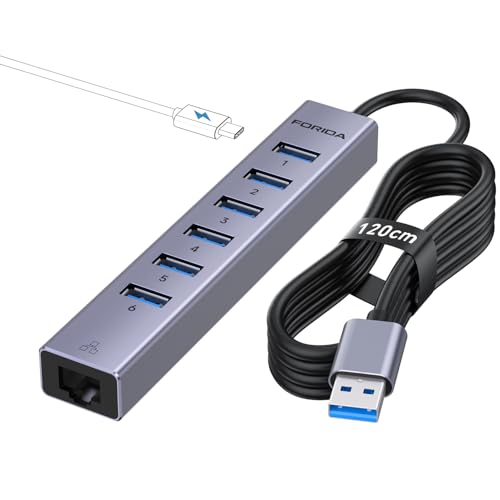
- Six USB 3.0 ports plus Gigabit Ethernet
- USB-C 5V/3A power port supports up to 15W
- 3.9-foot cable and broad Windows/macOS/Linux support
Best For: Desktop setups needing many USB-A ports and wired networking
Best All-Around Value – ABLEWE 4-in-1 USB Hub with Gigabit Ethernet
If you need a practical usb hub with ethernet for a laptop or desktop, the ABLEWE combines a Gigabit RJ45 port with three USB 3.0 ports. It supports simultaneous use, plug-and-play setup on supported systems, and compact aluminum construction.
Best For: Users who want wired networking plus several fast USB-A connections in one compact adapter.
Pros:
- Gigabit Ethernet supports 10/100/1000Mbps connections.
- Three USB 3.0 ports support up to 5Gbps data transfer.
- Ports can operate simultaneously, with broad Windows, macOS, Linux, and Chrome OS compatibility.
- Includes a 24-month warranty and lightweight aluminum housing.
Cons:
- Uses a USB 3.0 host connection rather than USB-C.
- Compatibility details vary by operating-system version.
The ABLEWE is a straightforward choice when Ethernet and multiple USB-A ports matter more than video output or laptop charging.
Best for Powered Peripherals – UGREEN 5-in-1 USB Hub with Ethernet
The UGREEN 5-in-1 is a versatile usb hub with ethernet that adds Gigabit networking, three USB 3.0 ports, and a USB-C power input. That extra power connection can help support higher-power peripherals such as external hard drives.
Best For: Laptop users who need wired internet and additional USB-A ports while running power-hungry peripherals.
Pros:
- Gigabit Ethernet provides network speeds up to 1000Mbps.
- Three USB 3.0 ports support data sync up to 5Gbps.
- USB-C power input is designed to improve stability with high-power peripherals.
- Plug-and-play support is listed for Windows 11/10/8.1, macOS, and Chrome OS.
Cons:
- The USB-C power port cannot charge the host laptop.
- Windows XP/7/8/Vista and Linux require driver installation.
Choose this UGREEN model if peripheral power is a priority; otherwise, its three USB ports and Gigabit Ethernet provide a balanced everyday setup.
Best Simple Plug-and-Play Pick – TP-Link UE330 USB Ethernet Hub
The TP-Link UE330 is a compact usb hub with ethernet for adding stable wired networking and three USB 3.0 ports to a compatible computer. Its Gigabit Ethernet connection, backward compatibility, and broad operating-system support make it a dependable travel option.
Best For: Travelers and users seeking a simple USB-A network adapter from an established networking brand.
Pros:
- Gigabit Ethernet supports up to 1000Mbps.
- Adds three USB 3.0 ports with backward compatibility for USB 2.0 and 1.1 devices.
- Plug-and-play operation is listed for Windows, macOS, Linux, and Chrome OS.
- Compact, lightweight design includes a two-year warranty and 24/7 technical support.
Cons:
- Provides USB-A expansion rather than USB-C ports.
- It does not include video output or a dedicated power input.
The UE330 is a sensible no-frills pick for adding Ethernet and USB connectivity without carrying a larger multiport dock.
Best for USB-C Laptops and Displays – UGREEN Revodok 6-in-1 Hub
For a USB-C laptop, the UGREEN Revodok is a more capable usb hub with ethernet that also includes 4K HDMI, three USB-A 3.0 ports, and USB-C pass-through charging. Its Gigabit Ethernet port adds a stable wired connection while the HDMI port supports 4K at 30Hz.
Best For: USB-C laptop users who want Ethernet, external-display support, USB-A expansion, and pass-through charging from one hub.
Pros:
- Gigabit Ethernet supports up to 1000Mbps.
- HDMI supports 4K output at 30Hz.
- Three USB-A 3.0 ports provide up to 5Gbps data transfer.
- USB-C PD input supports up to 100W input, with up to 85W passed through to the laptop.
Cons:
- The USB-C port is for charging only and does not carry data or video.
- HDMI does not support HDR or 3D according to the supplied notes.
- Requires a USB-C host device.
This is the strongest fit for a USB-C workstation setup where wired networking is only one part of the expansion needs.
Flexible Dual-Connector Pick – Acer USB Ethernet Hub
If you need a USB hub with ethernet that works with both USB-A and USB-C devices, this Acer adapter offers a practical combination of wired networking and extra USB ports. Its Gigabit Ethernet connection supports up to 1,000Mbps, while three USB-A 3.0 ports handle everyday peripherals and file transfers.
Best For: Users who switch between USB-A and USB-C laptops, tablets, and smartphones and want wired internet plus three USB-A ports.
Pros:
- Dual USB-A and USB-C connector design for broad device compatibility.
- Gigabit Ethernet supports up to 1,000Mbps and is backward compatible with 10/100Mbps networks.
- Three USB-A 3.0 ports support data speeds up to 5Gbps and can be used alongside Ethernet.
- Compact aluminum construction supports portability and heat dissipation.
Cons:
- No HDMI, USB-C data port, or USB Power Delivery charging.
- The three USB-A ports share a total 5Gbps bandwidth.
- Windows 7 and XP may require manual driver installation.
This is a focused connectivity upgrade rather than a full multimedia dock. Choose it when dual-connector flexibility, Gigabit networking, and three USB-A data ports matter more than video output or charging.
Full-Featured Docking Choice – Anker 8-in-1 Ethernet Hub
For shoppers who want more than networking, the Anker 8-in-1 is a USB hub with ethernet that also adds HDMI, card readers, USB data ports, and USB-C Power Delivery input. It is designed for compatible USB-C laptops and tablets that support DisplayPort Alt Mode and Power Delivery.
Best For: USB-C laptop users who need Ethernet, 4K HDMI output, card readers, fast data ports, and pass-through charging in one hub.
Pros:
- Eight-in-one expansion includes Ethernet, HDMI, SD and microSD readers, USB-C data, and two USB-A data ports.
- HDMI supports up to 4K at 60Hz with a DP 1.4 laptop, or 4K at 30Hz with DP 1.2.
- USB data ports support speeds up to 10Gbps.
- USB-C Power Delivery pass-through supports up to 85W when paired with a suitable 100W charger and cable.
Cons:
- Not compatible with Linux according to the supplied specifications.
- Video output requires a compatible laptop with DisplayPort Alt Mode.
- The hub uses 15W for operation, so adequate charging capacity is required for pass-through charging.
The Anker is the most versatile option here for a desk setup or travel workstation. Its broader feature set makes it a stronger choice than a basic Ethernet adapter, provided your device supports the required video and charging standards.
Simple Value Option – ALL-LUCKY USB A/C Ethernet Hub
This ALL-LUCKY adapter is a straightforward USB hub with ethernet for adding wired networking and three USB-A 3.0 ports. Its convertible USB-A connector can switch to USB-C, making it useful across compatible laptops, tablets, and other devices without adding HDMI or charging features.
Best For: Budget-conscious users who want a compact Ethernet adapter with three USB-A ports and a convertible USB-A/USB-C connection.
Pros:
- Convertible connector supports USB-A and USB-C devices.
- Gigabit Ethernet supports up to 1,000Mbps and 10/100Mbps networks.
- Three USB 3.0 ports support data transfers up to 5Gbps.
- Compact, lightweight design is convenient for office, school, library, or travel use.
Cons:
- Does not support charging connected devices.
- No HDMI, card readers, or USB-C data port are listed.
- Windows 7 requires a driver, and the USB ports share the adapter’s available output.
This is a sensible pick for basic wired internet and peripheral expansion without paying for docking features you may not need. Select it for portability and connector flexibility, but look elsewhere if video output or pass-through charging is important.
Best Overall – UGREEN Revodok Pro 9-in-1 USB-C Hub
If you need a versatile usb hub with ethernet for a MacBook, Steam Deck, or compatible USB-C laptop, the UGREEN Revodok Pro combines Gigabit networking with display output, charging, card readers, and fast data ports. Its HDMI port supports up to 4K at 60Hz, while the RJ45 port supports up to 1000Mbps.
Best For: Users who want an all-in-one USB-C hub with Gigabit Ethernet, 4K display support, card readers, and high-speed data transfer.
Pros:
- Includes 9 functions, including Gigabit Ethernet, HDMI, SD/TF readers, USB-A, and USB-C ports.
- Supports 4K@60Hz HDMI output for meetings, presentations, and media.
- Offers up to 85W USB-C pass-through charging from its 100W PD input.
- Provides data transfer speeds up to 10Gbps through compatible ports.
Cons:
- The USB-C port supports charging only; it does not support data or video output.
- Compatibility details list macOS 14 Sonoma as the minimum required operating system version.
This is the most feature-rich option in the group, especially for users who need 4K@60Hz video and SD/TF card access alongside wired networking. Check your laptop and operating-system compatibility before buying.
Best Value – UtechSmart 6-in-1 USB-C Ethernet Hub
The UtechSmart 6-in-1 is a practical usb hub with ethernet for adding wired internet, HDMI, USB 3.0 ports, and charging to a USB-C device. It supports a 1000M Ethernet connection, 4K HDMI output, and up to 100W Power Delivery across compatible Windows, macOS, Chrome OS, Linux, and Steam OS devices.
Best For: USB-C laptop, tablet, phone, and Steam Deck users who need essential connectivity in a cost-conscious hub.
Pros:
- Combines 1000M Ethernet, 4K HDMI, three USB 3.0 ports, and USB-C charging.
- Supports USB 3.0 data transfer speeds up to 5Gbps.
- Provides up to 100W Power Delivery for compatible Type-C devices.
- Offers plug-and-play compatibility across several operating systems.
Cons:
- HDMI output is limited to 4K at 30Hz.
- It has fewer total functions than the 9-in-1 UGREEN model.
- Warranty information varies in the supplied details, which list 12 and 18 months.
Choose this hub when you want a balanced set of ports without prioritizing 4K@60Hz or card readers. Its Gigabit Ethernet and 100W PD support make it a useful everyday option for compatible USB-C devices.
Best for USB-A Desktops – FORIDA 8-Port USB Ethernet Hub
If your computer uses USB-A and you need more peripheral ports, the FORIDA is a flexible usb hub with ethernet that adds six USB 3.0 ports, a USB-C 5V charging interface, and Gigabit Ethernet. Its 3.9-foot cable can make placement easier on a desktop or workstation.
Best For: Desktop and laptop users who need many USB-A ports, wired networking, and a longer connection cable.
Pros:
- Expands one USB-A connection into eight total ports.
- Includes six USB 3.0 ports with data speeds up to 5Gbps.
- Gigabit Ethernet can provide a more stable wired connection than Wi-Fi.
- USB-C 5V/3A power input supplies up to 15W for connected devices.
Cons:
- It does not include HDMI or other display-output ports.
- The USB-C interface is described as a 5V charging port rather than a USB-C data port.
- As a USB-A hub, it may be less suitable for devices with only USB-C ports unless an adapter is used.
This model is the strongest fit for users focused on expanding USB-A connectivity rather than adding video output. The long cable and external 15W power interface are particularly useful for busy desktop setups with several peripherals.
How We Picked the Best USB Hub with Ethernet
We focused on hubs that combine wired Ethernet with useful expansion rather than treating networking as an isolated feature. The selection covers USB-A and USB-C models, compact travel adapters, and larger multiport docks. We also considered stated Gigabit Ethernet support, USB port count and speed, display outputs, charging features, cable design, operating-system compatibility, and the likely needs of home, office, and travel users.
Because actual performance can vary with the host device, network hardware, and connected peripherals, specifications should be viewed as a starting point. A USB 3.0 or USB-C connection, a capable Ethernet switch or router, and current drivers may all affect real-world results.
Quick Comparison
- Best for basic wired networking: A compact USB-to-Ethernet hub with a few USB 3.0 ports.
- Best for USB-C laptops: A 5-in-1 or 6-in-1 hub with Gigabit Ethernet and HDMI.
- Best for a larger workstation: A 8-in-1 or 9-in-1 dock with display output, extra USB ports, and power delivery.
- Best for flexible compatibility: A USB-A/USB-C model that supports both common connector types.
- Best for extended placement: A hub with a longer cable when the laptop or desktop port is inconveniently positioned.
Key Buying Factors for a USB Hub with Ethernet
Connector and Compatibility
Check whether your computer has USB-A, USB-C, or Thunderbolt ports before ordering. USB-C describes the connector shape, not necessarily the same data, video, or charging capabilities. Confirm support for your operating system and verify that the hub’s video features match your device’s hardware.
Ethernet Speed
Gigabit Ethernet is preferable for fast broadband, large file transfers, remote work, and reliable wired video calls. A 10/100 model can still work well for basic internet access, but it may become a bottleneck on faster networks. Remember that the final speed is limited by your internet plan, router, cabling, and computer.
Ports, Power, and Display Support
Count the ports you will use simultaneously. USB 3.0 ports are useful for storage and peripherals, while HDMI can connect a monitor or television. If you need to charge through the hub, look for USB-C Power Delivery support and check its maximum input and pass-through limits. Bus-powered hubs are convenient, but several power-hungry devices may require an externally powered design.
Portability and Build
A small adapter is easier to carry, while a larger aluminum hub may provide more ports and better desk organization. Consider cable length, connector placement, heat management, and whether the hub can sit securely beside your laptop instead of hanging from its port.
Who Should Buy Which USB Hub with Ethernet?
Students and travelers should prioritize a compact hub with Gigabit Ethernet, at least one or two USB 3.0 ports, and a short integrated cable. Remote workers will benefit from dependable wired networking, several peripheral ports, and HDMI if they use a second display. Photographers, creators, and power users should look for higher port counts, fast USB connections, display support, and adequate power delivery for storage devices and accessories. Desktop users may prefer a 7-port or larger hub with a longer cable and external power support. Finally, users with uncertain equipment should choose a model whose connector, operating-system support, and required video or charging functions are clearly documented before buying.