A docking station with an Ethernet port can turn a laptop into a more capable desktop setup, adding wired internet, external displays, USB accessories, and charging through one connection.
These 10 picks cover compact USB-C hubs and full-featured docks for home offices, multi-monitor workstations, travel, and productivity-focused setups.
Best 10 Docking Station with Ethernet Port Picks for 2026
Best Dual-Display Dock

- Dual 4K@60Hz or single 8K@30Hz HDMI output
- Gigabit Ethernet plus SD and microSD readers
- Up to 85W pass-through charging
Best For: Windows dual-monitor workstations
Best Compact Ethernet Hub
UGREEN Revodok 6-in-1 USB-C Hub

- 1000Mbps Gigabit Ethernet connection
- 4K HDMI output at 30Hz
- Three 5Gbps USB-A ports and up to 85W charging
Best For: Portable laptop connectivity and travel
Best Triple-Display Dock

- Supports up to three 1080p displays on Windows
- Gigabit Ethernet with HDMI and dual DisplayPort
- Includes card readers, USB, audio, and 85W charging
Best For: Windows multi-monitor workstations
Best Everyday USB-C Hub
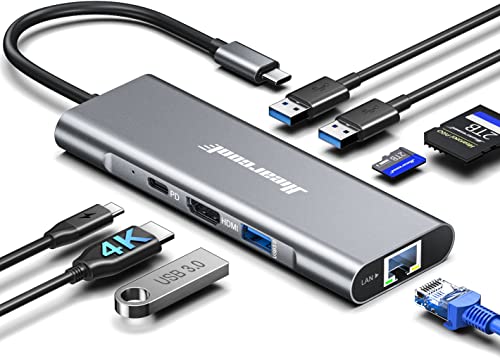
- 4K@60Hz HDMI for one external display
- 1Gbps Ethernet and three USB-A 3.0 ports
- SD/TF readers with up to 100W pass-through charging
Best For: Daily office, home, and travel setups
Best for Triple-Display Workstations

- Drives up to three 4K 60Hz displays
- Up to 100W laptop charging
- Includes Ethernet, USB, audio, and card readers
Best For: Multi-monitor office and professional workstations
Best Windows Dual-Monitor Value
WAVLINK 10-in-1 Docking Station
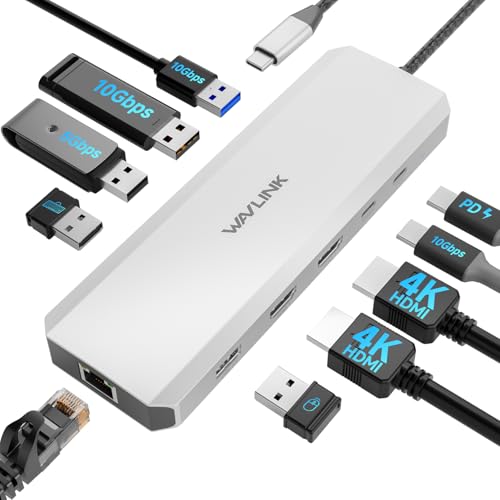
- Dual HDMI support for Windows
- Gigabit Ethernet and 10Gbps USB ports
- Up to 85W laptop charging; charger sold separately
Best For: Windows dual-monitor desks
Best Compact Hub for Portability

- Adds 100Mbps RJ45 Ethernet
- 4K HDMI, SD/TF readers, and USB ports
- 56-gram aluminum design with 100W PD
Best For: Portable USB-C connectivity and media workflows
Best Dual-4K Value

- Dual 4K@60Hz HDMI support with DP 1.4 laptops
- 1000Mbps RJ45 Ethernet for stable wired networking
- 100W PD charging and numerous USB ports
Best For: Dual-monitor office setups with wired networking
Best Triple-Display Flexibility

- HDMI and DisplayPort outputs support up to 4K@60Hz
- Gigabit Ethernet plus 10Gbps USB connectivity
- Windows supports MST and SST display modes
Best For: Windows triple-monitor workstations
Best for Expandable Workstations

- Two HDMI and two DisplayPort outputs for flexible setups
- 1000Mbps Ethernet plus SD and microSD card readers
- Up to 100W PD input and multiple USB connections
Best For: Multi-monitor users who also transfer files from memory cards
Best Dual-Display Dock – UGREEN 10-in-1 Dual HDMI Dock
If you need a docking station with ethernet port and flexible display support, this UGREEN 10-in-1 model combines dual HDMI, USB expansion, card readers, and 100W USB-C Power Delivery in a compact aluminum design. It supports two 4K monitors at 60Hz or one 8K display at 30Hz, subject to host-device and operating-system limitations.
Best For: Windows laptop users building a dual-monitor workstation with wired networking and media-card access.
Pros:
- Two HDMI ports support dual 4K at 60Hz or single 8K at 30Hz.
- Gigabit Ethernet provides up to 1000Mbps wired networking.
- Includes SD and microSD readers, 5Gbps USB ports, and up to 85W laptop pass-through charging.
Cons:
- macOS mirrors the same content across connected external displays.
- The USB-C data and USB-A ports do not provide charging or video output.
- The power adapter is not specified as included.
With its strong display and connectivity mix, this is a practical choice for a Windows-focused desk setup. Mac users should verify the mirroring behavior before buying.
Best Compact Ethernet Hub – UGREEN Revodok 6-in-1 USB-C Hub
This compact docking station with ethernet port turns one USB-C connection into six useful ports, including Gigabit Ethernet, 4K HDMI, three USB-A data ports, and USB-C pass-through charging. Its portable design suits laptops and compatible tablets or phones that support the required functions.
Best For: Travelers and everyday laptop users who want wired networking, one external display, and several USB-A connections.
Pros:
- Gigabit RJ45 Ethernet supports speeds up to 1000Mbps.
- HDMI supports 4K output at 30Hz.
- Three USB-A ports support data transfer up to 5Gbps, while USB-C PD provides up to 85W pass-through charging.
Cons:
- The HDMI output does not support HDR or 3D.
- The USB-C port is for charging only, not data or video.
- It supports only one display output.
This hub keeps the essentials in a travel-friendly format and is especially useful when stable wired internet matters more than high-refresh-rate video or extensive expansion.
Best Triple-Display Dock – WAVLINK 12-in-1 USB-C Dock
For a more expansive workstation, this docking station with ethernet port offers HDMI, dual DisplayPort, Gigabit Ethernet, USB ports, card readers, audio, and 85W laptop charging. On supported Windows systems, it can drive one 4K display at 60Hz or three 1080p displays at 60Hz.
Best For: Windows users who need multiple monitors and a broad selection of workstation peripherals from one USB-C connection.
Pros:
- Supports one 4K@60Hz display or three 1080p@60Hz displays under DP 1.4.
- Includes Gigabit Ethernet, HDMI, dual DisplayPort, USB ports, SD/TF slots, and audio/mic connectivity.
- Provides up to 85W output from a 100W USB-C PD input.
Cons:
- Mac systems can show the same content on all three connected displays.
- The host USB-C port must support video output and charging.
- The charger and charging cable are not included.
This dock is the strongest fit here for a multi-monitor Windows desk, provided the laptop meets the USB-C and DisplayPort requirements. Its wide port selection can also reduce the need for additional adapters.
Best Everyday USB-C Hub – Hiearcool 8-in-1 Ethernet Hub
This Hiearcool docking station with ethernet port is designed for daily productivity, adding 4K HDMI, 1Gbps wired networking, three USB-A 3.0 ports, SD and TF card readers, and 100W USB-C pass-through charging. Its aluminum housing and compact size make it suitable for office, home, and travel use.
Best For: MacBook and USB-C laptop users who want a versatile single-display hub for work, media transfers, and wired internet.
Pros:
- 4K HDMI output supports 60Hz for monitors, TVs, and projectors.
- 1Gbps Ethernet offers a stable wired connection for meetings and downloads.
- Three USB-A 3.0 ports, SD/TF readers, and 100W PD add useful everyday expansion.
Cons:
- It is intended for a single external HDMI display.
- The USB-C laptop port must support the needed display and charging functions.
- The supplied specifications list broad compatibility, so users should verify their device before purchase.
With a balanced port selection and 4K@60Hz HDMI, this is a well-rounded option for productivity users who need reliable Ethernet and card access without a larger desktop dock.
Best for Triple-Display Workstations – Plugable 13-in-1 USB-C Dock
If you need a docking station with ethernet port for a demanding desk setup, the Plugable UD-ULTC4K combines wired networking, extensive USB connectivity, laptop charging, and support for up to three 4K displays through one USB-C connection. It is aimed at compatible Windows, macOS, and ChromeOS systems, though macOS requires DisplayLink drivers.
Best For: IT deployments, developers, financial analysts, and hybrid workers who need three-monitor productivity setups.
Pros:
- Supports up to three 4K displays at 60Hz using three HDMI and three DisplayPort outputs.
- Provides up to 100W laptop Power Delivery, with up to 20W charging for compatible accessories from the front USB-C port.
- Combines Ethernet, USB expansion, audio, SD card support, and charging in a 13-port design.
- Includes lifetime support from Plugable’s North American connectivity team.
Cons:
- DisplayLink drivers and Screen Recording permission are required for external displays on macOS.
- HDCP is not supported, so protected streaming content may not play on connected displays.
The UD-ULTC4K is a strong choice when display capacity and workstation expansion matter more than a minimal footprint. Confirm that your laptop has a compatible, full-featured USB-C, USB4, or Thunderbolt port before buying.
Best Windows Dual-Monitor Value – WAVLINK 10-in-1 Docking Station
The WAVLINK UMD309 is a practical docking station with ethernet port for Windows laptop users who want dual-display support, fast USB connections, and wired networking from one compact aluminum dock. It accepts up to 100W through USB-C Power Delivery, but the laptop receives up to 85W and the charger is not included.
Best For: Windows users with compatible Dell, HP, or Lenovo laptops who need two HDMI displays and Gigabit Ethernet.
Pros:
- Includes dual HDMI outputs with support for up to 4K at 60Hz plus 4K at 30Hz on Windows.
- Offers Gigabit Ethernet and three 10Gbps USB-A/C ports for networking and fast data transfers.
- Supports up to 100W PD input and up to 85W laptop charging.
- Compact aluminum enclosure measures 6.7 by 2.1 by 0.7 inches.
Cons:
- Not compatible with macOS computers.
- Power adapter is not included, and a 20V/5A/100W charger is required.
- Requires a host USB-C port with charging and video output; higher-resolution output may require DP 1.4 with DSC.
This WAVLINK dock offers a useful mix of dual HDMI, fast USB, Ethernet, and charging for a Windows desk. Check your laptop’s USB-C video, charging, and DP 1.4/DSC capabilities, as well as your charger requirements, before purchasing.
Best Compact Hub for Portability – Luonanava 8-in-1 USB-C Hub
For a lightweight docking station with ethernet port, the Luonanava 8-in-1 hub adds wired networking, HDMI, USB ports, card readers, and USB-C charging without the bulk of a full desktop dock. Its RJ45 connection supports speeds up to 100Mbps, while HDMI output reaches 4K at 30Hz on compatible USB-C devices.
Best For: Travelers, photographers, video editors, and USB-C laptop or tablet users who need basic connectivity in a portable format.
Pros:
- Combines 4K HDMI, RJ45 Ethernet, USB-A, USB-C, SD, and TF card slots in an 8-in-1 design.
- Supports up to 100W PD charging for compatible laptops and devices.
- USB 3.0 provides data transfers up to 5Gbps, while card readers support cards up to 1TB.
- Lightweight 56-gram aluminum housing is designed for portability and heat dissipation.
Cons:
- Ethernet speeds are limited to up to 100Mbps rather than Gigabit Ethernet.
- HDMI output is limited to 4K at 30Hz.
- The USB-C host device must support DP Alt Mode for video output, and the PD port does not transfer data.
This hub is a sensible travel companion when you want wired internet and media-card access in a small package. It is less suitable for high-speed network demands or high-refresh-rate external displays, but it covers common connectivity needs across Windows, macOS, ChromeOS, iPadOS, iOS, and Android devices.
Best Dual-4K Value – MOKiN 13-in-1 Dual HDMI Dock
If you need a docking station with ethernet port for a laptop workstation, this MOKiN model combines dual HDMI output, extensive USB connectivity, and a 1000Mbps RJ45 connection in a 13-in-1 design. It supports dual 4K displays at up to 60Hz when the laptop uses the required DisplayPort 1.4 protocol.
Best For: Laptop users who want dual 4K monitors, wired networking, and plenty of USB ports from one compact dock.
Pros:
- Two HDMI ports support dual 4K@60Hz with a compatible DP 1.4 laptop.
- Includes a 1000Mbps RJ45 Ethernet port for stable wired connectivity.
- Offers multiple USB-C and USB-A ports plus up to 100W USB-C PD charging.
- Screen-lock button can quickly turn off connected displays.
Cons:
- Dual-display performance depends on the laptop’s USB-C or Thunderbolt capabilities.
- The port mix includes USB 2.0 connections, which are slower for data transfer.
With dual HDMI, wired Ethernet, broad peripheral support, and 100W charging, this is a practical all-in-one choice for office users who prioritize two external screens without needing DisplayPort outputs.
Best Triple-Display Flexibility – LIONWEI 13-in-1 HDMI/DP Dock
This LIONWEI docking station with ethernet port is designed for users who need flexible display and connectivity options. It provides two HDMI ports, DisplayPort, Gigabit Ethernet, multiple USB ports, audio connectivity, and up to 100W PD input, although 13W is used by the dock itself.
Best For: Windows users building a triple-display workstation with HDMI and DisplayPort monitors.
Pros:
- Supports HDMI and DisplayPort outputs, with up to 4K@60Hz on compatible DP 1.4 sources.
- Gigabit Ethernet helps provide a stable wired network connection.
- Includes 10Gbps USB-C and USB 3.1 connectivity alongside three USB 3.0 and two USB 2.0 ports.
- Built-in 3.5mm audio/mic jack adds convenient headset connectivity.
Cons:
- macOS can extend to only one monitor according to the supplied notes.
- Up to 87W is available for laptop charging after the dock’s 13W power use.
The combination of HDMI, DisplayPort, Gigabit Ethernet, fast USB, and audio makes this a versatile desktop hub. Its strongest fit is a Windows setup, where MST and SST modes support more display flexibility than macOS.
Best for Expandable Workstations – MOKiN 14-in-1 Display Dock
For a docking station with ethernet port that also handles multiple displays and memory cards, this MOKiN 14-in-1 dock offers two HDMI ports, two DisplayPort outputs, a 1000Mbps RJ45 connection, SD and microSD readers, and USB expansion. It supports flexible combinations such as two HDMI plus DisplayPort or two DisplayPort plus HDMI.
Best For: Users who need a multi-monitor workstation with wired networking and built-in SD or microSD card access.
Pros:
- Four video outputs provide flexible HDMI and DisplayPort configurations.
- Includes 1000Mbps Ethernet for stable video calls, downloads, and online activity.
- Built-in SD and microSD slots simplify card-based file transfers.
- Offers up to 100W USB-C PD input and a screen-lock button.
Cons:
- Actual display support depends on the connected laptop and its USB-C capabilities.
- Several USB connections are limited to USB 2.0 speeds.
This dock stands out when card readers and flexible monitor arrangements matter as much as Ethernet. It is a strong choice for creators, office users, or anyone consolidating displays, storage cards, peripherals, and charging into one connection.
How We Picked the Best Docking Station with Ethernet Port
We evaluated these docking stations by focusing on the connections that matter most in daily use: Ethernet speed, display support, USB expansion, power delivery, compatibility, and overall practicality. We also considered whether each design suits a portable setup or a permanent workstation. Because USB-C features vary between laptops, we give extra weight to clear display specifications and broad device compatibility.
Quick Comparison
| Best For | What to Look For | Typical Advantage |
|---|---|---|
| Travel and basic connectivity | Compact hub, HDMI, Gigabit Ethernet | Easy to carry and set up |
| Dual-monitor offices | Two video outputs and adequate USB-C support | More screen space for multitasking |
| Triple-monitor workstations | Multiple DisplayPort or HDMI outputs | Expanded productivity workspace |
| Power users | High-wattage power delivery and many ports | Fewer adapters and cables |
Key Buying Factors for a Docking Station with Ethernet Port
Ethernet Speed and Reliability
Most options use Gigabit Ethernet, which is a strong choice for office work, video calls, cloud applications, and large file transfers. A wired connection is generally more consistent than Wi-Fi, but your router, network switch, and internet plan must also support the expected speed.
Display Compatibility
Check the number and type of video outputs before buying. HDMI is convenient for common monitors and TVs, while DisplayPort is often preferred for business monitors. Confirm the maximum resolution and refresh rate, and verify whether your laptop supports the required USB-C video mode or Thunderbolt standard.
Charging and Port Selection
Power Delivery can reduce cable clutter by charging the laptop through the dock. Compare the dock’s maximum wattage with your laptop’s charger requirements. Also count the ports you will actually use, such as USB-A, USB-C, SD card, audio, and additional display connections.
Compatibility and Setup
Some docks work broadly with Windows laptops, MacBooks, Chromebooks, and USB-C tablets, while multi-monitor operation may depend on the operating system or DisplayLink software. Confirm compatibility before purchase, especially for Mac multi-display setups.
Who Should Buy Which Docking Station with Ethernet Port?
Choose a compact USB-C hub if you mainly need wired networking, one monitor, and a few USB accessories while traveling. A dual-monitor dock is a better fit for office productivity, research, spreadsheets, and creative workflows that benefit from side-by-side screens. Select a triple-monitor model when your laptop and operating system explicitly support the required outputs and you regularly manage several applications at once.
For a permanent desk, prioritize reliable Gigabit Ethernet, strong power delivery, enough USB ports, and the display connections your monitors already use. If you move between locations often, a smaller Docking Station with Ethernet Port may be more convenient than a larger workstation dock, even if it offers fewer total connections.