A USB hub with an NVMe enclosure combines everyday connectivity with fast, expandable storage in one compact accessory. Instead of carrying a separate hub and portable SSD, you can add ports, memory-card access, display output, and an M.2 drive from a single connection.
These 10 picks cover a range of setups, from Mac mini stands and laptop docks to phone-focused hubs and full desktop workstations. Use the guide below to compare compatibility, performance, power delivery, and the features that matter most before buying.
Best 10 USB Hub with Nvme Enclosure Picks for 2026
Best All-in-One Pick
SABRENT HB-6PNV Hub & SSD Dock

- M.2 NVMe/SATA enclosure for 2242/2260/2280 drives
- 4K60 HDMI, Gigabit Ethernet, and 90W PD passthrough
- Drive connection is limited to 5Gbps
Best For: General laptop expansion with integrated storage and connectivity
Best for Mac mini
Satechi Mac mini NVMe Hub Stand

- Purpose-built stand and hub for selected Mac mini models
- 10Gbps single-sided NVMe support plus UHS-II SD reader
- Not compatible with double-sided or heatsink-equipped SSDs
Best For: Mac mini desktops needing tidy storage and front-facing expansion
Best Feature-Rich Dock

- Tool-free NVMe and SATA M.2 enclosure
- 10Gbps USB, SD/TF readers, and high-resolution HDMI
- Up to 87W host charging through PD passthrough
Best For: Creative users who need storage, media readers, display output, and charging
Best Portable 10Gbps Pick
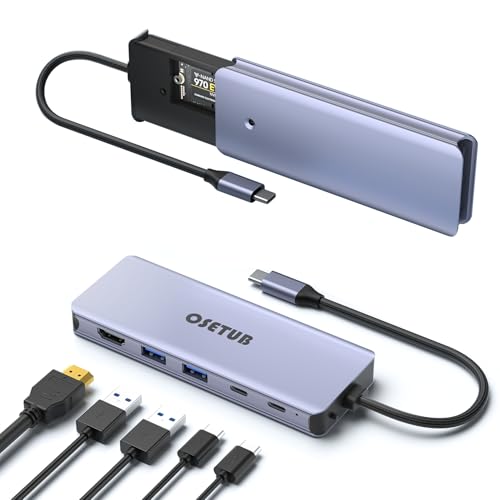
- Compact enclosure for 2230/2242/2260/2280 NVMe drives
- Three listed 10Gbps data connections plus 4K60 HDMI
- 100W PD compatibility in a lightweight aluminum design
Best For: Mobile users needing fast NVMe storage and USB-C connectivity
Best Magnetic Phone Dock
10Gbps USB-C Hub With NVMe Enclosure

- Magnetic 6-in-1 design for compatible phones
- Supports M.2 sizes 2230 through 2280
- Cooling fan plus 4K@60Hz HDMI
Best For: Mobile creators recording and storing 4K ProRes video
Best Full-Featured Desktop Dock
8-Port USB-C Hub With NVMe Enclosure

- Supports NVMe and SATA M.2 drives up to 4TB
- Includes Ethernet and 4K@60Hz HDMI
- Offers 10Gbps data and 100W PD input
Best For: Workstations needing storage, networking, display, and charging
Best Portable Value
8-in-1 USB-C Hub With M.2 Enclosure

- Supports NVMe and SATA M.2 drives
- Adds card readers, HDMI, and 100W PD
- Slim, lightweight fanless aluminum design
Best For: Travelers and photographers transferring files on the go
Best All-in-One Value
YOTUO NVMe Hub and Card Reader

- NVMe enclosure, SD/TF readers, and four USB ports
- Supports M.2 NVMe drives up to 8TB
- Compatible with computers, tablets, phones, and iPhone 15+
Best For: Travelers and media users needing compact storage and connectivity expansion
Best for Charging
OseTub 7-in-1 NVMe Charging Hub

- Adds NVMe storage and up to 100W PD charging
- Dual USB 3.1 Gen 2 ports support up to 10Gbps
- Aluminum body is slim and portable
Best For: USB-C laptop users who need storage expansion with pass-through charging
Best Desktop Dock

- Adds 4K@60Hz HDMI, 100W PD, and NVMe storage
- Includes multiple 10Gbps USB ports and card readers
- Cooling accessories and installation tools are included
Best For: Laptop workstations needing storage, display output, charging, and peripherals
Best All-in-One Pick – SABRENT HB-6PNV Hub & SSD Dock
If you want a usb hub with nvme enclosure that combines storage, display output, Ethernet, and charging, the SABRENT HB-6PNV is a practical option. It accepts 2242, 2260, and 2280 M.2 NVMe or SATA drives, though the drive is sold separately and the enclosure operates at up to 5Gbps.
Best For: Laptop users who want built-in M.2 storage plus HDMI, Gigabit Ethernet, and USB expansion in one aluminum hub.
Pros:
- Supports M.2 NVMe and SATA drives in 2242, 2260, and 2280 sizes.
- Includes 4K at 60Hz HDMI, Gigabit Ethernet, and 90W USB Power Delivery passthrough.
- Thermal pad and aluminum construction help with drive cooling.
Cons:
- The internal drive slot is limited to up to 5Gbps rather than full modern NVMe speeds.
- No SD or microSD card reader is included.
- Charger and SSD are sold separately.
The HB-6PNV is strongest as a versatile desk or travel hub for general file transfers, backups, and productivity. Check that your computer supports DisplayPort Alt Mode if you plan to use HDMI.
Best for Mac mini – Satechi Mac mini NVMe Hub Stand
The Satechi Mac mini hub stand is a specialized usb hub with nvme enclosure for compatible Mac mini setups. It adds a single-sided M.2 NVMe SSD bay, front-facing USB ports, and an UHS-II SD card reader while sitting beneath the computer as a space-saving stand.
Best For: Mac mini M6, M5 Pro, and M4 owners who want expanded storage, front-access ports, and a cleaner desktop arrangement.
Pros:
- Supports single-sided 2230, 2242, 2260, and 2280 M.2 NVMe SSDs up to 10Gbps.
- Provides two USB-A ports up to 10Gbps, a USB-A 2.0 port, and UHS-II SD access.
- Aluminum stand design includes ventilation, a power button, and a two-year limited warranty.
Cons:
- Designed exclusively for specified Mac mini models rather than general laptops.
- Heatsink-equipped and double-sided SSDs are incompatible.
- SSD is not included.
This is a particularly tidy choice for a Mac mini workstation, especially for photographers and content creators using SD cards. Follow the installation and safe-ejection guidance to reduce the risk of data loss.
Best Feature-Rich Dock – Minthouz 8-in-1 NVMe Hub
The Minthouz combines a usb hub with nvme enclosure and a broad selection of docking features. Its tool-free M.2 bay supports NVMe drives at up to 10Gbps and SATA drives at up to 6Gbps, while the dock adds HDMI, USB ports, SD/TF readers, and power passthrough.
Best For: Users who need fast removable storage alongside card readers, high-resolution HDMI, USB expansion, and laptop charging.
Pros:
- Tool-free enclosure supports PCIe NVMe and M.2 SATA SSDs.
- Offers 10Gbps USB-C and USB-A ports, SD/TF readers, and a legacy USB 2.0 port.
- Supports HDMI up to 8K at 30Hz or 4K at 144Hz and delivers up to 87W to the host.
Cons:
- Actual display and data performance depends on the host device and its USB-C capabilities.
- It provides card readers but no Ethernet port is listed.
- SSD and wall charger are not included in the supplied package details.
With its combination of fast storage and media-friendly ports, the Minthouz is well suited to creative workflows and travel setups. Confirm your laptop supports the required USB-C video and power features before buying.
Best Portable 10Gbps Pick – OseTub 6-in-1 NVMe Hub
For a compact usb hub with nvme enclosure, the OseTub 6-in-1 adapter combines an M.2 PCIe NVMe bay with 4K HDMI, two 10Gbps USB 3.1 Gen 2 ports, USB-C data, and USB-C PD charging. Its aluminum housing and lightweight design make it convenient for mobile laptop use.
Best For: MacBook and USB-C laptop users who prioritize portable 10Gbps storage and fast peripheral connectivity.
Pros:
- Supports 2230, 2242, 2260, and 2280 PCIe NVMe M.2 drives.
- Includes two 10Gbps USB ports, 10Gbps USB-C data, and 4K at 60Hz HDMI.
- Compact aluminum design supports up to 100W PD charging compatibility.
Cons:
- The supplied warranty is limited to 90 days.
- No SD card reader or Ethernet port is listed.
- HDMI requires a compatible USB-C port with video output support.
This adapter is a straightforward fit for users who want fast external NVMe storage without carrying a larger dock. Its feature set favors high-speed USB and display connections over card-reader or networking expansion.
Best Magnetic Phone Dock – 10Gbps USB-C Hub With NVMe Enclosure
If you want a USB hub with NVMe enclosure for an iPhone, iPad, or USB-C laptop, this magnetic 6-in-1 dock combines storage expansion with everyday connectivity. It supports M.2 NVMe drives up to 2280 size, 10Gbps transfers, 4K@60Hz HDMI, card readers, and 100W pass-through charging. The built-in fan and aluminum housing are designed to help manage SSD heat.
Best For: iPhone 15/16/17 Pro users who want magnetic attachment and direct external storage for 4K ProRes video.
Pros:
- Combines an NVMe enclosure with HDMI, SD, TF, USB-C, USB-A, and PD connectivity.
- Supports 2230, 2242, 2260, and 2280 M.2 drives at up to 10Gbps.
- Magnetic design and built-in cooling fan suit mobile recording and portable workflows.
Cons:
- SSD is not included, and a new drive must be formatted as exFAT before use.
- Magnetic attachment requires a compatible magnetic phone case or MagSafe-style surface.
- Higher-capacity 2TB and 4TB SSDs may require external power.
This is a particularly specialized choice for mobile creators. Its magnetic design and cooling system add convenience, while the broad port selection also makes it useful as a compact laptop or tablet dock.
Best Full-Featured Desktop Dock – 8-Port USB-C Hub With NVMe Enclosure
This USB hub with NVMe enclosure is built for users who want one desktop-friendly device for storage, displays, networking, peripherals, and charging. The Yottamaster hub supports M.2 NVMe and SATA drives up to 4TB, offers 10Gbps connectivity, 4K@60Hz HDMI, Ethernet, and 100W PD input, and includes a mix of high-speed and USB 2.0 ports.
Best For: Laptop and mini-PC users who need expanded storage alongside Ethernet, HDMI, USB ports, and pass-through charging.
Pros:
- Supports both M.2 NVMe and SATA drives in 2230, 2242, 2260, and 2280 sizes.
- Provides 8 ports, including Ethernet, 4K@60Hz HDMI, 10Gbps USB-C, and 100W PD.
- Aluminum alloy and ABS construction support heat dissipation and durability.
Cons:
- SSD is not included; the product is diskless.
- Multiple demanding peripherals may require a 60W-or-higher power supply through the PD input.
- Two of the USB-A ports are USB 2.0 rather than high-speed ports.
With its combination of storage flexibility and desktop-oriented expansion, this is the most versatile option of the three for a fixed workstation. Its Ethernet and 4K@60Hz support are useful additions when a laptop has limited built-in ports.
Best Portable Value – 8-in-1 USB-C Hub With M.2 Enclosure
For a compact USB hub with NVMe enclosure, this 8-in-1 model combines M.2 NVMe or SATA storage expansion with display output, fast USB connections, card readers, and 100W PD charging. It supports 2230 through 2280 drives, advertises transfer speeds up to 10Gbps, and uses a slim aluminum body without a cooling fan.
Best For: Travelers, photographers, and laptop users who need portable storage, card transfers, and essential USB-C expansion.
Pros:
- Accepts both M.2 NVMe and SATA SSDs in four common sizes.
- Includes 4K HDMI, 10Gbps USB-C, USB 3.1, SD/TF readers, and 100W PD.
- Lightweight aluminum design provides passive heat dissipation without a fan.
Cons:
- The HDMI output is 4K@30Hz, not 4K@60Hz.
- SSD is not included.
- Actual storage and transfer performance depends on the SSD, host port, and computer.
This model makes sense when portability matters more than maximum display refresh rate. Its card readers and M.2 support are especially practical for photo and video file transfers, while the fanless aluminum enclosure keeps the design simple for travel.
Best All-in-One Value – YOTUO NVMe Hub and Card Reader
If you want a compact usb hub with nvme enclosure for everyday expansion, the YOTUO combines NVMe storage, card readers, and four USB ports in one travel-friendly device. It supports 2230, 2242, 2260, and 2280 NVMe drives up to 8TB, with transfer speeds up to 10Gbps when paired with a compatible host port and cable.
Best For: Travelers, photographers, and users who want storage expansion, card reading, and peripheral connectivity in one compact unit.
Pros:
- Combines an NVMe enclosure, SD/TF readers, and four-port USB hub.
- Supports common M.2 NVMe sizes from 2230 through 2280 and capacities up to 8TB.
- Includes USB-C and USB 3.2 connectivity, plus a 5V power cable for lower-powered host ports.
- Works with Windows, macOS, Linux, Android, and iPhone 15 or newer without extra drivers.
Cons:
- Two of the USB ports are limited to USB 2.0 speeds.
- Reaching 10Gbps requires a compatible USB 3.2 Gen 2 or faster host connection.
- The snap-fit case should not be forcefully disassembled after installation.
The YOTUO is a practical choice when minimizing desk or bag clutter matters more than premium construction. Its broad device compatibility and generous SSD support make it especially versatile for mixed storage and media-transfer tasks.
Best for Charging – OseTub 7-in-1 NVMe Charging Hub
The OseTub is a useful usb hub with nvme enclosure for USB-C laptops and phones that also need pass-through charging. Along with an M.2 NVMe slot supporting 2230, 2242, 2260, and 2280 drives, it provides 10Gbps data ports, SD/TF readers, and up to 100W Power Delivery.
Best For: MacBook and USB-C device users who want fast storage expansion while keeping a charging connection available.
Pros:
- Combines NVMe storage, card readers, USB connectivity, and 100W PD charging.
- Supports M.2 PCIe NVMe drives in four common sizes.
- Offers dual USB 3.1 Gen 2 ports with claimed speeds up to 10Gbps.
- Aluminum construction helps with portability and SSD heat dissipation.
Cons:
- Only two total USB ports are listed in the product details, limiting peripheral expansion.
- Compatibility is specified for Mac OS 10.12 Sierra and Windows 10 or newer.
- The manufacturer warranty is listed as 90 days.
Choose this model when charging capability is as important as storage and data transfer. Its aluminum body and 100W PD support suit a portable workstation, although users needing many USB peripherals may prefer a larger dock.
Best Desktop Dock – Buerlaseul 9-in-1 NVMe Dock
For a more complete desktop setup, the Buerlaseul pairs a usb hub with nvme enclosure with 4K HDMI, 100W PD, USB 3.2 ports, and SD/TF card reading. Its internal slot accepts M-Key PCIe NVMe SSDs up to 4TB, making it a strong fit for laptop docking, external storage, and display expansion.
Best For: Laptop users who want one USB-C dock for NVMe storage, an external 4K display, charging, and multiple peripherals.
Pros:
- Provides nine functions, including NVMe storage, HDMI, USB ports, card readers, and PD charging.
- Supports 4K output at 60Hz when the host USB-C port supports video output.
- Includes dual USB-A 3.2 Gen 2 ports, a USB-C 3.2 Gen 2 port, and a USB-A 2.0 port.
- Includes an aluminum heatsink, silicone cooling pad, screwdriver, and quick-start guide.
Cons:
- The SSD slot supports PCIe NVMe M-Key drives only, not SATA M.2 SSDs.
- A PD power adapter and charging cable are not included.
- SD and TF cards cannot be used simultaneously.
The Buerlaseul is the most dock-oriented option here, especially for a laptop desk setup with a 4K monitor. Check your computer’s USB-C video, data, and Power Delivery support before buying, and plan to supply your own PD adapter.
How We Picked the Best USB Hub with Nvme Enclosure
We focused on models that combine practical port expansion with an M.2 NVMe SSD enclosure, rather than ordinary USB hubs with no storage support. Our evaluation criteria include interface speed, PCIe and drive-format compatibility, video output, power delivery, card readers, Ethernet, build quality, cooling, and overall fit for laptops, tablets, phones, and desktop computers.
Because specifications vary widely, confirm the product listing before purchasing. Some enclosures support NVMe drives only, while others accept SATA M.2 drives; supported sizes may range from 2230 to 2280. The host device, cable, SSD, and operating system can also limit real-world transfer speeds.
Quick Comparison
- Best for compact laptop expansion: Choose a six- or seven-in-one hub with 10Gbps USB and HDMI.
- Best for desktop organization: A stand-style dock can hold the computer while adding storage and ports.
- Best for creators: Prioritize 10Gbps performance, SD and TF readers, HDMI 4K output, and reliable cooling.
- Best for a complete workstation: Look for Ethernet, multiple USB ports, 100W PD, and broad display support.
- Best for mobile use: Select a smaller model with a short cable, low power draw, and phone compatibility.
Key Buying Factors for a USB Hub with Nvme Enclosure
SSD and Enclosure Compatibility
Check whether the enclosure supports NVMe PCIe drives, SATA M.2 drives, or both. Verify the supported form factors, such as 2230, 2242, 2260, or 2280, and whether an SSD is included. A bare enclosure requires you to supply and install the drive.
Speed and Thermal Management
USB 3.2 Gen 2 or 10Gbps connectivity can provide substantially faster transfers than 5Gbps USB, though actual performance depends on the SSD and host port. Sustained workloads can create heat, so ventilation, a metal body, thermal pads, or an integrated fan may help reduce throttling.
Ports, Display, and Power
Match the port selection to your workflow. HDMI 4K at 60Hz is useful for an external monitor, while SD and TF readers benefit photographers and video creators. Ethernet helps desktop setups, and 90W or 100W power delivery can charge compatible laptops, but the hub’s pass-through rating is not always the same as the power supplied to the computer.
Device and Operating-System Support
USB-C does not guarantee identical functionality on every device. Confirm support for video output, charging, external storage, and phone or tablet use. Some models are designed specifically for Mac mini systems, MacBooks, iPads, Windows laptops, or newer iPhones.
Who Should Buy Which USB Hub with Nvme Enclosure?
Choose a stand-style model if you want a cleaner Mac mini or desktop workspace. Choose a multiport laptop hub if you need HDMI, charging, storage, and extra USB connections while traveling or working remotely. Choose a card-reader model if you regularly move photos or video from SD and microSD cards. Choose a high-speed, cooled enclosure for large file transfers, editing projects, or frequent SSD use. Finally, choose the broadest dock if Ethernet, several peripherals, display connectivity, and high-wattage charging matter more than minimum size.