The best USB hubs make a laptop or desktop easier to use by adding the ports you actually need—whether that means HDMI, Ethernet, USB-A, USB-C, or extra power for accessories.
We selected 10 options for different setups, from compact travel adapters to high-capacity powered hubs. Use the comparison and buying advice below to match port selection, performance, and power delivery to your workspace.
Best 10 USB Hubs Picks for 2026
Best 4K USB-C Hub

- 4K@60Hz HDMI output
- SD, TF, USB-A, and USB-C data ports
- Up to 85W laptop charging
Best For: USB-C laptops needing display, card-reader, data, and charging expansion
Best Ethernet USB Hub
7-in-1 USB-C Hub with Gigabit Ethernet

- 10/100/1000Mbps Gigabit Ethernet
- Four USB-A and two USB-C data ports
- 5Gbps data transfer across six ports
Best For: Desks requiring wired networking and many USB peripherals
Best Dual-Monitor USB Hub

- Dual HDMI with 4K display support
- Gigabit Ethernet and SD/microSD readers
- Up to 85W pass-through charging
Best For: Windows laptop workstations with two external displays
Best Powered USB Hub
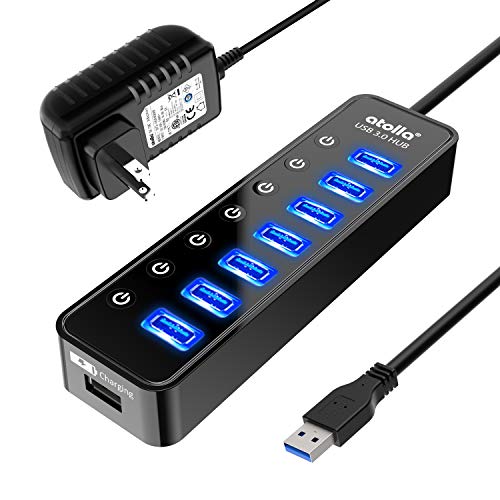
- Seven 5Gbps USB 3.0 data ports
- Individual on/off switches
- Includes 5V/4A power adapter
Best For: Desktops with many USB peripherals and charging needs
Best Compact USB-C Hub

- 4K HDMI output at 30Hz
- Three 5Gbps data ports
- Up to 85W pass-through charging
Best For: USB-C laptops needing display, data, and charging expansion
Best 7-in-1 USB-C Hub
Acer Multi-Port Adapter with Card Readers

- Seven ports with SD and microSD slots
- 4K HDMI at 30Hz
- Up to 100W Power Delivery
Best For: Creators and laptop users who need card-reader expansion
Best USB-A Hub
UGREEN 4-Port USB 3.0 Splitter

- Adds four USB-A ports
- Up to 5Gbps USB 3.0 transfers
- Compact 33g plug-and-play design
Best For: USB-A peripherals, storage devices, and console accessories
Best Overall USB-C Hub

- 4K HDMI output up to 60Hz with DP 1.4 laptops
- 10Gbps data ports plus Ethernet and card readers
- Up to 85W pass-through charging
Best For: USB-C laptops needing versatile expansion
Best High-Capacity USB Hub
Wenter 11-Port Powered USB Hub

- 10 USB 3.0 data ports plus a charging port
- 5Gbps transfers with a 12V/3A power adapter
- Individual switches and LEDs for every port
Best For: Busy desktop workstations with many USB devices
Best Long-Cable USB Hub

- Seven USB ports with up to 5Gbps transfers
- 4-foot cable supports flexible desktop placement
- Aluminum housing and broad OS compatibility
Best For: Desktop USB-A expansion with extra cable reach
Best 4K USB-C Hub – Anker 7-in-1 USB-C Hub
This compact Anker hub is a versatile choice for laptops that need more ports without sacrificing desk space. Among USB hubs, it stands out with 4K@60Hz HDMI, SD and TF card readers, three 5Gbps data ports, and USB-C Power Delivery pass-through.
Best For: USB-C laptop users who need video output, memory-card access, fast data transfers, and charging from one compact adapter.
Pros:
- HDMI supports sharp 4K@60Hz output.
- Includes USB-A, USB-C data, SD, and TF card connectivity.
- Supports up to 85W laptop charging through the USB-C PD input.
- Compact metal design with an 18-month warranty.
Cons:
- Only the HDMI port supports video; the USB-C port is data-only.
- Charger is not included.
- Requires a compatible USB-C port with DP Alt Mode and Power Delivery for full functionality.
This is a strong all-purpose USB-C hub for users who want a single-cable setup for displays, storage cards, peripherals, and laptop charging. Its main limitation is that video depends on HDMI and compatible host hardware.
Best Ethernet USB Hub – 7-in-1 USB-C Hub with Gigabit Ethernet
This 7-in-1 USB-C hub focuses on wired networking and plentiful peripheral connections. It combines Gigabit Ethernet with four USB-A and two USB-C data ports, making it a practical option for desks with several accessories.
Best For: Laptop users who need reliable wired internet and multiple 5Gbps USB data connections for keyboards, mice, flash drives, and other peripherals.
Pros:
- Gigabit Ethernet supports 10/100/1000Mbps connections.
- Provides four USB-A and two USB-C data ports.
- Six data ports support speeds up to 5Gbps.
- Its 1-foot cable offers convenient desk placement.
Cons:
- USB-C ports do not support video or PD charging.
- Power cable and adapter are not included.
- Optional 5V/3A power is needed for additional connection stability in some setups.
Choose this hub when Ethernet and port quantity matter more than display output or charging. Its clear USB-C limitations make it best suited to data and networking tasks rather than a full docking-station replacement.
Best Dual-Monitor USB Hub – Anker 8-in-1 Laptop Dock
This Anker 8-in-1 hub is built for a more complete laptop workstation. It combines dual HDMI, Gigabit Ethernet, SD and microSD readers, USB-A data ports, and up to 85W USB-C pass-through charging in one adapter.
Best For: Compatible Windows laptops and other USB-C systems that need two external displays, wired networking, card readers, and charging.
Pros:
- Supports one 4K@60Hz display or two displays at 4K@30Hz.
- Includes dual HDMI, Ethernet, SD, microSD, and USB-A connectivity.
- Provides up to 85W pass-through charging with a suitable 100W charger and USB-C cable.
- Works with USB-C, USB4, and Thunderbolt connections on supported systems.
Cons:
- macOS mirrors the same image across both external monitors.
- Not compatible with Linux.
- Charger and USB-C cable are not included.
This is one of the more workstation-oriented USB hubs in the group, especially for Windows users who want dual-display support. Check your laptop’s DP Alt Mode and Power Delivery compatibility before buying, particularly if you plan to use two monitors.
Best Powered USB Hub – Atolla 8-Port USB 3.0 Hub
The Atolla powered hub is designed for expanding a computer’s existing USB connection into a larger peripheral setup. It offers seven 5Gbps USB 3.0 data ports, a dedicated smart charging port, individual switches, and a 5V/4A power adapter.
Best For: Home and office desktops that connect several USB peripherals, including printers, drives, keyboards, mice, smartphones, and tablets.
Pros:
- Expands one USB 3.0 connection into seven USB 3.0 data ports.
- Individual on/off switches make connected devices easy to control.
- Powered design supports stable multi-device use.
- Dedicated charging port can provide up to 2.4A with the included adapter.
Cons:
- It uses a standard USB connection rather than USB-C.
- The dedicated charging port is separate from the seven data ports.
- Its plastic enclosure is less compact and premium than a small metal travel hub.
For a fixed workstation, this is a practical USB hub with useful power management and port switches. It is less suitable for USB-C-only laptops or users looking for HDMI, Ethernet, or memory-card connectivity.
Best Compact USB-C Hub – 5-in-1 Anker Hub with 4K HDMI
If you need a compact way to add ports to a compatible laptop, this Anker hub combines HDMI, USB-A, USB-C data, and pass-through charging in one adapter. It is a practical choice among USB hubs for everyday peripherals and an external display.
Best For: MacBook, Windows, Chromebook, and other USB-C laptops with DP Alt Mode and Power Delivery.
Pros:
- Includes 4K HDMI output at up to 30Hz.
- Provides two USB-A and one USB-C data port with speeds up to 5Gbps.
- Supports up to 85W pass-through charging.
- Compact, lightweight design with an 18-month warranty.
Cons:
- Power adapter is not included.
- HDMI is limited to 4K at 30Hz.
- Not compatible with Linux, and the USB-C charging port does not transfer data.
This is a well-rounded USB-C hub for users who want essential expansion without a bulky dock. Confirm that your device supports DP Alt Mode and Power Delivery before buying.
Best 7-in-1 USB-C Hub – Acer Multi-Port Adapter with Card Readers
This Acer adapter is one of the more versatile USB hubs for USB-C laptops, adding display output, USB data ports, charging, and SD or microSD card access. Its aluminum housing also supports portability and heat dissipation.
Best For: Laptop users who need card-reader access alongside 4K HDMI, USB expansion, and USB-C charging.
Pros:
- Seven ports include HDMI, two USB-A ports, USB-C data, PD charging, SD, and microSD.
- Supports 4K output at 30Hz through HDMI.
- Offers up to 100W USB-C Power Delivery with a suitable charger.
- Works with Windows, macOS, ChromeOS, and Linux.
Cons:
- HDMI does not support 4K at 60Hz or 2K at 144Hz.
- USB data ports do not provide video or audio transmission.
- Best performance requires a 65W or higher charger and compatible PD support.
Choose this Acer hub if memory-card support is important for your workflow. It offers broad expansion, but display and charging performance still depend on the host device and connected power supply.
Best USB-A Hub – UGREEN 4-Port USB 3.0 Splitter
This UGREEN hub is a straightforward USB-A expander that turns one port into four. Among USB hubs, it is a particularly simple option for adding wired peripherals such as keyboards, mice, flash drives, and printers without installing extra software.
Best For: Laptops, desktops, game consoles, and other USB-A devices that need additional peripheral ports.
Pros:
- Adds four USB-A ports from a single USB-A connection.
- Supports USB 3.0 transfer speeds up to 5Gbps.
- Plug-and-play compatibility with Windows, macOS, Linux, and ChromeOS.
- Compact 0.4-inch-thick design weighing 33g.
Cons:
- Provides USB-A ports only, with no HDMI, USB-C, or card readers.
- It is a data and peripheral hub rather than a charging or display dock.
- Connected devices share the hub’s available bandwidth.
For expanding a single USB-A port on a budget-friendly, portable setup, this UGREEN model keeps things uncomplicated. It is best suited to peripherals and storage rather than display connectivity or high-power charging.
Best Overall USB-C Hub – Anker 8-in-1 USB-C Hub
For laptop users who need more than basic USB expansion, this Anker hub combines eight useful connections in a compact aluminum design. It adds HDMI, Ethernet, USB-A and USB-C data ports, card readers, and pass-through charging, making it a versatile choice among USB hubs.
Best For: USB-C laptop users who need display output, wired networking, fast data transfers, and card-reader access from one hub.
Pros:
- Supports up to 4K at 60Hz with a compatible DP 1.4 laptop.
- Includes Ethernet, HDMI, microSD/SD readers, USB-C, and two USB-A data ports.
- Provides data speeds up to 10Gbps and up to 85W pass-through charging.
- Works with USB-C, USB4, and Thunderbolt connections.
Cons:
- Only the HDMI port supports video output; the USB-C port is data-only.
- Requires a 100W Power Delivery charger and cable for adequate charging capacity.
- Not compatible with Linux.
This is a strong all-purpose USB-C hub for modern laptops, especially if you need video, networking, and storage-card connectivity in one accessory. Check your laptop’s DP Alt Mode and operating-system compatibility before buying.
Best High-Capacity USB Hub – Wenter 11-Port Powered USB Hub
If your desk regularly fills with peripherals, the Wenter powered hub provides substantial USB expansion without relying solely on the computer’s power. With 10 USB 3.0 data ports, a dedicated charging port, individual switches, and long cables, it is one of the more practical USB hubs for a busy workstation.
Best For: Desktop users connecting many keyboards, mice, printers, drives, flash drives, and other USB peripherals at once.
Pros:
- Offers 11 total ports, including 10 USB 3.0 data ports and one charging port.
- Transfers data at speeds up to 5Gbps.
- Individual on/off switches and LED indicators make port management convenient.
- Includes a 12V/3A power adapter and long connection cables.
Cons:
- Its larger port count and external power adapter make it less portable than compact hubs.
- Charging is limited to the dedicated smart-charging port rather than all data ports.
- The supplied notes list duplicate power-cable lengths, so verify the included cable specification.
The Wenter is a sensible choice when the priority is maximum USB-A connectivity and convenient power management. It supports older USB standards and multiple operating systems, while the powered design suits stationary setups better than travel use.
Best Long-Cable USB Hub – 4FT 7-Port USB 3.0 Hub
This seven-port aluminum hub is designed for desktop setups where the computer is not directly beside the connected accessories. Its 4-foot cable provides placement flexibility, while USB 3.0 supports transfers up to 5Gbps for everyday peripherals and storage devices.
Best For: Desktop and laptop users who need several USB-A ports with extra cable reach for keyboards, mice, drives, and other peripherals.
Pros:
- Provides seven USB ports in a compact aluminum enclosure.
- Uses a 4-foot cable for more flexible positioning.
- Supports USB 3.0 transfer speeds up to 5Gbps.
- Works with Windows, Mac OS, Linux, Chrome OS, and Unix systems.
Cons:
- Supports data transmission only and is not designed for charging.
- Provides USB expansion rather than HDMI, Ethernet, or card-reader connections.
- Its ports are suited to USB-A accessories, so newer USB-C-only devices may require an adapter.
This hub is a straightforward option for adding USB-A connectivity across a desk, particularly when a short built-in cable would be inconvenient. Choose it for peripheral and file-transfer expansion, not for charging or video output.
How We Picked the Best USB Hubs
We evaluated these USB Hubs by looking at port selection, connection standards, practical bandwidth, power options, build and cable convenience, and the types of users each model suits. The lineup includes USB-C multiport adapters for modern laptops, USB-A expanders for desktops and older systems, and powered hubs for multiple peripherals.
Display support was also important. HDMI-equipped models can turn a compatible laptop into a larger-screen workstation, but supported resolution and refresh rate depend on both the hub and the host device. Ethernet-equipped options are useful when Wi-Fi is unreliable or when a wired connection is preferred.
Quick Comparison
| Best For | What to Look For |
|---|---|
| Travel and everyday laptop use | Compact USB-C hub with HDMI, USB-A, and pass-through charging |
| Wired networking | Gigabit Ethernet and a USB-C host connection |
| Dual-monitor workstations | Docking features, display compatibility, and adequate power delivery |
| Many USB accessories | Powered hub with individual switches and a suitable power adapter |
| Simple desktop expansion | USB 3.0 ports, a practical cable length, and a compact footprint |
Key Buying Factors for USB Hubs
Port Types and Layout
Start by listing your devices. USB-A remains common for keyboards, mice, flash drives, and printers, while USB-C is increasingly used for storage, phones, and modern accessories. HDMI is useful for an external monitor or TV, and Ethernet provides a dependable wired network connection. Check whether a USB-C port supports data, charging, video, or only one of those functions.
Speed, Display, and Compatibility
USB 3.0 and faster standards are preferable for external drives and large file transfers, but real-world speeds depend on the computer, cable, and connected device. For video, verify the advertised resolution and refresh rate. A hub cannot add video output if the laptop’s USB-C port does not support the required display mode, such as DisplayPort Alt Mode.
Power Requirements
Bus-powered hubs are convenient, but several hard drives, high-draw accessories, or charging devices may exceed what a computer port can comfortably provide. Choose a powered model when you plan to connect multiple peripherals simultaneously. A dedicated charging port may charge devices, although charging speed varies by model and power supply.
Size and Cable Reach
Compact hubs are better for travel, while longer cables and powered desktop models make it easier to position equipment. Individual on/off switches can reduce cable clutter and let you disconnect accessories without repeatedly unplugging them.
Who Should Buy Which USB Hubs?
Traveling laptop users should choose a compact USB-C adapter with HDMI, USB-A, and pass-through charging. Home-office users will usually benefit from Ethernet, display output, and several data ports in one adapter. Dual-monitor users should prioritize a docking-style model and confirm operating-system and display compatibility before buying.
Desktop users with many accessories should consider a powered multiport hub, especially for external storage, cameras, and other power-hungry devices. Users who only need more USB-A ports can save space and money with a straightforward USB 3.0 splitter. Before ordering, confirm the host connector, required port types, display specifications, and whether an included power adapter is necessary for your setup.