Compact mesh WiFi systems make it easier to replace weak spots and inconsistent performance with one coordinated home network. The best option depends on your floor plan, internet speed, connected devices, and whether you need newer WiFi 6E or WiFi 7 features.
We selected 10 systems ranging from affordable dual-band kits to high-performance tri-band models, with options for apartments, larger homes, busy households, and Gigabit-plus internet plans.
Best 10 Compact Mesh Wifi Systems Picks for 2026
Best High-Capacity Pick
TP-Link Deco X55 AX3000 (3-Pack)

- Wi-Fi 6 AX3000 system with 160 MHz support
- Coverage rated up to 6,500 square feet
- Three Gigabit ports per unit with Ethernet backhaul
Best For: Large homes and device-heavy households
Best Budget Coverage
Tenda Nova MW5G AC1200 (3-Pack)

- Covers up to 3,500 square feet
- Supports up to 80 connected devices
- Simple app setup with seamless roaming
Best For: Moderate-size homes seeking affordable coverage
Best Extended Wi-Fi 5 Value
TP-Link Deco S4 AC1900 (3-Pack)

- Coverage rated up to 5,500 square feet
- Supports up to 100 connected devices
- Includes parental controls and Gigabit ports
Best For: Families wanting broad Wi-Fi 5 coverage
Best Easy Gigabit Setup
Amazon eero 6+ Mesh Wi-Fi (3-Pack)

- Supports gigabit internet plans
- Covers up to 4,500 square feet
- Includes Thread and Zigbee smart-home hub
Best For: Connected homes wanting simple gigabit networking
Best Premium WiFi 6E Pick

- Tri-band WiFi 6E with a dedicated 6 GHz band
- Up to 7,200 sq. ft. and 200 connected devices
- App control, AI roaming, and basic HomeShield security
Best For: Larger homes and WiFi 6E households
Best Budget Mesh Value

- Three-unit WiFi 6 system for up to 5,600 sq. ft.
- Supports up to 120 devices at speeds up to 1,500 Mbps
- Unified network with automatic connection selection
Best For: Everyday home coverage on a budget
Best WiFi 7 Upgrade

- Dual-band WiFi 7 with speeds up to 5,000 Mbps
- Four-unit system rated for 6,600 sq. ft. and 150-plus devices
- 2.5G Ethernet, AI roaming, and expandable Deco compatibility
Best For: WiFi 7 households and multi-gigabit networks
Best Value Coverage

- Up to 3,800 sq. ft. coverage
- Seamless single-network roaming
- Four Gigabit Ethernet ports
Best For: Affordable whole-home coverage with simple setup
Best Wi-Fi 6 Upgrade
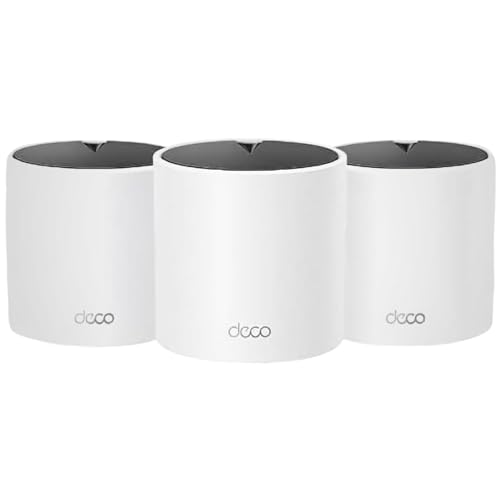
- Up to 5,600 sq. ft. coverage
- Wi-Fi 6 supports up to 120 devices
- Six Gigabit Ethernet ports
Best For: Larger homes with busy connected-device networks
Best Premium Performance

- Wi-Fi 7 tri-band performance
- Up to 5,800 sq. ft. coverage
- 10G and 2.5G wired ports
Best For: Multi-gigabit homes and demanding smart-home networks
Best High-Capacity Pick – TP-Link Deco X55 AX3000 (3-Pack)
For larger homes and busy networks, the TP-Link Deco X55 is one of the more capable compact mesh wifi systems. Its Wi-Fi 6 connection, three-node design, and stated coverage of up to 6,500 square feet make it suited to homes with many connected devices and demanding everyday use.
Best For: Large homes, households with up to 150 connected devices, and users who want Wi-Fi 6 with wired backhaul support.
Pros:
- Wi-Fi 6 AX3000 performance with 160 MHz channel support.
- Coverage rated for up to 6,500 square feet.
- Three Gigabit Ethernet ports per unit and Ethernet backhaul support.
- App-based setup, network management, and included HomeShield features.
Cons:
- Its three-unit coverage may be more than smaller homes require.
- Some HomeShield security features require the premium service.
The Deco X55 stands out when capacity and coverage matter more than having the smallest possible system. It is a strong choice for users who want a modern Wi-Fi 6 mesh network with plenty of wired connectivity.
Best Budget Coverage – Tenda Nova MW5G AC1200 (3-Pack)
The Tenda Nova MW5G is a straightforward option among compact mesh wifi systems for extending coverage across a moderately sized home. Its three nodes cover up to 3,500 square feet, while dual-band AC1200 networking is designed to handle everyday browsing, streaming, and smart-home connections.
Best For: Budget-conscious households that need whole-home coverage and support for up to 80 devices.
Pros:
- Three-node system rated for up to 3,500 square feet.
- Seamless roaming through one network name and password.
- Gigabit Ethernet ports and support for up to 80 devices.
- Tenda app supports setup, monitoring, and network management.
Cons:
- Uses Wi-Fi 5 rather than newer Wi-Fi 6 technology.
- Security features listed in the supplied details are basic WPA/WPA2 options.
The MW5G focuses on simple whole-home coverage instead of newer wireless standards. It makes practical sense for households that want an uncomplicated three-pack for everyday connectivity without needing the highest capacity.
Best Extended Wi-Fi 5 Value – TP-Link Deco S4 AC1900 (3-Pack)
The TP-Link Deco S4 is a sensible choice for shoppers comparing compact mesh wifi systems with broad coverage and family-friendly controls. Its three units are rated to cover up to 5,500 square feet, and the unified network lets devices move between nodes without switching Wi-Fi names.
Best For: Families that want broad Wi-Fi 5 coverage, parental controls, and Gigabit Ethernet connections.
Pros:
- Three-unit system rated for up to 5,500 square feet.
- AC1900 performance supports connectivity for up to 100 devices.
- Parental controls can limit online time and block inappropriate websites.
- Two Gigabit Ethernet ports per unit and wired backhaul support.
Cons:
- Uses Wi-Fi 5 rather than Wi-Fi 6.
- The tall unit design may be less convenient for tight placement areas.
Deco S4 offers a balance of coverage, family controls, and wired connectivity. It is best suited to buyers who value range and easy management but do not specifically need the newer features of Wi-Fi 6.
Best Easy Gigabit Setup – Amazon eero 6+ Mesh Wi-Fi (3-Pack)
The Amazon eero 6+ is a streamlined choice among compact mesh wifi systems for households that want gigabit-capable service and simple app management. This three-pack covers up to 4,500 square feet, supports 75 or more devices, and uses TrueMesh routing to help reduce drop-offs and dead spots.
Best For: Households with gigabit internet plans that prioritize simple setup, automatic updates, and smart-home connectivity.
Pros:
- Supports internet plans up to a gigabit.
- Wi-Fi 6 includes 160 MHz channel support for additional bandwidth.
- Three-pack coverage reaches up to 4,500 square feet and supports 75-plus devices.
- Built-in Thread and Zigbee smart-home hub with Alexa integration.
Cons:
- Online security and additional network-management features require a separate subscription.
- The supplied notes do not specify wired port details.
The eero 6+ is particularly appealing if ease of use is a priority. Its automatic updates, guided app setup, and built-in smart-home hub make it a convenient fit for connected homes, while gigabit support gives it room for fast internet service.
Best Premium WiFi 6E Pick – TP-Link Deco XE75
For shoppers comparing compact mesh wifi systems, the TP-Link Deco XE75 stands out for its tri-band WiFi 6E design and broad rated coverage. Its dedicated 6 GHz band can serve as a backhaul by default, helping maintain stable connections between nodes while supporting up to 200 devices.
Best For: Larger homes, crowded wireless environments, and households with compatible WiFi 6E devices.
Pros:
- Tri-band WiFi 6E with a new 6 GHz band and speeds up to 5,400 Mbps.
- Rated coverage of up to 7,200 square feet and support for up to 200 devices.
- Deco app offers guided setup, remote management, AI-driven roaming, and basic HomeShield features.
Cons:
- The 6 GHz benefits require compatible WiFi 6E devices.
- A modem is required for most internet service providers.
The XE75 is a strong choice when capacity, coverage, and reduced interference matter more than choosing the simplest or least expensive system. Its tri-band layout also gives it more flexibility for wireless node-to-node connections.
Best Budget Mesh Value – TP-Link Deco W4500
The renewed TP-Link Deco W4500 is a practical option among compact mesh wifi systems for shoppers who want whole-home coverage without moving to newer WiFi standards. Its three-router setup uses WiFi 6 features to support up to 120 devices across a rated 5,600 square feet.
Best For: Budget-conscious households seeking straightforward WiFi 6 coverage for everyday streaming, browsing, gaming, and video calls.
Pros:
- Three-unit system rated for coverage up to 5,600 square feet.
- WiFi 6 speeds up to 1,500 Mbps, with OFDMA and MU-MIMO for more connected devices.
- Unified network automatically selects the best connection as you move around the home.
Cons:
- As a renewed product, its condition and included support may vary by seller.
- It has lower rated speeds and capacity than the newer systems in this roundup.
The W4500 focuses on dependable coverage and uncomplicated roaming rather than premium throughput. It makes the most sense when your internet plan and connected-device load do not require WiFi 6E or WiFi 7 performance.
Best WiFi 7 Upgrade – TP-Link Deco 7
The TP-Link Deco 7 is a forward-looking choice among compact mesh wifi systems, pairing dual-band WiFi 7 with 2.5G Ethernet backhaul support. The four-stream system is rated for up to 6,600 square feet and more than 150 devices, making it suited to demanding connected homes.
Best For: Households with newer WiFi 7 devices, multi-gigabit networking needs, and heavy streaming or gaming workloads.
Pros:
- WiFi 7 performance rated up to 5,000 Mbps, including up to 4,324 Mbps on 5 GHz.
- Four-unit coverage rated for up to 6,600 square feet and more than 150 devices.
- Supports 2.5G Ethernet and wired/wireless backhaul for faster connections between Deco units.
- Includes app management, AI roaming, basic HomeShield features, and VPN server support.
Cons:
- WiFi 7 and 2.5G benefits depend on compatible client devices and networking equipment.
- Backhaul requires at least two Deco units, and a separate modem is required.
Deco 7 is the most future-focused option here, especially for homes preparing for WiFi 7 hardware and faster wired networking. Its dual-band design may be less flexible than a tri-band system in some wireless backhaul layouts, but its newer standard and expansion support provide substantial headroom.
Best Value Coverage – TP-Link Deco S4 2-Pack
For shoppers comparing compact mesh wifi systems, the TP-Link Deco S4 2-Pack is a practical Wi-Fi 5 option for eliminating dead zones without managing multiple network names. It covers up to 3,800 square feet and supports up to 75 connected devices.
Best For: Homes needing affordable whole-home coverage, simple roaming, and basic parental controls.
Pros:
- Coverage rated up to 3,800 square feet with two units
- Single network name with seamless roaming between Decos
- Four total Gigabit Ethernet ports and wired backhaul support
- App-based setup plus profile-based parental controls
Cons:
- Uses Wi-Fi 5 rather than newer Wi-Fi 6 or Wi-Fi 7
- Two-unit coverage may not suit larger or unusually shaped homes
The Deco S4 makes the most sense when straightforward coverage and easy management matter more than the latest wireless standard. Its Ethernet ports and access point mode add flexibility for existing home networks.
Best Wi-Fi 6 Upgrade – TP-Link Deco X15 3-Pack
The TP-Link Deco X15 3-Pack is one of the more capable compact mesh wifi systems for larger homes. Its Wi-Fi 6 dual-band design covers up to 5,600 square feet, supports up to 120 devices, and uses AI-assisted roaming to keep connections consistent as you move around.
Best For: Larger households with many connected devices that want Wi-Fi 6 performance and broad coverage.
Pros:
- Up to 5,600 square feet of advertised coverage
- Wi-Fi 6 AX1500 speeds with support for up to 120 devices
- Six total Gigabit Ethernet ports across the three units
- Includes basic security, parental controls, and remote app management
Cons:
- Dual-band design may offer less capacity than a tri-band system
- Advanced security features may require a paid service
Choose the Deco X15 when coverage and device capacity are higher priorities than having the newest Wi-Fi generation. Wired backhaul support can also help maintain performance where Ethernet cabling is available.
Best Premium Performance – TP-Link Deco BE63 Wi-Fi 7
For buyers seeking premium compact mesh wifi systems, the TP-Link Deco BE63 pairs tri-band Wi-Fi 7 with extensive wired connectivity. The two-pack covers up to 5,800 square feet, supports more than 200 devices, and includes 10G and 2.5G networking for future-ready setups.
Best For: Performance-focused homes with multi-gigabit internet, demanding streaming, gaming, or a large smart-home network.
Pros:
- Wi-Fi 7 tri-band speeds designed for demanding connected homes
- Up to 5,800 square feet of coverage and support for over 200 devices
- Four 2.5G WAN/LAN ports plus a 10G WAN/LAN connection
- Includes advanced security, parental controls, VPN support, and app management
Cons:
- Wi-Fi 7 benefits depend on compatible client devices and network conditions
- All Wi-Fi routers require a separate modem
The Deco BE63 is the strongest fit when maximum throughput and wired expansion justify a higher-end system. Its tri-band design, multi-gigabit ports, and large device capacity provide more headroom than the Wi-Fi 5 and Wi-Fi 6 options here.
How We Picked the Best Compact Mesh Wifi Systems
We compared these Compact Mesh Wifi Systems by looking at wireless standard, advertised coverage, system size, device capacity, Ethernet connectivity, and the features most useful in everyday homes. We also considered how well each class of system matches different internet speeds and layouts, since a large coverage number alone does not guarantee strong performance through walls or across multiple floors.
Product claims such as coverage and connected-device counts are manufacturer estimates. Actual results vary with construction materials, interference, placement, wired backhaul, and the speed of your internet service.
Quick Comparison
| Best For | Recommended Class | Why It Fits |
|---|---|---|
| Budget coverage | WiFi 5 dual-band | Lower cost for standard browsing and streaming |
| Most homes | WiFi 6 dual-band | Good efficiency, capacity, and value |
| Busy households | WiFi 6 tri-band | More wireless capacity and better mesh communication |
| Newer devices | WiFi 6E | Access to the less-crowded 6 GHz band |
| High-end networking | WiFi 7 | Higher throughput and longer-term upgrade potential |
Key Buying Factors for Compact Mesh Wifi Systems
Coverage and Node Placement
Choose a kit based on the home’s layout, not only its square-foot rating. Multiple smaller nodes can be more useful than one powerful router in a long or multi-level home. Place nodes in open areas between the main router and weak zones, rather than inside cabinets or at the far edge of coverage.
WiFi Generation and Speed
WiFi 6 is a strong default for most households, particularly when many phones, TVs, cameras, and smart-home devices share the network. WiFi 6E adds 6 GHz support, while WiFi 7 is best suited to newer client devices and very fast internet or local-network transfers. A newer standard will not make an older device operate at its maximum advertised speed.
Dual-Band Versus Tri-Band
Dual-band systems are often smaller and less expensive. Tri-band models add an extra wireless band that can help mesh nodes communicate without competing as heavily with connected devices. This matters most when nodes use wireless backhaul and the home has heavy traffic.
Ethernet and Management Features
Check whether each node has Gigabit or faster Ethernet ports if you plan to connect TVs, desktops, switches, or wired backhaul. App-based setup, automatic updates, guest networking, parental controls, and subscription requirements can also affect long-term value.
Who Should Buy Which Compact Mesh Wifi Systems?
Choose an Affordable WiFi 5 Kit
Basic dual-band systems make sense for smaller homes, moderate internet plans, and everyday browsing, streaming, and smart-home use where peak speeds are not the priority.
Choose WiFi 6 for the Best Balance
Most buyers should start with a WiFi 6 system. It provides a practical mix of range, efficiency, device handling, and price for family homes and apartments.
Choose WiFi 6E or WiFi 7 for Upgrade Headroom
Move to WiFi 6E if you have compatible 6 GHz devices and nearby network congestion. Choose WiFi 7 when you use very fast broadband, transfer large files locally, or want the most current platform for future devices.