Reliable storage is essential when you are managing large photo libraries, editing on the go, or creating a second backup of irreplaceable images. The right enclosure can turn an internal SATA or NVMe drive into a practical external workspace without requiring a complete portable SSD.
We selected 10 enclosures covering common drive formats, connection speeds, sizes, and budgets. Use the guide below to match your existing drive and workflow with an enclosure that offers the performance, compatibility, and portability you actually need.
Best 10 SSD Enclosures for Photo Storage Picks for 2026
Best Budget SATA Pick
Tool-Free 2.5-Inch SATA Enclosure

- Tool-free installation for 2.5-inch SATA drives
- USB 3.0 with UASP support
- Compatible with Mac and Windows
Best For: Affordable photo storage using a 2.5-inch SATA SSD
Best for Sustained NVMe Transfers

- Supports common M.2 NVMe sizes up to 8TB
- USB 3.2 Gen 2 reaches 10Gbps
- Aluminum cooling with tool-free access
Best For: Fast photo transfers from an M.2 NVMe SSD
Best for Flexible Connectivity
Transparent 2.5-Inch SATA Enclosure

- Includes USB-C and USB-A connection options
- Tool-free enclosure for 2.5-inch SATA drives
- Transparent shell and automatic sleep mode
Best For: SATA photo storage used across USB-C and USB-A computers
Best Portable NVMe Value

- Supports four common M.2 NVMe sizes
- 10Gbps USB 3.1 Gen 2 with UASP
- Compact aluminum design with dual cable options
Best For: Portable NVMe photo storage across USB-C and USB-A devices
Fast Aluminum Pick
UGREEN USB-C 2.5-Inch SATA Enclosure

- Up to 6Gbps SATA transfer speed with UASP
- Aluminum body supports passive heat dissipation
- Tool-free design supports drives up to 6TB
Best For: Photographers needing a fast, portable enclosure for 2.5-inch SATA photo-storage drives
Warranty-Minded Pick
BENFEI Tool-Free 2.5-Inch SATA Enclosure

- Supports up to 6Gbps transfer speeds with UASP
- Includes USB-C/USB-A 10Gbps cable
- Backed by an 18-month warranty
Best For: Photographers wanting simple drive swaps, broad compatibility, and warranty coverage
Simple Budget Design
MAIWO USB-C 2.5-Inch SATA Case
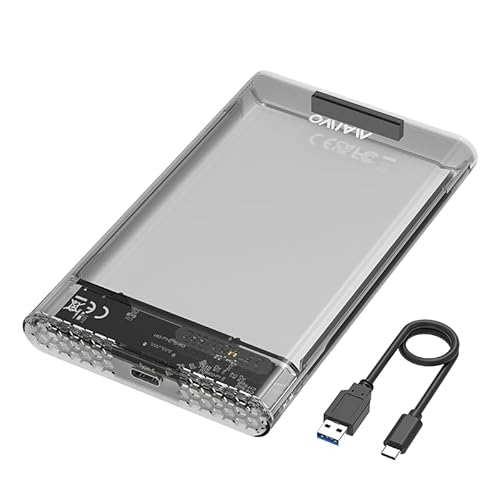
- 5Gbps USB-C transfer speed with UASP support
- Tool-free case supports 7mm and 9.5mm drives
- Includes LED indicator, anti-shock pads, and cable
Best For: Photographers needing a compact, easy-to-use enclosure for everyday photo storage
Best Compact Type-C Pick
BENFEI 2.5-Inch SATA Enclosure

- Supports 2.5-inch SATA drives up to 6TB
- Tool-free installation with UASP
- Includes Type-C and Type-A connectivity
Best For: Portable photo storage using a 2.5-inch SATA SSD
Best High-Capacity Desktop Pick

- Supports 3.5-inch drives up to 20TB
- Includes 12V/2A power adapter
- USB 3.0 and UASP support
Best For: Large desktop-based photo archives
Best Portable Value Pick

- Supports 2.5-inch SATA drives up to 6TB
- Lightweight, tool-free, and bus-powered
- UASP support with USB 3.0 speeds
Best For: Portable photo transfers from a 2.5-inch SATA drive
Best Budget SATA Pick – Tool-Free 2.5-Inch SATA Enclosure
For photographers moving a 2.5-inch SATA SSD or hard drive between computers, the SABRENT EC-UASP is a straightforward option among SSD enclosures for photo storage. Its tool-free installation, USB 3.0 connectivity, and UASP support make it practical for everyday photo transfers and backups.
Best For: Users with a 2.5-inch SATA SSD who want an affordable, plug-and-play enclosure for Mac or Windows.
Pros:
- Tool-free design simplifies drive installation.
- USB 3.0 supports transfer rates up to 5 Gbps, with backward compatibility for USB 2.0 and 1.1.
- Supports UASP SATA III and hot-swapping without additional drivers.
- Compact, lightweight plastic enclosure includes a USB 3.0 cable.
Cons:
- Only supports 2.5-inch SATA drives, not M.2 NVMe SSDs.
- USB 2.0 connections are limited to up to 480 Mbps.
This is a sensible choice for photographers repurposing a standard notebook-size SATA SSD. It is easy to use and broadly compatible, though users seeking the highest transfer speeds should consider a USB-C NVMe enclosure instead.
Best for Sustained NVMe Transfers – USB-C 10Gbps NVMe Enclosure
The SABRENT EC-PNVO is built for fast photo-library transfers from an M.2 NVMe SSD. Its USB 3.2 Gen 2 interface can reach 10 Gbps, while the aluminum top and thermal pad help manage heat during longer workloads.
Best For: Creators with an M.2 NVMe SSD who need fast, portable photo storage and USB-C connectivity.
Pros:
- Supports M.2 NVMe SSDs in 2230, 2242, 2260, and 2280 sizes.
- USB 3.2 Gen 2 provides up to 10 Gbps transfer speeds.
- Flip-open tool-free design makes drive installation quick.
- Aluminum cooling surface and thermal pad support more stable performance during heavy transfers.
Cons:
- Does not support M.2 SATA SSDs.
- USB-C connectivity may require an adapter or compatible port on some computers.
For photographers working with large RAW collections, this enclosure offers a strong balance of speed, portability, and cooling. Confirm that your SSD is NVMe rather than M.2 SATA before buying.
Best for Flexible Connectivity – Transparent 2.5-Inch SATA Enclosure
The ORICO 2139C3-G2 is a flexible choice for SSD enclosures for photo storage when you use both USB-C and USB-A computers. It accepts 2.5-inch SATA SSDs and HDDs, includes two cable options, and uses a transparent shell so you can view the installed drive.
Best For: Photographers with 2.5-inch SATA storage who want broad host compatibility and a visible drive enclosure.
Pros:
- Includes USB-C-to-C and USB-A-to-C cables for flexible connections.
- Supports 2.5-inch SATA SSDs and HDDs with UASP compatibility.
- Tool-free installation and hot-swapping simplify everyday use.
- Automatic sleep after 10 minutes can reduce unnecessary energy use.
Cons:
- Limited to 2.5-inch SATA drives rather than NVMe SSDs.
- Plastic construction may provide less rigidity than an aluminum enclosure.
This model is practical for photographers who move a SATA photo archive between newer USB-C laptops and older USB-A systems. Its drive-format limitation is the main consideration, especially if you are building around NVMe storage.
Best Portable NVMe Value – ORICO 10Gbps M.2 NVMe Case
The ORICO M2PV combines a compact aluminum design with USB 3.1 Gen 2 performance for portable photo storage. It supports common M.2 NVMe sizes, includes USB-C and USB-A connection options, and uses UASP to help achieve speeds above 900 MB/s with suitable media.
Best For: Photographers who want a compact NVMe enclosure compatible with both USB-C and USB-A hosts.
Pros:
- Supports 2230, 2242, 2260, and 2280 PCIe NVMe SSDs up to 8TB.
- USB 3.1 Gen 2 and UASP support up to 10 Gbps theoretical throughput.
- Aluminum top aids portability and heat dissipation.
- Includes USB-C-to-C and USB-C-to-A cable options.
Cons:
- Does not support M.2 SATA, M.2 PCIe AHCI, or SSDs from Mac.
- Drive installation requires using the included screwdriver and careful screw alignment.
This is a capable travel enclosure for photographers using a compatible NVMe drive and multiple computers. Check the SSD interface carefully, because the case is designed specifically for PCIe NVMe M-Key drives.
Fast Aluminum Pick – UGREEN USB-C 2.5-Inch SATA Enclosure
For photographers moving large RAW libraries or backups, this UGREEN model is one of the more speed-focused SSD enclosures for photo storage. Its USB-C connection supports USB 3.1 Gen 2, while the SATA interface supports up to 6Gbps and UASP acceleration.
Best For: Photographers who want a portable, aluminum enclosure for a 2.5-inch SATA SSD or HDD and value heat dissipation.
Pros:
- Supports up to 6Gbps SATA transfer speeds with UASP.
- Aluminum construction helps dissipate heat without a cooling fan.
- Tool-free, plug-and-play installation with no separate power supply required.
- Supports drives up to 6TB and Windows, macOS, and Linux systems.
Cons:
- Designed for 2.5-inch SATA drives, not M.2 NVMe SSDs.
- The included USB-C-to-USB-C cable may require another cable for USB-A-only devices.
Choose this enclosure when sustained file transfers and a metal exterior matter more than the lowest-cost design. It is a practical match for portable photo archives, drive upgrades, and routine backups.
Warranty-Minded Pick – BENFEI Tool-Free 2.5-Inch SATA Enclosure
The BENFEI enclosure offers a straightforward way to repurpose a 2.5-inch SATA SSD for photo storage, transfers, or backups. It supports up to 6Gbps, uses UASP, and includes a USB Type-C/Type-A 10Gbps cable for flexible connectivity.
Best For: Photographers who want an easy-to-install enclosure with broad computer compatibility and an 18-month warranty.
Pros:
- Supports SATA I, II, and III drives up to 6TB.
- JMS580 chipset and UASP are designed for stable, faster transfers.
- Tool-free, hot-swappable installation requires no driver.
- Includes both USB-C and USB-A connectivity through the supplied cable.
Cons:
- Limited to 7mm or 9.5mm-thick 2.5-inch drives.
- Its enclosure material is listed as a detachable-cable design rather than aluminum construction.
BENFEI is a sensible general-purpose option for photographers who move drives between computers, laptops, or a PS4. The included cable and extended warranty add convenience for a portable backup workflow.
Simple Budget Design – MAIWO USB-C 2.5-Inch SATA Case
MAIWO provides a simple plastic enclosure for photographers who need extra space for photo libraries, working files, or media backups. Its USB-C interface supports up to 5Gbps, and the tool-free design makes installing a compatible SATA drive quick.
Best For: Photographers seeking an affordable, compact enclosure for 7mm or 9.5mm 2.5-inch SATA SSDs or HDDs.
Pros:
- Supports up to 6TB of additional storage.
- USB-C connection offers up to 5Gbps transfer speeds with UASP on Windows 8 or later.
- Tool-free setup requires no drivers.
- Includes an LED indicator, anti-shock pads, and a USB-C-to-USB-A cable.
Cons:
- Its 5Gbps rating is lower than the 6Gbps-rated alternatives.
- High-strength ABS plastic may offer less heat dissipation than an aluminum enclosure.
- New drives must be initialized, partitioned, and formatted before use.
This MAIWO case is a practical choice for basic photo storage and file transport when maximum transfer speed is not essential. Its compact build, broad device compatibility, and included cable keep setup simple.
Best Compact Type-C Pick – BENFEI 2.5-Inch SATA Enclosure
For photographers looking for SSD enclosures for photo storage, the BENFEI 2.5-inch enclosure is a compact option for connecting a SATA SSD to a computer, laptop, phone, or tablet. Its tool-free design and included Type-C/Type-A connectivity make moving photo libraries straightforward.
Best For: Portable 2.5-inch SATA SSD storage and quick file transfers between modern and legacy devices.
Pros:
- Supports 2.5-inch SATA I/II/III SSDs and HDDs up to 6TB.
- Tool-free, plug-and-play installation with hot-swapping.
- USB Type-C/Type-A design and UASP support with speeds up to 5Gbps.
- Includes an 18-month unconditional warranty.
Cons:
- Limited to one 2.5-inch drive.
- Not compatible with 3.5-inch drives or non-SATA SSDs.
The BENFEI is a practical choice when portability and flexible connections matter more than multi-drive capacity. Verify that your SSD is a supported 7mm or 9.5mm 2.5-inch SATA model before buying.
Best High-Capacity Desktop Pick – ORICO 3.5-Inch SATA Enclosure
Photographers with large archives may prefer this ORICO enclosure for SSD enclosures for photo storage because it supports 3.5-inch SATA drives up to 20TB. The included 12V/2A power adapter makes it suited to desktop use, while USB 3.0 and UASP support help with transfers.
Best For: Large-capacity desktop photo libraries stored on a 3.5-inch SATA SSD or HDD.
Pros:
- Supports 3.5-inch SATA I/II/III drives up to 20TB.
- Includes the required 12V/2A power adapter and USB 3.0 cable.
- Tool-free, plug-and-play installation with no driver required.
- Auto-sleep mode, activity LED, internal anti-shock sponge, and thermal pads.
Cons:
- Requires external power for 3.5-inch drives.
- Larger and less portable than a 2.5-inch enclosure.
- The drive is not included.
This ORICO model makes the most sense for a high-capacity workstation or home photo archive. Its 20TB maximum is useful for extensive collections, but the powered 3.5-inch format is less convenient for travel.
Best Portable Value Pick – ORICO 2.5-Inch SATA Enclosure
This ORICO model is a lightweight choice among SSD enclosures for photo storage, connecting a 2.5-inch SATA SSD or HDD to computers, game consoles, routers, and other compatible devices. Its tool-free installation requires no separate power supply, making it convenient for mobile photo transfers.
Best For: Portable 2.5-inch SATA drive use when you want a simple, lightweight enclosure.
Pros:
- Supports 7mm and 9.5mm 2.5-inch SATA I/II/III drives up to 6TB.
- Tool-free installation, plug-and-play setup, and hot-swapping.
- USB 3.0 provides up to 5Gbps with UASP-supported systems.
- Lightweight ABS body requires no extra power supply.
Cons:
- Limited to one 2.5-inch SATA drive.
- Uses a USB 3.0 Type-B-to-Type-A cable rather than direct Type-C connectivity.
- The drive is not included.
Choose this enclosure if you need an uncomplicated way to repurpose a laptop drive or carry a photo SSD. It offers broad device compatibility, though users with newer Type-C-only devices may need an adapter.
How We Picked These SSD Enclosures for Photo Storage
We focused on enclosure compatibility, interface speed, installation convenience, portability, and value. The selection includes both 2.5-inch SATA models and M.2 NVMe enclosures, since these formats differ substantially in performance and physical design. We also considered useful features such as USB-C connectivity, USB-A compatibility, UASP support, tool-free installation, heat management, and support for common drive thicknesses.
Advertised speeds represent the enclosure interface, not guaranteed real-world transfer rates. Your SSD, computer port, cable, operating system, and file sizes will all affect performance.
Quick Comparison
| Enclosure type | Best suited to | Typical advantage |
|---|---|---|
| 2.5-inch SATA, USB 3.0 or 5Gbps | Older SATA SSDs and everyday backups | Affordable and widely compatible |
| 2.5-inch SATA, USB 3.1 Gen 2 or 10Gbps | Faster SATA photo transfers | Higher ceiling for large file copies |
| M.2 NVMe, USB 3.1 Gen 2 or 10Gbps | Fast editing and modern high-performance drives | Much faster potential than SATA |
| 3.5-inch SATA enclosure | Desktop drives and high-capacity archives | Supports larger drives, but needs external power |
Key Buying Factors for SSD Enclosures for Photo Storage
Drive Compatibility
Check whether your drive is 2.5-inch SATA or M.2 NVMe before buying. These standards are not interchangeable. For M.2 drives, confirm the enclosure supports your length, such as 2230, 2242, 2260, or 2280. A 2.5-inch enclosure should also match the drive thickness, commonly 7mm or 9.5mm.
Connection Speed and Ports
For routine JPEG backups, USB 3.0 may be sufficient. RAW libraries, video files, and frequent catalog transfers benefit from 10Gbps USB 3.1 Gen 2 or faster interfaces. Make sure your computer has a matching port; a 10Gbps enclosure connected to a slower port cannot reach its advertised maximum.
Cooling and Sustained Transfers
NVMe drives can run hot during extended imports or exports. Look for a sturdy aluminum body or other heat-dissipation features if you regularly move hundreds of gigabytes. For occasional backups, basic compact designs may be adequate.
Convenience and Reliability
Tool-free designs make drive swaps easier, while UASP support can improve command handling and transfer efficiency on compatible systems. Use a quality cable, eject the drive properly, and maintain a second backup for important images rather than relying on one external drive.
Who Should Buy Which SSD Enclosures for Photo Storage?
Choose a 2.5-Inch SATA Enclosure If:
You already own a SATA SSD or laptop hard drive and want an inexpensive external photo drive. These models are simple, portable, and broadly compatible.
Choose an M.2 NVMe Enclosure If:
You have a spare NVMe drive and need faster transfers for active editing, large RAW catalogs, or frequent travel workflows. Prioritize 10Gbps connectivity and sensible thermal design.
Choose a 3.5-Inch Enclosure If:
You need desktop-class capacity for a large archive and do not mind using an external power adapter. It is less portable but better suited to high-capacity drives.