The right USB-C SSD enclosure can turn an unused internal drive into a fast, portable external SSD for backups, file transfers, media libraries, or extra laptop storage. The best choice depends on more than the connector: drive type, interface speed, cooling, compatibility, and installation all matter.
We compared 10 enclosures spanning 2.5-inch SATA drives, M.2 NVMe SSDs, dual-standard designs, and hub-style solutions. Use the guide below to narrow the options by performance, convenience, and the way you plan to use your storage.
Best 10 USB C SSD Enclosures Picks for 2026
Best Compact NVMe Pick
UGREEN 10Gbps M.2 NVMe Enclosure

- Tool-free NVMe installation
- Supports drives up to 8TB
- Includes USB-C and USB-A cables
Best For: Portable M.2 NVMe storage
Best High-Speed NVMe Option

- USB4 and Thunderbolt-compatible design
- Supports speeds up to 3600MB/s
- Fanless finned cooling structure
Best For: High-speed external NVMe transfers
Best Simple SATA Enclosure
Cable Matters 10Gbps USB-C Case

- Fits 2.5-inch SATA drives
- Supports up to 10Gbps USB transfer
- Includes aluminum housing and cables
Best For: Backups, upgrades, and SATA drive diagnostics
Best Hybrid M.2 Pick
Tool-Free NVMe & SATA Enclosure

- Supports M.2 NVMe and SATA drives
- Tool-free 10Gbps USB-C design
- Fits 2242, 2260, and 2280 sizes
Best For: Flexible M.2 drive compatibility
Best 2.5-Inch Option
USB-C SATA SSD & HDD Enclosure

- Fits 2.5-inch SATA SSDs and HDDs
- Tool-free with no external power
- Supports USB 3.1 Gen 2 and UASP
Best For: Repurposing a 2.5-inch SATA drive
Best NVMe Performance Design

- NVMe-only support for 2230–2280 drives
- Flip-open tool-free installation
- Thermal pad and aluminum cooling design
Best For: Portable NVMe transfers and drive work
Best Budget SATA Pick
Tool-Free 2.5-Inch SATA Enclosure

- Tool-free installation for 2.5-inch SATA drives
- USB-C and USB-A cable included
- UASP support with up to 6Gbps transfers
Best For: Converting a 2.5-inch SATA SSD into portable storage
Best All-in-One Dock
8-in-1 USB-C Hub With M.2 Enclosure
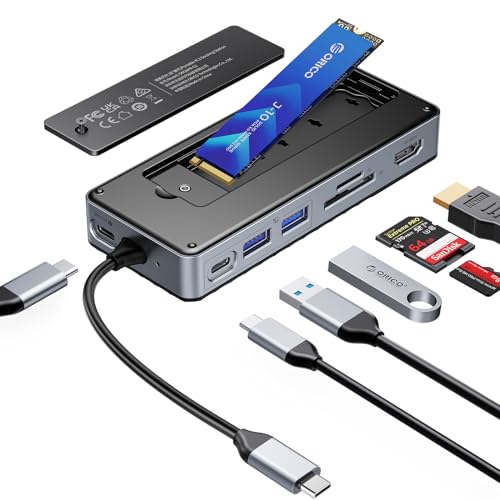
- Supports M.2 NVMe and SATA SSDs up to 8TB
- Adds HDMI, card readers, USB ports, and 100W PD
- USB 3.2 Gen 2 delivers up to 10Gbps
Best For: Laptop users needing storage plus docking features
Best Portable NVMe Option
Lexar E300 USB-C M.2 Enclosure

- 10Gbps USB 3.2 Gen 2 interface
- Supports multiple M.2 NVMe sizes up to 4TB
- Tool-free aluminum design with thermal pad
Best For: Portable use with an M.2 NVMe SSD
Best Compact NVMe Pick – UGREEN 10Gbps M.2 NVMe Enclosure
For shoppers comparing USB C SSD enclosures, this UGREEN model is a practical choice for M.2 NVMe drives when you want quick, tool-free installation and a portable design. Its USB 3.2 Gen 2 interface supports transfer speeds up to 10Gbps with a compatible cable.
Best For: Mac mini users, travelers, and anyone converting an M.2 NVMe drive into a compact external SSD.
Pros:
- Supports 2230, 2242, 2260, and 2280 NVMe drives up to 8TB.
- Tool-free installation with included USB-C and USB-A cables.
- Aluminum housing, silicone case, and thermal pad support portability and protection.
- RTL9210 chipset includes short-circuit and over-current protection.
Cons:
- Does not support SATA NGFF or mSATA SSDs.
- 10Gbps performance requires a USB-C 3.2 Gen 2 data cable and compatible host.
This is a well-rounded USB C SSD enclosure for users who already have an NVMe drive and want a simple, travel-friendly upgrade path. Just confirm your SSD protocol before buying.
Best 2.5-Inch SATA Value – ORICO Aluminum USB-C Drive Enclosure
This ORICO enclosure is designed for 2.5-inch SATA SSDs and HDDs, making it a useful option among USB C SSD enclosures for repurposing an older internal drive. It includes a USB-C to USB-A/C cable and supports USB 3.2 Gen 2 connectivity.
Best For: Users converting 2.5-inch SATA drives for computers, PS5, smart TVs, tablets, or phones.
Pros:
- Supports 7mm and 9.5mm 2.5-inch SATA drives up to 6TB.
- Includes a versatile USB-C to USB-A/C 2-in-1 cable.
- Aluminum housing and ventilation help with heat dissipation.
- Tool-free, plug-and-play installation with automatic sleep mode.
Cons:
- Designed for 2.5-inch SATA drives, not M.2 NVMe SSDs.
- Actual drive performance is limited by the SATA III interface.
- Users should safely eject the drive before unplugging.
Choose this model when drive compatibility and connection flexibility matter more than NVMe-class speeds. Its broad device support makes it suitable for backup storage and media use.
Best High-Speed NVMe Option – UGREEN 40Gbps M.2 Enclosure
For demanding transfers, this UGREEN enclosure stands out among USB C SSD enclosures with a USB4-ready design and an ASM2464PD controller. It can reach up to 3600MB/s when paired with suitable Thunderbolt 4 cables and devices, while supporting several USB and Thunderbolt standards.
Best For: Users with compatible USB4 or Thunderbolt 4 systems who need faster external NVMe storage for large files, gaming, or video playback.
Pros:
- Supports up to 40Gbps connectivity and speeds up to 3600MB/s under compatible conditions.
- Works with 2230, 2242, 2260, and 2280 NVMe drives up to 8TB.
- Double-sided fins and a three-dimensional cooling design improve heat dissipation without a fan.
- Includes a 40Gbps USB-C cable and cooling pad.
Cons:
- Maximum speed requires compatible Thunderbolt 4 cables and devices.
- Does not support SATA NGFF or mSATA drives.
- SSD is not included, and thicker SSDs may require a thinner thermal pad.
This is the performance-focused choice for compatible systems, but the premium bandwidth is only useful when the host, cable, and SSD can support it. Check those specifications before expecting peak speeds.
Best Simple SATA Enclosure – Cable Matters 10Gbps USB-C Case
This Cable Matters model is a straightforward choice among USB C SSD enclosures for 2.5-inch SATA SSDs and HDDs. Its aluminum body supports heat dissipation, while the 10Gbps USB connection provides a convenient way to add or diagnose external storage.
Best For: Laptop and desktop users who want a basic enclosure for SATA drive upgrades, backups, repairs, or temporary storage.
Pros:
- Supports 2.5-inch SATA drives up to 9.5mm thick, including 7mm models.
- Offers up to 10Gbps USB performance and supports SATA III speeds.
- Compatible with Windows, Mac, Thunderbolt 3, Thunderbolt 4, and USB4 ports.
- Supports UASP, TRIM, and S.M.A.R.T. with compatible systems and drives.
Cons:
- Only supports 2.5-inch SATA drives, not M.2 NVMe storage.
- Maximum transfer rates depend on the host, drive, and compatible cable.
- Limited to a one-year warranty.
For a no-frills SATA solution, this enclosure balances a metal build, broad port compatibility, and useful drive-management features. It is a sensible pick for repurposing or troubleshooting a 2.5-inch drive.
Best Hybrid M.2 Pick – Tool-Free NVMe & SATA Enclosure
If you want flexibility from your usb c ssd enclosures, the SABRENT EC-SNVE accepts both M.2 NVMe and M.2 SATA drives. Its tool-free design, 10Gbps USB 3.2 Type-C connection, and slim aluminum build make it a practical way to reuse compatible bare SSDs.
Best For: Users who want one enclosure for M.2 NVMe and SATA SSDs in 2242, 2260, or 2280 sizes.
Pros:
- Supports both M.2 NVMe and M.2 SATA SSDs.
- Tool-free installation takes seconds.
- USB 3.2 Type-C supports up to 10Gbps.
- Includes a thermal pad and USB-C to USB-C cable.
Cons:
- SSD is not included.
- Does not fit 2.5-inch SATA, mSATA, or drives with pre-installed heatsinks.
- Full speed depends on the connected USB port and drive.
This is the most versatile option in the group, especially if you work with different M.2 interfaces. Confirm your drive is a bare module and that your computer has a suitable USB-C connection before buying.
Best 2.5-Inch Option – USB-C SATA SSD & HDD Enclosure
For a conventional 2.5-inch drive, the UGREEN enclosure is a straightforward choice among usb c ssd enclosures. It connects 2.5-inch SATA SSDs or HDDs through USB-C, uses a tool-free installation process, and includes an aluminum enclosure for portable storage or backups.
Best For: Users moving a 2.5-inch SATA SSD or hard drive into a portable USB-C enclosure.
Pros:
- Supports most 2.5-inch SATA I, II, and III SSDs and HDDs.
- USB 3.1 Gen 2 and UASP support provide up to 6Gbps drive-side transfer speeds.
- Tool-free, plug-and-play installation requires no drivers or external power.
- Includes a USB-C to USB-C cable and supports up to 6TB drives.
Cons:
- Only supports 2.5-inch SATA drives, not M.2 SSDs.
- A USB-C-to-USB-A cable may be needed for devices with USB-A ports.
- Actual speeds depend on the drive, host port, and UASP support.
This model makes the most sense when you already have a 2.5-inch SATA drive to reuse. Its broad operating-system and device compatibility also suits backups, storage expansion, and data recovery tasks.
Best NVMe Performance Design – Flip-Open 10Gbps Enclosure
The SABRENT EC-PNVO is a focused choice for NVMe owners shopping for usb c ssd enclosures. Its flip-open tool-free cover, thermal-pad contact, and USB 3.2 Gen 2 connection are designed for convenient installation and steadier performance during longer transfers.
Best For: NVMe SSD users who want a compact enclosure for upgrades, cloning, troubleshooting, or portable high-speed storage.
Pros:
- Flip-open design installs NVMe SSDs without screws or tools.
- Supports M.2 NVMe sizes 2230, 2242, 2260, and 2280.
- Aluminum construction and thermal pad help transfer heat from the SSD.
- USB 3.2 Gen 2 provides up to 10Gbps without drivers or external power.
Cons:
- Supports NVMe only and is not compatible with M.2 SATA SSDs.
- SSD is not included.
- Actual transfer speeds depend on the host connection and installed drive.
This enclosure is a good fit when your priority is a simple NVMe workflow with attention to cooling. Check the SSD interface carefully, since SATA-based M.2 drives will not work in this model.
Best Budget SATA Pick – Tool-Free 2.5-Inch SATA Enclosure
If you need usb c ssd enclosures for a standard 2.5-inch SATA SSD, the BENFEI enclosure keeps the setup simple. Its tool-free design, included USB Type-C/Type-A 10Gbps cable, and UASP support make it a practical option for portable storage and file transfers.
Best For: Users converting a 2.5-inch SATA SSD or hard drive into an external USB drive.
Pros:
- Tool-free, plug-and-play installation with hot-swapping support.
- Supports 2.5-inch SATA I/II/III drives up to 6TB and 7/9.5mm thicknesses.
- Includes both USB Type-C and Type-A connectivity, with UASP support and up to 6Gbps transfer rates.
Cons:
- Designed for 2.5-inch SATA drives, not M.2 SSDs.
- Its stated 6Gbps enclosure speed is below newer 10Gbps options.
This is a straightforward choice when compatibility with a 2.5-inch SATA drive matters more than having the newest interface. The included detachable cable and 18-month warranty add practical value.
Best All-in-One Dock – 8-in-1 USB-C Hub With M.2 Enclosure
Among usb c ssd enclosures, the ORICO stands out by combining an M.2 enclosure with a multifunction USB-C dock. It supports NVMe and SATA M.2 SSDs while adding 10Gbps USB ports, HDMI, card readers, and 100W power delivery for a more complete desk or travel setup.
Best For: Laptop users who want external M.2 storage and docking features in one device.
Pros:
- Fits M.2 NVMe and SATA SSDs up to 8TB; SSD is not included.
- Offers USB 3.2 Gen 2 ports with up to 10Gbps transfer speeds.
- Adds 4K@60Hz HDMI, SD/TF readers, and a dedicated 100W PD charging port.
- Includes a heatsink, silicone cooling pad, screwdriver set, guide, and USB-C cable.
Cons:
- Power adapter and charging cable are not included.
- SD and TF cards cannot be used simultaneously.
- HDMI output requires a host USB-C port that supports video transmission.
The ORICO is a strong choice if you need more than storage access. It offers the broadest connectivity here, though its extra features and power requirements make it less compact than a dedicated enclosure.
Best Portable NVMe Option – Lexar E300 USB-C M.2 Enclosure
The Lexar E300 is a focused option for shoppers comparing usb c ssd enclosures for M.2 NVMe drives. Its USB 3.2 Gen 2 interface supports up to 10Gbps theoretical speeds, while the aluminum shell and thermal pad help manage heat during use.
Best For: Users who want a compact, tool-free enclosure for an M.2 NVMe SSD.
Pros:
- Supports M Key and B+M Key M.2 NVMe SSDs in 2230, 2242, 2260, and 2280 sizes.
- Offers up to 10Gbps transfer speeds through USB 3.2 Gen 2.
- Aluminum casing and built-in thermal pad support heat dissipation.
- Tool-free installation, shock-absorbing protection, and a lanyard hole improve portability.
Cons:
- Does not support SATA SSDs.
- Maximum supported capacity is 4TB.
- Requires a computer with a USB-C interface.
Choose the Lexar when you already have an NVMe drive and want a compact external conversion. Its drive-size coverage and cooling features are useful, but SATA owners will need a different enclosure.
How We Picked the Best USB C SSD Enclosures
We selected these enclosures to cover the most common upgrade and storage needs rather than rank products on headline speed alone. The lineup includes compact M.2 NVMe models, 2.5-inch SATA enclosures, tool-free designs, and a USB-C hub that combines storage with everyday connectivity.
Our comparison focuses on interface compatibility, advertised transfer rates, installation method, portability, construction, and practical extras. We also considered whether each enclosure is suited to existing SSDs, repurposed laptop drives, Mac and Windows systems, or high-speed workflows such as video editing and large backups.
Quick Comparison
- Best for maximum speed: A 40Gbps M.2 NVMe enclosure, provided your computer and SSD support the required USB standard.
- Best everyday NVMe choice: A 10Gbps USB-C enclosure balances broad compatibility, lower cost, and useful real-world performance.
- Best for older 2.5-inch drives: A USB-C SATA enclosure supports common 2.5-inch SSDs and hard drives without requiring an M.2 adapter.
- Best for mixed drive collections: A tool-free NVMe and SATA M.2 enclosure offers more flexibility when drive types vary.
- Best for desk setups: A hub-style enclosure adds HDMI, card readers, USB ports, and power delivery alongside M.2 storage.
Key Buying Factors for USB-C SSD Enclosures
Drive Format and Protocol
Check whether your drive is a 2.5-inch SATA model, an M.2 SATA SSD, or an M.2 NVMe PCIe SSD. These formats are not automatically interchangeable. An enclosure designed for NVMe will not necessarily accept M.2 SATA drives, while a 2.5-inch SATA enclosure requires a different physical connection.
USB Speed and Real-World Performance
10Gbps USB 3.2 Gen 2 is a strong choice for most users and is usually enough for fast backups and everyday file transfers. 40Gbps models can deliver substantially higher performance, but only when the host port, cable, and SSD all support the necessary standard. A faster enclosure cannot overcome a slower computer port.
Cooling, Materials, and Installation
Aluminum bodies can help dissipate heat during sustained transfers, while thermal pads or included heatsinks may reduce throttling on high-performance NVMe drives. Tool-free designs make drive swaps easier; screw-secured models may feel more dependable for a permanent installation.
Compatibility and Included Accessories
Confirm support for your operating system and inspect the included cable. USB-C-to-C is convenient for newer laptops and phones, while a USB-C-to-A option helps connect to older computers. For travel, prioritize a compact enclosure with a secure connector and minimal setup.
Who Should Buy Which USB C SSD Enclosures?
Choose an M.2 NVMe enclosure if you want the fastest portable storage or are repurposing a modern desktop or laptop SSD. A 10Gbps model is the sensible choice for most users; choose 40Gbps only if your equipment supports it and your workflow benefits from higher sustained speeds.
Choose a 2.5-inch SATA enclosure for an older laptop SSD, a spare hard drive, or an affordable backup drive. If you own several M.2 drives with different protocols, select a model explicitly supporting both NVMe and SATA. Finally, choose the ORICO hub-style option if you want storage plus display, card-reader, USB, and charging capabilities from one laptop connection.