The best laptops for photo editing balance a color-accurate display with enough memory, fast storage, and dependable processing power for RAW files and layered projects.
These 10 options range from portable MacBook Air models to larger Windows laptops, helping photographers match performance and screen size to their workflow and budget.
Best 10 Laptops for Photo Editing Picks for 2026
Best Large-Screen Mac

- 15.3-inch Liquid Retina display with 1 billion colors
- M5 chip, 16GB memory, and 1TB SSD
- Up to 18 hours of battery life
Best For: Mobile photo editors who prefer macOS and a larger display
Best Portable Mac

- 2.71-pound design for easy portability
- M5 chip with 16GB unified memory
- 13.6-inch display and up to 18-hour battery life
Best For: Traveling photographers and students using macOS
Flexible AMD Performer

- 8-core/16-thread Ryzen 7 processor
- 16GB RAM and 512GB NVMe SSD
- Full HD screen with integrated Radeon Graphics
Best For: Casual photo editing and multitasking
Productivity Powerhouse
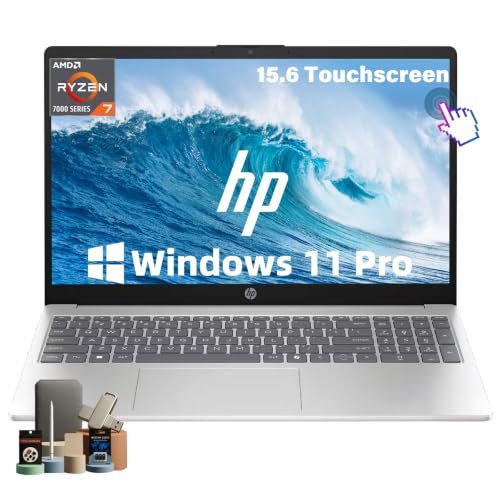
- Ryzen 7 7730U handles multitasking
- 32GB RAM and 1TB SSD
- Full HD IPS touchscreen
Best For: Everyday editing, study, and professional multitasking
Best Large-Screen Value

- 17.3-inch Full HD IPS display
- 512GB SSD and 8GB LPDDR5 RAM
- Up to 14 hours 15 minutes of advertised battery life
Best For: Casual photo editing on a large screen
Best Storage and Memory

- 16GB LPDDR5 RAM for multitasking
- 1TB SSD for large photo libraries
- Full HD display with broad port selection
Best For: Hobbyist editing and storage-heavy everyday use
Best Touchscreen Option

- 16-inch 1920×1200 IPS touchscreen
- Light 3.6-pound design
- Up to 14 hours 15 minutes of advertised battery life
Best For: Portable casual editing with touch input
Best Large-Screen Mac – 15-inch MacBook Air M5
If you want a roomy display in a lightweight Apple laptop, the 15-inch MacBook Air is a strong option among laptops for photo editing. Its M5 chip, 16GB unified memory, 1TB SSD, and Liquid Retina display provide a responsive setup for creative workflows, multitasking, and photo viewing.
Best For: Photographers and students who want a large, color-rich display, long battery life, and macOS portability.
Pros:
- 15.3-inch Liquid Retina display supports 1 billion colors.
- M5 chip and 16GB unified memory support smooth creative workflows.
- 1TB SSD provides generous space for photo libraries and projects.
- Up to 18 hours of battery life and a 3.32-pound design suit mobile work.
Cons:
- Only two Thunderbolt 4 ports, so a hub may be useful for a broader workstation.
- The supplied specifications do not identify a dedicated graphics card.
The large screen and 1TB storage make this MacBook Air especially practical for editing and organizing photos on the go. It is a polished choice for users already invested in macOS and the Apple ecosystem.
Best Windows Display – Dell 14 Plus Core Ultra 7
The Dell 14 Plus combines a high-resolution matte screen with 32GB of RAM and a 1TB SSD, making it a capable Windows choice among laptops for photo editing. Its Intel Arc integrated graphics and Core Ultra 7 processor are suited to everyday creative work, multitasking, and content review.
Best For: Windows users who want abundant memory, high-resolution viewing, and a glare-reducing display for photo and general creative work.
Pros:
- 2560×1600 anti-glare IPS display offers detailed workspace resolution.
- 32GB RAM supports multitasking across editing and productivity applications.
- 1TB SSD provides substantial file storage.
- Wi-Fi 7, Thunderbolt 4, HDMI, and three USB ports support flexible connectivity.
Cons:
- Integrated Intel Arc graphics share system memory rather than using dedicated video memory.
- The 14-inch screen is smaller than the display on a 15-inch-class laptop.
- No touchscreen or fingerprint reader is listed.
For photographers who prefer Windows, the sharp 16:10 display and generous memory are the Dell’s main attractions. Its integrated graphics make it better suited to mainstream editing than highly demanding workstation workloads.
Best Portable Mac – 13-inch MacBook Air M5
The 13-inch MacBook Air delivers the M5 platform and a color-rich Liquid Retina display in a particularly portable package. For shoppers comparing laptops for photo editing, its 16GB unified memory, 512GB SSD, and up to 18 hours of battery life make it well suited to editing away from a desk.
Best For: Students, traveling photographers, and Apple users who prioritize low weight and battery endurance.
Pros:
- Compact 2.71-pound design is easy to carry.
- M5 chip and 16GB unified memory support responsive multitasking and creative workflows.
- 13.6-inch Liquid Retina display supports 1 billion colors.
- Up to 18 hours of battery life supports extended mobile sessions.
Cons:
- 512GB SSD offers less built-in storage than the 1TB alternatives in this roundup.
- The smaller display provides less editing workspace than a 15-inch laptop.
- Only two Thunderbolt 4 ports are listed.
This is the most travel-friendly Mac option here, with enough memory for serious everyday editing and a display designed to show rich color. Consider external storage if your photo catalog is large.
Best Touchscreen Value – Acer Aspire AI 14
The Acer Aspire pairs a touchscreen with Intel Arc 140V graphics, 32GB of RAM, and a 1TB SSD. It stands out among laptops for photo editing by adding stylus-friendly touch interaction, local AI acceleration, and an included USB-C hub for a more adaptable creator setup.
Best For: Creators who want touchscreen retouching, ample memory and storage, and built-in connectivity for a home or mobile workspace.
Pros:
- 14-inch touchscreen supports intuitive photo retouching and stylus use.
- Intel Arc 140V graphics are specified for Lightroom and GPU-accelerated effects.
- 32GB RAM and a 1TB PCIe SSD support large multitasking workloads.
- Included hub adds HDMI, USB-A, USB-C, SD card, and Ethernet connections.
Cons:
- 1920×1200 resolution is lower than the Dell’s 2560×1600 display.
- The listed display refresh rate is 60Hz.
- Wi-Fi 6E is included rather than Wi-Fi 7.
The touchscreen and SD-card connectivity make this Acer particularly convenient for photographers working directly from cards and making hands-on adjustments. Its integrated graphics and 1920×1200 panel are practical, though not the most resolution-focused combination.
Flexible AMD Performer – Ryzen 7 5700U Laptop
For shoppers comparing laptops for photo editing, this KAIGERR model offers a capable everyday platform with an eight-core AMD Ryzen 7 5700U processor, 16GB of RAM, and integrated Radeon Graphics. Its Full HD display and memory card slot make it a practical option for basic photo work, file management, and general productivity.
Best For: Students, business users, and casual photo editors who want strong multitasking performance and portable storage.
Pros:
- Ryzen 7 5700U with 8 cores and 16 threads supports demanding multitasking.
- 16GB DDR4 RAM and a 512GB NVMe SSD provide responsive operation and useful storage.
- Full HD display, integrated Radeon Graphics, and a memory card slot suit basic image-editing workflows.
- Wi-Fi 6, Bluetooth 5.2, HDMI, USB ports, and USB-C offer versatile connectivity.
Cons:
- Integrated graphics are better suited to basic and moderate editing than GPU-intensive work.
- The 15.6-inch display is limited to 1920×1080 resolution and a 60Hz refresh rate.
This is a well-equipped value choice for photo editors who prioritize processor performance, RAM, and connectivity over a dedicated graphics card or higher-resolution display.
Productivity Powerhouse – HP Ryzen 7 Touchscreen Laptop
This HP is a strong general-purpose contender among laptops for photo editing, pairing an AMD Ryzen 7 7730U processor with generous memory and storage. The 15.6-inch Full HD IPS touchscreen provides a sharper workspace than an HD panel, while Windows 11 Pro and Wi-Fi 6 support a productive home or office setup.
Best For: Professionals, students, and home users who want ample storage, smooth multitasking, and a Full HD touchscreen for everyday photo work.
Pros:
- Ryzen 7 7730U provides 8 cores and 16 threads for multitasking.
- 32GB RAM and a 1TB SSD offer substantial capacity for applications, projects, and photo files.
- 15.6-inch Full HD IPS touchscreen has wide viewing angles and anti-glare treatment.
- Includes Wi-Fi 6, USB-C, two USB-A ports, HDMI, and a numeric keypad.
Cons:
- Integrated AMD Radeon Graphics may limit performance in demanding GPU-accelerated editing.
- The display is listed at 300 nits and 45% color gamut, so color-critical work may require an external monitor.
With its unusually generous RAM and storage, this HP is especially appealing for editors who keep large libraries and several applications open, though serious color grading users should plan for a more color-focused display.
Storage-Focused Budget Pick – HP Pavilion i3 Touchscreen
For basic photo editing on a budget, this HP Pavilion combines 16GB of RAM with a spacious 1TB SSD and a touch-enabled 15.6-inch display. Its Intel Core i3 processor and integrated Intel UHD Graphics are aimed at everyday computing and light image adjustments rather than intensive creative workloads.
Best For: Beginners, students, and personal users handling basic photo edits, organization, and web-based creative tasks.
Pros:
- 16GB RAM supports everyday multitasking and multiple browser tabs.
- 1TB PCIe NVMe SSD provides substantial file storage and fast booting.
- Touchscreen and anti-glare coating add convenience for general use.
- Includes USB-C, two USB-A ports, HDMI, and up to 10 hours of listed battery life.
Cons:
- Dual-core Intel Core i3 processor is less capable for large or complex editing projects.
- HD resolution is only 1366×768, limiting workspace and image detail.
- 220-nit, 45% NTSC display is not designed for color-critical editing.
This Pavilion makes sense when storage and affordability matter more than editing speed or display accuracy. It can handle simple photo adjustments, but more demanding users should consider a faster processor and Full HD panel.
Best Large-Screen Value – HP OmniBook 3 17.3-inch
For shoppers comparing laptops for photo editing, the HP OmniBook 3 offers a spacious 17.3-inch Full HD IPS display, a 512GB SSD, and an AMD Ryzen 3 processor. Its 62.5% sRGB coverage makes it better suited to casual edits and everyday creative work than color-critical professional production.
Best For: Home users who want a large screen for light photo editing, browsing, and general productivity.
Pros:
- Large 17.3-inch anti-glare IPS display with 1920×1080 resolution.
- 512GB PCIe NVMe SSD provides useful storage and quick everyday access.
- 8GB LPDDR5 memory, Wi-Fi 6, and two USB-C ports support everyday workflows.
- Advertised battery life reaches up to 14 hours and 15 minutes, with fast charging to 50% in about 45 minutes.
Cons:
- 8GB of onboard RAM may limit heavier multitasking.
- Integrated Radeon 610M graphics are intended for everyday use rather than demanding creative workloads.
- The display covers 62.5% of sRGB, so it is not ideal for color-critical editing.
The large panel and generous SSD make this a practical starter choice for organizing photos and making straightforward adjustments. More advanced editors should look for a wider-gamut display and stronger graphics hardware.
Best Storage and Memory – Lenovo V15 G4 15.6-inch
The Lenovo V15 G4 is a sensible option among laptops for photo editing when storage and multitasking capacity matter. It combines 16GB of LPDDR5 memory and a 1TB SSD with a 15.6-inch Full HD screen, though its integrated Radeon graphics and standard display are better aligned with basic editing than demanding creative work.
Best For: Students, office users, and hobbyist photographers who need substantial local storage and responsive everyday multitasking.
Pros:
- 16GB LPDDR5 memory supports smoother multitasking than an 8GB configuration.
- 1TB SSD provides ample space for photo libraries and applications.
- 15.6-inch 1920×1080 display offers a sharp workspace for documents and images.
- Useful connectivity includes USB-C, two USB-A ports, HDMI, Ethernet, Wi-Fi, and Bluetooth.
Cons:
- Integrated AMD Radeon graphics are not positioned for intensive photo or video workloads.
- The supplied specifications do not identify wide-gamut or color-accuracy features.
- At 6 pounds, it is less portable than lighter alternatives.
Its 16GB of memory and 1TB SSD are the main reasons to consider this Lenovo for a growing photo collection. Choose it for capacity and office versatility, but verify your color requirements before using it for professional output.
Best Touchscreen Option – HP OmniBook 3 16-inch
The HP OmniBook 3 16-inch brings a touch-enabled 1920×1200 IPS display to the laptops for photo editing category. Its compact 3.6-pound design and higher-resolution screen are appealing for casual editing on the go, while the 256GB SSD and 8GB RAM make it better suited to smaller photo libraries and lighter workflows.
Best For: Mobile users who want a lightweight touchscreen for basic photo adjustments and everyday creative tasks.
Pros:
- 16-inch 1920×1200 IPS touchscreen provides extra vertical workspace and touch input.
- Light 3.6-pound design is easier to carry than a larger desktop-replacement laptop.
- USB-C connectivity includes DisplayPort support, power delivery, and HP Sleep and Charge.
- Advertised battery life reaches up to 14 hours and 15 minutes, with fast charging to 50% in about 45 minutes.
Cons:
- 256GB SSD offers less photo-library capacity than the other listed options.
- 8GB of onboard RAM may be limiting for larger editing projects.
- Its 62.5% sRGB coverage is not designed for color-critical work.
This model is the most portable and interactive choice of the three, with a useful 16:10-style 1920×1200 workspace and touchscreen. It works well for light edits and travel, but external storage may be helpful for larger collections.
How We Picked These Laptops for Photo Editing
We focused on specifications that affect real editing work: processor performance, RAM, SSD capacity, screen resolution, portability, battery life, and upgrade flexibility. We also included a range of operating systems, sizes, and price points so casual creators, students, working photographers, and professionals can find a practical fit.
For photo editing, 16GB of memory is a sensible starting point, while 32GB is preferable for large RAW catalogs, Photoshop layers, Lightroom multitasking, or other demanding applications. An SSD improves application launches and file transfers, and a high-resolution display makes it easier to inspect detail.
Quick Comparison
- Best overall balance: The 15-inch MacBook Air combines a large, sharp display with efficient performance and strong battery potential.
- Best portable option: The 13-inch MacBook Air is easier to carry while retaining modern processing power and 16GB unified memory.
- Best Windows productivity picks: The Dell 14 Plus and Acer Aspire offer 32GB of RAM and high-resolution displays for demanding multitasking.
- Best larger-screen value: The HP 15.6-inch models and 17.3-inch OmniBook provide more workspace, though display specifications vary.
- Best budget-friendly choices: The Lenovo V15, HP Pavilion, and Ryzen-based systems can handle everyday editing, especially with sensible project sizes.
Key Buying Factors for Laptops for Photo Editing
Display Quality
Prioritize a sharp IPS or comparable panel with good viewing angles and reliable color coverage. Full HD is usable, but 2K or higher provides more workspace for tool panels and detailed images. Touch support is convenient but should not replace color accuracy.
Processor and Memory
A modern Intel Core Ultra, Apple M5, or comparable AMD processor provides a smoother experience when importing, exporting, generating previews, and applying adjustments. Choose 16GB RAM for general editing and 32GB if you regularly work with large files or multiple creative applications.
Storage and Connectivity
Choose at least a 512GB SSD, with 1TB preferred for photo libraries and applications. Check for USB-C, USB-A, HDMI, card-reader availability, and reliable Wi-Fi. A fast external SSD can expand storage, but it adds cost and reduces portability.
Portability, Battery, and Graphics
Smaller laptops travel better, while 15- to 17-inch models make long editing sessions more comfortable. Integrated graphics are sufficient for most still-photo workflows; dedicated graphics matter more for heavy video, 3D, or GPU-accelerated workloads.
Who Should Buy Which Laptops for Photo Editing?
Traveling photographers should favor the 13-inch MacBook Air or another lightweight model. Editors who want more screen space should consider the 15-inch MacBook Air, Dell 14 Plus, Acer Aspire, or a 15.6-inch Windows laptop. Heavy multitaskers should prioritize 32GB configurations such as the Dell, Acer, or selected HP models. Students and casual creators can save money with the Lenovo, HP Pavilion, or Ryzen 5 configuration, provided their projects are moderate. Models with 8GB RAM or smaller SSDs are best reserved for basic editing and should be compared carefully against higher-memory alternatives.