The best laptops for multitasking combine enough memory, responsive processors, fast storage, and a comfortable display so you can move between browser tabs, documents, video calls, and demanding applications without constant slowdowns.
This roundup compares 10 capable laptops across several budgets and use cases, from compact business machines to large-screen productivity models. Use the guide below to narrow your choice by performance, portability, screen size, connectivity, and long-term value.
Best 10 Laptops for Multitasking Picks for 2026
Power User Pick

- Core i9 processor with 32GB RAM
- 1TB SSD and extensive connectivity
- Business-ready security features
Best For: Professionals and demanding multitaskers
Touchscreen Value
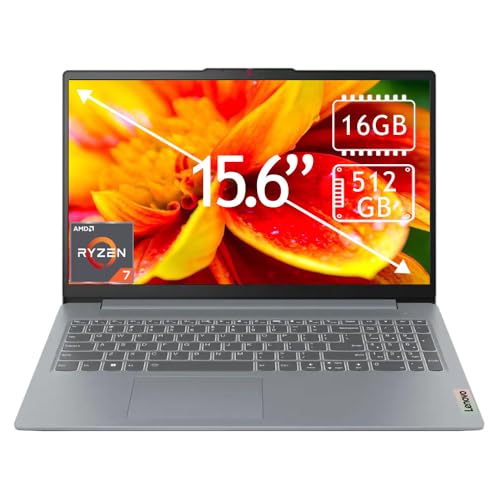
- Ryzen 7 and 16GB RAM for everyday multitasking
- 15.6-inch Full HD touchscreen
- 512GB SSD and Wi-Fi 6 connectivity
Best For: Students and remote workers
Large-Screen Office Pick

- 17.3-inch FHD IPS workspace
- Core Ultra 7 with 32GB DDR5 RAM
- Numeric keypad and privacy camera
Best For: Office productivity and spreadsheet-heavy work
Office Essentials Pick

- Ryzen 7 with 16GB RAM
- Touchscreen and numeric keypad
- 512GB NVMe SSD with office software
Best For: Students and everyday business productivity
Best Large-Screen Multitasker

- 10-core Core i7 processor and 32GB RAM
- 17.3-inch 1600 x 900 LED display
- 1TB SSD plus 500GB external drive
Best For: Students and business users who want a spacious multitasking workspace
Best Touchscreen Workhorse
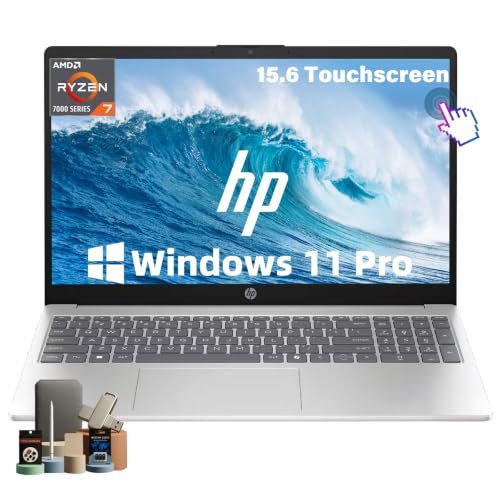
- Ryzen 7 processor with 8 cores and 16 threads
- 32GB RAM and 1TB NVMe SSD
- Full HD touchscreen with Windows 11 Pro
Best For: Professionals and students needing portable, touch-enabled productivity
Best Portable Productivity Pick

- Eight-core 13th Gen Core i5 processor
- 16GB DDR5 RAM and 512GB PCIe 4.0 SSD
- 16-inch 1920 x 1200 anti-glare IPS display
Best For: Mobile professionals and students who value ports and screen workspace
Best Large-Screen Value

- 17.3-inch Full HD IPS display
- 8GB LPDDR5 RAM and 512GB SSD
- 1080p HDR camera with AI noise reduction
Best For: Home users and students who want a large multitasking screen
Best Business Multitasker

- Core i5-13420H processor
- 16GB RAM and 512GB SSD
- Numeric keypad and RJ45 Ethernet
Best For: Office users handling multiple apps, tabs, and spreadsheets
Best Big-Screen Office Pick

- 17.3-inch anti-glare display
- Ryzen 5 and 16GB RAM
- Numeric keypad and 512GB SSD
Best For: Students and office users who prefer a roomy display
Power User Pick – ASUS Vivobook 15 i9
For demanding laptops for multitasking, the ASUS Vivobook 15 combines an Intel Core i9-13900H processor with 32GB of RAM and a 1TB SSD. It is configured for heavy productivity, creative software, and business workloads, while the included cooler is intended to support sustained performance.
Best For: Professionals and power users who need strong multitasking performance, generous memory, and ample storage.
Pros:
- 14-core Intel Core i9-13900H processor and 32GB DDR4 RAM support demanding workflows.
- 1TB PCIe SSD provides fast boot times and substantial file storage.
- Fingerprint reader, webcam privacy shield, backlit keyboard, and Windows 11 Pro suit business use.
- HDMI and multiple USB ports support peripherals and external displays.
Cons:
- Integrated Intel UHD Graphics are not intended for graphics-intensive gaming or professional GPU workloads.
- The 15.6-inch display is limited to 1080p at 60Hz.
- The original seal was opened for upgrades, so coverage is split between PCOnline US and the manufacturer.
This Vivobook is a performance-focused choice when memory and processor speed matter more than a premium display or discrete graphics. The 3.8-pound chassis and business-oriented security features add practical appeal.
Touchscreen Value – Lenovo IdeaPad Slim 3 Ryzen 7
The Lenovo IdeaPad Slim 3 is a practical option among laptops for multitasking, pairing an eight-core AMD Ryzen 7 5825U processor with 16GB of RAM and a 512GB SSD. Its touchscreen and portable design make it suitable for everyday work, school, and remote productivity.
Best For: Students, remote workers, and home users who want a responsive touchscreen and balanced everyday performance.
Pros:
- Ryzen 7 processor and 16GB DDR4 RAM support office work, browsing, and simultaneous applications.
- 15.6-inch Full HD capacitive touchscreen offers intuitive navigation.
- 512GB SSD provides quick load times and useful everyday storage.
- Wi-Fi 6, HDMI, and three USB ports support common accessories and displays.
Cons:
- Integrated AMD Radeon graphics are aimed at general use rather than demanding graphics workloads.
- The 250-nit display may be less suitable for very bright environments.
- Memory is listed as non-upgradable beyond the installed 16GB maximum.
With a 1.6 kg weight and slim Arctic Grey chassis, this IdeaPad balances portability with a comfortable 15.6-inch workspace. It is a sensible general-purpose pick rather than a specialist performance machine.
Large-Screen Office Pick – HP OmniBook 17
The HP OmniBook 17 is built for users who want a spacious workspace from their laptops for multitasking. Its 17.3-inch FHD IPS display, 32GB DDR5 RAM, Core Ultra 7 processor, and full-size keyboard with numeric keypad favor spreadsheets, documents, meetings, and side-by-side windows.
Best For: Office professionals who prioritize a large display, numeric keypad, and business-focused features.
Pros:
- Large 17.3-inch FHD IPS micro-edge display provides room for documents and split-screen work.
- Intel Core Ultra 7 processor and 32GB DDR5 RAM support smooth productivity multitasking.
- Backlit full-size keyboard with numeric keypad benefits accounting and data entry.
- Wi-Fi 7, 1080p privacy camera, HDMI, and multiple USB ports support modern work setups.
Cons:
- The large 17.3-inch format is less convenient for frequent travel than a smaller laptop.
- Integrated Intel Iris Xe graphics are suited to productivity rather than demanding GPU workloads.
- The supplied details list 512GB of storage despite the product title stating 1TB, so verify the configuration before purchase.
This OmniBook emphasizes workspace and office usability over compact portability. Claimed battery life of up to 12 hours and fast charging further support full-day productivity, though real-world results vary.
Office Essentials Pick – Lenovo IdeaPad Slim 3 2025
This 2025 Lenovo IdeaPad Slim 3 offers a straightforward setup for laptops for multitasking, with an AMD Ryzen 7 5825U processor, 16GB RAM, and a 512GB NVMe SSD. The touchscreen, numeric keypad, Wi-Fi 6, and included Microsoft Office software make it geared toward everyday study and office tasks.
Best For: Students and business users who need familiar office tools, touchscreen control, and everyday multitasking.
Pros:
- Eight-core Ryzen 7 processor and 16GB DDR4 memory handle common productivity workloads.
- Full HD touchscreen and full-size keyboard with numeric keypad support flexible input.
- 512GB NVMe SSD provides responsive storage for documents, applications, and media.
- Wi-Fi 6, HDMI, three USB ports, and privacy camera support home or office setups.
Cons:
- Integrated AMD Radeon graphics are not designed for demanding visual workloads.
- The listed 26Wh battery capacity may limit endurance compared with larger-capacity systems.
- At 3.17 kg, it is relatively heavy for a slim 15.6-inch laptop.
This IdeaPad is a practical productivity bundle, particularly for buyers who can use the included Microsoft Office software. Confirm the operating-system and Office configuration before ordering, since the supplied details contain differing software listings.
Best Large-Screen Multitasker – HP 17 Core i7 Laptop
If you want a spacious desktop-style setup, this HP 17 is one of the more capable laptops for multitasking. Its 10-core Intel Core i7 processor and 32GB of RAM are well suited to office applications, research tabs, video calls, and other demanding everyday workloads.
Best For: Students, business users, and home-office buyers who prioritize a large display, generous memory, and storage flexibility.
Pros:
- 10-core Intel Core i7-1255U processor with speeds up to 4.7 GHz
- 32GB RAM supports extensive multitasking
- Large 17.3-inch LED display with 1600 x 900 resolution
- Includes 1TB SSD storage plus a 500GB external drive
Cons:
- The 17.3-inch size is less convenient for frequent travel
- Display resolution is below Full HD
- Integrated graphics are intended for everyday use rather than intensive graphics work
This model emphasizes screen space, memory, and practical connectivity, including USB-C, two USB-A ports, HDMI, and a numeric keypad. Choose it if your multitasking setup benefits more from a roomy workspace than maximum portability.
Best Touchscreen Workhorse – HP 15.6 Ryzen 7 Laptop
This HP 15.6-inch model is a practical choice among laptops for multitasking, combining an eight-core Ryzen 7 processor with 32GB RAM and a 1TB SSD. The Full HD touchscreen, Windows 11 Pro, and numeric keypad make it especially useful for business, study, and flexible home-office work.
Best For: Professionals, students, and remote workers who want strong everyday performance, touch input, and a portable design.
Pros:
- AMD Ryzen 7 7730U with 8 cores and 16 threads
- 32GB RAM and 1TB NVMe SSD support responsive multitasking
- 15.6-inch Full HD IPS touchscreen with wide viewing angles
- Windows 11 Pro, Wi-Fi 6, privacy camera shutter, and numeric keypad
Cons:
- Integrated AMD Radeon graphics are not designed for demanding gaming or professional graphics workloads
- The listed display has a 60Hz refresh rate and 300-nit brightness
- The supplied specifications contain conflicting memory figures, so buyers should verify the configuration at purchase
With up to 10.75 hours of stated battery life, fast charging support, and a 3.52-pound design, this HP balances capability with portability. It is a strong fit for users who switch frequently between spreadsheets, meetings, browser tabs, and cloud applications.
Best Portable Productivity Pick – Lenovo 16 Core i5 Laptop
The Lenovo 16 is a balanced option for laptops for multitasking, pairing an eight-core 13th Gen Intel Core i5-13420H processor with DDR5 memory and a fast PCIe 4.0 NVMe SSD. Its 16-inch 16:10 display provides extra vertical room for spreadsheets, coding, documents, and side-by-side work.
Best For: Students, professionals, and creators who want a relatively lightweight productivity laptop with modern connectivity.
Pros:
- Eight-core Intel Core i5-13420H processor with up to 4.6 GHz turbo speed
- 16GB DDR5 RAM and 512GB PCIe 4.0×4 NVMe SSD
- 16-inch WUXGA IPS display with anti-glare coating and 1920 x 1200 resolution
- Wi-Fi 6, USB-C with DisplayPort and power delivery, HDMI, and SD card reader
Cons:
- 16GB RAM provides less headroom than the 32GB HP models
- 512GB storage may fill quickly with large media libraries
- Integrated Intel UHD Graphics are aimed at light creative work rather than demanding graphics tasks
At about 3.70 pounds and 0.67 inches thick, the Lenovo offers a useful mix of portability and workspace. Its durable, MIL-STD-810H-tested design and broad port selection make it a sensible everyday machine for work and study.
Best Large-Screen Value – HP OmniBook 3 17.3-inch
The HP OmniBook 3 is a practical choice among laptops for multitasking if you want a spacious screen for documents, streaming, video calls, and everyday work. Its Ryzen 3 processor, 8GB of LPDDR5 memory, and 512GB SSD are suited to common productivity tasks, while the Full HD IPS display provides wide viewing angles.
Best For: Home users, students, and multitaskers who prioritize a large display and built-in video-call features.
Pros:
- 17.3-inch Full HD IPS display with anti-glare treatment and 178-degree viewing angles.
- 512GB PCIe NVMe SSD and 8GB LPDDR5 RAM provide responsive everyday storage and multitasking.
- 1080p camera with HDR auto-switch, dual microphones, and advanced AI noise reduction support clearer calls.
- Wi-Fi 6, Bluetooth 5.4, USB-C connectivity, HDMI 2.1, and a claimed battery life of up to 14 hours and 15 minutes.
Cons:
- Integrated Radeon 610M graphics are intended for entertainment and casual use rather than demanding graphics work.
- At 4.4 pounds, it is less convenient to carry than a smaller laptop.
- The 8GB onboard memory may offer less flexibility for future upgrades.
Choose this OmniBook when screen size and communication features matter more than maximum performance or portability. It offers a comfortable workspace for several everyday tasks, with a fast SSD and modern wireless connectivity supporting the overall package.
Best Business Multitasker – Lenovo V15 Gen 4
The Lenovo V15 Gen 4 is a business-focused option among laptops for multitasking, pairing a 13th Gen Intel Core i5-13420H processor with 16GB of DDR4 RAM and a 512GB SSD. Its Windows 11 Pro features, numeric keypad, wired Ethernet, and broad port selection make it well suited to office workflows.
Best For: Business users who need strong everyday multitasking, spreadsheet-friendly input, and Windows 11 Pro.
Pros:
- Intel Core i5-13420H offers 8 cores, 12 threads, and speeds up to 4.6GHz.
- 16GB of RAM and a 512GB PCIe NVMe SSD support multiple applications, browser tabs, and quick file access.
- 15.6-inch Full HD display and a built-in numeric keypad suit office and spreadsheet work.
- Includes HDMI, USB-A, USB-C, RJ45 Ethernet, Wi-Fi, Bluetooth, and a webcam.
Cons:
- Intel UHD integrated graphics are aimed at standard productivity rather than demanding graphics workloads.
- The supplied listing contains inconsistent memory and storage bullet details, so specifications should be verified before purchase.
- The listed 26Wh battery capacity may be a consideration for users who work away from outlets.
The V15 stands out for office multitasking because it combines a relatively capable H-series processor with 16GB of memory and business-friendly connectivity. It is a sensible productivity machine, especially for users who value Ethernet and a numeric keypad.
Best Big-Screen Office Pick – HP 17 Business Laptop
The HP 17 Business Laptop is designed for users who want a roomy display and straightforward productivity features. With a Ryzen 5 7430U processor, 16GB of RAM, 512GB SSD, Windows 11, a numeric keypad, and Office 365 for the web, it is a practical contender among laptops for multitasking at home, school, or work.
Best For: Business users and students who want a large anti-glare display, full-size keyboard, and generous memory.
Pros:
- 17.3-inch Full HD anti-glare display provides a spacious workspace for documents and side-by-side tasks.
- Ryzen 5 processor and 16GB of DDR4 RAM support everyday productivity and multitasking.
- 512GB SSD provides solid-state storage for applications and files.
- Full-size keyboard with numeric keypad, Windows 11, Copilot, and Office 365 for the web support common work tasks.
Cons:
- Integrated graphics are suited to general productivity and entertainment rather than demanding gaming or creative workloads.
- The supplied details list conflicting display-resolution information, so the exact panel specification should be confirmed.
- The large 17.3-inch form factor is less convenient for frequent travel.
This HP is a good fit when a large workspace and comfortable keyboard matter most. Its 16GB memory and Ryzen 5 processor give it a stronger multitasking foundation than entry-level configurations, while the anti-glare display and numeric keypad are useful for extended office work.
How We Picked These Laptops for Multitasking
We focused on configurations that are well suited to running multiple applications at once. The selection prioritizes 16GB or more of RAM where available, modern Intel or AMD processors, solid-state storage, Full HD displays, and practical productivity features such as numeric keypads, touchscreens, webcams, USB-C, HDMI, and Ethernet. We also included a few more affordable models for lighter multitasking, while noting where their lower memory or entry-level processors may limit demanding workloads.
Specifications can vary by seller and configuration, so verify the exact RAM, storage, processor, operating system, and included accessories before purchasing.
Quick Comparison
| Best For | Recommended Configuration | What to Look For |
|---|---|---|
| Heavy productivity | Core i9 or Core Ultra 7, 32GB RAM | Fast multitasking, large spreadsheets, creative and business apps |
| Most users | Ryzen 7 or Core i5, 16GB RAM | Office work, study, browsing, streaming, and video calls |
| Large-screen work | 17.3-inch Full HD display | More workspace and easier split-screen viewing |
| Budget multitasking | Ryzen 3 or equivalent, 8GB RAM | Web, email, documents, and light everyday use |
Key Buying Factors for Laptops for Multitasking
Processor and Sustained Performance
Choose a recent Core i5, Core Ultra 5, Ryzen 5, or better for dependable everyday multitasking. Core i7, Core Ultra 7, Ryzen 7, and Core i9 systems provide more headroom for large spreadsheets, programming, content creation, virtual machines, and heavier workloads. Processor model generation matters, so compare the complete chip name rather than relying only on the Core i7 or Ryzen 7 label.
RAM and Storage
16GB of RAM is the practical baseline for most multitaskers. Choose 32GB if you routinely keep many browser tabs open while using large office files, creative software, or business applications. A 512GB SSD offers a good starting point, while a 1TB SSD is preferable for large files and longer-term use. SSD storage also makes startup and application loading substantially faster than a traditional hard drive.
Display, Keyboard, and Connectivity
A 15.6-inch display is a versatile choice, while a 16- or 17.3-inch model can make split-screen work more comfortable. Full HD resolution is important for clear text. Touchscreens add convenience, and numeric keypads help with finance, inventory, and data-entry tasks. For office setups, check for HDMI, USB-C, multiple USB ports, Wi-Fi 6, Bluetooth, and an Ethernet port if wired networking matters.
Who Should Buy Which Laptops for Multitasking?
Choose a high-performance 32GB model if you work with demanding applications, extensive research tabs, large spreadsheets, or several simultaneous business tools. Choose a 16GB Ryzen 7 or Core i5 laptop for the best balance of speed, price, and everyday versatility. Choose a 17.3-inch model if screen space matters more than portability, especially for home-office use. Choose a touchscreen model for interactive navigation and flexible everyday use. Choose an 8GB entry-level system only for lighter browsing, email, streaming, and document work; it may feel constrained with heavier multitasking. Finally, prioritize a comfortable keyboard, adequate ports, and a return policy that lets you confirm the actual configuration meets your needs.