A good desk clamp can make a flight simulator yoke feel far more stable while keeping your controls accessible and your workspace flexible. The right setup should hold firm during aggressive inputs without damaging your desk or blocking other peripherals.
We’ve selected 10 options covering complete yoke systems, adjustable mounts, HOTAS-compatible brackets, and specialized solutions for popular Logitech, Thrustmaster, Honeycomb, and Turtle Beach hardware. Use the guide below to narrow the choices by compatibility, space, platform, and mounting style.
Best 10 Flight Simulator Yokes with Desk Clamps Picks for 2026
Best Space-Saving Mount
Honeycomb Under-Desk Yoke Holder

- Designed for Honeycomb Alpha and Bravo units
- Frees desk space with under-desk mounting
- Tool-free installation using original clamps
Best For: Honeycomb owners seeking a cleaner, compact flight station
Best Complete Yoke System

- Includes yoke, throttle quadrant, and two desk clamps
- Provides smooth control with a stainless steel shaft
- Offers extensive programmable controls
Best For: PC pilots wanting a full yoke-and-throttle setup
Best Metal Flight Mount
Thrustmaster Adjustable Flying Clamp
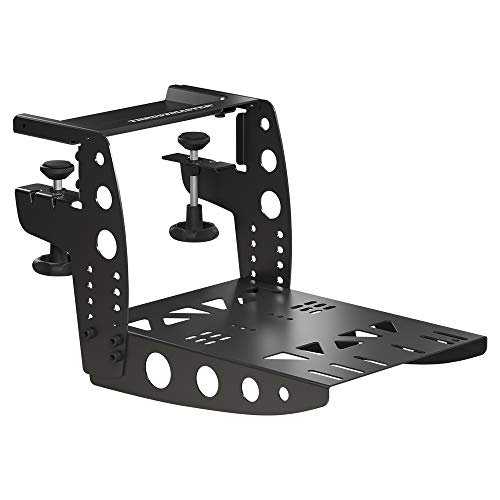
- Built with a 100% metal structure
- Height-adjustable for ergonomic positioning
- Designed for compatible Thrustmaster controls
Best For: Thrustmaster users needing a sturdy adjustable mount
Best Yoke and Pedal Bundle
Logitech Pro Flight Control Bundle

- Combines yoke, throttle quadrant, and rudder pedals
- Adds differential toe brakes for ground control
- Includes adjustable, non-slip pedal footrests
Best For: Windows pilots building a fuller flight-sim cockpit
Best Heavy-Duty Mount Set

- Two mounts position joystick and throttle separately
- Metal construction supports heavy HOTAS systems
- Height and position adjustments improve ergonomics
Best For: PC users building a stable, compatible HOTAS cockpit layout
Best Boeing-Style Flight Pack
TCA Yoke & Quadrant Boeing Edition

- Includes a Boeing-inspired yoke and throttle quadrant
- Supports Windows and Xbox Series consoles
- Provides 35 buttons and two additional axes
Best For: Users seeking a realistic Boeing-style control package
Best Broad-Compatibility Mount

- Fits desktops from 0.2 to 5.3 inches thick
- Supports many Logitech, Thrustmaster, VKB, and VPC devices
- Quick-release clamps allow easy removal
Best For: Flexible, removable mounting for compatible HOTAS controllers
Best All-in-One Pick
VelocityOne Flight Universal Control System

- Yoke, throttle, trim, rudder, and brake controls
- 180° rotation with Hall effect sensing
- Xbox and Windows compatibility with desk clamping
Best For: Complete home flight-sim setups
Best Dual-Device Mount

- Two mounts for joystick and throttle hardware
- Wide listed HOTAS compatibility
- Adjustable height and front-to-back positioning
Best For: Flexible HOTAS desk setups
Best Thrustmaster-Focused Mount
BUJ Adjustable Metal Desk Mount

- Metal clamp with vertical adjustment
- Silicone pad protects desks and improves grip
- Designed for many Thrustmaster flight sticks
Best For: Stable mounting of compatible Thrustmaster controllers
Best Space-Saving Mount – Honeycomb Under-Desk Yoke Holder
If you already own Honeycomb controls, this under-desk mount is a practical way to build a cleaner setup around flight simulator yokes with desk clamps. It is designed for the Honeycomb Alpha Yoke and Bravo Throttle and uses their original clamp hardware without drilling.
Best For: Honeycomb Alpha and Bravo owners who want to free desk space and position their controls closer to real-world locations.
Pros:
- Designed specifically for Honeycomb Alpha and Bravo devices.
- Under-desk installation helps keep the desktop clear.
- Tool-free setup uses the existing clamp hardware.
- Compatible with MSFS 2020/2024 and X-Plane setups.
Cons:
- It is a mount, not a complete yoke or throttle system.
- Compatibility is limited to the listed Honeycomb devices.
This is a focused space-saving accessory rather than a universal solution. It makes the most sense when you already have compatible Honeycomb gear and want a stable, less cluttered workstation.
Best Complete Yoke System – Logitech G PRO Flight Yoke
The Logitech G PRO Flight Yoke System is a complete control package for shoppers comparing flight simulator yokes with desk clamps. It includes a yoke, throttle quadrant, USB connectivity, and two-position desk clamps for a range of desks.
Best For: New or experienced PC pilots who want realistic yoke control, a matching throttle quadrant, and extensive programmable inputs.
Pros:
- Includes both the flight yoke and throttle quadrant.
- Two-position desk clamps provide flexible mounting.
- Stainless steel yoke shaft is designed for smooth, accurate control.
- Offers 14 buttons, a POV hat, and a three-position mode switch.
Cons:
- Requires optional software for several listed flight simulators.
- Its substantial desktop footprint may not suit compact stations.
With its included clamps and broad control layout, this is a strong all-in-one starting point. Windows compatibility and the listed software requirement should be checked before purchase.
Best Metal Flight Mount – Thrustmaster Adjustable Flying Clamp
The Thrustmaster Flying Clamp is a sturdy mounting option for shoppers considering flight simulator yokes with desk clamps. Its fully metal structure and adjustable height are intended to improve the positioning and ergonomics of compatible Thrustmaster aviation controls.
Best For: PC users with compatible Thrustmaster TCA or T.16000M FCS equipment who want adjustable, metal-supported mounting.
Pros:
- Uses a 100% metal structure.
- Height-adjustable design supports ergonomic positioning.
- Designed for Thrustmaster TCA and T.16000M FCS product ranges.
Cons:
- It is a mounting accessory rather than a yoke or control set.
- The supplied compatibility information focuses on Thrustmaster product ranges.
- Its listed dimensions may require substantial setup space.
This mount prioritizes solid construction and adjustability. Confirm your specific Thrustmaster devices and available desk space before choosing it for a simulator station.
Best Yoke and Pedal Bundle – Logitech Pro Flight Control Bundle
This Logitech bundle combines a Pro Flight Yoke System with rudder pedals, giving shoppers a broader control setup when comparing flight simulator yokes with desk clamps. It adds foot-operated steering and differential toe brakes to the yoke and throttle controls.
Best For: Windows-based sim pilots who want coordinated yoke, throttle, and rudder control in one bundle.
Pros:
- Combines the yoke system with self-centering rudder pedals.
- Pedals include differential toe brakes for ground handling.
- Yoke provides 14 buttons, a POV hat, and a three-position mode switch.
- Adjustable footrests and non-slip materials support varied users.
Cons:
- The supplied notes do not specify desk-clamp details for the bundle.
- It is intended for Windows and desktop use.
This bundle is better suited to shoppers building a more complete cockpit than those seeking only a clamped yoke. Its added pedals provide a meaningful control upgrade for takeoffs, landings, and taxiing.
Best Heavy-Duty Mount Set – Adjustable HOTAS Desk Mounts
For flight simulator yokes with desk clamps—or more accurately, HOTAS controls—this two-piece Meza Mount set creates a stable, cockpit-style layout. Its adjustable brackets and metal construction suit compatible Warthog, Orion 2, and VPC systems, while keeping the joystick and throttle off the desktop.
Best For: PC flight sim users building a heavy-duty left-and-right HOTAS setup.
Pros:
- Includes separate mounts for a joystick and throttle.
- Adjustable height and positioning improve control access.
- Reinforced metal plates and aluminum support columns suit heavy controls.
- Designed for several popular Thrustmaster, WinWing, and VPC systems.
Cons:
- Controls are not included.
- Compatibility is focused on specific joystick and throttle bases.
- Its 5-pound weight and larger mount footprint may not suit portable setups.
This is a practical choice when rigidity and a separated HOTAS layout matter more than an all-in-one package. Check your exact control model before ordering.
Best Boeing-Style Flight Pack – TCA Yoke & Quadrant Boeing Edition
The Thrustmaster TCA Boeing Edition is a complete yoke-and-quadrant option for shoppers comparing flight simulator yokes with desk clamps. It combines a 1:1 Boeing 787-inspired yoke with a throttle quadrant for PC and Xbox flight simulation, though the supplied details do not specify a desk-clamp mounting system.
Best For: Boeing fans who want a realistic yoke and throttle package for Microsoft Flight Simulator on PC or Xbox.
Pros:
- Officially licensed Boeing 787-inspired, 1:1-scale design.
- PENDUL_R mechanism provides an 8.3-inch range of pendular movement.
- Includes adjustable spring tension and a metal internal structure.
- Offers 35 action buttons, two extra axes, and a quadrant with autopilot functions.
Cons:
- The package does not list a desk clamp in the supplied specifications.
- Rudder pedals are compatible but sold separately.
- Its larger 19 x 15 x 19-inch dimensions may require substantial desk space.
Choose this pack for integrated Boeing-style controls and broad PC/Xbox compatibility. If desk-clamp mounting is essential, verify the included mounting hardware or plan for a separate solution.
Best Broad-Compatibility Mount – Hikig Dual Desk Mounts
For users searching for flight simulator yokes with desk clamps, the Hikig two-pack is a versatile mounting option for compatible flight-control hardware. Its push-pull clamps fit desktops from 0.2 to 5.3 inches thick, and the mounts can be positioned for left- or right-handed use.
Best For: Multi-device flight sim setups needing removable mounts with wide HOTAS compatibility.
Pros:
- Supports a broad range of Logitech, Thrustmaster, VKB, VPC, and Winwing equipment.
- Quick clamps make installation and removal straightforward.
- Vertical adjustment accommodates desktops from 0.2 to 5.3 inches thick.
- Non-slip feet help protect the desk and improve grip.
Cons:
- The supplied compatibility list focuses on hand controllers and HOTAS devices rather than yokes.
- Correct installation is necessary for the advertised stability.
- At 5.27 kg, the pair is relatively heavy for frequent transport.
This set stands out for flexibility, especially when switching between supported controllers or sharing a desk between users. Confirm your specific device and desktop thickness before purchase.
Best All-in-One Pick – VelocityOne Flight Universal Control System
For shoppers comparing flight simulator yokes with desk clamps, the Turtle Beach VelocityOne Flight stands out as a complete control system rather than a yoke-only accessory. It combines a yoke, throttle quadrant, trim wheel, and integrated rudder and brake controls, with a clamping system designed for various home setups.
Best For: Pilots who want an all-in-one setup for Xbox and Windows flight simulation.
Pros:
- Combines yoke, throttle, trim, rudder, and brake controls in one system.
- Offers 180° yoke rotation with a non-contact Hall effect sensor.
- Includes a customizable throttle quadrant, flight management display, and status indicator panel.
- Supports Microsoft Flight Simulator 2020 and 2024 on Xbox and Windows titles.
Cons:
- Its broad feature set and approximately 10-pound weight may require more desk space than a basic yoke.
- It is a corded USB system rather than a wireless controller.
The VelocityOne Flight is the strongest choice here for users who want a ready-made cockpit-style control center. Its secure clamp and extensive controls reduce the need to buy separate flight-sim peripherals.
Best Dual-Device Mount – Hikig 2-Set Flight Desk Mount
If you are shopping for flight simulator yokes with desk clamps but primarily use joystick-and-throttle hardware, the Hikig 2 Set Desk Mount offers a practical mounting solution. Its paired mounts are designed for a wide range of HOTAS and flight-control devices and provide adjustable height and front-to-back positioning.
Best For: Multi-device HOTAS setups that need adjustable, space-saving desk mounts.
Pros:
- Two-piece set supports separate joystick and throttle mounting.
- Compatible with many Logitech, Thrustmaster, Turtle Beach, Winwing, VKB, and Virpil devices listed by the manufacturer.
- Adjusts vertically from -175 mm to +175 mm and front to back from 80 mm to 300 mm.
- Uses a 91 N·m force clamp for a stable installation.
Cons:
- It is a joystick and HOTAS mount, not a dedicated yoke system.
- Compatibility depends on the specific controller and mounting arrangement.
The Hikig mount makes the most sense for users building a flexible HOTAS station. Its two-mount format and broad listed compatibility are useful when the throttle and stick need separate, ergonomic positions.
Best Thrustmaster-Focused Mount – BUJ Adjustable Metal Desk Mount
For flight simulator yokes with desk clamps shoppers who already own a compatible joystick, the BUJ Metal Desk Mount provides a targeted tabletop mounting option. It is precision-designed for several Thrustmaster models and other listed flight sticks, with a metal clamp, vertical adjustment, and a silicone desk-protection pad.
Best For: Thrustmaster-focused flight-sim users who want a stable, adjustable joystick mount.
Pros:
- Supports numerous listed Thrustmaster models, including T-Flight, T16000M FCS, TCA Sidestick, and Sol-series devices.
- Metal adjustable clamp is designed to fit desks of different thicknesses.
- Silicone padding helps protect the desk and reduce slipping or rotation.
- Vertical adjustment and quick-release mounting add setup flexibility.
Cons:
- It is a mount for compatible flight sticks rather than a yoke controller.
- Its compatibility is more specialized than a universal mount.
The BUJ is a sensible choice when your controller appears on its compatibility list and you prioritize a firm, desk-friendly mount. The padded base and adjustable metal clamp are particularly useful for repeated tabletop use.
How We Picked the Best Flight Simulator Yokes with Desk Clamps
We focused on products that either include a yoke and clamp-ready control system or provide a practical desk-mounting solution for established flight simulator hardware. We compared compatibility, mounting flexibility, construction, adjustment options, platform support, and how well each product suits a compact home cockpit.
Because “yoke” and “HOTAS mount” products serve different purposes, this list includes complete control systems as well as brackets and clamp sets. Check the product specifications carefully before ordering, especially when pairing a mount with a yoke or throttle purchased separately.
Quick Comparison
| Best For | What to Look For |
|---|---|
| Complete yoke setup | Integrated yoke, throttle, clamp, and platform support |
| Existing Honeycomb or Logitech hardware | Exact model compatibility and sufficient desk clearance |
| HOTAS users | Separate adjustable mounts for joystick and throttle placement |
| Console pilots | Confirmed Xbox or PlayStation compatibility |
| Small desks | Compact brackets, low-profile clamps, and easy removal |
Key Buying Factors for Flight Simulator Yokes with Desk Clamps
Compatibility
Start with the exact yoke, throttle, joystick, and platform you use. A mount designed for a Logitech X52 or Thrustmaster HOTAS may not fit a Honeycomb Alpha or a Boeing-style quadrant. Also verify compatibility with your simulator platform, such as Windows, Xbox, or PlayStation.
Desk Thickness and Clearance
Measure the desktop thickness and inspect the space beneath it. Clamp ranges vary, and under-desk supports, drawers, cable trays, or beveled edges can prevent a secure installation. Leave enough room for the yoke shaft, throttle movement, and cable routing.
Stability and Adjustability
Metal construction and broad clamping surfaces generally provide better resistance to movement, but adjustability matters just as much. Look for height, angle, and lateral adjustments that let you position controls comfortably without forcing your wrists or shoulders into awkward angles.
Installation and Storage
If you share your desk for work or gaming, choose a mount that can be installed and removed easily. A fixed bracket may offer maximum rigidity, while a quick-release or compact clamp is more convenient for temporary setups.
Yoke Versus HOTAS Layout
Airliner and general aviation fans often prefer a yoke and separate throttle quadrant. Fighter and space-sim players may be better served by a joystick-and-throttle HOTAS arrangement. Do not buy a mount solely because it is labeled for flight simulation; confirm that its control layout matches the aircraft and games you play.
Who Should Buy Which Flight Simulator Yokes with Desk Clamps?
Choose a complete yoke system if you want the simplest route to a functional cockpit. Choose a dedicated mounting bracket if you already own compatible hardware and mainly need more stability or desk space. Adjustable two-piece mounts are a strong choice for HOTAS users who want independent joystick and throttle positioning. Console players should prioritize explicitly supported Xbox or PlayStation models, while PC users have the broadest selection and should focus on fit, ergonomics, and simulator compatibility.