Building a flight simulator on a small desk requires more than choosing a realistic controller. The best setup balances control feel, mounting stability, cable management, and enough room for your keyboard, mouse, and monitor.
This roundup compares 10 compact yokes, HOTAS systems, mounting solutions, and simulator stands to help you create a capable cockpit without taking over your workspace.
Best 10 Flight Simulator Yokes for Small Desks Picks for 2026
Full-Featured Yoke
Logitech G PRO Flight Yoke System
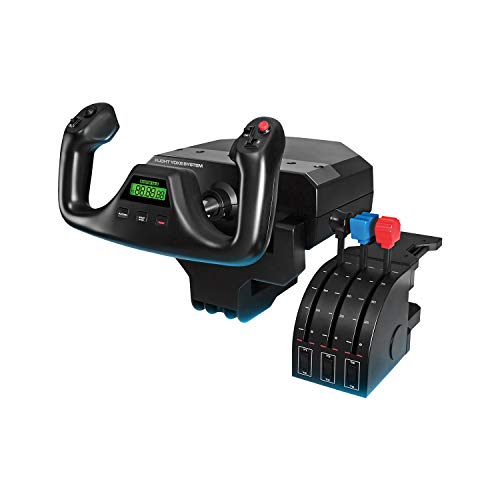
- Includes yoke, throttle quadrant, and desk clamps
- 14 buttons plus mode and POV controls
- Windows-compatible with extensive programmability
Best For: Complete desktop yoke setups with flexible mounting
Compact HOTAS Alternative

- Detachable throttle adapts to limited desk layouts
- 12 programmable buttons and five axes
- Adjustable resistance with plug-and-play controls
Best For: Small desks suited to a stick-and-throttle setup
Complete Control Bundle
Logitech G Pro Yoke and Rudder Pedals

- Combines yoke, throttle, and rudder pedals
- Adds differential toe brakes and self-centering pedals
- Adjustable, non-slip foot rests support varied users
Best For: Complete Windows flight-sim control without separate pedal shopping
Desk-Mount Space Saver
Meza Mount HOTAS Desk Mount Set

- Two mounts position joystick and throttle separately
- Adjustable height and placement reduce desk clutter
- Heavy-duty construction for selected HOTAS bases
Best For: Compatible HOTAS owners needing more usable desk space
Space-Saving Stand
Foldable Flight Simulator and Racing Stand

- Foldable pedal section helps simplify storage
- Supports flight and racing equipment
- X-shaped frame is designed for stability
Best For: Floor-based setups that need to fold away
Desk-Mount Pick
Logitech G PRO Flight Yoke System

- Two-position clamp mounts directly to desks
- Includes yoke and throttle quadrant
- Offers programmable flight controls
Best For: Compact PC flight sim desks
Adjustable Cockpit
Marada Universal Flight Racing Stand

- Modular boards support varied simulator gear
- Adjusts in multiple directions
- Provides space for mouse and keyboard
Best For: Expandable floor-based simulator stations
Complete HOTAS Kit
T-Flight Full Kit with Rudder Pedals

- Full flight stick, throttle, and rudder pedal package
- 14 programmable buttons and five axes
- Compatible with PC and Xbox Series X|S
Best For: Pilots wanting a complete HOTAS alternative to a yoke
Compact Mounting Solution

- Supports several Honeycomb and Logitech controls
- Pre-drilled metal mounting plate
- Includes screws and Allen key
Best For: DIY desk-mounted yoke and throttle installations
Organized Cockpit Panel
Meza Flight Simulator Mounting Kit

- Clamps to desks from 0.5 to 2.2 inches thick
- Supports compatible yokes and up to two throttles
- Adds dimmable LED cockpit lighting
Best For: Builders creating a stable, expandable home cockpit
Full-Featured Yoke – Logitech G PRO Flight Yoke System
For shoppers comparing flight simulator yokes for small desks, the Logitech G PRO offers realistic controls in a clamp-mounted design. Its stainless-steel shaft, included throttle quadrant, and broad programmable control layout make it a versatile option when desk space must support many simulator functions.
Best For: New pilots and experienced sim users who want a complete yoke-and-throttle setup with flexible desk mounting.
Pros:
- Two-position desk clamps provide mounting flexibility and a secure hold.
- Includes both the flight yoke and throttle quadrant.
- Offers 14 buttons, a POV hat, and a three-position mode switch with extensive programmability.
- Compatible with Windows 11, 10, 8.1, and 7.
Cons:
- The listed dimensions may be substantial for especially narrow desks.
- Optional software download is required for several supported simulators.
- It is a corded desktop setup rather than a wireless control.
The included clamps help make this a practical small-desk choice, but measure your available surface first. It is especially appealing if you want yoke, throttle, and numerous aircraft controls without buying separate primary hardware.
Compact HOTAS Alternative – Thrustmaster T-Flight Hotas X
Although it is a flight stick rather than a yoke, the Thrustmaster T-Flight Hotas X is worth considering among flight simulator yokes for small desks when compact flexibility matters more than yoke-style control. Its detachable throttle can stay connected for a tidy desktop arrangement or separate for a custom layout.
Best For: Small-desk users who prefer a programmable HOTAS stick and throttle with adjustable resistance.
Pros:
- Detachable, full-size throttle supports connected or separated layouts.
- Offers 12 programmable buttons and five axes.
- Adjustable joystick resistance and dual rudder control support personalized handling.
- Plug-and-play setup includes preset switching and built-in memory.
Cons:
- It is a flight stick, not a traditional yoke.
- Listed compatibility is for PC.
- The combined dimensions may still require careful desk placement.
The detachable design gives this controller useful flexibility in cramped spaces, while its weighted base helps stability. Choose it when a HOTAS layout suits your simulator better than a forward-and-back yoke.
Complete Control Bundle – Logitech G Pro Yoke and Rudder Pedals
For flight simulator yokes for small desks, this Logitech bundle combines the Pro yoke and throttle quadrant with rudder pedals for a more complete cockpit setup. It is a strong option when you want realistic control across the desk and footwell rather than adding pedals later.
Best For: Windows users seeking an all-in-one yoke, throttle, and rudder-pedal package.
Pros:
- Bundles the yoke, throttle quadrant, and rudder pedals.
- Rudder pedals provide smooth self-centering control and differential toe brakes.
- Adjustable foot rests with non-slip materials accommodate different users.
- The yoke includes 14 buttons, a POV hat, and a three-position mode switch.
Cons:
- Adding pedals requires usable floor space in addition to desk space.
- The bundle may be more equipment than beginners need.
- Listed compatibility is for Windows desktop setups.
This bundle can reduce future upgrade needs, but it is best for a small desk with enough surrounding floor area for pedals. It delivers broader aircraft control than a yoke-and-throttle package alone.
Desk-Mount Space Saver – Meza Mount HOTAS Desk Mount Set
For flight simulator yokes for small desks, the Meza Mount set is a mounting accessory rather than a control system. Its two adjustable metal mounts can move a compatible joystick and throttle off the desktop, helping organize a compact HOTAS station while keeping the controls stable.
Best For: Users with compatible heavy HOTAS hardware who need adjustable desk mounting and less desktop clutter.
Pros:
- Set includes separate mounts for joystick and throttle placement.
- Height and position adjustments support a more comfortable control level.
- Heavy-duty metal construction is designed for substantial HOTAS systems.
- Compatible with selected Thrustmaster, WinWing, and VPC bases.
Cons:
- Controls are not included.
- It is designed for joystick-and-throttle systems, not a standalone yoke.
- Compatibility should be confirmed before purchase.
This set can reclaim valuable desktop surface, but it only makes sense if you already own—or plan to buy—a listed compatible HOTAS base. Verify both hardware compatibility and desk-clamp space before ordering.
Space-Saving Stand – Foldable Flight Simulator and Racing Stand
For shoppers comparing flight simulator yokes for small desks, this foldable stand is a better fit for a dedicated floor setup than a desktop yoke. Its X-shaped frame supports flight and racing equipment, while the folding pedal section helps reduce storage space when the rig is not in use.
Best For: Users who want one adjustable stand for flight and racing gear and need to fold it away between sessions.
Pros:
- Folds down for more compact storage.
- Supports a wide range of Logitech, Thrustmaster, and other flight or racing equipment.
- Pre-drilled, wider panels allow customizable mounting.
- Double-triangle X-shape design is intended to improve stability.
Cons:
- Its listed dimensions make it substantially larger than a small desktop yoke.
- Flight controls and other accessories are not specified as included.
- Assembly is still required, despite being 80% pre-installed.
This is a versatile choice when a small desk cannot accommodate a yoke and separate racing controls. Confirm your available floor space and device mounting requirements before buying.
Desk-Mount Pick – Logitech G PRO Flight Yoke System
The Logitech G PRO is the most directly suited option here for flight simulator yokes for small desks. Its two-position desk clamp provides flexible mounting, while the yoke, throttle quadrant, and programmable controls keep core flight functions within reach without requiring a large cockpit frame.
Best For: PC pilots who need a clamp-mounted yoke system for a compact or shared desk.
Pros:
- Two-position desk clamp offers flexible mounting on a range of desks.
- Stainless steel yoke shaft is designed for smooth, accurate control.
- Includes a throttle quadrant and extensive programmable controls.
- USB connectivity is straightforward for PC use.
Cons:
- This renewed unit has a listed 90-day limited warranty.
- It is designed for PC rather than multiple gaming platforms.
- A secure clamp fit still depends on the desk’s available edge and surface.
Among these products, this is the clearest match for a small desk because it mounts directly instead of adding a separate floor stand. Its renewed status and limited warranty are worth weighing against the compact installation.
Adjustable Cockpit – Marada Universal Flight Racing Stand
For flight simulator yokes for small desks, the Marada stand is best considered when you need a separate, adjustable cockpit rather than a desktop accessory. Its modular boards can accommodate yokes, joysticks, pedals, wheels, and a mouse and keyboard, but its floor-standing dimensions require more room than a clamp-on system.
Best For: Users building a configurable flight-and-racing station with dedicated floor space.
Pros:
- Modular mounting supports many Logitech, Thrustmaster, Honeycomb, Turtle Beach, VKB, and Winwing devices.
- Handle bolts allow front, back, up, down, and side-to-side adjustments.
- Separate mounting boards can hold simulator equipment plus a mouse and keyboard.
- Single-column design leaves more comfortable foot space.
Cons:
- Its listed dimensions make it unsuitable for many genuinely small desks or tight rooms.
- Wheels, pedals, throttles, joysticks, yokes, and shifters are not included.
- More adjustability can mean a longer setup process than a simple desk clamp.
This stand offers the most expansion flexibility of the three, but it is not the most space-efficient solution. Choose it if your priority is a customizable cockpit that can grow across flight and racing equipment.
Complete HOTAS Kit – T-Flight Full Kit with Rudder Pedals
Although it is not a yoke, the Thrustmaster T-Flight Full Kit is a complete alternative for shoppers comparing flight simulator yokes for small desks. It combines a flight stick, detachable throttle, and rudder pedals, but its listed dimensions and 12.4-pound weight mean it needs more desk and floor space than a compact yoke setup.
Best For: Xbox and PC pilots who want a complete HOTAS system with included rudder pedals rather than a yoke.
Pros:
- Includes the flight stick, detachable throttle, and TFRP rudder pedals.
- Offers five axes, 14 programmable buttons, a trigger, and a multidirectional hat switch.
- Provides official Xbox Series X|S integration and PC compatibility.
- Rudder pedals use a smooth S.M.A.R.T. slide rail system and removable heel rests.
Cons:
- Its 12.4-pound weight and listed dimensions are not especially small-desk friendly.
- It is a HOTAS flight-stick system, not a traditional yoke.
- Requires floor space for the included rudder pedals.
This is a feature-rich choice when immersion and console compatibility matter more than minimizing the footprint. For a genuinely small desk, measure carefully and consider whether the throttle and pedal arrangement can fit comfortably.
Compact Mounting Solution – Desk Mount Bracket for Yokes
For shoppers researching flight simulator yokes for small desks, this metal desk mount bracket can help secure a compatible yoke or throttle to the available surface. Its narrow 16 x 2 x 0.2-inch profile and pre-drilled plate are aimed at organized desk or cockpit installations, though the controls themselves are sold separately.
Best For: DIY builders mounting a Honeycomb Alpha or Bravo, Sierra TPM module, or Logitech yoke to a desk or cockpit frame.
Pros:
- Compatible with Honeycomb Alpha, Honeycomb Bravo, Sierra TPM, and Logitech yoke equipment.
- Pre-drilled holes help with alignment and installation.
- Sturdy metal construction is designed to improve setup stability.
- Includes self-tapping screws and an Allen key.
Cons:
- Yokes, throttles, and TPM modules are not included.
- It is a mounting bracket, not a flight controller.
- Installation may require modifying or securing the desk with the supplied screws.
This is one of the more space-conscious options in the group because it focuses on mounting rather than adding another large control housing. Confirm compatibility and desk construction before installation, especially if you need a removable setup.
Organized Cockpit Panel – Meza Flight Simulator Mounting Kit
The Meza cockpit panel is a larger mounting framework for shoppers comparing flight simulator yokes for small desks. Rubber-tipped clamps fit desks from 0.5 to 2.2 inches thick, while the pre-cut panel organizes compatible yokes, throttle quadrants, and flight panels; however, its 30.3-inch depth makes it better suited to a dedicated simulator surface than a very limited desk.
Best For: Home cockpit builders who want a stable, organized panel with room for up to two throttle quadrants.
Pros:
- Compatible with Logitech yokes, throttle quadrants, flight panels, and Honeycomb yokes.
- Supports up to two throttle quadrants.
- Includes dimmable LED ambient lighting for daytime or nighttime simulation.
- Aluminum-alloy construction, supporting legs, adjustable feet, and rubber-tipped clamps add stability.
Cons:
- The 30.3-inch depth is substantial for a small desk.
- Yokes, throttles, instruments, and displays are not included.
- Its cockpit-focused design may be excessive for casual desk use.
This kit makes sense when organization and expandability are priorities. Its desk clamps broaden placement options, but the overall footprint should be measured carefully before choosing it for a compact workstation.
How We Picked the Best Flight Simulator Yokes for Small Desks
We focused on products that can work in limited spaces, including compact yoke systems, HOTAS controllers, desk brackets, adjustable mounts, and foldable simulator stands. We considered the control layout, mounting method, footprint, platform compatibility, adjustability, and whether each option can be removed or stored when the desk is needed for other tasks.
Because a small-desk setup may use either a yoke or a joystick-and-throttle arrangement, this list includes both traditional flight yokes and HOTAS alternatives. Product descriptions and compatibility claims should still be checked carefully before purchase, particularly for Xbox support, mounting hardware, and specific Honeycomb, Logitech, Thrustmaster, WinWing, or other components.
Quick Comparison
| Setup type | Best for | Main space advantage |
|---|---|---|
| Yoke and throttle system | General aviation simulation | Integrated controls in one desk-friendly unit |
| HOTAS joystick and throttle | Combat and mixed flight simulation | Usually smaller and easier to reposition |
| Desk mount or bracket | Existing controls | Raises controls off the desktop and frees surface area |
| Foldable simulator stand | Dedicated cockpit setups | Provides a stable frame that can be moved or stored |
Key Buying Factors for Flight Simulator Yokes for Small Desks
Footprint and Mounting Clearance
Measure the usable width and depth of your desk, including monitor stands, drawers, speakers, and cable access. A yoke may fit on paper but still be impractical if its clamp, throttle quadrant, or connecting cables interfere with other equipment. Check the required rear and underside clearance before ordering.
Clamp Stability and Adjustability
Desk mounts can save space, but they need a sturdy attachment point. Look for adjustable clamps, padded contact surfaces, and enough range for your desk thickness. Avoid mounting heavy controls to thin, flexible panels that may wobble during use.
Control Style and Compatibility
Yokes suit many airliner and general aviation games, while HOTAS controls can be more versatile for fighter aircraft and space simulators. Confirm operating-system, console, game, and connection requirements. Rudder pedals and throttle quadrants may also need separate USB ports or additional desk space.
Storage and Cable Management
For shared workspaces, choose a system that can be detached, folded, or moved quickly. Removable mounts and foldable stands are especially useful, while permanently installed brackets may be better for dedicated simulation desks. Plan cable routing so controls do not pull against the desk or block peripherals.
Who Should Buy Which Flight Simulator Yokes for Small Desks?
Choose a compact Logitech yoke system if you mainly fly general aviation or airliner aircraft and want a familiar control layout with an integrated throttle. A bundle with rudder pedals is a stronger choice when you want coordinated turns without buying accessories separately.
Choose a Thrustmaster HOTAS kit if you need a smaller, more flexible controller for PC or compatible console use, or if your desk cannot accommodate a full yoke. Add-on desk mounts are best for users who already own compatible controls and want to reclaim desktop space. A foldable simulator stand makes more sense when stability matters most and you have somewhere to store a larger frame after each session.