Choosing the right flight control can make Microsoft Flight Simulator feel dramatically more immersive. The best Xbox-compatible setups range from dedicated yokes and throttle quadrants to versatile HOTAS systems for pilots who prefer a stick.
Below, we compare 10 strong options for Xbox Series X|S and compatible PC use, with practical guidance on compatibility, realism, included controls, and value.
Best 10 Flight Simulator Yokes for Xbox Picks for 2026
Best All-in-One Pick
Turtle Beach VelocityOne Flight
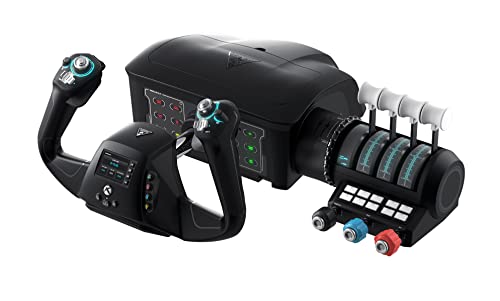
- Yoke, throttle, trim, rudder, and brakes in one system
- 180° Hall effect yoke rotation
- Compatible with Xbox and Windows
Best For: Xbox pilots wanting comprehensive built-in controls
Best Airbus-Style Alternative
Thrustmaster TCA Captain Pack X

- Officially licensed Airbus sidestick and throttle
- Built-in thrust reverser and sidestick rudder control
- 31 quadrant action buttons and four axes
Best For: Airliner enthusiasts preferring Airbus-style controls
Best PC-Focused Yoke System
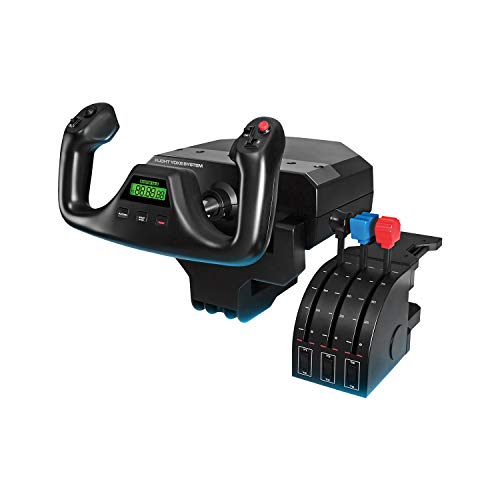
- Traditional yoke and separate throttle quadrant
- 14 buttons plus three-position mode switch
- Desk clamps support flexible mounting
Best For: Windows flight sim users wanting a conventional yoke
Best Joystick Value for Xbox
Thrustmaster T-Flight Hotas One

- Official Microsoft Flight Simulator 2024 controls
- Five axes, 14 buttons, and 10-bit precision
- Detachable throttle with dual rudder options
Best For: Xbox users who prefer versatile joystick controls
Premium Yoke Bundle
Logitech G Pro Yoke + Rudder Pedals

- Realistic yoke with throttle quadrant
- Rudder pedals include toe brakes
- At least 54 programmable controls
Best For: Windows users building a fuller cockpit setup
Xbox Starter HOTAS
Thrustmaster T-Flight Hotas One

- Works with Xbox One and Series X|S
- Detachable stick and throttle
- 14 programmable buttons
Best For: Xbox beginners wanting simple HOTAS control
Advanced Xbox HOTAS
Turtle Beach VelocityOne H.O.T.A.S.
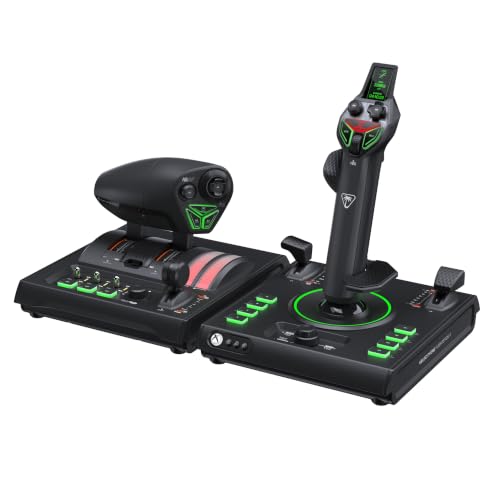
- 73 inputs and 15 Hall-Effect axes
- Full-color display and dual throttle
- Works with Xbox and PC
Best For: Enthusiasts seeking deep customization and expansion
Best Boeing-Style Yoke
TCA Yoke & Quadrant Boeing Edition

- Official Boeing 787-inspired 1:1 design
- Pendular motion with adjustable spring tension
- Throttle quadrant and 35 action buttons included
Best For: Airliner-focused Xbox and PC sim pilots
Best Complete HOTAS Kit
T-Flight Full Kit with Rudder Pedals

- Joystick, throttle, and rudder pedals included
- Five axes and 14 programmable buttons
- Official Xbox integration with console controls
Best For: Versatile Xbox flight and space-sim setups
Best Yoke-and-Game Bundle
TCA Yoke Boeing Edition with MSFS 2024
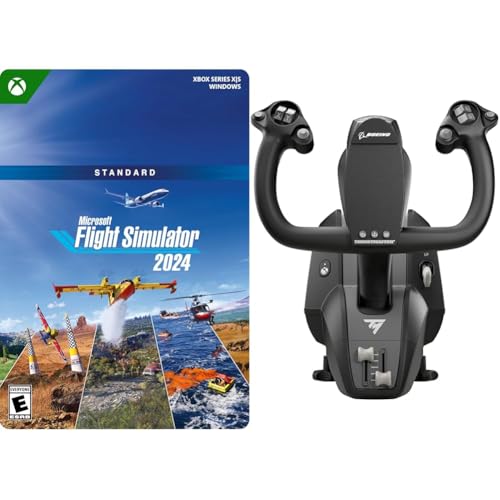
- Includes Microsoft Flight Simulator 2024 Standard
- Boeing 787-inspired 1:1 ergonomic yoke
- Adjustable pendular motion and metal internal structure
Best For: New Xbox pilots wanting hardware and software together
Best All-in-One Pick – Turtle Beach VelocityOne Flight
For shoppers seeking flight simulator yokes for Xbox, the Turtle Beach VelocityOne Flight is a complete control system rather than a standalone yoke. It combines a 180° yoke, throttle quadrant, trim wheel, and integrated rudder and brake controls in one Xbox- and Windows-compatible setup.
Best For: Xbox pilots who want an all-in-one flight control system with extensive built-in controls.
Pros:
- Includes the yoke, throttle quadrant, trim wheel, rudder, and brake controls.
- Uses 180° yoke rotation with a non-contact Hall effect sensor.
- Offers 12 analog axes, 26 buttons, POV and HAT switches, plus a flight management display.
- Designed for Xbox consoles and Microsoft Flight Simulator titles on Windows.
Cons:
- Its 10-pound, sizable design requires suitable desk space.
- The extensive controls may be more than casual players need.
The VelocityOne Flight is the most comprehensive option here for an Xbox-focused home cockpit. Its secure clamping system and modular controls make it particularly appealing when you want to consolidate several flight peripherals into one unit.
Best Airbus-Style Alternative – Thrustmaster TCA Captain Pack X
The Thrustmaster TCA Captain Pack X takes a different approach to flight simulator yokes for Xbox by using an Airbus-style sidestick and throttle quadrant. Its officially licensed, 1:1-scale controls are aimed at players who prefer airliner-inspired controls over a traditional yoke.
Best For: Xbox and PC users who want an Airbus A320-style sidestick and throttle experience.
Pros:
- Includes officially licensed 1:1-scale Airbus sidestick and throttle replicas.
- Provides 14 remappable sidestick buttons and swappable joystick head modules.
- Throttle includes a built-in thrust reverser, while the sidestick can provide rudder control.
- Offers Airbus-style controls for trim, landing gear, autobrake, rudder trim, and parking brake.
Cons:
- It is a sidestick system, not a conventional yoke.
- Some additional accessories mentioned in the notes are sold separately.
Choose this pack when the feel and layout of an Airbus cockpit matter more than traditional yoke handling. The ecosystem hub also helps connect compatible expansion accessories through a single USB connection to Xbox or PC.
Best PC-Focused Yoke System – Logitech G PRO Flight Yoke
The Logitech G PRO Flight Yoke System is a traditional yoke-and-throttle package for desktop flight simulation. It is worth considering among flight simulator yokes for Xbox only with care, since the supplied compatibility information lists Windows rather than Xbox support.
Best For: Windows users who want a conventional yoke with a separate throttle quadrant and many programmable controls.
Pros:
- Includes both a flight yoke and a flight throttle quadrant.
- Provides a POV hat, 14 buttons, and a three-position mode switch.
- Stainless steel yoke shaft is designed for smooth, accurate control.
- Desk clamps provide flexible mounting for a range of desks.
Cons:
- The supplied notes identify Windows compatibility, not Xbox compatibility.
- Optional software is required for Microsoft Flight Simulator and other listed PC simulators.
This is a sensible PC-oriented choice for newcomers and experienced pilots who want yoke muscle-memory practice. Xbox buyers should verify platform support before purchasing, as this model is not presented in the supplied details as an Xbox-compatible controller.
Best Joystick Value for Xbox – Thrustmaster T-Flight Hotas One
Although it is not a yoke, the Thrustmaster T-Flight Hotas One is a practical alternative for shoppers comparing flight simulator yokes for Xbox. It is officially licensed for Microsoft Flight Simulator 2024 and pairs a joystick with a detachable throttle for flexible Xbox and PC setups.
Best For: Xbox players who prefer joystick controls for aircraft, helicopters, and combat-style flying.
Pros:
- Officially licensed for Microsoft Flight Simulator 2024 on Xbox Series X|S and PC.
- Provides five axes, 10-bit precision, 14 action buttons, and a multidirectional hat switch.
- Detachable throttle can be used with the joystick or separately.
- Offers rudder control through the joystick Z-axis or throttle lever.
Cons:
- It is a joystick and throttle, not a yoke system.
- Thrustmaster TFRP rudder pedals are compatible but sold separately.
This model makes the most sense when flexibility and broad aircraft compatibility are more important than yoke realism. Its detachable design suits desks, laps, and varied flight styles, while the adjustable joystick resistance adds control across different aircraft categories.
Premium Yoke Bundle – Logitech G Pro Yoke + Rudder Pedals
If you want traditional yoke handling among flight simulator yokes for Xbox, this Logitech bundle focuses on realistic aircraft control with an included throttle quadrant and rudder pedals. Note that the supplied compatibility details list Windows and desktop use, so verify Xbox support before buying.
Best For: Windows-based flight sim users who want a more complete yoke-and-pedals setup.
Pros:
- Realistic yoke controls support precise aircraft handling and muscle-memory practice.
- Included rudder pedals offer smooth self-centering control and differential toe brakes.
- POV hat, 14 buttons, and a three-position mode switch provide at least 54 programmable controls.
- Adjustable, non-slip footrests accommodate a range of users.
Cons:
- Supplied compatibility information lists Windows rather than Xbox.
- The bundle is more involved than a basic flight stick setup.
This is the most simulation-focused option of the three, pairing yoke input with pedals for a fuller cockpit feel. Its main buying consideration is platform compatibility, particularly for Xbox players.
Xbox Starter HOTAS – Thrustmaster T-Flight Hotas One
For shoppers comparing flight simulator yokes for Xbox, the Thrustmaster T-Flight Hotas One is a console-ready alternative that uses a flight stick and throttle rather than a yoke. It connects by USB to Xbox One, Xbox Series X|S, and Windows PC, making it a straightforward entry point.
Best For: Beginners and Xbox players who want plug-and-play stick-and-throttle control.
Pros:
- Officially compatible with Xbox One, Xbox Series X|S, and Windows PC.
- Detachable throttle can be used with the stick or separately on a desk or lap.
- Adjustable resistance, a responsive trigger, hat switch, and 14 programmable buttons support varied flight games.
- Expandable with Thrustmaster TFRP rudder pedals sold separately.
Cons:
- It is a flight stick, not a traditional yoke.
- Rudder pedals are an additional purchase.
This model is a practical choice when Xbox compatibility and simple setup matter more than authentic yoke mechanics. Its detachable design also suits flexible desk or casual setups.
Advanced Xbox HOTAS – Turtle Beach VelocityOne H.O.T.A.S.
The Turtle Beach VelocityOne H.O.T.A.S. is a feature-rich alternative for Xbox users researching flight simulator yokes for Xbox. Although listed as a yoke controller, its setup centers on Flightstick II controls and a dual throttle, with extensive customization for Xbox One, Xbox Series X|S, and PC.
Best For: Enthusiasts who want extensive inputs, adjustable controls, and a configurable Xbox cockpit setup.
Pros:
- Offers 73 programmable inputs and 15 axes with high-resolution 16-bit Hall-Effect sensors.
- Full-color display provides flight data and quick performance tuning.
- Dual throttle detents, adjustable resistance, and stick tension support personalized control.
- Supports left- or right-handed grip positioning, RGB lighting, and optional pedals or mounting solutions.
Cons:
- Its many settings and inputs may be more than a beginner needs.
- The supplied details describe a flightstick-and-dual-throttle system rather than a conventional yoke.
With its display, Hall-Effect axes, and broad customization options, this is the most advanced Xbox-compatible control system in the group. It makes the most sense for users planning to expand their setup over time.
Best Boeing-Style Yoke – TCA Yoke & Quadrant Boeing Edition
For shoppers comparing flight simulator yokes for Xbox, the Thrustmaster TCA Yoke & Quadrant Boeing Edition is a realism-focused choice. Its officially licensed, 1:1 Boeing 787-inspired design combines a pendular yoke mechanism with a throttle quadrant and Boeing-style autopilot controls.
Best For: Xbox Series X|S and PC pilots who want an authentic airliner-style cockpit setup for Microsoft Flight Simulator.
Pros:
- Officially licensed Boeing 787-inspired yoke with 8.3-inch range of motion.
- Metal internal structure, adjustable spring tension, and suspended pendular mechanism.
- Includes throttle quadrant, autopilot controls, 35 action buttons, and two additional axes.
Cons:
- Designed around airliner-style simulation rather than a compact joystick setup.
- Rudder pedals are compatible but sold separately.
- Its 19-by-15-by-19-inch listed dimensions require substantial desk or cockpit space.
This is the strongest fit for buyers prioritizing Boeing immersion, expanded controls, and a substantial cockpit feel over simplicity or minimal desk space.
Best Complete HOTAS Kit – T-Flight Full Kit with Rudder Pedals
Although it is not a traditional yoke, the Thrustmaster T-Flight Full Kit is worth considering alongside flight simulator yokes for Xbox because it delivers a complete stick, throttle, and rudder-pedal control system. It supports Xbox and PC flight simulation with a combat-ready layout and dedicated console buttons.
Best For: Xbox users who want an all-in-one HOTAS setup for civil aviation, space combat, and other flight-simulation styles.
Pros:
- Includes the joystick, detachable throttle, and TFRP rudder pedals.
- Five axes, 14 programmable buttons, a trigger, and a multidirectional hat switch provide broad control.
- Rudder pedals use a S.M.A.R.T. slide rail system and full-foot design for smoother steering.
Cons:
- Uses a joystick-and-throttle layout rather than a Boeing-style yoke.
- Its 12.4-pound weight and listed dimensions make it less portable than a basic controller.
- Offers fewer buttons than the Boeing yoke pack.
Choose this kit when versatility and included rudder pedals matter more than authentic airliner yoke movement. It is a practical complete package for varied flight and space-simulation games.
Best Yoke-and-Game Bundle – TCA Yoke Boeing Edition with MSFS 2024
For buyers seeking flight simulator yokes for Xbox with software included, this bundle pairs the Thrustmaster TCA Yoke Boeing Edition with a digital code for Microsoft Flight Simulator 2024 Standard. The yoke brings Boeing-inspired controls, pendular motion, and a metal internal structure to Xbox Series X|S and Windows PC.
Best For: New or upgrading Xbox Series X|S pilots who need both an airliner-style yoke and Microsoft Flight Simulator 2024.
Pros:
- Includes Microsoft Flight Simulator 2024 Standard digital code.
- Officially licensed Boeing 787-inspired 1:1 ergonomic yoke design.
- PENDUL_R mechanism offers an 8.3-inch range with adjustable spring resistance.
Cons:
- This bundle is centered on the yoke and does not list a throttle quadrant or rudder pedals.
- The software code is tied to the stated Xbox Series X|S and Windows PC platforms.
- Its airliner-focused design may be less suitable for buyers wanting a compact joystick.
This package is convenient if you need the simulator software as well as the hardware. If you already own Microsoft Flight Simulator 2024, a hardware-only bundle may be the more focused purchase.
How We Picked the Best Flight Simulator Yokes for Xbox
We focused on flight controls that support Xbox gaming and provide a meaningful upgrade over a standard controller. The selection includes true yoke systems, Airbus-style sidesticks, HOTAS bundles, throttle controls, and packages with rudder pedals. We also considered platform compatibility, the number of included controls, layout and adjustability, ease of setup, and suitability for Microsoft Flight Simulator.
Because no single design suits every aircraft, this list includes both yoke-based systems and flight sticks. A yoke is generally the better match for airliners and general-aviation aircraft, while a HOTAS or sidestick can feel more natural for fighter jets, helicopters, and Airbus-style flight decks.
Quick Comparison
- Best all-around yoke experience: Turtle Beach VelocityOne Flight Universal Control System.
- Best for an Airbus-style setup: Thrustmaster TCA Captain Pack X.
- Best traditional PC-style yoke: Logitech G PRO Flight Yoke System.
- Best value for stick-and-throttle flying: Thrustmaster T-Flight Hotas One.
- Best complete yoke package: Thrustmaster TCA Yoke & Quadrant Boeing Edition Flight Pack.
- Best for a fuller cockpit setup: Logitech G Pro Flight Yoke System with Pro Flight Rudder Pedals or a Thrustmaster full-kit bundle.
Key Buying Factors for Flight Simulator Yokes for Xbox
Xbox Compatibility
Confirm that the exact model supports your console generation. Xbox Series X|S compatibility is especially important, as some older PC-oriented flight controls work only through Windows. Also check whether the required game profile or firmware supports your preferred version of Microsoft Flight Simulator.
Yoke, Sidestick, or HOTAS Layout
Choose a yoke for conventional aircraft and airliners, a sidestick for Airbus-inspired control, or HOTAS for combat aircraft and more compact desk setups. A yoke usually requires more room because it moves forward and backward as well as side to side.
Included Throttle and Rudder Controls
A yoke alone may leave you relying on buttons or a controller for throttle and rudder input. Quadrants add more realistic engine controls, while rudder pedals improve taxiing, coordinated turns, and crosswind landings. Bundles can cost more initially but often provide better value than adding accessories later.
Mounting, Adjustability, and Desk Space
Look for stable clamps or a solid base, particularly if you make frequent pitch and roll inputs. Measure your desk before buying, and consider whether the controls can be stored easily. Backlit displays, trim wheels, and programmable buttons are useful extras, but they should not outweigh good ergonomics and reliable compatibility.
Who Should Buy Which Flight Simulator Yokes for Xbox?
Choose a dedicated yoke if you primarily fly Cessnas, business aircraft, or Boeing-style airliners and want the most authentic control motion. Choose a sidestick if you prefer Airbus aircraft or want a smaller, simpler arrangement. Choose HOTAS for fighter jets, space flight, helicopters, or a flexible setup that takes up less front-to-back space.
New pilots should prioritize Xbox support and an included throttle before chasing advanced features. Enthusiasts who already own pedals may benefit from a standalone yoke, while first-time buyers should consider a complete bundle. Finally, verify the exact included accessories and platform listing before ordering, since similarly named products may differ between Xbox, PC, and regional editions.