The best flight simulator joysticks with Hall effect sensors deliver smoother, more consistent input than traditional contact-based designs. They are a smart upgrade for flight sim enthusiasts who want precise control without constant calibration or early wear.
Our selection spans compact single sticks, HOTAS systems, dual-stick space setups, and realistic airline-style controls, so you can match your controller to the aircraft and simulator you actually use.
Best 10 Flight Simulator Joysticks with Hall Effect Sensors Picks for 2026
Best Ambidextrous Space Stick

- 16-bit Hall-effect sensing on three axes
- Up to 44 programmable actions
- Detachable ambidextrous grip with central throttle
Best For: Space-sim pilots wanting extensive controls in a single PC stick
Best Aviation-Style Stick

- 16-bit Hall-effect sensors
- Adjustable tension with no center detent
- Premium gimbal and aviation-style switch panel
Best For: PC pilots seeking smooth, realistic stick movement
Best Full HOTAS Package

- 16-bit Hall-effect aileron and elevator axes
- Twin throttles with friction adjustment
- Extensive programmable controls and RGB lighting
Best For: PC pilots wanting a separate throttle and comprehensive HOTAS controls
Best Premium Combat Replica
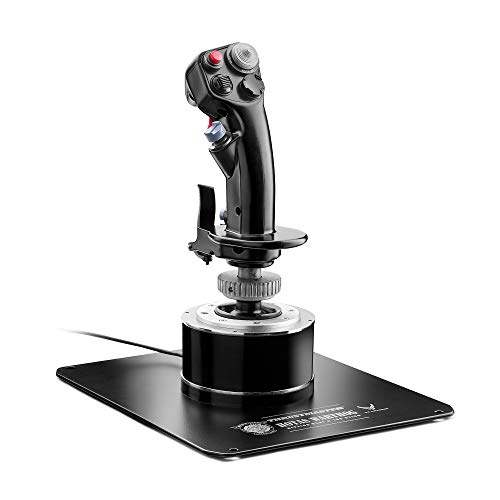
- A-10C-inspired all-metal detachable handle
- 16-bit Hall-effect precision
- Weighted base and 19 combat-focused controls
Best For: Dedicated PC combat-sim pilots seeking a substantial replica stick
Best Xbox/PC Pick

- Hall-effect main axes
- Xbox and PC compatible
- 27 programmable buttons
Best For: Cross-platform pilots wanting an all-in-one stick
Best PC Precision Value

- H.E.A.R.T. magnetic sensors
- Ambidextrous PC design
- 16 buttons and four axes
Best For: PC pilots seeking precise, customizable controls
Best Complete HOTAS Setup

- Joystick, throttle, and pedals included
- Xbox and PC compatibility
- Five axes and 14 mappable buttons
Best For: Pilots wanting a complete cockpit-style control set
Arcade-Ready Precision
Famthrob Hall Sensor Flight Stick

- Contactless Hall sensors target drift-free precision
- Ergonomic grip with extended cabinet stem
- USB plug-and-play arcade and Windows setup
Best For: DIY arcade cabinets and durable gunship-style control
Dual-Stick Combat Control
Thrustmaster T16000M FCS Space Sim Duo

- Two Hall Effect sticks for precise dual control
- 32 programmable buttons with tactile identification
- Ambidextrous, weighted, and software-customizable
Best For: PC space-sim and combat pilots needing many inputs
Airliner-Style Control
Thrustmaster TCA Airbus Sidestick

- 1:1 Airbus A320-inspired sidestick design
- Hall sensor input with integrated throttle and rudder
- 17 buttons plus remappable and swappable controls
Best For: Windows pilots building an Airbus-focused simulator
Best Ambidextrous Space Stick – Thrustmaster Sol-R1
The Thrustmaster Sol-R1 is a strong option among flight simulator joysticks with hall effect sensors for PC pilots who want extensive controls in a compact, space-combat-focused design. Its 16-bit Hall-effect sensing covers the X, Y, and Z axes, while the integrated central throttle and programmable inputs reduce reliance on the keyboard.
Best For: Space-sim players and ambidextrous PC users who want a feature-rich single-stick setup.
Pros:
- 16-bit Hall-effect accuracy across X, Y, and Z axes.
- Up to 44 programmable actions, including 21 controls on the stick.
- Detachable ambidextrous grip, central throttle, ministick, and backlit design.
Cons:
- Designed for PC and Windows rather than console platforms.
- Its space-combat styling and extensive controls may be more than casual pilots need.
The Sol-R1 balances precise sensing with an unusually broad control layout. It is particularly appealing if you want a standalone flight stick with built-in throttle functionality and flexible left- or right-handed ergonomics.
Best Aviation-Style Stick – Honeycomb Foxtrot
The Honeycomb Foxtrot Aviation Stick brings an aviation-oriented feel to the category of flight simulator joysticks with hall effect sensors. Its 16-bit sensors and premium gimbal are paired with adjustable tension and a linear movement profile without a center detent, making it suited to stick-controlled aircraft and aerobatics.
Best For: Flight-simulation enthusiasts who prioritize smooth, realistic stick movement and aviation-style controls.
Pros:
- 16-bit Hall-effect sensors and a premium gimbal mechanism.
- Adjustable tension with smooth, linear movement and no center detent.
- Includes a POV switch, four action buttons, rocker switches, trigger, and twist movement.
Cons:
- Limited to PC connectivity.
- Its 18-button layout is less extensive than some dedicated combat HOTAS systems.
The Foxtrot emphasizes feel over a crowded button count. Choose it when realistic, adjustable resistance and a center-detent-free motion profile matter more than having a large number of programmable controls.
Best Full HOTAS Package – Logitech G X56
The Logitech G X56 combines a joystick and twin-throttle unit for pilots comparing flight simulator joysticks with hall effect sensors as part of a complete HOTAS setup. It offers 16-bit Hall-effect aileron and elevator axes, adjustable stick force through four springs, RGB lighting, and a large set of programmable controls.
Best For: PC flight and space-sim players who want separate throttles and extensive hands-on controls.
Pros:
- 16-bit Hall-effect sensing on the aileron and elevator axes.
- Twin throttles with friction adjustment and throttle lock.
- Up to 189 programmable controls, RGB lighting, and a mini analog stick.
Cons:
- Requires two USB 2.0 ports.
- The full HOTAS arrangement occupies more desk space than a standalone stick.
- Compatibility is centered on PC and Windows systems.
The X56 is the most control-heavy choice in this group. Its separate throttle module and extensive programming options make it a practical fit for complex combat, space, and VR-oriented control schemes, provided your desk has room for both units.
Best Premium Combat Replica – Thrustmaster HOTAS Warthog
The Thrustmaster HOTAS Warthog is a premium combat-oriented option among flight simulator joysticks with hall effect sensors. Modeled after the A-10C stick, it pairs 16-bit Hall-effect precision with a detachable all-metal handle, a weighted base, and a control layout built for demanding simulator sessions.
Best For: Serious PC combat-sim users who want an authentic, heavy, metal flight-stick experience.
Pros:
- 16-bit Hall-effect sensing designed to resist drift and long-term degradation.
- All-metal detachable handle with a weighted base over 6 pounds.
- 19 controls, including three 8-way hats, dual trigger, and pinkie switches.
- Supports detailed programming through Thrustmaster T.A.R.G.E.T. software.
Cons:
- PC-only compatibility.
- Its heavy, full-size construction is less convenient for casual or compact desk setups.
- It is a flight stick rather than a complete throttle-and-stick package.
The Warthog favors solidity, authenticity, and tactile control over portability. It is a compelling centerpiece for a dedicated PC cockpit or desk setup, especially for pilots who value the A-10C replica design and substantial metal construction.
Best Xbox/PC Pick – VelocityOne Flightstick
The Turtle Beach VelocityOne Flightstick is a versatile choice among flight simulator joysticks with hall effect sensors, especially for players who switch between Xbox and PC. Its non-contact main axes, 27 programmable buttons, built-in throttle and flap levers, and OLED flight management display provide broad control without requiring a separate throttle unit.
Best For: Xbox and PC pilots who want an ambidextrous, feature-rich stick for both fighter jets and airliners.
Pros:
- Hall-effect, non-contact main axes designed for precise control.
- Works with Xbox Series X|S, Xbox One, and PC.
- Includes 27 programmable buttons, eight axes, a POV hat, and a rapid-fire trigger.
- Built-in OLED display, configuration wheel, touchpad, and adjustable RGB lighting.
Cons:
- Its extensive feature set may be more than casual pilots need.
- It uses a corded USB connection rather than wireless connectivity.
Choose this model if platform flexibility and an all-in-one control layout matter most. The integrated display and cursor-control touchpad also make it practical for navigating flight-management functions without leaving the stick.
Best PC Precision Value – T16000M FCS
The Thrustmaster T16000M FCS is a focused PC option for shoppers comparing flight simulator joysticks with hall effect sensors. Its H.E.A.R.T magnetic sensor technology, four axes, integrated twist rudder, and programmable controls offer detailed input without requiring separate rudder pedals.
Best For: PC pilots who want drift-free sensor precision and a fully ambidextrous layout.
Pros:
- H.E.A.R.T. magnetic sensors provide consistent, drift-free control.
- Ambidextrous design includes removable and swappable components.
- Offers 16 buttons, an eight-way hat switch, four axes, and an integrated throttle.
- T.A.R.G.E.T. software supports customizable game profiles.
Cons:
- Compatible with PC only.
- Does not include separate rudder pedals.
This is a sensible pick for PC users who prioritize sensor accuracy and flexible button mapping. The built-in twist rudder keeps the setup compact while still covering pitch, roll, yaw, and throttle inputs.
Best Complete HOTAS Setup – T-Flight Full Kit
The Thrustmaster T-Flight Full Kit is a complete option for shoppers seeking flight simulator joysticks with hall effect sensors and dedicated pedals. It combines a joystick, detachable throttle, and TFRP rudder pedals, while its Xbox integration and five-axis layout support hands-on control across compatible Xbox and PC flight simulations.
Best For: Xbox and PC pilots who want a fuller cockpit-style setup with throttle and rudder pedals included.
Pros:
- Includes a Hall-effect joystick, detachable throttle, and rudder pedals.
- Provides five axes, 14 mappable buttons, a rapid-fire trigger, and a multidirectional hat switch.
- Official Xbox controls include Guide, View, and Menu buttons.
- Pedals use a smooth S.M.A.R.T. slide rail system and full-foot surfaces.
Cons:
- The complete kit is substantially larger and heavier than a standalone joystick.
- Its full setup requires more space and installation than a stick-only solution.
This kit is the strongest choice when realistic hands-on control is more important than desk simplicity. The included pedals add dedicated yaw control for coordinated turns, taxiing, and landing approaches.
Arcade-Ready Precision – Famthrob Hall Sensor Flight Stick
The Famthrob is a practical choice for builders seeking flight simulator joysticks with hall effect sensors for arcade cabinets or PC gaming. Its contactless magnetic sensing is designed for consistent input, while the extended stem and palm-supporting grip suit longer arcade sessions.
Best For: DIY arcade cabinet builders and players who want a durable, gunship-style wired joystick.
Pros:
- Hall Effect sensors are designed to avoid drift, dead zones, and physical wear.
- Large ergonomic grip and wide palm rest support a natural hold.
- USB plug-and-play setup works with Windows and arcade installations.
- Extended stem and mounting disc are suited to cabinet fitting.
Cons:
- Only two buttons are listed, limiting controls for complex simulator setups.
- The installation is aimed at users comfortable with drilling and fitting.
- Its arcade-focused design may be less suitable for desktop aviation simulation.
This is a specialized, sturdy-feeling option for arcade projects rather than a full HOTAS replacement. Choose it when installation flexibility and long-term Hall sensor durability matter more than extensive onboard controls.
Dual-Stick Combat Control – Thrustmaster T16000M FCS Space Sim Duo
The Thrustmaster T16000M FCS Space Sim Duo is built for PC pilots comparing flight simulator joysticks with hall effect sensors. Its two magnetic-sensor sticks provide dual-stick control, while 32 programmable buttons and weighted bases support detailed space and combat-simulation setups.
Best For: Space-sim players who want ambidextrous dual-stick control and extensive programmable inputs.
Pros:
- Both sticks use Hall Effect magnetic sensors for precise, wear-resistant input.
- 32 programmable buttons keep many commands within reach.
- Ambidextrous components support left-handed, right-handed, or dual-stick configurations.
- Weighted bases and contoured rests help reduce movement and fatigue.
Cons:
- The dual-stick setup takes substantially more desk space than a single joystick.
- It is designed for PC use rather than console compatibility.
- Advanced customization depends on learning the included T.A.R.G.E.T. software.
For space combat and other games that benefit from two-handed analog control, this is the most feature-rich option in the group. Its button count and configuration flexibility make it better suited to complex mappings than simple aviation setups.
Airliner-Style Control – Thrustmaster TCA Airbus Sidestick
The Thrustmaster TCA Sidestick Airbus Edition combines an Airbus-inspired layout with Hall sensor precision, making it a focused option among flight simulator joysticks with hall effect sensors. Its integrated throttle, thrust reverser, twist rudder, and remappable buttons reduce the need for separate controls.
Best For: PC flight-sim users who want an Airbus-style sidestick with integrated throttle and rudder functions.
Pros:
- Officially licensed, 1:1-scale Airbus A320 sidestick design.
- Contactless magnetic sensing is intended to prevent potentiometer wear and drift.
- Includes 17 action buttons, with 12 remappable buttons and swappable head modules.
- Built-in throttle, thrust reverser, and twist rudder add useful all-in-one control.
Cons:
- The Airbus-oriented shape may feel less natural for users seeking a conventional joystick.
- It is compatible with Windows PC systems, not broadly listed for other platforms.
- A single sidestick may provide fewer controls than a dedicated dual-stick or full HOTAS setup.
This model is a strong fit for civilian and Airbus-focused simulation, especially where desk space is limited. Its integrated controls offer a convenient starting point, while additional Thrustmaster accessories can expand the setup later.
How We Picked the Best Flight Simulator Joysticks with Hall Effect Sensors
We focused on control precision, sensor technology, ergonomics, button access, compatibility, construction quality, and overall value. Hall effect sensors use magnets rather than physical contact to detect movement, which can provide smooth response and reduce mechanical wear. Because manufacturers do not always use the term consistently, we also considered the stick’s broader control system, adjustability, software support, and suitability for flight simulation.
The lineup includes standalone joysticks, HOTAS combinations, rudder-pedal bundles, and left-right stick options. Compatibility matters as well, so check the listed Xbox, PC, or simulator support before buying.
Quick Comparison
| Best For | What to Prioritize |
|---|---|
| General flight simulation | Precise axes, comfortable grip, and easy button access |
| Combat simulation | Programmable controls, adjustable resistance, and throttle access |
| Space simulation | Ambidextrous design, dual-stick support, and many axes |
| Airliner simulation | Realistic layout, smooth pitch and roll, and aircraft-style controls |
| Console gaming | Native platform compatibility and simple setup |
Key Buying Factors
Sensor Accuracy and Axis Feel
Look for smooth movement around center, low unwanted drift, and consistent response across the full range. Hall effect sensing is useful, but gimbal design and calibration still affect real-world performance.
Controls and Programmability
Count the buttons, hats, triggers, sliders, and rotary controls you can reach without removing your hand. Combat aircraft and complex simulators benefit from extensive programmable inputs, while casual pilots may prefer a simpler layout.
Throttle, Pedals, and Expansion
A standalone stick can be more affordable and flexible, but a HOTAS bundle provides coordinated throttle control. Rudder pedals add realism and finer yaw control, especially for takeoffs, landings, and helicopters.
Comfort, Mounting, and Compatibility
Check grip size, handedness, resistance adjustment, base stability, and desk space. Confirm operating-system, console, and simulator compatibility, along with whether configuration software is required.
Who Should Buy Which Flight Simulator Joysticks with Hall Effect Sensors?
Choose a compact single stick if you want straightforward controls for general aviation or arcade-style flying. A HOTAS setup is better for combat sims and long sessions where throttle control and extra inputs matter. Space-sim players should consider dual-stick options or an ambidextrous model for six-degree-of-freedom control. Pilots seeking airline realism may prefer an aviation-focused sidestick with a familiar layout. Finally, console users should prioritize officially supported Xbox or PC connectivity over expanded customization.