The best flight simulator joysticks with twist rudders make coordinated turns, yaw corrections, and precise landings easier without requiring a separate rudder-pedal setup. This roundup covers straightforward USB sticks, complete HOTAS systems, and expandable controls for both flight and space simulators.
We compare compatibility, control layout, adjustability, and overall value so you can choose a setup that fits your aircraft, desk space, and experience level.
Best 10 Flight Simulator Joysticks with Twist Rudders Picks for 2026
Best Complete Xbox Kit

- Joystick, throttle, and rudder pedals included
- Adjustable stick resistance
- Plug-and-play for Xbox and PC
Best For: Xbox and PC pilots wanting a complete flight-control setup
Best Premium HOTAS Layout

- Adjustable throttle with detents
- LCD display and illuminated buttons
- Programmable PC-focused controls
Best For: PC pilots seeking a configurable HOTAS cockpit setup
Best Twist-Rudder and Pedal Flexibility

- Built-in twist-rudder axis
- Hall Effect stick sensors
- Includes sliding-rail rudder pedals
Best For: PC pilots wanting twist control plus a pedal upgrade path
Best Feature-Rich Console Controls
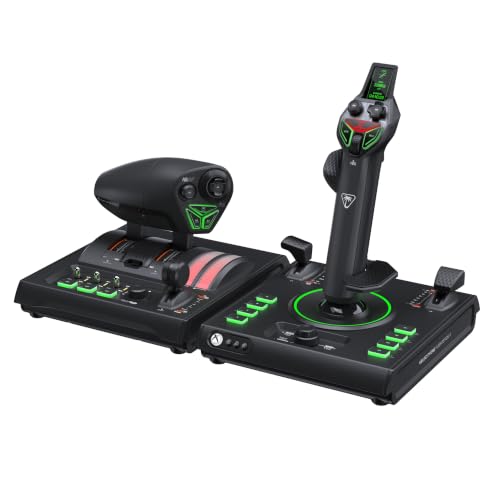
- 73 programmable inputs and 15 axes
- Selectable twist rudder
- Works with Xbox and PC
Best For: Console and PC pilots planning a customizable flight setup
Best Premium Bundle
Logitech G X56 H.O.T.A.S. with Rudder Pedals

- HOTAS controller plus dedicated rudder pedals
- Adjustable pedal tension and differential toe brakes
- RGB lighting and VR-friendly control placement
Best For: PC sim enthusiasts wanting a comprehensive cockpit-style setup
Best Dual-Stick Choice
Thrustmaster T16000M FCS Space Sim Duo

- Dual Hall-effect sticks with twist rudder
- 32 programmable buttons and tactile identification
- Ambidextrous layouts with weighted bases
Best For: PC space-sim players wanting two-handed control
Best Customizable HOTAS
Logitech G X56 H.O.T.A.S. Flight Controller
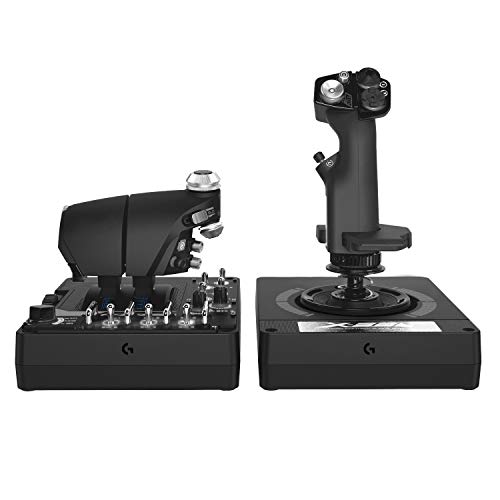
- Twin throttles with friction adjustment
- Adjustable stick force and Hall-effect sensors
- RGB lighting and extensive programmable controls
Best For: PC pilots wanting a configurable HOTAS system
Premium HOSAS Pick
Thrustmaster Sol-R2 HOSAS Dual Space Combat Flight Joystick Set

- Dual detachable grips and bases for HOSAS space control
- 88 programmable action buttons for complex inputs
- Hall-effect sensing with 16-bit X, Y, and Z resolution
Best For: Space-sim players wanting a highly configurable dual-stick setup
Modular Military-Style Pick

- Aviation-grade aluminum body with a classic military-control design
- 30 configurable input signals through MOZA software
- Modular expansions connect through pogo pins without extra cables
Best For: PC pilots building a realistic and expandable MOZA cockpit
Simple Twist-Rudder Value Pick
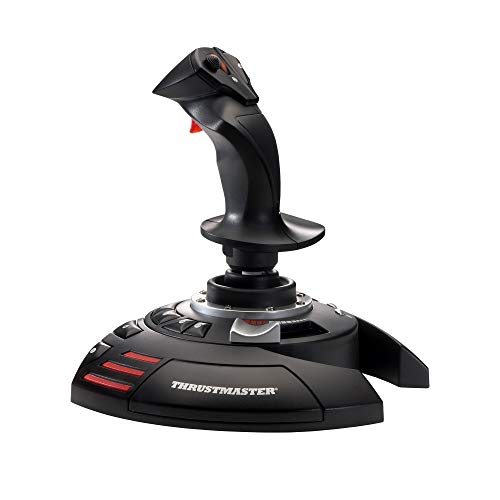
- Built-in rotating-handle rudder control
- Integrated throttle and weighted base save desk space
- Plug-and-play setup with 12 programmable buttons
Best For: Beginners wanting compact, all-in-one flight controls
Best Complete Xbox Kit – T.Flight Full Kit X
For shoppers seeking flight simulator joysticks with twist rudders, the T.Flight Full Kit X takes a different approach: it combines a joystick and detachable throttle with dedicated rudder pedals. Its plug-and-play setup supports Xbox Series X|S, Xbox One, and PC.
Best For: Xbox and PC pilots who want a complete control kit with dedicated pedals.
Pros:
- Includes joystick, detachable throttle, and TFRP rudder pedals.
- Joystick resistance is adjustable for personalized control.
- Offers 14 action buttons, five joystick axes, and three pedal axes.
- Plug-and-play configuration enables quick installation.
Cons:
- The full kit is comparatively large and heavy.
- Dedicated pedals require more desk or floor space than a twist-rudder-only setup.
This is a strong all-in-one option for console users who want to move beyond twist control and add dedicated rudder input. Its detachable components also make positioning more flexible.
Best Premium HOTAS Layout – X52 Pro Flight Control System
The Logitech G Saitek X52 Pro is a PC-focused HOTAS system for flight sim players who prefer separate stick and throttle controls. It pairs a precision centering mechanism with an adjustable throttle, illuminated controls, and an LCD multifunction display.
Best For: PC pilots who value configurable controls, throttle detents, and a cockpit-style interface.
Pros:
- Progressive throttle includes resistance adjustment and Afterburner and Idle detents.
- Illuminated buttons and LCD display provide useful feedback.
- Five-position handle adjustment accommodates different hand sizes.
- Smart software supports game-specific controller programming.
Cons:
- Compatible with PC rather than Xbox consoles.
- Requires two USB 2.0 ports.
- Optional software download requires an internet connection.
The X52 Pro is best suited to PC users who want a dedicated HOTAS arrangement and extensive configuration options. It does not specifically list a twist-rudder axis in the supplied details, so buyers prioritizing twist control should verify their preferred setup.
Best Twist-Rudder and Pedal Flexibility – T.16000M FCS HOTAS
For flight simulator joysticks with twist rudders, the T.16000M FCS HOTAS stands out by combining a precision joystick with a built-in twist axis and separate TFRP rudder pedals. The system is designed for PC, while the pedals also support other compatible joystick setups.
Best For: PC pilots who want twist-rudder control now and the option to add smooth sliding rudder pedals.
Pros:
- Joystick provides four independent axes, including a twist rudder.
- Hall Effect magnetic sensors support precise stick input.
- Includes 16 action buttons with braille-style identification.
- TFRP pedals offer smooth aluminum slide rails and differential braking.
Cons:
- The listed HOTAS compatibility is centered on Windows PC.
- Separate pedals add to the setup’s footprint.
- Some console compatibility depends on the specific joystick used.
This bundle is a versatile choice for players who want both control methods: twist rudder input from the stick and a dedicated pedal upgrade. Its Hall Effect sensing and adjustable pedal configuration make it suitable across combat, space, and civilian flight simulations.
Best Feature-Rich Console Controls – VelocityOne H.O.T.A.S.
The Turtle Beach VelocityOne H.O.T.A.S. is a feature-rich option for flight simulator joysticks with twist rudders, offering an enabled-or-locked twist-rudder control alongside dual throttles. It works with Xbox One, Xbox Series consoles, and PC, and adds extensive customization through its display and app.
Best For: Xbox and PC pilots who want extensive inputs, adjustable controls, and room to expand into a cockpit setup.
Pros:
- Provides 73 programmable inputs and 15 axes.
- Twist rudder can be enabled or locked when pedals are added.
- Dual throttle detents, adjustable resistance, and stick-tension settings support customization.
- Full-color display, RGB lighting, and app-based configuration add feedback and personalization.
Cons:
- Its extensive features may be more than casual pilots need.
- Dedicated pedals are not included.
- Uses USB-C connectivity, so cable compatibility should be checked.
This is a strong choice when flexibility and expansion matter. The selectable twist-rudder function lets users begin without pedals and later lock the axis when building a more advanced cockpit.
Best Premium Bundle – Logitech G X56 H.O.T.A.S. with Rudder Pedals
For sim pilots who want a comprehensive setup, this Logitech X56 bundle combines a HOTAS controller with Pro Flight Rudder Pedals. It is a strong option among flight simulator joysticks with twist rudders, although the included pedals provide the dedicated yaw control rather than the joystick itself.
Best For: PC sim enthusiasts seeking a detailed, multi-control setup with dedicated rudder pedals.
Pros:
- Includes both the X56 HOTAS and adjustable-tension rudder pedals.
- Offers customizable controls, RGB backlighting, and VR-friendly button placement.
- Pedals include differential toe brakes for added runway control.
Cons:
- Requires a larger setup area for the throttle, joystick, and pedals.
- Uses separate rudder pedals instead of a twist-rudder axis on the stick.
This is the most complete choice here for buyers prioritizing realistic, layered control over a compact footprint.
Best Dual-Stick Choice – Thrustmaster T16000M FCS Space Sim Duo
The Thrustmaster T16000M FCS Space Sim Duo is a PC-focused dual-stick system for players who want precise, two-handed control. Each stick includes Hall-effect sensing, and the supplied specifications list a twist rudder, making it a particularly versatile pick among flight simulator joysticks with twist rudders.
Best For: PC space-sim players who prefer dual sticks, extensive button mapping, and ambidextrous configuration.
Pros:
- Dual Hall-effect sticks are designed for accurate, drift-resistant inputs.
- Provides 32 programmable buttons with tactile Braille-style identification.
- Supports left-handed, right-handed, or true dual-stick layouts.
- Includes weighted bases, ergonomic hand rests, and T.A.R.G.E.T. software.
Cons:
- Designed for PC and connects through USB.
- Dual-stick controls may be more specialized than a conventional HOTAS layout.
Choose this set when two-handed space-sim control and configuration flexibility matter more than a bundled throttle.
Best Customizable HOTAS – Logitech G X56 H.O.T.A.S. Flight Controller
The Logitech G X56 H.O.T.A.S. is a standalone throttle-and-joystick system built for PC flight and space simulation. Its adjustable stick-force options, twin throttles, programmable controls, and mini analog stick make it a flexible choice for buyers comparing flight simulator joysticks with twist rudders, though the supplied notes do not identify a twist-rudder axis for this model.
Best For: PC users who want a configurable HOTAS with twin throttles and extensive controls.
Pros:
- Provides 189 programmable controls according to the product notes.
- Includes twin throttles with friction adjustment and a throttle-lock cable.
- Offers four spring options and adjustable stick force.
- Features Hall-effect sensors, RGB lighting, and a mini analog stick.
Cons:
- Requires two USB 2.0 ports and a Windows-compatible PC.
- Its many controls may involve a longer setup and mapping process.
- The supplied notes do not confirm an integrated twist-rudder axis.
This X56 suits pilots who value HOTAS depth and customization, especially for complex aircraft or space-sim control schemes.
Premium HOSAS Pick – Thrustmaster Sol-R2 HOSAS Dual Space Combat Flight Joystick Set
For demanding space-sim pilots comparing flight simulator joysticks with twist rudders, the Sol-R2 takes a dual-stick HOSAS approach rather than relying on a traditional single stick. Its two detachable grips, dual bases, Hall-effect sensors, and extensive button layout are designed for complex spacecraft control.
Best For: Space-sim players who want dual-stick control and extensive programmable inputs.
Pros:
- Two ambidextrous detachable grips and two bases provide a complete HOSAS setup.
- Offers 88 programmable action buttons, including triggers, hat switches, ministicks, and thumbwheels.
- Hall-effect technology provides 16-bit resolution across the X, Y, and Z axes, with zero drift and zero deadzone according to the supplied specifications.
- Interchangeable wrist and thumb rests, stability supports, and backlit sci-fi styling add comfort and visual appeal.
Cons:
- Its dual-stick design is specialized for space combat and may be more setup than conventional flight sim users need.
- The complete system is relatively substantial at 2,539 g.
The Sol-R2 is a feature-heavy choice for PC pilots who want maximum control over spacecraft systems. It is less about a simple twist-rudder layout and more about building an immersive, expandable HOSAS cockpit.
Modular Military-Style Pick – MOZA MH16 Flightstick
The MOZA MH16 is a metal-bodied PC flightstick for buyers who prioritize a realistic aircraft-control aesthetic and modular expansion. While it is not described as having a twist rudder, it offers 30 configurable input signals and direct integration with the MOZA AB9.
Best For: PC sim pilots building a realistic, modular MOZA cockpit setup.
Pros:
- Military-inspired styling and an aviation-grade aluminum body provide a substantial, realistic feel.
- Thirty configurable input signals support customized cockpit controls.
- Removable modules use pogo-pin connections for cable-free expansion.
- Includes an ALPS 8-way hat switch and plug-and-play integration with the MOZA AB9.
Cons:
- The supplied notes do not list a built-in twist rudder or integrated throttle.
- Some third-party systems require adapters for compatibility.
The MH16 suits users who are assembling a dedicated flight-control environment rather than seeking an all-in-one joystick. Its metal construction, configurable inputs, and modular design make it especially appealing within or alongside a MOZA setup.
Simple Twist-Rudder Value Pick – Thrustmaster T-Flight Stick X
The T-Flight Stick X is a practical option for shoppers seeking flight simulator joysticks with twist rudders without adding separate pedals. It combines a rotating handle with rudder control, an integrated throttle, adjustable resistance, and plug-and-play USB connectivity for PC and PlayStation 3.
Best For: Beginners and space or flight-sim players who want an affordable all-in-one control setup.
Pros:
- Built-in twist rudder provides yaw control without requiring separate rudder pedals.
- Integrated throttle, adjustable stick resistance, and a weighted base support a straightforward desk setup.
- Plug-and-play USB connection helps users start quickly without complicated installation.
- Twelve programmable buttons, mapping controls, presets, and internal memory allow customized profiles.
Cons:
- It has fewer controls than the dual-stick Sol-R2, with 12 listed buttons.
- Its platform compatibility is listed as PC and PlayStation 3 rather than newer consoles.
For most buyers specifically looking for twist-rudder functionality, the T-Flight Stick X is the most direct match in this group. Its integrated throttle and weighted base keep the setup compact while still covering the core controls needed for many flight and space games.
How We Picked the Best Flight Simulator Joysticks with Twist Rudders
We focused on the controls that matter most in real use: reliable twist-axis yaw, comfortable grip design, button placement, throttle integration, connection type, platform support, and the ease of expanding the setup later. We also considered whether each product is best suited to casual flying, serious simulator use, combat flight, or space games.
Because the list includes both standalone joysticks and larger HOTAS or HOSAS bundles, value was judged by the controls included—not simply the lowest price. A joystick with a twist rudder may be all a beginner needs, while a dedicated throttle and pedals can be worthwhile for frequent simulator users.
Quick Comparison
| Setup type | Best for | Main advantage |
|---|---|---|
| Standalone twist joystick | Beginners and compact desks | Simple setup and lower cost |
| Joystick and throttle | Combat and flight simulation | More immersive power control |
| HOTAS with pedals | Dedicated sim users | Independent yaw and throttle inputs |
| Dual-stick HOSAS | Space combat | Excellent six-axis control |
Key Buying Factors
Twist Rudder Feel and Precision
Check whether the stick provides a true twist axis and whether the resistance feels predictable. Adjustable sensitivity, dead-zone controls, and calibration support can make a major difference when lining up approaches or making small yaw corrections.
Compatibility and Connection
Confirm support for your platform before buying. PC compatibility is common, but Xbox support varies considerably. Also check whether the product requires multiple USB ports, proprietary software, or separate power connections.
Control Layout and Ergonomics
Count the buttons, hats, triggers, and analog controls you actually need. A dense layout is useful for complex aircraft, but a simpler grip may be easier to learn. Look for a stable base, comfortable palm support, and accessible controls during long sessions.
Throttle, Pedals, and Expandability
An integrated throttle keeps the setup compact, while a separate throttle provides more range and controls. Rudder pedals offer the most natural yaw input, but they require additional floor space. Consider whether you may add pedals or a throttle later.
Who Should Buy Which Flight Simulator Joysticks with Twist Rudders?
Choose a standalone twist joystick if you are new to flight simulation, have limited desk space, or want an affordable controller for occasional play. These models are also convenient for mixed use across flight and space games.
Choose a HOTAS setup if you regularly fly combat aircraft or want throttle and stick controls separated for more immersion. Models with extensive programmable inputs are particularly useful for complex cockpit bindings.
Choose a bundle with rudder pedals if you plan long sessions or want independent yaw control rather than twisting the stick. Pedals are especially appealing for civilian flight simulation and aircraft that benefit from coordinated rudder input.
Choose a dual-stick HOSAS system if space combat is your priority. Two sticks provide flexible pitch, roll, yaw, strafe, and acceleration control, though they can require more configuration and practice than a conventional joystick.