The right flight simulator joystick can make aircraft control feel more precise, immersive, and intuitive. Whether you fly Microsoft Flight Simulator, combat sims, or space games, the best choice depends on your platform, preferred aircraft, desk space, and appetite for programmable controls.
We compared 10 standout flight simulator joysticks and HOTAS systems across compatibility, control layout, adjustability, build quality, and overall value. Use the guide below to narrow the list to the setup that best matches how you fly.
Best 10 Flight Simulator Joysticks Picks for 2026
Best Value HOTAS

- 12 programmable buttons and 5 axes
- Detachable full-size throttle
- Adjustable resistance with plug-and-play setup
Best For: PC pilots seeking an accessible HOTAS setup
Best Xbox Pick

- Works with Xbox and PC
- 27 programmable buttons and 8 axes
- OLED display with throttle and flap controls
Best For: Xbox and PC air or space sim players
Best Premium Combat Stick

- All-metal A-10C replica handle
- 16-bit Hall-effect precision
- 19 buttons with T.A.R.G.E.T. programming
Best For: Serious PC combat-sim cockpit builders
Best for Customization
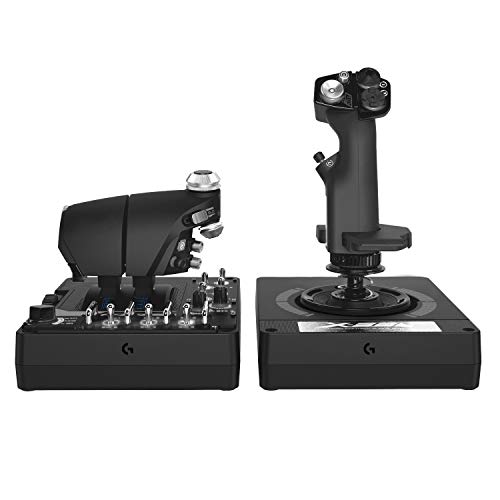
- Twin throttles with friction adjustment
- 24 buttons and extensive programmable controls
- Adjustable stick force with RGB lighting
Best For: PC and VR sim players wanting maximum control mapping
Best Xbox & PC Flight Sim Starter

- Official Microsoft Flight Simulator 2024 licensing
- Five axes with dual rudder options
- Detachable throttle for flexible setups
Best For: Xbox and PC beginners seeking versatile controls
Best Programmable PC HOTAS

- LCD display with illuminated buttons
- Adjustable throttle with flight detents
- Programmable through Smart Technology software
Best For: PC users wanting customizable combat-sim controls
Best Airbus-Style Immersion

- Official 1:1-scale Airbus replicas
- Built-in thrust reverser and rudder control
- 31-button, four-axis throttle quadrant
Best For: Airbus and civil aviation simulation enthusiasts
Best Dual-Stick Setup

- Dual Hall-effect sticks for precise input
- 32 programmable buttons
- Ambidextrous dual-stick configuration
Best For: Dedicated PC space-sim players seeking extensive two-handed control
Best for Airbus Simulation

- Official 1:1 A320 sidestick design
- Built-in throttle and thrust reverser
- Drift-free magnetic sensing
Best For: PC pilots building an Airbus-focused simulator setup
Best Feature-Rich Space Stick
Sol-R1 Hall-Effect Flight Stick

- Up to 44 programmable actions
- Integrated central throttle
- Ambidextrous Hall-effect grip
Best For: PC space-combat pilots wanting extensive controls in one unit
Best Value HOTAS – T-Flight Hotas X
The Thrustmaster T-Flight Hotas X is a practical starting point for shoppers comparing flight simulator joysticks on PC. Its joystick and full-size throttle provide a familiar HOTAS layout, while programmable controls and adjustable resistance make it easy to tailor for civil aviation or combat games.
Best For: PC pilots who want an affordable, flexible HOTAS setup with a detachable throttle.
Pros:
- Includes 12 programmable buttons and 5 axes.
- Detachable throttle supports compact or separated setups.
- Adjustable joystick resistance and dual rudder control.
- Plug-and-play setup includes preset switching and onboard memory.
Cons:
- Designed primarily for PC, with PlayStation 3 compatibility also listed.
- Its feature set is more streamlined than higher-end HOTAS systems.
For new or occasional sim pilots, the T-Flight Hotas X covers the essential controls without adding unnecessary complexity. The weighted base, programmable layout, and flexible throttle arrangement make it a sensible desktop choice.
Best Xbox Pick – VelocityOne Flightstick
The Turtle Beach VelocityOne Flightstick stands out among flight simulator joysticks for its broad platform support and unusually large control count. It works with Xbox consoles and PC, pairing 27 programmable buttons with eight axes, an OLED flight management display, and cursor navigation.
Best For: Xbox and PC users who want one ambidextrous controller for air and space simulation.
Pros:
- Compatible with Xbox Series X|S, Xbox One, and PC.
- Provides 27 programmable buttons and 8 axes.
- Includes customizable throttle and flap levers.
- Features an OLED display, configuration wheel, touchpad, and adjustable RGB lighting.
Cons:
- Requires USB-C connectivity and a wired setup.
- Its extensive controls may take time to configure.
This is a strong choice when console compatibility matters as much as control flexibility. Its ambidextrous design and display-driven features also give it appeal for players switching between different aircraft and simulation styles.
Best Premium Combat Stick – HOTAS Warthog A-10C
The Thrustmaster HOTAS Warthog is a premium option for shoppers who prioritize realism and tactile control in flight simulator joysticks. Its A-10C-inspired metal stick, weighted base, Hall-effect sensors, and extensive button layout are aimed at serious PC combat-simulation setups.
Best For: Dedicated PC combat-sim pilots building a heavy, realistic desktop or cockpit setup.
Pros:
- Authentic A-10C replica design with an all-metal detachable handle.
- Hall-effect sensors provide 16-bit resolution per axis.
- Offers 19 action buttons, multiple hats, dual trigger, and pinkie switches.
- Supports detailed programming through Thrustmaster T.A.R.G.E.T. software.
Cons:
- At 9.8 pounds, it is substantially heavier than many desktop sticks.
- PC-focused and positioned as a specialized, premium controller.
The Warthog is best viewed as a long-term centerpiece rather than a casual accessory. Its metal construction and extensive programming potential suit pilots who want stable, deliberate inputs and a more authentic combat-cockpit feel.
Best for Customization – Logitech G X56 HOTAS
The Logitech G X56 is one of the more control-dense flight simulator joysticks for PC, combining a joystick with twin throttles and a large collection of programmable inputs. Its adjustable stick force, throttle friction controls, mini analog sticks, and RGB lighting make it especially suited to customizable space and flight sim configurations.
Best For: PC and VR-oriented players who want extensive controls for aircraft or spacecraft simulation.
Pros:
- Includes twin throttles with friction adjustment and throttle lock.
- Offers 24 buttons plus a large set of programmable controls.
- Uses Hall-effect sensors for the aileron and elevator axes.
- Provides adjustable stick force through a four-spring system and customizable RGB lighting.
Cons:
- Requires two USB 2.0 ports.
- Listed compatibility is centered on Windows PC.
- The many controls may require more setup than a simpler joystick.
The X56 makes sense for pilots who want to map numerous aircraft or spacecraft functions without relying heavily on the keyboard. Its twin-throttle design and adjustable controls offer flexibility, while the PC-only focus keeps the system targeted at dedicated sim users.
Best Xbox & PC Flight Sim Starter – T-Flight Hotas One MSFS 2024
The Thrustmaster T-Flight Hotas One MSFS 2024 Collector Edition is a practical choice among flight simulator joysticks for Xbox Series X|S and PC users. As an officially licensed Microsoft Flight Simulator 2024 controller, it offers plug-and-play setup, adjustable resistance, and a detachable throttle for flexible desk or lap-based configurations.
Best For: Beginners and experienced players who want versatile Microsoft Flight Simulator controls for Xbox or PC.
Pros:
- Officially licensed for Microsoft Flight Simulator 2024 on Xbox and PC.
- Provides 10-bit precision, five axes, 14 action buttons, a rapid trigger, and a multidirectional hat switch.
- Detachable throttle supports together or separate placement.
- Offers dual rudder control through the joystick Z-axis or throttle lever.
Cons:
- Rudder pedals are not included and require a separate purchase.
- Its Xbox and PC compatibility does not extend to other listed platforms.
This is a well-rounded option for general aviation, helicopters, and combat aircraft, especially when you want broad compatibility without immediately building a full cockpit.
Best Programmable PC HOTAS – Logitech G Saitek X52 Pro
The Logitech G Saitek X52 Pro is a PC-focused HOTAS system for shoppers comparing flight simulator joysticks with programmable controls. Its illuminated buttons, LCD multifunction display, adjustable progressive throttle, and Smart Technology software are designed for customizable flight and combat simulation.
Best For: PC pilots who value programmable inputs, an informative display, and a dedicated stick-and-throttle setup.
Pros:
- LCD multifunction display and illuminated buttons improve visibility during play.
- Progressive throttle includes resistance adjustment plus Afterburner and Idle detents.
- Precision centering mechanism and no-contact X/Y-axis technology support consistent control.
- Five-position handle adjustment accommodates different hand sizes.
Cons:
- Designed for PC use rather than Xbox consoles.
- Requires two USB 2.0 ports, with internet needed for optional software download.
- The listed warranty is 90 days.
The X52 Pro makes the most sense for PC users ready to spend time configuring profiles and taking advantage of its display, illuminated controls, and adjustable throttle.
Best Airbus-Style Immersion – TCA Captain Pack X Airbus
The Thrustmaster TCA Captain Pack X Airbus is one of the most specialized flight simulator joysticks in this roundup, pairing officially licensed, 1:1-scale Airbus sidestick and throttle replicas. It is built for Xbox and PC users who want authentic airline-style controls, extensive customization, and a cockpit-inspired desk setup.
Best For: Airbus enthusiasts and civil aviation sim pilots prioritizing realistic A320-style controls.
Pros:
- Officially licensed 1:1-scale Airbus sidestick and throttle replicas.
- Offers 14 remappable buttons and four swappable joystick head modules.
- Includes a built-in thrust reverser and rotating sidestick rudder control.
- Quadrant provides 31 action buttons and four axes for functions such as trim, landing gear, and autobrake.
Cons:
- Its Airbus-specific design may be less suitable for pilots wanting a general-purpose joystick.
- The larger setup measures 13.19 by 12.6 by 9.45 inches and weighs 6.44 pounds.
- Additional ecosystem accessories are sold separately.
For airline simulation, the Captain Pack X offers a much more focused and immersive experience than a conventional joystick, while its single-cable ecosystem hub helps keep connected accessories organized.
Best Dual-Stick Setup – T16000M FCS Space Sim Duo
The Thrustmaster T16000M FCS Space Sim Duo is one of the most capable flight simulator joysticks for PC pilots who want two-handed control. Its dual Hall-effect sticks, 32 programmable buttons, weighted bases, and ambidextrous configuration support detailed space-sim and combat-flight setups.
Best For: Space-sim players who want dual-stick control, extensive button mapping, and stable hardware for extended sessions.
Pros:
- Dual Hall-effect sensors provide precise, drift-resistant input.
- 32 programmable buttons offer extensive control without reaching for the keyboard.
- Ambidextrous components support left-handed, right-handed, or dual-stick use.
- Weighted bases and contoured hand rests improve stability and comfort.
Cons:
- The dual-stick design is more specialized than a conventional single flight stick.
- It is wired and compatible with PC rather than a broad range of platforms.
This is a strong choice for dedicated PC space-sim pilots who value precision and customization. The dual-stick layout and large control count are especially useful for players who want a hands-on combat setup.
Best for Airbus Simulation – TCA Sidestick Airbus Edition
The Thrustmaster TCA Sidestick Airbus Edition is a practical choice among flight simulator joysticks for PC users who want an Airbus-style cockpit experience. This officially licensed 1:1 A320 sidestick combines magnetic sensing with a built-in throttle, thrust reverser, and rotating rudder control.
Best For: Commercial-aviation enthusiasts who want an Airbus-inspired control layout in a compact PC setup.
Pros:
- Official 1:1 Airbus A320 sidestick design adds cockpit realism.
- Contactless magnetic sensors provide drift-free precision.
- Built-in throttle, thrust reverser, and twist rudder reduce the need for extra peripherals.
- 17 action buttons and swappable modules support customized controls.
Cons:
- The Airbus-style layout is less tailored to users seeking a traditional combat stick.
- It is designed for Windows and connects through USB.
For Microsoft Flight Simulator users focused on Airbus-style flying, this sidestick offers realism without requiring a separate throttle immediately. Its compact all-in-one controls also make it suitable for smaller desks.
Best Feature-Rich Space Stick – Sol-R1 Hall-Effect Flight Stick
The Thrustmaster Sol-R1 is a feature-rich option among flight simulator joysticks for PC space combat. It combines a detachable ambidextrous grip, central throttle, backlit design, and up to 44 programmable actions for pilots who want substantial control from one unit.
Best For: Space-combat players who want a highly configurable, ambidextrous stick with integrated throttle controls.
Pros:
- Up to 44 programmable actions provide extensive in-game control.
- 16-bit Hall-effect precision across the X, Y, and Z axes helps reduce drift.
- Detachable ambidextrous grip and adjustable rests accommodate different users.
- Integrated central throttle and backlit sci-fi styling suit space-combat setups.
Cons:
- Its feature-rich layout may take time to configure fully.
- It is a USB PC/Windows joystick rather than a multi-platform controller.
The Sol-R1 is aimed at players who want more than basic directional control. Its high button count, integrated throttle, and adaptable grip make it a compelling centerpiece for a customizable PC space-sim setup.
How We Picked the Best Flight Simulator Joysticks
We focused on the features that have the biggest effect on everyday flying: platform compatibility, stick and throttle ergonomics, axis precision, button placement, programmable controls, mounting stability, and setup complexity. We also considered whether each model suits a specific use case, such as civilian aviation, military flight simulation, space combat, or entry-level gaming.
Hall-effect sensors and adjustable resistance can improve control feel, while a separate throttle or HOTAS layout can reduce keyboard dependence. However, extra controls are only useful if they are easy to reach and configure. Compatibility is equally important, particularly for Xbox users, because PC software support and console support are not always interchangeable.
Quick Comparison
- Best budget starter: Thrustmaster T-Flight Hotas X.
- Best universal Xbox and PC option: Turtle Beach VelocityOne Flightstick.
- Best premium military-style setup: Thrustmaster HOTAS Warthog.
- Best for extensive customization: Logitech G X56 H.O.T.A.S.
- Best Airbus-style setup: Thrustmaster TCA Captain Pack X.
- Best for space and combat sims: Thrustmaster Sol-R1 or T16000M FCS Space Sim Duo.
- Best compact Airbus sidestick: Thrustmaster TCA Sidestick Airbus Edition.
Key Buying Factors for Flight Simulator Joysticks
Platform and Game Compatibility
Confirm support for your exact platform before buying. PC models generally offer broader remapping and configuration options, while Xbox-compatible products may require specific console support. Also check whether the included throttle, rudder controls, and software work with your preferred simulator.
Stick, Throttle, and Control Layout
A standalone stick is compact and often easier to learn. HOTAS systems add a dedicated throttle for more immersive aircraft control. Airbus-style sidesticks are designed around a different cockpit experience, while dual-stick systems can be especially effective for space combat and six-degree-of-freedom games.
Precision and Resistance
Look for smooth axis movement, reliable centering, and a resistance level that suits your flying style. Adjustable springs or resistance settings can help you fine-tune the feel, while Hall-effect sensors may offer durable, consistent input without relying on traditional contact points.
Ergonomics, Desk Space, and Software
Check the footprint, cable arrangement, button accessibility, and whether the base stays planted during aggressive inputs. Programmable profiles are valuable for complex aircraft, but they can add setup time. Choose a simpler design if you want to plug in and fly quickly.
Who Should Buy Which Flight Simulator Joysticks?
New sim pilots should start with an affordable stick or entry-level HOTAS that includes the essential axes without overwhelming controls. Xbox and PC players should prioritize confirmed cross-platform compatibility, such as a universal or officially supported console model. Serious combat-sim players will benefit from a heavier, more configurable HOTAS with numerous switches and a dedicated throttle.
Airliner enthusiasts may prefer Airbus-inspired sidesticks and throttle controls that mirror commercial cockpit layouts. Space-sim players should consider dual-stick control or a model with abundant buttons and smooth analog axes. Finally, desk-limited users should choose a compact standalone joystick, while enthusiasts with a permanent cockpit setup can take advantage of larger premium systems.