A laptop screen extender can turn a single-display workspace into a more productive multi-screen setup without requiring a full desktop monitor. The best models balance resolution, portability, compatibility, and simple plug-and-play setup.
We compared ten portable extenders, including true 4K displays and lighter 1080p alternatives, to help you choose the right screen configuration for work, travel, creative tasks, and everyday multitasking.
Best 10 4K Laptop Screen Extenders Picks for 2026
Best Flexible 4K Pick
Aefieoy 15.6-Inch Dual Screen Extender

- 4K UHD IPS display with 100% sRGB coverage
- Detachable, rotating design with multiple modes
- Supports 13- to 17-inch laptops and multiple operating systems
Best For: Travelers and multitaskers who want flexible positioning
Best Mac-Focused 4K Pick
Intehill 13.4-Inch IGZO Extender

- 3840×2400 resolution in a productivity-friendly 16:10 ratio
- 500-nit IGZO panel with 100% sRGB coverage
- Matte anti-glare finish and multiple eye-care modes
Best For: Compatible MacBook users and detail-focused professionals
Best Feature-Rich 4K Pick

- 3840×2160 IPS display with a 178-degree viewing angle
- Four display modes and a detachable 360-degree stand
- Supports laptops, phones, tablets, and gaming consoles
Best For: Travelers needing one display for work and entertainment
Best Triple-Screen Alternative
16-Inch 1200P Triple-Screen Extender

- Creates a triple-screen workstation with two 16-inch panels
- 16:10 1920×1200 resolution adds vertical workspace
- Slim aluminum design with built-in speakers
Best For: Productivity users who prioritize three screens over 4K
Best Plug-and-Play Pick
KEFEYA 14-inch FHD Laptop Screen Extender

- 14-inch 1080p IPS panel
- Cables included for easy setup
- 180-degree rotation and portrait mode
Best For: Traveling workers who want a simple second display
Best Large Triple-Screen Option
BKVOO 15.6-inch Triple Monitor Extender
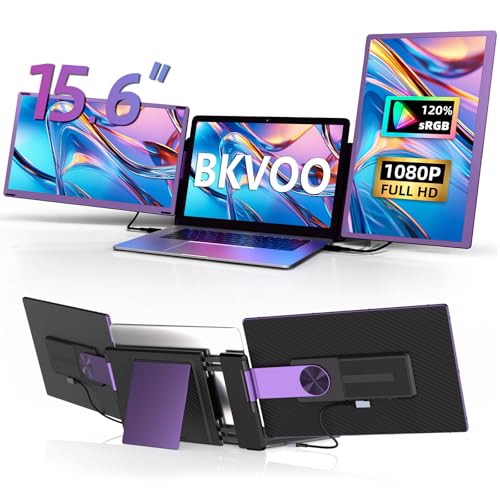
- Large 15.6-inch 1080p display
- Detachable screens and 11 layouts
- 235-degree rotation range
Best For: Users who want a spacious, configurable triple-screen setup
Best Lightweight Triple-Screen Pick
Vixtan 14-inch FHD Laptop Extender

- Slim 3.0-pound triple-screen design
- 100% sRGB IPS displays
- Driver-free setup for compatible devices
Best For: Travelers and remote workers needing three portable screens
Best Lightweight Pick
Ultra-Portable 14.2-inch FHD Extender

- 1.87-pound, 0.27-inch-thin design
- 1080p IPS display with flexible viewing angle
- Driver-free setup with broad OS compatibility
Best For: Frequent travelers and mobile multitaskers
Best Detachable Design
GlixyPixVue M5 15.6-inch FHD Extender

- 15.6-inch 1080p IPS display
- 2.8-pound, 0.27-inch-thin portable design
- Rotates up to 192 degrees and supports major operating systems
Best For: Work, study, and travel with a larger second screen
Best Flexible 4K Pick – Aefieoy 15.6-Inch Dual Screen Extender
If you want a flexible option among 4k laptop screen extenders, the Aefieoy combines a 15.6-inch 4K UHD IPS display with detachable hardware and several viewing modes. Its slim 0.27-inch body and 2.8-pound weight make it practical for mobile work, while USB-C and HDMI support broaden device compatibility.
Best For: Travelers, students, traders, programmers, and anyone who wants a detachable dual-screen setup for 13- to 17-inch laptops.
Pros:
- 4K UHD IPS panel with 350 nits, 100% sRGB coverage, and wide viewing angles.
- Detachable screen and 360-degree rotating stand support landscape, portrait, and single-screen use.
- Works with Windows, Mac, Android, Linux, and Chrome OS, with HDMI connectivity for additional devices.
- Anti-glare coating and built-in blue-light reduction support extended viewing.
Cons:
- HDMI-connected devices require separate power through the included USB cable setup.
- The 15.6-inch size may be less convenient for smaller laptops or compact bags.
This is a strong all-around choice if portability and positioning flexibility matter as much as resolution. The detachable design gives it more setup options than a fixed extender, while the compatibility range makes it useful beyond a single laptop platform.
Best Mac-Focused 4K Pick – Intehill 13.4-Inch IGZO Extender
The Intehill LR13U is a compact, premium-feeling choice among 4k laptop screen extenders, using a 13.4-inch IGZO panel with 3840×2400 resolution and a taller 16:10 ratio. Its matte anti-glare finish, 500-nit brightness, and USB-C setup are well suited to focused work in travel or office environments.
Best For: Compatible MacBook users, professionals, writers, coders, and creators who prioritize a sharp, eye-friendly portable display.
Pros:
- 4K+ 3840×2400 resolution provides detailed text and extra vertical workspace.
- IGZO panel offers 500-nit brightness, 100% sRGB coverage, and power-efficient operation.
- Matte anti-glare coating, reduced blue light, and grayscale eye-care mode support long sessions.
- Includes two full-function USB-C ports, a charging USB-C port, and a one-year warranty.
Cons:
- Compatibility is specifically limited; Windows and other laptop users should confirm support before buying.
- Its 6.6-pound listed weight is relatively substantial for a travel monitor.
Choose this model when display clarity and MacBook compatibility are your priorities. It is less universal than many extenders, but its high-resolution 16:10 panel and eye-care features make it particularly compelling for document-heavy workflows.
Best Feature-Rich 4K Pick – M5 Pro 15.6-Inch 4K Extender
The M5 Pro is a versatile 15.6-inch option for shoppers comparing 4k laptop screen extenders. Its 3840×2160 IPS display, 350-nit brightness, detachable stand, built-in speakers, and support for multiple display modes create a flexible workstation for work, study, entertainment, and travel.
Best For: Remote workers, frequent travelers, console users, and laptop owners who want one extender for productivity and entertainment.
Pros:
- Native 4K UHD resolution with a 178-degree viewing angle.
- Supports mirror, extend, portrait, and single-screen configurations.
- Broad compatibility includes Windows, macOS, ChromeOS, Linux, Android, selected Apple silicon devices, and consoles.
- One-cable USB-C setup is supported on compatible ports, and the USB-C port supports 100W PD reverse charging.
Cons:
- Devices without a full-featured USB-C port require HDMI and additional USB power cables.
- Nintendo Switch use requires external power.
- Compatibility can vary by device and operating system, especially among Apple models.
This model stands out for the breadth of its feature set rather than just its resolution. The detachable 360-degree stand, speakers, charging support, and console connectivity make it a good fit for users who want a portable display that can serve several roles.
Best Triple-Screen Alternative – 16-Inch 1200P Triple-Screen Extender
This 16-inch extender is not a 4K model, but it is worth considering alongside 4k laptop screen extenders if your main goal is maximum workspace. Its two 1920×1200 IPS panels turn a compatible laptop into a triple-screen setup, adding vertical room for documents, spreadsheets, code, and web pages.
Best For: Professionals, remote workers, students, traders, and creators who value three-screen productivity over 4K resolution.
Pros:
- Dual 16-inch 16:10 panels provide a spacious triple-screen workspace.
- 1920×1200 resolution adds vertical space compared with standard 1080p displays.
- Two USB-C cables can provide a driver-free setup on laptops with two full-featured USB-C ports.
- Ultra-slim aluminum screens are designed for portability and include built-in speakers.
Cons:
- It does not provide 4K resolution, making it less suitable for shoppers specifically requiring UHD detail.
- Two full-featured USB-C ports are required for the advertised two-cable setup.
- The glossy finish may reflect more ambient light than a matte screen.
Consider this extender when screen quantity matters more than pixel density. It offers a broad three-screen canvas in a thin design, but buyers specifically seeking 4K image detail should choose one of the UHD models instead.
Best Plug-and-Play Pick – KEFEYA 14-inch FHD Laptop Screen Extender
The KEFEYA is a practical choice for shoppers comparing 4k laptop screen extenders who primarily need an easy-to-connect second display. Its 14-inch 1080p IPS panel supports 60Hz viewing, multiple display modes, and broad device compatibility without requiring drivers.
Best For: Remote workers, travelers, programmers, stock traders, and anyone wanting a portable second screen for a 13- to 17-inch laptop.
Pros:
- 14-inch Full HD IPS display with 300-nit brightness and a 178-degree viewing angle.
- Plug-and-play setup with USB-C, USB-A, and HDMI cables included.
- Supports mirror, extended, landscape, portrait, and 180-degree rotation modes.
- Works with Windows, Mac, Chrome, Linux, Android, and selected gaming devices.
Cons:
- This is a 1080p display, not a native 4K screen.
- HDMI connections require an additional USB-A-to-USB-C connection for power.
- Compatibility and display behavior can vary by laptop ports and operating system.
Choose the KEFEYA when simple setup and flexible positioning matter more than maximum resolution. Its compact 14-inch design and included cables make it a straightforward portable productivity upgrade.
Best Large Triple-Screen Option – BKVOO 15.6-inch Triple Monitor Extender
For shoppers researching 4k laptop screen extenders but prioritizing workspace size, this BKVOO model adds a larger 15.6-inch 1080p display in a triple-screen configuration. Its detachable screens, wide rotation range, and multiple setup styles make it especially adaptable for multitasking.
Best For: Remote workers, programmers, traders, and users who want a larger, highly configurable triple-display setup.
Pros:
- Large 15.6-inch Full HD screen with 300-nit brightness and a 178-degree viewing angle.
- Detachable side screens can function as portable monitors with the included stand.
- Up to 11 display combinations, with horizontal, vertical, and 235-degree rotation options.
- Includes connection options for USB-C and HDMI laptops.
Cons:
- The 2.39 kg weight is substantially higher than lighter portable extenders.
- Some laptops require the included H5-T cable or an H4 hub and driver installation.
- Mac devices with M1, M2, or M3 chips cannot use both extra screens without additional support.
This is the strongest fit when screen area and configuration flexibility outweigh portability. Before buying, check your laptop’s ports and processor because the triple-screen experience depends on the available signal outputs.
Best Lightweight Triple-Screen Pick – Vixtan 14-inch FHD Laptop Extender
The Vixtan stands out among 4k laptop screen extenders for its lightweight triple-screen design rather than native 4K resolution. It combines two additional 14-inch FHD IPS displays with a slim body, adjustable stand, and driver-free setup for compatible laptops.
Best For: Digital nomads, students, business travelers, creators, and remote workers who need triple-screen productivity without a heavy setup.
Pros:
- Lightweight 3.0-pound design with a slim 0.3-inch body for travel.
- 14-inch 1080p IPS panels offer 300-nit brightness, 100% sRGB coverage, and a 178-degree viewing angle.
- Supports extended, mirrored, and portrait display modes.
- Includes USB-C and HDMI cables and works with Windows, macOS, ChromeOS, Linux, Android, and selected consoles.
Cons:
- The displays are Full HD rather than native 4K.
- MacBook M1, M2, and M3 models support only one extra screen without a DisplayLink adapter.
- A 5V/3A-or-higher power adapter may be needed if brightness is low or the screen flickers.
The Vixtan is a compelling travel-oriented option for users who value three screens and accurate color in a relatively light package. Confirm your laptop’s display-output support, particularly for M-series MacBooks, before ordering.
Best Lightweight Pick – Ultra-Portable 14.2-inch FHD Extender
For shoppers comparing 4k laptop screen extenders, this model prioritizes portability over 4K resolution. Its 14.2-inch 1080p IPS display weighs 1.87 pounds and is designed to add a second screen to 14- to 17.3-inch laptops without a complicated setup.
Best For: Frequent travelers, remote workers, students, and anyone who wants a lightweight dual-screen workstation.
Pros:
- Lightweight 1.87-pound, 0.27-inch-thin design.
- 1080p IPS display with 300-nit brightness and a 226-degree adjustable viewing range.
- Supports extend, mirror, and portrait modes across Windows, macOS, ChromeOS, Linux, and Android.
- Includes cables and supports USB-C or HDMI plus USB-A connectivity without requiring drivers.
Cons:
- It is a 1080p display rather than a 4K screen.
- Compatibility depends on having a full-function USB-C port or the required HDMI and USB connections.
This is a practical choice when low carry weight and quick setup matter more than maximum resolution. Its broad operating-system support and flexible viewing modes make it useful for mobile multitasking.
Best Triple-Screen Setup – KEFEYA 15.6-inch Portable Monitor
Among 4k laptop screen extenders, the KEFEYA stands out for adding two external displays instead of one. Its pair of 15.6-inch 1080p IPS panels can turn a compatible laptop into a triple-screen workspace for multitasking, conferencing, or entertainment.
Best For: Programmers, stock traders, IT professionals, remote workers, and users who need three simultaneous screens.
Pros:
- Two 15.6-inch FHD 1080p IPS displays create a triple-screen setup.
- Foldable design includes a leather carrying bag and supports landscape, portrait, mirror, and extended modes.
- Thin 0.16-inch design with 300-nit brightness, 1000:1 contrast, and 100% sRGB color coverage as specified.
- Includes multiple USB-C, HDMI-to-USB-C, and USB-A cables for plug-and-play connections.
Cons:
- The complete setup weighs about 3.9 to 4 pounds, making it less travel-light than a single-screen extender.
- Mac laptops with M1, M2, or M3 chips require a separate H6 adapter, which is not included.
- It provides 1080p resolution rather than 4K.
The KEFEYA is the strongest productivity option here if your priority is screen quantity. Before buying, confirm your laptop’s ports and note the additional adapter requirement for affected Mac models.
Best Detachable Design – GlixyPixVue M5 15.6-inch FHD Extender
If you are comparing 4k laptop screen extenders but mainly need a portable second display, the GlixyPixVue M5 offers a slim 15.6-inch 1080p IPS panel. Its detachable design, broad laptop compatibility, and included HDMI and USB connectivity suit business, home-office, and student use.
Best For: Users wanting a larger portable second screen for work, study, and travel.
Pros:
- 15.6-inch FHD 1080p IPS display with a 178-degree viewing angle.
- Relatively portable 2.8-pound body measuring 0.27 inches thick.
- Supports 0- to 192-degree rotation for flexible positioning.
- Compatible with Windows, macOS, ChromeOS, and Android through Mini HDMI, USB-A, and USB-C connections.
Cons:
- It is a 1080p extender, not a 4K model.
- The listed 280-nit brightness and 45% color gamut are more modest than some competing specifications.
- Port requirements may vary depending on the laptop and connection method.
The M5 balances screen size, weight, and adjustability well. It is a sensible pick for everyday productivity when a detachable 15.6-inch display matters more than 4K detail or premium color coverage.
How We Picked the Best 4K Laptop Screen Extenders
We evaluated these 4K Laptop Screen Extenders and related portable models by focusing on the features that matter most in daily use: display resolution, panel quality, laptop compatibility, connection options, weight, thickness, adjustability, and setup requirements. We also considered whether each design supports dual- or triple-screen workflows and how practical it is for travel.
True 4K models can provide noticeably sharper text and more detailed images, while Full HD options may be lighter, less demanding on your laptop, and more affordable. Because those trade-offs matter, this roundup includes both high-resolution choices and practical alternatives.
Quick Comparison
- Best for maximum sharpness: Choose a true 4K UHD model with an IPS or IGZO panel.
- Best for portability: Look for a lightweight extender with a slim detachable design.
- Best for multitasking: Triple-screen models offer the most workspace but add weight and power demands.
- Best for broad compatibility: USB-C and HDMI support provides more connection flexibility.
- Best value: A 1080p extender can deliver useful extra workspace at a lower cost.
Key Buying Factors for 4K Laptop Screen Extenders
Resolution and Panel Quality
4K resolution is most useful for detailed creative work, crisp text, photo editing, and viewing content at close range. Check that your laptop and operating system can drive the chosen resolution. IPS and IGZO panels generally offer better viewing angles and more consistent color than basic display technologies.
Ports, Power, and Compatibility
Do not assume every USB-C port supports video output. Many extenders require a USB-C port with DisplayPort Alt Mode, while HDMI connections may need separate power through USB. Confirm your laptop’s operating system, port capabilities, screen size, and supported display count before buying.
Size, Weight, and Mounting
Match the extender’s mounting range to your laptop display size. A lightweight dual monitor is easier to carry, but larger or triple-screen units may provide a more immersive workspace. Check hinge movement, rotation range, case clearance, and whether the monitor can also stand independently.
Everyday Usability
Look for plug-and-play operation, sturdy hinges, an anti-glare surface, brightness controls, and a detachable design if you switch between desk and travel use. A short cable setup is convenient, but longer or replaceable cables can be easier to manage in crowded workspaces.
Who Should Buy Which 4K Laptop Screen Extenders?
Professionals and creators who prioritize image detail should select a genuine 4K model with a quality IPS or IGZO panel. Frequent travelers should favor the lightest slim dual-screen option that fits their laptop securely. Remote workers and analysts may prefer a 1080p dual monitor for email, documents, and spreadsheets without the added power demands of 4K. Power users who regularly compare documents, code, dashboards, or timelines should consider a triple-screen extender, provided their laptop can support the required displays and power.
Before ordering, verify port compatibility, screen-size fit, included cables, power requirements, and return coverage. Those checks are more important than resolution alone and help ensure your extender works smoothly with your specific laptop.