Photo editing is easier when your canvas, tools, layers, and reference images are not fighting for space on one laptop display. A portable screen extender can add a second or third workspace without requiring a desktop monitor.
These 10 options emphasize sharp Full HD or higher-resolution panels, broad laptop compatibility, flexible positioning, and travel-friendly designs. Before buying, confirm your laptop’s ports, screen size limits, and power capabilities.
Best 10 Laptop Screen Extenders for Photo Editing Picks for 2026
Best for Vertical Workspace
16-inch 1200p Triple Monitor Extender

- Dual 16-inch 1920×1200 IPS screens
- 16:10 ratio adds vertical editing space
- 350-nit brightness and slim aluminum build
Best For: Creators who need more vertical room for editing panels and documents
Best for Triple-Screen Travel Workflows
Synnov 15.6-Inch Triple Monitor

- 15.6-inch 1080p IPS display
- Supports portrait and triple-screen modes
- Portable aluminum design with carry bag
Best For: Mobile photo editors needing three-screen workspace
Best for Flexible Display Configurations
BKVOO 15.6-Inch Triple Monitor
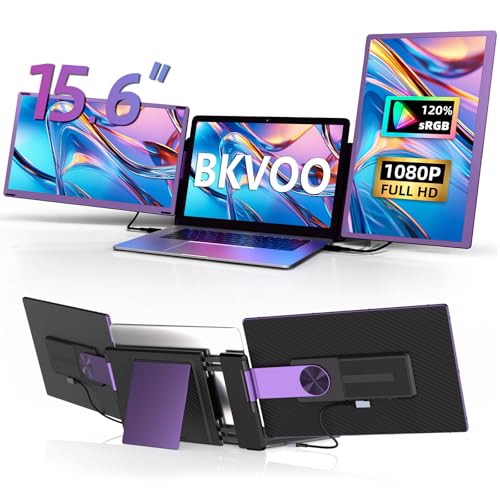
- Up to 11 detachable display combinations
- 300-nit 1080p screens
- 235-degree rotation with portrait support
Best For: Power users needing customizable photo-editing layouts
Balanced Dual-Screen Pick

- 14-inch FHD IPS display
- HDR and blue-light reduction
- HDMI, DisplayPort, and USB-C
Best For: Portable photo-editing support on 13- to 16-inch laptops
Large Triple-Screen Choice
15.6" P7 Triple Monitor Extender

- Two 15.6-inch FHD IPS panels
- Triple-screen workspace for multitasking
- Includes cables, adapter, and carry case
Best For: Creators needing extensive screen space for editing workflows
Lightweight Travel Pick
14.2" Ultra-Portable Dual Monitor

- Only 1.87 pounds and 0.27 inches thin
- 1080p IPS display with 300 nits
- Supports portrait and extended modes
Best For: Traveling photographers and remote editors
Best Color Coverage – KEFEYA 15.6-inch Triple Monitor Extender
For photographers who need extra workspace while editing, the KEFEYA is one of the more color-focused laptop screen extenders for photo editing. Its two 15.6-inch Full HD IPS screens are rated for 100% sRGB coverage, with independent display controls for brightness, contrast, and backlight.
Best For: Photo editors who prioritize sRGB coverage and want a portable triple-screen workstation.
Pros:
- Two 15.6-inch 1080p IPS displays with claimed 100% sRGB coverage
- 300-nit brightness, 178-degree viewing angles, and matte screens
- Supports landscape and portrait modes with 180-degree rotation
- Includes multiple connection cables and folds into a portable setup
Cons:
- Not directly compatible with Mac laptops using M1, M2, or M3 chips without a separate adapter
- Compatibility depends on a full-featured USB-C port or an HDMI connection
- At about 4 pounds, it is less lightweight than a single-screen extender
The KEFEYA stands out when color coverage matters more than minimal weight. Confirm your laptop’s ports—and Mac chipset, if applicable—before buying.
Best One-Cable Setup – KYY 15.6-inch FHD Triple Extender
The KYY is a practical choice among laptop screen extenders for photo editing if you want a straightforward portable workstation. It uses two 15.6-inch 1080p IPS screens, and its upgraded design can connect through one USB-C cable when the laptop supports the required full-function port.
Best For: Designers and creators who want a portable dual-screen add-on with a simplified connection setup.
Pros:
- Dual 15.6-inch Full HD IPS displays with 300-nit brightness
- 1200:1 contrast ratio and 178-degree viewing angle
- Adjustable stand and screens that rotate from 0 to 360 degrees
- Includes the necessary cables and power adapter
Cons:
- Drivers must be downloaded before use
- Requires a compatible full-function USB-C or Type-A connection
- Not compatible with PS5, Xbox Series X, and other listed gaming consoles
Its adjustable viewing design is useful for editing alongside reference material, palettes, or file browsers. Check the port requirements and driver support on your operating system before purchase.
Best for Vertical Workspace – 16-inch 1200p Triple Monitor Extender
This 16-inch model offers more vertical room than standard 1080p extenders, making it a compelling option among laptop screen extenders for photo editing. Its two 1920×1200 IPS displays use a 16:10 ratio, providing additional space for image thumbnails, panels, documents, and editing controls.
Best For: Photo and content creators who want extra vertical workspace for editing applications and supporting documents.
Pros:
- Dual 16-inch IPS screens with 1920×1200 resolution
- 16:10 aspect ratio provides more vertical space than 16:9 Full HD screens
- 350-nit brightness, 178-degree viewing angles, and stated 100% color gamut
- Ultra-slim aluminum construction with built-in speakers and eye-care features
Cons:
- Two full-featured USB-C ports are required for the stated two-cable setup
- Glossy screen finish may be less convenient in bright environments
- The product details provide less specific operating-system compatibility information than some alternatives
The 16:10 panels are especially useful when editing tools and timelines compete for vertical room. Verify that your laptop has two compatible USB-C ports before relying on the no-driver setup.
Best Detachable Design – FLYTOCCA 15.6-inch Portable Extender
The FLYTOCCA is a flexible pick among laptop screen extenders for photo editing, particularly if you sometimes need a second screen rather than a permanent dual-screen attachment. Its 15.6-inch 1080p IPS display detaches and supports vertical mounting for portrait-oriented images, reference material, or editing panels.
Best For: Mobile photographers who want a detachable monitor that can switch between horizontal and vertical layouts.
Pros:
- 15.6-inch Full HD IPS display with 300-nit brightness
- Detachable screen supports vertical or horizontal mounting
- Fits laptops from 13 to 17.3 inches with telescoping brackets
- One-cable Type-C setup, with HDMI and USB-A alternatives, and a 1.5-pound listed weight
Cons:
- This is a single-screen extender rather than a triple-monitor system
- Full-featured USB-C, or both USB-A and HDMI, may be needed depending on the laptop
- Vertical mounting may require adjusting the included bracket and mounting position
Its detachable design makes it easier to pack for travel while retaining portrait-orientation flexibility. It is a strong fit for photographers who value portability and adaptable placement over maximum screen count.
Best for Triple-Screen Travel Workflows – Synnov 15.6-Inch Triple Monitor
For photographers who need more workspace while traveling, the Synnov is one of the more practical laptop screen extenders for photo editing. Its 15.6-inch 1080p IPS display, portrait support, and triple-screen setup can keep editing tools, reference images, and communication windows visible at once.
Best For: Mobile photo editors and multitaskers who want a lightweight triple-monitor setup.
Pros:
- 15.6-inch 1080p IPS screen with a 178-degree viewing angle.
- Supports extended, mirrored, and portrait display modes.
- Lightweight 4-pound aluminum-alloy design with a protective carry bag.
- Plug-and-play setup with compatible USB-C or HDMI connections.
Cons:
- Requires at least one full-featured USB-C port for compatibility.
- Not compatible with MacBook models using M1, M2, or M3 chips, according to the supplied notes.
- At 4 pounds, it is heavier than some dual-screen alternatives.
The Synnov stands out when screen real estate matters more than minimum carry weight. Confirm your laptop ports and operating system before buying, especially if you use an Apple Silicon MacBook.
Best Lightweight Dual-Screen Pick – Aefieoy 15.6-Inch Detachable Monitor
The Aefieoy is a flexible option among laptop screen extenders for photo editing, pairing a 15.6-inch 1080p IPS panel with 100% sRGB coverage. Its detachable design lets you use the display in different positions or as a standalone portable monitor when your editing setup changes.
Best For: Photographers who want a relatively light dual-screen extender with flexible positioning.
Pros:
- 15.6-inch 1080p IPS display with claimed 100% sRGB coverage.
- Compact 2.8-pound body measuring 0.27 inches thick.
- Detachable screen and stand support landscape, portrait, and single-screen use.
- Anti-glare coating, blue-light reduction, and 300-nit brightness.
Cons:
- Fits laptops from 13 to 17 inches, so smaller or larger devices may not suit it.
- Some connection setups require separate video and power cables.
- Screen flicker or no-signal issues may require an external 5V/2A power adapter.
With its stated sRGB coverage and detachable construction, the Aefieoy is appealing for editing workflows that need a second reference or tool screen without carrying a bulkier triple-monitor system. Check your laptop’s USB-C capabilities before relying on one-cable operation.
Best for Flexible Display Configurations – BKVOO 15.6-Inch Triple Monitor
The BKVOO offers an adaptable approach to laptop screen extenders for photo editing, with two detachable 15.6-inch 1080p screens and up to 11 display combinations. Horizontal and vertical positioning can help you arrange a main editing workspace alongside portrait-oriented references or tools.
Best For: Advanced users who want detachable screens and numerous layout options.
Pros:
- 15.6-inch 1080p displays with 300-nit brightness.
- 235-degree rotation supports horizontal and vertical viewing angles.
- Detachable screens can function as portable monitors with included stands.
- Offers up to 11 display configurations for customized workflows.
Cons:
- Connection requirements vary and may involve HDMI, USB-C, USB-A, or the included H5-T cable.
- Some setups require driver installation.
- Mac devices with M1, M2, or M3 chips may not run both extra screens without additional solutions.
The BKVOO is a strong fit when arrangement flexibility is a priority, but it has a more involved compatibility checklist than simpler extenders. Review your laptop’s available ports and whether your setup needs the H5-T cable or H4 hub before purchasing.
Balanced Dual-Screen Pick – APILDELLA 14" FHD Extender
For shoppers comparing laptop screen extenders for photo editing, the APILDELLA A4 offers a practical 14-inch FHD workspace. Its IPS panel, matte finish, HDR support, and blue-light reduction are useful for keeping reference images, tools, or palettes visible beside the main editing canvas.
Best For: Photo editors who want a portable second screen for 13- to 16-inch laptops.
Pros:
- 1920×1080 FHD resolution with an IPS panel
- Matte finish, HDR, and blue-light reduction features
- 60Hz refresh rate and 1ms response time
- Supports HDMI, DisplayPort, and USB-C connectivity
Cons:
- Its 250-nit brightness may be less suitable for very bright environments
- Designed for a narrower 13- to 16-inch laptop range
The A4 is a sensible dual-screen option when portability and straightforward connectivity matter. Its FHD IPS specifications fit everyday photo-editing support work, although users needing a larger canvas or higher brightness may prefer a bigger model.
Large Triple-Screen Choice – 15.6" P7 Triple Monitor Extender
Among laptop screen extenders for photo editing, this P7 model stands out for its two additional 15.6-inch IPS panels. The triple-screen layout can keep editing tools, reference material, and a main image workflow visible at once, while 1080p resolution and 178-degree viewing angles support a broad working setup.
Best For: Creators who want a spacious triple-screen workspace for 13- to 17.3-inch laptops.
Pros:
- Two 15.6-inch IPS panels with FHD 1080p resolution
- 178-degree viewing angles and stated accurate color reproduction
- Free-standing design avoids hanging from the laptop display
- Includes cables, power adapter, and carrying handbag
Cons:
- At 3.9 pounds, it is heavier than the other listed options
- Two full-function USB-C ports are needed for the simplest setup
- M1–M3 MacBooks and some other laptops require extra cabling and driver installation
This is the most expansive option for multitasking, particularly when photo-editing panels and reference windows compete for space. Check your laptop’s ports before buying, since compatibility requirements vary by device.
Lightweight Travel Pick – 14.2" Ultra-Portable Dual Monitor
For mobile users seeking laptop screen extenders for photo editing, this 14.2-inch model emphasizes low weight and simple setup. Its 1080p IPS display, 300-nit brightness, and adjustable viewing angle provide a useful secondary workspace for editing tools or image references while traveling.
Best For: Traveling photographers and remote editors using 14- to 17.3-inch laptops.
Pros:
- Lightweight 1.87-pound, 0.27-inch-thin design
- 1080p IPS display with 300 nits of brightness
- Supports extend, mirror, and portrait modes
- Works with USB-C or HDMI and USB-A connections without a driver
Cons:
- Compatibility is listed for 14- to 17.3-inch laptops, excluding smaller models
- HDMI setups require a separate USB-A connection for power
The combination of a 300-nit IPS display and very low weight makes this a strong travel-oriented choice. It provides less total workspace than a triple-screen extender, but its portability and one-second, driver-free setup are convenient for mobile editing.
How We Picked the Best Laptop Screen Extenders for Photo Editing
We focused on portable extenders that are practical for editing workflows rather than simply maximizing the number of panels. The selected models offer 1080p or higher resolution, IPS-style viewing characteristics on many listings, USB-C and/or HDMI connectivity, and compatibility with common laptop sizes. We also considered weight, thickness, mounting flexibility, rotation, detachable designs, and whether the extender can operate in dual- or triple-screen configurations.
Because advertised brightness, color coverage, and calibration can vary by production batch and source, treat these accessories as productivity displays unless the manufacturer provides dependable color-gamut and calibration specifications. For print-critical work, a calibrated primary monitor remains the safer reference.
Quick Comparison
| Feature | What to look for | Why it matters |
|---|---|---|
| Screen size | 14 to 16 inches | Balances workspace with portability and laptop fit. |
| Resolution | 1080p minimum; 1200p is a useful upgrade | Keeps menus and image previews reasonably sharp. |
| Connectivity | USB-C video, HDMI, and compatible USB power | Improves compatibility across laptops and setups. |
| Configuration | Dual, triple, detachable, or rotating panels | Lets you match the display layout to your editing workflow. |
| Portability | Thin construction and roughly 1.5 to 2 pounds where possible | Makes regular travel more manageable. |
Key Buying Factors for Laptop Screen Extenders for Photo Editing
Resolution and Usable Workspace
Full HD is adequate for tool palettes, file browsers, and reference images, while a 1200p panel provides a little more vertical room. Remember that an extender adds workspace but does not necessarily improve the color accuracy or pixel density of your laptop’s main display.
Color, Brightness, and Viewing Angles
Prioritize IPS panels or clearly stated wide-viewing-angle specifications. Look for published sRGB coverage, brightness, and contrast figures when available. If those details are missing, use the extender for panels, previews, organization, and reference material rather than final color decisions.
Ports, Drivers, and Power
USB-C video output is not universal: your laptop’s port must support DisplayPort Alt Mode or another compatible video standard. Some systems require HDMI for video plus USB for power, and triple-screen configurations may need additional bandwidth, adapters, or software. Check the exact requirements for Windows, macOS, and your laptop model before ordering.
Fit, Stability, and Positioning
Verify the extender’s supported laptop width and thickness, especially with slim-bezel laptops or protective cases. Rotating and detachable models can help with portrait-oriented references, but hinges and mounts add weight and potential movement. A stable setup is more valuable than a highly flexible one if you edit for long sessions.
Who Should Buy Which Laptop Screen Extenders for Photo Editing?
Choose a lightweight 14-inch model if you travel frequently or use a smaller laptop. Choose a 15.6- or 16-inch extender if you want larger palettes and a more comfortable two-screen layout. Choose a triple-monitor design if your workflow regularly separates the canvas, controls, browser, and reference material. Choose a detachable or rotating model if portrait references, client presentations, or flexible placement are important.
Finally, confirm return coverage and test the display with your editing software immediately. Check color consistency, scaling, connection stability, charging behavior, and hinge fit before relying on it for paid or time-sensitive work.