Standalone USB duplicators let you copy flash drives without a computer, making them useful for deployment, content distribution, backups, and secure media workflows.
We selected 10 models across different target capacities, speeds, interfaces, and form factors to help you find the right fit for occasional projects or continuous production.
Best 10 Standalone USB Duplicators Picks for 2026
Best Compact Pick

- Duplicates one drive to two targets
- Supports quick and whole-media copying
- Portable LCD-controlled standalone design
Best For: Small batches, field technicians, schools, and basic USB deployment
Best High-Volume Pick

- Duplicates up to seven drives simultaneously
- Copies at up to 100MB per second per slot
- Adds three erase modes, including DoD 3-pass
Best For: Large USB batches and workflows that require media erasure
Best 15-Target Pick

- Handles one master and 15 targets
- Works without a PC or software
- Displays real-time status on an LCD
Best For: Large institutional or production-scale USB distribution
Best Touchscreen Pick

- Copies to up to 10 USB targets
- Uses a touchscreen control interface
- Adds compare, format, and erase tools
Best For: User-friendly office and small production workflows
Best for Easy Setup
USB131SA 1-to-31 USB Duplicator
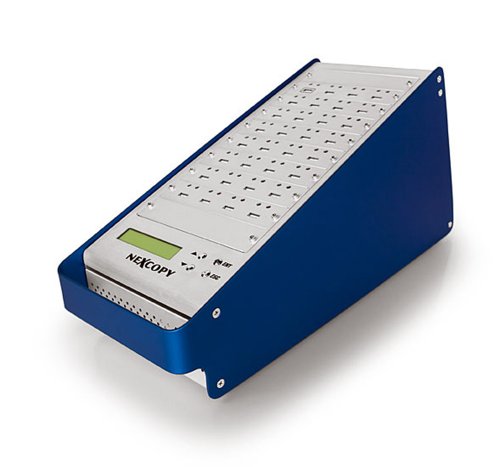
- 1 master to 31 targets
- No PC or software required
- LCD status feedback
Best For: Large duplication batches and production workflows
Most Versatile
EZ Dupe USB Cyclone 1-to-15 Duplicator

- Supports USB 1.0 through 3.1
- Four copy and erase modes
- Handles flash drives and external HDDs/SSDs
Best For: Mixed-media copying and drive-erasure tasks
Secure Flash-Drive Pick
Vinpower Digital USBShark 7-Target

- One source to seven targets
- Bit-by-bit duplication for all data formats
- Prescan and secure erase features
Best For: Smaller flash-drive batches with verification and erasure needs
Best with Extra Features

- Copies one source to up to 23 target drives
- Standalone LCD-guided operation
- Supports USB drives, SSDs, and multiple file systems
Best For: High-volume USB duplication
Compact Multi-Copy Pick

- Copies to up to seven USB drives at once
- Lightweight 12-ounce standalone design
- Supports USB 1.0/2.0/3.0 media
Best For: Portable small-batch duplication
Feature-Rich Professional Option
Vinpower USBDBL 15-Target Duplicator

- Copies to 15 targets without a PC
- Offers Smart Copy and bit-by-bit Raw Mode
- Includes secure erase functionality
Best For: Professional duplication and drive erasure
Best Compact Pick – BestDuplicator UB300 1:2
If you need standalone USB duplicators for occasional deployment, classroom use, or field work, the BestDuplicator UB300 offers a compact 1-to-2 setup without a computer. It supports quick file copying and whole-media cloning, with LCD and LED feedback for monitoring each target.
Best For: Small-scale USB duplication, technicians, schools, and portable deployment.
Pros:
- Duplicates one USB drive to two targets simultaneously.
- Offers Quick Copy and bit-for-bit Whole Media Copy modes.
- Includes media testing, verification, and erase functions.
- Compact, lightweight design with simple four-button LCD control.
Cons:
- Limited to two target drives per batch.
- Designed around USB 1.1 and USB 2.0 media, with slower listed speeds than newer USB 3.x models.
- Memory-card duplication requires a compatible USB card reader sold separately.
The UB300 is a practical choice when portability and basic testing tools matter more than high-volume throughput. Its two-target capacity keeps operation simple, though larger production runs may call for a multi-port model.
Best High-Volume Pick – EZ DUPE U07-SSPX100 1:7
For users comparing standalone USB duplicators for larger batches, the EZ DUPE U07-SSPX100 provides seven target slots and a listed copy rate of up to 100MB per second per slot. It also combines duplication with several erase modes, including a DoD 3-pass option.
Best For: High-volume USB deployment, IT operations, software distribution, and media sanitization.
Pros:
- Copies to up to seven USB flash drives at once.
- Supports Quick Copy and Full Copy duplication modes.
- Includes full, quick, and DoD 3-pass erase options.
- Works independently without software or a host computer.
Cons:
- Supports Type-C drives only with an optional Type-C-to-Type-A adapter.
- Its 11-pound weight makes it less portable than compact duplicators.
- USB flash media must use the unit’s Type-A slots.
This is the strongest fit in the group for repeatable, higher-volume workflows. The seven-port layout and sanitization features add efficiency, while the heavier tower-style construction favors a dedicated work area over field use.
Best 15-Target Pick – Nexcopy USB115SA
The Nexcopy USB115SA is designed for users who need standalone USB duplicators with a particularly large target count. Its 1-master, 15-target configuration supports asynchronous duplication, while the LCD provides real-time performance and status feedback.
Best For: High-volume USB stick production, institutional distribution, and repeated batch duplication.
Pros:
- Supports one master and up to 15 target drives.
- Operates without a PC or software.
- Uses asynchronous duplication for masters up to 256MB/s.
- Provides LCD status and performance feedback.
Cons:
- The supplied notes do not specify copy and erase modes beyond duplication.
- The large 15-target configuration may be excessive for occasional users.
- Detailed port specifications in the notes are limited and inconsistent.
Choose the USB115SA when maximizing the number of simultaneous targets is the priority. It is better suited to a fixed production or distribution station than to compact, occasional use.
Best Touchscreen Pick – EZ Dupe SOHO Touch 1:10
For straightforward daily operation, the EZ Dupe SOHO Touch combines standalone USB duplicators with a touchscreen interface and a 1-to-10 target layout. Its menu includes copying, comparison, formatting, and one-touch erasing, with a listed duplication speed of 35MB per second.
Best For: Offices and small production environments that want simple touchscreen control and flexible USB media handling.
Pros:
- Provides a touchscreen menu for copy, compare, format, and erase tasks.
- Duplicates USB flash media to up to 10 targets.
- Supports all file formats, file sizes, and drive capacities according to the supplied notes.
- Offers intelligent copying and data comparison features.
Cons:
- Its listed 35MB-per-second speed is lower than the faster EZ DUPE tower’s stated rate.
- The supplied notes do not identify a specific USB generation for the unit’s ports.
- It is a tabletop device rather than a battery-powered portable unit.
The SOHO Touch is a good middle ground for teams that value ease of use as much as throughput. Its 10-target capacity is substantial, while the touchscreen and verification tools make routine jobs easier to manage.
Best for Easy Setup – USB131SA 1-to-31 USB Duplicator
For buyers comparing standalone USB duplicators for large production runs, the USB131SA is built around a 1-to-31 master-and-target setup. It operates without a PC or software and provides real-time feedback on its LCD.
Best For: High-volume USB duplication where many target drives must be processed at once.
Pros:
- Copies from one master to 31 target ports.
- Standalone operation requires no computer or software.
- Advertised copy speed exceeds 1800 MB/s to each port.
- Asynchronous duplication supports masters up to 256 MB/s.
Cons:
- At 18 pounds, it is less portable than compact duplicators.
- The 31-target capacity may be more than small batches require.
The USB131SA stands out when throughput and port count matter most. Its LCD status feedback and asynchronous operation add practical control for demanding duplication workloads.
Most Versatile – EZ Dupe USB Cyclone 1-to-15 Duplicator
The EZ Dupe USB Cyclone is a flexible standalone USB duplicator for USB flash drives and external HDDs or SSDs. It supports USB 1.0 through 3.1 devices, multiple copy modes, and one-touch copy, compare, erase, or format functions.
Best For: Users who need broad device compatibility plus copying, comparison, formatting, and secure-erasure options.
Pros:
- Supports up to 15 target devices.
- Works with USB 1.0, 2.0, 3.0, and 3.1 media and external drives.
- Offers four copy modes and four erase modes, including DoD 3-pass and 7-pass.
- Independent bandwidth design helps preserve speed across channels.
Cons:
- Advertised speed is up to 45 MB/s per USB slot.
- Its broader feature set may be unnecessary for simple drive-to-drive copying.
With support for different drive types, capacities above 2TB, and several copy and erase workflows, the USB Cyclone is a practical all-rounder for business, multimedia, or personal use.
Secure Flash-Drive Pick – Vinpower Digital USBShark 7-Target
Vinpower Digital USBShark Standalone USB Flash Drive Duplicator - 7 Targets (High Speed)
Check Price On AmazonThe Vinpower Digital USBShark is a standalone USB duplicator with seven target ports and no PC requirement. Its smart copy, prescan, bit-by-bit duplication, and secure-erase features make it suited to controlled flash-drive workflows.
Best For: Smaller duplication runs where drive checking and secure erasure are important.
Pros:
- Duplicates one source to seven targets.
- Supports USB 3.0, 2.0, and 1.0 devices.
- Smart copy quickly copies accessible source content.
- Includes prescan for physical reading errors and secure erase.
Cons:
- Seven targets provide less throughput than higher-capacity duplicators.
- The supplied notes do not specify a warranty.
The USBShark is a focused option for flash-drive duplication rather than the largest possible batch size. Its prescan and secure-erase functions add useful safeguards for repeatable handling of USB media.
Best with Extra Features – DupliM 1:23 USB Duplicator
DupliM 1:23 USB Flash Drive Duplicator Stand-Alone Burner Cloner Copier (1 to 23)
Check Price On AmazonFor buyers comparing standalone usb duplicators for larger duplication jobs, the DupliM 1:23 is built to copy one source drive to as many as 23 target drives without a computer. Its LCD-guided, three-step operation keeps the workflow straightforward.
Best For: High-volume USB duplication, including bootable flash drives and compatible external drives.
Pros:
- Copies to up to 23 USB drives simultaneously.
- Standalone operation with a simple three-step process.
- Supports USB 2.0/3.0 drives, external 2.5-inch hard drives, and SSDs.
- Supports FAT, FAT32, NTFS, HFS, Ext2, Ext3, and Ext4 file systems.
Cons:
- Its 7-pound size may be excessive for occasional or portable use.
- Maximum listed hard-drive capacity is below 2TB.
- The listed read/write speed is up to 1.5GB/min, so actual performance depends on the media.
The DupliM is the strongest fit when throughput and target count matter most. It offers broad file-system support and bootable-drive copying, but its larger chassis is best suited to a dedicated workspace.
Compact Multi-Copy Pick – EZ Dupe Mini USB Plus MK III
The EZ Dupe Mini USB Plus MK III is a practical option for buyers seeking standalone usb duplicators in a compact format. It copies to up to seven USB flash drives at once and operates without a computer.
Best For: Small-batch flash-drive duplication where portability and simple plug-and-use operation are priorities.
Pros:
- Supports simultaneous asynchronous copying to up to seven USB drives.
- Compact 12-ounce design is easier to move than larger duplicators.
- Updated model lists copy speeds up to 2.5GB/min or 45MB/second, depending on the drives.
- Supports USB 1.0, 2.0, and 3.0 flash drives and externally powered USB storage.
Cons:
- Seven target slots provide less capacity than larger duplicators.
- External USB hard drives or storage devices need their own power source.
- Actual copying speed depends on the connected flash drives.
This EZ Dupe model balances capacity and convenience well for modest production runs. Its lightweight build and asynchronous copying are useful, while users handling larger batches may prefer a higher-slot unit.
Feature-Rich Professional Option – Vinpower USBDBL 15-Target Duplicator
The Vinpower USBDBL is among the more versatile standalone usb duplicators for users who need independent copying and drive-erasing functions. It works without a PC, supports 15 target USB drives, and offers both Smart Copy and Raw Mode.
Best For: Professional duplication workflows requiring asynchronous copying, bit-by-bit modes, and secure drive erasure.
Pros:
- Copies to 15 target flash drives without a computer.
- Asynchronous duplication lets each target copy independently.
- Smart Copy and Raw Mode support quick accessible-content copying or bit-by-bit duplication.
- Secure Erase is designed to remove drive content so it cannot be recovered.
Cons:
- At 11 pounds, it is less convenient for mobile use.
- Additional SD, microSD, or CompactFlash support requires the corresponding adapter module.
- Its feature set may be more than needed for basic USB copying.
The USBDBL stands out when workflow control matters as much as copy count. Its asynchronous operation and erase function add flexibility, while optional adapters expand media compatibility at additional setup cost.
How We Picked These Standalone USB Duplicators
We focused on dedicated, computer-free duplicators that copy USB media from a source drive to multiple targets. The selection includes compact units for small batches, higher-capacity systems for production environments, and models with erasing or verification features. We also considered target count, USB generation support, advertised transfer speed, control-panel usability, and compatibility with common flash drives and external storage.
Specifications can vary by source media, file size, drive speed, and whether the unit performs a full or intelligent copy. Treat advertised throughput as a maximum rather than a guaranteed real-world result.
Quick Comparison
| Best For | What to Look For | Typical Advantage |
|---|---|---|
| Small batches | 1:2 to 1:7 capacity | Lower cost and simpler operation |
| Office or classroom deployment | USB 3.0 or newer support | Faster distribution of large files |
| Production work | 1:15 or higher capacity | More copies per cycle |
| Secure reuse | Built-in erase modes | Faster media preparation and sanitization |
Key Buying Factors for Standalone USB Duplicators
Target Capacity
The ratio describes how many destination drives can be copied at once. A 1:2 model suits occasional use, while 1:7, 1:15, 1:23, or 1:31 systems are better for repeated distribution and larger batches. Higher capacity usually means a larger chassis and greater upfront cost.
Speed and USB Compatibility
USB 3.0, USB 3.1, and newer-compatible ports can reduce cycle times, but the slowest device in the chain limits performance. If your source files are large, prioritize high-throughput hardware and fast target drives rather than relying on port labeling alone.
Copy Modes and Verification
Look for intelligent copying when you need to duplicate only used data, as well as full-copy support for sector-level replication. Verification helps identify failed targets before they are distributed. Erase functions are valuable when reusing drives, but confirm which erase standard or method the unit supports.
Controls, Size, and Reliability
A clear menu or touchscreen can simplify repetitive jobs, while compact designs are easier to transport. For frequent use, consider cooling, power requirements, warranty coverage, replacement parts, and whether the duplicator can operate all ports simultaneously at its advertised speed.
Who Should Buy Which Standalone USB Duplicators?
Choose a compact 1:2 or 1:7 duplicator for occasional backups, small software rollouts, classrooms, or home labs. A USB 3.x model is the better choice when large files make speed important. Offices, event teams, and content distributors should consider 1:10 to 1:15 capacity to reduce the number of cycles. For sustained production, a 1:23 or 1:31 unit can provide substantially greater output per run.
If data removal is part of your workflow, select a model with clearly documented erase and verification options. Before buying, confirm the required drive types, maximum supported capacities, copy method, and expected daily workload.