The right SSD enclosure can turn a bare NVMe drive into a fast, portable workspace for editing footage, moving project files, and creating backups. For video editors, interface speed, thermal control, reliability, and compatibility matter more than headline numbers alone.
We selected 10 enclosures spanning affordable 10Gbps models and premium 40Gbps and 80Gbps USB4 designs, with options for Mac, PC, Thunderbolt, and mobile recording workflows.
Best 10 SSD Enclosures for Video Editing Picks for 2026
Mac Mini Specialist
UGREEN 80Gbps M.2 NVMe Enclosure

- Up to 7000MB/s stated transfer speed
- Supports M.2 sizes from 2230 to 2280
- Compatible with macOS, Windows, Linux, and Android
Best For: Compact Mac mini and cross-platform editing setups
Multi-Drive Workstation
ORICO 40Gbps Four-Bay NVMe Dock

- Four NVMe bays with up to 32TB total support
- USB4 bandwidth up to 40Gbps
- Built-in fan and aluminum thermal design
Best For: Multi-drive editing, DIT, and large media libraries
Silent Pro Choice

- Up to 7061MB/s stated read speed
- Fanless dual-fin aluminum cooling
- Supports Thunderbolt, USB4, Windows, macOS, and Linux
Best For: Quiet professional 8K and 12K editing workflows
Fastest 40Gbps Pick
UGREEN 40Gbps M.2 NVMe Enclosure

- Up to 3,600MB/s with compatible Thunderbolt 4 hardware
- Fanless fin-based cooling design
- Supports M.2 2230–2280 drives up to 8TB
Best For: USB4 and Thunderbolt 4 editing systems
Best Mobile Recording Setup
ACASIS Magnetic NVMe Enclosure

- Direct 4K@60 ProRes recording on compatible iPhones
- Magnetic attachment for portable shooting
- 10Gbps connection with built-in cooling fan
Best For: iPhone Pro video recording and mobile editing
Quiet Active-Cooling Choice
OSCOO 40Gbps USB4 NVMe Enclosure
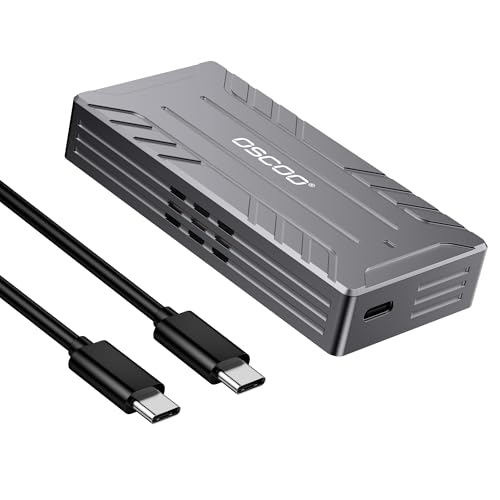
- USB4 and Thunderbolt-compatible 40Gbps bandwidth
- Active cooling with claimed near-silent fan operation
- Tool-free support for 2242, 2260, and 2280 NVMe drives
Best For: Sustained 4K/8K editing transfers
Smart Data Protection Pick
DOCKCASE Explorer M.2 NVMe Enclosure

- HD display shows SSD health, life, and capacity
- Approx. 10-second power-loss protection
- 10Gbps USB-C with dual heat dissipation
Best For: Editors prioritizing drive monitoring and data protection
High-Speed 4K Workflow Pick
Yottamaster 40Gbps NVMe Enclosure

- 40Gbps USB4/Thunderbolt compatibility
- Typical sustained speeds of 2800–3200 MB/s
- Active cooling and tool-free installation
Best For: 4K editors with USB4 or Thunderbolt-capable systems
Simple 10Gbps Creator Pick

- Tool-free flip-open SSD installation
- Aluminum cooling for sustained 10Gbps transfers
- Supports NVMe sizes 2230 through 2280
Best For: Creators needing easy portable NVMe storage
Fast DIY Pick – OWC Express 1M2 USB4 NVMe Enclosure
For editors assembling their own portable drive, the OWC Express 1M2 is one of the more capable SSD enclosures for video editing. Its USB4 connection is rated for up to 80Gbps, with supplied notes citing peak real-world speeds above 6000MB/s, while the aluminum design helps maintain performance during demanding transfers.
Best For: Video editors who want a fast, upgradeable DIY NVMe enclosure with broad device compatibility.
Pros:
- Supports PCIe Gen 3.0, 4.0, and selected Gen 5 NVMe M.2 SSDs.
- Works with Macs, PCs, iPad Pros, Chromebooks, and Surface devices.
- Patented heat-dissipating design provides silent cooling and rugged protection.
- Bus-powered and includes a USB4 cable.
Cons:
- SSD is not included in the enclosure-only configuration.
- PCIe Gen 5 SSD selection requires attention to sustained power consumption.
- Actual speed depends on the installed SSD and host device.
The Express 1M2 is a strong flexible option when you want internal-drive-like performance in a portable enclosure. Its upgradeable design also lets you choose capacity and replace the SSD later.
Mac Mini Specialist – UGREEN 80Gbps M.2 NVMe Enclosure
The UGREEN 80Gbps enclosure is designed around high-speed USB-C connectivity and Mac mini workflows. Its dual-chip architecture is rated for transfers up to 7000MB/s, and the finned aluminum cooling structure is intended to help manage heat during large video-file transfers.
Best For: Mac mini owners and cross-platform editors who need a compact, high-capacity NVMe enclosure.
Pros:
- Supports USB4 and Thunderbolt 3, 4, and 5 connections.
- Accepts M.2 2230, 2242, 2260, and 2280 NVMe drives.
- Supports SSDs up to 8TB.
- Aluminum double-sided fins improve heat dissipation.
Cons:
- Does not support SATA, NGFF, or mSATA SSDs.
- Pre-installed heatsink SSDs and some thicker drives may not fit.
- SSD is not included.
With broad operating-system support and a compact aluminum body, this UGREEN model suits editors who value portability and compatibility. Check your SSD’s dimensions before buying, especially if it already has a heatsink.
Multi-Drive Workstation – ORICO 40Gbps Four-Bay NVMe Dock
For editors managing multiple projects or large media libraries, the ORICO 8848U4 is a four-bay NVMe enclosure rather than a single-drive case. It provides up to 40Gbps total bandwidth and supports up to four M-Key NVMe SSDs, making it suited to expandable 4K and 8K video workflows.
Best For: DITs, production teams, and editors who need several removable NVMe drives in one desktop-oriented enclosure.
Pros:
- Four bays support up to 8TB per drive and 32TB total.
- Accepts M-Key NVMe SSDs in 2230, 2242, 2260, and 2280 sizes.
- USB4 interface provides up to 40Gbps bandwidth.
- Aluminum housing, fan cooling, and front and rear vents support sustained workloads.
Cons:
- SSD storage is not included.
- Single-drive operation is specified at up to 10Gbps, not the full 40Gbps.
- Its four-bay design is less compact than a single-drive portable enclosure.
The ORICO stands out when capacity and drive flexibility matter more than pocketability. Its multi-bay layout can simplify media organization, while the cooling system is intended for longer continuous editing sessions.
Silent Pro Choice – TERRAMASTER D1 SSD Pro 80Gbps
The TERRAMASTER D1 SSD Pro targets demanding post-production work with an 80Gbps interface and a stated read speed of up to 7061MB/s in testing. Its fanless CNC aluminum body and dual-fin heatsink are designed to sustain performance quietly during intensive 8K and 12K editing workloads.
Best For: Professional editors who prioritize high sustained speed, quiet operation, and cross-platform support.
Pros:
- Rated for up to 7061MB/s read speed and real-time 12K editing in supplied testing.
- Fanless 38-fin aluminum cooling design operates without fan noise.
- Supports Thunderbolt 3, 4, and 5, plus USB4 and USB 3.x.
- Includes a USB-C cable, protective case, screwdriver, and thermal pad.
Cons:
- Diskless design requires a separate M.2 2280 NVMe SSD.
- Top performance depends on a compatible high-speed host and SSD.
- Supports up to 8TB, which may be less capacity than a multi-drive enclosure.
The D1 SSD Pro is a compelling choice for quiet studios and mobile professional workflows. Its speed indicator, passive cooling, protective case, and two-year warranty add practical value beyond raw throughput.
Fastest 40Gbps Pick – UGREEN 40Gbps M.2 NVMe Enclosure
The UGREEN 40Gbps M.2 NVMe enclosure is a strong choice among SSD enclosures for video editing when your computer supports USB4 or Thunderbolt 4. Its ASM2464PD chip, aluminum fin design, and broad M.2 size support are suited to fast project transfers and portable workflows, but the SSD must be purchased separately.
Best For: Editors using USB4 or Thunderbolt 4 systems who want maximum transfer performance from an NVMe drive.
Pros:
- Up to 40Gbps bandwidth and claimed speeds up to 3,600MB/s with compatible hardware.
- Double-sided fins and a three-dimensional cooling design operate without a fan.
- Supports 2230, 2242, 2260, and 2280 NVMe drives up to 8TB.
- Works with Windows, macOS, Linux, and Android.
Cons:
- SSD is not included.
- Full speed requires Thunderbolt 4 cables and compatible devices.
- Does not support SATA NGFF or mSATA drives.
For high-bandwidth editing transfers, this enclosure offers excellent potential without fan noise. Check your host port, cable, and SSD specifications first, and use a thinner thermal pad if your drive is unusually thick.
Best Mobile Recording Setup – ACASIS Magnetic NVMe Enclosure
The ACASIS magnetic NVMe enclosure stands out among SSD enclosures for video editing by combining portable storage with a 4K@60Hz HDMI port and direct ProRes recording support for compatible iPhone Pro and Pro Max models. Its 10Gbps connection and built-in fan suit mobile creators, while the SSD is sold separately.
Best For: iPhone video creators, event shooters, and editors who need portable ProRes storage and a magnetic attachment.
Pros:
- Supports direct 4K@60 ProRes recording to an installed SSD on compatible iPhones.
- Built-in magnetic attachment helps secure the enclosure to a compatible setup.
- 10Gbps transfer rate is suited to moving photos, videos, and project files.
- Combines a cooling fan, aluminum alloy body, and thermal pad.
Cons:
- SSD is not included.
- Supports 2230 NVMe drives rather than a broad range of M.2 sizes.
- Drives larger than 1TB or multiple connected devices may need external power.
This is a specialized option rather than a general-purpose high-speed enclosure. Format a new SSD as exFAT or APFS before connecting it to an iPhone, and verify your phone model is supported for ProRes recording.
Quiet Active-Cooling Choice – OSCOO 40Gbps USB4 NVMe Enclosure
The OSCOO XT6 is a practical option among SSD enclosures for video editing when sustained transfers and heat control matter. It combines USB4 and Thunderbolt compatibility with an aluminum housing and active cooling, although actual performance depends on the installed NVMe SSD, host port, cable, and system configuration.
Best For: Editors moving large 4K or 8K files who want active cooling and broad computer compatibility.
Pros:
- Advertised up to 3,800MB/s read and 1,100MB/s write with suitable USB4 or Thunderbolt hardware.
- Active fan cooling is designed to maintain performance during heavy workloads.
- Supports 2242, 2260, and 2280 NVMe SSDs with tool-free installation.
- Works with Windows, macOS, laptops, desktops, tablets, and compatible consoles.
Cons:
- SSD is not included.
- Does not support M.2 2230, SATA, or mSATA drives.
- Older interfaces can substantially limit transfer speeds.
The XT6 is appealing for sustained editing workloads because its active cooling is intended to reduce heat buildup and throttling. Treat the headline speeds as conditional: the enclosure, SSD, cable, and host device must all support the required standard.
Smart Data Protection Pick – DOCKCASE Explorer M.2 NVMe Enclosure
For video editors comparing SSD enclosures for video editing, the DOCKCASE Explorer emphasizes data awareness and protection alongside 10Gbps USB-C performance. Its display shows SSD health, remaining life, power-on time, and capacity, while power-loss protection can provide approximately 10 seconds of writing time after an outage.
Best For: Editors who value drive-health monitoring, power-loss protection, and a broad range of NVMe SSD sizes.
Pros:
- HD display provides SSD health and capacity information at a glance.
- 10-second power-loss protection may help prevent write data loss during an outage.
- Supports M.2 NVMe sizes 2230, 2242, 2260, and 2280, with read/write performance exceeding 900 MB/s when conditions allow.
- Graphite thermal pad and temperature-control features support sustained operation.
Cons:
- USB 3.2 Gen 2 performance is lower than 40Gbps USB4 enclosures.
- Power-loss timing varies with the SSD’s workload and power consumption.
- Designed for NVMe drives rather than a universal M.2 SATA/NVMe setup.
The DOCKCASE is a practical choice when monitoring and data safeguards matter as much as portable transfer speed. It is especially appealing for project drives where health information and outage resilience can support a more dependable editing workflow.
High-Speed 4K Workflow Pick – Yottamaster 40Gbps NVMe Enclosure
The Yottamaster is built for editors seeking high-performance SSD enclosures for video editing. With USB4 and Thunderbolt 4 compatibility, an ASM2464PD controller, and typical sustained speeds of 2800–3200 MB/s in suitable conditions, it is designed for demanding portable workflows such as 4K editing.
Best For: Video editors with Thunderbolt 3/4 or USB4 computers who need fast external NVMe storage.
Pros:
- 40Gbps interface can deliver substantially higher performance than 10Gbps USB enclosures.
- Supports M.2 NVMe SSD sizes 2230, 2242, 2260, and 2280.
- Active cooling fan and aluminum construction support sustained workloads.
- Tool-free transparent design allows installation in seconds and shows activity status.
Cons:
- Its highest speeds require a compatible Thunderbolt 3/4 or USB4 host and a 40Gbps-rated cable.
- Actual transfer speeds vary with the SSD, computer, files, and operating conditions.
- Supports NVMe drives, not a stated M.2 SATA compatibility option.
For compatible systems, the Yottamaster offers the strongest speed profile in this group and is the most natural fit for high-bandwidth editing tasks. Its fan and protective design are useful additions for sustained transfers, though host compatibility is essential.
Simple 10Gbps Creator Pick – SABRENT USB-C NVMe Enclosure
The SABRENT EC-PNVO is a straightforward option among SSD enclosures for video editing, combining USB 3.2 Gen 2 connectivity with tool-free installation and aluminum-assisted cooling. It supports portable NVMe storage for laptops, desktops, gaming handhelds, and other USB-C devices without requiring external power.
Best For: Creators who want an easy-to-install, portable 10Gbps NVMe enclosure for project transfers and everyday editing storage.
Pros:
- Flip-open design installs an NVMe SSD without screws or tools.
- Thermal pad presses against the drive to help maintain stable 10Gbps performance.
- Supports 2230, 2242, 2260, and 2280 NVMe SSDs, including capacities up to at least 8TB.
- USB-C plug-and-play operation requires no drivers or external power.
Cons:
- Limited to USB 3.2 Gen 2 speeds rather than 40Gbps USB4 performance.
- Not compatible with M.2 SATA SSDs.
- Actual performance depends on the host device, SSD, cable, and workload.
The SABRENT is a sensible match for editors who prefer uncomplicated setup and dependable 10Gbps portability. Its cooling-focused construction makes it better suited to longer transfers than a basic slide-in enclosure, while its NVMe-only design keeps compatibility requirements clear.
How We Picked These SSD Enclosures for Video Editing
We focused on the features that directly affect editing performance: connection bandwidth, NVMe compatibility, cooling, sustained-write behavior, portability, and host-device support. We also considered useful extras such as magnetic mounting, drive-health displays, power-loss protection, and support for direct recording. Since most enclosures are sold without an SSD, value depends on the complete drive-and-enclosure setup rather than the enclosure alone.
Quick Comparison
| Speed class | Best suited to | What to expect |
|---|---|---|
| 10Gbps USB 3.2 | General editing and backups | Good everyday performance with broad compatibility |
| 40Gbps USB4 | Frequent 4K editing and large transfers | Much faster transfers when the computer and cable support the standard |
| 80Gbps USB4 | High-end desktop and laptop workflows | Maximum throughput potential, with greater host and cable requirements |
Key Buying Factors for SSD Enclosures for Video Editing
Interface and Real-World Speed
A 40Gbps or 80Gbps label describes the interface ceiling, not guaranteed file-transfer speed. Your computer, port, cable, SSD, and file sizes all affect results. Check whether your system supports USB4 or Thunderbolt before paying for a premium enclosure. A quality 10Gbps model can still be a sensible choice for proxy media, backups, and standard 4K projects.
Cooling and Sustained Performance
NVMe drives can throttle when writing large video files continuously. Look for aluminum heat dissipation, thermal pads, vents, or an active fan. Fan-equipped designs may maintain speed better during long exports, while fanless models are quieter and easier to carry.
Compatibility and Capacity
Confirm that the enclosure accepts the correct M.2 size and PCIe NVMe protocol; SATA M.2 drives are not universally supported. Also verify operating-system support, Thunderbolt compatibility, and the maximum advertised capacity. Use a short, certified USB-C cable rated for the enclosure’s speed.
Reliability and Workflow Features
For important footage, favor sturdy housings, secure drive mounting, and dependable thermal management. Power-loss protection, drive-status information, or direct-camera recording support can be valuable for specialized workflows, but they should supplement—not replace—regular backups.
Who Should Buy Which SSD Enclosures for Video Editing?
Choose a 10Gbps enclosure if you need affordable, broadly compatible storage for project transfers, proxies, and backup drives. A 40Gbps USB4 model is the best balance for editors regularly working with large 4K media on a compatible Mac or PC. Choose an 80Gbps enclosure only when your computer, cable, and SSD can use that bandwidth and your workflow includes frequent large transfers. If you edit on location or record directly to external storage, prioritize compact construction, cooling, secure mounting, and any camera-specific compatibility over the highest theoretical speed.