The right USB-C hard drive enclosure can turn an unused SATA drive into affordable external storage without the cost of a new portable SSD or hard drive. The best option depends on whether you need a compact 2.5-inch case, a powered 3.5-inch enclosure, or a dock with cloning support.
We selected 10 USB-C hard drive enclosures covering everyday upgrades, high-capacity desktop drives, faster SSD transfers, and multi-drive workflows. Use the buying guide below to narrow the list by drive size, speed, power, and intended use.
Best 10 USB C Hard Drive Enclosures Picks for 2026
Best Compact Pick
UGREEN USB-C 2.5-Inch SATA Enclosure

- USB 3.1 Gen 2 and UASP support
- Fits 2.5-inch SATA drives up to 6TB
- Tool-free aluminum design with USB-C cable
Best For: Portable 2.5-inch SATA SSD or HDD storage
Best for Drive Cloning

- Offline drive-to-drive cloning
- Supports two 2.5- or 3.5-inch SATA drives
- Tool-free bays with USB-C connectivity
Best For: Drive upgrades and two-drive workflows
Best Large-Capacity 3.5-Inch Pick
ORICO USB-C 3.5-Inch SATA Enclosure

- Supports 3.5-inch SATA HDDs up to 20TB
- Includes 12V power adapter
- Tool-free installation with UASP support
Best For: High-capacity 3.5-inch SATA hard drives
Best Budget Drive Dock

- Supports 2.5- and 3.5-inch SATA drives
- Tool-free hot-swappable design
- Includes 12V adapter for 3.5-inch drives
Best For: Simple bare-drive access from USB-A computers
Clear-View 2.5-Inch Pick
Transparent USB-C SATA Enclosure

- Clear shell lets you view the installed drive.
- Up to 5Gbps USB-C transfer with UASP.
- Tool-free support for 7mm and 9.5mm drives.
Best For: Portable 2.5-inch SATA drive reuse and easy visual identification
High-Capacity Desktop Pick

- Supports 2.5- and 3.5-inch SATA drives.
- Handles capacities up to 30TB.
- Aluminum body, power switch, and smart sleep mode.
Best For: Desktop backups and large-capacity SATA storage
Simple Dual-Cable Pick
BENFEI 2.5-Inch SATA Enclosure

- Offers Type-C and Type-A connection options.
- Tool-free installation with plug-and-play operation.
- Supports UASP and drives up to 6TB.
Best For: Easy 2.5-inch drive transfers across modern and older ports
Best with Extra Features
MAIWO 2.5-Inch USB-C SATA Enclosure
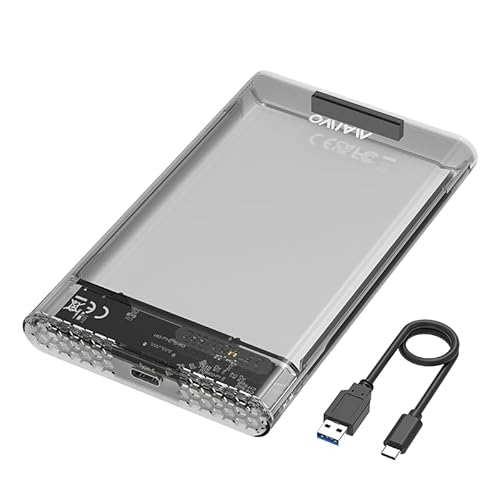
- Fits 7mm and 9.5mm 2.5-inch SATA drives
- 5Gbps USB-C with UASP support
- Tool-free setup and 6TB capacity
Best For: Compact 2.5-inch drive upgrades and portable storage
Best for SSD Transfers
BENFEI 2.5-Inch SATA Enclosure

- Up to 6Gbps with UASP SATA III
- Includes USB-C/USB-A 10Gbps cable
- Tool-free design supports drives up to 6TB
Best For: Fast 2.5-inch SSD or HDD transfers across multiple systems
Best High-Capacity Choice
RSHTECH 3.5-Inch USB-C SATA Enclosure

- Supports 2.5-inch and 3.5-inch drives up to 24TB
- Includes USB-C/USB-A detachable cable
- Aluminum housing with stand and sleep function
Best For: Desktop users housing large-capacity SATA drives
Best Compact Pick – UGREEN USB-C 2.5-Inch SATA Enclosure
The UGREEN is a practical choice among USB C hard drive enclosures for turning a 2.5-inch SATA SSD or HDD into portable external storage. Its USB 3.1 Gen 2 USB-C connection, UASP support, aluminum construction, and tool-free installation make it well suited to upgrades, backups, and file transfers.
Best For: Users needing a compact enclosure for a single 2.5-inch SATA drive.
Pros:
- Supports 2.5-inch SATA I/II/III HDDs and SSDs up to 6TB.
- USB-C interface supports up to 10Gbps, with SATA transfers up to 6Gbps.
- Tool-free, plug-and-play design includes a USB-C-to-USB-C cable.
- Aluminum body helps with heat dissipation without a cooling fan.
Cons:
- Only supports one 2.5-inch drive.
- Not designed for 3.5-inch, M.2, or NVMe drives.
- USB-A-only devices require a separate USB-C-to-USB-A cable.
Choose this enclosure when portability and a modern USB-C connection matter more than multi-drive capacity. It is a straightforward fit for compatible 2.5-inch SATA drives and does not require an external power supply.
Best for Drive Cloning – SABRENT Dual-Bay USB-C Dock
The SABRENT EC-CH2B is a dual-bay option for shoppers who need more than a single-drive enclosure. This USB C hard drive enclosure-style docking station accepts bare 2.5-inch and 3.5-inch SATA drives, lets both bays operate through one USB connection, and can clone one drive to another without a computer.
Best For: Drive upgrades, offline cloning, and managing two bare SATA drives at once.
Pros:
- Offline 1-to-1 cloning works without a connected computer.
- Reads and writes two SATA drives simultaneously when connected to a computer.
- Accepts both 2.5-inch and 3.5-inch SATA HDDs and SSDs.
- Tool-free, hot-swappable bays include activity LEDs and a USB-C cable.
Cons:
- Supports SATA drives only; M.2, NVMe, IDE/PATA, and Molex-connected drives are excluded.
- Offline cloning runs at up to 60MBps and requires the target drive to be the same size or larger.
- The included USB-C cable requires a computer with USB-C or a separate adapter.
This dock is more versatile than a compact single-drive case, particularly for migrations and maintenance. Its separate drive bays and offline cloning feature make it a strong choice for users who regularly work with multiple bare SATA drives.
Best Large-Capacity 3.5-Inch Pick – ORICO USB-C 3.5-Inch SATA Enclosure
The ORICO 3588C3 is built for a single 3.5-inch SATA hard drive, making it a useful USB C hard drive enclosure for desktop-class storage. It supports drives up to 20TB, includes a 12V power adapter, and uses a tool-free design with UASP support for convenient external access.
Best For: Users housing a high-capacity 3.5-inch SATA HDD externally.
Pros:
- Supports 3.5-inch SATA HDDs up to 20TB.
- USB 3.1 Type-C-to-SATA III interface offers up to 5Gbps.
- Tool-free installation and plug-and-play operation require no drivers.
- Includes a 12V power adapter and internal shock-protection material.
Cons:
- Designed for one 3.5-inch drive rather than multiple drives.
- Requires wall power through the included 12V adapter.
- The included host cable is USB-A-to-USB-C, not USB-C-to-USB-C.
For large desktop hard drives, the ORICO combines the needed external power with broad capacity support. It is a better match for high-capacity 3.5-inch SATA storage than for compact, bus-powered portable drives.
Best Budget Drive Dock – SABRENT USB 3.0 SATA Dock
The SABRENT EC-DFLT is a simple lay-flat dock for accessing bare 2.5-inch or 3.5-inch SATA drives without installing them in a case. It is not a USB-C enclosure—the host connection is USB Type-A—but it can still be useful for buyers who need a tool-free SATA dock and already have a compatible USB-A port or adapter.
Best For: Occasional bare-drive access, swaps, and backups from a USB-A computer.
Pros:
- Accepts both 2.5-inch and 3.5-inch SATA I/II/III drives.
- Tool-free, plug-and-play design supports hot-swapping without rebooting.
- UASP support and USB 3.0 provide up to 5Gbps interface speed.
- Includes the required 12V adapter for 3.5-inch drives.
Cons:
- Uses USB Type-A rather than a USB-C host port.
- Does not support IDE/PATA, M.2 SATA, M.2 NVMe, SAS, or enclosed USB drives.
- 3.5-inch drives require a wall outlet and the included power adapter.
This dock is a practical general-purpose SATA reader, but it is not the right pick if native USB-C connectivity is essential. Confirm your computer ports and drive interface before ordering, especially when using it with a USB-C-only laptop.
Clear-View 2.5-Inch Pick – Transparent USB-C SATA Enclosure
If you want a compact usb c hard drive enclosure for a 2.5-inch SATA SSD or HDD, the ORICO 2139C3 combines a transparent shell with tool-free installation. It supports USB 3.0 speeds up to 5Gbps with UASP and works with 7mm and 9.5mm drives up to 6TB.
Best For: Users who want to reuse a 2.5-inch SATA drive and see the drive inside the enclosure.
Pros:
- Transparent crystal PC shell provides high visibility and helps protect against scratches.
- USB-C connectivity, UASP, and up to 5Gbps transfer speeds.
- Tool-free, plug-and-play installation with hot-swapping.
- Includes a 50cm USB-A cable and supports Windows, Linux, and macOS.
Cons:
- Limited to 2.5-inch SATA drives rather than 3.5-inch models.
- USB-A cable is included, but a USB-C-to-USB-C cable is not specified.
The ORICO is a practical choice for portable drive transfers, backups, or connecting an older SATA drive to a computer, TV, or PS4. Its clear design is especially useful if visual access to the installed drive matters.
High-Capacity Desktop Pick – ACASIS 3.5/2.5-Inch Enclosure
The ACASIS is a versatile usb c hard drive enclosure for both 2.5- and 3.5-inch SATA SSDs and HDDs. Its aluminum shell, open-frame tray, included power adapter, and support for up to 30TB make it suited to larger desktop storage setups.
Best For: Backup users and content creators who need support for larger 3.5-inch drives and high storage capacities.
Pros:
- Supports 2.5- and 3.5-inch SATA drives with up to 30TB capacity.
- Aluminum construction and open-frame tray help dissipate heat.
- Includes an independent power switch and 10-minute smart sleep mode.
- Comes with a 12V/2A adapter and USB-C-to-USB-C/A data cable.
Cons:
- Requires an external power adapter, making it less portable than bus-powered enclosures.
- The larger enclosure is better suited to a desktop than travel use.
- Listed transfer-rate details vary between the product claims and specifications.
Choose the ACASIS when drive size and capacity matter more than minimal portability. The switch, thermal-focused aluminum design, and broad drive support make it a flexible option for sustained storage access.
Simple Dual-Cable Pick – BENFEI 2.5-Inch SATA Enclosure
For a straightforward usb c hard drive enclosure, the BENFEI supports 2.5-inch SATA I/II/III SSDs and HDDs up to 6TB. Its Type-C/Type-A plug design, tool-free construction, and UASP support make it convenient for moving files between computers and compatible mobile devices.
Best For: Users who want an easy-to-install 2.5-inch enclosure with flexible Type-C and Type-A connectivity.
Pros:
- Supports USB Type-C and Type-A connections for flexible device compatibility.
- Tool-free, plug-and-play installation with hot-swapping.
- Up to 5Gbps transfer speeds with UASP support.
- Supports 7mm and 9.5mm drives up to 6TB and includes an 18-month warranty.
Cons:
- Supports only 2.5-inch drives, not 3.5-inch HDDs.
- Its integrated cable design may be less convenient to replace than a detachable cable.
- Capacity is limited to 6TB.
The BENFEI focuses on convenience: slide out the cover, insert the drive, and connect it without tools or drivers. It is a sensible option for routine drive upgrades, file transfers, and portable use when 6TB is sufficient.
Best with Extra Features – MAIWO 2.5-Inch USB-C SATA Enclosure
If you need a compact choice among USB C hard drive enclosures, the MAIWO case supports one 7mm or 9.5mm 2.5-inch SATA SSD or HDD. Its USB-C connection, UASP support, tool-free setup, and 6TB capacity make it practical for expanding storage or reusing an existing drive.
Best For: Users seeking a slim, tool-free enclosure for a single 2.5-inch SATA drive.
Pros:
- Supports 7mm and 9.5mm 2.5-inch SATA SSDs and HDDs.
- USB-C output supports transfers up to 5Gbps and UASP.
- Tool-free installation with no drivers required.
- Includes anti-shock pads, an LED indicator, and a USB-C-to-USB-A cable.
Cons:
- Designed for one 2.5-inch drive only.
- New drives require initialization, partitioning, and formatting before use.
The MAIWO is a straightforward, space-saving option for laptops, desktops, consoles, and other compatible hosts. Its 5Gbps ceiling is suitable for routine file transfers and everyday external storage.
Best for SSD Transfers – BENFEI 2.5-Inch SATA Enclosure
The BENFEI enclosure is a strong fit for shoppers comparing USB C hard drive enclosures for 2.5-inch SSDs and HDDs. Its JMS580 chipset supports up to 6Gbps, while the included USB Type-C/Type-A 10Gbps cable adds flexibility across newer and older host ports.
Best For: Users who want a tool-free 2.5-inch enclosure with broad computer compatibility and an included dual-purpose cable.
Pros:
- Supports 7mm and 9.5mm 2.5-inch SATA I/II/III drives up to 6TB.
- Supports UASP SATA III and data rates up to 6Gbps.
- Tool-free, plug-and-play installation with hot-swapping.
- Includes a USB Type-C/Type-A cable and an 18-month warranty.
Cons:
- Limited to one 2.5-inch drive.
- Actual performance depends on the drive and host connection.
With support for Windows, Linux, and MacOS 8.0 or later, the BENFEI is a versatile enclosure for moving files between systems or turning a spare 2.5-inch drive into external storage. Its 6Gbps specification and SSD-focused design make it particularly appealing for faster SATA-based transfers.
Best High-Capacity Choice – RSHTECH 3.5-Inch USB-C SATA Enclosure
For larger desktop drives, the RSHTECH stands out among USB C hard drive enclosures with support for one internal 2.5-inch or 3.5-inch SATA drive up to 24TB. Its aluminum housing, vertical stand, USB-C/USB-A cable, and sleep function make it suited to desk-based storage setups.
Best For: Users needing a high-capacity enclosure for a 3.5-inch HDD or SSD, with support for both USB-C and USB-A hosts.
Pros:
- Supports 2.5-inch and 3.5-inch SATA drives up to 24TB.
- Includes a detachable 3.3-foot USB-A/USB-C 2-in-1 cable.
- Supports UASP, with data transfer rates listed up to 6Gbps.
- Aluminum housing, vents, vertical stand, LED indicators, and automatic sleep mode.
Cons:
- Its larger desktop enclosure is less portable than 2.5-inch cases.
- Supports one drive at a time.
- The enclosure is intended for SATA drives rather than NVMe models.
The RSHTECH offers the capacity and physical design needed for substantial desktop storage. Its power button, cooling-oriented aluminum construction, and dual-connector cable make it a practical choice for regular backups, media libraries, and other high-volume storage tasks.
How We Picked the Best USB C Hard Drive Enclosures
We focused on enclosure compatibility, connection type, practical transfer performance, construction, installation, and overall usability. The selection includes tool-free 2.5-inch cases for SATA SSDs and laptop hard drives, larger powered enclosures for 3.5-inch disks, and docking stations for users who regularly swap or clone drives.
USB-C ports do not automatically guarantee the same speed. Actual performance depends on the enclosure chipset, USB standard, connected computer, cable, and the drive installed inside. We therefore considered whether each model supports features such as UASP, SATA III, dual-drive operation, or high-capacity disks.
Quick Comparison
| Best For | Recommended Type | What to Look For |
|---|---|---|
| Portable laptop-drive upgrades | 2.5-inch enclosure | Bus power, tool-free installation, UASP |
| Large desktop hard drives | 3.5-inch enclosure or dock | External power adapter, cooling, capacity support |
| Fast SATA SSD transfers | USB 3.1 or faster enclosure | 6Gbps SATA support, UASP, quality cable |
| Drive cloning | Dual-bay docking station | Standalone cloning controls and source-target compatibility |
| Occasional drive access | Open docking station | Easy insertion and broad 2.5/3.5-inch support |
Key Buying Factors for USB-C Hard Drive Enclosures
Drive Size and Interface
Confirm that the enclosure accepts your drive’s physical format. Most 2.5-inch models support SATA SSDs and laptop HDDs, while 3.5-inch drives require a larger enclosure and usually a separate power supply. These cases are for SATA drives, not M.2 NVMe SSDs, unless NVMe support is explicitly stated.
Speed and USB Compatibility
A 5Gbps USB 3.0 or USB 3.2 Gen 1 enclosure is sufficient for many hard drives and provides a substantial upgrade for older USB connections. A 6Gbps SATA-compatible model can be a better choice for SATA SSDs, but the host computer must also support the advertised USB speed. UASP can improve performance and reduce overhead when supported by the computer’s operating system.
Power, Cooling, and Capacity
Portable 2.5-inch enclosures typically draw power over USB. Desktop 3.5-inch drives generally need an included AC adapter. For frequent transfers or always-on use, consider aluminum construction, ventilation, and a stable connector. Check the manufacturer’s stated maximum capacity if you plan to install a very large HDD.
Installation and Extras
Tool-free designs make drive swaps easier, while docking stations are more convenient for testing several disks. If you need cloning, verify that the dock supports standalone operation and that the destination drive is at least as large as the source.
Who Should Buy Which USB C Hard Drive Enclosures?
Choose a compact 2.5-inch enclosure for a repurposed laptop drive, portable backups, or an SSD upgrade. Pick a powered 3.5-inch model for high-capacity desktop storage. A dual-bay dock is best for cloning and regular drive maintenance, while a single-bay dock suits occasional access and quick swaps. For the best balance of portability and speed, prioritize UASP, a reliable USB-C cable, and a SATA SSD matched to the enclosure’s capabilities.